Overview
ProductRatingMost Used ByProduct SummaryStarting Price
Adobe Acrobat Sign
Score 8.2 out of 10
Mid-Size Companies (51-1,000 employees)
Acrobat Sign is an e-signature solution that combines simple and secure e-signatures with Adobe Acrobat. With Acrobat Sign, the user can create, sign, send for signature, manage, and track documents from one Adobe platform. The user can create signing experiences for customers and teams by enabling them to sign documents on any device or browser – anytime, anywhere. No additional software download or accounts are needed. As Microsoft’s e-signature solution, Acrobat Sign…
$14.99
per month license
Gavel
Score 10.0 out of 10
N/A
Gavel, formerly Documate, is a document automation software company headquartered in San Francisco that enables users to turn frequently used templates into intelligent workflows and client-facing legal applications.
$99
per month
Pointerpro
Score 9.3 out of 10
N/A
Pointerpro is an assessment platform designed for professionals who want to turn their expertise into personalized, scalable guidance. Instead of stopping at data collection, Pointerpro transforms each completed assessment into an automatically generated, fully branded PDF or PowerPoint report containing personalized results and recommendations. This enables organizations to deliver insights instantly, without manual analysis. The platform supports advanced scoring…
$828
per year
Pricing
Adobe Acrobat SignGavelPointerpro
Editions & Modules
Acrobat Standard DC for teams
$14.99
per month license
Acrobat Pro DC with advanced e-sign
$16.99
per month license
Acrobat Sign Solutions
Call 800-685-4192 for pricing
Lite
$99
per month
Standard
$199
per month
Enterprise
Custom
Professional Plan
$69
per month 2000 monthly responses
Enterprise
On Request
5000+ monthly responses
ReportR
On Request
10000+ monthly responses
DistributR
On Request
15000+ monthly responses
Offerings
Pricing Offerings
Adobe Acrobat SignGavelPointerpro
Free Trial
YesYesYes
Free/Freemium Version
NoNoNo
Premium Consulting/Integration Services
YesNoYes
Entry-level Setup Fee$34.99 license per monthNo setup feeNo setup fee
Additional DetailsDiscounts available for annual plans.Professional Plan Price: $69 per month (billed annually) Unlimited questionnaires & questions Large variety of question types Removable Pointerpro branding Advanced question logic & piping Offline functionality Zapier and Make integration Emails with customizable content Questionnaire in multiple languages Custom scoring Variable end messages & outcomes Show dynamic final screen messages based on scores and answers. Email invitations with unique tracking link Enterprise Plan Custom pricing available upon request Professional features plus: Custom formulas for advanced calculations Response upload Use formulas in question logic & piping Payment processing Before, during or after completing a survey or assessment. Extended design options with custom CSS Integration via WebHooks A Webhook is a notification sent over the web, which transfers data from one app to another. Questionnaire campaigns (on request) A campaign shows a group of questionnaires all in one screen which can be accessed with just a single link. Full white labeling URL and email domain white labeling. Multiple users and team management (on request) Dashboard Builder (on request) ReportR Plan Custom pricing available upon request Enterprise features plus: Drag & drop PDF report builder with preview Large variety of report widgets Use logic to show and hide report widgets based on responses and scores Individual, aggregated & team PDF reports Generate a PDF right after taking the questionnaire PDF distribution via email & download Extended design options with custom CSS Integrate with external databases Multiple users and team management (on request) Dashboard Builder (on request) Aggregate Reports (on request) optional AI prompt widget to scale report content faster DistributR Plan Custom pricing available upon request ReportR features plus: Distribution Portal to leverage assessment distribution Respondent base feeding by customers/co-workers Respondent invitation templates with unique links You create the templates for customers/co-workers. Unique respondent links are generated. Real-time response collection and result view Real-time response collection and result view Your customers/co-workers collect responses. You view overall results. Email campaign template creation Created by your customers/co-workers Optional: charge for assessment/report access Overview of to-do assessments for respondents Overview of responses and reports for respondents Dashboard Builder Multiple users and team management (on request) Aggregate Reports (on request)
More Pricing Information
Community Pulse
Adobe Acrobat SignGavelPointerpro
Best Alternatives
Adobe Acrobat SignGavelPointerpro
Small Businesses
Foxit eSign
Foxit eSign
Score 9.2 out of 10
airSlate WorkFlow
airSlate WorkFlow
Score 9.9 out of 10
Renaissance Accelerated Reader
Score 9.9 out of 10
Medium-sized Companies
MSB Docs
MSB Docs
Score 9.4 out of 10
Foxit PDF Editor
Foxit PDF Editor
Score 8.6 out of 10
Renaissance Accelerated Reader
Score 9.9 out of 10
Enterprises
DocuSign
DocuSign
Score 8.7 out of 10
Conga Composer
Conga Composer
Score 8.3 out of 10
Renaissance Accelerated Reader
Score 9.9 out of 10
All AlternativesView all alternativesView all alternativesView all alternatives
User Ratings
Adobe Acrobat SignGavelPointerpro
Likelihood to Recommend
4.5
(228 ratings)
8.0
(1 ratings)
7.7
(28 ratings)
Likelihood to Renew
8.0
(30 ratings)
-
(0 ratings)
-
(0 ratings)
Usability
3.4
(194 ratings)
-
(0 ratings)
8.0
(10 ratings)
Availability
9.0
(5 ratings)
-
(0 ratings)
-
(0 ratings)
Performance
9.0
(4 ratings)
-
(0 ratings)
-
(0 ratings)
Support Rating
7.3
(164 ratings)
-
(0 ratings)
7.8
(11 ratings)
Online Training
8.0
(1 ratings)
-
(0 ratings)
-
(0 ratings)
Implementation Rating
8.0
(7 ratings)
-
(0 ratings)
-
(0 ratings)
Configurability
9.0
(3 ratings)
-
(0 ratings)
-
(0 ratings)
Ease of integration
5.0
(2 ratings)
-
(0 ratings)
-
(0 ratings)
Product Scalability
8.0
(3 ratings)
-
(0 ratings)
-
(0 ratings)
Vendor post-sale
9.0
(2 ratings)
-
(0 ratings)
-
(0 ratings)
Vendor pre-sale
9.0
(2 ratings)
-
(0 ratings)
-
(0 ratings)
User Testimonials
Adobe Acrobat SignGavelPointerpro
Likelihood to Recommend
Adobe
Acrobat Sign isn't quite as user friendly as other E-Sign platforms I have used. However, it offers a wide range of features that provide convenience and efficiency. For example, I can have multiple people receive the same document separately, or I can have multiple people receive and review the exact same document. I also like that I can choose to set a signing order or not, this is important for when I send Offer Letters and other things that require order of approvals.
Read full review
Documate
Windows or Mac works well, and making client-based documents is flawless because of its customization ability.
Read full review
Pointerpro
They get the job done. We were able to do everything that our client wanted and needed. Its a free quiz on their website, so having to pay $1,500 a year for this service is hurting our bank. My only complaint is the price. If you are able to lower your price or offer promotions, then I would have no problem staying. We are currently looking for cheaper alternatives.
Read full review
Pros
Adobe
  • Adobe Acrobat Sign tracks whether or not a signer has viewed a document
  • Adobe Acrobat Sign tracks when a signer has signed, and the document has been sent to the next signer
  • Adobe Acrobat Sign sends you confirmation emails and progress update emails along the way
  • Adobe Acrobat Sign provides a "confirmation of signing" page at the end of the document package you put together, to prove the signatures are authentic
Read full review
Documate
  • More control over our data
  • Ability to customize it as per our needs
  • Cross platform work like Windows and Mac is good
Read full review
Pointerpro
  • Intuitive branching logic mechanics. Survey Anyplace offers a nicely pipeline/process map format to visually see the branching logic for more robust question sets.
  • Reliable results. Survey Anyplace offers important tracking data to evaluate and hold respondents accountable to completing the surveys.
  • Users can save progress and come back. This allows busy respondents time to think about deeper questions, specifically when the surveys are being used in an interviewing approach.
Read full review
Cons
Adobe
  • Builds on Adobe platform so it is easy to utilize, but many features require enterprise subscription.
  • Integrations available but your CRM integration is only available with enterprise license.
  • Lots of templates but there are additional templates with enterprise only and there was no drag and drop editor.
  • Adobe captures some analytical metrics but many of the analytics we required were not available - specifically metrics related to how the tool converts and reduces use time by our team and the impact on clients.
Read full review
Documate
  • Adding more examples for help
  • Nothing more as it is such a good software
Read full review
Pointerpro
  • Creating something highly customized at the ReportR level means you will need to have some savvy with CSS if you want to do it yourself. But it also means you can create something truly incredible and they do not have the same limitations as other similar software.
Read full review
Likelihood to Renew
Adobe
It is by far the easiest service we have used to obtain digital signatures from employees. In the past we had done it by hand (a process I would not recommend for 1500+ employees) and with another company that would not allow us to create our own forms and would charge us for each form.
Read full review
Documate
No answers on this topic
Pointerpro
No answers on this topic
Usability
Adobe
I've had very little trouble with it in all my uses with it. I do wish the text boxes you add wouldn't cut off the text if you entered too many words and that it would adjust it's size to fit within the space you've provided. However, that just takes a little refining in the initial set up of the document before you send it out.
Read full review
Documate
No answers on this topic
Pointerpro
This is a great platform. The ease of use and ability to generate instant reports is killer. I highly recommend this platform for those who want to showcase a professional survey to impress their clients and employees. For us, this helps expand our product offering greatly, which also supplements our other services. [Survey Anyplace is a] great product and platform!
Read full review
Reliability and Availability
Adobe
I would have rated this a 9 or greater had they not had had such critical outages. They have taken steps to resolve this so I may come in and revise this
Read full review
Documate
No answers on this topic
Pointerpro
No answers on this topic
Performance
Adobe
The Adobe Acrobat Sign's performance are excellent.
When we send electronic document by email for signature all the customers receive it regularly, nobody has any issue to open it and the signature phase was very easy. The user-friendly aspect of this product reduce or reset the call for IT support
Read full review
Documate
No answers on this topic
Pointerpro
No answers on this topic
Support Rating
Adobe
It is a great tool to get signatures from the client and has reduced a lot of overhead that was caused before resulting in very long delays. With the integration of Adobe Acrobat Sign, we have reduced this delay making the process much smoother and more efficient.
Read full review
Documate
No answers on this topic
Pointerpro
I wish there was a better live chat feature. Seems like I have to wait 30-60 every time I need to talk to someone. Though once I am able to speak with someone via the chat in my account, they have been very helpful in answering my questions or pointing me in the right direction.
Read full review
Online Training
Adobe
The best types of training are well integrated into the product and Echosign does this well. As mentioned earlier in my review - there are some areas of functionality that can be difficult to understand ("only I sign") for the novice user. Other areas such as macro usage, bulk signature and so on were easily learned and understood via the online tools.
Read full review
Documate
No answers on this topic
Pointerpro
No answers on this topic
Implementation Rating
Adobe
We did not use it in the manner that most companies do, so I am pleased with how our company handled implementation. We will be pushing the full company over into Echosign for various processes which will incorporate more of an implementation effect.
Read full review
Documate
No answers on this topic
Pointerpro
No answers on this topic
Alternatives Considered
Adobe
They are just different. Adobe's number one feature that puts it above it's competitors is that your document, the signing process, all of it exists within Adobe. There is no need to go from Word, to Adobe, to DocuSign. It saves you time and makes life easy for you (and for your clients).
Read full review
Documate
Easy to use as GUI is very user-friendly and meets all the expectations of someone who needs to take care of their documents.
Read full review
Pointerpro
Survey Anyplace is an excellent piece of software.
It can create in depth surveys and has a huge functional capability! I would highly recommend using Survey Anyplace for any business as it is so adaptable!
The support team are fabulous and always on hand to answer any queries and set up Zoom calls for more tailored help! Mark has been brilliant in helping me to create a complex survey!
Read full review
Scalability
Adobe
At the beginning we assigned Adobe Acrobat Sign just to Purchase Office Department because at that moment we needed a tool that supported us to avoid manual signature and was compliance with remote working.
Now we are using it also in other situation because it help us with time and we can also reduce cost
Read full review
Documate
No answers on this topic
Pointerpro
No answers on this topic
Return on Investment
Adobe
  • Significantly reduced the time required for document signing processes reducing wasted time and effort
  • Cost savings since there is no longer any need to print and post/scan traditional signed paper-based documents
  • Faster decision-making since time-sensitive decisions and approvals can now be processed much more quickly by using e-signatures.
Read full review
Documate
  • Small monthly fee, so it's a budget-friendly software
  • Keeping all the data and having control over it
Read full review
Pointerpro
  • As a publisher, the quizzes provide us with compelling type of "advertising" product to engage our clients' audiences.
  • We use the quizzes to direct respondents to thought leadership content for lead gen. The "correct response" feature in the quizzes provide the most interesting sample of our clients' content.
Read full review
ScreenShots

Adobe Acrobat Sign Screenshots

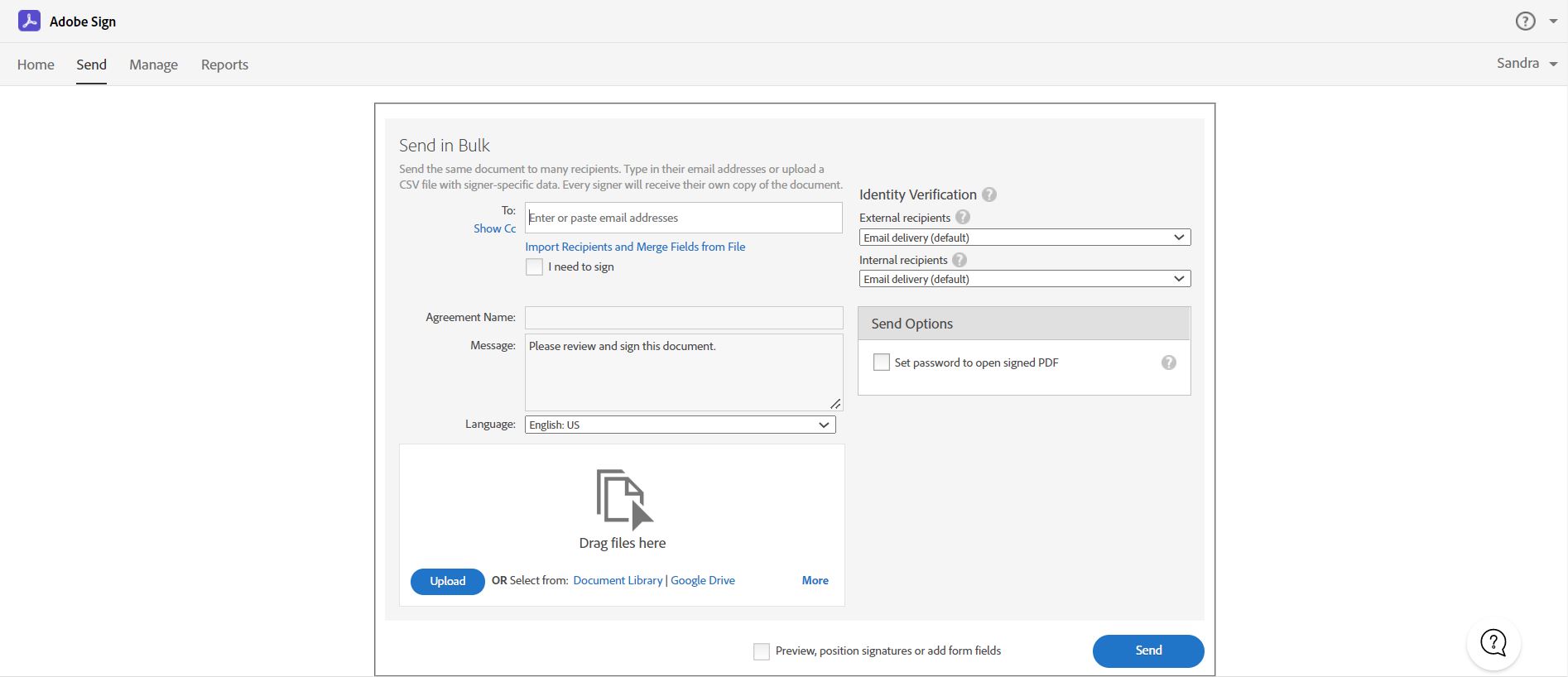
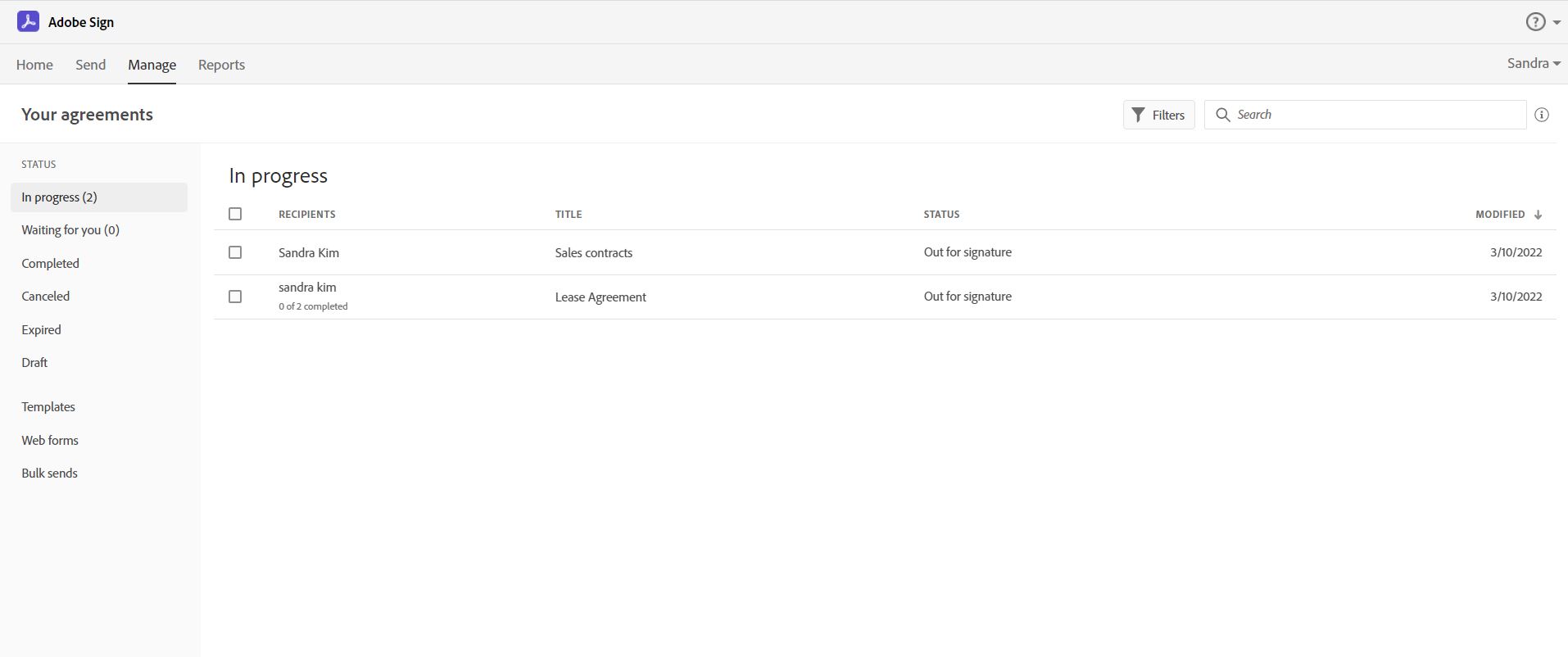
Screenshot of Send, sign, manage and archive documents with 100% legal e-signatures. Collecting e-signatures is as easy as swipe and tap with Adobe Sign. Sign from any device. Legally binding. Works with multiple apps. extremely cost-effective.Screenshot of Easily send e-signature requests to multiple recipients using Send in bulk feature.  Send a document to multiple people with one click, and every recipient gets their own personalized form ready to sign.Screenshot of Track and manage signatures with Adobe Acrobat Sign.  Get real-time visibility for every document out for signature, and receive notifications when documents have been signed.Screenshot of Create an online web form with Acrobat Sign.  It allows your recipients – whether they’re your employees or customers – to quickly access, complete, and sign critical documents without printing or mailing anything.  You will also get immediate access to the data and signatures.

Pointerpro Screenshots

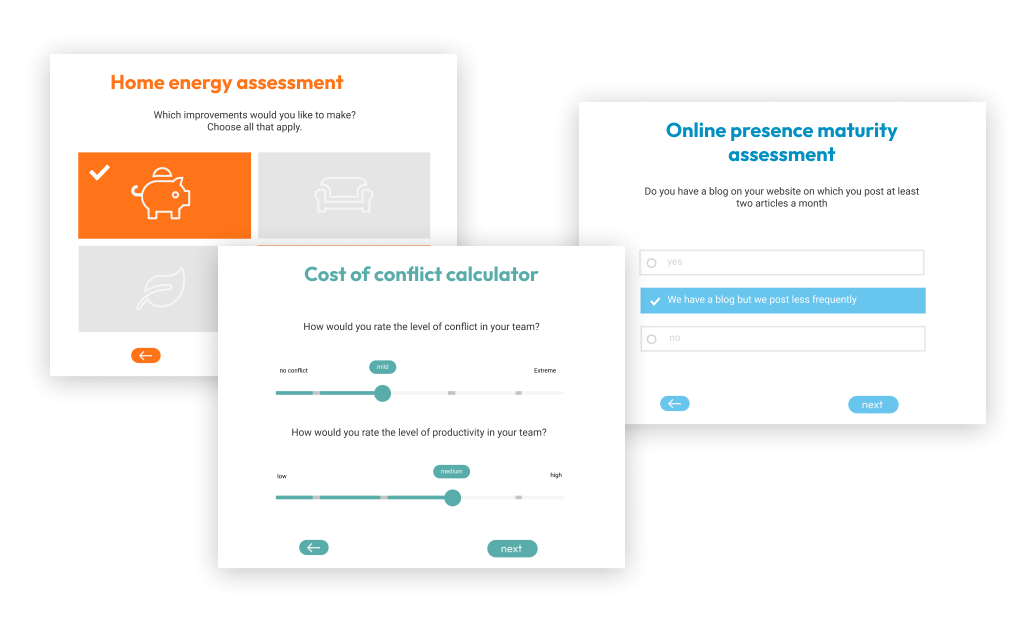
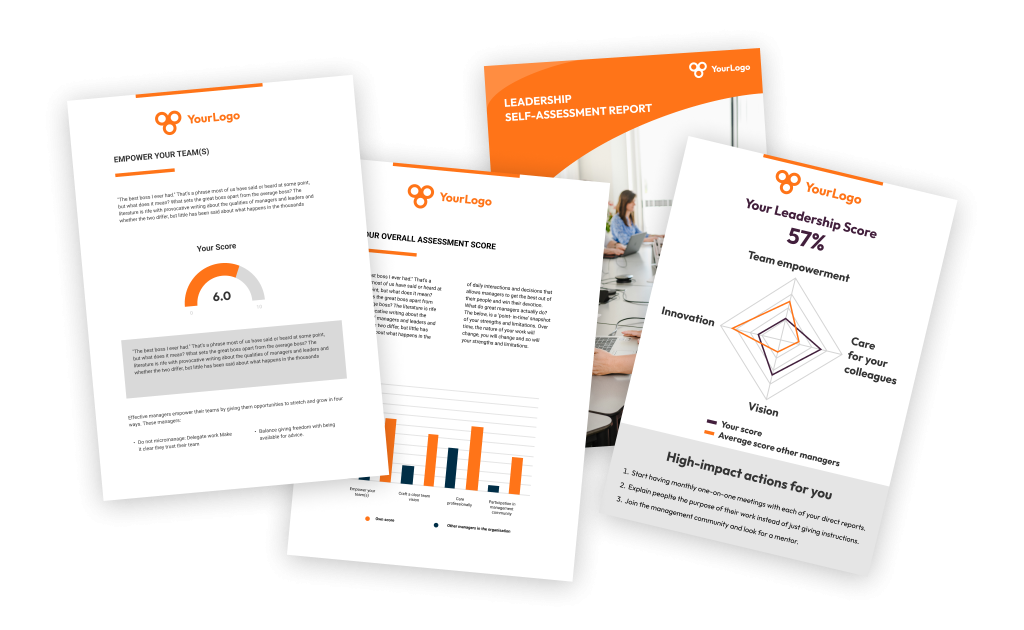
Screenshot of the Pointerpro assessment app, used to build maturity assessments, personality tests, 360 assessments, competency quizzes, self-assessments, or quote calculators.Screenshot of how respondents can immediately receive their personalized report after they complete their assessment. Of course the tool also offers the possibility of giving postponed feedback.Screenshot of the tool's no-code assessment builder.Screenshot of how Pointerpro allows respondents to download their personalized PDF with a download button at the end of the assessment.Screenshot of some examples of Pointerpro's branded assessments.