Adobe After Effects allows users to create cinematic movie titles, intros, and transitions, remove an object from a clip, start a fire or make it rain, or animate a logo or character. The vendor states that with After Effects, users can apply motion-graphics and animation to any digital object.
$20.99
Per User Per Month
Adobe Express
Score 8.7 out of 10
N/A
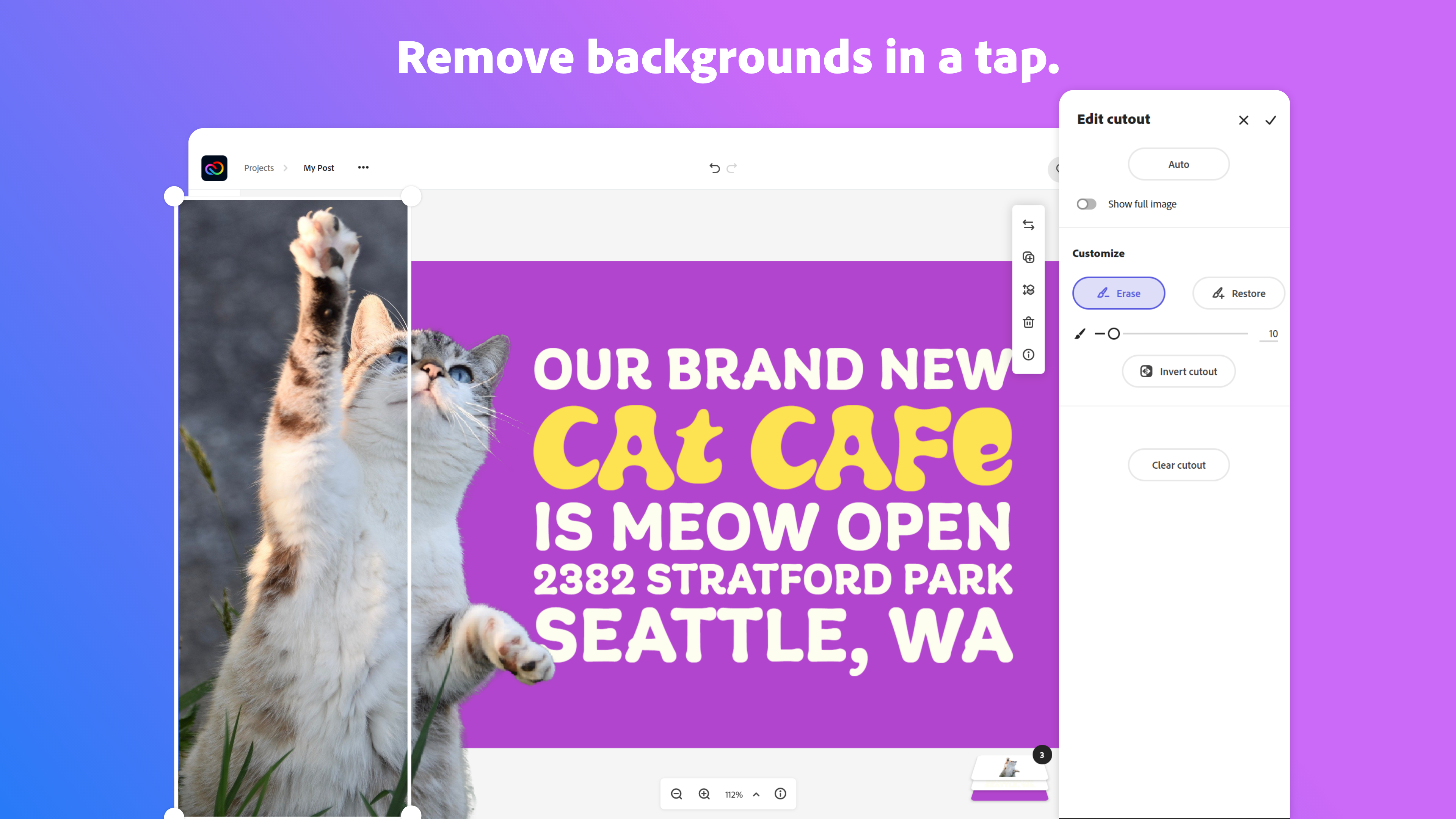
Adobe Creative Cloud Express (formerly Adobe Spark) is a task-based, web and mobile product used to create and share rich multimedia content – from social media posts and stories to invitations to marketing materials like logos, flyers and banners.
$0
Pricing
Adobe After Effects
Adobe Express
Editions & Modules
Annual Plan (Paid Monthly)
$20.99
Per User Per Month
Monthly Plan
$31.49
Per User Per Month
Annual Plan (Prepaid)
$239.88
Per User Per Year
Free
$0.00
Premium
$9.99 / $99.99
per month
Teams
$9.99
per month per user
Offerings
Pricing Offerings
Adobe After Effects
Adobe Express
Free Trial
No
Yes
Free/Freemium Version
No
Yes
Premium Consulting/Integration Services
No
No
Entry-level Setup Fee
No setup fee
No setup fee
Additional Details
—
Contact Adobe directly for Enterprise pricing plan details.
I've created videos with Adobe Premiere Pro and Adobe Photoshop (with the GIF function), as well as Canva and other online products. Adobe Premiere Pro does not have the same capabilities for creating vector-based content, meaning if that is necessary, Adobe After Effects is …
Because they are part of the Creative Cloud platform, all Adobe software. They are well integrated into each other. If I create a vector in Illustrator and save it, load it up in After Effects, and notice that I need to adjust it? Well I don't have to fully close out of After …
Adobe After Effects stands out for its comprehensive set of tools for creating motion graphics, visual effects, and animations. Its seamless integration with other Adobe software, vast community, and extensive tutorials make it user-friendly. It offers a wide range of 2D and 3D …
Adobe After Effects is a great bridge from still graphics and vector, to motion graphics. The integration with Premiere makes things work seamlessly and the way it can ustilise native PSDs and ai files makes working in Adobe After Effects ideal for most clients.
The other tools we use are part of the Adobe CC Family and they complement each other very well. We chose Adobe After Effects because it is far superior in terms of functionality and output to any other application in the market and it met our design needs perfectly well.
In Adobe After we can do Motion Graphics, 2d Animation, Text Animation, 3d Animation, Video Editing, Chroma Key Cutting, Visual Effects, Color grading, Motion Tracking all this can be done in After Effects only, and I have been using this software quite a while so it's a …
I have used Adobe Premiere Pro, Camtasia, Microsoft PowerPoint, and Apple Keynote. All of these programs allow you to do some level of animation. However, Adobe After Effects is specifically designed to create advanced and dynamic effects and animations for video. Though you …
Adobe After Effects is available for both windows and macOS with no software level performance degradation. Final cut pro is available only for Mac os on apple devices which let's file sharing between windows difficult. File sizes also vary for same level of editing. After …
Before switching to Adobe After Effects we were using Camtasia Studio to edit videos and it's a great video editing software but it couldn't provide us with the complex video effects that we needed to implement for our videos so we switched it to After Effects for that purpose.
[Adobe After Effects] is a beast and Vegas pro is just a baby when compared to Adobe. It doesn't match [Adobe After Effects] when it comes to the feature and performance it offers.
Photoshop is good for simple video editing, but it doesn't have animation or audio help and it takes a while to get your video put together in a way that looks good. iMovie is also just for simpler video editing and lacks the extras that After Effects have that really turn your …
We use these tools in conjunction with After Effects not as a replacement. Apple Motion does many of the same things as After Effects and in some ways is more intuitive. However, After Effects is bundled with software we absolutely must use and is the industry standard. New …
It is part of the Adobe Creative Cloud that I sign monthly and is full of possibilities. Most of them I've not yet explored. Adobe has a large library of tutorials and we can find a huge number of tutorials on YouTube for free to teach how to use it better or find some plugins …
I find Adobe After Effects to be superior to iMovie and Final Cut Pro in that I am able to do much more with the software. It isn't as limiting as the other two. I also like that it isn't an Apple product. Personally, I'm not a huge fan of Apple. There is a bigger learning …
iMovie motion graphics limitations are just that, limitations. Motion Graphics in [Adobe] After Effects are very easy. [Adobe] After Effects opens many more doors for typography, visuals, and 3D animations that are leaps and bounds cooler than anything you can do in iMovie. …
Adobe After Effects and Final Cut Pro are quite similar in the sense of their functionalities as far as I'm aware and the interfaces are more or less similar. But Adobe After Effects is preferred over Final Cut Pro mostly because of the fact that it is part of the Adobe …
I haven’t used any direct competitors. I’ve used plenty of other paid and free photo and video editing programs, but none as full featured and powerful as After Effects, which makes it a pretty simple choice to use and buy if you need something that can perform like it can!
Compared to other software, Adobe After Effects is more useful for motion graphics and composition. Adobe After Effects is simpler and easier to use for video editing and adding effects.
Adobe Illustrator is used for creating templates, logos, cartoons but you can animate the beautiful logo or cartoon with the help of a camera and 3D space, it worth the experience no matter what...
After Effects is the halfway point between simple editing software like Premiere Pro and complex 3D suites like Cinema 4D. It offers a balance of speed and functionality for mid-level production.
I also prefer it over Apple Motion and Black Magic Fusion, mostly due to being in …
After Effects is on par with most of these other non-Adobe software. It is able to edit, create, render, illustrate, stabilize video content; and so much more.
Associate Manager- Visual Communications Men's and Licensee
Chose Adobe Express
I can input creative content and files I've made in other Adobe programs directly into Adobe Express, which helps me create more authentic, original content.
Express is very similar to Canva. I like to express more, except that Canva makes it easier to ensure that text/images are centered and aligned, and that the spacing is correct.
Express has put all the tools a design agency will need for day-to-day operations, production, and creation. And with the addition of the Calendar, scheduling these posts is a breeze and very important in a designer's tool belt. We used other products before and found ourselves …
The feature of using the library in Adobe Express helps me to manage my content easily, and the content can be used across all other Adobe apps. Which can be benificial than using Canva.
Adobe Express integrates very well with other products like Adobe Photoshop or Adobe Firefly. The Images from the other Tools can be integrated in new projects or edited out of Adobe Express into those Adobe Tools. Also the Files can be managed and rearranged in the Creative …
In addition to Adobe Express, I have also used Canva because both platforms are quite similar. Basically, the application that I use is typically based on the clients needs, however my personal preference is Adobe Express because I find it too intuitive to my creative persona.
I think they all have a different target audience and a different use for them. I love crafting posts with Figma but i think the "figma look" is a bit cold and super recognizable for my taste. I think creating something with Illustrator still gives me the most options in terms …
I use Adobe Express for designing social media content, appreciating its ready-made templates which save time and effort. It solves creative blocks by providing design ideas, and I love its voice character feature for making animations. However, the layering feature feels basic …
I think Adobe Express is a bit behind Canva, but as an Adobe Community Expert, I try to provide as much feedback as I can to help improve Adobe Express. ADobe Express does a better job than InShot and a few other apps, but isn't quite there against Canva, I'm sorry to say!
In my opinion, Adobe Express blows it away. Canva is great and all and gets the job done. But it lacks the additional value offered by Adobe Express and Adobe. Canva's stock asset library doesn't come close to Adobe's stock asset library, and the Creative Cloud makes using …
Software like Illustrator, Photoshop, and After Effects are indispensable for my needs. I used Canva to streamline the process of creating carousels, mainly, and Express effectively replaces Canva. The advantage of having everything under a single subscription was crucial for …
It's very easy to generate images or graphics and find them on Adobe Express.In the application, in "Your stuff" > Files section, you'll find all the creations you've made with Adobe Photoshop and Adobe Illustrator, and you can use them directly in Adobe Express. No need to …
Maybe because I use other Adobe products, but I find that Adobe Express is more intuitive than Canva, especially when trying to format text. As for Adobe Express versus other Adobe products, well I think there is a place for them all. There are just certain things that you …
Adobe Express is incredibly similar to Canva. Both tools are something that makes design easy for anyone to do as well as provide templates and pre-made graphics to assist in the design process. However, Express still feels limited compared to Canva and Illustrator. Illustrator …
Overall Adobe Express offers a more polished finished product but does take a little time to learn. But worth the time spent to have more unique content
Adobe After Effects is well suited for creating short video projects that require intricate animation, like 5 minute or 1-minute countdowns, credit roll-ins, outros, and video bumpers. It is also useful for creating animated elements that can be incorporated into video projects, like animated key titles. For longer videos, I would recommend using Adobe Premiere Pro instead.
Basically, I truly find that Adobe Express is pretty much great for all professional scenarios because it offers many creative options and comes with an extremely robust collection of assets (stock photos, videos, music, and graphics) all of which can be edited and enhanced within Adobe Express if needed. One project that it was quite helpful with utilizing was creating a logo for one of our clients. I was able to create the prototype and then offer several iterations of said logo to help the client quickly decide on its official branding. By having all of my assets neatly stored right on my Adobe Express project folder it was very easy for me to remain organized when creating various outputs.
After Effects is great for creating motion content once and easily exporting it to various formats such as web, broadcast, GIF, etc.
After Effects is the industry standard for motion graphics. While I’m an Apple user and have used Motion in the past it is not as feature rich and most clients will expect you to use After Effects.
After Effects is great for complex UI animation. Tools like principle and Flinto are great but are quite cumbersome for complex UI animations.
I will renew my use of After Effects since it's affordable and always has been reliable. They also always continue to update new features and add new things to compete with other software out there. I also like all the 3rd party plugins out there that keep my interest for the future and new toolsets and creative solutions.
i love express!!! i use it every day and will continue to use it even if my job doesn't pay for it, although i hope i never have to pay for it haha. even though the updates are sometimes frustrating, i think for the most part i get used to/like the updates. it's easy to use and i like the change to projects instead of sharing a brand with collaborators
There's a lot of features and functionality that Adobe After Effects offers that can be hard to navigate at times. Depending on the depth you plan to use the software for, that can take some time to learn. The built-in templates and tutorials really help soften that learning curve. Once you get past some of the basics, it's fairly simple to use.
The user interface is pretty straightforward to use. It has easy to navigate navigations, and the canvas UX is also pretty good. One thing i would like to add it to use shortcuts to add elements on canvas. Like if I am on canvas and I press 'T' on my keyboard the text box should be added automatically
Adobe customer support is wonderful. They genuinely care about their product and the end user experience. The products they create have always been innovative and continue to improve. They have a huge chunk of the user market in their field and still strive to improve. This is such a big deal for me and other small business/organizations that need their products and don't have a large voice on our own.
Overall, the Adobe Creative Cloud Express is worth a try and may be a good fit for many organizations and businesses. At a monthly rate, the cost is not prohibitive, but the tools are somewhat limited and not necessarily worthwhile when compared to standard applications and software that are often available free or through a package of services commonly found on workplace computers.
I've created videos with Adobe Premiere Pro and Adobe PhotoShop (with the GIF function), as well as Canva and other online products. Adobe Premiere Pro does not have the same capabilities for creating vector-based content, meaning if that is necessary, Adobe After Effects is superior. The video format functionality of Adobe PhotoShop is more basic and works similarly to Adobe After Effects, so I would choose to use Adobe After Effects over Photoshop for video-making needs because of the increased capability.
Express has put all the tools a design agency will need for day-to-day operations, production, and creation. And with the addition of the Calendar, scheduling these posts is a breeze and very important in a designer's tool belt. We used other products before and found ourselves importing, exporting, editing and then exporting again a bit tiresome. We only need one app: Adobe Express.