Adobe Presenter is a PowerPoint plugin for converting PowerPoint presentations into elearning content. It allows for multimedia and interactive integrations and can be mobile accessible. Presenter can also integrate with standalone LMS products, including Adobe Captivate.
N/A
Wistia
Score 9.6 out of 10
N/A
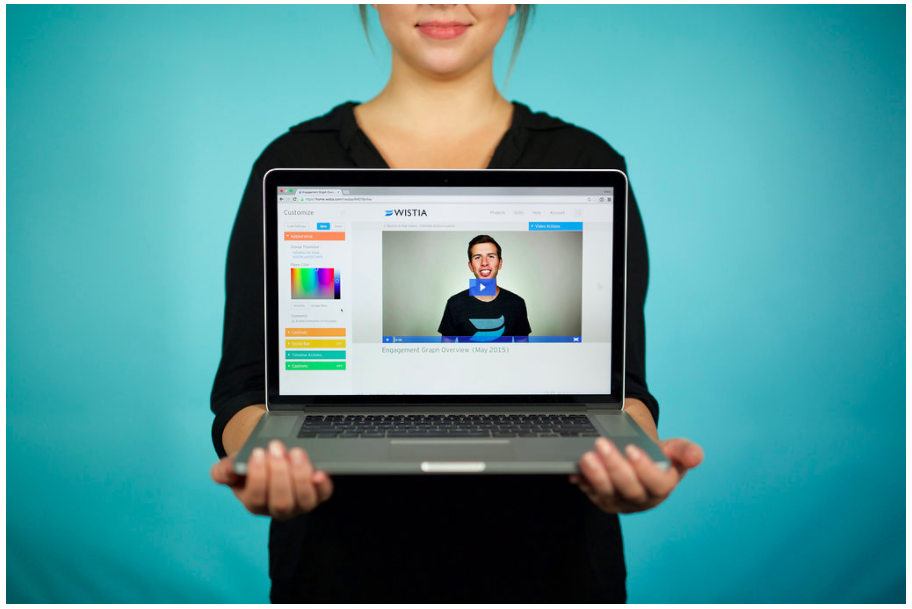
Wistia is a video marketing platform that helps teams create, host, market, and measure their videos and webinars. Wistia is used to create professional videos, host webinars, collect and send leads to a connected marketing automation platform. Wistia additionally offers customers support and educational resources.
As I mentioned earlier, it's best used for "presentations," rather than bona fide "training." That's why we tend to use it when the information is relatively simple and/or doesn't need to be fully internalized or mastered (which would require providing opportunities for practice and feedback and a more engaging, interactive learning experience). However, it can be used as part of a blended-learning solution, with some information provided via an Adobe Presenter module first, and then some kind of instructor-led session as a follow-up, which would include more role-specific info, as well as practice and feedback opportunities. Also, as I mentioned earlier, Adobe Presenter Video Express is great for creating quick overview demos about a new system -- more of a "see what it can do" type thing than a "here's how you do it" thing (unless the "it" is very simple and the video is used more as a microlearning/performance support type of offering).
For companies that want to integrate their videos into actionable steps like behavioral follow up through a CRM, Wistia is the best tool to use. You can automate your systems to track when a video is viewed, engaged with or how long a person has been watching along with heatmaps to show where people were most interested and least interested so you can adjust your videos to optimize their performance.
Because it integrates with PowerPoint, it is possible to go from planning outline to storyboard to final output withing a single document and as part of a seamless and logical design process.
Its ability to create videos that capture screens along with web-cam recordings, then edit them within the solution means higher level training recordings can be created versus, say a recorded WebEx training session.
Presenter's ability to create quiz elements similar to Adobe Captivate, add interactions, and interface with Adobe's LMS means it is capable of functioning as a complete e-learning development environment. .
If up front cost is a consideration, Presenter wins hands down over many better known training development and e-learning solutions.
Obtaining embed codes for a significantly large number of videos can be very time consuming as there is no way to automatically pull a report.
Within a project, there is no way to set the list to show a specific number of videos and you may only have a certain number of videos shown unless you click to expand the list and continue to do so.
Once the list is expanded and you click in to a video, when clicking back, the list reloads and you must expand the entire list again which can become very time consuming.
My company is pretty invested in the Adobe ecosystem and is unlikely to change that in the foreseeable future. Also, Adobe Presenter is a very valuable tool and, with the new subscription model and the pricing we have, a relatively modest expense now. It's also fairly easy to learn and use, so it is starting to spread beyond the sphere of the various Learning & Development departments.
Wistia is super easy to use and very reliable, anytime a video needs to be updated, the existing media can be replaced, but the url remains the same so anywhere this media is shared or embedded, it is immediately updated. Their support is extremely helpful, and there is very rarely any issues with this product.
Great, simple, usable product. Would have given it higher marks, but sometimes the folders and permissions aren't the most intuitive. Interface for uploading, tagging, describing videos is simple. Sharing is also relatively intuitive. Overall, a clean and simple interface and most of our marketing team had no issues using it. I think it was easier than using Vimeo.
It is easy to access since it is an added tool to the Powerpoint program. We have not had complaints from faculty members regarding not having it available when they need it.
Due to the aforementioned issues with Flash, it can be discouraging to get to the publishing stage and begin receiving error messages. Once we are able to move past that issue, we have great success with the performance of Adobe Presenter.
I have never had any technical issues with Wistia. The service is fast and reliable. video play back begins as soon as a few seconds of video have buffered. The stats are accurate and available within a few hours of current use. I have integrated it with Marketo and found that the integration is clean and is easily incorporated into the campaign logic flow. (ex. If the user played more than 50% of the video, do Action-A, otherwise do Action-B.
I think I pretty much answered this earlier....premium support is extremely expensive and online support can be difficult to navigate. Although, to be fair, when it comes to Presenter (compared to, say, Captivate), there isn't too frequent a need for support, since Presenter is a rather simple tool to use
We have only had to reach out to Wistia support a handful of times in the 4 years we have been using Wistia. They have always been quick to respond and help us solve the problem. The system is self-service so there should be very little to no need to reach out to support on a regular basis.
LMS365 and Adobe Presenter are not that much different, the major issue that we faced with LMS was that we had to integrate that with the SharePoint, for accessibility and that cases whole lot of confusions and keeping things clean as SharePoint was being used for file store and sharing within the company. Moving to Adobe Presenter was taken as it was independent platform and didn't have any dependency.
Wistia is for business. Period. Vimeo has none of the benefits for a business that Wistia offers. The SEO value and SUPER FAST playback speed are essential. Wistia has it all. Personally, I can rarely get thought a video if hosted on Vimeo because of the glitchy playback and slow rendering.
The program still seems to rely heavily on Adobe Flash even though the online community is moving away from it. When publishing, users will experience error messages regarding Flash, which can make it difficult to complete your work.
It will be safe to say that overall impact had been positive in regards to ROI
Training costs have been reduced by a huge margin since we started using this tool.
Time consumed in training staff is also decreased, as with Adobe Presenter training can be done remotely and are able to train different groups at the same time.
Doubled lead capture from lead magnet on website from one year to the next.
Increased email interaction on newsletters when embedding Wistia video thumbnail into email campaigns (10-15% links clicked bumped to 30-40% links clicked).
Can save us about 50+ hours of one-on-one client meeting time per year for pointing clients to video content rather than presenting the same info in a live setting.