AODocs is a document management platform that extracts structured data from 100+ file formats and automates workflows for claims management, sales proposal review, engineering designs, manufacturing instructions, etc. A cloud-native SaaS, AODocs integrates with SAP, Salesforce, and other business applications.
N/A
Box
Score 8.6 out of 10
N/A
Box is an online Intelligent Content Management solution that caters to individual users as well as businesses.
$20
per month 3 users (minimum)
Curata
Score 8.0 out of 10
N/A
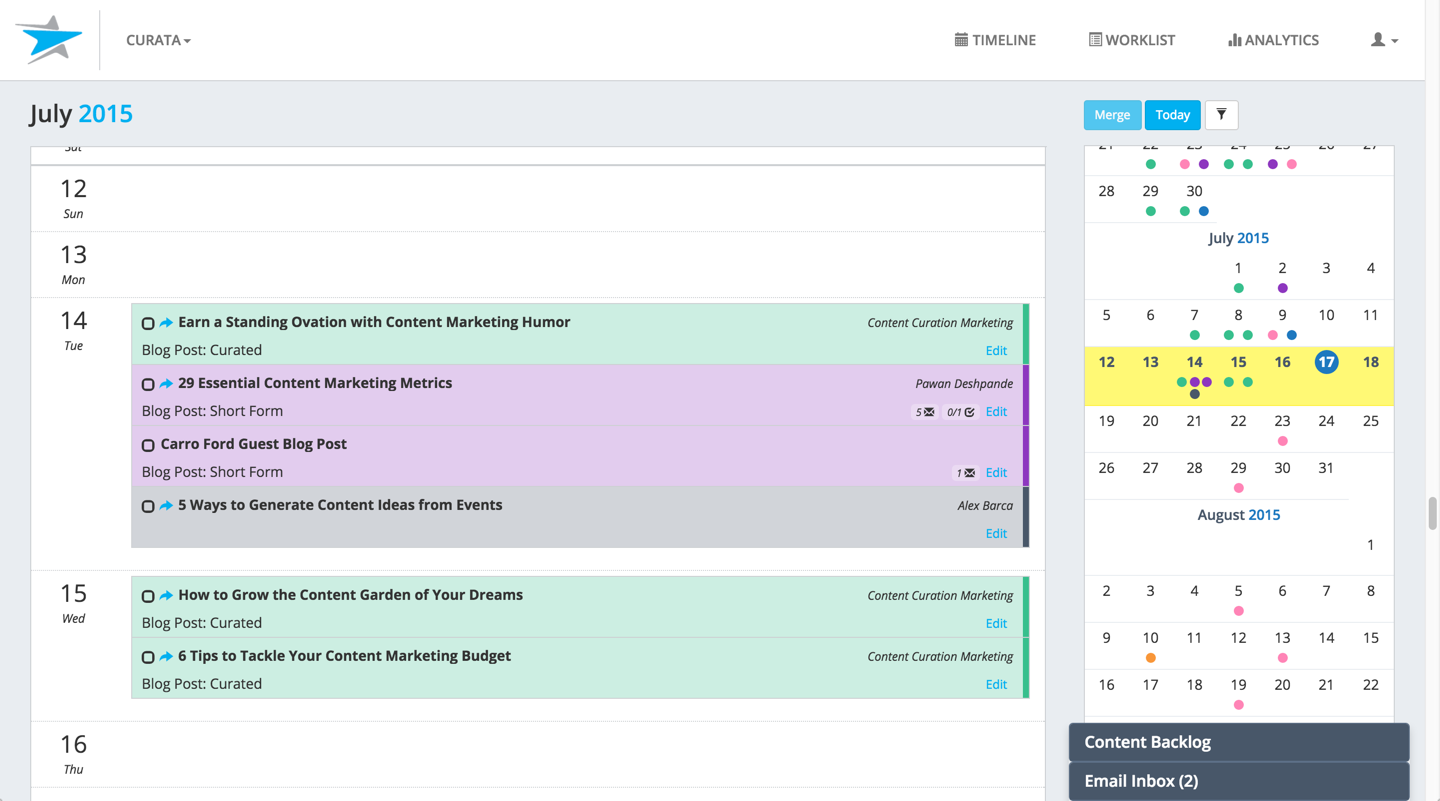
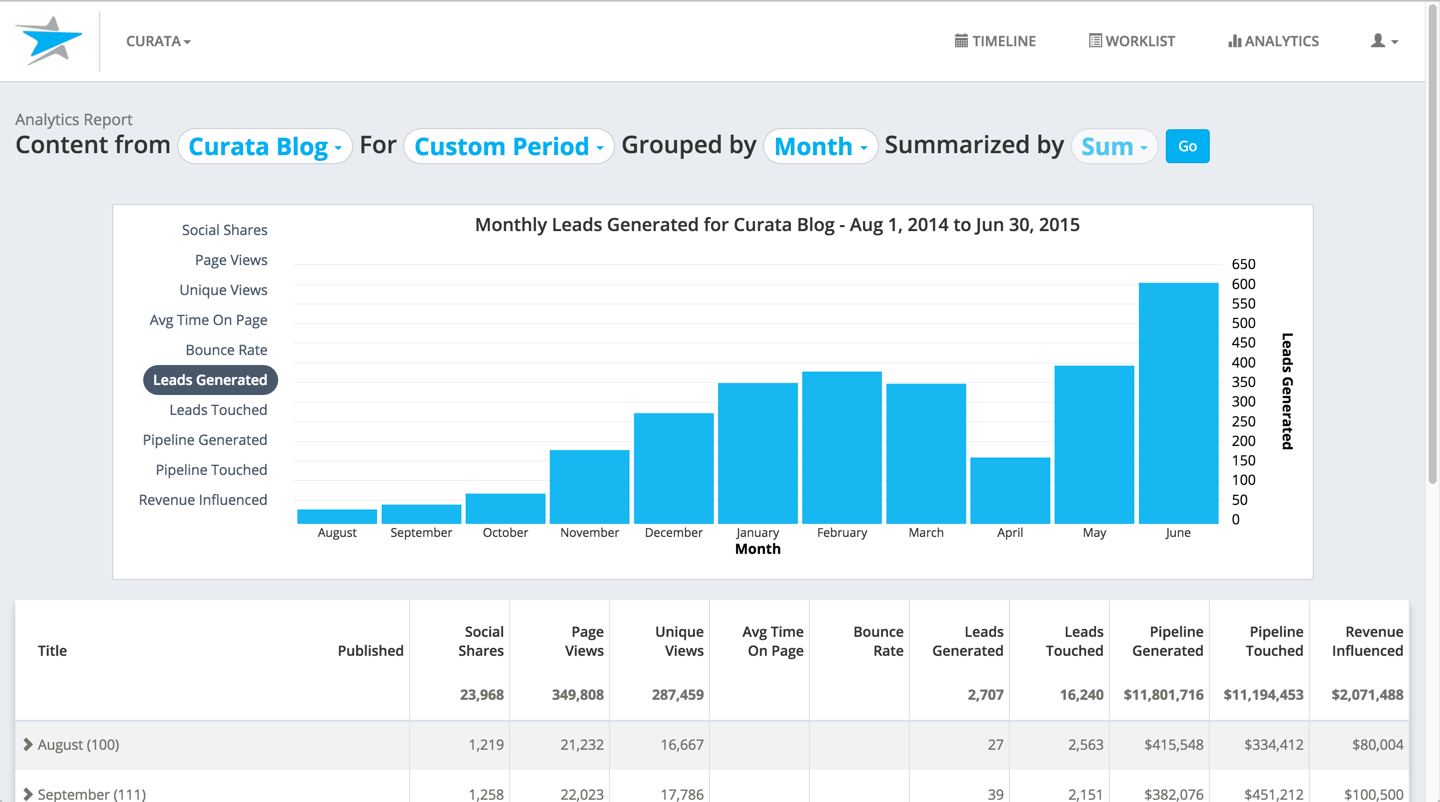
Curata's content marketing platform (Curata CMP) enables more efficient content creation with greater impact on pipeline. According to the vendor, this solution enables users to:
Analyze marketing and sales pipeline impact: Instantly access content metrics such as leads generated/touched and sales opportunities generated/touched by gated, un-gated and off-site content. Streamline content production: An easy to use editorial calendar to keep your team on the same page and…
$699
per Instance (no seat limits)
Pricing
AODocs
Box
Curata
Editions & Modules
No answers on this topic
Business Starter
$7
per month per user (3 minimum)
Business
$20
per month per user (3 minimum)
Business Plus
$33
per month per user (3 minimum)
Enterprise
$47
per month per user (3 minimum)
Enterprise Plus
$50
per month (billed annually) per user (3 minimum)
Enterprise Advanced
Contact us
per month per user (35 minimum)
Curata Software
$699
per Instance (no seat limits)
Offerings
Pricing Offerings
AODocs
Box
Curata
Free Trial
Yes
Yes
No
Free/Freemium Version
No
Yes
No
Premium Consulting/Integration Services
Yes
Yes
No
Entry-level Setup Fee
No setup fee
Optional
No setup fee
Additional Details
—
A discount is available for annual pricing.
We have 2 solutions:
- Curata CCS content curation software
- Curata CMP content marketing platform (e.g., editorial calendar, analytics engine)
A simple secure link and a password protection is what employees use to share files. Box is made different from other cloud content collaboration software because of the commenting feature which keeps all discussions together and enables any collaborator to provide feedback on …
AODocs provides a world-class corporate content management solution for enterprises of all sizes. This company has top-notch product development, support, and professional services team, and they're building a community of like-minded customers who can benefit from one other's knowledge and experiences. A remarkable set of extensions, migration tools, and links to other relevant services make up the ecosystem of functionality.
I think Box is great for research teams or anyone that has a large number of files that need to be securely stored. Particularly in the case of social science research, where it is important to protect identifying data, Box is a great option. In cases where teams need a more reliable means for real-time collaboration, I would probably consider a different alternative
I liked Curata, but it depends on the use case of how it will be used as to how effective it is for someone. If you are trying to curate content it works great. Had I not been so put off by the issue mentioned earlier I would have given more effort to learn the CMS, so I am not sure how effective it really is.
The main feature that I like the most in Box is that it makes collaboration seamless, workers can easily check the documents any time and make changes according to the needs.
Box manages and backs up all of your files on its cloud servers, and provides a very nice interface for creating, viewing, editing, and collaborating on the most commonly used file types (PDF, XLS, DOC, etc.).
Over the past few years, Box has built on top of its basic cloud storage management with a host of other tools, such as workflows, AI, monitoring, and analytics.
It is helping us to make good connections with clients and our workers themselves as to its syncing and viewing feature to all is very much helpful and easy to go.
Curata is great at curating in content that is relevant to our audience. It is easy to add many different sources to the feed from all around the web and we've really seen Curata "learn" what we see as the most relevant.
The microsite we got as part of our Curata subscription is really fantastic. It's very customizable and we've been able to really craft it to suit our needs. There are so many different options available and our Curata rep has been really great with helping us cater each piece to our vision while making helpful suggestions along the way in terms of best practices. Plus, the word processor for publishing blog posts is so easy to use and I've had no issues with it so far unlike many other CMS platforms I've worked with. The Curata microsite is actually going to be replacing our current blog very soon - we love it that much!
I've had a great experience with customer service from Curata. Our rep is responsive and helpful and really good about not just answering our concerns but also providing feedback on our processes and giving advice for how we can improve.
Search capabilities within the curated content feed are fabulous. This is one area where I found other solutions to be lacking when we were going through the sales process, but Curata really succeeds here. It's extremely easy to find exactly what you're looking for in your content feed.
There is some difficulty in understanding the training material. Make it easier to understand how to use key features in real-world work situations by providing more thorough examples or videos.
Custom scripts would benefit from greater online training and certification options.
The user interface is a nightmare to work with. It could take anywhere from five to ten clicks to move a file to a new subfolder.
I like the security features and I like the website. It's easy to use and create and move things around as needed. The main reason for a lower rating is because the Box Sync app is just not a good program. It's a memory hog, it's slow, transfer speeds are slow, and it's not the most efficient route. If you have a large Box account and you need to get a computer up to speed on a large amount of data within Box, you are in for the long haul. Last time I had to do this, it took 3 days to sync all of the files and we are talking around 100 GB worth of data
For all of the features we loved when we signed on like the microsite and search capabilities and also their customer service, we will very likely renew with Curata. We also really like the evolution we have seen of the solution, just recently a new integration with Marketo (also a vendor of ours) was announced which will be very beneficial to us in optimizing our email newsletters
Everything with Box is seamless. It can be integrated into virtually any other software or application. You can even get the app for your phone or tablet to work on the go. File syncing is so quick. The only reason I gave it a 9 is the issue I discussed earlier about the local file application rebooting and not continuing to sync files. Other than that, it's great!
Yeah, it's always worked, I've never had any kind of connection issues, the only issues I've had it I've been on our end when the Internet hasn't worked.
The general operation and management of Box is very efficient, both when accessing the account, and when adding files, downloading or modifying any document directly. The web platform, mobile and desktop versions work really well and quickly, making all the work and process flow smoothly and without setbacks. So far I have not been able to observe any inconvenience
I found their support community lacking in clarity when I experienced a login issue. The error messaging was poor on my Box Sync application. I did not reach out to support staff for help, instead, I reasoned that I should try downloading the Box Sync application again and reinstall it. That fixed my issue, thankfully. I think a less computer-savvy user would've been much more frustrated.
The documentation is good. Since Box is a popular service, there were also a number of YouTube videos and other sources that were helpful as we were considering the product and planning for deployment. Also, the ability to try the free version helped to prepare us.
Be careful with settings. It is easy to get overwhelmed with updates. For example, you don’t want to be updated when doing historical data uploads. I recommend taking off notifications initially and then turn on post you have done your historical data upload.
Using AODocs, we can solve difficult business procedures immediately. Regular updates bring new capabilities to the platform. This workflow engine is superior to all others I've used in SharePoint and Nintex over the years. Until now, I (we) have not encountered a business problem that we couldn't solve. AODocs is a top-notch service.
They are kind of the same. And both of them do their job as promised. But for company and project wise I think that Box slightly wins for some points. Which [makes him] win over Google Drive (don't forget that Google Drive is very easy to use and has a lot [of] nice features too).
The main difference that made me choose Curata over Percolate is that it is not complex. Curata is easier to set up, to use, and to manage. It does not involve any complicated configuration to get the content and data you need. Curata technical support is amazing, to say the least. I am not an expert in the technical stuff, but I feel assured their team can help me out when I have an issue
Box has been an only positive experience. It provides a seamless way for me and my team to collaborate on documents in such a way where we're not sending the document back/forth via email. It's a huge timesaver.
Box reduces the risk of sharing a sensitive document to the wrong person via email.
Box has provided a platform where my team can share notes in meetings - this has helped streamline and organize our meetings. Our meetings are more productive and actionable.