Overview
ProductRatingMost Used ByProduct SummaryStarting Price
apprex
Score 0.0 out of 10
N/A
N/A
$39
per month
ScienceLogic AI Platform
Score 8.8 out of 10
Enterprise companies (1,001+ employees)
ScienceLogic provides a unified IT Operations platform designed to manage operational workflows using high-fidelity Telemetry Data and explainable automation. The ScienceLogic AI Platform is deployable across On-Premises, Cloud, and Hybrid Environments. The platform consolidates monitoring tools to provide Observability and enables engineers to automate manual processes using Machine Learning capabilities. The platform utilizes automation for Closed-Loop Remediation and provides insights…N/A
IBM Turbonomic
Score 8.7 out of 10
Enterprise companies (1,001+ employees)
IBM Turbonomic, now part of the Concert platform, is a performance and cost optimization platform for public, private, and hybrid clouds used by cloud, infrastructure operations, and architecture to assure application performance while eliminating inefficiencies by dynamically resourcing applications through automated actions. One of the key features of IBM Turbonomic is its ability to continuously adjust…N/A
Pricing
apprexScienceLogic AI PlatformIBM Turbonomic
Editions & Modules
Basic
$39
per month
No answers on this topic
IBM® Turbonomic On-Prem
Varies - Request a Quote
per month IBM Turbonomic On-prem optimizes data center resources in real time, ensuring app performance at the lowest cost by aligning infrastructure supply with dynamic application demand.
IBM® Turbonomic Cloud Standard
Varies - Request a Quote
per month For customers with more than USD 1.6 million in annual cloud spend or 50 Managed Virtual Servers (MVS) or greater
IBM® Turbonomic Hybrid Standard
Varies - Request a Quote
per month Advanced hybrid cloud optimization capabilities for customers with 200 managed virtual servers (MVS) or more
Offerings
Pricing Offerings
apprexScienceLogic AI PlatformIBM Turbonomic
Free Trial
YesNoYes
Free/Freemium Version
NoNoNo
Premium Consulting/Integration Services
NoNoNo
Entry-level Setup FeeNo setup feeRequiredOptional
Additional DetailsScienceLogic SL1 offers four tiers: SL1 Advanced – Application Health, Automated Troubleshooting and Remediation Workflows SL1 Base – Infrastructure Monitoring, Topology & Event Correlation SL1 Premium – AI/ML-driven Analytics, Low-Code Automated Workflow Authoring SL1 Standard – Infrastructure Monitoring – with Agents, Business Services, Incident Automation, CMDB Synchronization, Behavioral CorrelationVolume discounting available.
More Pricing Information
Community Pulse
apprexScienceLogic AI PlatformIBM Turbonomic
Considered Multiple Products
apprex

No answer on this topic

ScienceLogic AI Platform
Chose ScienceLogic AI Platform
real-time data monitoring, scalability of a complex environment is the key feature. For any new requirement, powerpack installation is very easy & handful.
Chose ScienceLogic AI Platform
Both of the tools we used before were with agents, so there was a need to configure the agent initially, before it could be used. Sometimes, there were issues with the service or the configuration of the agent, and deep troubleshooting was necessary to find the mistake in …
Chose ScienceLogic AI Platform
I have not used any other tools other than ScienceLogic SL1.
Chose ScienceLogic AI Platform
Restorepoint is a great tool and perfectly integrated with ScienceLogic SL1. However, PowerFlow implementation is not smooth and don't have enough resources to help build out the features necessary for a successful implementation. Also, documentation is not well written.
Chose ScienceLogic AI Platform
ScienceLogic adds easy customization through the "power packs" that have carefully designed applications specific to certain vendors/models
Chose ScienceLogic AI Platform
SL1 is easy to implement which is much easier to understand and what more implementation can be further deployed
Chose ScienceLogic AI Platform
ScienceLogic SL1 supports large scale of IT Infrastructure devices and vendors.
Was the single tool providing multiple functionalities at same time and allowed to remove additional legacy tools used for monitoring.
Allowed integration with incident management and CMDB. Allowed …
Chose ScienceLogic AI Platform
From a capability perspective they stack up very similar but from a look and feel, ScienceLogic SL1 one is miles behind the curve on all three. We chose SL because we already had elements of the service in place on our infrastructure from our previous MSP so they were a …
Chose ScienceLogic AI Platform
It is a User-friendly tool compared to other tools in the market.
Chose ScienceLogic AI Platform
I see great potential and infact i do strongly beleive it offers even beter capabilities than the traditional tools out there but again it comes down to how well you have trained us on how to unlock these capabilities. I suggest incentives for techs for providing feedback for …
Chose ScienceLogic AI Platform
Geneos is more complicated and 'heavy' to setup. It requires a lot of expertise in setting up. Also the dashboards are not great. ScienceLogic SL1 works well for customer facing dashboards.
Chose ScienceLogic AI Platform
ScienceLogic SL1 is comparable with the products but with low cost of investment gives an edge in convincing customer when we offer similar features.
Chose ScienceLogic AI Platform
For url monitoring, db status monitoring
Chose ScienceLogic AI Platform
Entuity was lacking a lot of custom reporting and also the out of the box automation and RBA was also less. Our customers were mainly looking for devices which are next gen like sdwan which Entuity doesn't support. When it come to ScienceLogic SL1 it will support all sets of …
Chose ScienceLogic AI Platform
As a fresher, this is my first organization, and they use SL1. So, I don’t have more knowledge of other tools. But I do know Grafana, which is predominantly used for dashboards. I think compared to that, the SL1 dashboard gives more details about devices. So, I feel SL1 would …
Chose ScienceLogic AI Platform
Galileo analyzes storage arrays and backups more thoroughly, but SL1 is much better for host and network monitoring. SL1 has some storage monitoring features for some storage arrays, but they are not as detailed.
Chose ScienceLogic AI Platform
IBM Tivoli NetCool/OMNIbus
Chose ScienceLogic AI Platform
In comparison to above tools specifically in terms of monitoring capabilities, ScienceLogic SL1 is way-way behind.

A lot of features which were available in these suites may be in 2010s are still not available in 2020s.
Chose ScienceLogic AI Platform
I was not part of the team selecting ScienceLogic SL1. Our goal was to increase event visibility in our server environment. We were using scripting which created many false events. SolarWinds is primarily used in the Network space to monitor network gear.
Chose ScienceLogic AI Platform
Agentless product that can integrate easily with other product and also allow us to automate tasks, example closing tickets when events are cleared automatically which user interactions.
Chose ScienceLogic AI Platform
Just because Science logic provides much more better enhancement and getting improved everyday. The autonomous integration and overall customization provided by the SL1 Platform is outstanding. In every sections be it in Monitoring or checking system logs and provide the best …
Chose ScienceLogic AI Platform
Nimsoft is a very powerful tool that has been around for years.. ScienceLogic SL1 is able to be tweaked and customised due to python scripting
IBM Turbonomic
Chose IBM Turbonomic
Splunk is good at diagnosis, and I found the UI a bit easier to get up to speed on. However, diagnosing an issue does not equate to fixing an issue...Turbonomic supports both. With Azure, I found it far more intuitive to pick up fast, but you are limited to Microsoft, and that …
Chose IBM Turbonomic
This isn't really an either/or situation, but rather a complementary set of applications or capabilities that allow you to combine observability and monitoring in real time with actionable insight connected to the cost control and workload management aspect across a number of …
Chose IBM Turbonomic
Apart from Spectrum Control the others are fundamentally different to Turbonomic and so Spectrum control really has storage monitoring agents and will give you some server metrics but not the deep AIOPS that Turbonomic has and then the automation is not as mature and available …
Chose IBM Turbonomic
IBM Instana, IBM Concert, IBM Cloudability and Flexera ONE
Chose IBM Turbonomic
Resource management with openshift and turbonomic forms an ideal set for observing problems and correctly dimensioning the environment

Chose IBM Turbonomic
Simpler. IBM Turbonomic is more efficient and simpler to use.
Chose IBM Turbonomic
I think IBM Turbonomic is much much better than Datadog. Both in terms of functionality and capabilities. AI driven resource allocation is the standout feature.
Chose IBM Turbonomic
We already had the Turbonomic license acquired.
Chose IBM Turbonomic
IBM Turbonomic supports multi cloud deployments and work well with other IBM cloud/web tools we use within our organization.
While there is an initial learning curve, over long period of time it pays off once the cost benefits are realized from the efficiency gains. Given the …
Chose IBM Turbonomic
I chose IBM Turbonomic because it is a good tool that integrates any CSP and on-premises solutions. It also helps with difficult tasks related to ARM issues.
Chose IBM Turbonomic
We found that that the support we had from IBM and 3rd party vender on IBM Turbonomic was superb , and was one of deciding factors of why we choose IBM Turbonomic. We like a lot of the automation features , and how it helps our engineers work smarter. Even though the VM ware …
Chose IBM Turbonomic
Turbonomic is class apart compared to the others. It helps you achieve what is not possible with the other solutions. Turbonomic can work in an auto-mode and keep delivering savings and business performance. No other product comes even close.
Chose IBM Turbonomic
I selected IBM Turbonomic because it is a comprehensive tool that can help me monitor and optimize the entire IT environment. The choice of IBM Turbonomic is often driven by its extensive feature set, scalability, and delivering tangible results. IBM Turbonomic stands out in …
Chose IBM Turbonomic
As the organization had experience of years in using IBM products, we had the confidence that they will provide us with great support. And we needed a reliable solution as a financial institute to ensure continuous operations. Even though the price was very high, we made the …
Chose IBM Turbonomic
Application awareness is the key success criteria of IBM Turbonomic when the comparison came on the table. To be aware of the application performance and nature when monitoring or analyzing the components and resources of the applications is the key differentiation of the IBM …
Chose IBM Turbonomic
IBM Turbonomic is still trying the pick the pace and against the other products in the market. It is equivalent to SolarWinds, LogicMonitor and some part of AppDynamics but far behind SPLUNK Enterpsie and ServiceNow Now Platform due to the fact that they offer open wide …
Chose IBM Turbonomic
IBM Turbonomic has grown to a respectable level now in the market and after associating with IBM its value has been increased in terms of trust and results. From technical point of view this is a potential solution and provide almost all similar features like its competitors. …
Chose IBM Turbonomic
Turbonomic blew the doors off the competition. When we did a comparison to our current application that was monitoring our environment, Turbonomic surpassed them with flying colors at the start during the POC. Then during the POC white we were kicking the tires around the …
Chose IBM Turbonomic
I like Turbonomic it helps us to ensure our applications get the resources they need to perform. With a complete understanding of the application and infrastructure stack, we are able to automate actions and prevent resource congestion across a hybrid cloud environment.
Features
apprexScienceLogic AI PlatformIBM Turbonomic
AIOps Features
Comparison of AIOps Features features of Product A and Product B
apprex
-
Ratings
ScienceLogic AI Platform
7.4
Ratings
2% below category average
IBM Turbonomic
-
Ratings
Monitoring and Alerting00 Ratings8.10 Ratings00 Ratings
Performance Analytics00 Ratings7.60 Ratings00 Ratings
Incident Management00 Ratings6.70 Ratings00 Ratings
Service Desk Integration00 Ratings7.30 Ratings00 Ratings
Root Cause Analysis00 Ratings7.50 Ratings00 Ratings
Capacity Planning Tool00 Ratings7.00 Ratings00 Ratings
Configuration and Change Management00 Ratings7.40 Ratings00 Ratings
Automated Remediation00 Ratings7.50 Ratings00 Ratings
Collaboration and Communication00 Ratings7.80 Ratings00 Ratings
Threat Intelligence00 Ratings7.20 Ratings00 Ratings
Cloud Management
Comparison of Cloud Management features of Product A and Product B
apprex
-
Ratings
ScienceLogic AI Platform
-
Ratings
IBM Turbonomic
8.0
Ratings
9% below category average
Cloud Management Security00 Ratings00 Ratings7.60 Ratings
Automation and Orchestration00 Ratings00 Ratings8.70 Ratings
Cost Management00 Ratings00 Ratings7.90 Ratings
Cloud Management Performance Monitoring00 Ratings00 Ratings8.40 Ratings
Governance and Compliance00 Ratings00 Ratings7.60 Ratings
Resource Management00 Ratings00 Ratings9.30 Ratings
Systems Integration00 Ratings00 Ratings6.80 Ratings
Best Alternatives
apprexScienceLogic AI PlatformIBM Turbonomic
Small Businesses
iSpring LMS
iSpring LMS
Score 9.5 out of 10

No answers on this topic

VMware Cloud Director
Score 8.5 out of 10
Medium-sized Companies
Infosec Skills
Infosec Skills
Score 9.9 out of 10
LogicMonitor
LogicMonitor
Score 9.1 out of 10
Cisco Intersight
Cisco Intersight
Score 8.9 out of 10
Enterprises
Infosec Skills
Infosec Skills
Score 9.9 out of 10
ignio AIOps
ignio AIOps
Score 8.1 out of 10
vRealize Operations (discontinued)
Score 9.0 out of 10
All AlternativesView all alternativesView all alternativesView all alternatives
User Ratings
apprexScienceLogic AI PlatformIBM Turbonomic
Likelihood to Recommend
-
(0 ratings)
8.1
(0 ratings)
8.7
(0 ratings)
Likelihood to Renew
-
(0 ratings)
8.4
(0 ratings)
9.0
(0 ratings)
Usability
-
(0 ratings)
9.6
(0 ratings)
7.8
(0 ratings)
Availability
-
(0 ratings)
9.3
(0 ratings)
10.0
(0 ratings)
Performance
-
(0 ratings)
8.2
(0 ratings)
8.0
(0 ratings)
Support Rating
-
(0 ratings)
6.5
(0 ratings)
8.0
(0 ratings)
In-Person Training
-
(0 ratings)
8.7
(0 ratings)
8.2
(0 ratings)
Online Training
-
(0 ratings)
7.9
(0 ratings)
10.0
(0 ratings)
Implementation Rating
-
(0 ratings)
6.5
(0 ratings)
9.7
(0 ratings)
Configurability
-
(0 ratings)
10.0
(0 ratings)
10.0
(0 ratings)
Ease of integration
-
(0 ratings)
8.0
(0 ratings)
7.3
(0 ratings)
Product Scalability
-
(0 ratings)
8.0
(0 ratings)
7.3
(0 ratings)
Vendor post-sale
-
(0 ratings)
9.1
(0 ratings)
10.0
(0 ratings)
Vendor pre-sale
-
(0 ratings)
8.4
(0 ratings)
10.0
(0 ratings)
User Testimonials
apprexScienceLogic AI PlatformIBM Turbonomic
Likelihood to Recommend
No answers on this topic
Appropriate if you are setting up a monitoring suite in new Infrastructure Environment. Definitely NOT suited for Migration Projects. ScienceLogic SL1 cannot cater to a lot of monitoring requirements which already would have been configured in old monitoring suite. Plus, limited support for customizations and having to go to "Feature Requests" route makes in extremely complicated.
Read full review
Datacenter Consolidation and Hardware Optimization: This scenario is relevant to you as a hardware manager. It applies when you have physical servers (like Power or System z) and want to maximize virtual machine density. Why it works: IBM Turbonomic analyzes the peak usage times of each VM. If VM "A" is active during the day and VM "B" at night, it places them on the same physical host. Ideal scenario: Data migration projects or when you're told, "[...], there's no budget for more servers this year, make everything fit on what we have." Consolidación de Datacenters y Optimización de Hardware,Este escenario te toca de cerca como encargado de Hardware. Cuando tienes servidores físicos (como los Power o System z) y quieres maximizar la densidad de máquinas virtuales.Por qué funciona: IBM Turbonomic analiza las horas pico de cada VM. Si la VM "A" es activa de día y la VM "B" de noche, las coloca en el mismo host físico.Escenario ideal: Proyectos de migración de datos o cuando te dicen: "[...], no hay presupuesto para más servidores este año, haz que quepa todo en lo que tenemos". This review was originally written in Spanish and has been translated into English using a third-party translation tool. While we strive for accuracy, some nuances or meanings may not be perfectly captured.
Read full review
Pros
No answers on this topic
  • Best overall coverage of montioring different technologies.
  • Easy to use in any environment
  • Customizable being able to generate your own reports, dashboards, DA's, RBA's, etc.
  • Have very good out of the box integrations with other monitoring solutions such as ServiceNow
  • Always improving and regularly releasing new versions and upgrades to the system/DA's.
  • Interactive community
Read full review
  • Presentation is nice. Its easy to understand what your looking at and the data that is being presented to you.
  • Properly identify resource utilization and recommendations for action on how VMs can be improved and resources can be better utilized.
  • It was also able to tell us the same information and analysis for cloud resources. I was not expecting that.
Read full review
Cons
No answers on this topic
  • Creating powerpacks from scratch for new devices may be straightforward but will rarely be easy. Rewarding when completed, but not easy.
  • Developer documentation needs a rethink. While the information may be there (it isn't always) it is not easy to find. This is not helped by using different terms for the same things.
  • A developer console/dashboard for monitoring data collection from powerpacks instances without having to switch webpages or have to monitor multiple webpages.
Read full review
  • It would be nice if the UI included a break-down of features that are both licensed as well as un-licensed. That way, you could not only see what you have, but what you don't.
  • The right-sizing recommendations are great, but very little info is given about why the recommendation is being made. More info would not only increase understanding, but would also help drive decision-making.
Read full review
Likelihood to Renew
No answers on this topic
We migrated away from our 20-year-old homegrown solution and have no back-tracking capability. ScienceLogic is demonstrating new capabilities that we would not have been able to do on our own using our legacy system.
We understand the capabilities of competitors based on our bake-off selection where ScienceLogic won on capabilities and future near-term potential (expandability, platform growth). We know that those competitors are not really close to where we have been able to push ScienceLogic (as a partner).
Read full review
I have not found a better tool for capacity planning my VM environment than Turbonomic. If that is the use case, I would highly recommend. Similarly, if you are looking for automation and VM rightsizing automation I would also highly recommend. For troubleshooting scenarios where deep levels of infrastructure metrics are required, there are better tools available.
Read full review
Usability
No answers on this topic
We use ScienceLogic SL1 in our organization to serve effective monitoring solutions to our external customers. Our customers depend upon us for critical events/alerts related to their IT infrastructure gears and using SL1, we're able to provide them with a proactive monitoring solution that resolves an issue before an impact is noticed by the customer. There are very few monitoring solutions that can cater to a variety of Cloud platforms like Public Cloud (AWS, Azure) and private cloud simultaneously and SL1 addresses this business problem very well
Read full review
Excellent approach to larger VM organizational management. They have an very clean integrated dashboard that allows us to see everything in our environment and what that is doing in real-time. It works on multiple hyper-visors really well and integrates capacity planning on my local site as well as my cloud locations.
Read full review
Reliability and Availability
No answers on this topic
Science Logic SL1 provides the option of Distributed deployment where multiple instances of each appliance can be deployed to manage the load and availability. SL1 provides a High Availability feature for Database Servers and Data Collection. If one of the Data Collectors in the collector group fails, it will automatically redistribute the devices from the failed Data Collector among the other Data Collectors in the Collector Group. The high availability feature for the Database server ensures that SL1 performs failover automatically to another server without causing the outage to the application.
Read full review
VMTurbo has not caused any outages by not doing what we expect it to do.
Read full review
Performance
No answers on this topic
The performance is entirely dependent on the complexity of the environment/network being used to host the platform. Outside of those factors, the platform runs very efficiently and quickly out of the box. We have integrations with other platforms and neither seem to take a hit from our moderate API usage. Any issues with performance would be experienced by choices made in infrastructure or complexity of things built by the customer to display in the GUI (overly complicated and cluttered dashboards for example)
Read full review
It allocates resources among applications by showing more on the cost breakdown by cloud service, with metrics on cloud provider information like Azure Management, Identity, Networking, Storage with costs per day, and total services costs. This then could facilitate and show the corresponding actions thereafter upon scaling.
Read full review
Support Rating
No answers on this topic
So far, it's good as part of my overall experience, except for a couple of use cases. The support team is well knowledgeable, has technical sound, and is efficient. When support escalates to engineering, the issue gets stuck and takes months to resolve.
Read full review
Just this week we had an issue where security permissions we had done wrong were causing problems in VMTurbo Operations Manager. Despite this being our fault the service request was handled very quickly. In addition we are routinely contacted proactively to see if there is anything we need or they could do for us.
Read full review
In-Person Training
No answers on this topic
When I joined our company, I did not know about the in person training at firts. Logging onto the SL University, I realised that there were different sessions being held at different times throughout the year. The training itself was good, but being in a different time zone, made it difficult to attend, but the sessions that I attended was great!
Read full review
Alex (from VMTurbo) has worked with the product for years and helped develop the product. He was very knowledgeable and was able to provide our support team with details knowledge on how to get our deployment configured correctly as well as help with another VMTurbo POC within another customers environment.
Read full review
Online Training
No answers on this topic
There are a lot of educational materials and courses on the SL1 training site (Litmos university). However the recording quality is sometimes not very good - screen resolution is low. There is a lack of professional rather than user-oriented documents and there are mistakes in documentation and education is not well structured.
Read full review
After buying VMTurbo Operations Manager, I was invited to an online user training event. I felt this training was effective and dug just deep enough to be informative yet still keep my attention. Additionally, the webinar was free.
Read full review
Implementation Rating
No answers on this topic
Along with the purchase of the solution, we purchased a statement of work with their Professional Services organization to meet our outcomes and fill our critical gaps. The PS team was outstanding, very professional and allowed us to screen share while they built our integrations. In many cases they would teach us how they did certain things within the platform.
Read full review
VMTurbo was easy to setup and implement. Probably helped by the remote telephone support we received. It was a simple process and and fairly painless. More complex configuration was achieved via a webex session and the support was greatly appreciated
Read full review
Alternatives Considered
No answers on this topic
Both of the tools we used before were with agents, so there was a need to configure the agent initially, before it could be used. Sometimes, there were issues with the service or the configuration of the agent, and deep troubleshooting was necessary to find the mistake in configuration before the communication with the endpoint was restored. Once the tools were running, they enabled very smooth reporting of what is running and what not, and the performance impact was lover than with WINRM monitoring.
Read full review
As the organization had experience of years in using IBM products, we had the confidence that they will provide us with great support. And we needed a reliable solution as a financial institute to ensure continuous operations. Even though the price was very high, we made the correct decision to go ahead with IBM Turbonomic as the feedback from existing users in the region was very positive. We needed a solution which was capable of handling our automation requirements. All these were green in IBM Turbonomic.
Read full review
Scalability
No answers on this topic
Our deployment model is vastly different from product expectations. Our global / internal monitoring foot print is 8 production stacks in dual data centers with 50% collection capacity allocated to each data center with minimal numbers of collection groups. General Collection is our default collection group. Special Collection is for monitoring our ASA and other hardware that cannot be polled by a large number of IP addresses, so this collection group is usually 2 collectors). Because most of our stacks are in different physical data centers, we cannot use the provided HA solution. We have to use the DR solution (DRBD + CNAMEs). We routinely test power in our data centers (yearly). Because we have to use DR, we have a hand-touch to flip nodes and change the DNS CNAME half of the times when there is an outage (by design). When the outage is planned, we do this ahead of the outage so that we don't care that the Secondary has dropped away from the Primary. Hopefully, we'll be able to find a way to meet our constraints and improve our resiliency and reduce our hand-touch in future releases. For now, this works for us and our complexity. (I hear that the HA option is sweet. I just can't consume that.)
Read full review
It’s very scalable.
Read full review
Return on Investment
No answers on this topic
  • Identified Major Incidents at least 50% of times when it happens
  • Prevented Major Incidents due to alerting for basic IT Infra level issues at least more than 60% scenarios
  • Provides ability to monitor large variety of IT Infra level devices and services
Read full review
  • Application performance has been a big one. With Turbonomic keeping everything running at top performance, it can make changes when extra resources are need, quicker than somebody being notified and then making the necessary changes.
  • Turbonomic has been a great cost savings for us on multiple occasions. We use it every time we are improving servers.
  • With the planning feature we get the best performance form new hardware purchases
Read full review
ScreenShots

ScienceLogic AI Platform Screenshots

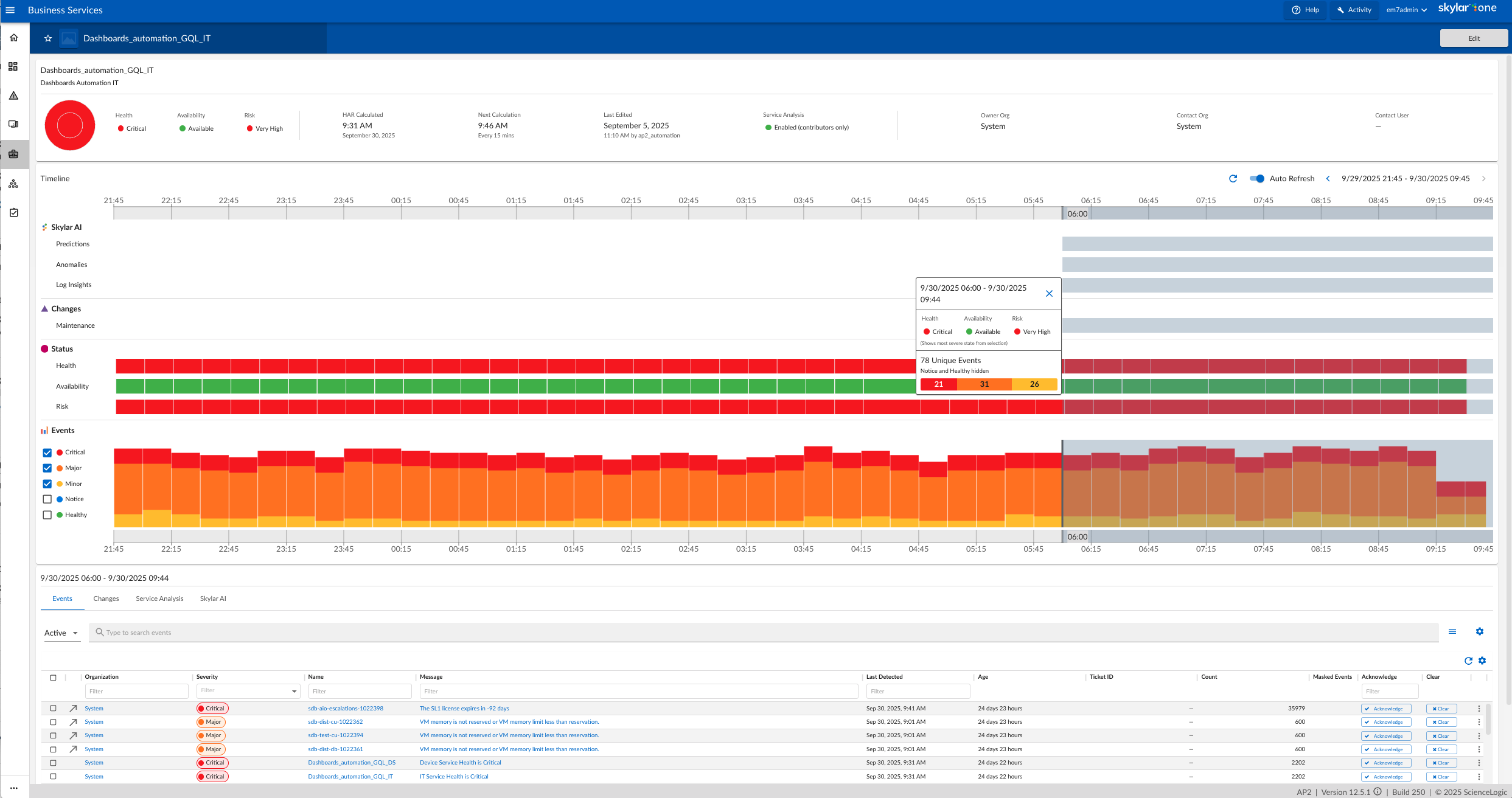
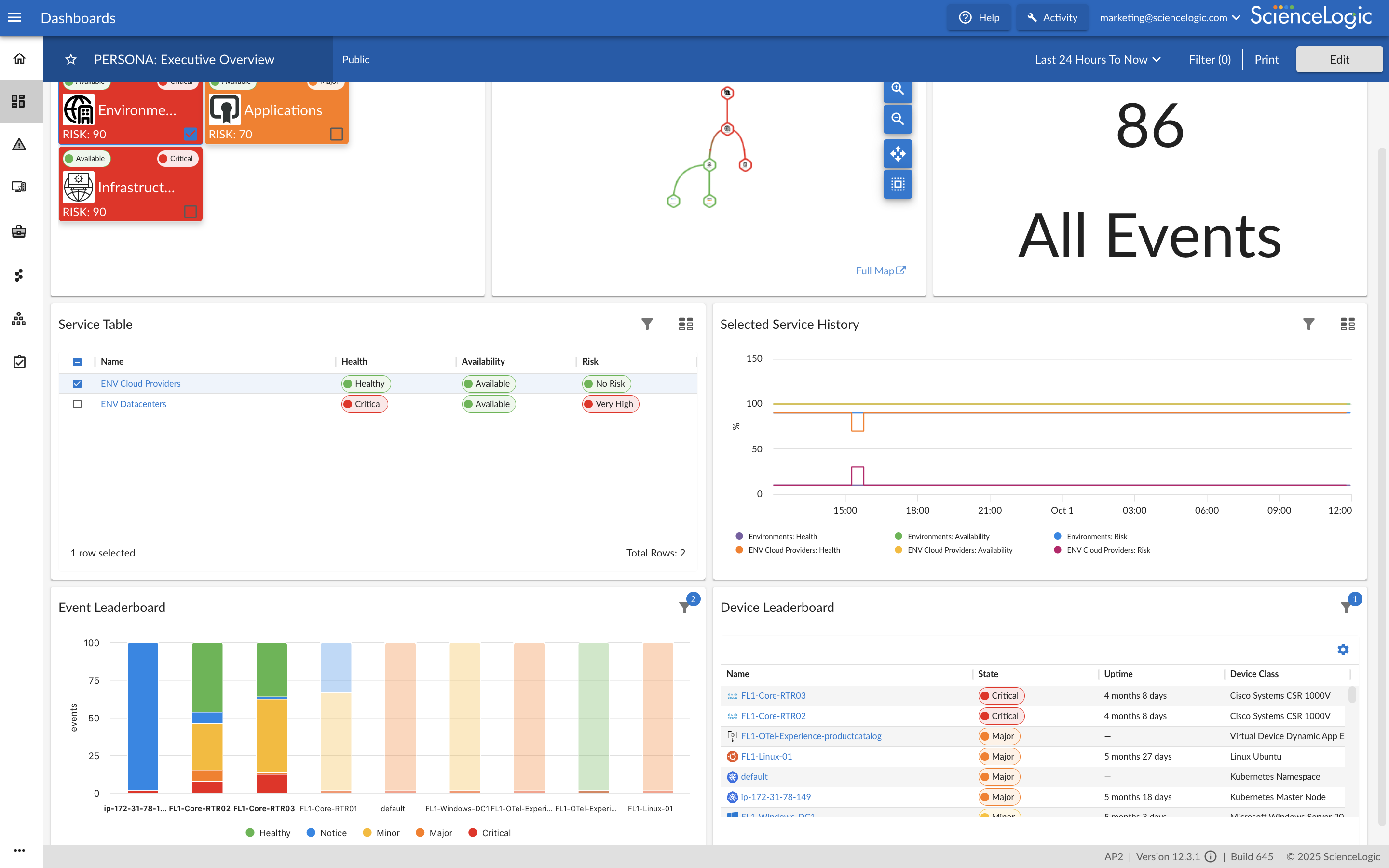
Screenshot of Unified Observability and Contextual IntelligenceScreenshot of Relationship Mapping & Service VisibilityScreenshot of ITSM and Collaboration IntegrationsScreenshot of Low-Code Workflow BuilderScreenshot of Dynamic Application DevelopmentScreenshot of Executive Overview Dashboard

IBM Turbonomic Screenshots

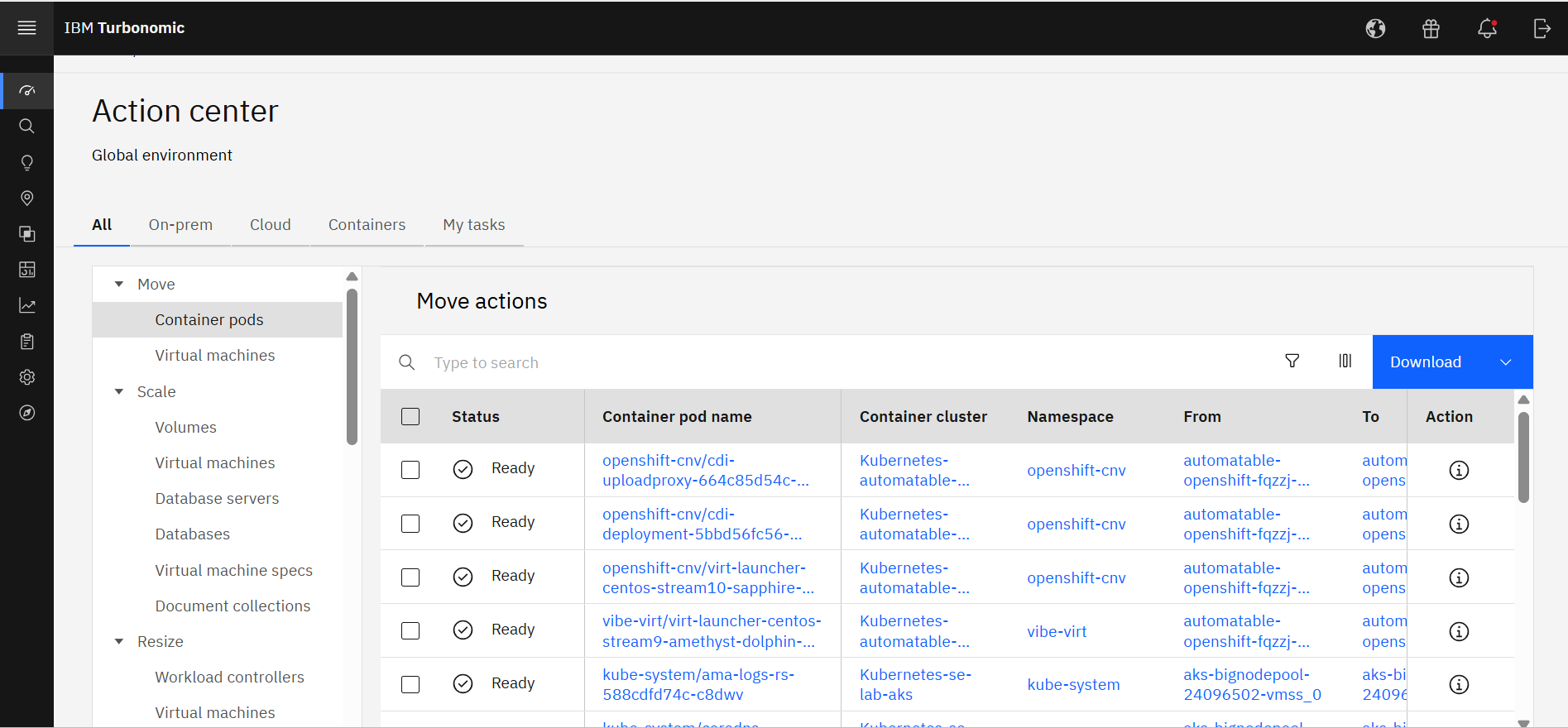
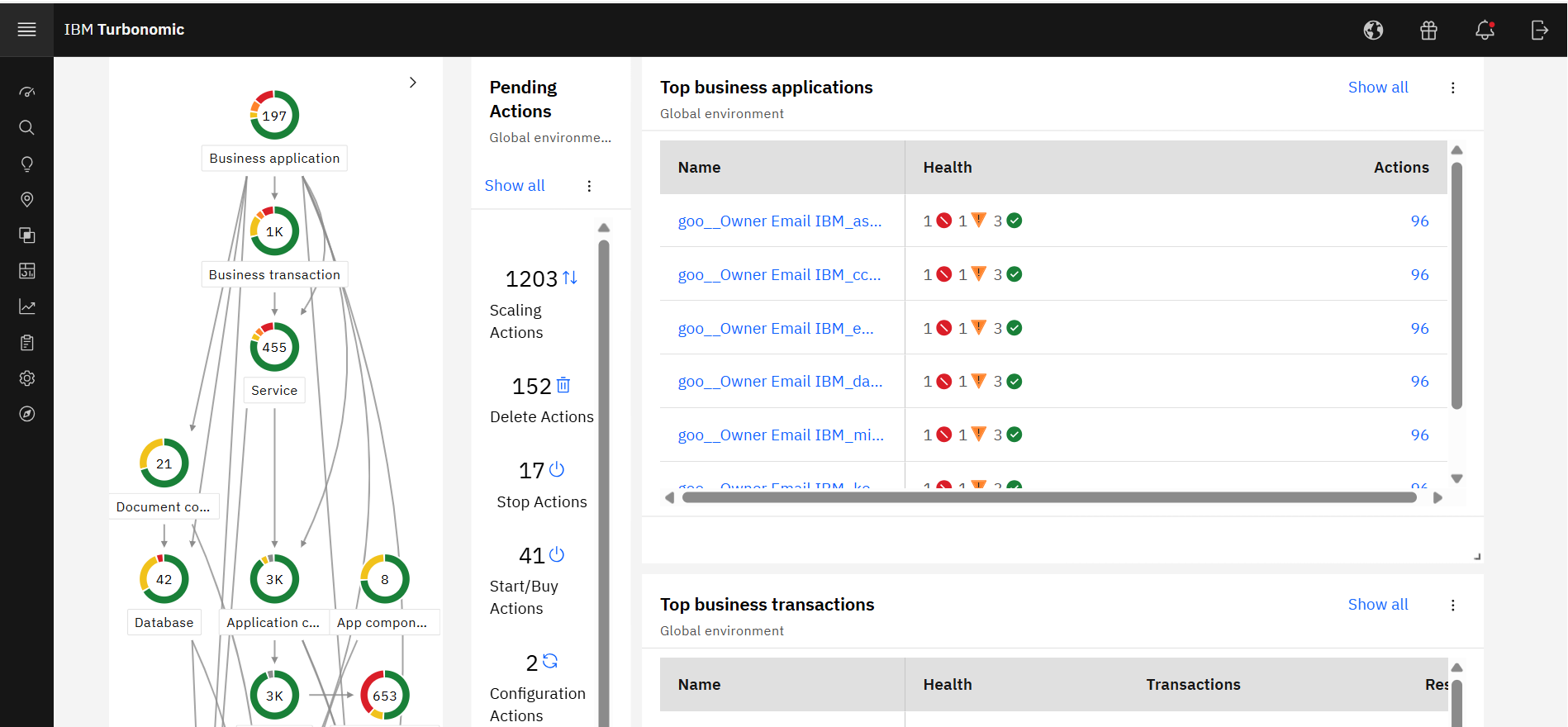
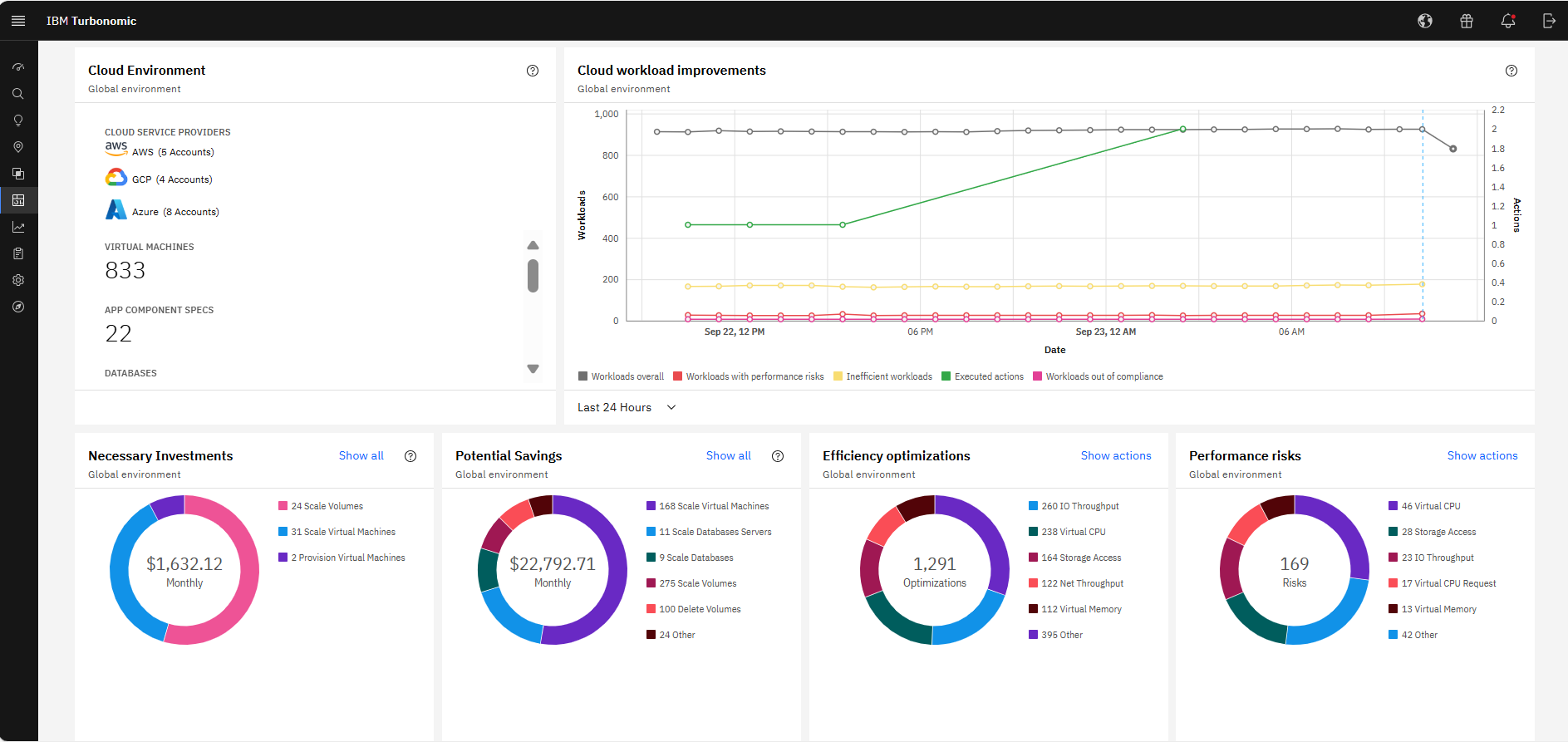
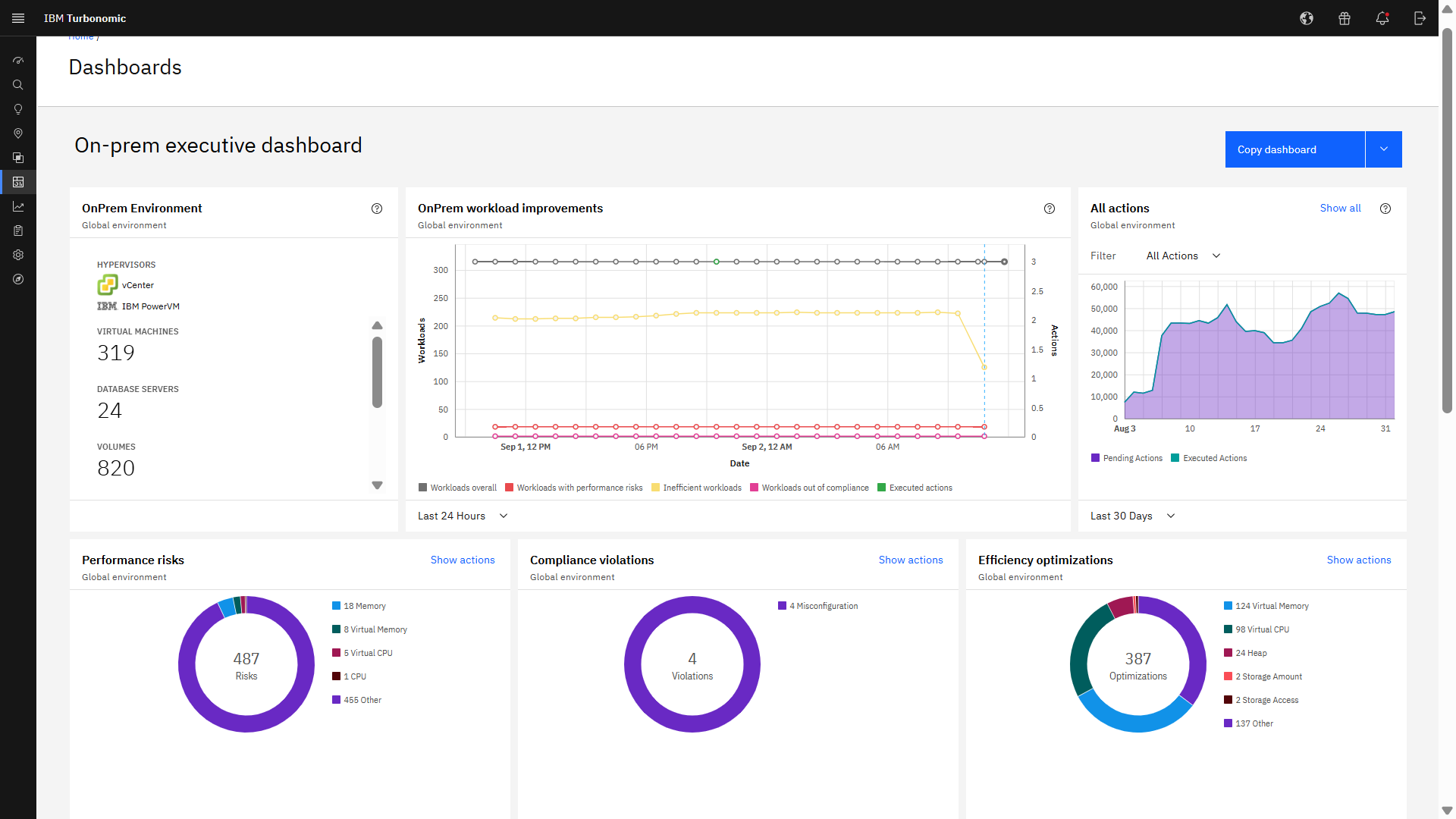
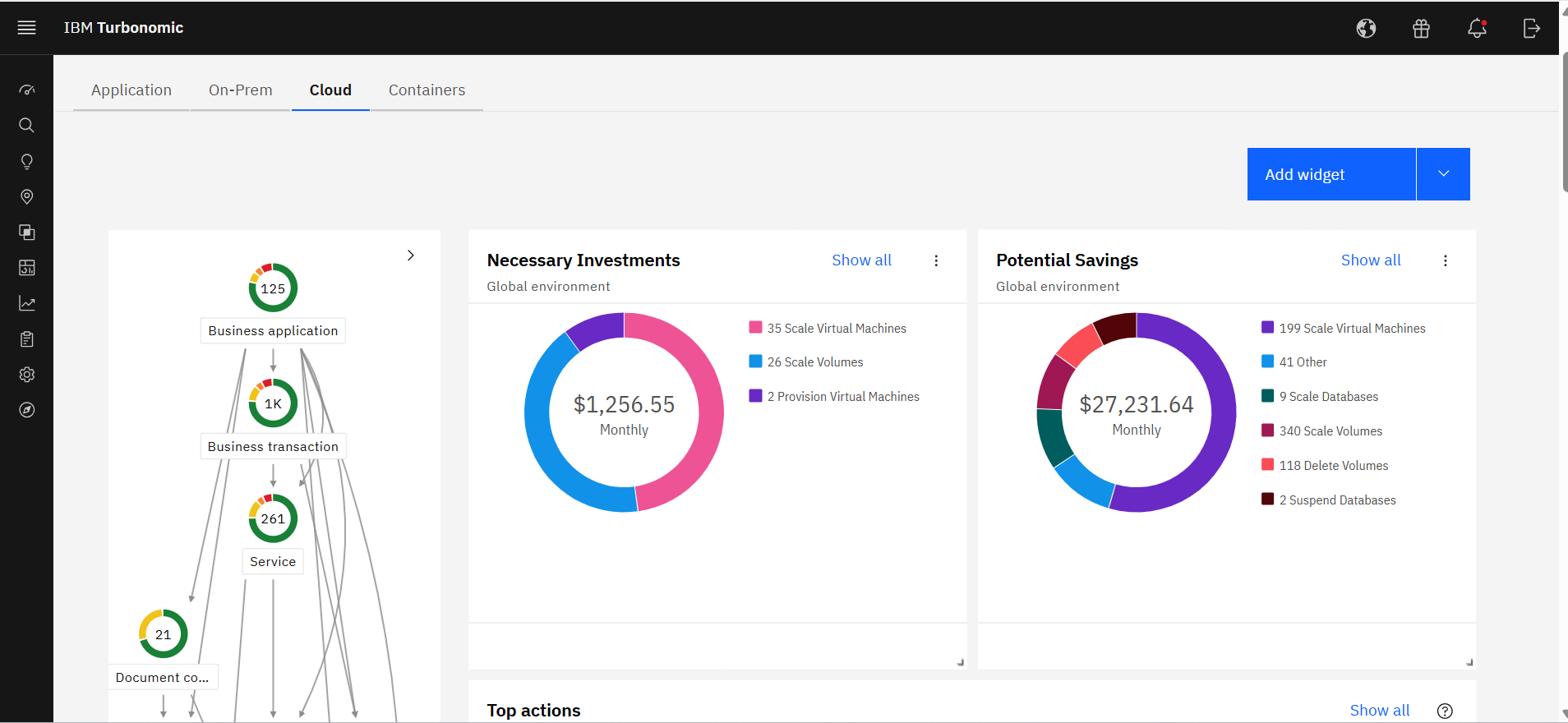
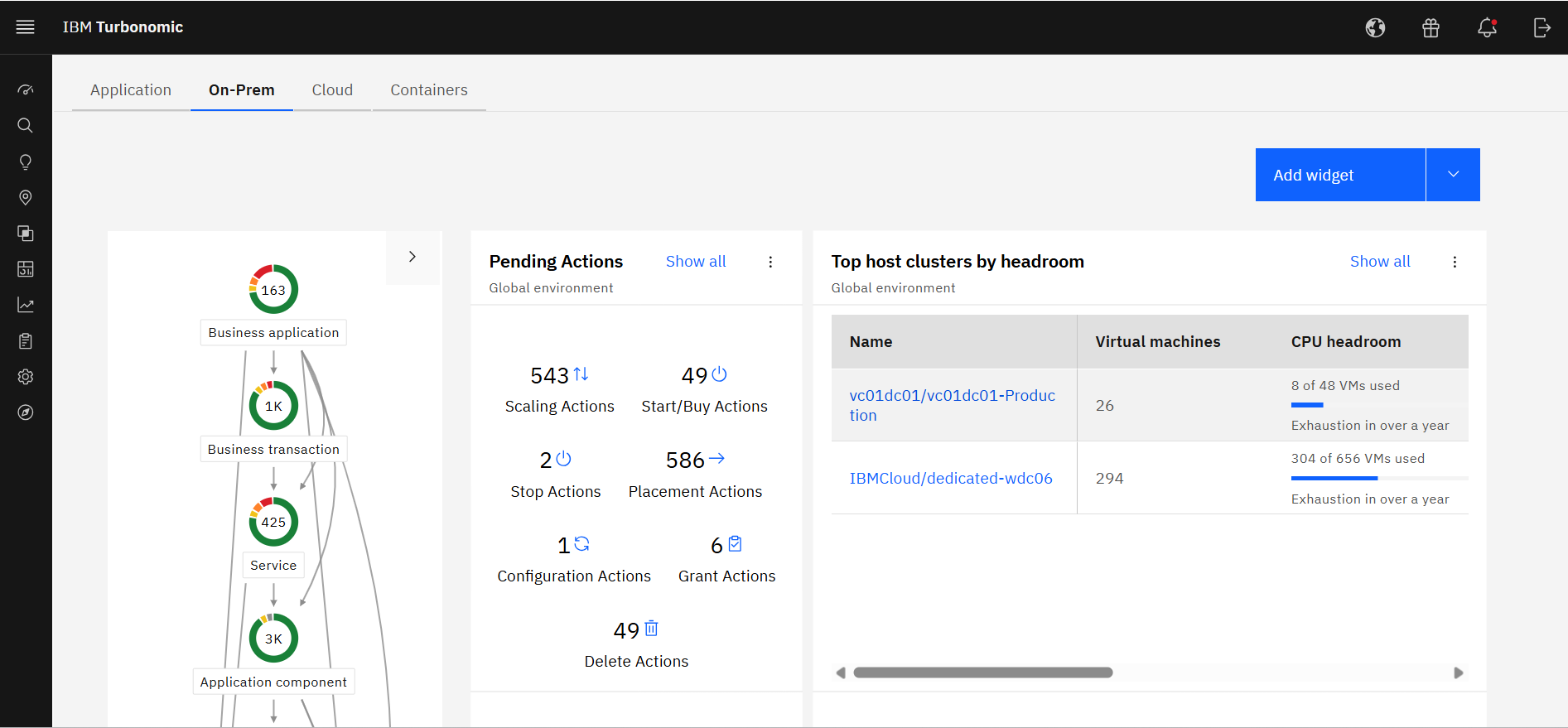
Screenshot of IBM Turbonomic Action Center, where it shows the list of optimization actions across the global environment—on-prem and cloud—that should be taken to minimize cost while assuring performance.Screenshot of IBM Turbonomic Application, a view that shows the global environment across private and public infrastructure from the context of individual application components. Users can optimize one application at a time by viewing each app's pending actions. The Supply Chain at left shows all of the entities across applications and their interdependencies.Screenshot of The IBM Turbonomic Cloud Executive Dashboard, an out of the box dashboard that allow users to rapidly communicate value to executives. This view shows the cloud cost savings opportunities realized and not yet realized over any time period.Screenshot of The IBM Turbonomic On-prem Executive Dashboard, an out of the box dashboard that allow users to rapidly communicate value to executives. This view shows the savings opportunities realized and not yet realized over any time period.Screenshot of an IBM Turbonomic Cloud view, where the public cloud environment(s) and all of the pending actions required to bring them into an efficient, performant state. The Supply Chain at left shows all of the entities in the public cloud(s) and their interdependencies.Screenshot of The IBM Turbonomic On-Prem view that shows the user's private data center environment(s) and all of the pending actions required to bring them into an efficient, performant state. The Supply Chain at left shows all of the entities in data center(s) and the interdependencies between them.