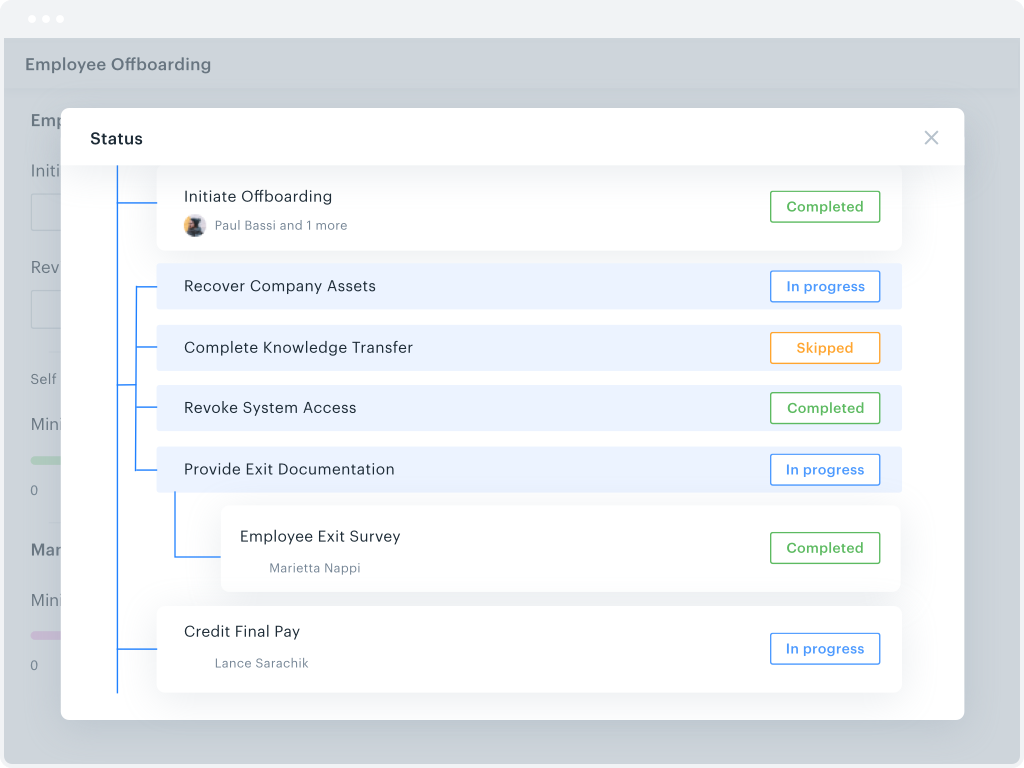
Aurea Process (formerly CX Process) from Aurea Software in Austin is a business process management offering, based on Savvion BPM.
$200,000
per year
Kissflow
Score 8.1 out of 10
Enterprise companies (1,001+ employees)
Kissflow is a low-code platform for custom application development tailored to business operations. Kissflow empowers process owners and IT developers to automate and build processes and applications for internal business operations.
$1,500
per month 50 Users
Process Street
Score 8.3 out of 10
N/A
Process Street in San Francisco offers their application which allows teams to create simple recurring checklists, collaborate around them and track as they’re completed.
$25
per month per user
Pricing
Aurea Process
Kissflow
Process Street
Editions & Modules
License
$200,000
per year
Small Business
$1500
per month
Free
$0
per month per user
Pro
$25
per month per user
Enterprise
Custom
per month per user
Offerings
Pricing Offerings
Aurea Process
Kissflow
Process Street
Free Trial
No
Yes
Yes
Free/Freemium Version
No
No
Yes
Premium Consulting/Integration Services
No
Yes
Yes
Entry-level Setup Fee
No setup fee
No setup fee
No setup fee
Additional Details
—
—
—
More Pricing Information
Community Pulse
Aurea Process
Kissflow
Process Street
Features
Aurea Process
Kissflow
Process Street
Reporting & Analytics
Comparison of Reporting & Analytics features of Product A and Product B
Aurea Process
5.3
1 Ratings
38% below category average
Kissflow
-
Ratings
Process Street
10.0
3 Ratings
25% above category average
Dashboards
6.01 Ratings
00 Ratings
10.03 Ratings
Standard reports
6.01 Ratings
00 Ratings
10.03 Ratings
Custom reports
4.01 Ratings
00 Ratings
10.03 Ratings
Process Engine
Comparison of Process Engine features of Product A and Product B
Aurea Process
5.8
1 Ratings
36% below category average
Kissflow
-
Ratings
Process Street
9.7
4 Ratings
15% above category average
Process designer
6.01 Ratings
00 Ratings
9.24 Ratings
Process simulation
7.01 Ratings
00 Ratings
00 Ratings
Business rules engine
5.01 Ratings
00 Ratings
00 Ratings
SOA support
5.01 Ratings
00 Ratings
00 Ratings
Process player
7.01 Ratings
00 Ratings
00 Ratings
Model execution
5.01 Ratings
00 Ratings
10.03 Ratings
Form builder
00 Ratings
00 Ratings
10.03 Ratings
Collaboration
Comparison of Collaboration features of Product A and Product B
Aurea Process
4.0
1 Ratings
70% below category average
Kissflow
-
Ratings
Process Street
9.0
3 Ratings
7% above category average
Social collaboration tools
4.01 Ratings
00 Ratings
9.03 Ratings
Content Management Capabilties
Comparison of Content Management Capabilties features of Product A and Product B
Aurea Process
4.0
1 Ratings
68% below category average
Kissflow
-
Ratings
Process Street
10.0
3 Ratings
21% above category average
Content management
4.01 Ratings
00 Ratings
10.03 Ratings
Low-Code Development
Comparison of Low-Code Development features of Product A and Product B
The tool has potential. Its capabilities and visual aspects could be considered rather basic but this might improve, particularly if the business intelligence/analytics aspect is leveraged. Once running well, it could allow (perhaps smaller) companies to successfully improve their customers' experiences through digitalizing customer journey - and we all know that customer loyalty goes a long way. However, whether or not the tool is comprehensive enough to deliver this for larger companies with more complex, multi- and omni-channel interactions is yet to be seen...
We've used Kissflow [School Cloud] in order to track parent requests for transportation in the SpEd department. It has been user friendly for parents to input a request and staff to review, double check school sites and locations, and set up specific routes to meet the needs of students and communicate the info back to parents.
if you have standard processes that are often executed, it's worth to use. If you are a small company it is generally not worth to implement because you will need somebody who permanently works with it and maintains the processes.
They know what they are. You aren't going to get a Workflow program that also wants to be a CRM. You will get the equivalent of an electronic assistant going from station to station, taking care of business and giving you the end result.
Paper. It reduces the amount of paper needed for menial tasks tremendously. You can automate an entire process. As an educational institution, you may still need paper copies, but you aren't waiting for John Doe to sign Line 3, then Jane Doe to initial, and so on and so on with a paper form.
Tracking. If you need to know where things are in the process, the fact that this program is dedicated to workflow makes it incredibly easy to identify where people are in the sales flow.
Customer appreciation. When your workflow is stronger, faster, and better, the customers feel it. They feel like you are right there with them and getting things moving.
Workflow Design: There isn't a copy/paste function when creating the workflow, and you can't move a workflow task between parallel branches. This becomes a pain point when an item has 98% of what you need, but you can't copy it and place it in another branch to make the last tweaks. Instead, it needs to be completely recreated
Interface: While I like the current design features, which make it easy for an end-user to find their tasks and items, it would be nice to also have some flexibility within the platform. Things like being able to groups apps under a category or tailoring the look and feel of the page a little more would be a welcome addition.
If you had the ability to drag tasks around in a nonlinear way, it could be a cool creative feature. An example is to have a subtask next to another that says N/A if the task wasn't executed because it wasn't applicable.
Inbox tab can be overwhelming but that may just be the style in which I built my checklists.
The system has room to grow as it's limited by not being able to edit POs after they've been approved. The system is great for registrations and syncing to other systems while including the attachments. The reporting from Kissflow is also easy to setup to link to other platforms such as Looker
I haven't encountered a need for support with KiSSFLOW. It's not a perfect platform, but it's functional, dependable, and reasonably intuitive. I can't fault a support team just because their product works!
Since my last login into the platform, the latest update made the app much easier to use and learn. It's incredibly clean, and everything is exactly where it should be location-wise. You can tell they listen to their user base for features.
KiSSFLOW is much easier to set up, less coding and easier to explain to those that are being trained. The company already had SharePoint, but it is a very difficult system to set up. A class had to be taken, along with getting books in order to understand the process of the workflow. With KiSSFLOW, it is simple to understand, the helpdesk is quick with their response, help topics are laid out simply and you can even talk with someone on that side to ask your questions. Overall, KiSSFLOW is a much easier workflow and system to use.
I've tried other checklist tools like Google Keep, but it was too simple. I've tried Flowster, which is very similar to Process Street, but I like Process Street better. The interface is a lot more balanced and pleasant to look at. I found Flowster to be a less appealing interface even though the features were similar. I also briefly tried systemHUB but it is very expensive for what it offers compared to Process Street.
As our customers vary in size and maturity, the ROI ranges accordingly.
For younger, smaller businesses this is a useful tool. Digitalization of he customer journey has certainly helped save time and efforts in many cases.
For more mature market players the tool is not always comprehensive enough. Dashboard and report personalization take time and efforts, and sometimes it feels that a dedicated BI tool would be a more suitable solution.
The only real hard number savings that we have had with KiSSFLOW is the money we have saved in forms being printed, especially multi-part forms. So for a small college like us that it probably in the $5000 to $10000 per year range. We have certainly saved money in increased efficiencies of the processes that we have moved to KiSSFLOW. But that is harder to calculate.
Because of Process Street I am no longer losing money when having to redo things
It helps me eliminate those nasty "egg on the face" situations with clients because now nothing slips through the cracks. The team is able to be on top of it!