Azure DevOps (formerly VSTS, Microsoft Visual Studio Team System) is an agile development product that is an extension of the Microsoft Visual Studio architecture. Azure DevOps includes software development, collaboration, and reporting capabilities.
$2
per GB (first 2GB free)
Bonita Platform
Score4 out of 10
N/A
Bonita is an open-source business process and workflow management platform created by the French National Institute for Research in Computer Science. It is available as a free community edition or as a commercial subscription product.
N/A
Pega Platform
Score8.5 out of 10
N/A
Pega Platform is a combined business process management and robotic process automation (RPA) platform with advanced workforce analytics from Pegasystems.
$0.45
one-time fee per case**
Pricing
Azure DevOps
Bonita Platform
Pega Platform
Editions & Modules
Azure Artifacts
$2
per GB (first 2GB free)
Basic Plan
$6
per user per month (first 5 users free)
Azure Pipelines - Self-Hosted
$15
per extra parallel job (1 free parallel job with unlimited minutes)
Azure Pipelines - Microsoft Hosted
$40
per parallel job (1,800 minutes free with 1 free parallel job)
Basic + Test Plan
$52
per user per month
No answers on this topic
Low-code Factory Edition
$0.45
one-time fee per case**
Standard Edition
$0.80
one-time fee per case**
Enterprise Edition
Custom Quote
Offerings
Pricing Offerings
Azure DevOps
Bonita Platform
Pega Platform
Free Trial
No
No
Yes
Free/Freemium Version
No
Yes
No
Premium Consulting/Integration Services
No
Yes
No
Entry-level Setup Fee
No setup fee
No setup fee
No setup fee
Additional Details
—
—
**350,000 cases / year minimum. Additional cases available in blocks of 150,000.
More Pricing Information
Community Pulse
Azure DevOps
Bonita Platform
Pega Platform
Considered Multiple Products
Microsoft
No answer on this topic
Bonitasoft
Verified User
Chose Bonita Platform
We liked Bonita's architecture, the open-source framework, and the licensing and support model. Maybe fewer features than other BPM platforms but easier to implement and maintain.
A de minimis incentive was given to thank the reviewer for their time. The incentive was not used to bias or drive a particular response, nor was the incentive contingent on a positive endorsement. More Info
Verified User
Chose Bonita Platform
Bonita Platform is very easy to use and more convenient when it comes to data handling. In the poTher Bpm Tools, the processing of the data is very difficult and connections are very confusing. In Bonita Platform, one can even use the customized search for the retrieval of the …
A de minimis incentive was given to thank the reviewer for their time. The incentive was not used to bias or drive a particular response, nor was the incentive contingent on a positive endorsement. More Info
Verified User
Chose Bonita Platform
Bonita has a community version, open-source, so it´s easy to test the benefits of process automation for any enterprise. Bonita Platform is also very near to Java architecture, so the learning curve for developers is not difficult, and they only need to understand how processes …
A de minimis incentive was given to thank the reviewer for their time. The incentive was not used to bias or drive a particular response, nor was the incentive contingent on a positive endorsement. More Info
Verified User
Chose Bonita Platform
Bonita may be the easiest to start with without a steep learning curve, anyway on the other side it probably is not as powerful in the case you need to handle a very complicated and high volume or mission critical process. If look by the platform cost or license fee, Bonita has …
A de minimis incentive was given to thank the reviewer for their time. The incentive was not used to bias or drive a particular response, nor was the incentive contingent on a positive endorsement. More Info
Director technology in Engineering at JLL (Real Estate, 10,001+ employees)
Chose Bonita Platform
There is no user license in Bonita. Given the opensource, we have freedom here to extend requirements that might be beyond OOTB concept. If you have to kill [an ant] you don't need a missile. I think, for simple use cases Bonita has a simplified approach to address.
A de minimis incentive was given to thank the reviewer for their time. The incentive was not used to bias or drive a particular response, nor was the incentive contingent on a positive endorsement. More Info
A de minimis incentive was given to thank the reviewer for their time. The incentive was not used to bias or drive a particular response, nor was the incentive contingent on a positive endorsement. TR verified that a representative sample of customers was invited. More Info
Azure DevOps works well when you’ve got larger delivery efforts with multiple teams and a lot of moving parts, and you need one place to plan work, track it properly, and see how everything links together. It’s especially useful when delivery and development are closely tied and you want backlog items, code and releases connected rather than spread across tools. Where it’s less of a fit is for small teams or simple pieces of work, as it can feel like more setup and process than you really need, and non-technical users often struggle with the interface. It also isn’t great if you want instant, easy programme-level views or a very visual planning experience without putting time into configuration.
A de minimis incentive was given to thank the reviewer for their time. The incentive was not used to bias or drive a particular response, nor was the incentive contingent on a positive endorsement. More Info
Well suited for low code/no code applications centered around approval flows. It has built-in task management for users to see their pending actions, comments, statuses, etc. It has a very nice design for process flows. Less appropriate may be for generic type applications with complex screens and logic within those screens that need a lot of data to process.
A de minimis incentive was given to thank the reviewer for their time. The incentive was not used to bias or drive a particular response, nor was the incentive contingent on a positive endorsement. More Info
Pega Platform has introduced the low code feature, using app studio seasonal and professional developer can develop application easily and quickly. The initial application can be build by Business analyst and product owner who has less knowledge of Pega Platform, further application can be enhanced/extended by professional developer. We can develop end to end application and promote to higher environment. Easily we can perform parallel development using branch.
A de minimis incentive was given to thank the reviewer for their time. The incentive was not used to bias or drive a particular response, nor was the incentive contingent on a positive endorsement. More Info
A de minimis incentive was given to thank the reviewer for their time. The incentive was not used to bias or drive a particular response, nor was the incentive contingent on a positive endorsement. More Info
Bonita seems particularly suited for processes requiring a great deal of human interaction. Its user model allows you to control access to business processes in a fine-grained way. This allows for business processes to move smoothly between users and services as the process advances.
The definition and usage of custom forms from the latest version of Bonita seems particularly powerful. It allows for a thorough customization of the look-and-feel and does not require complex developments.
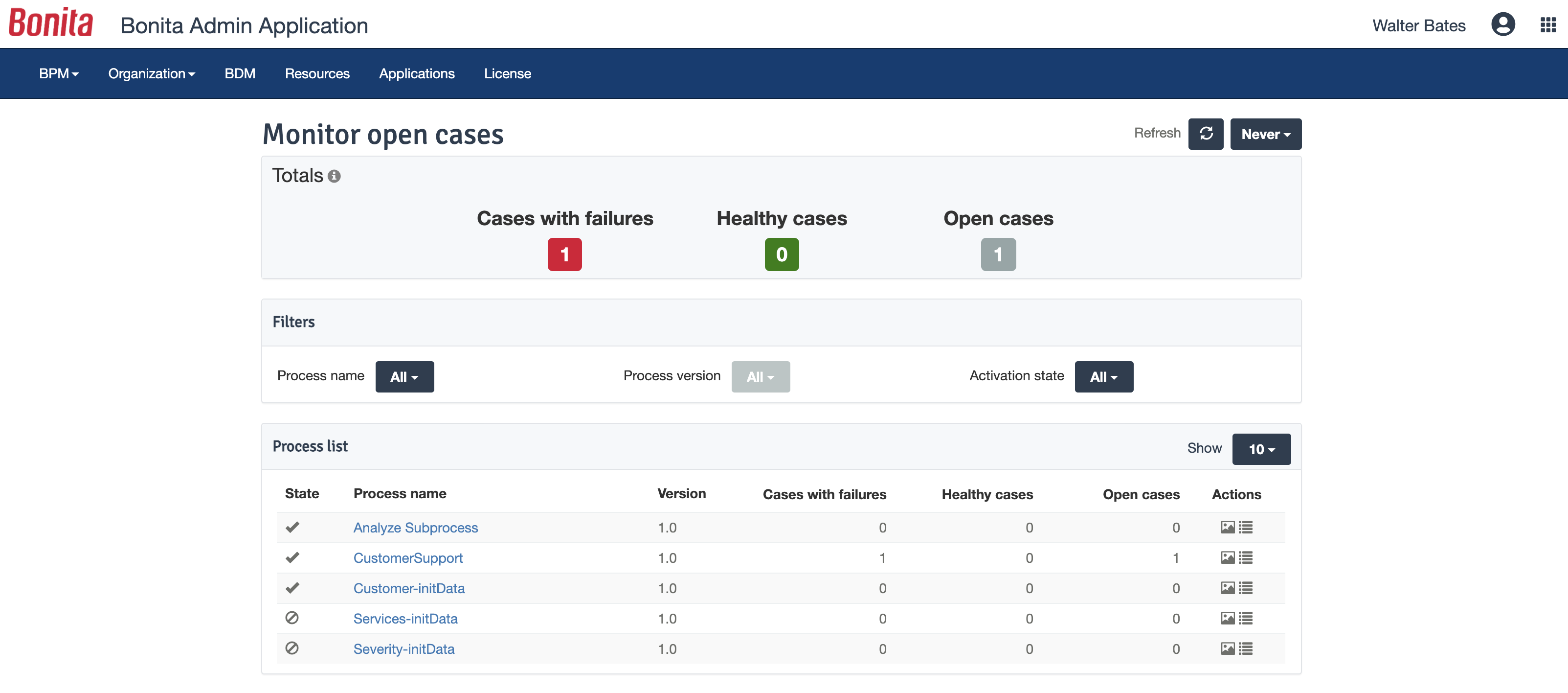
The web interface and administration section have greatly improved in the latest versions. Installation and configuration of processes has become more flexible and more structured. The administration section gives a good view on failed processes, allowing to analyse problems in an efficient way.
A de minimis incentive was given to thank the reviewer for their time. The incentive was not used to bias or drive a particular response, nor was the incentive contingent on a positive endorsement. TR verified that a representative sample of customers was invited. More Info
Quick development time. Much of the Pega "rules" are easy to configure and implement.
Visually friendly and modern. Much of the UI/UX elements in the system are continuously supported and updated, giving a nice feel to the apps.
Many of the configurations and rules Pega gives to the developers can also be delegated to business users. The organization and structure of the client's business can easily be adapted in the Pega platform.
A de minimis incentive was given to thank the reviewer for their time. The incentive was not used to bias or drive a particular response, nor was the incentive contingent on a positive endorsement. TR verified that a representative sample of customers was invited. More Info
I did mention it has good visibility in terms of linking, but sometimes items do get lost, so if there was a better way to manage that, that would be great.
The wiki is not the prettiest thing to look at, so it could have refinements there.
There is a learning curve beyond the boot camps that needs to be addressed with more structured curriculum.
The full stack technologies are industry standard, but these [are] challenging to learn and could use a learning path and orientation. There's probably opportunity for third-parties here to help with learning and adoption.
A de minimis incentive was given to thank the reviewer for their time. The incentive was not used to bias or drive a particular response, nor was the incentive contingent on a positive endorsement. More Info
A de minimis incentive was given to thank the reviewer for their time. The incentive was not used to bias or drive a particular response, nor was the incentive contingent on a positive endorsement. TR verified that a representative sample of customers was invited. More Info
I don't think our organization will stray from using VSTS/TFS as we are now looking to upgrade to the 2012 version. Since our business is software development and we want to meet the requirements of CMMI to deliver consistent and high quality software, this SDLC management tool is here to stay. In addition, our company uses a lot of Microsoft products, such as Office 365, Asp.net, etc, and since VSTS/TFS has proved itself invaluable to our own processes and is within the Microsoft family of products, we will continue to use VSTS/TFS for a long, long time.
A de minimis incentive was given to thank the reviewer for their time. The incentive was not used to bias or drive a particular response, nor was the incentive contingent on a positive endorsement. More Info
A de minimis incentive was given to thank the reviewer for their time. The incentive was not used to bias or drive a particular response, nor was the incentive contingent on a positive endorsement. TR verified that a representative sample of customers was invited. More Info
Pegasystems has continued to demonstrate a strong partnership with our organization and investment in their product that aligns with our overall vision and need. Pegasystems has engaged us at every level, with the assistance of minor defects to the overall roadmap planning and alignment of our goals
It's a great help to get more information about new feature release and stay updated on what the dev team is working on. I like how easy it is to just login and read through the work items. Each work item has basic details: Title, Description, Assigned to, State, Area (what it belongs to), and iteration (when it’s worked on). See image above.They move through different states (New → Discovery → Ready for Prod → etc.).
A de minimis incentive was given to thank the reviewer for their time. The incentive was not used to bias or drive a particular response, nor was the incentive contingent on a positive endorsement. More Info
Bonita Platform has allowed us to develop GUI relatively fast using its UI Designer while being able to seamlessly integrate our business logic in Java in a BPMN2 process diagram. It gives a nice productivity boost but still requires programming know-how to be able to deliver the final solution to your business problems.
A de minimis incentive was given to thank the reviewer for their time. The incentive was not used to bias or drive a particular response, nor was the incentive contingent on a positive endorsement. More Info
Pega Platform is enhancing its product and launching new features day by day which help to achieve customers needs. If I talk about the earlier version of Pega Platform (i.e. pega v5 and 6.3) there were many numbers of limitations in Pega Platform and if we need to do some customization then needed to write custom java and jave scripts to achieve the functionally. Now I can say Pega Platform is running with market trends and demand. Pega Platform is giving all the options which support the current technologies like decisioning capabilities, real time processing, mashup, process fabrics etc..
A de minimis incentive was given to thank the reviewer for their time. The incentive was not used to bias or drive a particular response, nor was the incentive contingent on a positive endorsement. More Info
Engine itself is efficient enough for most cases I dealt with. It can also be extended by clustering. I have done performance tests with JMeter and only managed to induce the crash of... JMeter. If there are efficiency issues they usually concern bad design/implementation of created apps or bottlenecks in integrated systems. Although I have met two cases with efficiency loss.
1. Java 7 related PermGen saturation caused by big number of installed apps (there is no jar dependency reusal between apps option).
2. Big number of waiting event handlers in processes stresses the database.
A de minimis incentive was given to thank the reviewer for their time. The incentive was not used to bias or drive a particular response, nor was the incentive contingent on a positive endorsement. TR verified that a representative sample of customers was invited. More Info
When we've had issues, both Microsoft support and the user community have been very responsive. DevOps has an active developer community and frankly, you can find most of your questions already asked and answered there. Microsoft also does a better job than most software vendors I've worked with creating detailed and frequently updated documentation.
A de minimis incentive was given to thank the reviewer for their time. The incentive was not used to bias or drive a particular response, nor was the incentive contingent on a positive endorsement. More Info
A de minimis incentive was given to thank the reviewer for their time. The incentive was not used to bias or drive a particular response, nor was the incentive contingent on a positive endorsement. More Info
It’s very slow sometimes, but that may be our servers. Also the Knowledge Library needs some work - again, not sure if it’s our setup or what- but I’m unable to search the body of an article for content, so I have to be very intentional with tagging, but it’s not ideal.
A de minimis incentive was given to thank the reviewer for their time. The incentive was not used to bias or drive a particular response, nor was the incentive contingent on a positive endorsement. More Info
A de minimis incentive was given to thank the reviewer for their time. The incentive was not used to bias or drive a particular response, nor was the incentive contingent on a positive endorsement. More Info
A de minimis incentive was given to thank the reviewer for their time. The incentive was not used to bias or drive a particular response, nor was the incentive contingent on a positive endorsement. TR verified that a representative sample of customers was invited. More Info
A de minimis incentive was given to thank the reviewer for their time. The incentive was not used to bias or drive a particular response, nor was the incentive contingent on a positive endorsement. More Info
Microsoft Planner is used by project managers and IT service managers across our organization for task tracking and running their team meetings. Azure DevOps works better than Planner for software development teams but might possibly be too complex for non-software teams or more business-focused projects. We also use ServiceNow for IT service management and this tool provides better analysis and tracking of IT incidents, as Azure DevOps is more suited to development and project work for dev teams.
A de minimis incentive was given to thank the reviewer for their time. The incentive was not used to bias or drive a particular response, nor was the incentive contingent on a positive endorsement. More Info
A de minimis incentive was given to thank the reviewer for their time. The incentive was not used to bias or drive a particular response, nor was the incentive contingent on a positive endorsement. More Info
We did evaluate multiple products offerings with Pega Platform capabilities and observed that Pega PRPC rules engine and case management capabilities are better over so many BPM Tools. We also conducted a detailed study with developers to identify the best products out of Suite of BPM products. It's observed that Rules engines integration is very streamlined with forms in Pega whereas other tools multiple have powerful data model capabilities but lacks the ease of creating business rules.
A de minimis incentive was given to thank the reviewer for their time. The incentive was not used to bias or drive a particular response, nor was the incentive contingent on a positive endorsement. TR verified that a representative sample of customers was invited. More Info
Respect of BPMN standard over the long term. Good enhancements by Bonitasoft for new use cases, for example the introduction of a real form editor even if it has been technically difficult to manage. Once done though, we have far greater possibility of human interaction.
A de minimis incentive was given to thank the reviewer for their time. The incentive was not used to bias or drive a particular response, nor was the incentive contingent on a positive endorsement. TR verified that a representative sample of customers was invited. More Info
We have saved a ton of time not calculating metrics by hand.
We no longer spend time writing out cards during planning, it goes straight to the board.
We no longer track separate documents to track overall department goals. We were able to create customized icons at the department level that lets us track each team's progress against our dept goals.
A de minimis incentive was given to thank the reviewer for their time. The incentive was not used to bias or drive a particular response, nor was the incentive contingent on a positive endorsement. More Info
A de minimis incentive was given to thank the reviewer for their time. The incentive was not used to bias or drive a particular response, nor was the incentive contingent on a positive endorsement. More Info
For one of the applications we worked on, we were able to reduce the processing time on a case from 2 days to 20 minutes by utilizing Pega
We were able to resolve the issue of the routing of cases to users based on a specific algorithm by use of Pega
Pega case management feature was extensively used in one of the application to establish a parent-child relationship which was very helpful for all the business users
A de minimis incentive was given to thank the reviewer for their time. The incentive was not used to bias or drive a particular response, nor was the incentive contingent on a positive endorsement. TR verified that a representative sample of customers was invited. More Info