
Shane Layt
ILS Manager QTEC
Chose MindManager
Nothing compares to the capability of Mind Manager, and it gets better and better.

| Product | Rating | Most Used By | Product Summary | Starting Price |
|---|---|---|---|---|
 Backlog | N/A | Backlog is a project management and bug tracking tool for teams that want higher productivity, greater visibility, and simple project tracking. Development teams can work together with Design, Marketing, IT, and more. Backlog is designed to get everyone on track by organizing work, teammates, projects and tasks. The activity feed and watchlist are designed to help users keep an eye on relevant work and deadlines. Gantt charts and burndown charts are designed to help users visualize project… | N/A | |
 MindGenius | N/A | MindGenius is a project management software built around capabiliities such as map creation, meeting management, and strategic planning. | $16 per month | |
 MindManager | N/A | MindManager is a mind mapping and project management tool that aims to boost users’ productivity. It is designed to facilitate a wide range of project types, and includes cross-platform functionality and 3rd party integrations. | $105 per year |
| Backlog | MindGenius | MindManager | ||||||||||||||||||||||
|---|---|---|---|---|---|---|---|---|---|---|---|---|---|---|---|---|---|---|---|---|---|---|---|---|
| Editions & Modules | No answers on this topic |
|
| |||||||||||||||||||||
| Offerings |
| |||||||||||||||||||||||
| Entry-level Setup Fee | No setup fee | No setup fee | No setup fee | |||||||||||||||||||||
| Additional Details | — | — | — | |||||||||||||||||||||
| More Pricing Information | ||||||||||||||||||||||||
| Backlog | MindGenius | MindManager | |
|---|---|---|---|
| Considered Multiple Products | Backlog No answer on this topic |  MindGenius No answer on this topic |  MindManager Shane Layt ILS Manager QTEC Chose MindManager Nothing compares to the capability of Mind Manager, and it gets better and better.  Jennie Vickers Executive Director, New Zealand Defence Industry Association Inc. (NZDIA) Chose MindManager We are still paying for what I feel is the outrageous licensing fee for MindManager.  Fred Greco Senior Pastor Chose MindManager MindManager is far more robust than other mind mapping software. It offers more formatting options, better exporting to other programs (especially Word) and is not reliant on an internet connection. |
| Backlog | MindGenius | MindManager | |||||||||||||||||||||||||||||||||||||||||||
|---|---|---|---|---|---|---|---|---|---|---|---|---|---|---|---|---|---|---|---|---|---|---|---|---|---|---|---|---|---|---|---|---|---|---|---|---|---|---|---|---|---|---|---|---|---|
| Project Management |
| ||||||||||||||||||||||||||||||||||||||||||||
| Professional Services Automation |
| ||||||||||||||||||||||||||||||||||||||||||||
| Mind Mapping |
|
| Backlog | MindGenius | MindManager | |
|---|---|---|---|
| Small Businesses |  Stackby Score 8.9 out of 10 | Stackby Score 8.9 out of 10 |  Whimsical Score 9.3 out of 10 |
| Medium-sized Companies |  InEight Score 8.4 out of 10 | InEight Score 8.4 out of 10 | Whimsical Score 9.3 out of 10 |
| Enterprises | InEight Score 8.4 out of 10 | InEight Score 8.4 out of 10 | Whimsical Score 9.3 out of 10 |
| All Alternatives | View all alternatives | View all alternatives | View all alternatives |
| Backlog | MindGenius | MindManager | |
|---|---|---|---|
| Likelihood to Recommend | 9.0 (3 ratings) | 9.0 (1 ratings) | 8.0 (256 ratings) |
| Likelihood to Renew | - (0 ratings) | - (0 ratings) | 8.9 (24 ratings) |
| Usability | 10.0 (1 ratings) | - (0 ratings) | 8.3 (19 ratings) |
| Availability | - (0 ratings) | - (0 ratings) | 8.3 (7 ratings) |
| Performance | - (0 ratings) | - (0 ratings) | 8.6 (6 ratings) |
| Support Rating | 8.0 (1 ratings) | - (0 ratings) | 7.4 (16 ratings) |
| Online Training | - (0 ratings) | - (0 ratings) | 6.4 (1 ratings) |
| Implementation Rating | - (0 ratings) | - (0 ratings) | 8.3 (6 ratings) |
| Configurability | - (0 ratings) | - (0 ratings) | 8.6 (5 ratings) |
| Ease of integration | - (0 ratings) | - (0 ratings) | 8.8 (4 ratings) |
| Product Scalability | - (0 ratings) | - (0 ratings) | 8.6 (6 ratings) |
| Vendor post-sale | - (0 ratings) | - (0 ratings) | 8.8 (5 ratings) |
| Vendor pre-sale | - (0 ratings) | - (0 ratings) | 8.8 (5 ratings) |
| Backlog | MindGenius | MindManager | |
|---|---|---|---|
| Likelihood to Recommend | Nulab, Inc.
 Vishal Sonawane Customer support | MindGenius Ltd.
| Alludo
|
| Pros | Nulab, Inc.
 Carol Aleman Software Engineering Manager | MindGenius Ltd.
| Alludo
 Manu Mejías Founder. CEO. R&D. Engineering. Innovation. |
| Cons | Nulab, Inc.
 Sanyam Jain RPA Consultant | MindGenius Ltd.
| Alludo
Shane Layt ILS Manager QTEC |
| Likelihood to Renew | Nulab, Inc. No answers on this topic | MindGenius Ltd. No answers on this topic | Alludo
 Thomas Kleinschmidt, CIM(R) Manager, Private Client; CCO |
| Usability | Nulab, Inc.
Vishal Sonawane Customer support | MindGenius Ltd. No answers on this topic | Alludo
|
| Reliability and Availability | Nulab, Inc. No answers on this topic | MindGenius Ltd. No answers on this topic | Alludo
|
| Performance | Nulab, Inc. No answers on this topic | MindGenius Ltd. No answers on this topic | Alludo
|
| Support Rating | Nulab, Inc.
Sanyam Jain RPA Consultant | MindGenius Ltd. No answers on this topic | Alludo
 Scott E. Miller Owner / President |
| Online Training | Nulab, Inc. No answers on this topic | MindGenius Ltd. No answers on this topic | Alludo
Thomas Kleinschmidt, CIM(R) Manager, Private Client; CCO |
| Implementation Rating | Nulab, Inc. No answers on this topic | MindGenius Ltd. No answers on this topic | Alludo
 José M. Guerrero Consultant |
| Alternatives Considered | Nulab, Inc.
Carol Aleman Software Engineering Manager | MindGenius Ltd.
| Alludo
|
| Scalability | Nulab, Inc. No answers on this topic | MindGenius Ltd. No answers on this topic | Alludo
|
| Return on Investment | Nulab, Inc.
Vishal Sonawane Customer support | MindGenius Ltd.
| Alludo
|
| ScreenShots | Backlog Screenshots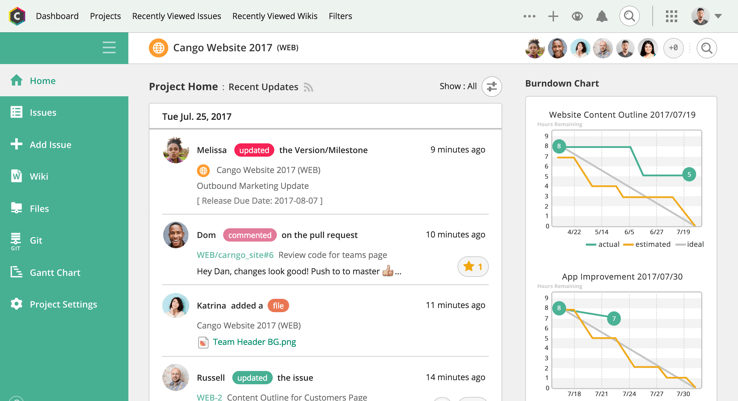 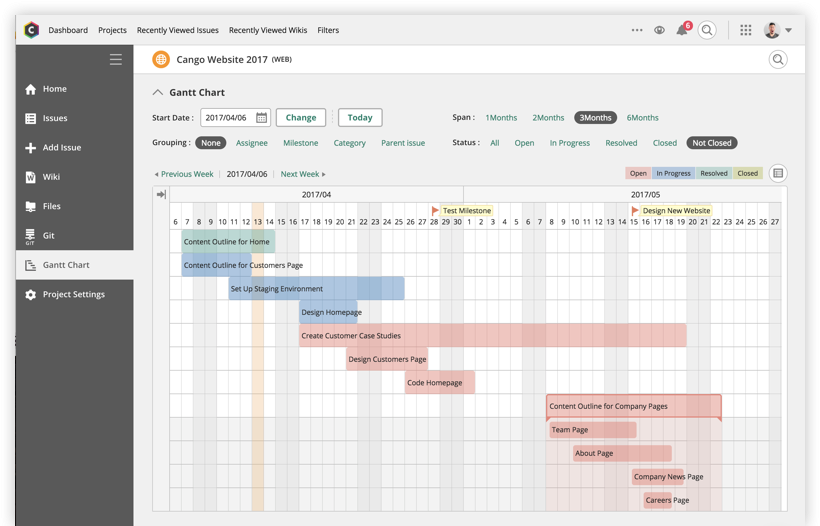   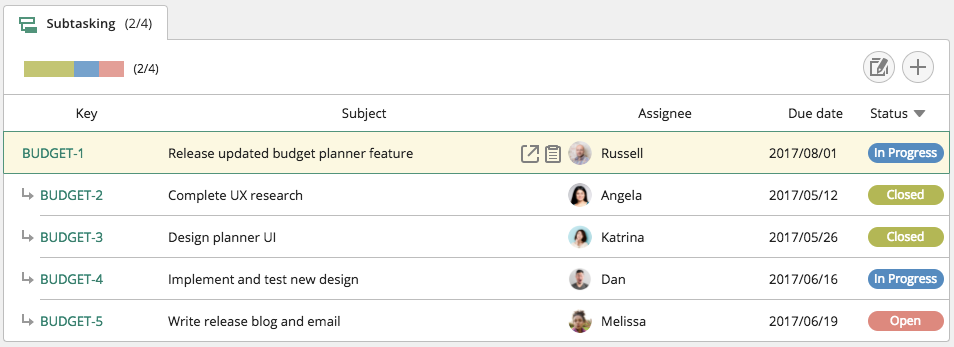 | MindManager Screenshots      |