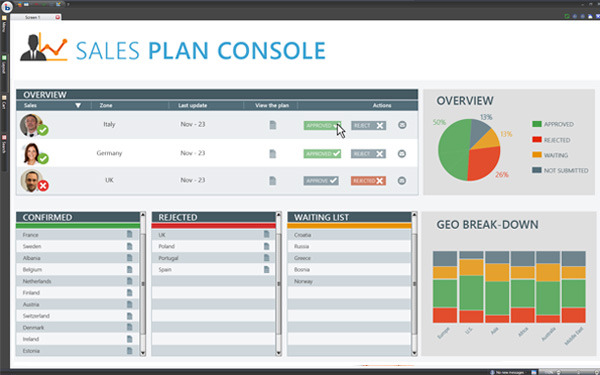
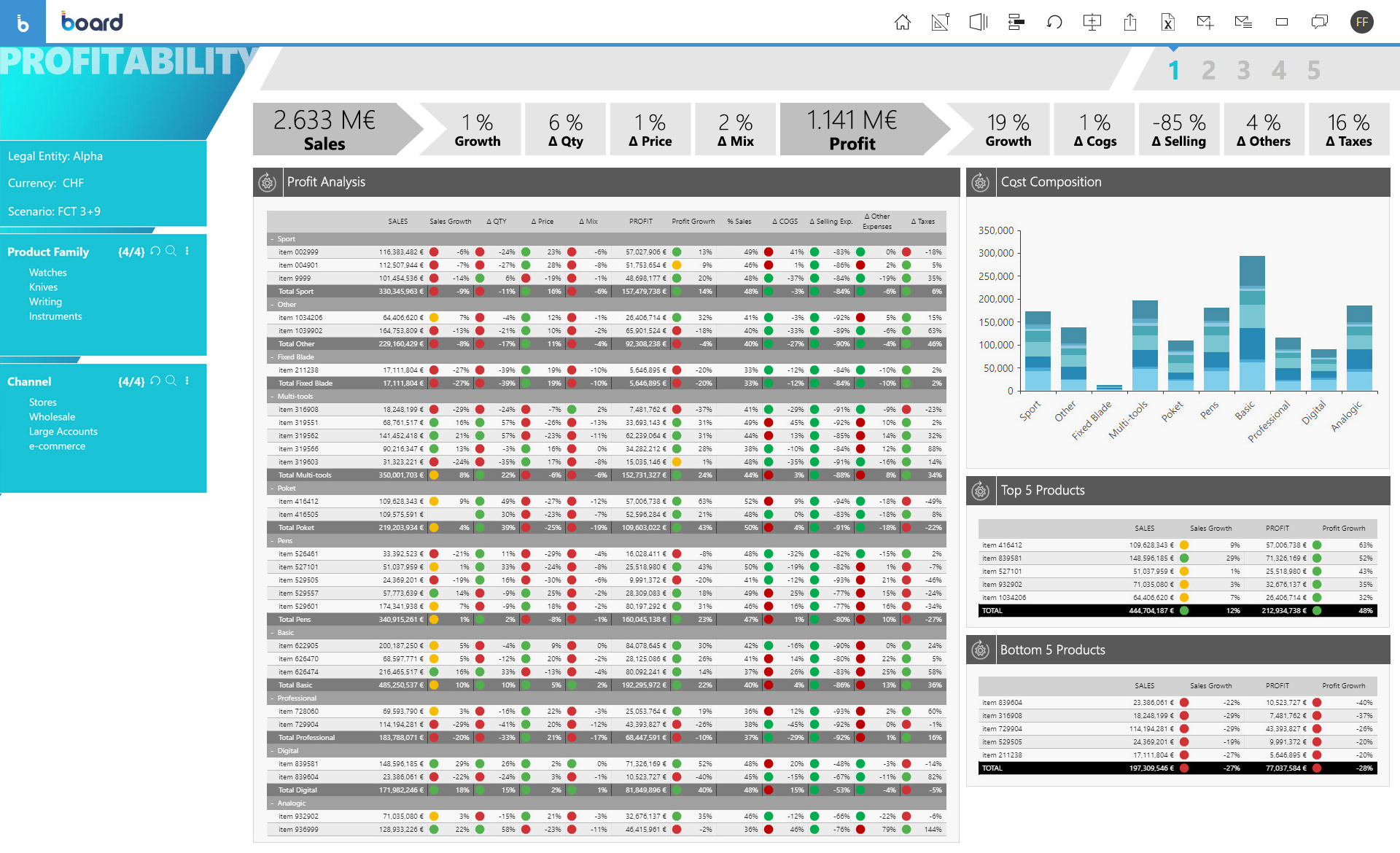
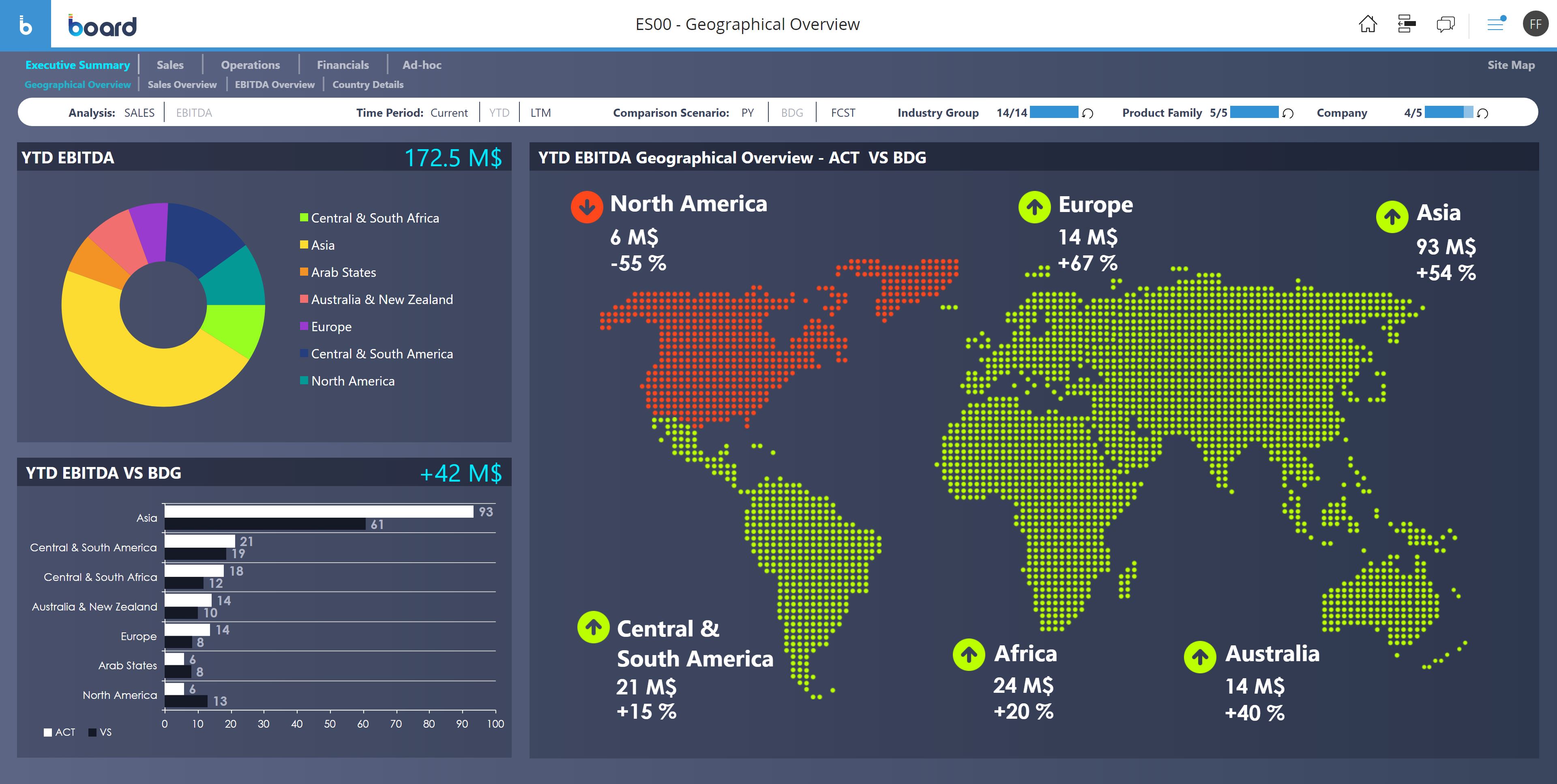
Board is presented as an enterprise planning platform, offered as a solution to accelerate business performance and enable continuous planning with greater forecast accuracy to drive confident, aligned decisions.
N/A
Brackets
Score 9.3 out of 10
N/A
Brackets is a free and open source text editor developed at Adobe under the MIT license, featuring inline editing, live preview, and a wide range of extensions.
N/A
Notepad++
Score 9.0 out of 10
N/A
Notepad++ is a popular free and open source text editor available under the GPL license, featuring syntax highlighting and folding, auto-complete, multi-document management, and ac customizable GUI.
Brackets is an open-source IDE and free to use. It is specifically used for developing web applications that provide brackets an edge over the other available IDE in industry. There are more features available in Brackets as compared to other IDE. Being, Open-source, It is …
I have used Notepad++ before. I prefer Brackets, the core functionality is similar, but I like the feel and usability more. I think Brackets has some added features and customization abilities as well.
Does the same but in my opinion better. It might [be my] preference but the other options are either too technical or not technical enough. Notepad++ seems to tow this perfect balance, at least in my eyes, of being friendly enough for beginners and deep enough for experts. With …
Notepad++ is the no-frills, simpler options that is an old reliable text editor. The alternatives have slicker interfaces and more features, but can be overkill for certain uses. The quality of plugins that Notepad++ has is a bit higher and there is less noise. Notepad++ is …
Board is a useful tool with a great set of features. We migrated from human apps to board and we find it relatively fast in search results and better-managed threads and forums. There are some areas, such as UI and interactions which could be improved but overall a great product. The learning section is also pretty good.
Brackets can handle most text editing problems, at least if you have a file small enough that it opens. But with so many free and open-source editors out there, it is easy to have multiple tools that fit specific niches. If you are editing HTML and CSS, get Brackets.
well suited for 1) Coding and Development - Writing and editing code, Quick prototyping and testing of code snippets, Debugging and inspecting code using syntax highlighting and line numbering, 2) web development - Creating and editing HTML, CSS, JavaScript, and other web-related files .Managing and organizing web projects with multiple files and directories. Not suited for - 1) processing huge files 2) graphic designing 3) complex gui designs 3) Data Analysis and Manipulation - Editing and cleaning up text-based data files before importing them into analytical tools. Applying regular expressions to extract, transform, and manipulate data. 4) System Administration and IT - change system configuration file
The Live Preview feature is extremely helpful. You can make tweaks to your CSS and then see how it affects the pge you're coding.
The recently added file tree feature is really a time saver. You can move files with a drop and drag feature without ever minimizing the program.
One of my favorite features is the ability to update the core program with extensions. Some of the extensions are simple, like adding themes, while others are a offer a little more assistance like creating Lorem Ipsum text for you.
Notepad++ allows us to keep open files in tabs. Like in a web browser, these tabs let us access these files quickly and easily. Furthermore, even if we forget to save the files when closing the program or shutting down the PC, Notepad++ retains them in the open tabs when we reopen it.
Notepad++ supports many different file types. We usually save our files created in Notepad as normal text files, but sometimes as JSON, PHP, and HTML files.
Notepad++ is lightweight and requires little resources. Using it is snappy and responsive.
The developer of Notepad++ frequently updates the software with bug fixes, performance improvements and new features.
Sometimes the number of options are overwhelming and require a quick search to figure out where to locate a particular function.
Some way to do a diff between files would be great. Still need to resort to another paid app for that - unless it is a buried function I don't know about or there's a plugin for it.
Board is a fantastic product for swift BI solution delivery when compared with its peers. Ease of use, support and integration with Microsoft Office Addin open a wide horizon of opportunities for further enhancements to solutions. Easy bespoke app development capabilities make it a winner for us. BOARD is just like a white canvas, it lets you explore your creative side while designing and delivering a solution
From a user perspective, Board is quite simple to use. You can evaluate the presentation of the data, the navigation, the configuration of the users, the selection of the data etc ... It would have a better rating if it were even more intuitive as regards the construction of a project, starting from the database, to the info-cubes, to entities, to data acquisition procedures from other servers.
As far as usability, text editors are about as simple as you can get in the GUI world. The little features that make Brackets unique are intuitive enough that you don't really need a manual to find them and come to rely on them. If anybody knows enough about coding and markup enough to be looking for different editors, they will be up to speed before the download finishes.
There are lot of features to talk about. Especially the usability is good. Everyone can easily to use and user-friendly. Can also update easily. Can also write and execute the programming languages like C, C++ etc. Encoding is also the major feature that helps me a lot and converter as well.
The only time I needed assistance was due to a problem in the prints: the colors of the brochures as they were on the screen were not reproduced in the print, but a series of standard colors were reproduced. This fact made colored numbers on a colored background illegible. From the assistance they confirmed that it was a problem of version 10.2 that occurred when leaving the brochures with the default colors proposed by Board. To obtain the desired colors, they had to be personalized ... I didn't like the solution very much and the technician who recommended it didn't like me either, but they would have solved the problem with the following versions. In any case, the assistance was quick and effective even if not exactly efficient.
Brackets has a very extensive support site. Everything is organized nicely for easy navigation. If you can't find an answer you can easily file an issue with them and they will be quick to respond. What's cool is you can also message them on Slack, if you request an invite first. Slack is a very popular program right now so it's great having that integration.
I haven't needed to utilize any support related to Notepad++. I guess this is a good thing because I found it to be quite intuitive. There are almost infinite features you can tweak and plugins you can download but I haven't had to do that because Notepad++ is really good right out of the box.
Board is fairly simple and straight forward. Advance training on workflows and procedures is a good one but the training content only touches through the interesting areas. training content needs to cover a few areas more in-depth
The problem of user profiling in our context is certainly quite complex. The complexity is given by the fact that the company is divided territorially into logistic points of sale, but at the same time they are virtually divided into divisions (or specific implementation areas) and points of sale of competence. The same operator can have access to data at different logistic sales points, sales points of competence and divisions.
Board has been more complete when compared to Anaplan. Although I didn't participate in the buying decision of any of those products I have used both and by far Board just has more features. It's more than a CPM, it's BI and CPM put together. If I had to make a choice now it would be Board.
Brackets can be considered as the barebones version of a more complex piece of software like Dreamweaver. We selected Brackets due to the simplicity of the UI and the ease of use. In our case we do not need all the additional tools and gadgets that other, more complex software packages offer. We need something that's quick, easy, uncluttered and focuses specifically on our needs, which are seeing code and editing code. In this case no frills and complex UIs are required.
Notepad for Windows, Microsoft Word...LibreOffice Writer....I have used all of these for code writing and editing. Once again I like the universal feel of Notepad++. Basic Notepad, is just that, basic...and kind of clunky for what it is. This is a cool that I have installed on all my computers and also keep it on a thumb drive if I need it elsewhere.
Board facilitates proactive decision making - it gives all the insights of the company's needs, which includes predictive analytics and manipulation of data to make different types of reports.
Easy to use for non-programmer and integration with other software is seamless. It has [the] ability to handle large amounts of data.
ROI is great. The version of the tool we are using is free so not a whole of lot “investment” went into it. And the work we can accomplish with it more than makes up for the “cost.”
The ease of use makes it simple for anyone new to the tool to start using it and contributing to the project.