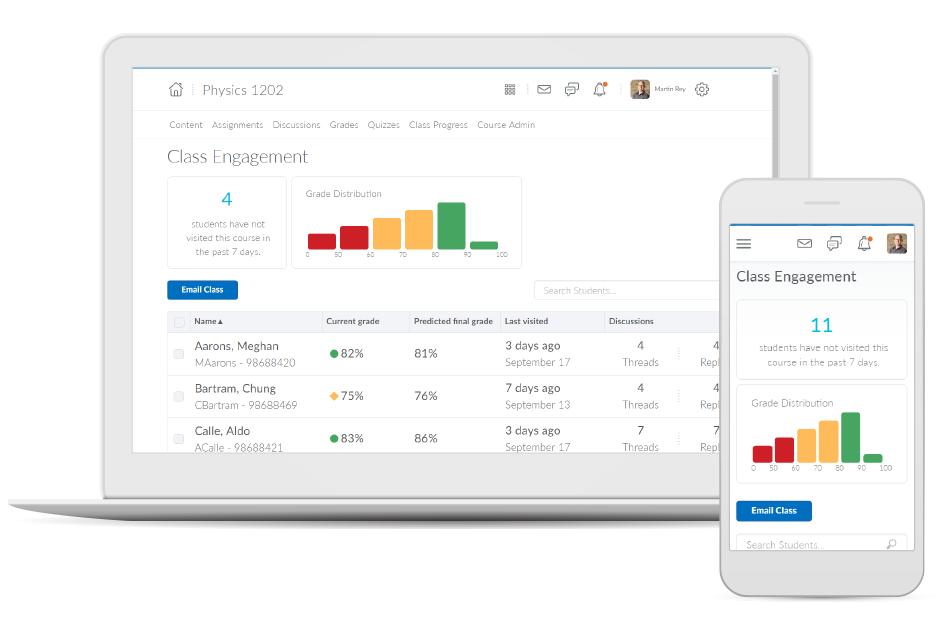
Brightspace is an academic and corporate learning management platform. It provides core e-learning features, as well as mobile accessibility and granular personalization and analytics insights.
N/A
Class for Web
Score 9.8 out of 10
N/A
Class for Web, formerly Blackboard Collaborate, is an online, collaborative learning platform for the education industry and corporate learning needs. It includes features such as screen and application sharing, and web conferencing.
$300
per year
Zoom Workplace
Score 8.4 out of 10
N/A
Zoom Workplace, Zoom’s open collaboration platform with an AI Companion, empowers teams to be more productive, and strengthen customer relationships throughout the customer lifecycle with Zoom’s Business Services for sales, marketing, and customer experience teams, including Zoom Contact Center.
$16.99
per month per user
Pricing
D2L Brightspace
Class for Web
Zoom Workplace
Editions & Modules
No answers on this topic
Classroom
$300.00
per year
Department
$9000.00
per year
Add-On Zoom Translated Captions
$5
per month per license
Pro
$16.99
per month per user
Business
$21.99
per month per user
Add-On - Conference Room Connector
$499
per year
Basic
Free
Enterprise
Custom
Add-On - Zoom Whiteboard
starting at $2.49
per month per user
Add-On - Large Meetings
starting at $600
per year
Add-On - Cloud Storage
starting at $120
per year
Add-On Audio Conferencing
starting at $1200
per year
Add-On Zoom Phone Power Pack
Starting at $300
per year per user
Add-On - Quality of Service Subscription
Contact Sales
Offerings
Pricing Offerings
D2L Brightspace
Class for Web
Zoom Workplace
Free Trial
Yes
No
Yes
Free/Freemium Version
No
No
Yes
Premium Consulting/Integration Services
Yes
No
Yes
Entry-level Setup Fee
No setup fee
No setup fee
No setup fee
Additional Details
Must contact vendor for pricing information. 30-day free trial is available.
In my opinion, D2L Brightspace is inferior to CANVAS and Blackboard. I didn't choose it. It was selected by my employer.
Verified User
Administrator
Chose D2L Brightspace
We migrated from PLS. Brightspace is much more intuitive and modern than PLS was. The ability for Brightspace to work across a range of devices (mobile, tablet, PC, Mac, etc) has been positive for our instructors and students. The main interface is straightforward and easy to …
Brightspace is by far the most user-friendly LMS I have ever used. Faculty with a lower technical skill set have an easier time navigating Brightspace features. Teaching wise, I have also found Brightspace to be easier for students to navigate than its competitors. I adjunct …
Although it's been some time since I used Blackboard (as a student in my undergraduate degree), it felt much more intuitive at the time than Brightspace has when I've taken or taught classes. However, I don't feel especially comfortable comparing them since it's been quite …
Canvas LMS is a far more superior product, in fact, many schools switched to it from Blackboard while 0 switched from Canvas to BB. The reason is that Canvas is a Cloud-native tool and it is faster at implementing new features, fixing bugs, etc. It has a bigger advantage in the …
Nearpod does not allow for the same type of synchronous environment that Blackboard collaborate does. Further, Nearpod, as the name suggests is best suited for a face-to-face classroom that is, preferably, one-to-one. While it has some of the same functions as Nearpod, …
Zoom has the most consistent experience so far compared to the other products. With the exception of Blackboard's integration into a learning management system, Zoom is by far the most feature-rich compared to its competitors.
I think that Zoom and Webex are by far the two strongest in this industry and the features are similar. I think the capabilities are far superior to what you find with GoToMeeting and Blackboard Collaborate. I chose Zoom over the others for this specific group of users …
We selected Zoom over two other FREE products because of its reliability and rich features (breakout rooms). Blackboard Collaborate has not been reliable for us, though other institutions in the university system have no issues with it and love it. Skype is moving to Teams …
We used to use Blackboard Collaborate, but there were so many technical issues that just don't happen in Zoom. It's easy to use for the instructors, the students, and everyone in between.
Zoom's screen sharing feature allowed us to shift gears on the fly without uploading documents ahead of time like on Blackboard. This saves our teachers and therapists tons of time!
Zoom is easier to use than any webinar software I have experienced. We don't spend much time answering support calls about it because people find the interface intuitive. Zoom prompts walk you through everything from install to locating meeting recording files. The video is …
If you're an educational institution (K-12, Higher Ed, etc.), this is an amazing tool, and it will provide you all the functionality to support anything you may want and need it to do. If you are looking at Brightspace as a tool for corporate training, I'm not sure exactly how good or bad it will be for you. My guess would be that it likely depends on your organization's size. Along that line, what I can speak to is how we use it for our customized training and in-house professional development/training, and it works fantastically for that. While we primarily use it for normal higher ed coursework, we regularly do training and professional development for all of our employees and I manage those along with our HR department. Because we use it for many other things as well, all of our employees are familiar with the product, which makes our trainings go that much smoother and makes my job that much easier.
I would say it is very useful for group collaborations online, as well as virtual classrooms where you wish your students/guests to collaborate in an adaptable environment; however I would advise against using the shared screen to display audio or video, nor would I encourage the use of the shared board with a group of people with disciplinary issues (as there is no accountability for who wrote/drew what).
Zoom Workplace is ideal for many businesses, more so because it saves money by uniting different functionalities into one app - meetings, messaging, phone, and scheduling. The tool keeps teams connected thanks to the amazing collaboration and communication features. In addition, Zoom Workplace is helpful for businesses with a hybrid team, thanks to its effortless connections.
Allowing users to embed content links from YouTube or Google Drive enables learners to experience a richer lesson.
Providing a powerful editor that allows developers to also include content from Adobe Stock as well as textbook publishers and cloud storage companies gives more power and creative ability to instructors.
Providing scaling for mobile and traditional computer systems ensures students will not have issues on the go.
The customization of home pages and groups enable courses to be used for small training sessions with breakout groups, large courses with separate sections, and even just more engaging courses that present themed icons and logos.
The Whiteboard feature is perfect for tutoring. We use it to write out formulas, draw diagrams, etc while in video chat to enhance explanations.
The file attachment feature is also very handy. This means we don't have to do a follow-up with a student using their email to send files of handouts, etc.
It's great that we only have to share a classroom access link for a student to enter a session. With other products, they had to set up a username and log-in with an account. Link access means 1 less hassle.
We are currently beginning to use the "record session" feature video sessions to use as training for new employees.
It offers amazing unified collaboration features, including Zoom whiteboard, Zoom team chat, and integrated mail and calendar.
Zoom is a great meeting solution, with features like smart recording, breakout rooms, and personalized video and audio, making it a functional business meeting tool.
It is equipped with amazing AI features that help summarize meetings, generate content, and provide quick catch-up, allowing one to ask AI questions without interrupting meetings.
One can feel a bit rushed on the Brightspace platform during the log-out period. Security requirements may require this, but it makes end-users more conscious about getting through content than taking notes.
From my experience, there is not a direct connection between the platform and Outlook.
Some of the newest computer high resolution screens are not as compatible with the interface. The font and windows are much smaller and the user is not able to increase the size of the windows to make it easier to read/navigate.
The audio can sometimes be inconsistent and tune in and out when someone is speaking. This is not every time though and many times the audio is clear.
The login process takes a bit longer to get into the program. You have to go through a few step process and loading time to get into the application.
I don't think there is any malfunction in their solution; it's extremely convenient to use, be it creating a meeting invite, adding people, sending any extra stuff to them. It's quick, and this is the only tool that works seamlessly even on Androids.
I would never give any system a perfect score. In the technology environment today we need to be constantly looking at ways to improve the user experience and LMS companies like Desire2Learn need to know that we have options today with other systems and they need to stay current with features and listen to their customers.
It is a tool that faculty likes to use. It has so much flexibility to allow students to see a class even if they happen to not be available in the classroom.
We're sticking with Zoom for the foreseeable future--given its compelling feature set, ease of use, and advanced technology, there's just no other competition to be excited about. Plus it's a Gartner-recognized industry leader, so it's a rather easy choice.
Overall, the learning environment works as expected. However, there are plenty of bugs. For example, for a few versions, trying to print out a PDF from the Content screen in several browsers would produce a blank page. We inform D2L support about these issues, most of which are known issues. However, they are very slow to respond. D2L seems to spend more time selling than actually coding and testing their product. Most of the issues are not major -- however, there have been a few that are unbelievable. In fact, this past week we had a sudden issue where the "Submit" button in quizzes would not appear if users had a certain browser/operating system combination. This is a major problem, if students cannot submit their exams! D2L is slow to respond to these kinds of situations, which do occur more often than I would like.
Blackboard Collaborate is reliable and feature-rich. It's a great web conferencing tool for teaching & learning, offering polls, chat, video and audio, whiteboard, content sharing, and breakout rooms. Blackboard Collaborate can be used for virtual office hours, lectures, guest speakers, training, professional development, conferences, technical support, academic advising, and so much more. Blackboard Collaborate can be used separately from the learning management system or it can be integrated for a single sign-on experience. It supports recordings, playbacks, private sharing, and MP4 downloads. Overall, it's a solid tool and very reliable.
Zoom is made for the non tech office. It has features that can be made to do what you need to run things on a day to day basis. Immediately we we able to get meetings going with remote employees. The ability to be able to add smartphone connected people was a big plus. Zoom met our needs at the time.
Both students and instructor enjoy the 24-hoiur access. After, all isn't that the point of online learning. As an instructor located in an Eastern time zone state it is great to connect with students located in a Pacific time zone state. I have gotten comments about the early hours I am in the course room grading assignments . . . 4:00 a.m. PST; 7:00 a.m. EST So, it's sleep time for my students and "first cup of coffee" time for me.
The availability of the software is quite impressive. You can access it at any time that you want and from anywhere that you want, but that depends on how the software is set up by the University. There might be sudden outages due to not having enough space on your database, which we had that very issue happen recently here at our University. During that time, you could not access their blackboard at all until it was brought up online again.
There have been less than a handful of outages during our two years with Zoom, and whenever there was one, an email informing us of the outage went out immediately, and they had the issue resolved shortly thereafter.
The performance of the software is remarkable. The loading speed of the pages is more than satisfying, it all depends on the users internet package. So far, there wasn't any issue of Blackboard slowing down other software or systems when integrated with them
Zoom has among the best performance of any video conference platform, as I've mentioned several times. Besides that, their Chat platform works great, and their back end always runs smooth. It's unfortunate that reporting can now only be done by one month at a time, but nonetheless, it only takes a second to run any kind of Zoom report, whether it's an attendee report, Poll results, a user report, a list of meetings from the past month, etc.
I have had excellent support from Desire2Learn. Any ticket that I submit is acknowledged immediately and the correction is usually almost as quick. We use this for thousands of classes and it is pretty well liked by both faculty and students. We have been using it for almost 4 years now and most of our instructors have become pretty proficient with it.
Sometimes they do planned maintenance. Depending on the time zone you’re in, this may be in the middle of the night. That’s great. Sometimes this maintenance isn’t completed overnight however, and you need to use the platform and it is down. I’ve never been able to successfully contact them to report an outage or get assistance when it is down. I just have to wait until it comes back up to go to class, review sessions, etc.
Because I got a response right away, and was assigned one specific individual to work with me from the beginning to the resolution. I had an actual email address and direct contact with this person without having to start over and over every time I contacted Zoom - this singular individual remained attentive and was well informed on the subject matter and quite able to resolve my needs.
The training provided online did not, necessarily, fit the version of the system that I was using. Screens were somewhat different and not all options were readily available. This could have been due to customization on the part of my institution however, I rather believe it was due to version changes and training materials not yet being updated.
If you receive any pushback from higher ups, point to any of the various positive reviews like this one. Or show Zoom's excellent Gartner report, or articles describing Zoom's partnership with Sequoia capital. It's not difficult to show how Zoom is a trustworthy industry leader with best-in-class technology.
I have used Blackboard Learn 8 and 9. I am currently learning about Canvas. Blackboard is overall much clunkier and lacks the intuitive feel in some parts of D2L. Its grade book is much harder to control and manipulate than D2L's. Its navigation menu can be more radically modified from the default than D2L's, but this doesn't seem that useful to me. Discussions in Blackboard can be more easily reorganized than in D2L, but no grading of discussions is possible. Blackboard Assignments is a good innovation which allows markup directly in the students' submissions, but it displays student work in a confusing manner that doesn't allow for any customization, and its markup options need further tweaking. Furthermore, no rubrics can be used in Blackboard in any way to grade any kind of work (that I am aware of). Overall, I would choose D2L over Blackboard.
Nearpod does not allow for the same type of synchronous environment that Blackboard collaborate does. Further, Nearpod, as the name suggests is best suited for a face-to-face classroom that is, preferably, one-to-one. While it has some of the same functions as Nearpod, Blackboard collaborate is best suited for remote transmission rather than face-to-face
Teams do not stack up to Zoom at all. My clients use Teamas because it is a corporate policy, and they use it most of the time between employees of the same company. It makes sense for this, NOT for me. Every time a Teams meeting is launched, since I am not part of this company, the meeting is laborious, the interface is not as nice as Zoom's, sharing documents is more difficult, etc., etc. Zoom is superior to Teams in every way!!!
The billing and price model is really fair for so many functions that they offer, our remote work requires each of the features that Zoom offers, so accepting payment for a tool like this is the least we can do. I like that billing arrives on time and that they offer opportunities and payment times.
During my first semester working with Desire2Learn the integrated learning management system was more down than up. This meant reconfiguring assignment due dates, frustration for both the instructor, students, and help desk staff. After an upgrade, Desire2Learn has been reliable.
The reason for this rating is that the software is a pretty good tool that can be utilized for use in all of the Universities around the world. It has the capability to fulfill the needs of various different education systems. Although, there are slight improvements that are needed, therefore the rating is at 8.
Because the Basic licenses are completely free, and because it's very easy to configure and install Zoom, and because anyone can join Zoom from a link without needing an account, scaling is a Breeze. There are absolutely no roadblocks. My company keeps adding more Zoom Pro license every week since it's so in demand. We were able to convert users from several different platforms onto Zoom with no trouble at all.
Zoom is perfect for our business. We use it to video chat with prospective clients. The name recognition alone gives us credibility and it is very easy to screen share and send content out.
I cannot speak to whether this system is less expensive than the more fully featured Blackboard, but employees are far less efficient, frustrated, and require frequent calls to the help center to set up fairly simple course templates.
I have been asked to consider teaching courses which will be completely online at my current institution. I have done such online courses several times at other universities, but I have decided Desire2Learn is too frustrating and cumbersome to do so. I am now exploring using Google Drive to teach a course online. Otherwise, I will not teach online until required or I find an alternate system.
Because faculty can schedule sessions on-the-fly without IT involvement, they are able to accomplish goals that they plan for weeks in advance as well as impromptu goals that come up at a moments notice.
Integration with the campus Learning Management Systems provides quick and easy scheduling of sessions that can be joined easily by students in those courses.
Scheduling of meetings can also be done through the web interface directly which enables administrative departments not associated with courses in the learning management system to also schedule meetings not affiliated with courses.
On-campus users can schedule meetings without outside participants by sending an open "guest link" URL that allows users to participate despite not having an account within the system iteself.
We are still early in our adoption of Zoom Workplace for business, so we don't really have any data to show cost savings.
The ability to take a call summary or meeting summary and add it to our practice management system have been remarkable. It's a quick copy/paste and it's in the system. Prior to this, we would have to scan in notes and save them into the system, if it even got that far. Mostly, attorneys would be searching through legal pads for the notes of a previous meeting or phone call.