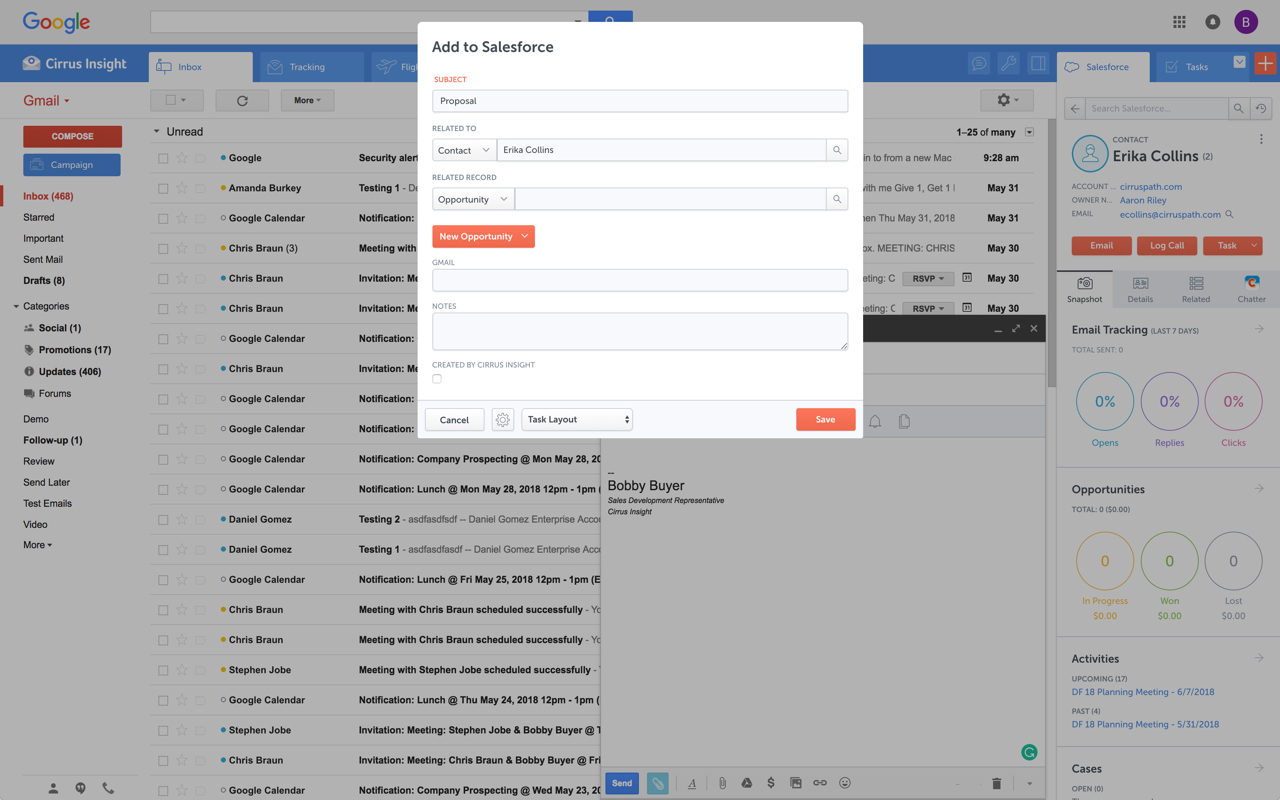
Cirrus Insight integrates Salesforce with Gmail, Google Calendar, and Google Contacts. Instantly View Contextual Salesforce Information in Your Inbox. Save Emails & Attachments to Salesforce with a Click. Sync Your Google & Salesforce Calendars. Create & Edit Salesforce Records on the Fly. Customize Your Salesforce Workflow in Gmail. Add Google Contacts to Salesforce. Salesforce Tasks Integration. Salesforce Templates Integrated with Gmail.
$15
per month
Salesflare
Score 9.5 out of 10
Small Businesses (1-50 employees)
Salesflare headquartered in Antwerp offers their small business intelligent CRM, providing automated event tracking and related features designed to aid the operations of SMBs.
$39
per month per user
Pricing
Cirrus Insight
Salesflare
Editions & Modules
Starter
$27
per user/month
Closer
$45
per user/month
Rainmaker
$72
per user/month
Growth
$39
per month per user
Pro
$64
per month per user
Enterprise
$124
per month per user
Offerings
Pricing Offerings
Cirrus Insight
Salesflare
Free Trial
Yes
Yes
Free/Freemium Version
No
No
Premium Consulting/Integration Services
Yes
Yes
Entry-level Setup Fee
$500 per installation
No setup fee
Additional Details
Pricing based on annual billing.
Discount available for annual billing.
More Pricing Information
Community Pulse
Cirrus Insight
Salesflare
Features
Cirrus Insight
Salesflare
Sales Force Automation
Comparison of Sales Force Automation features of Product A and Product B
Cirrus Insight
-
Ratings
Salesflare
8.4
17 Ratings
8% above category average
Customer data management / contact management
00 Ratings
9.516 Ratings
Workflow management
00 Ratings
9.017 Ratings
Territory management
00 Ratings
5.12 Ratings
Opportunity management
00 Ratings
9.017 Ratings
Integration with email client (e.g., Outlook or Gmail)
00 Ratings
10.017 Ratings
Contract management
00 Ratings
10.01 Ratings
Quote & order management
00 Ratings
6.12 Ratings
Interaction tracking
00 Ratings
8.315 Ratings
Channel / partner relationship management
00 Ratings
8.910 Ratings
Customer Service & Support
Comparison of Customer Service & Support features of Product A and Product B
Cirrus Insight
-
Ratings
Salesflare
8.3
1 Ratings
8% above category average
Case management
00 Ratings
9.01 Ratings
Call center management
00 Ratings
7.01 Ratings
Help desk management
00 Ratings
9.01 Ratings
Marketing Automation
Comparison of Marketing Automation features of Product A and Product B
Cirrus Insight
-
Ratings
Salesflare
9.7
15 Ratings
23% above category average
Lead management
00 Ratings
9.515 Ratings
Email marketing
00 Ratings
10.014 Ratings
CRM Project Management
Comparison of CRM Project Management features of Product A and Product B
Cirrus Insight
-
Ratings
Salesflare
8.2
15 Ratings
7% above category average
Task management
00 Ratings
8.515 Ratings
Billing and invoicing management
00 Ratings
8.01 Ratings
Reporting
00 Ratings
8.215 Ratings
CRM Reporting & Analytics
Comparison of CRM Reporting & Analytics features of Product A and Product B
Cirrus Insight
-
Ratings
Salesflare
9.2
16 Ratings
19% above category average
Forecasting
00 Ratings
8.513 Ratings
Pipeline visualization
00 Ratings
10.016 Ratings
Customizable reports
00 Ratings
9.014 Ratings
Customization
Comparison of Customization features of Product A and Product B
Cirrus Insight
-
Ratings
Salesflare
8.9
15 Ratings
15% above category average
Custom fields
00 Ratings
10.015 Ratings
Custom objects
00 Ratings
10.02 Ratings
API for custom integration
00 Ratings
6.812 Ratings
Security
Comparison of Security features of Product A and Product B
Cirrus Insight
-
Ratings
Salesflare
8.1
14 Ratings
3% below category average
Single sign-on capability
00 Ratings
7.910 Ratings
Role-based user permissions
00 Ratings
8.213 Ratings
Social CRM
Comparison of Social CRM features of Product A and Product B
Cirrus Insight
-
Ratings
Salesflare
6.8
10 Ratings
9% below category average
Social data
00 Ratings
6.810 Ratings
Social engagement
00 Ratings
6.810 Ratings
Integrations with 3rd-party Software
Comparison of Integrations with 3rd-party Software features of Product A and Product B
Cirrus Insight
-
Ratings
Salesflare
8.4
11 Ratings
12% above category average
Marketing automation
00 Ratings
7.811 Ratings
Compensation management
00 Ratings
9.01 Ratings
Platform
Comparison of Platform features of Product A and Product B
For someone who uses both Gmail and Salesforce as part of their main role, this software is an invaluable connector for them both. Some of the features are also not Salesforce specific - such as the Meeting Scheduler, which has proved invaluable to me, and I would recommend to any Gmail user who frequently set up meetings (either internally or externally).
If a client or friend of mine was in search of a quality tool that is a robust CRM and has a great team behind it, I would highly recommend SalesFlare. The team has consistently updated the application; it is a robust and useful tool, and most importantly, the team behind SalesFlare is easy to work with when needed.
Log email to Salesforce. You click one button and it logs for you. This is easier than adding the BCC email address that Salesforce provides as a way to log email.
Track views and engagement on these emails. It's nice to know if the email was opened and if links were clicked.
Update quick fields in Salesforce directly from their inbox using Cirrus. This prevented reps from needing to click into Salesforce, wait for it to load, then update fields like the phone number or name.
If the rep did need to open Salesforce, Cirrus provides a quick button to navigate to the Lead/Contact/Opportunity page quickly.
Outlook for Mac could use some work as an add-on because it's hard to read sometimes on my laptop. It's not a sidebar, like the Windows functionality, so it's harder to read.
Doesn't always find an opportunity, even though I know it's in our Salesforce system.
Randomly shuts down and doesn't log in properly at times. I've had to remove and re-download more than once.
Salesflare automatically captures and organises data about leads so it can effectively surface the ones that require your attention. It also provides you with the tools to do just that. What it doesn't cover as much right now is feeding top of the funnel: I would for example happily pay extra to have a website visitor identification functionality into the mix.
It is the best google to salesforce integration on the market. support is incredibly responsive and very helpful. They are constantly adding new features, and the current feature set is well beyond anything else that is currently offered in the market
Very easy to use. Everything opens in a familiar interface right inside the google apps sidebar. It brings in salesforce records, so as long as you know google apps / gmail and salesforce you'll be all set. It's point and click.
The pipeline, which is the core of the platform, is very clear and full of features. On top of that Salesflare added automations, integrations, plugins and emails. You can easily get your leads there from any platform and nurture your leads until you get the deal done. I think any business can benefit from using this sales CRM.
Hit them on Chat support, and you are gonna get a response within a few minutes (if not in a few hours, during weekends) But they are gonna keep following with you till they make sure that your query has been resolved. Keep it up!
The plugin is installed inside your internet browser as an extension/add-on. It can be found in most add on stores and is easy to install. Usually just a few clicks. It handles authorization for you once you sign in, and then takes care of all the rest. It couldn't be easier to get working right out of the box. You're up in running in less than 5 minutes.
Yesware regularly sent me alerts that my emails had been opened by someone who I hadn't sent them to, from locations they couldn't possibly have been. I also don't recall its Salesforce activity logging working as smoothly, though I last used Yesware more than 12 months ago so my memory isn't as fresh as it could be
Pipedrive was another option but I chose Salesflare for the seamless integration into my regular everyday workflow as well as its ability to integrate with just about any app you can think of. It plays nice with all of my other apps and makes using a CRM actually fun. I love the fact it works inside my Gsuite account and automatically pulls data from Gsuite into Salesflare.