TrustRadius: an HG Insights company

Cirrus Insight

Score8.2 out of 10

52 Reviews and Ratings

What is Cirrus Insight?

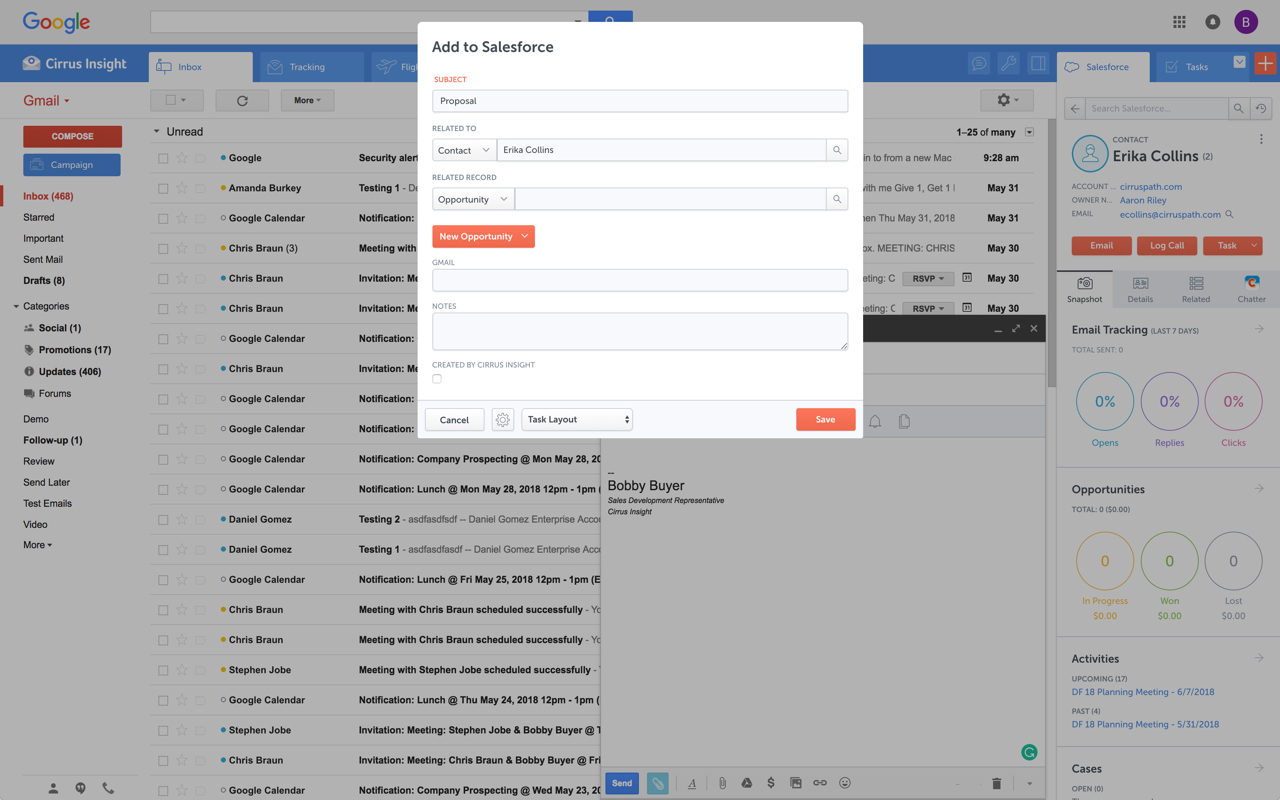
Cirrus Insight integrates Salesforce with Gmail, Google Calendar, and Google Contacts. Instantly View Contextual Salesforce Information in Your Inbox. Save Emails & Attachments to Salesforce with a Click. Sync Your Google & Salesforce Calendars. Create & Edit Salesforce Records on the Fly. Customize Your Salesforce Workflow in Gmail. Add Google Contacts to Salesforce. Salesforce Tasks Integration. Salesforce Templates Integrated with Gmail.

Media

Cirrus Insight
Cirrus Insight
Cirrus Insight
Cirrus Insight

1 / 4

Essential Tool for Salesforce Users

Use Cases and Deployment Scope

We use Cirrus Insight to automatically log emails in Salesforce (that are sent in Gmail between staff and contacts). Salesforce has a native tool for this called Einstein Activity Capture but it does not work for our organization - and really the whole higher-education industry - because both our staff and our customers use the same email domain.

Pros

  • automatically logging emails and events
  • integrating with Salesforce
  • giving admins control
  • saving admins and users time

Return on Investment

  • Automatic email logging saves us so much time every day for so many users, it can't be quantified very well.
  • I would estimate that Cirrus Insight saves us around $5000 per month or 10 hours a day.

Usability

Other Software Used

FormAssembly, Ivy.ai, Dialpad Connect, Dialpad Sell

Easy Salesforce Email Tracking

Use Cases and Deployment Scope

The goal of using Cirrus Insight in our organization was strictly to track emails sent thought Google Mail and to log them via Salesforce. The solution was one of the ways we increased our Salesforce compliance in order to make sure that everything emailed to clients was captured appropriately and logged.

Pros

  • Logs emails to Salesforce
  • Integrates with Google Gmail
  • Easy to track

Cons

  • Disappearing from Mailbox
  • Not logging consistently
  • Had some down time

Return on Investment

  • Positive impact was the greater insight into communications with clients
  • Having emails tracked to leads and prospects helped with the continuity of the sales process
  • Being able to have all customer emails tracked led to an increase in ROI

Alternatives Considered

HubSpot CRM and Salesforce Inbox

I don't know why we pay for this.

Pros

  • I can't think of anything that it does really well.

Cons

  • The Salesforce link often doesn't work - I don't know if that's Cirrus or Salesforce, but Cirrus gets the blame in my mind. This means that either we duplicate work in the sales>customer success handoff by consolidating communication information OR we lose it. Losing it is easier, so it's what happens more often.
  • Building campaigns is painful - the integration with Salesforce requires a significant amount of back-and-forth work. If my contacts were better linked or it could be done in fewer steps, I may have a different opinion.
  • Tracking doesn't work consistently. Between being sporadically tagged for tracking (doesn't work automatically) and losing the tracking mid-exchange (subsequent emails can be untracked), I might as well just not have it at all.
  • If we were a more email-centric sales team, I expect I would know more about the software but I've found it unintuitive at best and obstructive at worst.

Return on Investment

  • I don't think we have an ROI target, a baseline to measure from, or a metric that we track CI against.

Alternatives Considered

Outreach

Best Gmail-Salesforce integration I've tried

Pros

  • Activity logging
  • View contacts within Gmail
  • Case creation

Cons

  • UI on smaller screens

Return on Investment

  • Saves time on logging activities
  • Saves time looking up records in Salesforce before sending them an email
  • Tracks opens accurately and consistently to know when recipients get your messages

Alternatives Considered

Yesware

Other Software Used

GoToMeeting, Snagit

A Great Solution to a Pretty Big Problem

Pros

  • Clear, clean interface and very easy to use for any type of user.
  • Can customize according to your Salesforce needs.
  • Any Salesforce updates are immediately connected to Cirrus. No waiting for sync.

Cons

  • Outlook for Mac could use some work as an add-on because it's hard to read sometimes on my laptop. It's not a sidebar, like the Windows functionality, so it's harder to read.
  • Doesn't always find an opportunity, even though I know it's in our Salesforce system.
  • Randomly shuts down and doesn't log in properly at times. I've had to remove and re-download more than once.

Return on Investment

  • More efficient. It only takes a few seconds to upload an email to the right location.
  • More emails in Salesforce now, where as before, people didn't even try uploading it due to the difficulty.
  • Equality across the board. Everyone is on the same page in how we record things.

Alternatives Considered

Salesforce

Other Software Used

Dropbox, Basecamp, SurveyMonkey