Overview
ProductRatingMost Used ByProduct SummaryStarting Price
ClickMeeting
Score 9.5 out of 10
N/A
ClickMeeting is a webinar solution formerly owned by GetResponse, an email marketing software company. ClickMeeting's online meeting and collaboration tools are designed to support the sales, marketing, e-learning, and training needs of business of all sizes.
$25
up to 25 attendees
Mitingu
Score 0.0 out of 10
N/A
N/AN/A
Webex Webinars
Score 8.9 out of 10
N/A
Webex Webinars is a scalable webinar platform that helps users to create engaging and impactful experiences for everyone, from small sessions to massive global audiences.N/A
Pricing
ClickMeetingMitinguWebex Webinars
Editions & Modules
Live 25
$25
up to 25 attendees
Live 50
$35
up to 50 attendees
Automated 25
$40
up to 25 attendees
Automated 50
$45
up to 50 attendees
Live 100
$60
up to 100 attendees
Automated 100
$75
up to 100 attendees
Live 200
$119
up to 200 attendees
Live 500
$139
up to 500 attendees
Automated 200
$145
up to 200 attendees
Enterprise
$165
500 - 5000
Automated 500
$179
up to 500 attendees
Live 1000
$239
up to 1000 attendees
Automated 1000
$279
up to 1000 attendees
No answers on this topic
Webex Events
Contact Sales
Offerings
Pricing Offerings
ClickMeetingMitinguWebex Webinars
Free Trial
YesYesNo
Free/Freemium Version
NoNoNo
Premium Consulting/Integration Services
NoNoNo
Entry-level Setup FeeNo setup feeNo setup feeNo setup fee
Additional DetailsDetailed enterprise pricing on demand.
More Pricing Information
Community Pulse
ClickMeetingMitinguWebex Webinars
Considered Multiple Products
ClickMeeting
Chose ClickMeeting
I have not used other webinar platforms extensively, so my choice was based on ClickMeeting’s features, ease of use, and reliability.
Chose ClickMeeting
ClickMeeting was designed with webinars in mind, and it's done well. It features built-in registration forms, automated emails, surveys, and analytics, making event management and tracking easier. Furthermore, joining a webinar is simple and doesn't require software …
Chose ClickMeeting
ClickMeeting is better suited for large group of people and it is available in Polish, which is quite important for my customer base.
Chose ClickMeeting
We chose ClickMeeting over zoom and teams because it’s better for running structured webinars and online workshops. Unlike Zoom, it has built-in tools for registration, reminders, and audience engagement without needing extra setup. Teams is great for internal meetings, but not …
Chose ClickMeeting
ClickMeeting stands out due to its more visually appealing interface and simplified usability. The layout feels more intuitive, especially for hosting webinars and interactive sessions. The platform is easier to navigate for both hosts and participants. Another strength of …
Chose ClickMeeting
For several years we have been using the ClickMeeting platform exclusively for our webinars. As for meetings within the organization - here we previously used other platforms. However, since we have ClickMeeting we also use this platform to organize meetings for our teams. …
Chose ClickMeeting
We selected ClickMeeting for its specialized focus on webinars and virtual events, which aligns with our organization's needs. ClickMeeting's dedicated webinar features and ease of use make it an ideal choice for hosting engaging and interactive online presentations and live Q&A…
Chose ClickMeeting
The interface is clear and legible, user-friendly. The quality of audio-video is outstanding, as with the other platform we sometimes encountered some issues. ClickMeeting has a lot better registration tools and other user engaging features (polls and surveys). The technical …
Chose ClickMeeting
I only use ClickMeeting to conduct online meetings and webinars. I don't need to change the program to another one. I am satisfied with the functionalities that the program offers. The ability to upload your own files and record meetings is very nice. The program helps a lot in …
Chose ClickMeeting
While Google Meet is a reliable product for small, internal meetings, the specific features and functionalities of ClickMeeting make it a better fit for the purposes of organizing large scale events and webinars. Whether through the ability to add multiple event managers, …
Chose ClickMeeting
ClickMeeting distinguishes itself as a standout EU solution primarily due to its GDPR compliance, a feature that sets it apart in the competitive market. Unlike Teams and Zoom, which often grapple with GDPR-related issues, ClickMeeting's adherence to these regulations makes it …
Chose ClickMeeting
In addition to its benefits for staff meetings and online courses, ClickMeeting offers a range of teaching tools that enhance the learning experience. These tools allow for interactive presentations, real-time collaboration, and engaging multimedia content. Furthermore, …
Chose ClickMeeting
While Google Meet is a reliable platform for simple meetings, ClickMeeting offers a more comprehensive set of features tailored for webinars and large-scale events. These include advanced event management, interactive engagement tools like polls and Q&As, and seamless screen …
Chose ClickMeeting
ClickMeeting won competition with other products becuse it gives ability to organise big events, has good support and takes care of clients.
Chose ClickMeeting
We chose ClickMeeting because this solution offers us the optimal basis for our language teaching. Working with the ClickMeeting platform comes in our opinion closest to the possibilities of a face-to-face language training. All classroom tools can be found on the platform, …
Chose ClickMeeting
Our organization considered using skype, but it did not seem safe in terms of data security. Skype also offered fewer features than the ClickMeeting platform. Clickmeeting is a very secure platform. It offers a number of different functions. There is a possibility to conduct …
Chose ClickMeeting
ClickMeeting is better priced, has post-event abilities that I am looking for. LOVE the automated webinars. Love being able to make a separate studio room for a tech check with guest presenters. Been using for so long, the product is very stable, tech support chat is really …
Chose ClickMeeting
Zoom is fine for education, however, it has no support for earning with it ClickMeeting gives us suport for conntact with clients, we can manage webinars easily, it's integrated with FB, it save our time fo administration and organizational work it's really adopted for need of …
Chose ClickMeeting
- does not require installation - clear interface - fast chat technical support - available in Polish language - provides a stable connection - it allows us to share presentations - we can also record the meeting - the process of creating the meeting is quick and easy also …
Mitingu

No answer on this topic

Webex Webinars
Chose Webex Webinars
Webex Webinars video and audio quality is outstanding. Webex Webinars has the capability to host a large number of audience at once.
Chose Webex Webinars
I don't have experience with other products.
Chose Webex Webinars
Considering the many features of Webex Webinars, I would say it is the best compared to major competitors. It is functional and affordable.
Chose Webex Webinars
The thing that is mainly a major focus among the users is that Webex has a very good and stable solution that makes sure that there are no drops and no lag during the webinars, which is a must-have for large-scale connection, as per me . As well as it supports up to 1 lakh …
Chose Webex Webinars
The reason why we have Chosen Webex Webinars over others as it Supports up to 100,000 attendees in webcast mode and 10,000 in interactive sessions, making it ideal for large enterprises and global events . talking about the Zoom Events it has Maxes out at 50,000 attendees . …
Chose Webex Webinars
ON24 has a lot more bells and whistles, which is great when you need them but when you're looking for a straight up platform to host a stand alone webinar, Webex Webinars is a good alternative. We've selected Webex Webinars when we don't need such a customized webinar console.
Chose Webex Webinars
Webex is more effective in its capacity to integrate with other platforms and screen share in various ways. The transition between screen share and presenter view is slightly more clunky on the webex webinars but motion by sky road is much more limited overall. I recommend …
Chose Webex Webinars
Webex Webinars has more features than Google Meet but it is costly compared to Google Meet.
Chose Webex Webinars
More user friendly and faster UI.
Chose Webex Webinars
I think it's more reliable, honestly. I've had a lot of issues with GoTo. People complain about it a lot. They have GoToMeeting, they have GoToWebinar, so they probably roughly align with the WebEx. But to me they're not. I've had fewer issues within the actual webinar with the …
Chose Webex Webinars
Microsoft Teams is a little more versatile than Webex Webinars since it used for video conferencing and collaboration, at least at first blush. However, as a hosting software for webinars, it's a little more finicky and a bit less intuitive to facilitate different media for …
Chose Webex Webinars
Each vendor determines which platform works best for their presentations. Each platform has its strengths and weaknesses. Teams is a memory hog that can often freeze up someone's computer because of bandwidth issues. Zoom has tons of bells and whistles and offers more than …
Chose Webex Webinars
Webex Webinars has more customisation options than Zoom Webinars and allows a staggering 1,00,000 attendees in a webinar. It also provides detailed analytics after the webinar which helps us make informed decision and look for ways to increase our number of attendees and the …
Chose Webex Webinars
One of the main reason we chose Webex Webinar was because trainers like the in-webinar/training emoticons that stick next to a user's name on the participant panel. Other products just have the emoji's that pop up, but you can't easily tell who posted them. Those are important …
Chose Webex Webinars
Slightly easier set up for the end user for Webex Webinars. It doesn't require an account creation like ON24. That being said, ON24 has robust reporting and polling capabilities.
Chose Webex Webinars
WebEx has some advantages over Google Meet and Zoom. For instance, Google Meetin has a video meeting recording option only in the commercial version of the subscription. Zoom can record for up to 40 minutes only, which is not really suitable for a long-lasting event like …
Chose Webex Webinars
We have been using Webex webinar for a long time and we did not find a reason to change to other applications because of the kind of features it provides for a larger group like us.
Chose Webex Webinars
Zoom has updated and is gaining fast on Webex and lot user friendlier when it comes to break out rooms.
Chose Webex Webinars
Webex Webinars is far superior than Teams. Teams is best suited for smaller Internal audience and if mid size and large would recommend Webex Webinars. Webex has. more features, analytics and reporting features that are good. Teams on the other hand is good for internal and …
Chose Webex Webinars
I think Webex is comparable to Zoom in features and quality. We chose it because we use the whole suite of Webex tools.
Chose Webex Webinars
There are some features that score above them but going for Webex was a management decision. The security feature of WebEx is what drove the decision. Most of the customers can join WebEx without any security concerns. Other applications have a lot of restrictions interns of …
Features
ClickMeetingMitinguWebex Webinars
Performance & Compatibility of Online Events Software
Comparison of Performance & Compatibility of Online Events Software features of Product A and Product B
ClickMeeting
9.0
Ratings
13% above category average
Mitingu
-
Ratings
Webex Webinars
8.8
Ratings
8% above category average
High quality audio9.80 Ratings00 Ratings9.20 Ratings
High quality video9.50 Ratings00 Ratings00 Ratings
Low bandwidth requirements8.60 Ratings00 Ratings00 Ratings
Mobile support8.30 Ratings00 Ratings8.50 Ratings
Screen Sharing
Comparison of Screen Sharing features of Product A and Product B
ClickMeeting
9.5
Ratings
18% above category average
Mitingu
-
Ratings
Webex Webinars
-
Ratings
Desktop sharing9.60 Ratings00 Ratings00 Ratings
Whiteboards9.30 Ratings00 Ratings00 Ratings
Online Meetings / Events
Comparison of Online Meetings / Events features of Product A and Product B
ClickMeeting
9.7
Ratings
17% above category average
Mitingu
-
Ratings
Webex Webinars
9.0
Ratings
10% above category average
Calendar integration9.70 Ratings00 Ratings9.00 Ratings
Meeting initiation9.60 Ratings00 Ratings00 Ratings
Integrates with social media9.60 Ratings00 Ratings00 Ratings
Record meetings / events9.90 Ratings00 Ratings8.80 Ratings
Slideshows9.70 Ratings00 Ratings9.30 Ratings
Event registration00 Ratings00 Ratings8.80 Ratings
Online Events Collaboration
Comparison of Online Events Collaboration features of Product A and Product B
ClickMeeting
9.7
Ratings
18% above category average
Mitingu
-
Ratings
Webex Webinars
8.9
Ratings
5% above category average
Live chat9.60 Ratings00 Ratings00 Ratings
Audience polling9.70 Ratings00 Ratings9.00 Ratings
Q&A9.80 Ratings00 Ratings8.80 Ratings
Online Events Security
Comparison of Online Events Security features of Product A and Product B
ClickMeeting
9.5
Ratings
17% above category average
Mitingu
-
Ratings
Webex Webinars
8.9
Ratings
6% above category average
User authentication9.80 Ratings00 Ratings00 Ratings
Participant roles & permissions9.70 Ratings00 Ratings9.10 Ratings
Confidential attendee list8.90 Ratings00 Ratings8.70 Ratings
Reporting & Analytics
Comparison of Reporting & Analytics features of Product A and Product B
ClickMeeting
-
Ratings
Mitingu
-
Ratings
Webex Webinars
8.8
Ratings
13% above category average
Dashboards00 Ratings00 Ratings8.70 Ratings
Data exportability00 Ratings00 Ratings8.90 Ratings
Online Events Marketing
Comparison of Online Events Marketing features of Product A and Product B
ClickMeeting
-
Ratings
Mitingu
-
Ratings
Webex Webinars
8.8
Ratings
11% above category average
Branding options00 Ratings00 Ratings8.80 Ratings
Integration to Marketing Automation00 Ratings00 Ratings8.80 Ratings
Best Alternatives
ClickMeetingMitinguWebex Webinars
Small Businesses
Intermedia AnyMeeting Pro
Score 7.1 out of 10
Whova
Whova
Score 9.5 out of 10
BigMarker
BigMarker
Score 6.0 out of 10
Medium-sized Companies
JioMeet
JioMeet
Score 9.8 out of 10
Cvent Event Diagramming
Score 9.2 out of 10
Zoho Meeting
Zoho Meeting
Score 9.0 out of 10
Enterprises
Webex Meetings
Webex Meetings
Score 8.7 out of 10
Cvent Event Diagramming
Score 9.2 out of 10
ON24
ON24
Score 7.5 out of 10
All AlternativesView all alternativesView all alternativesView all alternatives
User Ratings
ClickMeetingMitinguWebex Webinars
Likelihood to Recommend
9.5
(0 ratings)
-
(0 ratings)
8.6
(0 ratings)
Likelihood to Renew
9.1
(0 ratings)
-
(0 ratings)
9.7
(0 ratings)
Usability
9.3
(0 ratings)
-
(0 ratings)
9.0
(0 ratings)
Availability
-
(0 ratings)
-
(0 ratings)
8.0
(0 ratings)
Performance
-
(0 ratings)
-
(0 ratings)
8.0
(0 ratings)
Support Rating
9.9
(0 ratings)
-
(0 ratings)
5.9
(0 ratings)
Online Training
-
(0 ratings)
-
(0 ratings)
9.0
(0 ratings)
Implementation Rating
9.1
(0 ratings)
-
(0 ratings)
8.0
(0 ratings)
Configurability
-
(0 ratings)
-
(0 ratings)
10.0
(0 ratings)
Ease of integration
-
(0 ratings)
-
(0 ratings)
10.0
(0 ratings)
Product Scalability
-
(0 ratings)
-
(0 ratings)
9.0
(0 ratings)
Vendor post-sale
-
(0 ratings)
-
(0 ratings)
10.0
(0 ratings)
Vendor pre-sale
-
(0 ratings)
-
(0 ratings)
10.0
(0 ratings)
User Testimonials
ClickMeetingMitinguWebex Webinars
Likelihood to Recommend
ClickMeeting is highly suitable for large-scale webinars, remote training sessions, team meetings, and non-profit outreach events due to its robust features and user-friendly interface. However, for small team meetings or highly interactive workshops, a simpler or more specialized platform might be preferable. Also, its performance could be impacted in areas with limited or unstable internet connections. Overall, it's an excellent tool for remote communication and collaboration, but its suitability may depend on the specific needs and circumstances.
Read full review
No answers on this topic
I'd say mainly well suited for larger audiences. I think there's probably some products that are a little more economical for smaller audiences, but if you need a solid, reliable platform for larger audiences, say more than a hundred people. So this is the best product for that or at least top two.
Read full review
Pros
  • ClickMeeting is user-friendly, the admin and user panel is simple, intuitive!
  • When conducting training, you can use default settings such as edu mode and it saves time, I don't have to worry if I'm sure I've muted everyone and if I'm the only one visible.
  • ClickMeeting is also integrated with the Moodle e-learning platform, so it's a great support in organizing blended-learning processes.
Read full review
No answers on this topic
  • Cisco Webex Events is very straightforward and easy to use. Setting up an event within the platform is quite simple - anyone can do it.
  • Webex Events is a great add-on feature to the Webex conferencing platform to allow a one-way broadcast of information, rather than worrying about attendees being able to interrupt the presentation.
  • Recording a session is fairly simple and accessing the recordings post-event is quite reliable. I believe you can also upload .mp4 files into the Webex Events platform to serve as a host.
Read full review
Cons
  • Individual Audio Controls. I'd love to be able to adjust the audio for each of the presenters within the platform, as the host. Not all presenters are tech savvy and sometimes don't know how to adjust this themselves.
  • Additional Saved Color Schemes. I'd love to be able to create/save multiple custom color schemes that I can use for various events instead of a single one.
Read full review
No answers on this topic
  • There always seems to be room for video quality improvement (not a necessity, but would be nice)
  • Mobile screensharing from iOS/Android (and other mobile) devices would be a great feature
  • The mobile app should be able to track meetings a user has been invited to, but does not do so (yet)
Read full review
Likelihood to Renew
No answers on this topic
Webex Webinars continues to provide exceptional value as a community engagement and professional education platform. As long as there are a multitude of event offerings and the product continues to be supported with periodic software and security updates, I can anticipate using Webex Webinars for the foreseeable future. Overall a great product!
Read full review
Usability
ClickMeeting solves many problems related to the organization of online meetings. Thanks to this platform, you can easily connect with other people from anywhere in the world without leaving your home. This saves time and travel costs. ClickMeeting also enables interactive exchange of information, presentations and documents, which allows for more effective teamwork. Additionally, the platform offers features such as meeting recording, allowing you to easily store and share information. ClickMeeting also provides high quality audio and video, which allows for smooth and effective online communication. All these benefits translate into time savings and increased work efficiency.
Read full review
No answers on this topic
My experience with this software is fantastic; it's so satisfying that it only took me a week to go through an internal training program to use this software, actually, I don't think this training program was necessary. Usability is one of the most fantastic features to guarantee the increase of members in remote events.
Read full review
Reliability and Availability
No answers on this topic
Webex Webinars are available 24/7 and is based on your license purchase and usage. Webex Webinars needs maximum bandwidth consumption for sending and receiving videos and listed below are some examples. High-Definition Video: 2.5 Mbps (Receive) and 3.0 Mbps (Send)· High Quality Video: 1.0 Mbps (Receive) and 1.5 Mbps (Send)· Standard Quality Video: 0.5 Mbps (Receive) and 0.5 Mbps (Send) Webex Webinars makes it easy to analyze attendance statistics, send participants to a post-webinar landing page, and integrate data into CRMs and marketing automation.
Read full review
Performance
No answers on this topic
You can turn around WebEx Attendance reports within 24 hours. Sign in to Webex Site Administration and go to Reports - Access Anywhere. Select the beginning and ending dates for the report. Report data is available only for sessions conducted up to three months before the current date depending on your administration set-up. From the Sort results by drop-down list, select the sort order criteria for the report. After hosting a WebEx Webinar, you have the ability to create a report of all of the participants and the times that they entered and left the meeting. Reports cannot track emoji's or reactions. Best practice for Q&A and tracking you can integrate SLIDO. You cannot save individual polling results. Also the polling report does not include who asked and answered the questions. This limitation does not apply to SLIDO. Closed captions and transcriptions are only saved if the Webinar is recorded. If you face problems during a webinar, you can hit then button which creates and send a report to Cisco who will then look into the problems to avoid future occurrences
Read full review
Support Rating
ClickMeeting has never disappointed. This platform made us organize webinars and trainings for our target groups more often. Our internal communication has also improved thanks to the use of this tool. ClickMeeting responds to all our need and we are very glad that we decided to use it. It is a cost-effective tool which is quite important for NGO.
Read full review
No answers on this topic
The support of vendors in the realization and achievements of our objectives has played a big role. The customer support team has helped us to set up and test the operation across our organization. It is flexible and our team members are free to join or leave a meeting at their own pleasure. The product displays superior videos with a high-resolution definition that helps each member to have a clear view of meeting proceedings.
Read full review
Online Training
No answers on this topic
It was a good training to understand not only webinars but the entire platform.
Read full review
Implementation Rating
It was very simple.
Read full review
No answers on this topic
The implementation process was fairly simple and straightforward
Read full review
Alternatives Considered
In addition to its benefits for staff meetings and online courses, ClickMeeting offers a range of teaching tools that enhance the learning experience. These tools allow for interactive presentations, real-time collaboration, and engaging multimedia content. Furthermore, ClickMeeting's optimized video streaming capabilities minimize delays, ensuring a smooth and uninterrupted learning environment for students.
Read full review
No answers on this topic
ON24 has a lot more bells and whistles, which is great when you need them but when you're looking for a straight up platform to host a stand alone webinar, Webex Webinars is a good alternative. We've selected Webex Webinars when we don't need such a customized webinar console.
Read full review
Scalability
No answers on this topic
Webex Webinars is a scalable platform designed for interactive experiences. It can accommodate attendees from 100 up to 100,000 attendees depending on the purchase of your license. The scalability is based on each company's requirements and usage. Webex Webinars can offer key features like real-time translations, moderated Q&A, live polling, and chat, making it suitable for both small and large audiences and can be deployed across multiple departments and sites as needed.
Read full review
Return on Investment
  • ClickMeeting has had a very positive impact on our organization’s objectives. It allows us to run open training sessions and webinars for participants from multiple organizations, reaching more people without the need for travel or large venues. The platform’s reliability and ease of use help us deliver high-quality training efficiently.
Read full review
No answers on this topic
  • It has exceptional HQ video and audio conferences. Ease scaling events and reach audiences.
  • It dives deeper into topics or gets to know panelists more intimately with breakout sessions.
  • You can invite many people, 100 or more. You take more control of the meeting compared to other services and have a private room for the presenters.
Read full review
ScreenShots

ClickMeeting Screenshots

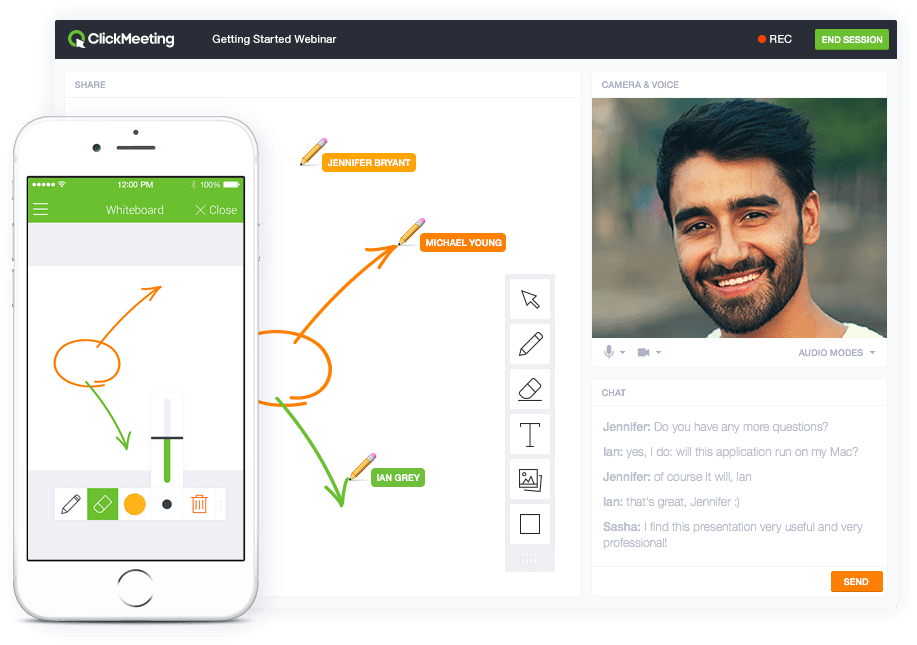
Screenshot of Whiteboard featureScreenshot of Presentation featureScreenshot of Responsive designScreenshot of Webinar roomScreenshot of Webinar room 2Screenshot of Webinar room 3