ConceptDraw PROJECT is a project management tool providing a set of options to plan
and implement projects successfully, and belongs to the ConceptDraw OFFICE suite. The core features of the tool are task and resource management and reporting, along with change control. The vendor says managing multiple projects is simple due to the Gantt Chart and Multi-Project Views and shared Resource Pool. Tasks that occur on a…
N/A
Microsoft Project
Score 7.9 out of 10
N/A
Microsoft Project is a project management software. It provides core PM functionality, including agile workflow support and resource management. Project can be deployed in the cloud or on-premise.
$120
per year per user
WorkflowMax
Score 8.0 out of 10
Small Businesses (1-50 employees)
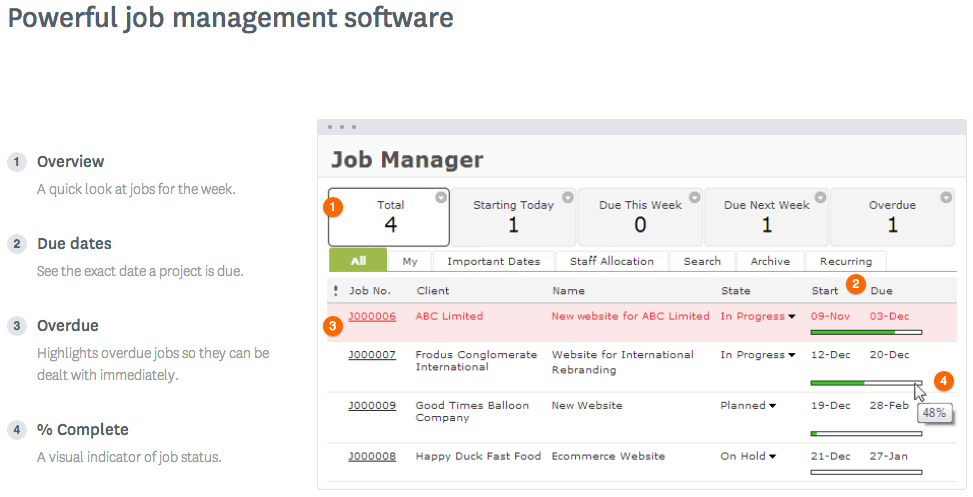
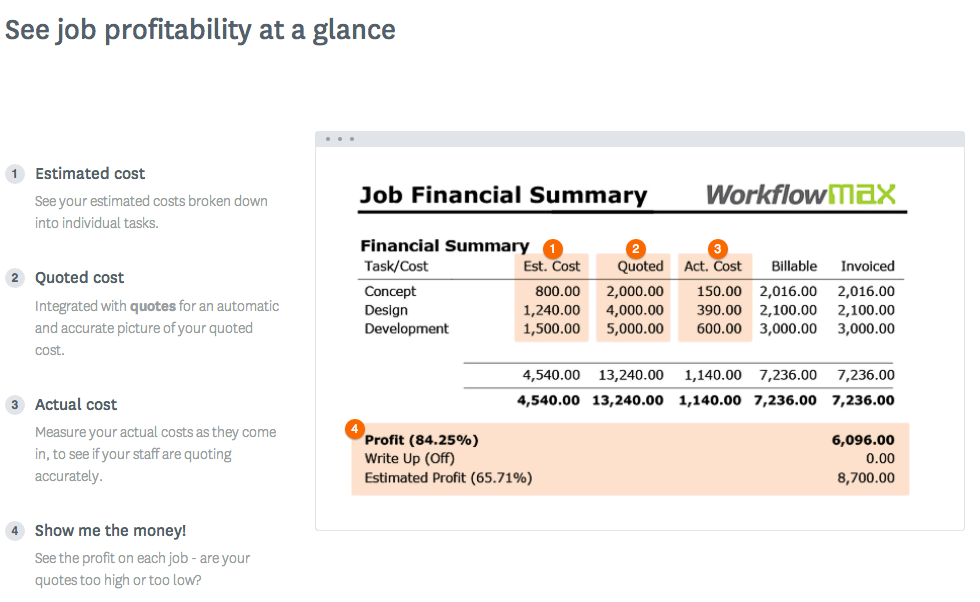
WorkflowMax is a web-based project management solution.The platform offers end-to-end functionality standard to project management software, including time tracking, lead management, collaboration with external stakeholders, invoicing, integrations, and customizable reporting.
$20
per month
Pricing
ConceptDraw PROJECT
Microsoft Project
WorkflowMax
Editions & Modules
No answers on this topic
Project Server
$0
Planner Plan 1
$10
per month per user
Planner and Project Plan 3
$30
per month per user
Planner and Project Plan 5
$55
per month per user
Project Standard 2024
$679.99
one-time fee per installation
Project Professional 2024
$1,129.99
one-time fee per installation
Standard
$20
per month
Standard
$35
per month
Premium
$70
per month
Offerings
Pricing Offerings
ConceptDraw PROJECT
Microsoft Project
WorkflowMax
Free Trial
Yes
Yes
Yes
Free/Freemium Version
No
No
No
Premium Consulting/Integration Services
No
No
No
Entry-level Setup Fee
No setup fee
No setup fee
No setup fee
Additional Details
Price varies for Individual, Commercial, Academic, Nonprofit and Government
Plans are billed annually.
—
More Pricing Information
Community Pulse
ConceptDraw PROJECT
Microsoft Project
WorkflowMax
Considered Multiple Products
ConceptDraw PROJECT
Verified User
Employee
Chose ConceptDraw PROJECT
MS Project has far more features and functionality, but ConceptDraw PROJECT has the features we need at a price-point that is far easier to handle for a small business.
Microsoft Project is a typical Microsoft product - too much programming overhead, poor graphics, confusing and fussy interface. OmniGraffle is close to CD PROJECT but has its own fussy parts, plus it is a lot more expensive than CD PROJECT; it is in the middle between …
Verified User
Executive
Chose ConceptDraw PROJECT
ConceptDraw has a much simpler licensing and pricing model. Perpetual license and ability to use in offline mode was an important criteria for us. Perfect bundle for small and medium business.
Microsoft Project
No answer on this topic
WorkflowMax
No answer on this topic
Features
ConceptDraw PROJECT
Microsoft Project
WorkflowMax
Project Management
Comparison of Project Management features of Product A and Product B
ConceptDraw PROJECT
9.0
3 Ratings
15% above category average
Microsoft Project
8.0
111 Ratings
3% above category average
WorkflowMax
9.3
27 Ratings
18% above category average
Task Management
9.63 Ratings
8.2110 Ratings
9.525 Ratings
Resource Management
9.63 Ratings
7.7107 Ratings
9.56 Ratings
Gantt Charts
9.63 Ratings
9.0107 Ratings
9.23 Ratings
Scheduling
9.53 Ratings
8.5109 Ratings
9.419 Ratings
Email integration
10.01 Ratings
5.082 Ratings
9.44 Ratings
Timesheet Tracking
7.01 Ratings
10.073 Ratings
9.624 Ratings
Budget and Expense Management
7.93 Ratings
7.686 Ratings
9.418 Ratings
Workflow Automation
00 Ratings
10.083 Ratings
9.54 Ratings
Team Collaboration
00 Ratings
7.398 Ratings
9.519 Ratings
Support for Agile Methodology
00 Ratings
4.883 Ratings
8.93 Ratings
Support for Waterfall Methodology
00 Ratings
7.783 Ratings
9.23 Ratings
Document Management
00 Ratings
9.077 Ratings
9.219 Ratings
Mobile Access
00 Ratings
10.067 Ratings
9.221 Ratings
Change request and Case Management
00 Ratings
7.864 Ratings
9.111 Ratings
Professional Services Automation
Comparison of Professional Services Automation features of Product A and Product B
Getting started - using the Gantt chart to enter tasks in any order and then using those tasks to initially define a MindMap to further explore alternative dependencies. The alternative works better when initiating a project with significant unknowns.
Microsoft Project Online is suited to Turnkey Projects where more Collaboration is required in Project Progress monitoring, risk assessment and conveying, issue recording and tracking. It is less appropriate when ERP Suites other than MS Dynamics are used, i.e when Enterprises need to integrate Finance / Accounting with It and having straight project management workflow
WorkflowMax is very well suited for a business that wants to track time billed by project, to have an easy way to generate invoices for those projects, and to keep track of overall productivity and invoice status. I imagine it can also be adapted to different types of businesses that deal in goods rather than services and time. I am not sure for which scenarios or businesses the program is not appropriate.
Integration with ConceptDraw Mindmap makes work breakdown very easy.
We have cross-functional teams where team members often work on different projects in parallel. The multi project management feature has been a blessing over these years.
Another import feature is the availability of many different predefined report generation templates that made it very easy to communicate different aspects of the project to different stakeholders.
I love the Gantt Chart that Microsoft Project offers me, because it provides me with a view from various aspects, it provides me with exact details about the fulfillment of tasks over a period of time, it also allows me to make comparisons with the necessary data and the fulfilled data. by the employees, in order to know exactly if the project's expectations have been met.
I love the Gantt Chart that Microsoft Project offers me, because it provides me with a view from various aspects, it provides me with exact details about the fulfillment of tasks over a period of time, it also allows me to make comparisons with the necessary data and the fulfilled data by the employees, in order to know exactly if the project's expectations have been met.
The alert system for the fulfillment and delay of assignments is perfect. Microsoft Project allows me to configure the task system, I can assign the necessary tasks to fulfill the project, and the software alerts me immediately if the managers are fulfilling the assignments.
You can customize the notifications and this has helped us enormously to schedule dates that we overlooked. Also the templates are customizable which gives the company its own branding on its reports.
It is integrated with the Xero platform which makes it very useful to streamline the processes of billing, accounts payable, accounts receivable, petty cash flow and all the accounting and administrative area.
It also has a very complete mobile version, where we can be present and monitor the progress of projects in real time, no matter where we are.
Currently the timesheet function allows staff to input time for overlapping periods which can cause some headaches when it comes to payroll and invoicing. We understand this is being addressed.
The amount of flexibility in the product can create some challenges when setting up the jobs database at the onset. It is a daunting challenge but worthwhile when completed correctly and rolled out across the firm. Adding new jobs is much easier.
No search function to find a specific job, you have to scroll through all jobs allocated to you.
Microsoft Project is easy to operate because data could be inserted, changed and deleted like you are in an Excel timesheet. Besides, it provides a great level of automation beween his fields allowing few data changes. Also, its funcionalities are well defined and grouped in upper menus, so you can find a funcionality quickly
Microsoft in recent years has transformed itself and gives a positive feeling when one interacts with the company. The company is focusing on its customers and willing to go extra mile to make customers happy.The company continues to invest in its products and bringing new features from time to time. Overall it is a positive feeling to be associated with such an iconic company.
Decide how to breakdown your ongoing jobs - are they monthly recurring or annual broken into chunks? What are you going to give clients i.e. how will your proposals and invoices look?
ConceptDraw has a much simpler licensing and pricing model. Perpetual license and ability to use in offline mode was an important criteria for us. Perfect bundle for small and medium business.
While many of the above tools are extremely well-versed, Microsoft Project's largest advantage comes from it being related to the largest business productivity company in the world. Project does have its sharing limitations - but regardless, offers one of the most robust tools in the market today. Microsoft Project is built with large-scale projects in mind but is more than up to the task for smaller projects as well. However, there are options available (especially cloud-based options) that may be more fitting for higher-level projects that do not require going into the weeds.
WorkflowMax is much much easier than Streamtime, much more affordable and easier to try out and see if it meets your needs. Streamtime is a great comprehensive product but we lost a year's subscription in investment because we couldn't get answers to the support questions we needed and they had a no refund policy!
Project saved me, as the project manager, countless hours of digging through tickets and schedules to plan everything out. It also saved me time in adjusting the project triangle as needed, since it does so much automatically.
It is costly, and since it requires extensive training to master, it's not just the high licensing cost that you need to take into account.
The reporting features - even just printing out Gantt charts - makes it far easier to communicate with stakeholders. That means less time for PMs doing all of this manually, and it means less follow-up questions and delays moving forward.
Max enables Loan Assistant to invoice very quickly and easily and integration with Xero for card payments brings our cashflow forward.
Max enables the Loan Assistant team to manage their workflow in an efficient and productive way. The team all work from home. It is the centre of our Loan Assistant universe.