TrustRadius: an HG Insights company

Save this comparison

Save this comparison

Add Product

Recommended Comparisons

    Overview
    ProductRatingMost Used ByProduct SummaryStarting Price

    Copper

    Score8.6 out of 10
    N/ACopper is a customer relationship management (CRM) built as an integration into Google Apps.

    $12

    per month per user

    Neon CRM

    Score5.8 out of 10
    Small Businesses (1-50 employees)
    Neon CRM is a nonprofit relationship management platform for small and midsize nonprofits, used to make and maintain the personal connections that drive sustainable growth. By centralizing a nonprofit’s data and tools, Neon CRM helps teams save on manual work, deepen relationships with their supporters, and grow their impact. Key Features: Donor Management: Neon CRM provides a 360-degree view of supporters, automatically capturing every…

    $99

    per month

    Pricing
    CopperNeon CRM
    Editions & Modules
    Starter - Paid Annually
    $9.00
    per month per user
    Basic - Paid Annually
    $23.00
    per month per user
    Professional - Paid Annually
    $59.00
    per month per user
    Business - Paid Annually
    $99.00
    per month per user
    Neon CRM
    $99
    per month
    Offerings
    Pricing Offerings
    CopperNeon CRM
    Free Trial
    YesNo
    Free/Freemium Version
    NoNo
    Premium Consulting/Integration Services
    NoYes
    Entry-level Setup FeeNo setup fee$349 one-time fee
    Additional DetailsUp to 15% discount for annual pricing.—
    More Pricing Information
    Community Pulse
    CopperNeon CRM
    Considered Both Products
    Copper
    No answer on this topic
    Neon One LLC
    No answer on this topic
    Key User Insights
    Would buy again
    90%
    Would buy again
    47 Answers
    60%
    Would buy again
    3 Answers
    Delivers good value for the price
    91%
    Delivers good value for the price
    42 Answers
    No answers on this topic
    Happy with the feature set
    87%
    Happy with the feature set
    45 Answers
    60%
    Happy with the feature set
    3 Answers
    Lived up to sales and marketing promises
    91%
    Lived up to sales and marketing promises
    39 Answers
    No answers on this topic
    Implementation went as expected
    94%
    Implementation went as expected
    44 Answers
    No answers on this topic
    Features
    CopperNeon CRM
    Sales Force Automation
    Comparison of Sales Force Automation features of Copper CRM and Neon CRM
    Feature
    Copper CRM
    5.5
    61 Ratings
    35% below category average
    Neon CRM
    -
    Ratings
    Customer data management / contact management7.359 Ratings00 Ratings
    Workflow management7.357 Ratings00 Ratings
    Territory management5.04 Ratings00 Ratings
    Opportunity management8.456 Ratings00 Ratings
    Integration with email client (e.g., Outlook or Gmail)7.261 Ratings00 Ratings
    Contract management5.29 Ratings00 Ratings
    Quote & order management2.07 Ratings00 Ratings
    Interaction tracking6.057 Ratings00 Ratings
    Channel / partner relationship management1.07 Ratings00 Ratings
    Customer Service & Support
    Comparison of Customer Service & Support features of Copper CRM and Neon CRM
    Feature
    Copper CRM
    1.4
    10 Ratings
    138% below category average
    Neon CRM
    -
    Ratings
    Case management1.29 Ratings00 Ratings
    Call center management1.55 Ratings00 Ratings
    Help desk management1.67 Ratings00 Ratings
    Marketing Automation
    Comparison of Marketing Automation features of Copper CRM and Neon CRM
    Feature
    Copper CRM
    5.7
    47 Ratings
    30% below category average
    Neon CRM
    -
    Ratings
    Lead management6.944 Ratings00 Ratings
    Email marketing4.537 Ratings00 Ratings
    CRM Project Management
    Comparison of CRM Project Management features of Copper CRM and Neon CRM
    Feature
    Copper CRM
    5.9
    58 Ratings
    26% below category average
    Neon CRM
    -
    Ratings
    Task management8.656 Ratings00 Ratings
    Billing and invoicing management1.75 Ratings00 Ratings
    Reporting7.452 Ratings00 Ratings
    CRM Reporting & Analytics
    Comparison of CRM Reporting & Analytics features of Copper CRM and Neon CRM
    Feature
    Copper CRM
    7.7
    54 Ratings
    1% above category average
    Neon CRM
    -
    Ratings
    Forecasting7.337 Ratings00 Ratings
    Pipeline visualization8.551 Ratings00 Ratings
    Customizable reports7.346 Ratings00 Ratings
    Customization
    Comparison of Customization features of Copper CRM and Neon CRM
    Feature
    Copper CRM
    4.4
    57 Ratings
    54% below category average
    Neon CRM
    -
    Ratings
    Custom fields7.356 Ratings00 Ratings
    Custom objects3.412 Ratings00 Ratings
    Scripting environment4.13 Ratings00 Ratings
    API for custom integration3.036 Ratings00 Ratings
    Security
    Comparison of Security features of Copper CRM and Neon CRM
    Feature
    Copper CRM
    8.3
    49 Ratings
    1% below category average
    Neon CRM
    -
    Ratings
    Single sign-on capability8.712 Ratings00 Ratings
    Role-based user permissions7.948 Ratings00 Ratings
    Social CRM
    Comparison of Social CRM features of Copper CRM and Neon CRM
    Feature
    Copper CRM
    2.0
    12 Ratings
    116% below category average
    Neon CRM
    -
    Ratings
    Social data2.012 Ratings00 Ratings
    Social engagement2.07 Ratings00 Ratings
    Integrations with 3rd-party Software
    Comparison of Integrations with 3rd-party Software features of Copper CRM and Neon CRM
    Feature
    Copper CRM
    2.6
    39 Ratings
    97% below category average
    Neon CRM
    -
    Ratings
    Marketing automation4.239 Ratings00 Ratings
    Compensation management1.01 Ratings00 Ratings
    Platform
    Comparison of Platform features of Copper CRM and Neon CRM
    Feature
    Copper CRM
    8.3
    49 Ratings
    9% above category average
    Neon CRM
    -
    Ratings
    Mobile access8.349 Ratings00 Ratings
    Communications and Marketing
    Comparison of Communications and Marketing features of Copper CRM and Neon CRM
    Feature
    Copper CRM
    -
    Ratings
    Neon CRM
    1.2
    2 Ratings
    139% below category average
    Constituent engagement and marketing00 Ratings1.52 Ratings
    Social listening00 Ratings1.01 Ratings
    Digital advocacy enablement00 Ratings1.01 Ratings
    Reporting and Analytics
    Comparison of Reporting and Analytics features of Copper CRM and Neon CRM
    Feature
    Copper CRM
    -
    Ratings
    Neon CRM
    1.8
    2 Ratings
    111% below category average
    Reporting and data visualization00 Ratings1.02 Ratings
    Wealth screening00 Ratings2.62 Ratings
    Fundraising and Events
    Comparison of Fundraising and Events features of Copper CRM and Neon CRM
    Feature
    Copper CRM
    -
    Ratings
    Neon CRM
    1.4
    2 Ratings
    120% below category average
    Online donation options00 Ratings3.12 Ratings
    Event registration and ticketing00 Ratings1.01 Ratings
    Text and phone donations00 Ratings1.01 Ratings
    Volunteer shift management00 Ratings1.01 Ratings
    Mobile event check-in00 Ratings1.01 Ratings
    Security and Platform
    Comparison of Security and Platform features of Copper CRM and Neon CRM
    Feature
    Copper CRM
    -
    Ratings
    Neon CRM
    1.5
    2 Ratings
    125% below category average
    Role-based user permissions00 Ratings2.62 Ratings
    Mobile access00 Ratings1.01 Ratings
    Integrations00 Ratings1.01 Ratings
    Best Alternatives
    CopperNeon CRM
    Small Businesses
    Salesflare
    Score10 out of 10
    Agentforce 360 for Nonprofits
    Score8.5 out of 10
    Medium-sized Companies
    Kintone
    Score9.7 out of 10
    DonorPerfect
    Score8.4 out of 10
    Enterprises
    Oracle Sales
    Score8.9 out of 10
    Ellucian CRM Advance
    Score5 out of 10
    All AlternativesView all alternativesView all alternatives
    User Ratings
    CopperNeon CRM
    Likelihood to Recommend
    8.7
    (64 ratings)
    1.0
    (12 ratings)
    Likelihood to Renew
    8.2
    (1 ratings)
    1.0
    (1 ratings)
    Usability
    8.7
    (54 ratings)
    1.0
    (1 ratings)
    Support Rating
    8.2
    (12 ratings)
    1.0
    (3 ratings)
    Implementation Rating
    -
    (0 ratings)
    4.0
    (1 ratings)
    User Testimonials
    CopperNeon CRM
    Likelihood to Recommend
    Copper
    If you need to track contract expiration dates of your clients or your prospects that you're trying to sell - Copper is your tool. If you want to track specific products, solutions, vendors, etc. Copper can do it. I use it to track many brands of IT products and services with the use of custom fields to track which prospects/clients have any number of these items. Rather than taking notes, I can select the product from a drop down list that I created VERY EASILY within Copper.
    Read full review
    Neon One LLC
    If you are looking for a quick and easy database option, which integrates breezily with email clients like MailChimp and Constant Contact, and has built-in credit/debit card processing capabilities, NeonCRM is a very good option. An affordable alternative to Salesforce or Raiser's Edge, it does lack some of their "bells and whistles" but gets the job done. On the one hand, Neon features a shallow learning curve and solid user interface, and is web based and mobile friendly. On the other hand, Neon might not be totally appropriate for large or national level organizations because some of the reporting seems less "robust" than pricier alternatives...
    Incentivized
    Read full review
    Pros
    Copper
    • Allows for contacts to be synced and organized directly from Gmail.
    • Gives a flexible style and customizable settings to match our company's specific needs.
    • Does a great job of helping us keep track of projects. We easily created a customized "Status" field with several status options that help us update the many phases of our project.
    Incentivized
    Read full review
    Neon One LLC
    • NeonCRM allows you to build events, take registrations, and customize those events. Customizations include different ticketing options, add-ons, promotions, etc.
    • NeonCRM does a good job helping you track donors' activities/engagements.
    • It also provides a variety of reporting mechanisms - from dashboard snapshots to graphical reports - that allow you to review programs at a glance or in-depth.
    Incentivized
    Read full review
    Cons
    Copper
    • Window change: for mobile - when you tap on a card from a pipeline it takes you to the lead’s basic info. I wish it would immediately just open all activities so I can quick see notes
    • I usually use Copper on the go. When you open the Copper app, it immediately opens a collab window. I wish it had some sort of easy dashboard….plus a notes area. I open Copper on mobile to quickly search for someone’s name or to take quick notes from a sales meeting
    Read full review
    Neon One LLC
    • Learning the ropes is largely accomplished by reading manuals and watching videos. I don't learn that way. I'd much prefer to be shown. I guess I'm old school.
    • They can be stingy with the customer support. We bought the big package and I still wind up going back to my salesperson to help me cut through any red tape to get what I need.
    Incentivized
    Read full review
    Likelihood to Renew
    Copper
    It is good value for money
    Incentivized
    Read full review
    Neon One LLC
    Neon CRM was difficult and frustrating to use without IT experience, and way to costly for the a small to mid-sized nonprofit. We believe that we lost donors due to the inaccurate report system in Neon CRM
    Read full review
    Usability
    Copper
    Copper is simple to use and it's simple to figure out the additional functionality you may need or want to use. There are a lot of support articles and the support itself is great. But it's also fairly simple to figure out on your own. It integrates easily with Google Workspace as well.
    Incentivized
    Read full review
    Neon One LLC
    The Neon CRM system is confusing (we had to watch video tutorials and html code to understand many of the features, many of which we did not need). Around 2022, Neon started to go downhill. Bells and whistles were added that were of no benefit (to our nonprofit) and the system became even harder to use
    Read full review
    Support Rating
    Copper
    There have been a few times when I contacted the "help desk" or "support team" and they just told me to watch a video or join a seminar to learn what I am looking to do. I would have expected someone to take a few minutes and literally walk me through the steps one by one until either I figured it out or accomplished the goal of my request.
    Read full review
    Neon One LLC
    As stated before, they push you to read the manual or watch the video when what I want is a human being to walk/talk me through it. Like I said, maybe I am old school but that's how I learn. It's been a challenge.
    Incentivized
    Read full review
    Implementation Rating
    Copper
    No answers on this topic
    Neon One LLC
    We had to hire someone to implement our donors into Neon CRM
    Read full review
    Alternatives Considered
    Copper
    We selected Copper over these other CRMs mainly because of its ability to integrate with Google Workspace. Members of our team have used Salesforce in the past and found it to be a nightmare to work with/on. Candidly, Copper doesn't fill all of our needs so we supplement that with the use of Asana.
    Incentivized
    Read full review
    Neon One LLC
    It works. It's easy to customize for nonprofit and industry-specific categories. It does what it does well, and integrates with platforms that specialize in those areas rather than trying to be everything to all users.
    Incentivized
    Read full review
    Return on Investment
    Copper
    • Copper has simplified our CRM and makes it easy for the sales team to keep track of leads and opportunities.
    • Copper has allowed us to save money as it is a fairly competitively priced platform.
    • Copper has simplified our workflow, allowing us to work more efficiently and save time from tedious data entry.
    Incentivized
    Read full review
    Neon One LLC
    • Positive: Neon allows us to track, analyze, and optimize our fundraising efforts and outcomes. It is critical to our success.
    • Positive: Neon works easily with our website, making donations easy for the donor.
    • Positive: Neon is affordable in comparison with similar products.
    • Negative: Neon is not well known (yet) so each new employees will probably need to learn it from scratch.
    Incentivized
    Read full review
    ScreenShots

    Neon CRM Screenshots

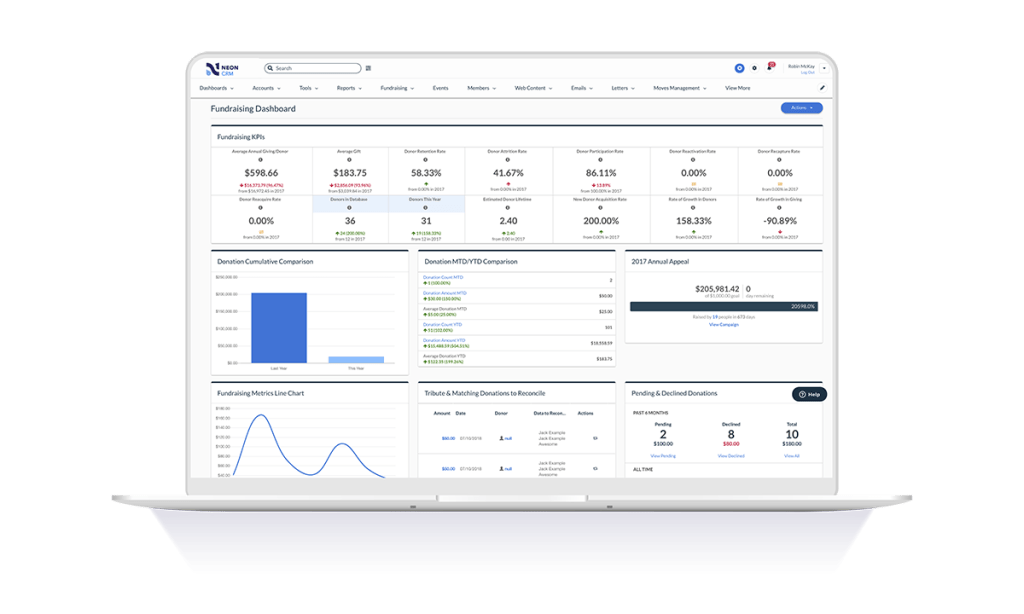
    Screenshot of Email Builder: Elevates appeals, newsletters, and other communications with mobile-responsive emails, multi-column layouts, text block editor and full email preview while building.Screenshot of Fundraising Dashboard: Aggregates fundraising data in one place to analyze various campaigns, performance, progress, and comparisons to other years and campaigns.Screenshot of Workflow Automation: Automated workflows that take care of redundant administrative tasks, with workflows to define triggers, audience, and the action to be performed.Screenshot of Reporting: Comprehensive reporting features to pull a variety of reports. By selecting the data source of interest and the fields needed, Neon CRM provides reports to analyze and share with key stakeholders.Screenshot of Donation Form Themes: Drag and drop themes for donation pages matched to the brand with customization.Screenshot of Volunteer Management: To understand the ways that people want to give support, and to track and manage volunteer sign-ups, projects, and time.