Crownpeak Digital Accessibility and Quality vs. Userlytics

Overview
ProductRatingMost Used ByProduct SummaryStarting Price
Crownpeak Digital Accessibility and Quality
Score 7.4 out of 10
N/A
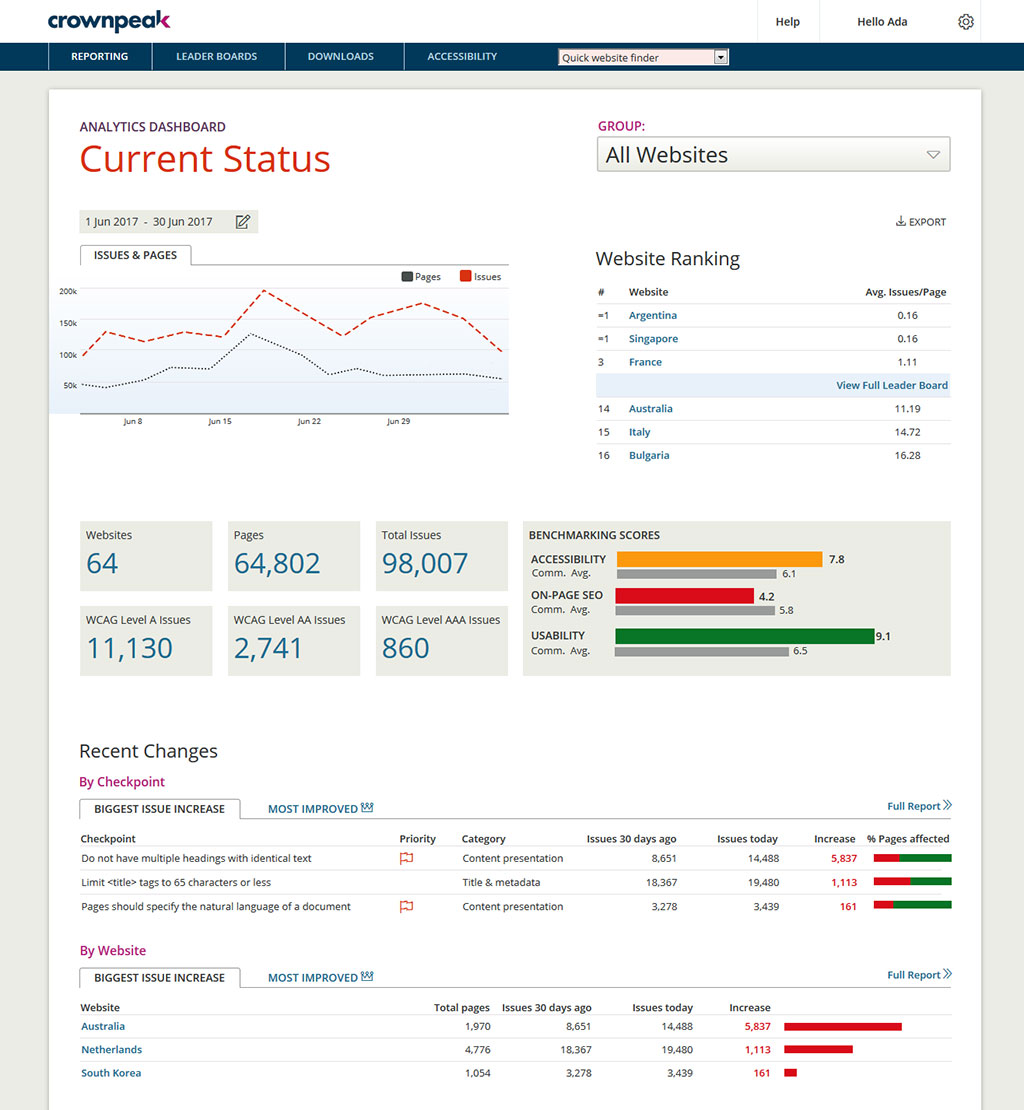
Crownpeak Digital Accessibility and Quality is a digital governance and web content management and monitoring solution designed to support excellent customer experience across all digital touchpoints, supporting web accessibility needs, error catching, SEO best practices, brand compliance, and analytics with benchmarking. Crownpeak Digital Accessibility and Quality can be integrated into an existing CMS.N/A
Userlytics
Score 6.1 out of 10
N/A
Userlytics headquartered in San Francisco provides their suite of usablity testing tools for UI or website developers (or deliverers of similar digital assets) on a pay-as-you-go / per participant basis, or a subscription basis.
$3,450
per year
Pricing
Crownpeak Digital Accessibility and QualityUserlytics
Editions & Modules
No answers on this topic
Offerings
Pricing Offerings
Crownpeak Digital Accessibility and QualityUserlytics
Free Trial
YesYes
Free/Freemium Version
NoYes
Premium Consulting/Integration Services
NoYes
Entry-level Setup FeeNo setup feeNo setup fee
Additional Details
More Pricing Information
Community Pulse
Crownpeak Digital Accessibility and QualityUserlytics
Features
Crownpeak Digital Accessibility and QualityUserlytics
Accessibility Testing
Comparison of Accessibility Testing features of Product A and Product B
Crownpeak Digital Accessibility and Quality
6.5
1 Ratings
3% below category average
Userlytics
-
Ratings
Accessibility Scanning and Assessment6.41 Ratings00 Ratings
Automatic or Scheduled Scanning8.21 Ratings00 Ratings
Automatic Fixes6.41 Ratings00 Ratings
Issue Ranking6.41 Ratings00 Ratings
Manual Auditing Services6.41 Ratings00 Ratings
Compliance Reporting and Tracking6.41 Ratings00 Ratings
HTML and CSS scanning6.41 Ratings00 Ratings
PDF scanning6.41 Ratings00 Ratings
JavaScript scanning6.41 Ratings00 Ratings
Integrations and Interoperability6.41 Ratings00 Ratings
Color/Contrast Analysis6.41 Ratings00 Ratings
Best Alternatives
Crownpeak Digital Accessibility and QualityUserlytics
Small Businesses
BrowserStack
BrowserStack
Score 8.4 out of 10
Smartlook
Smartlook
Score 8.7 out of 10
Medium-sized Companies
Siteimprove
Siteimprove
Score 9.1 out of 10
Optimal
Optimal
Score 9.1 out of 10
Enterprises
BrowserStack
BrowserStack
Score 8.4 out of 10
Optimal
Optimal
Score 9.1 out of 10
All AlternativesView all alternativesView all alternatives
User Ratings
Crownpeak Digital Accessibility and QualityUserlytics
Likelihood to Recommend
7.6
(18 ratings)
7.6
(4 ratings)
Likelihood to Renew
9.6
(2 ratings)
7.0
(1 ratings)
Usability
8.4
(15 ratings)
9.0
(2 ratings)
Availability
9.1
(1 ratings)
4.0
(1 ratings)
Performance
9.1
(1 ratings)
5.0
(1 ratings)
Support Rating
7.5
(15 ratings)
9.0
(1 ratings)
In-Person Training
-
(0 ratings)
9.0
(1 ratings)
Online Training
9.1
(1 ratings)
7.0
(1 ratings)
Implementation Rating
9.1
(2 ratings)
8.0
(1 ratings)
Configurability
7.3
(1 ratings)
2.0
(1 ratings)
Ease of integration
-
(0 ratings)
5.0
(1 ratings)
Product Scalability
9.1
(1 ratings)
5.0
(1 ratings)
Vendor post-sale
9.1
(1 ratings)
2.0
(1 ratings)
Vendor pre-sale
9.1
(1 ratings)
7.0
(1 ratings)
User Testimonials
Crownpeak Digital Accessibility and QualityUserlytics
Likelihood to Recommend
Crownpeak
If you have a fully customized cms and have people working on the site with html and css knowledge this is the best tool ever, all specifics can be checked. Using ab tests and optimization services we identify best practices of the website and everywhere the best practices aren't implemented we find using the custom checkpoints. Aspects that cannot be automated via a quick IT solution is turned into a checkpoint and that's great!
Read full review
Userlytics
Userlytics would be appropriate to use if you were investigating UX on your website, or wanted to identify any pain points which could be causing lower conversion rates. Not only will it be a way to gain direct user feedback, but it enhances your visual ability to see how a user progresses through your website. It is well suited if you have less time to conduct moderated user research at a facility or a client doesn't quite have the budget for that. It may be less appropriate if a client wants a bigger project with larger budgets and more time. In this case, moderated, face-to-face research may be more appropriate.
Read full review
Pros
Crownpeak
  • Preconfigured checkpoints to gather a baseline.
  • Reporting at regular intervals to identify pain points.
  • Mapping to WCAGG standard to understand how to resolve errors.
  • Ability to add customized checkpoints to align with messaging changes
  • Aggregating images in a visual repository to scan for relevancy.
Read full review
Userlytics
  • Excellent customer service
  • Fast response rate
  • Implementing new features
Read full review
Cons
Crownpeak
  • It would be helpful if the Issues page under Website showed the WCAG level for each issue (A, AA, AAA). You currently have to look up the guideline to find the level.
  • There is no indicator that a page is currently being scanned. During a website scan, some of the reports are blank or missing information. Having a notification on the main page showing which websites are being scanned would be helpful.
  • Some ADA compliance items are left off, such as keyboard navigation, tabbing, etc.
  • It doesn't view the websites on mobile devices or if using a screen reader. Some pages or formatting changes depending on resolution. The DQM, from what I have seen, doesn't account for that.
Read full review
Userlytics
  • User interface
  • Mobile support
  • Consolidation of Results
Read full review
Likelihood to Renew
Crownpeak
We've seen competitors, they're not doing as well of a job as dqm is. It's a wonderful tool and there a huge opportunities for crownpeak
Read full review
Userlytics
No answers on this topic
Usability
Crownpeak
I had a small learning curve in order to become fluent with the platform as it doesn't work like the other automated accessibility tools that I've used. However, once I was up to speed, I like it better than any of the other tools and find the data more useful, digestible, and relevant.
Read full review
Userlytics
I think it's very user friendly. I think it gives you a chance to get a feel for websites you may not previously have experience with nor have otherwise experienced. It's also a great way to give input and help shape functionality of business you may enjoy or have further interest in
Read full review
Reliability and Availability
Crownpeak
Haven't had issues accessing the dashboard when needed.
Read full review
Userlytics
No answers on this topic
Performance
Crownpeak
No issues with speed and performance
Read full review
Userlytics
No answers on this topic
Support Rating
Crownpeak
DQM support teams are responsive and knowledgeable, and will spend time working directly with client and agency teams to ensure the best outcomes are achieved. I can't fault the level of input and engagement from Crownpeak support teams across the board.
Read full review
Userlytics
They give their best and also reply to queries immediately
Read full review
In-Person Training
Crownpeak
No answers on this topic
Userlytics
Well trained Professionls
Read full review
Online Training
Crownpeak
Product is straight-forward but the training was helpful and beneficial
Read full review
Userlytics
Decent but not comprehensive
Read full review
Implementation Rating
Crownpeak
The initial process is not clear but after the first cookie banner all others are faster to implement.
Read full review
Userlytics
Even though it takes time to set up. The work is diligent and out of the quality is great
Read full review
Alternatives Considered
Crownpeak
One of the most similar solutions to Crownpeak is the Yext tool because it has a good set of functions that can be managed from content to customer experiences, it is fascinating to be able to track all user interactions through users, in the same way as in Crownpeak that allows all users to create digital experiences.
Read full review
Userlytics
We used WhatUsersDo. However, the tool currently got bought out by a bigger company and were removing the remote research tool. We chose to use Userlytics as it stacked up well against competitors.
Read full review
Scalability
Crownpeak
haven't had issues accessing when needed.
Read full review
Userlytics
Delay to get output
Read full review
Return on Investment
Crownpeak
  • When driving Customer Care, it was great to be able to add the Autofix tool to the web estate - a quick-win that really drives the accessibility agenda.
  • Building reports off the back of DQM gives senior stakeholders an understanding of the importance of usability and accessibility.
  • The gamification of league tables highlights to stakeholders the areas that need focus and budget in order to improve.
Read full review
Userlytics
  • Definitely positive, I would say about 30%.
Read full review
ScreenShots

Crownpeak Digital Accessibility and Quality Screenshots
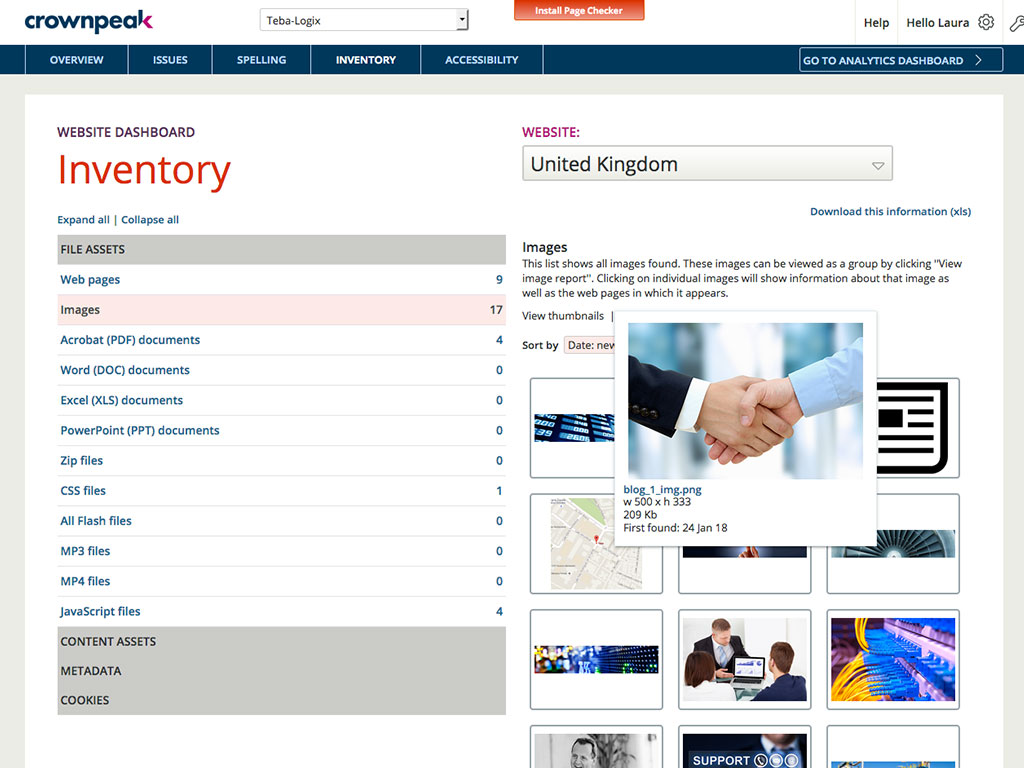
Screenshot of DQM banishes the silos and brings it all together in one powerful but simple to use dashboard, providing visibility and control across all your global digital properties.Screenshot of Do you know what's actually out there on your sites? Take control with a global view of your digital assets.Screenshot of Web accessibility is legally mandated in many countries. We make it easy to ensure compliance and expand audience by adhering to industry best-practice standards for accessible web design.Screenshot of Powerful reports and diagnostic tools provide deep insight across your global web properties, so you can drive improvement, manage risk and react quickly.

Userlytics Screenshots

Screenshot of Testing for all digital assets on desktop and mobile devicesScreenshot of Downloadable, advanced metricsScreenshot of Shareable video clips and resultsScreenshot of Sentiment analysisScreenshot of AI UX AnalysisScreenshot of AI based audio transcriptions