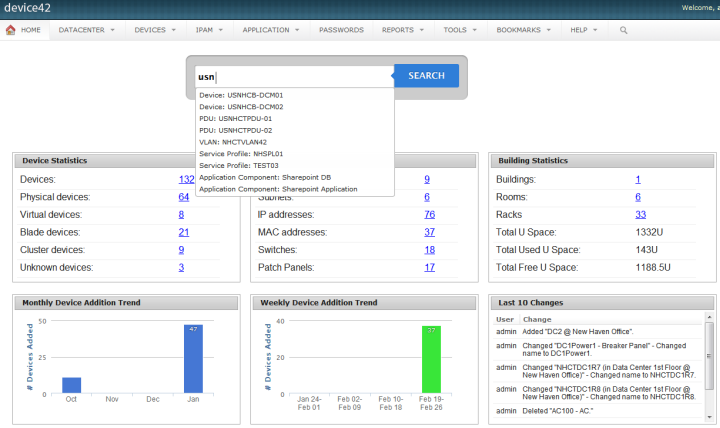
Device42 is a comprehensive, agentless discovery system for Hybrid IT. Device42 can continuously discover, map, and optimize infrastructure and applications across data centers and cloud, in order to provide an accurate views of the IT ecosystem. Device42 intelligently groups discovered workloads by application affinities, so as to reduce the effort required to create move groups, capturing all communications. The vendor boasts customers in more than 60 countries including Global 2000…
$1,449
1-1K IPs
LogMeIn Resolve
Score 8.9 out of 10
N/A
LogMeIn Resolve is an IT management and support solution designed to help organizations take control of their IT infrastructure. The platform combines features like remote monitoring, access, and support with tools such as ticketing, AI-assisted task automation, and patch management.
$29
per month
Microsoft Intune
Score 8.2 out of 10
N/A
Microsoft Intune (formerly Microsoft Endpoint Manager), combining the capabilities of the former Microsoft System Center Configuration Manager, SCCM or ConfigMgr, is presented as a unified endpoint management option. Microsoft Intune is an endpoint management solution for mobile devices, an MDM solution that allows the user to securely manage iOS, Android, Windows, and macOS devices with a single endpoint management solution. The component Endpoint Configuration Manager (the…
$5
per user/per month
Pricing
Device42
LogMeIn Resolve
Microsoft Intune
Editions & Modules
Core 1-100 Devices
$1,449
1-1K IPs
Core 101-500 Devices
$2,999
1K-5K IPs
Core 501-1000 Devices
$4,999
5K-10K IPs
Core 1001-2500 Devices
$9,999
10K-25K IPs
Core 2500+ Devices
Request Quote
25K+ IPs
Remote Access
$29
per month
Remote Support Plus
$55
per month
Standard Endpoint Management
$70
per month
Premium Endpoint Management
$78
per month
Premium
Contact Sales
Microsoft 365 Business Basic
$5
per user/per month
Microsoft 365 For Individuals
$6.99
per month
Microsoft 365 Apps
$8.25
per user/per month
Microsoft 365 For Families
$9.99
per month
Microsoft 365 Business Standard
$12.50
per user/per month
Microsoft 365 Business Premium
$15
per user/per month
Offerings
Pricing Offerings
Device42
LogMeIn Resolve
Microsoft Intune
Free Trial
Yes
Yes
No
Free/Freemium Version
No
Yes
No
Premium Consulting/Integration Services
No
No
No
Entry-level Setup Fee
No setup fee
No setup fee
No setup fee
Additional Details
Pricing for each customer requesting a SaaS installation/deployment is negotiated on a case by case basis, and depends on many factors
Discount available for annual pricing. MDM is available as a standalone or as an add-on. Additional endpoints and agents and save up to 20%
GoTo Resolve is not necessarily an app that I personally chose to use in my organization; this is just one of many that I have interacted with and experienced through the different organizations that I have worked at over the years. However, I will say that I enjoy the engaging …
Verified User
Project Manager
Chose LogMeIn Resolve
Intune does not have remote desktop. Intune also does not do 3rd party patching very well. Manage Engine Desktop Central requires a VPN Client to access the remote clients. It also requires quite a bit of configuration to work well. GoTo Resolve is the most complete tool I …
GoTo Resolve is more reliable compared to some of the others listed. They all have their pros and cons, but GoTo Resolve is more well-rounded for our use case. You will not be disappointed in GoTo Resolve.
RescueAssist is a good solution, as it is a standalone solution, whereas some other remote assistance programs are integrated within another program. These would be Skype for Business or Microsoft SCCM. You actually have to buy licensing for those pieces of software, and …
1. Installbase management feature allows us to retire our old spreadsheet methods for tracking the data in favour of a singular database with some excellent reporting.2. We are also providing data connectivity from the WAN Providers and keeping all connections in Device42 gives us the ability have documentation of all connection that are made. 3. Ever changing and growing inventory that needs to be carefully tracked and inventoried. We find this so simple to use that we spend much less time than we used to on tracking these items.
LogMeIn Resolve has been useful in supporting users working on-site or remotely, and with the unattended agent, allows for a quick and easy way to start a support session. With the integrated Help Desk system, LogMeIn Resolve allows for a seamless support experience without having to bounce from a ticketing platform to a remote support platform, giving us the ability to reduce ticket sprawl and save time overall.
Microsoft Intune is well suited for the larger end of the small business segment to the enterprise. The ability to configure and remotely deploy computer configurations, control mobile devices, and fine tune security controls of each device or device group is a major win for this product. Smaller and mid-sized businesses may balk at having to increase their license level to unlock the better updating features.
Allows easy, comprehensive access to Apple products via web-based applet. (It does require customer input and cooperation.)
It allows me to resolve issues remotely, most times within minutes instead of hours, without a physical location visit.
It allows the customer to view my activity, giving them peace of mind that nothing untoward occurs during my interaction. I also use the record feature so all sessions are recorded, especially on rare occasions when there is an issue or question from the session.
[Microsoft Endpoint Manager (Microsoft Intune + SCCM)] helps to speed up the deployment of patches/software throughout our environment. I can easily build a package and then deploy across all endpoints.
The ability to supercede software is also quite handy. This automates the removal of old versions and replacing them with newer versions.
The Intune Autopilot option is very useful if you want to deploy software to devices straight out of the box. You can configure them to download software when a user opens a new PC and turns it on for the first time.
The user interface is clunky and difficult to use in terms of CRITICAL functions that lie at the core of any remote access solution.
ctrl + key combos are currently terribly implemented and difficult to use - since this is one of the most common keys used in Windows - this presents MASSIVE usability issues that impede my workflow all day every single day.
And now - in a recent development - SHIFT + key combos are currently terribly implemented and difficult to use - since this is one of the most common keys used in Windows - this presents MASSIVE usability issues that impede my workflow all day every single day.
Things like frequently used key combos and shortcuts should work the same via remote access solutions as they do on a hardware keyboard. Anything else is an annoyance and an impediment to workflow and productivity.
Deploying more apps besides Microsoft Edge and Microsoft Office 365 app
Microsoft needs to make it easier to deploy exe, pkg, and msi apps without having to go through the manual process of re-packaging these apps using tools from github like intuneapputil
Add a feature to push out software updates for 3rd party apps
I would say yes, we would definitely renew, everyone likes it in the IT dept, and there are more features we have yet to put to use. I am expanding the Windows update / Endpoint features as I get time, and the remote PowerShell console is unbeatable for me at present when facing remote computers that are not letting create a new remote PSSession.
Mascom Wireless is a Microsoft shop and SCCM has proved to be helpful in keeping our Microsoft products up to date every month without fail. We also have a Microsoft Enterprise Agreement which we renewed for three years ending 2022. The remote access utility works wonders for the organisation and have saved travel bills including subsistance allowance. We have been able to fulfill security audits both internal and external. We have been able to keep a robust inventory of our computer assets and nothing falls of the cracks
We were able to get up and running quickly after our initial implementation, and the monthly feature update webinars are a great way to keep up with new features and how we can use them to our benefit. We can also request features we would like to see in the future, and can vote on other users’ submittals.
The console is not intuitive and does not work well often. Due to the complexity of the product, documentation can be confusing. When properly configured, routine tasks like OS deployment, remote control, and software deployment are easy to do. Troubleshooting of System Center Configuration Manager issues is hard, as there are various logs, and their content can be hard to understand.
Usually available without a problem, although sometimes calls get dropped or users sit in empty meeting rooms while waiting for an admin to arrive, while the call is actually going on.
If you are connected to someone with proper bandwidth, there are no issues at all. With all things, if you connect to someone with dial-up (yes, it still exists), the performance is terrible.
It's a 'heavy' system, which demands a lot of resources form the datacenter perspective. So, make sure you followed the requirements to avoid frustration in the future. From the 'client' perspective, it's fine. I've never had any issue with that.
Ive used their tech support a handful of times, and each time they have been able to help me sort out any hiccups or kinks that arise. They have a resourceful knowledge base, and have experts available for training and troubleshooting. I often recommend them to my other coworkers and colleagues because of the ease of use and security
We have not needed to seek support for this product in the time that we have used it thus far. It's been working really well, and have not had any major issues. Being that it's a Microsoft product, it goes without saying that there will be many support options available if needed. This includes phone, web, forums, KB articles, etc. There is even comprehensive documentation that is available on the web through Microsoft's website for use of the product.
GoToAssist SeeIt was very easy to implement. As long as your techs have a basic understanding of most remote support tools they will be able to understand this product easily.
Work with a "test group" of users who you have a good relationship with so that when things don't work properly they understand! Work with your partner nicely without forcing things especially timelines as you are bound to make mistakes and create oversights in the project Management can also interfere with the implementation (which can cause delays) if you make too many mistakes which takes me back to having a "test group" where you have good relations
What I appreciate and love about Device42 is how everything links together from room layout,to server rack organisation,down to all VMs and Business applications. We are also able to get full value of our money and full visibility of our assets management process.
Go to offer all-in-one functionalities without compromising organizational security and policy. Go-to is versatile compared to other systems like JIRA and is suitable for medium organizations. It has all the support options required. Like web meetings, conversational ticketing, etc., other software does not offer the combination of all, like video calls.
We did not evaluate or use other products like Microsoft Endpoint Manager (Microsoft Intune + SCCM). The main reason we did not evaluate or use other products is because Microsoft Endpoint Manager (Microsoft Intune + SCCM) integrates seamlessly with Microsoft 365 and Windows PCs. Expenses would have increased as well if we had purchased another similar product.
LogMeIn Resolve has increased productivity for our support teams with the addition of camera share. Not only are we able to remote into workstations, but with camera share we can utilize end user and customer phones to visually see physical setups to troubleshoot some situations on the fly.
Unattended support now requires the agent to enter in a signature key as an extra layer of security before accessing a device, which further improves the safety of all devices registered for unattended.
In our current environment, this System Center Configuration Manager had replaced several standalone solutions for patching, imaging, remote assistance, reporting, etc. That saved a lot of time and resulted in money to manage the IT infrastructure.
Once SCCM is deployed and fully configured, all agents are deployed and it is easy to automate a lot of processes and just control them from time to time to make sure that everything is working as supposed to be.
SCCM + Windows 10: great built-in endpoint protection solution. As a result, there is no need to buy additional software for that purpose.
The imaging process is better compared to WDS because you can modify deployment packages and apply patches to a newly imaged machine. This saves tons of time for new employees deployment.