DocuSign vs. OpenText XM Fax

Overview
ProductRatingMost Used ByProduct SummaryStarting Price
DocuSign
Score 8.7 out of 10
N/A
DocuSign supports transactions with document sharing and electronic signature, as well as automated and guided data collection and entry, record updating across disparate systems and payment collection upon agreement, as well as analytics and reporting.
$15
per month
OpenText XM Fax
Score 10.0 out of 10
Small Businesses (1-50 employees)
XM Fax, now from OpenText (acquired March 2020) is a software-based solution for sending and receiving confidential faxes by email. It allows secure transmission of highly sensitive documents, using standardized T.38 Fax-over-IP and G.711 Fax Pass-Through protocols. The vendor says it is easy to install, and faxes can be sent using a desktop client (SendFAX), email clients (MS outlook), networked MFPs or via Web Services. According to the vendor, one of the main benefits of using XM Fax…N/A
Pricing
DocuSignOpenText XM Fax
Editions & Modules
Personal
$15
per month
Real Starter
$15
per month
DocuSign for Realtors
$35
per month
Standard
$40
per month
Business Pro
$60
per month
Advanced Solutions
Custom Pricing
No answers on this topic
Offerings
Pricing Offerings
DocuSignOpenText XM Fax
Free Trial
YesYes
Free/Freemium Version
NoNo
Premium Consulting/Integration Services
NoNo
Entry-level Setup FeeNo setup feeOptional
Additional Details
More Pricing Information
Community Pulse
DocuSignOpenText XM Fax
Considered Both Products
DocuSign

No answer on this topic

OpenText XM Fax
Chose OpenText XM Fax
The XM Fax Connector that is available for the Xerox MFP devices make faxing from XM Fax simple and convenient.
Best Alternatives
DocuSignOpenText XM Fax
Small Businesses
BoldSign, by Syncfusion
Score 10.0 out of 10

No answers on this topic

Medium-sized Companies
MSB Docs
MSB Docs
Score 9.4 out of 10

No answers on this topic

Enterprises
Conga Sign
Conga Sign
Score 8.7 out of 10

No answers on this topic

All AlternativesView all alternativesView all alternatives
User Ratings
DocuSignOpenText XM Fax
Likelihood to Recommend
8.9
(161 ratings)
10.0
(9 ratings)
Likelihood to Renew
7.0
(12 ratings)
-
(0 ratings)
Usability
8.4
(19 ratings)
-
(0 ratings)
Availability
10.0
(3 ratings)
-
(0 ratings)
Performance
10.0
(2 ratings)
-
(0 ratings)
Support Rating
10.0
(46 ratings)
-
(0 ratings)
Online Training
10.0
(1 ratings)
-
(0 ratings)
Implementation Rating
10.0
(5 ratings)
-
(0 ratings)
Product Scalability
10.0
(1 ratings)
-
(0 ratings)
User Testimonials
DocuSignOpenText XM Fax
Likelihood to Recommend
DocuSign
This product is well suited in the use case that I provided before: when it comes to onboarding employees and providing a clear channel for decision making for human resources, this is an excellent tool to accomplish that. I would say the weak points is when you have back and forth communication with users that it might seem a little redundant to have that back and forth communication in that scenario.
Read full review
OpenText
XMedius is well suited for a large business with hundreds of fax numbers. Could you imagine trying to manage 1000 individual fax machines? That would be a nightmare! Instead it's all in one neat place
Read full review
Pros
DocuSign
  • Ease of sending the same document out to multiple recipients, at multiple locations, for multiple signatures
  • Quick turnaround - once the recipient signs the document, we receive notification and the document back immediately
  • Can resend, alter, change, and/or add to the email and/or document that is sent out very easily
  • The recipient can save the document after signing, so they too have their own electronic copy for their records
Read full review
OpenText
  • Contacted sales to set up the creation of enterprise accounts directly through the dashboard.
  • XM Fax Support worked directly with Xerox to correct an issue I had with a device software update. Issues correct within a few days.
  • XM Fax provided onsite sales support for sales and technical training.
Read full review
Cons
DocuSign
  • Tracking, particularly when collecting signatures through connected applications, such as an ATS, is not always clean or easily traceable.
  • Formatting documents to handle electronic signature types (signatures, initials, etc.) is not always easy, and highly dependent on the partner's technology.
  • It is not convenient to have to use DocuSign as a stand alone product if the signatures are required for 3rd party applications. It definitely excels on its own, but the scope of that usage, at least for us, is slim.
Read full review
OpenText
  • Error logs include error codes, but sometimes it is hard to understand what it means. Either a shared documentation or detailed error log might help end users better to detect any issue on fax requests.
Read full review
Likelihood to Renew
DocuSign
I can't imagine doing business without DocuSign now. I would never want to go back to the way we used to do things. The "new way" is "the way" is "the right way." We can honestly be proud of a "one right way" process and not have to suffer through "5 ways for 5 days."
Read full review
OpenText
No answers on this topic
Usability
DocuSign
Generally user-friendly once you have command of the basics, but also has a lot of nuances that can make it difficult to train others on. DocuSign University is a helpful tool, but understandably a lot of content to get through to become a well-versed user. A lot of different functionalities but only a few I use on a weekly basis.
Read full review
OpenText
No answers on this topic
Reliability and Availability
DocuSign
It does not go down. I have had zero issues with DocuSign, approaching 4 years.
Read full review
OpenText
No answers on this topic
Performance
DocuSign
Everything loads quickly. Reports are generated in a reasonable time. No noticeable difference in integrated software processing speeds.
Read full review
OpenText
No answers on this topic
Support Rating
DocuSign
I'd give them a 10, but there has been 1 or 2 small cases that seemed to fall to the wayside, but I was able to call them up and get them resolved. We were having a bad implementation night (after midnight) and we needed assistance from Docusign. They were able to get an engineer to help us in the early morning hours
Read full review
OpenText
No answers on this topic
Online Training
DocuSign
Docusign is super easy to use, and apart from a few administration details, there was really nothing to train on. Post implementation, there were issues with configuration of auto-filled documents with the integrating 3rd party. That training required some time, because the DocuSign expert took the time to walk me through the 3rd party's configuration (how often does that happen?) so I could see how DocuSign should be best used to overcome weaknesses in the 3rd party platform. 10/10 expert care.
Read full review
OpenText
No answers on this topic
Implementation Rating
DocuSign
Until you get the hang of it, I recommend doing several internal tests before sending a document to a client. As I mentioned earlier, you have to go through a bit of trial and error at first to verify that the workflow works as expected.
Read full review
OpenText
No answers on this topic
Alternatives Considered
DocuSign
There has never been anything that we could really compare to Docusign. We have tried sending documents in a PDF version, but that was not nearly as efficient. DocuSign saves your signature in the system and uses that as it goes through your documents.
Read full review
OpenText
XMedius does faxing for a quick response from an end user where Egnyte is best suited for secure file transfer.
Read full review
Scalability
DocuSign
In my years of using DocuSign, I have never had an outage. I haven't even encountered a bug.
Read full review
OpenText
No answers on this topic
Return on Investment
DocuSign
  • Less paper use, faster signature times, less time standing at the printer/scanner to send documents to yourself
  • Security over your signature! Security over your company's signature and authorization to approve projects, cash flow etc
  • Love audit trails and the seamless tracking of the status of the document
Read full review
OpenText
  • I m not sure on pricing or how XMedius is pricing solutions now
  • Cloud-based / vs On-Prem I think my vote always goes for on Prem
  • ROI (not my field)
Read full review
ScreenShots

DocuSign Screenshots

Screenshot of Screenshot of Screenshot of

OpenText XM Fax Screenshots

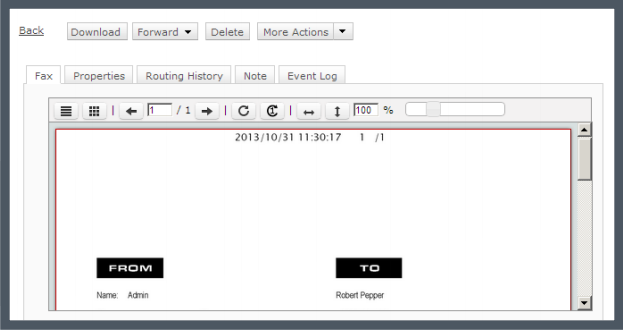
Screenshot of Track your faxes through an event log tab.Screenshot of Built-in viewer in the web client: XMediusFAX® allows you to view faxes directly in your browser without having to download files.Screenshot of Download the free XMediusFAX® application for Android, iPhone or iPad and send secure faxes from your mobile.Screenshot of Choose your fax recipients (Device contacts, Fax service Phone Book, Favorites).Screenshot of Select your documents from any file management application available on your mobile device.Screenshot of Configure your fax options (priority, resolution, retries).