Esker vs. Yooz

Overview
ProductRatingMost Used ByProduct SummaryStarting Price
Esker
Score 7.5 out of 10
N/A
Esker is a global cloud platform built to unlock strategic value for finance and customer service professionals and strengthen collaboration between companies by automating the cash conversion cycle. Esker’s mission is to build a foundation that promotes positive-sum growth, increased productivity, improved employee engagement, and greater trust between organizations.N/A
Yooz
Score 8.8 out of 10
Small Businesses (1-50 employees)
Yooz delivers intelligent financial operations automation that aims to reduce waste, mitigate risk, prevent fraud, and eliminate errors from the AP process. Yooz provides Lean Financial Operations™ for companies of all sizes, offering clarity and control in the most complex environments. The Yooz platform combines a workflow engine, real-time applied AI, and transparency, with advanced fraud detection. Boasting over 7,000 customers worldwide and processing more than 300 million…N/A
Pricing
EskerYooz
Editions & Modules
No answers on this topic
Offerings
Pricing Offerings
EskerYooz
Free Trial
NoYes
Free/Freemium Version
NoNo
Premium Consulting/Integration Services
NoNo
Entry-level Setup FeeNo setup feeNo setup fee
Additional DetailsSubscription price based on the volume of documents processed. Unlimited number of users. 4 hours of complimentary service to start.
More Pricing Information
Community Pulse
EskerYooz
Considered Both Products
Esker
Chose Esker
I have listed a few that we considered but there were many more in the initial assessment, Esker was priced well and had the best user interface. Was really easy to use and the implementation process was well designed. It was a system that could handle a two tiered delegations …
Chose Esker
I don't recall the other three companies that we looked at. One major reason we went with Esker is because it is local.
Chose Esker
We investigated Readsoft early in our exploration of upgrade options. We were on Esker DeliveryWare, but the UI for Readsoft, at the time, seemed to be a little convoluted and geared towards exception handling and required tiered users. Also, ReadSoft was more cost prohibitive …
Chose Esker
Kofax is very similar to Esker in terms of functionality as well as ease of use. I feel that both programs work well, but neither is very user-friendly. Kofax is more expensive, which is why Esker wins.
Chose Esker
TermSync was a little more difficult to learn but has become much better in the end. Once the universal search bar feature was implemented, it became so much easier to navigate and find accounts.
Yooz
Chose Yooz
We looked at a couple of different products, and Yooz came out the winner based on overall interface and cost. Our bank also pitched a solution, but it was not as robust as Yooz.
Chose Yooz
Selected Yooz because of the dynamic workflow ability.
Chose Yooz
Deltek Maconomy, Citrix Endpoint Management and KlearStack
Chose Yooz
PDF is too much slow in OCR reading, comparing to Yooz. you can't compare it even.
Chose Yooz
Chrome River is slow and full of inconsistencies. Capturing invoices is confusing, as you have to assign approvers and coding at that time. No time to save it and research those details. It has multiple screens labeled inbox but are for different stages in the approval process …
Chose Yooz
it better with uploading invoice and easier to use and very assessable and easy to learn and has a lot of verification so errors on payments are avoided and also used to know which invoice is late and needs to be paid and coded
Chose Yooz
I did not choose yooz myself as it was a company decision
Chose Yooz
They are all different for each other. In our scenario, since we do not use QuickBooks as our software system, Yooz works better with integration to Sage Intacct
Chose Yooz
Yooz is much more user friendly and provides more features
Chose Yooz
We looked at other products when we chose Yooz and all were comparable, the key focus was that Yooz integrated with our ERP
Chose Yooz
Yooz has better accuracy and it is more automated to do tasks itself.
Chose Yooz
We used POs or excel sheets you had to manually enter and scan in invoices so it was definitely a pain and super time consuming.
Chose Yooz
We liked Yooz better and it was competitive on the monthly payment basis
Chose Yooz
Our corporate team chose the switch - I see why the change and it is beneficial, however, not very time saving!
Chose Yooz
Have not used other products in the past. This one is great! Don't plan on changing !
Chose Yooz
Yooz is more simple to use but doesn't have as many features.
Chose Yooz
Yooz comes close to Coupa, but Coupa is much more robust and can handle much larger batches of information.

Yooz performed well against Bank of America's Checkbook product, because it was more efficient.
Features
EskerYooz
Payment Management
Comparison of Payment Management features of Product A and Product B
Esker
-
Ratings
Yooz
8.7
Ratings
14% above category average
Customizable Approval Policies00 Ratings8.90 Ratings
Financial Document Management00 Ratings8.20 Ratings
Payment Status Tracking00 Ratings8.70 Ratings
Payment Audit Trail00 Ratings8.90 Ratings
Duplicate Bill Detection00 Ratings8.70 Ratings
Advanced OCR00 Ratings8.80 Ratings
Electronic Funds Transfer00 Ratings8.70 Ratings
Accounts Payable
Comparison of Accounts Payable features of Product A and Product B
Esker
-
Ratings
Yooz
8.5
Ratings
19% above category average
Automated Accounts Payable Processes00 Ratings9.00 Ratings
Vendor Management00 Ratings8.10 Ratings
Best Alternatives
EskerYooz
Small Businesses
Square 9 Softworks
Square 9 Softworks
Score 9.3 out of 10
Square 9 Softworks
Square 9 Softworks
Score 9.3 out of 10
Medium-sized Companies
MSB Docs
MSB Docs
Score 9.4 out of 10
Square 9 Softworks
Square 9 Softworks
Score 9.3 out of 10
Enterprises
M‑Files
M‑Files
Score 8.9 out of 10
Webexpenses
Webexpenses
Score 8.7 out of 10
All AlternativesView all alternativesView all alternatives
User Ratings
EskerYooz
Likelihood to Recommend
10.0
(0 ratings)
8.6
(0 ratings)
Likelihood to Renew
-
(0 ratings)
8.6
(0 ratings)
Usability
5.5
(0 ratings)
8.8
(0 ratings)
Support Rating
8.9
(0 ratings)
-
(0 ratings)
User Testimonials
EskerYooz
Likelihood to Recommend
I would recommend Esker based on the automation of invoice sending - it is very nice to have a tool that not only stores all of the contact info, but sends the invoices out as well. The tracking feature is great to have to see if the submission was successful. I do think that overall it could be much more user-friendly, but once you know what you're doing, it is not hard software to use.
Read full review
when you have put the amount in, and the amount does not match the invoice yooz sends an alert to indicate that there is a missing amount that you have not added, and it also helps to let you know when some invoice amounts are more than the usual get for that vendor so you can take note
Read full review
Pros
  • Everything is electronic and every manager receives an email each morning telling them how many invoices they need to approve.
  • It has completely removed paper form the Accounts payable process and automatically archives invoices for the mandatory period required by Inland Revenue.
  • For monthly reporting there is visibility over what has not yet been included in the accounts and staff can follow with the tardy managers.
Read full review
  • Strong integtation with Intacct (our GL)
  • Strong OCR capabilities that capture the key information of an invoice with accuracy
  • Very responsive Support Team if we encounter a problem or have a question.
  • In depth documentation for users (pdf's videos) to learn the product
Read full review
Cons
  • We can't enter credit memos in Esker. Need to enter in SAP and then link.
  • PO invoices that were trained to go into the PO bucket, route into the non-PO buckets.
  • Freight invoices that have had hundreds going into the non-PO bucket have a tendency to route to the PO-bucket because a PO number is referenced on page 7.
Read full review
  • when exporting we have to change the total column's to numbers or it will export with the incorrect totals.
  • Yooz needs to not allow itself to add a line to the total and change what you are posting. instead it needs to freeze you from moving on.
Read full review
Likelihood to Renew
No answers on this topic
ALSOME PROGRAM MAKE EVERYDAY SO MUCH EASIER
Read full review
Usability
Esker does everything that it promises to do, but it is very hard to figure out. I am a very tech-savvy person, but I needed extensive training to be able to use the basic functions of Esker. Once you know what you're doing, it's not too hard, but I don't understand why they couldn't make it easier to use.
Read full review
Usability of Yooz is close to 10, solves the issue that many companies have and serve to its purpose. The platform is simple, but well design and it is always improving. Since we started using it almost 8 months ago, the invoicing process of our company enhanced sharply. But there is also room for improvement that is why a 9/10
Read full review
Support Rating
They have been very helpful and the online support site is awesome. They keep the site up to date with the latest changes and present challenges to keep learning the new updates to keep things entertaining. They are overall a great crew to work with
Read full review
No answers on this topic
Alternatives Considered
We investigated Readsoft early in our exploration of upgrade options. We were on Esker DeliveryWare, but the UI for Readsoft, at the time, seemed to be a little convoluted and geared towards exception handling and required tiered users. Also, Readsoft was more cost prohibitive and did not have a solution for our faxing. Though, as I understand it, they may have since found a solution for this issue
Read full review
Chrome River is slow and full of inconsistencies. Capturing invoices is confusing, as you have to assign approvers and coding at that time. No time to save it and research those details. It has multiple screens labeled inbox but are for different stages in the approval process that aren't specified unless you go into the invoice and review. When you go to exit the invoice, it takes you back to the main menu instead of the inbox you were currently working in. It is live, but the updates are every 10-15 minutes as opposed to immediately.
Read full review
Return on Investment
  • We now have reporting available down to the individual field level (changes, errors, etc) and can calculate cost to serve.
  • It replaced on-premise hardware with cloud SaaS that is more cost effective and risk adverse.
  • It is more intuitive; we can put new hires on order entry and experience less user errors. As a solution owner who fixes problems and answers questions, I don't find myself having to "think" about Esker and it has become a smaller part of my job now that end-users are more self-sufficient.
Read full review
  • Yooz helped us process thousands of invoices in a more efficient manner than our previous process called Checkbook with Bank of America.
  • Yooz allowed for a more efficient invoice approval process than the previous systems that were used. If the invoices were three way matched, they would be processed quicker.
  • Yooz made the integration of the invoice and credit memo process into NetSuite more efficient than the previous software, however, there some limitations with Yooz because it did allow for duplicate invoices to be processed, and that was a big issue.
Read full review
ScreenShots

Yooz Screenshots

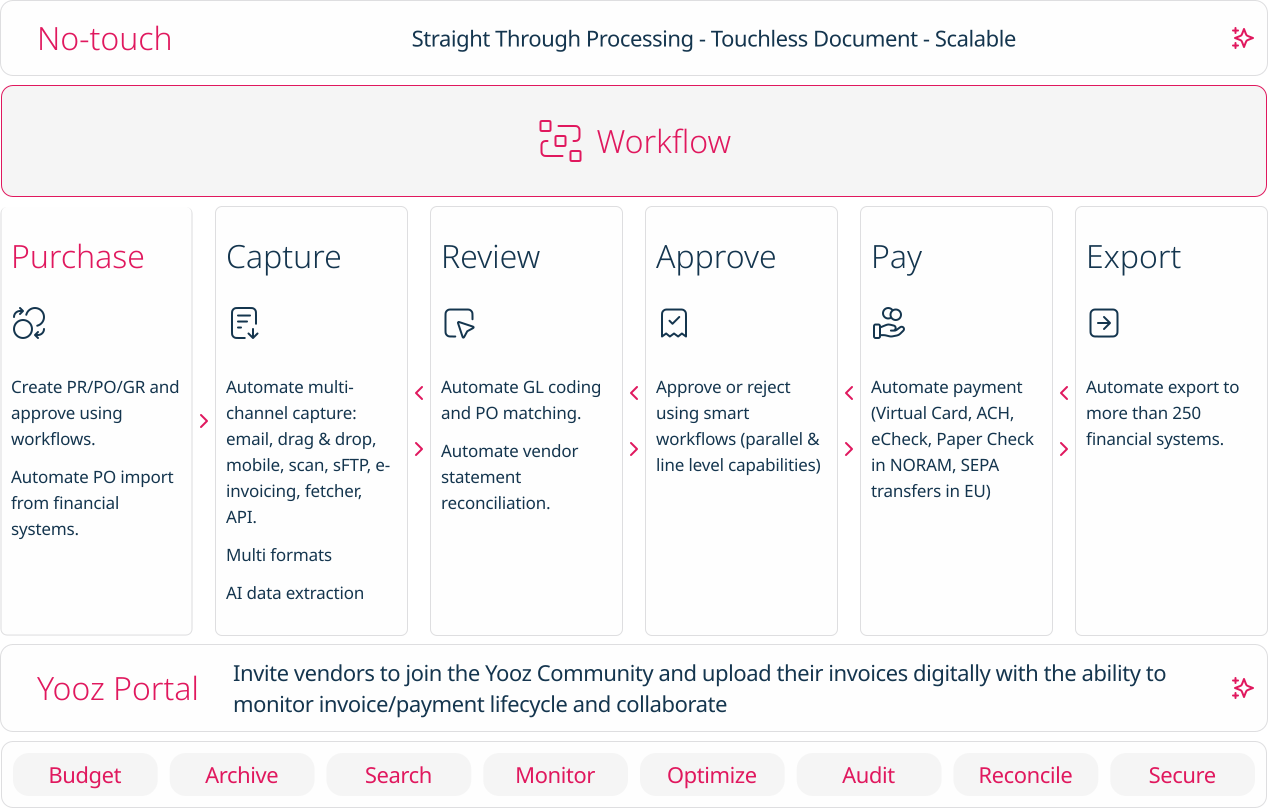
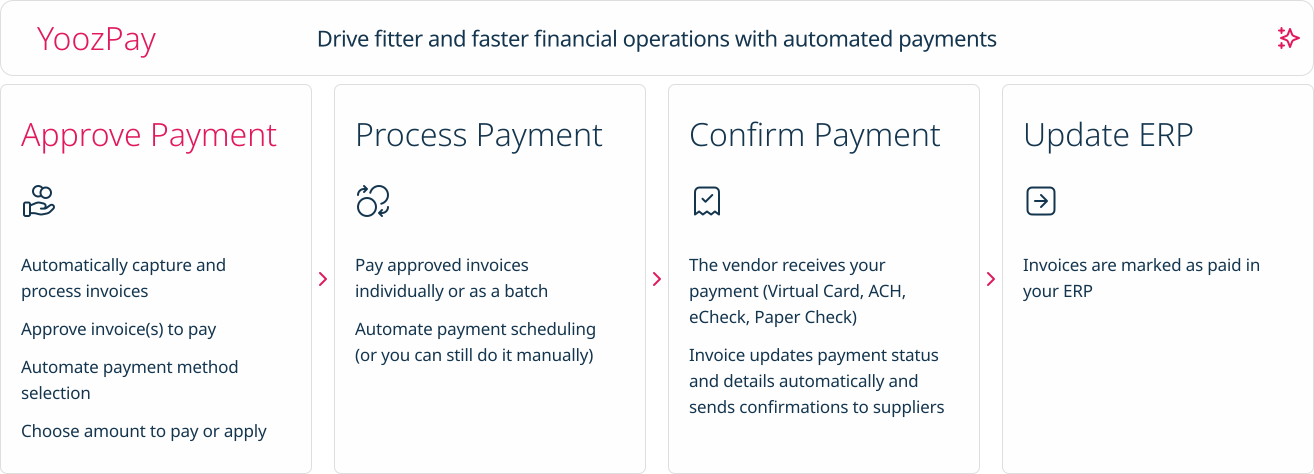
Screenshot of how Yooz works - The solution provides artificial intelligence (AI) and machine learning technologies to help AP teams with invoice automation.Screenshot of Purchase: Automates PR/PO and approvals using workflows. Additionally users can create purchase requests, automate approval workflows, automatically generate purchase orders, manage deliveries and monitor the budget.Screenshot of Capture: AI based data extraction to extract invoices. Works for almost any format (PDF, Factur-X, UBL, CII, EDIFACT, etc.)Screenshot of No touch: Intelligent workflows to automate approvals and paymentsScreenshot of Pay: A Digital Invoice Payment Workflow. Invoices can be paid individually or as a batch,  and vendors receive payment through Virtual Card, ACH, eCheck, or Paper Check.Screenshot of Export: Invoice capture and automation that integrates with accounting software, or with more than 200 ERPs worldwide.