Expensify automates the entire spend management process. Scan receipts, track mileage, submit and approve expenses, manage corporate cards, reimburse employees, pay bills, send invoices, and book travel. Built for individuals and companies of all sizes, anywhere in the world.
$5
per month per user
MIP Fund Accounting
Score8.8 out of 10
N/A
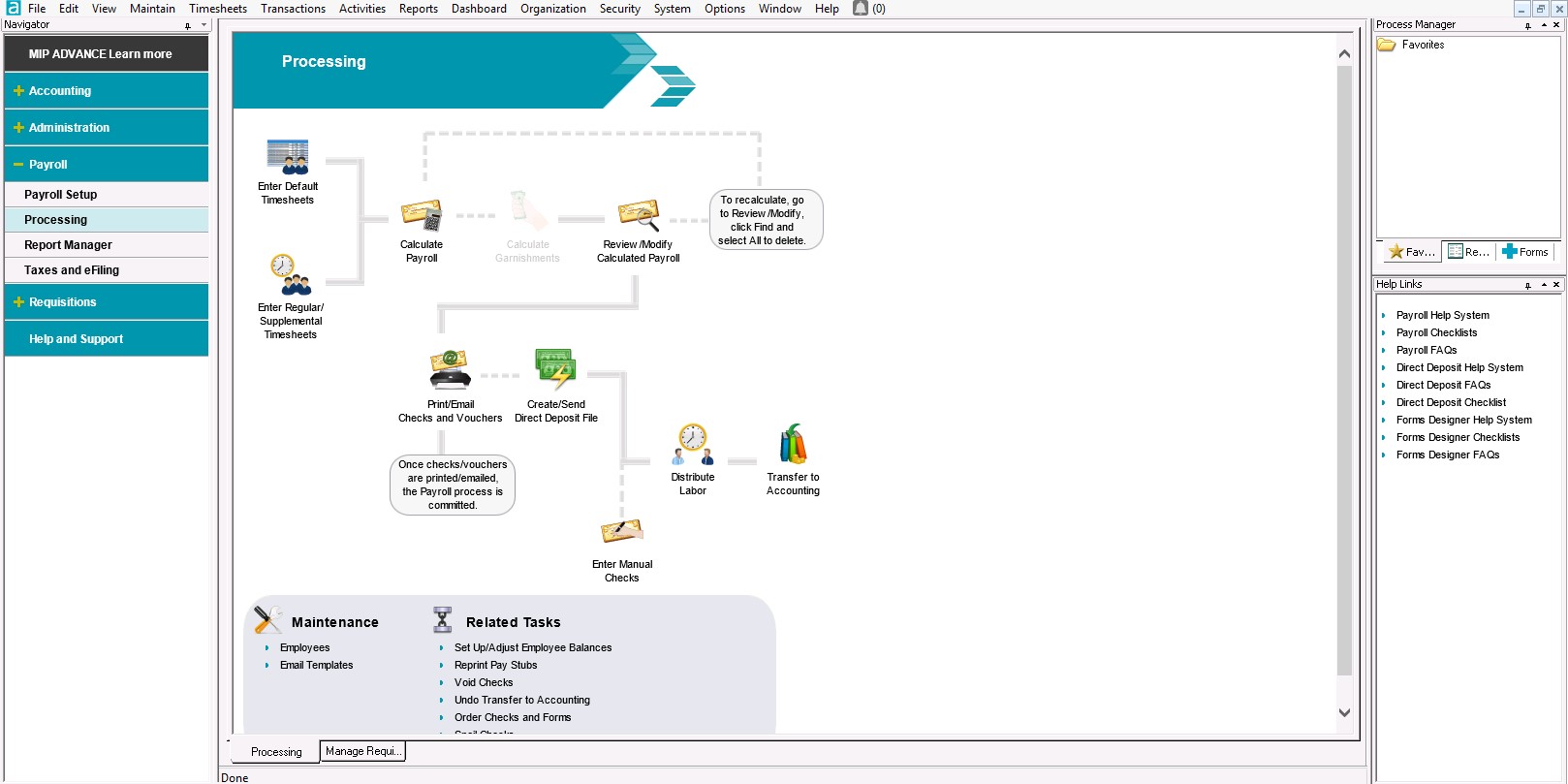
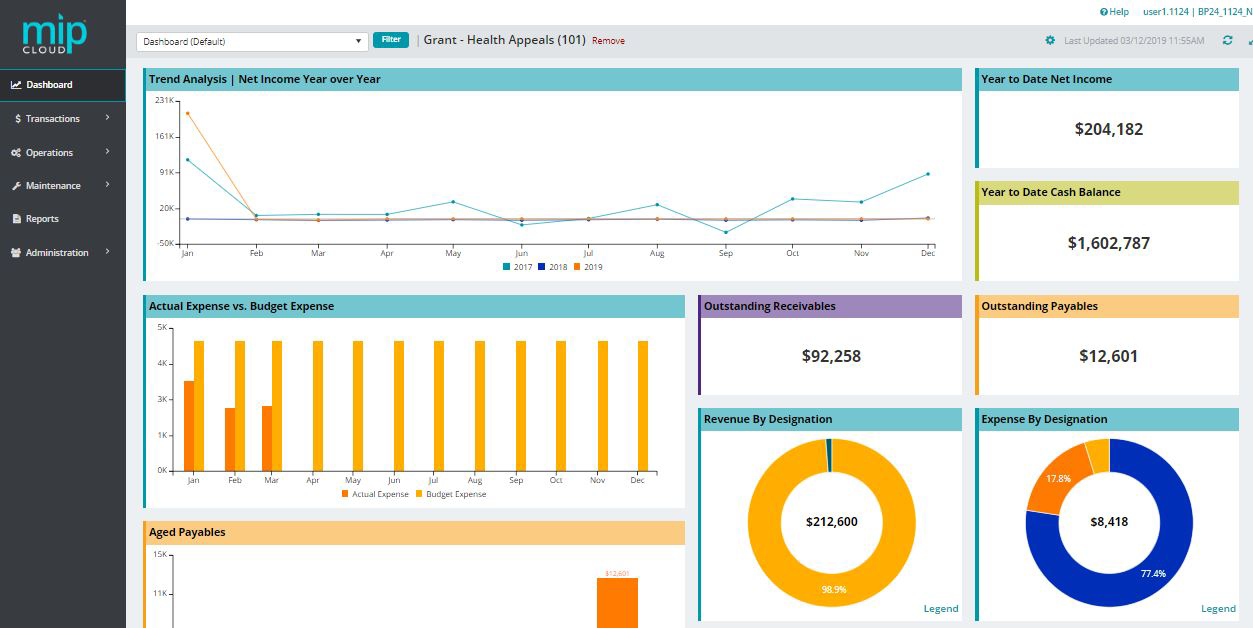
MIP Fund Accounting™ is a configurable fund accounting solution. The solution includes functionality for fund accounting, procurement, budgeting, payroll, human resources, timekeeping, fixed asset management, grant management, and dashboards for nonprofits and government agencies.
N/A
Pricing
Expensify
MIP Fund Accounting
Editions & Modules
Collect
$5
per month per user
Control
$9
per month per user
No answers on this topic
Offerings
Pricing Offerings
Expensify
MIP Fund Accounting
Free Trial
Yes
No
Free/Freemium Version
No
No
Premium Consulting/Integration Services
No
Yes
Entry-level Setup Fee
No setup fee
No setup fee
Additional Details
—
—
More Pricing Information
Community Pulse
Expensify
MIP Fund Accounting
Considered Both Products
Expensify
No answer on this topic
Momentive Software
Verified User
Chose MIP Fund Accounting
MIP Fund Accounting has fewer 3rd-party integrations than Sage Intacct, but the cost was much lower for MIP, which was important to me.
A de minimis incentive was given to thank the reviewer for their time. The incentive was not used to bias or drive a particular response, nor was the incentive contingent on a positive endorsement. TR verified that a representative sample of customers was invited. More Info
I think it's really good for small businesses. At least in the way we use it. It's very good for keeping an eye on employee spending in nearly real time. I'm not sure how it works for larger companies when there is a larger number of people to keep track of.
A de minimis incentive was given to thank the reviewer for their time. The incentive was not used to bias or drive a particular response, nor was the incentive contingent on a positive endorsement. More Info
MIP Fund Accounting works very well for general fundraising. The form creation process is easy and allows you to set parameters and add fees, quantities, images, etc. This process is smooth on the customer (forward-facing) side as well. Reports are generated once the transactions have gone through, making tracking and reconciliation with accounting easy.
A de minimis incentive was given to thank the reviewer for their time. The incentive was not used to bias or drive a particular response, nor was the incentive contingent on a positive endorsement. TR verified that a representative sample of customers was invited. More Info
A de minimis incentive was given to thank the reviewer for their time. The incentive was not used to bias or drive a particular response, nor was the incentive contingent on a positive endorsement. More Info
A de minimis incentive was given to thank the reviewer for their time. The incentive was not used to bias or drive a particular response, nor was the incentive contingent on a positive endorsement. TR verified that a representative sample of customers was invited. More Info
I wish that I could sync accounts on the back end kind of like with banking software, so that Expensify would automatically port over receipts for recurring expenses as soon as they're available
It would be nice to one-click submit an expense all the way through instead of having to attach it to a report
Wackier profile icons? :) Not a big deal. This software is pretty much amazing as it is now, and typically the urge to update and modify very good software leads to poor outcomes!
A de minimis incentive was given to thank the reviewer for their time. The incentive was not used to bias or drive a particular response, nor was the incentive contingent on a positive endorsement. More Info
With the payroll process, if there is an error in sending the stubs through email, there is no option to resend without a restore. That really needs to change.
Being able to void encumbrance at the same time as a PO would be an incredible time saver.
A de minimis incentive was given to thank the reviewer for their time. The incentive was not used to bias or drive a particular response, nor was the incentive contingent on a positive endorsement. TR verified that a representative sample of customers was invited. More Info
We like using the tool and we receive positive feedback from employees and management who use the tool. It saves time and helps us concentrate on the value adding activities so we are very likely to keep using Expensify in the future
A de minimis incentive was given to thank the reviewer for their time. The incentive was not used to bias or drive a particular response, nor was the incentive contingent on a positive endorsement. More Info
I give MIP a 10 because Our organization use MIP Fund Accounting ever since I've been there and that's been for over 20 plus years for all of our accounting and payroll. MIP has stayed on the cutting edge of technology, ever evolving to meet the needs of the times, especially post pandemic, while many are working remotely! MIP support staff are very knowledgeable and efficient. Even new users can get up to speed quickly with MIP Fund Accounting.
A de minimis incentive was given to thank the reviewer for their time. The incentive was not used to bias or drive a particular response, nor was the incentive contingent on a positive endorsement. TR verified that a representative sample of customers was invited. More Info
My rating of 8 out of 10 for Expensify's overall usability reflects its strong performance in empowering individual users and streamlining core expense processes, while acknowledging that there are specific areas, particularly on the administrative or enterprise side, where the user experience could be further refined. Exceptional End-User Experience (for basic tasks).Automation & Time-Saving Features.Clear Workflow for Approvers. Why it's not a perfect 10 (areas for improvement that dock points): Limited corporate bank to choose from, limited multi-currency to pay to ( for instance, as a foreign corporatio,n i cannot pay with my US account to Israeli employees, or pay to our UK employees)
I have used this system for about 12 years now and I still learning how to use it. It always surprises me how there is another report to learn to achieve my data reporting goals. It is great to have a system that you have used long enough to feel comfortable with but also a system that allows you to learn new ways to report and enter data into the system
A de minimis incentive was given to thank the reviewer for their time. The incentive was not used to bias or drive a particular response, nor was the incentive contingent on a positive endorsement. TR verified that a representative sample of customers was invited. More Info
I have rarely encountered any issues accessing MIP Fund Accounting over the years. On the rare occasions when availability was interrupted, the reasons were always found in-house when using the on-premises version. Since we have migrated to the MIP cloud, we have had no issues with availability. Any maintenance or updates are always communicated to us and are usually done outside of business hours.
A de minimis incentive was given to thank the reviewer for their time. The incentive was not used to bias or drive a particular response, nor was the incentive contingent on a positive endorsement. TR verified that a representative sample of customers was invited. More Info
We have 18 programs and the CFO has the ability through MIP Fund Accounting to generate separate and/or collective reporting for those programs. Each program has its own grant or funding source. Each has its own reporting guidelines that must be met so the ability to run reporting separately or collectively is a plus.
A de minimis incentive was given to thank the reviewer for their time. The incentive was not used to bias or drive a particular response, nor was the incentive contingent on a positive endorsement. TR verified that a representative sample of customers was invited. More Info
Our rep has been amazing. He has built custom reports for us that have been very time consuming and difficult. Our reps are also currently looking into new submission solutions for us that we are excited about. They came up with this and recommended it on their own without me complaining about an issue. They are about our success and are very excited about the product they offer.
A de minimis incentive was given to thank the reviewer for their time. The incentive was not used to bias or drive a particular response, nor was the incentive contingent on a positive endorsement. More Info
I have not reached out to MIP for technical support; however, their website offers great help resources so I can solve an issue on my own. Another team member reached out to MIP for support and was helped quickly. The transition process took longer than expected due to a lag in communication.
A de minimis incentive was given to thank the reviewer for their time. The incentive was not used to bias or drive a particular response, nor was the incentive contingent on a positive endorsement. TR verified that a representative sample of customers was invited. More Info
There are no specifics on what happens if you make one choice or another to know which is the best selection. This is true for JVs and AP. In training we were not given specifics of what happens when one possibility is selected over another.
A de minimis incentive was given to thank the reviewer for their time. The incentive was not used to bias or drive a particular response, nor was the incentive contingent on a positive endorsement. TR verified that a representative sample of customers was invited. More Info
Denise O'Malley provided training for the HR module when we added it to our system. Denise also gave us a demo of the EWS module which we were able to see that it would not meet our needs. She was very kind about and understanding regarding the functions we needed with a time clock system.
A de minimis incentive was given to thank the reviewer for their time. The incentive was not used to bias or drive a particular response, nor was the incentive contingent on a positive endorsement. TR verified that a representative sample of customers was invited. More Info
The implementation process went rather smoothly, linking it to the bank and cards was handled easily. without too many unnecessary steps. Getting the accounts setup did take some time, but that would be true with any organization. All in all things went smoothly and I was very pleased with the setup and implementation process
Don't waste your time with MIP. There are plenty of other softwares out there that will do the job better. Do your homework. Get references from actual users. Make sure that what you choose will truly integrate. Make sure that there is local support. Get training. You will be glad that you passed this one by. Trust me.
A de minimis incentive was given to thank the reviewer for their time. The incentive was not used to bias or drive a particular response, nor was the incentive contingent on a positive endorsement. TR verified that a representative sample of customers was invited. More Info
It is definitely 10 times better than using an Excel spreadsheet. We are talking a digitized with AI type capabilities to do the work for you. It’s honestly a lifesaver. This beats manual calculations and data entry any day. Scanning 100 receipts and saving them to pdf files not only takes space on your storage but it is an extra unnecessary step
A de minimis incentive was given to thank the reviewer for their time. The incentive was not used to bias or drive a particular response, nor was the incentive contingent on a positive endorsement. More Info
I've utilized other ERP accounting software like Infor, NetSuite, and MS Dynamics, to name a few. MIP Fund Accounting offers flexibility and room for growth while not being overly heavy on your team to maintain it. And, we're now learning more about the add-on's and more advanced capabilities to leverage with our team.
A de minimis incentive was given to thank the reviewer for their time. The incentive was not used to bias or drive a particular response, nor was the incentive contingent on a positive endorsement. TR verified that a representative sample of customers was invited. More Info
The flexibility to create certain features are helpful and are designed to be easier on MIP Accounting Cloud. It has been easier than the MIP Accounting classic version. I may have not fully utilized the software to deploy across multiple departments other than generating revenue reports or expenses. As well as developing budget worksheets for our departments. Which are great as it is, but have not gone farther than that.
A de minimis incentive was given to thank the reviewer for their time. The incentive was not used to bias or drive a particular response, nor was the incentive contingent on a positive endorsement. TR verified that a representative sample of customers was invited. More Info
We went from paying credit card fees with no approval process to a no fees and complex approval processes.
I personally save time in not having to develop a spend report I just have my admin assistent fill in the details of the auto generated report and it is done. Went from an hour long process to 5- 10 minutes max to prepare a high quality audit ready report.
A de minimis incentive was given to thank the reviewer for their time. The incentive was not used to bias or drive a particular response, nor was the incentive contingent on a positive endorsement. More Info
We converted to the cloud version a few years ago to reduce our dependency on a dedicated internal IT server which needed to be replaced. The cost of the product switched to a monthly fee which increased cost somewhat but probably is matched with IT savings over time in doing upgrades.
We have an efficient team of two people doing the transactional work, so we don't really have much incentive to further automate our processes. And with the turnover in the CFO position we have had, has helped us maintain consistency in our processing.
Once I learned how to memorize and recall transactions it was a huge timesaver and increased the accuracy and consistency of our entry.
The cost of training is sometimes prohibitive. Example is my accounting clerk MIGHT benefit from additional training but at about $200 for a lot of the courses, it is more than we have budgeted.
A de minimis incentive was given to thank the reviewer for their time. The incentive was not used to bias or drive a particular response, nor was the incentive contingent on a positive endorsement. TR verified that a representative sample of customers was invited. More Info