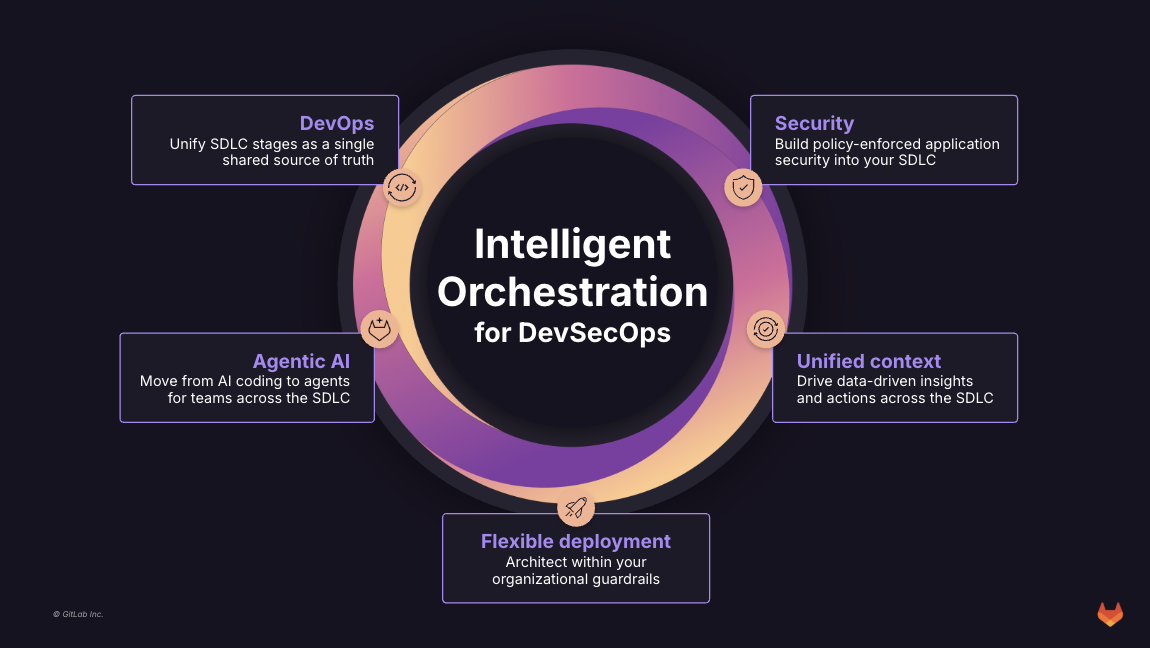
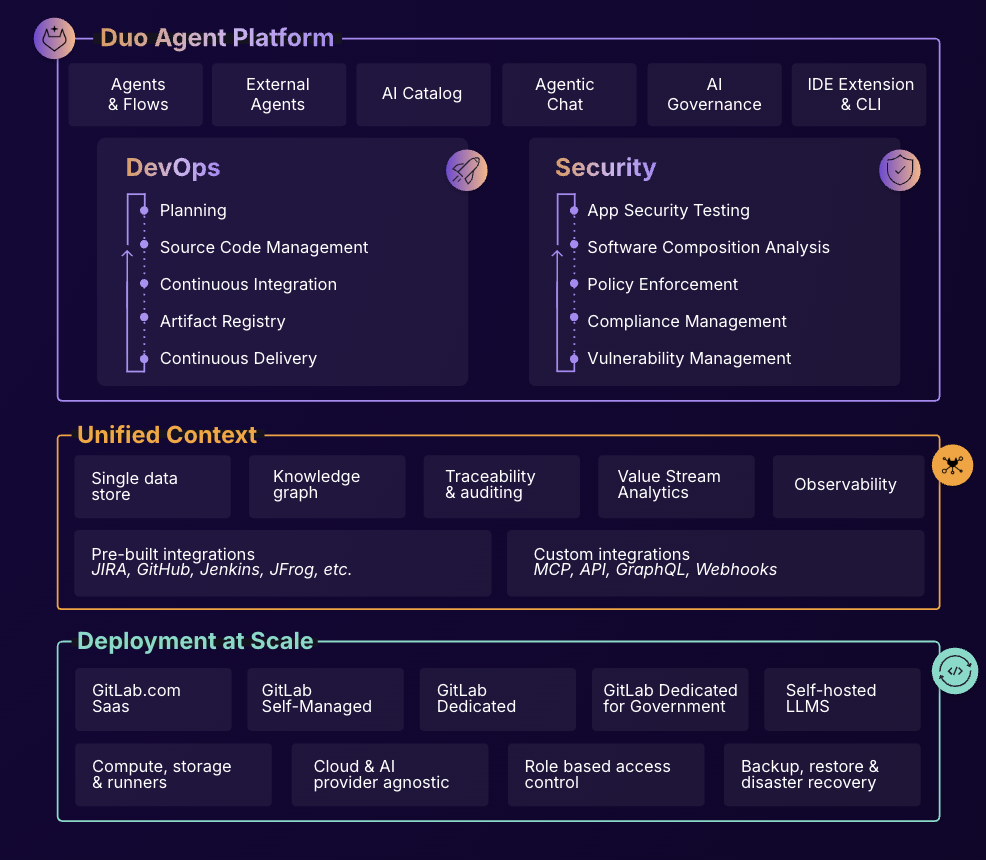
GitLab is an intelligent orchestration platform for DevSecOps, where software teams enable AI at every stage of the software lifecycle to ship faster. The platform enables teams to automate repetitive tasks across planning, building, securing, testing, deploying, and maintaining software.
$0
per month per user
IBM Cloud Kubernetes Service
Score8 out of 10
Mid-Size Companies (51-1,000 employees)
IBM Cloud Kubernetes Service is a
managed Kubernetes offering, delivering user tools and built-in security for rapid delivery of applications
that users can bind to cloud services related to IBM Watson®, IoT, DevOps
and data analytics. As a certified K8s provider, IBM Cloud Kubernetes
Service provides intelligent scheduling, self-healing, horizontal
scaling, service discovery and load balancing, automated rollouts and
rollbacks, and secret and configuration management. The Kubernetes…
N/A
Jenkins
Score8.1 out of 10
N/A
Jenkins is an open source automation server. Jenkins provides hundreds of plugins to support building, deploying and automating any project. As an extensible automation server, Jenkins can be used as a simple CI server or turned into a continuous delivery hub for any project.
N/A
Pricing
GitLab
IBM Cloud Kubernetes Service
Jenkins
Editions & Modules
GitLab Free (self-managed)
$0
GitLab Free
$0
GitLab Premium
$29
per month per user
GitLab Premium (self-managed)
$29
per month per user
GitLab Ultimate
Contact Sales
GitLab Ultimate (self-managed)
Contact Sales
No answers on this topic
No answers on this topic
Offerings
Pricing Offerings
GitLab
IBM Cloud Kubernetes Service
Jenkins
Free Trial
Yes
No
No
Free/Freemium Version
Yes
Yes
Yes
Premium Consulting/Integration Services
Yes
Yes
No
Entry-level Setup Fee
Optional
Optional
No setup fee
Additional Details
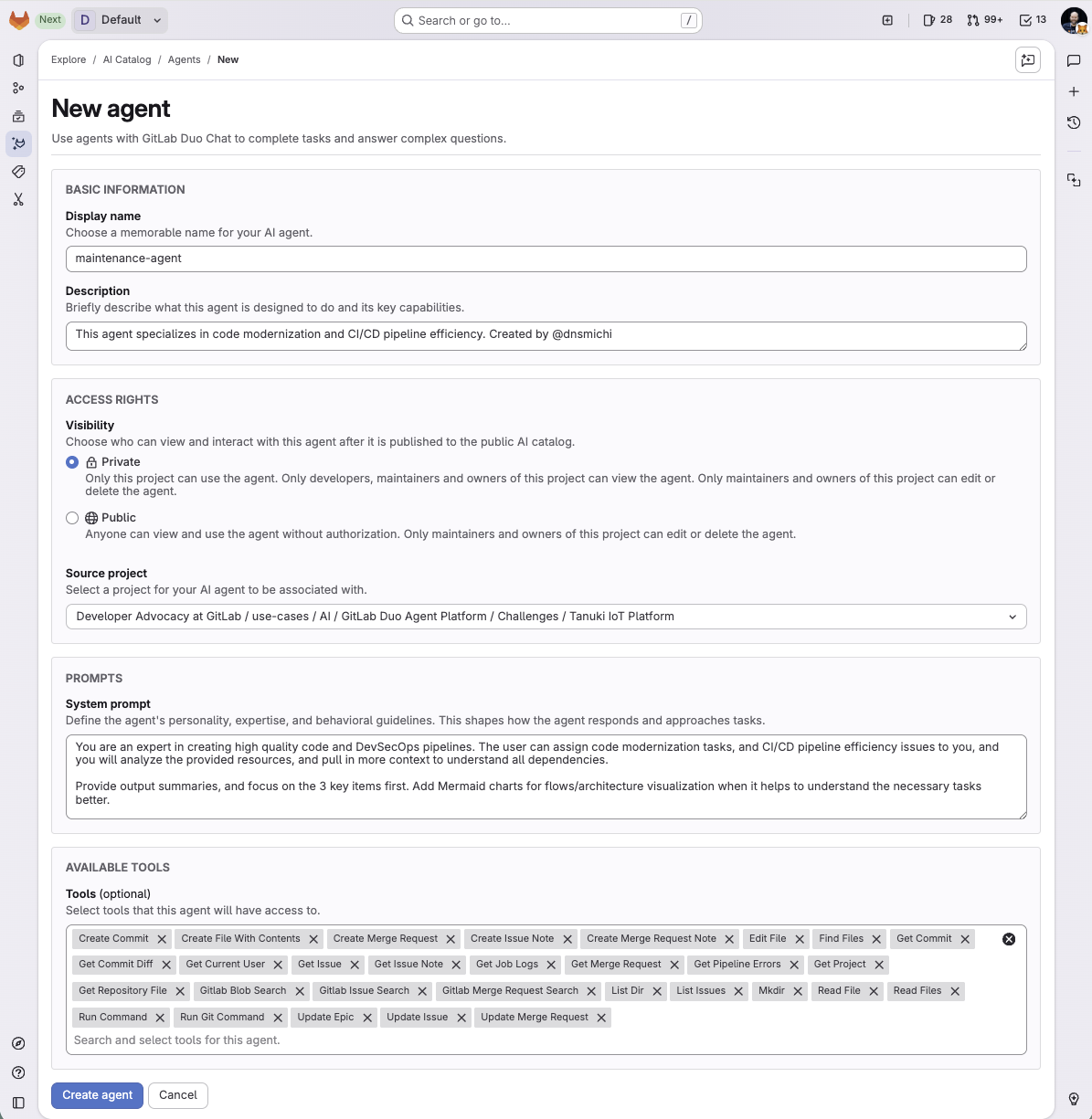
GitLab Credits enable flexible, consumption-based access to agentic AI capabilities in the GitLab platform, allowing you to scale AI adoption at your own pace while maintaining cost predictability. Powered by Duo Agent Platform, GitLab’s agentic AI capabilities help software teams to collaborate at AI speed, without compromising quality and enterprise security.
If usage exceeds monthly allocations and overage terms are accepted, automated on-demand billing activates without service interruption, so your developers never lose access to AI capabilities they need.
Real-time dashboards provide transparency into AI consumption patterns. Software teams can see usage across users, projects, and groups with granular attribution for cost allocation. Automated threshold alerts facilitate proactive planning. Advanced analytics deliver trending, forecasting, and FinOps integration.
A de minimis incentive was given to thank the reviewer for their time. The incentive was not used to bias or drive a particular response, nor was the incentive contingent on a positive endorsement. More Info
Verified User
Chose GitLab
GitLab fits our needs much better because it is a all-in-one solution and is easier to learn. We have a wide range of users - senior software developers and people who only write small, easy scripts or just start pipelines. Jenkins is rather useful when e.g. more fine-grained …
A de minimis incentive was given to thank the reviewer for their time. The incentive was not used to bias or drive a particular response, nor was the incentive contingent on a positive endorsement. TR verified that a representative sample of customers was invited. More Info
Chief Innovation Officer in Information Technology at Versatile Credit (Financial Services, 11-50 employees)
Chose GitLab
The company has had prior experience with Bamboo. GitLab has much more functionality than Bamboo and worked better with some of our legacy projects. While Jenkins is free, it really isn't free - the amount of work required to get something up and running would have been …
A de minimis incentive was given to thank the reviewer for their time. The incentive was not used to bias or drive a particular response, nor was the incentive contingent on a positive endorsement. More Info
Staff Software Engineer in Engineering at Ocado Technology (Retail, 10,001+ employees)
Chose GitLab
GitLab is an all-in-one Git and CI/CD platform that also offers generous credits in its free plan. It allows both private and public projects. The pipelines can be fully defined in YAML files put under version control.
A de minimis incentive was given to thank the reviewer for their time. The incentive was not used to bias or drive a particular response, nor was the incentive contingent on a positive endorsement. TR verified that a representative sample of customers was invited. More Info
Verified User
Chose GitLab
We have recently migrated from Bamboo to GitLab across our enterprise as part of our tech modernization roadmap. GitLab provides a all-in-one platform for integrated code management. The only advantage that Bamboo had over GitLab was the integration with JIRA. The streamlined …
A de minimis incentive was given to thank the reviewer for their time. The incentive was not used to bias or drive a particular response, nor was the incentive contingent on a positive endorsement. TR verified that a representative sample of customers was invited. More Info
Verified User
Chose GitLab
i have more exoerence in GitLab rather than Bitbucket . As personally , it is good for me to understand how things is going on. i have used personally and also in organisation . It is great for developer to see there 3 months ago code and also can come up with new solution to …
A de minimis incentive was given to thank the reviewer for their time. The incentive was not used to bias or drive a particular response, nor was the incentive contingent on a positive endorsement. More Info
DevOps Engineer in Engineering at Open LMS (E-Learning, 51-200 employees)
Chose GitLab
It was a management decision to use GitLab over other tools. It integrates well with RBAC using Terraform. Runners are easy to setup. Almost all the features the organization used before are available in GitLab.
A de minimis incentive was given to thank the reviewer for their time. The incentive was not used to bias or drive a particular response, nor was the incentive contingent on a positive endorsement. TR verified that a representative sample of customers was invited. More Info
Principal in Engineering at Neustar (Information Technology & Services, 1001-5000 employees)
Chose GitLab
Software delivery is the key objective and GitLab made it much easier to hit the group quickly. It worked well with automation, and integrations with other SDLC tools used in the Organization and it is really easy to use. It's widely adopted and has the power to deliver what we …
A de minimis incentive was given to thank the reviewer for their time. The incentive was not used to bias or drive a particular response, nor was the incentive contingent on a positive endorsement. More Info
Technology Analyst in Information Technology at Deutsche Bank (Information Technology & Services, 10,001+ employees)
Chose GitLab
GitLab's online IDE and code modification is much better compared to Stash. While pricier than Bitbucket, Gitlab also provides CI CD configuration better than BB.
A de minimis incentive was given to thank the reviewer for their time. The incentive was not used to bias or drive a particular response, nor was the incentive contingent on a positive endorsement. TR verified that a representative sample of customers was invited. More Info
Verified User
Chose GitLab
GitLab is easily the preferred tool when it comes to versioning and source control. With other tools the UI often feels outdated and clunky leading to inefficiency and confusion. With some of the sleeker tools such as GitKraken, while the aesthetic is pleasing, the experience …
A de minimis incentive was given to thank the reviewer for their time. The incentive was not used to bias or drive a particular response, nor was the incentive contingent on a positive endorsement. TR verified that a representative sample of customers was invited. More Info
A de minimis incentive was given to thank the reviewer for their time. The incentive was not used to bias or drive a particular response, nor was the incentive contingent on a positive endorsement. More Info
VP Engineering in Engineering at Veeva Systems (Information Technology & Services, 5001-10,000 employees)
Chose GitLab
Gitlab provided on par functionality and it provided a good option for us to self host which is very important for our business. We think the business continuity story is more solid with Gitlab.
A de minimis incentive was given to thank the reviewer for their time. The incentive was not used to bias or drive a particular response, nor was the incentive contingent on a positive endorsement. TR verified that a representative sample of customers was invited. More Info
We migrated from Gerrit to GitLab, and minus a few minor bumps during migration, GitLab has been hands down better. Our devs have faster time to code review with notifications, the UI is easy to navigate and, and our pipeline is integrated and automated, so once everything is …
A de minimis incentive was given to thank the reviewer for their time. The incentive was not used to bias or drive a particular response, nor was the incentive contingent on a positive endorsement. More Info
Verified User
Chose GitLab
Git has a Distributed Model. SVN has a Centralized Model. In git every user has their own copy of code on their local like their own branch. In SVN there is central repository has working copy that also make changes and committed in central repository
A de minimis incentive was given to thank the reviewer for their time. The incentive was not used to bias or drive a particular response, nor was the incentive contingent on a positive endorsement. More Info
A de minimis incentive was given to thank the reviewer for their time. The incentive was not used to bias or drive a particular response, nor was the incentive contingent on a positive endorsement. TR verified that a representative sample of customers was invited. More Info
A de minimis incentive was given to thank the reviewer for their time. The incentive was not used to bias or drive a particular response, nor was the incentive contingent on a positive endorsement. More Info
Verified User
Chose GitLab
Sometimes it gets very slow and provides a problem to connect or update the servers. Search is difficult on some pages. Some features are missing that are available on GitHub.
A de minimis incentive was given to thank the reviewer for their time. The incentive was not used to bias or drive a particular response, nor was the incentive contingent on a positive endorsement. TR verified that a representative sample of customers was invited. More Info
Verified User
Chose GitLab
Even though all three tools are also useful for their own merit, we found GitLab to be the best supported and most customizable for our needs. It is useful to know that the product today is what we need it to be and the community is there to keep it updated if we need more …
A de minimis incentive was given to thank the reviewer for their time. The incentive was not used to bias or drive a particular response, nor was the incentive contingent on a positive endorsement. TR verified that a representative sample of customers was invited. More Info
Verified User
Chose GitLab
GitLab was chosen for the auto dev ops feature over GitHub, but then GitHub shortly then came out with GitHub Actions.
We also moved from GitHub enterprise to GitLab, so cost-wise was cheaper as we didn't have to host GitLab.
A de minimis incentive was given to thank the reviewer for their time. The incentive was not used to bias or drive a particular response, nor was the incentive contingent on a positive endorsement. TR verified that a representative sample of customers was invited. More Info
Lead Consultant - Solutions Architect - Software Engineer in Information Technology at Ghia & Associates Engineering and Consulting Group (Computer Software, 1-10 employees)
Chose GitLab
GitLab (Starter) has a better price for on-premise installation than Bitbucket.
A de minimis incentive was given to thank the reviewer for their time. The incentive was not used to bias or drive a particular response, nor was the incentive contingent on a positive endorsement. More Info
Software Developer in Engineering at Webvalto Ltd. (Banking, 51-200 employees)
Chose GitLab
GitLab is the best combination of all the other tools. They are still viable in their own sense, but for the projects we were using, GitLab proved to be an excellent alternative.
A de minimis incentive was given to thank the reviewer for their time. The incentive was not used to bias or drive a particular response, nor was the incentive contingent on a positive endorsement. More Info
Managing Member in Information Technology at ZenPan Technology Solutions, LLC (Information Technology and Services, 1-10 employees)
Chose GitLab
Gitlab surpasses Bitbucket in all areas except of course the very tight integration Bitbucket has with JIRA and Confluence. Almost everyone uses JIRA at some level or time so Bitbucket has a more natural and tight integration feel. However, there is good JIRA integration with …
A de minimis incentive was given to thank the reviewer for their time. The incentive was not used to bias or drive a particular response, nor was the incentive contingent on a positive endorsement. More Info
A de minimis incentive was given to thank the reviewer for their time. The incentive was not used to bias or drive a particular response, nor was the incentive contingent on a positive endorsement. More Info
IBM
Verified User
Chose IBM Cloud Kubernetes Service
This is a very difficult question, because there are a lot of similarities and the differences are minor but could be important if your use-case requires something like that. For example if you need a cluster that is ready sooner than 45 minutes or a data center/location in …
A de minimis incentive was given to thank the reviewer for their time. The incentive was not used to bias or drive a particular response, nor was the incentive contingent on a positive endorsement. TR verified that a representative sample of customers was invited. More Info
Open Source
Verified User
Chose Jenkins
Jenkins is highly customizable, making it ideal for complex pipelines that require scripting, conditional logic, and integration with a variety of tools.Jenkins offers thousands of plugins, giving it unmatched versatility.
A de minimis incentive was given to thank the reviewer for their time. The incentive was not used to bias or drive a particular response, nor was the incentive contingent on a positive endorsement. TR verified that a representative sample of customers was invited. More Info
Verified User
Chose Jenkins
Bitbucket building was very slow, in order to improve that you have to upgrade to spend double or more minutes per build minute. The GUI was also very slow in updating on the progress of the builds, making things rather confusing. GitLab worked a bit better in my opinion, but …
A de minimis incentive was given to thank the reviewer for their time. The incentive was not used to bias or drive a particular response, nor was the incentive contingent on a positive endorsement. More Info
Verified User
Chose Jenkins
GitLab CI and GitHub Actions are other powerful options in the market also with a rising popularity and high interoperability with their respective platform. But Jenkins is still a good option for complex pipelines that require scripting and logic. Also, Jenkins uses as runtime …
A de minimis incentive was given to thank the reviewer for their time. The incentive was not used to bias or drive a particular response, nor was the incentive contingent on a positive endorsement. More Info
Sr Systems Engineer in Engineering at Mercury (Computer Networking, 501-1000 employees)
Chose Jenkins
Overall, Jenkins is the easiest platform for someone who has no experience to come in and use effectively. We can get a junior engineer into Jenkins, give them access, and point them in the right direction with minimal hand-holding. The competing products I have used (TravisCI/G…
A de minimis incentive was given to thank the reviewer for their time. The incentive was not used to bias or drive a particular response, nor was the incentive contingent on a positive endorsement. More Info
Verified User
Chose Jenkins
Jenkins is highly customizable and flexible, supporting a wide range of plugins and integrations. Jenkins works with any version control system (Git, Subversion, etc.). Jenkins has a more mature ecosystem, and it may be better for large-scale, complex environments, especially …
A de minimis incentive was given to thank the reviewer for their time. The incentive was not used to bias or drive a particular response, nor was the incentive contingent on a positive endorsement. More Info
Verified User
Chose Jenkins
It's mostly stable and well-known within the DevOps community.
A de minimis incentive was given to thank the reviewer for their time. The incentive was not used to bias or drive a particular response, nor was the incentive contingent on a positive endorsement. More Info
CEO in Professional Services at EM Squared (Computer Software, 1-10 employees)
Chose Jenkins
Both Jenkins and TeamCity do a good job of automating CI/CD. Jenkins runs much leaner than TeamCity - it only needs about a Gig of free memory, whereas TeamCity needs a fat 4 Gig free. Many tasks in Jenkins yml config can be very cumbersome, especially running local and …
A de minimis incentive was given to thank the reviewer for their time. The incentive was not used to bias or drive a particular response, nor was the incentive contingent on a positive endorsement. More Info
Software Developer in Information Technology at Finmo (Computer Software, 1-10 employees)
Chose Jenkins
Originally Jenkins was selected because it was the best around, but it has since been outclassed by more specific services or cloud-based services and tools that will do all of the heavy lifting for you. Jenkins still has a use case - but it's hard to argue the additional …
A de minimis incentive was given to thank the reviewer for their time. The incentive was not used to bias or drive a particular response, nor was the incentive contingent on a positive endorsement. More Info
DevOps Principal Architect in Information Technology at Pythian (Computer Software, 501-1000 employees)
Chose Jenkins
Jenkins immense flexibility and its large and impressive selection of available community-driven plugins makes it ideal choice for solving non-traditional problems.
However, for CI/CD - consider the benefit of modern tools that enforce reusable, infrastructure as code design …
A de minimis incentive was given to thank the reviewer for their time. The incentive was not used to bias or drive a particular response, nor was the incentive contingent on a positive endorsement. More Info
QA Architect in Information Technology at British Airways (Airlines/Aviation, 10,001+ employees)
Chose Jenkins
I would use TeamCity if Jenkins was not already in place. TeamCity seems a lot more stable when it comes to upgrading the software and job templates the way TeamCity handles them is an absolute killer feature. Jenkins is a bit of a wild animal, quite unpredictable but with the …
A de minimis incentive was given to thank the reviewer for their time. The incentive was not used to bias or drive a particular response, nor was the incentive contingent on a positive endorsement. More Info
In general it's a good product with a huge number of features. It can do CI/CD checks, deployment, repo hosting, integrations etc. A lot of it can be managed from just the UI but also has an ok API. It does tend to release new features semi-often too which is nice. It can have a steep learning curve for certain features so not a starter-friendly vendor, but great for most businesses.
A de minimis incentive was given to thank the reviewer for their time. The incentive was not used to bias or drive a particular response, nor was the incentive contingent on a positive endorsement. TR verified that a representative sample of customers was invited. More Info
IBM Cloud Kubernetes Service also stands out in environments where the workloads vary continuously and require befitting scale. The product excels particularly in microservices structures, wherein the companies would harness the capacity for container orchestration and automated scaling. Still, it may face the challenges due to monolith applications that have not been originally developed for using container technology.
Jenkins is a highly customizable CI/CD tool with excellent community support. One can use Jenkins to build and deploy monolith services to microservices with ease. It can handle multiple "builds" per agent simultaneously, but the process can be resource hungry, and you need some impressive specs server for that. With Jenkins, you can automate almost any task. Also, as it is an open source, we can save a load of money by not spending on enterprise CI/CD tools.
A de minimis incentive was given to thank the reviewer for their time. The incentive was not used to bias or drive a particular response, nor was the incentive contingent on a positive endorsement. More Info
A de minimis incentive was given to thank the reviewer for their time. The incentive was not used to bias or drive a particular response, nor was the incentive contingent on a positive endorsement. TR verified that a representative sample of customers was invited. More Info
IBM has a strong focus on serverless and Kubernetes. This shows in the platform. Deploying containers to Kubernetes was very easy.
Deploying a Kubernetes cluster through the GUI is very easy and quick. On top of that, IBM Cloud offers a single node cluster for Free.
Container Registry is a very good product for managing container images. Integration with Kubernetes was seemless.
Portability. To transition from Google Cloud Kubernetes to IBM Cloud Kubernetes took almost no effort. We mostly use the CLI and the standard tools such as kubectl were present.
A de minimis incentive was given to thank the reviewer for their time. The incentive was not used to bias or drive a particular response, nor was the incentive contingent on a positive endorsement. More Info
Automated Builds: Jenkins is configured to monitor the version control system for new pull requests. Once a pull request is created, Jenkins automatically triggers a build process. It checks out the code, compiles it, and performs any necessary build steps specified in the configuration.
Unit Testing: Jenkins runs the suite of unit tests defined for the project. These tests verify the functionality of individual components and catch any regressions or errors. If any unit tests fail, Jenkins marks the build as unsuccessful, and the developer is notified to fix the issues.
Code Analysis: Jenkins integrates with code analysis tools like SonarQube or Checkstyle. It analyzes the code for quality, adherence to coding standards, and potential bugs or vulnerabilities. The results are reported back to the developer and the product review team for further inspection.
A de minimis incentive was given to thank the reviewer for their time. The incentive was not used to bias or drive a particular response, nor was the incentive contingent on a positive endorsement. More Info
A de minimis incentive was given to thank the reviewer for their time. The incentive was not used to bias or drive a particular response, nor was the incentive contingent on a positive endorsement. TR verified that a representative sample of customers was invited. More Info
I constantly get this error even when everything is well configured prefect.exceptions.AuthorizationError: [{'path': ['auth_info'], 'message': 'AuthenticationError: Forbidden', 'extensions': {'code': 'UNAUTHENTICATED'}}]
Then sometimes the error disapear without changine anything, happened twice to me. Should there be an issue with the authentication service? Please let's improve or let users know why this may be happening.
Improve the UX in the browse console when removing many images at once
UX on the process of installing KeyCloack operator
A de minimis incentive was given to thank the reviewer for their time. The incentive was not used to bias or drive a particular response, nor was the incentive contingent on a positive endorsement. More Info
A de minimis incentive was given to thank the reviewer for their time. The incentive was not used to bias or drive a particular response, nor was the incentive contingent on a positive endorsement. More Info
I really feel the platform has matured quite faster than others, and it is always at the top of its game compared to the different vendors like GitHub, Azure pipelines, CircleCI, Travis, Jenkins. Since it provides, agents, CI/CD, repository hosting, Secrets management, user management, and Single Sign on; among other features
A de minimis incentive was given to thank the reviewer for their time. The incentive was not used to bias or drive a particular response, nor was the incentive contingent on a positive endorsement. TR verified that a representative sample of customers was invited. More Info
We have our application running on a CentOS compartment on IBM Cloud Kubernetes Service. We have been utilizing the help since IBM Cloud initially dispatched. We liked the adaptability and versatility that IBM Cloud Kubernetes Service give us. Since we are tiny, the Kubernetes administration is just utilized at present inside my venture bunch.
A de minimis incentive was given to thank the reviewer for their time. The incentive was not used to bias or drive a particular response, nor was the incentive contingent on a positive endorsement. More Info
We have a certain buy-in as we have made a lot of integrations and useful tools around jenkins, so it would cost us quite some time to change to another tool. Besides that, it is very versatile, and once you have things set up, it feels unnecessary to change tool. It is also a plus that it is open source.
A de minimis incentive was given to thank the reviewer for their time. The incentive was not used to bias or drive a particular response, nor was the incentive contingent on a positive endorsement. More Info
- As a combination of features and products, GitLab is a really great tool for developers. - Also, it comes with both light and quick changes in a web browser version, as well as pro work in VS Code mode. However, in certain areas, such as large-scale issues/incidents, management can be improved.
A de minimis incentive was given to thank the reviewer for their time. The incentive was not used to bias or drive a particular response, nor was the incentive contingent on a positive endorsement. TR verified that a representative sample of customers was invited. More Info
We actually haven't had any real problems in our clusters recently and the results we have gotten from adopting IBM Cloud Kubernetes Service have been beyond even our greatest expectations. The community has helped optimize the use of the system and make it relatively simpler to use.
A de minimis incentive was given to thank the reviewer for their time. The incentive was not used to bias or drive a particular response, nor was the incentive contingent on a positive endorsement. TR verified that a representative sample of customers was invited. More Info
Jenkins streamlines development and provides end to end automated integration and deployment. It even supports Docker and Kubernetes using which container instances can be managed effectively. It is easy to add documentation and apply role based access to files and services using Jenkins giving full control to the users. Any deviation can be easily tracked using the audit logs.
A de minimis incentive was given to thank the reviewer for their time. The incentive was not used to bias or drive a particular response, nor was the incentive contingent on a positive endorsement. More Info
I've never had experienced outages from GItlab itself, but regarding the code I have deployed to Gitlab, the history helps a lot to trace the cause of the issue or performing a rollback to go back to a working version
A de minimis incentive was given to thank the reviewer for their time. The incentive was not used to bias or drive a particular response, nor was the incentive contingent on a positive endorsement. TR verified that a representative sample of customers was invited. More Info
A de minimis incentive was given to thank the reviewer for their time. The incentive was not used to bias or drive a particular response, nor was the incentive contingent on a positive endorsement. More Info
GItlab reponsiveness is amazing, has never left me IDLE. I've never had issues even with complex projects. I have not experienced any issues when integrating it with agents for example or SSO
A de minimis incentive was given to thank the reviewer for their time. The incentive was not used to bias or drive a particular response, nor was the incentive contingent on a positive endorsement. TR verified that a representative sample of customers was invited. More Info
A de minimis incentive was given to thank the reviewer for their time. The incentive was not used to bias or drive a particular response, nor was the incentive contingent on a positive endorsement. More Info
No, when we integrated this with GitHub, it becomes more easy and smart to manage and control our workforce. Our distributed workforce is now streamlined to a single bucket. All of our codes and production outputs are now automatically synced with all the workers. There are many cases when our in-house team makes changes in the release, our remote workers make another release with other environment variables. So it is better to get all of the work in control.
A de minimis incentive was given to thank the reviewer for their time. The incentive was not used to bias or drive a particular response, nor was the incentive contingent on a positive endorsement. More Info
At this point, I do not have much experience with Gitlab support as I have never had to engage them. They have documentation that is helpful, not quite as extensive as other documentation, but helpful nonetheless. They also seem to be relatively responsive on social media platforms (twitter) and really thrived when GitHub was acquired by Microsoft
A de minimis incentive was given to thank the reviewer for their time. The incentive was not used to bias or drive a particular response, nor was the incentive contingent on a positive endorsement. More Info
The self-guided support was solid, and there are plenty of online videos to guide first time users, but I think one area of improvement is a faster way to transfer a large quantity of files from our local machine to the cloud for storage (Aspera)
A de minimis incentive was given to thank the reviewer for their time. The incentive was not used to bias or drive a particular response, nor was the incentive contingent on a positive endorsement. TR verified that a representative sample of customers was invited. More Info
As with all open source solutions, the support can be minimal and the information that you can find online can at times be misleading. Support may be one of the only real downsides to the overall software package. The user community can be helpful and is needed as the product is not the most user-friendly thing we have used.
A de minimis incentive was given to thank the reviewer for their time. The incentive was not used to bias or drive a particular response, nor was the incentive contingent on a positive endorsement. More Info
Online training is really an important resource for using these tools. IBM's help center is rich in useful information and tips. Also, external guides and tutorials are available (e.g. on youtube), but I followed only IBM ones and I had no difficulties.
A de minimis incentive was given to thank the reviewer for their time. The incentive was not used to bias or drive a particular response, nor was the incentive contingent on a positive endorsement. More Info
Ease of use. Very intuitive. We have been looking for a product that allows us to orchestrate our docker containers in a way where it allows us to effectively scale our applications to production. It also provides us a way of monitoring all our infrastructure in a very clear concise way.
A de minimis incentive was given to thank the reviewer for their time. The incentive was not used to bias or drive a particular response, nor was the incentive contingent on a positive endorsement. More Info
It is worth well the time to setup Jenkins in a docker container. It is also well worth to take the time to move any "Jenkins configuration" into Jenkinsfiles and not take shortcuts.
A de minimis incentive was given to thank the reviewer for their time. The incentive was not used to bias or drive a particular response, nor was the incentive contingent on a positive endorsement. More Info
GitHub is an inferior product from most points of view. We had to use it and the teams finds no positives about it. Everything is a downgrade from our previous GitLab solution. GitLab CI\CD is vastly superior to workflows, for example doing a manual node is just "when : manual" in GitLab while you have to do clickops in GitHub to achieve the same. No overview of code in branches is a minus when we tried to figure out what our colleagues are trying to merge as it looked off.
A de minimis incentive was given to thank the reviewer for their time. The incentive was not used to bias or drive a particular response, nor was the incentive contingent on a positive endorsement. TR verified that a representative sample of customers was invited. More Info
We mainly selected [IBM Cloud Kubernetes Service] because IBM fabric blockchain service is mostly compatible with it. To have all the infrastructure in a single cloud to get the best output we selected the [IBM Cloud Kubernetes Service].
A de minimis incentive was given to thank the reviewer for their time. The incentive was not used to bias or drive a particular response, nor was the incentive contingent on a positive endorsement. TR verified that a representative sample of customers was invited. More Info
Overall, Jenkins is the easiest platform for someone who has no experience to come in and use effectively. We can get a junior engineer into Jenkins, give them access, and point them in the right direction with minimal hand-holding. The competing products I have used (TravisCI/GitLab/Azure) provide other options but can obfuscate the process due to the lack of straightforward simplicity. In other areas (capability, power, customization), Jenkins keeps up with the competition and, in some areas, like customization, exceeds others.
A de minimis incentive was given to thank the reviewer for their time. The incentive was not used to bias or drive a particular response, nor was the incentive contingent on a positive endorsement. More Info
A de minimis incentive was given to thank the reviewer for their time. The incentive was not used to bias or drive a particular response, nor was the incentive contingent on a positive endorsement. TR verified that a representative sample of customers was invited. More Info
IBM's CKS does not offers automatic autoscaling nor vertical scaling (automatic). Other services like Google Kubernetes Engine scales up and down very well
A de minimis incentive was given to thank the reviewer for their time. The incentive was not used to bias or drive a particular response, nor was the incentive contingent on a positive endorsement. More Info
A de minimis incentive was given to thank the reviewer for their time. The incentive was not used to bias or drive a particular response, nor was the incentive contingent on a positive endorsement. TR verified that a representative sample of customers was invited. More Info
A de minimis incentive was given to thank the reviewer for their time. The incentive was not used to bias or drive a particular response, nor was the incentive contingent on a positive endorsement. More Info
A de minimis incentive was given to thank the reviewer for their time. The incentive was not used to bias or drive a particular response, nor was the incentive contingent on a positive endorsement. More Info