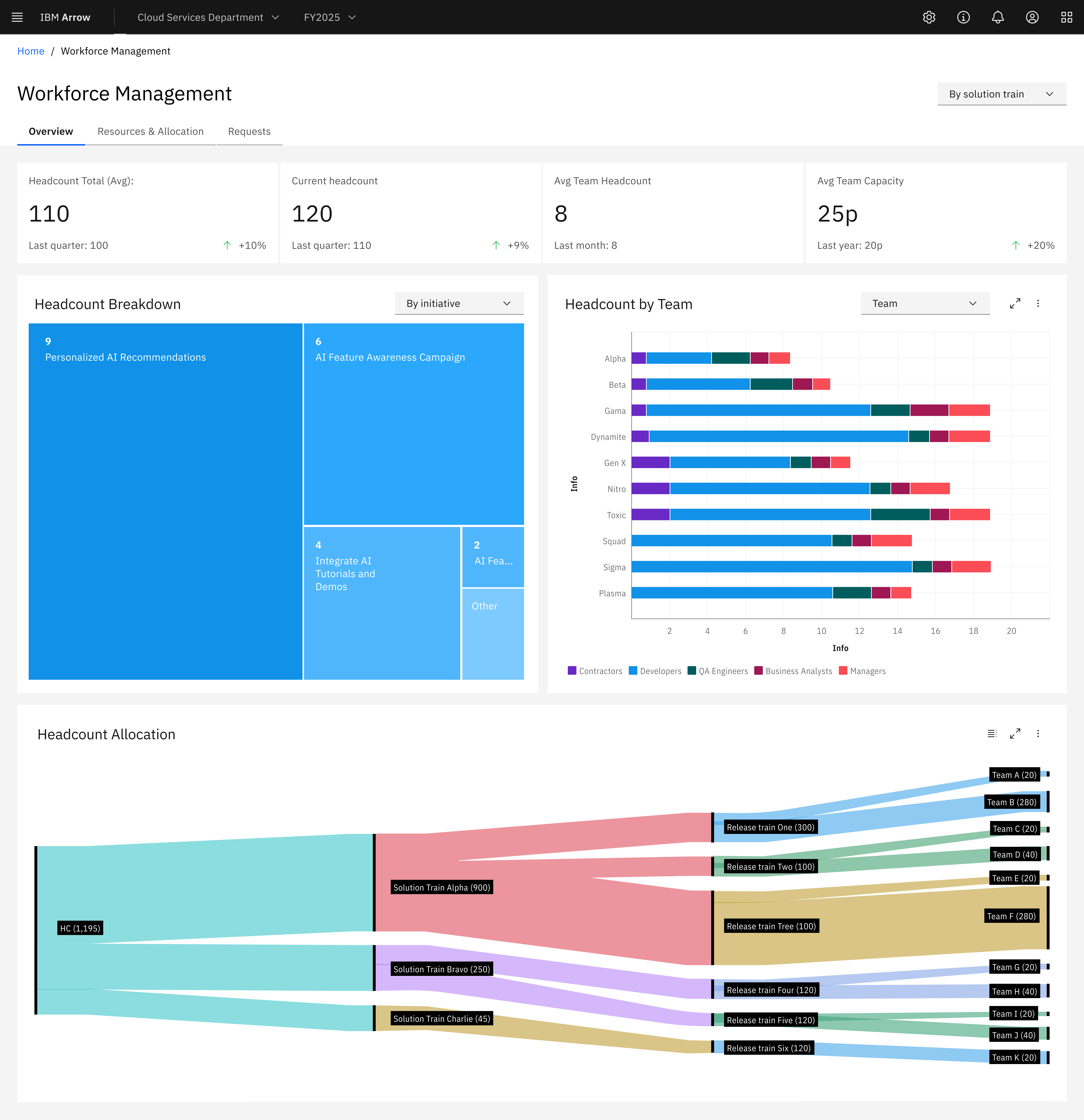
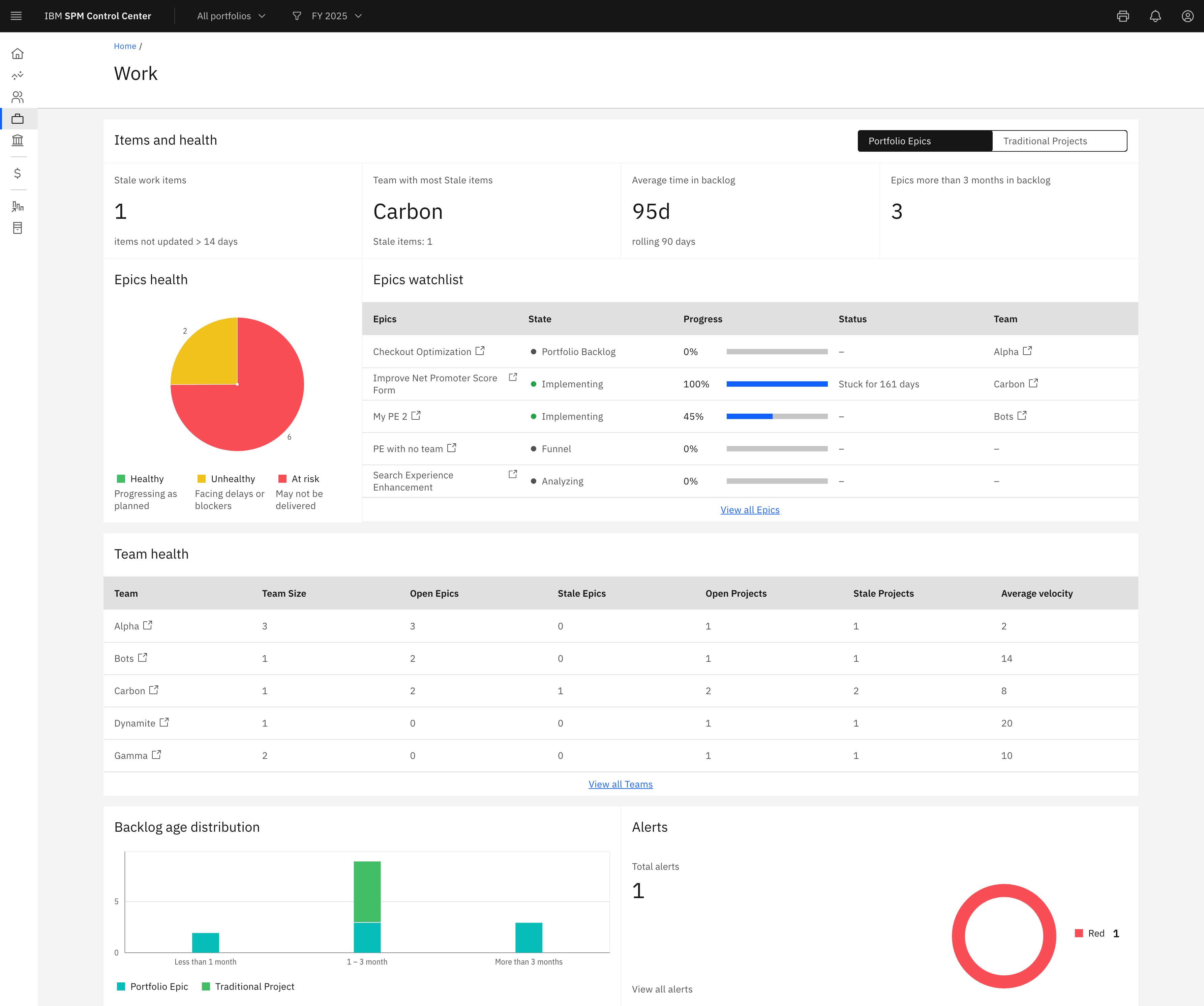
IBM Targetprocess is a Strategic Portfolio Management (SPM) SaaS that connects strategy, funding, and execution. It helps enterprises prioritize work, dynamically allocate resources, and continuously adapt plans. With real-time visibility and financial insights, organizations can deliver faster, clearer business outcomes.
N/A
Miro
Score 9.0 out of 10
N/A
Miro is a web-based Collaborative Whiteboard platform that provides teams with an infinite digital canvas for visual planning, diagramming, and workflow mapping. The platform integrates a spatial user interface with automated drawing tools and natural-language processing (NLP) to structure freeform ideas into defined project workflows and database schemas.
$10
per month per user
Pricing
IBM Targetprocess
Miro
Editions & Modules
No answers on this topic
1. Free - To discover what Miro can do. Always free
$0
2. Starter - Unlimited and private boards with essential features
$8
per month (billed annually) per user
3. Business - Scales collaboration with advanced features and security
$16
per month (billed annually) per user
4. Enterprise - For work across the entire organization, with support, security and control, to scale
contact sales
annual billing per user
Offerings
Pricing Offerings
IBM Targetprocess
Miro
Free Trial
Yes
Yes
Free/Freemium Version
No
Yes
Premium Consulting/Integration Services
Yes
No
Entry-level Setup Fee
Required
Optional
Additional Details
—
Monthly billing also available at $10 per month for the Starter plan, or $20 for the Business plan.
During our RFP and demo rating Apptio Targetprocess came out with the highest score by 3% and was the more cost effective of the closer rival. It rated the highest in 4 out of the 8 categories we graded and had one of the most cost effective implementation costs and ranked the …
Miro
Verified User
Engineer
Chose Miro
Has a limited functionality compared with Miro and White boarding was rough
It's too hard to collaborate quickly with people in Visio. Between installing the application and making sure you're licensed, it takes too much time. Miro is easy to get up and running with and can even support some collaboration with people who don't have a license. draw.io …
Apptio Targetprocess is well suited to track work and progress of that work. In addition it is easy to tie that work to OKRs. Cost and hours rollup across the work hierarchy works well. Our users like the flexibility of Targetprocess and the ability to develop their own views and reports Scenarios where it is less appropriate is to do executive level reporting and develop reports that can pull in all of our time data since there is a 300k record limit
For me, the greatest joy is watching a messy tangle of abstract thoughts instantly click into place. I can quickly drag in colorful sticky notes, connect them with smooth lines, and watch a beautiful, structured workflow come to life right before my eyes. It takes the stress out of alignment by letting everyone see the big picture immediately.
Extremely flexible: We are able to setup work for different groups in ways that work best for them.
Fantastic support group: They are extremely knowledgeable and helpful. I enjoy working with them.
Automation: Their automation capabilities have saved us a lot of time.
Customizing screens: We can go into code for the different entities, move fields around or hide them, add tabs or additional sections as needed to make for a streamlined user experience.
Reporting: Their reporting is flexible and phenomenal. There are so many different ways to pull data and the interface is easy to use.
Their user guide is well built and extremely helpful.
Makes internal coordination between admin team and tutors extremely painless. It's like a single place where everyone can drop ideas, get updates and notes without loss of context which usually happens in long email threads.
Versioning and board history are handled very well, which drastically reduces the workload. They help me track how a policy or math guideline has evolved, and also make it easy to revert changes if something doesn't work.
Comments stick exactly where they are meant to, making internal reviews much clearer. Admins don't have to guess which note refers to which rule or section.
Exports are clean, so even non-Miro teammates get it instantly.
Targetprocess is the most flexible application for tracking work among teams that we have found. This power comes from near limitless ability to customize your views on the work tracked in the system, and from the myriad reporting options to draw metrics and stats out of the data there. Custom fields, processes, and mashups all add to this flexibility and appeal.
Miro saves my day. I would spend at least 4x more time on documenting my projects and work without this tool. It support my day to day role and helps me be successful while saving my capacity. It is not only very easy to start working on it without additional training required, but also adapts to any use case that I might need to implement
Overall Targetprocess's usability is good. the tool is easy to use and has features which most BUs and organizations can use. Additional features like AI integration would help the tool and its overall usability. providing additional dashboards for specific roles and executives within the tool would benefit Targetprocess with its scale
This is a hard one.. and totally subjective.. Initially when i started using Miro, i had trouble scrolling here and there.. the canvas was so vast and zoomed out .. Now i have learnt how this works .. I feel we need some kind of indexing at board level, which will give the topics / headings in a concise way .. Like a birds eye view of the components on the board. That might improve usability a bit.
I have not encountered events where Miro is not available. It is quite nice and reliable to be fair, even on my freemium version (startup) I don't have reliability issues. It does have sometimes where the screen refresh or "freezes" or "consumes a lot of data" and we have to rewind windows and the likes, this instances are very less
Reports are fast loading, considering they can refresh in a second or less and we have 7 years of work tracked in over 40k entities. Pages can load slowly when the views are very busy, but not frustratingly. I am a console user most of my career and generally prefer it over webUI interfaces, but Targetprocess won me over from the beginning and I spend half my day using it now.
I took the loading quickly to be related to availability which I commented on before, so ditto with those comment on load time here. Although to reemphasize, Miro doesn't crash or just refuse to load like some other programs. The weak point of Miro for me is integration of files like Word, Excel, or PowerPoint (especially the later two). When you embed these, it gets slow, and complicated to bring them up while you're in the application.
TargetProcess' support is one of its strengths. The support team is very responsive and helpful when there is a problem but they're also proactive in providing good release notes and engaging with the community through a voting scheme to influence the priority of new features.
The team also releases new versions frequently with new features but with no knock-ons to currently working features.
We have never reached out to or contacted support because Miro's platform has been incredibly intuitive and user-friendly. The comprehensive resources available, such as tutorials, documentation, and community forums, have provided all the guidance we needed. The seamless integration with our existing tools and the reliability of the platform have ensured that we rarely encounter issues that require external assistance. This self-sufficiency has allowed us to focus more on our projects and collaboration without interruptions. Overall, our experience with Miro has been smooth and efficient, eliminating the need for additional support
There was a series of webinars which Miro hosted with our organization that went over the basics, then progressively became more advanced with additional sections. The instructors were knowledgeable, and provided examples throughout the sessions, as well as answered peoples' questions. There was ample time and experience on the calls to cover a range of topics. The instructors were also very friendly and sociable, as well as honest. Of course Miro isn't a "God-tool" that does absolutely everything, but the instructors were aware and emphasized the strengths where Miro had them and sincerely accepted feedback.
You should take some time to get everyone to agree how the system should be setup before work starts being tracked in Targetprocess, this avoids difficult and disruptive changes to processes or plugins later when everyone relies on it daily.
Easy to learn, Miro has a series of videos on YouTube that effectively taught this program to my team members and me. The program is drag-and-drop and works excellently. People pick up on how to use it efficiently, and it's great for organizing ideas more freely. This product is more challenging for some older audiences who are not accustomed to using a touchpad, but for most, it was very easy to use.
I would say TargetProcess is an incredibly wonderful tool. As compare to JIRA Software, it is a fully featured product. It fulfills all my business needs. Tracking efficiency of this application is quite favorable in order to track all the details from a certain project in just a few minutes.
We looked at other tools for the freeform communication and collaboration, as well as for tracking timelines and roadmaps, and Miro was just the best overall tool because we can keep everything in one spot and our team only has to learn and one use tool, as opposed to having to log into multiple spots.
We use the hosted version of Targetprocess and have never run into limitations or degraded performance due to scalability. Excellent performance over 7 years!
Maybe is possible now so... Could be useful to manage in some way source code for the projects? not to edit so when we make solutions with different components in MIro, maybe each component could redirect to the source code of this component