Overview
ProductRatingMost Used ByProduct SummaryStarting Price
Sage Intacct
Score 8.6 out of 10
N/A
Sage Intacct is a cloud ERP system targeted at high-growth small and medium-sized businesses. Intacct includes applications for core financials and accounting, purchasing, order management, and financial reporting and business intelligence. It also integrates with 3rd party software like Salesforce.N/A
Sage 100cloud
Score 7.9 out of 10
Mid-Size Companies (51-1,000 employees)
Sage 100 (or Sage 100cloud is a business management software offering a broad range of modules designed to meet the many needs of virtually any business. It encompasses financial operations and accounting, payroll, business intelligence, CRM, eBusiness, manufacturing and distribution.
$0
Per User per Month
Pricing
Sage IntacctSage 100
Editions & Modules
No answers on this topic
Sage 100 ERP Standard
Custom Pricing
Per Seat per Month
Sage 100 ERP Advanced
Custom Pricing
Per Seat per Month
Sage 100 ERP Premium
Custom Pricing
Per Seat per Month
Sage 100 ERP Online
Per User per Month
Offerings
Pricing Offerings
Sage IntacctSage 100cloud
Free Trial
NoNo
Free/Freemium Version
NoNo
Premium Consulting/Integration Services
YesNo
Entry-level Setup FeeNo setup feeNo setup fee
Additional DetailsMust contact sales team for pricing.
More Pricing Information
Community Pulse
Sage IntacctSage 100
Considered Both Products
Sage Intacct
Chose Sage Intacct
We made the switch as Sage 100 was no longer scalable for our business. There are still some things that Sage 100 did better than Intacct - see prior comments regarding joint checks and overall project summaries. However, i am hoping with time those issues will be corrected in …
Chose Sage Intacct
Sage 100 was not cloud based at the time of our implementation
Chose Sage Intacct
While I have liked all of the Sage products that I have used, Sage Intacct is simply just better for companies with complex accounting needs. The customized reporting blows the other products out of the water.
Chose Sage Intacct
We outgrew Sage 50, which is straightforward software. It doesn't have many drilled-down capabilities, but it's easier to learn and get proficient than Intacct. There is a more significant learning curve for Intacct, but there is also a more substantial benefit of having it. …
Chose Sage Intacct
Sage Intacct gave us more of what we needed versus other systems and our previous system. We are planning on growing and need to be able to have a system that could grow with us. Sage Intacct does just that.
Chose Sage Intacct
We quickly eliminated all ERP offerings that required care and feeding of a dedicated server, strongly opting for a multi-tenant hosted SaaS solution. We intentionally wanted to eliminate our IT department from needing to support our Finance and Accounting team, and Sage …
Chose Sage Intacct
Sage is very powerful and very good when it comes to audit trails. It is more challenging to correct a simple mistake which causes some frustration.
Chose Sage Intacct
I have used AccPac, Peachtree, QuickBooks and Great Plains as out of box systems and found Intacct the most intuitive and user friendly. Staff start-up time and familiarity with the software has been impressive. In addition, real time processing with a multiple user interface …
Chose Sage Intacct
I have used Sysoro, Summitt, Quick Books, Accpac, Great Plain Dynamics, Real World, JD Edwards, MAS 90 and Cougar Mountain, non can touch it in terms of overall functionality and ease of use.
Sage 100cloud
Chose Sage 100
We have used Foundation and it did not work out well, so we selected Sage 100 because the implementation and functionality was much better. We didn't have to keep coming up with workarounds or complications on Sage 100. Also the data security is better.
Features
Sage IntacctSage 100
Payroll Management
Comparison of Payroll Management features of Product A and Product B
Sage Intacct
7.0
333 Ratings
8% below category average
Sage 100
8.0
10 Ratings
9% above category average
Pay calculation7.05 Ratings7.210 Ratings
Benefit plan administration6.45 Ratings6.48 Ratings
Direct deposit files7.14 Ratings9.610 Ratings
Salary revision and increment management6.94 Ratings00 Ratings
Reimbursement management7.4333 Ratings00 Ratings
Customization
Comparison of Customization features of Product A and Product B
Sage Intacct
7.8
780 Ratings
1% above category average
Sage 100
4.7
11 Ratings
45% below category average
API for custom integration8.0736 Ratings4.18 Ratings
Plug-ins7.7590 Ratings5.311 Ratings
Security
Comparison of Security features of Product A and Product B
Sage Intacct
8.6
1192 Ratings
5% above category average
Sage 100
8.5
18 Ratings
2% above category average
Single sign-on capability8.8975 Ratings8.717 Ratings
Role-based user permissions8.51158 Ratings8.217 Ratings
Reporting & Analytics
Comparison of Reporting & Analytics features of Product A and Product B
Sage Intacct
7.8
1278 Ratings
0% below category average
Sage 100
7.1
20 Ratings
3% below category average
Dashboards7.71150 Ratings7.113 Ratings
Standard reports8.01244 Ratings7.319 Ratings
Custom reports7.81227 Ratings6.918 Ratings
General Ledger and Configurable Accounting
Comparison of General Ledger and Configurable Accounting features of Product A and Product B
Sage Intacct
8.1
1406 Ratings
6% above category average
Sage 100
7.4
20 Ratings
4% below category average
Accounts payable8.41304 Ratings8.420 Ratings
Accounts receivable8.21141 Ratings8.716 Ratings
Cash management8.21212 Ratings00 Ratings
Bank reconciliation8.21204 Ratings00 Ratings
Expense management8.1857 Ratings00 Ratings
Time tracking7.4464 Ratings00 Ratings
Fixed asset management7.7617 Ratings00 Ratings
Multi-currency support8.2466 Ratings00 Ratings
Multi-division support8.6766 Ratings00 Ratings
Regulations compliance7.8462 Ratings00 Ratings
Electronic tax filing7.7339 Ratings00 Ratings
Self-service portal7.6574 Ratings00 Ratings
Global Financial Support8.0339 Ratings5.06 Ratings
Intercompany Accounting8.5808 Ratings00 Ratings
Journals and Reconciliations8.71118 Ratings8.410 Ratings
Enterprise Accounting8.2477 Ratings00 Ratings
Configurable Accounting8.3651 Ratings8.18 Ratings
Centralized Rules Framework8.1465 Ratings00 Ratings
Standardized Processes8.3759 Ratings8.18 Ratings
Primary and Secondary Ledgers00 Ratings7.99 Ratings
Inventory Management
Comparison of Inventory Management features of Product A and Product B
Sage Intacct
6.7
446 Ratings
12% below category average
Sage 100
8.3
14 Ratings
5% above category average
Inventory tracking7.7332 Ratings8.014 Ratings
Automatic reordering5.58 Ratings8.510 Ratings
Location management8.3414 Ratings7.98 Ratings
Manufacturing module5.25 Ratings00 Ratings
Order Management
Comparison of Order Management features of Product A and Product B
Sage Intacct
7.7
664 Ratings
1% above category average
Sage 100
7.9
13 Ratings
1% above category average
Pricing8.0417 Ratings8.413 Ratings
Order entry8.3588 Ratings8.113 Ratings
Credit card processing7.7420 Ratings7.912 Ratings
Cost of goods sold6.314 Ratings8.713 Ratings
End-to-end order visibility8.0339 Ratings00 Ratings
Order Orchestration00 Ratings6.76 Ratings
Subledger and Financial Process
Comparison of Subledger and Financial Process features of Product A and Product B
Sage Intacct
-
Ratings
Sage 100
8.0
10 Ratings
7% above category average
Billing Management00 Ratings7.38 Ratings
Cash and Asset Management00 Ratings8.19 Ratings
Travel & Expense Management00 Ratings7.97 Ratings
Budgetary Control & Encumbrance Accounting00 Ratings8.56 Ratings
Period Close00 Ratings8.19 Ratings
Project Financial Management
Comparison of Project Financial Management features of Product A and Product B
Sage Intacct
-
Ratings
Sage 100
8.0
5 Ratings
5% above category average
Budgeting and Forecasting00 Ratings9.04 Ratings
Project Costing00 Ratings9.03 Ratings
Cost Capture00 Ratings8.04 Ratings
Capital Project Management00 Ratings8.63 Ratings
Customer Contract Compliance00 Ratings7.83 Ratings
Project Revenue Recognition00 Ratings7.83 Ratings
Project Execution Management
Comparison of Project Execution Management features of Product A and Product B
Sage Intacct
-
Ratings
Sage 100
5.3
2 Ratings
27% below category average
Project Planning and Scheduling00 Ratings7.02 Ratings
Task Insight for Project Managers00 Ratings7.02 Ratings
Project Mobile Functionality00 Ratings5.02 Ratings
Definable Resource Pools00 Ratings5.01 Ratings
Grants Management
Comparison of Grants Management features of Product A and Product B
Sage Intacct
-
Ratings
Sage 100
7.0
2 Ratings
5% below category average
Award Lifecycle Management00 Ratings7.02 Ratings
Procurement
Comparison of Procurement features of Product A and Product B
Sage Intacct
-
Ratings
Sage 100
5.4
3 Ratings
25% below category average
Bids Analyzed and Compared00 Ratings5.01 Ratings
Contract Authoring00 Ratings5.01 Ratings
Contract Repository00 Ratings5.01 Ratings
Requisitions-to-Purchase Orders Integrated00 Ratings10.02 Ratings
Supplier Management00 Ratings8.53 Ratings
Risk Management
Comparison of Risk Management features of Product A and Product B
Sage Intacct
-
Ratings
Sage 100
4.4
1 Ratings
39% below category average
Risk Repository00 Ratings5.01 Ratings
Control Management00 Ratings5.01 Ratings
Control Efficiency Assessments00 Ratings5.01 Ratings
Issue Detection00 Ratings3.01 Ratings
Remediation and Certification00 Ratings4.01 Ratings
Logistics
Comparison of Logistics features of Product A and Product B
Sage Intacct
-
Ratings
Sage 100
7.8
4 Ratings
14% above category average
Transportation Planning and Optimization00 Ratings10.03 Ratings
Transportation Execution Management00 Ratings10.02 Ratings
Trade and Customs Management00 Ratings7.02 Ratings
Fulfillment Management00 Ratings10.03 Ratings
Warehouse Workforce Management00 Ratings7.63 Ratings
Manufacturing
Comparison of Manufacturing features of Product A and Product B
Sage Intacct
-
Ratings
Sage 100
8.3
5 Ratings
12% above category average
Production Process Design00 Ratings8.42 Ratings
Production Management00 Ratings8.43 Ratings
Configuration Management00 Ratings10.03 Ratings
Work Execution00 Ratings10.03 Ratings
Manufacturing Costs00 Ratings5.03 Ratings
Supply Chain
Comparison of Supply Chain features of Product A and Product B
Sage Intacct
-
Ratings
Sage 100
7.3
5 Ratings
2% above category average
Forecasting00 Ratings6.04 Ratings
Inventory Planning00 Ratings8.05 Ratings
Performance Monitoring00 Ratings8.05 Ratings
Product Lifecycle Management
Comparison of Product Lifecycle Management features of Product A and Product B
Sage Intacct
-
Ratings
Sage 100
2.6
2 Ratings
94% below category average
Proposal Management00 Ratings1.01 Ratings
Product Master Data Management00 Ratings10.02 Ratings
Best Alternatives
Sage IntacctSage 100
Small Businesses
QuickBooks Self-Employed (discontinued)
Score 8.9 out of 10
Zoho One
Zoho One
Score 9.4 out of 10
Medium-sized Companies
Zoho Books
Zoho Books
Score 9.1 out of 10
Infor VISUAL
Infor VISUAL
Score 8.9 out of 10
Enterprises
SAP S/4HANA Cloud
SAP S/4HANA Cloud
Score 8.5 out of 10
24SevenOffice
24SevenOffice
Score 8.9 out of 10
All AlternativesView all alternativesView all alternatives
User Ratings
Sage IntacctSage 100
Likelihood to Recommend
8.4
(1454 ratings)
7.7
(24 ratings)
Likelihood to Renew
9.8
(82 ratings)
7.6
(5 ratings)
Usability
6.3
(140 ratings)
8.0
(8 ratings)
Availability
7.2
(13 ratings)
-
(0 ratings)
Performance
7.0
(14 ratings)
9.1
(1 ratings)
Support Rating
8.4
(127 ratings)
9.0
(3 ratings)
In-Person Training
8.2
(6 ratings)
-
(0 ratings)
Online Training
2.0
(13 ratings)
-
(0 ratings)
Implementation Rating
8.2
(21 ratings)
6.0
(1 ratings)
Configurability
7.1
(12 ratings)
-
(0 ratings)
Ease of integration
8.9
(309 ratings)
-
(0 ratings)
Product Scalability
7.3
(11 ratings)
-
(0 ratings)
Vendor post-sale
7.0
(10 ratings)
-
(0 ratings)
Vendor pre-sale
8.3
(10 ratings)
-
(0 ratings)
User Testimonials
Sage IntacctSage 100
Likelihood to Recommend
Sage
It is well-suited for nonprofit accounting with its ability to track expenses and revenues by both department and funding source. It is easy to set up vendors and customers for invoices and bill payments. It is less appropriate for proper budget management and purchasing with multiple approvers, particularly when edits are required.
Read full review
Sage
Sage 100 has been well suited for running the monthly accounts receivable and accounts payable aging reports. This helps us track our accounts that need to be collected and payments that need to be made. Our field operations team has been slow and unwanting to adopt the Sage Field Ops just because they're resistant to change and technology. It's less appropriate for really detailed accounting reports spanning for long periods of time with all accounts because it takes a very long time to run and process.
Read full review
Pros
Sage
  • Custom, real-time financial reporting. I am able to streamline my reporting to pull in various account groups and calculations which save me time from having to do it in Excel.
  • Out of the box standard reports for clients who don't require as custom of reporting or even as a great starting point to build out reports.
  • Integrations with other platforms, such as Airbase, various banks, Rippling, etc.
  • The dashboard module is extremely helpful in my monthly review of various entities.
Read full review
Sage
  • Simple to implement and use. Operation very intuitive so new employees are quickly trained.
  • It is very flexible with many modules and many features allows for easy customization to suit particular needs of any department or company.
  • Context sensitive help, training and support make it easy for a company to operate with out a lot of additional outside tech support.
  • Scalable plenty of room to grow as the business grows without being bloated.
  • Pricing is very reasonable.
Read full review
Cons
Sage
  • Downloading bill register reports for all the entities at the top level would be helpful.
  • An increase in the Time frame of the Auto-Log out feature for security will be helpful.
  • I think there is some room in the automation part that can be improved.
Read full review
Sage
  • Sage 100 at times will simply not connect to our server, we get remote support & all is well but, that issue tends to happen 2-3X a year.
  • Other than the above, I really can't complain. Coming from a more custom U.V. type database that used a whole bunch of codes to navigate, I think Sage 100 is 10x easier to use.
Read full review
Likelihood to Renew
Sage
Sage Intacct is continuously evolving and increasing it's functionalities. I am excited to attend conferences to learn what is in the roadmap for future releases. Additionally, using Sage Intacct allows me grow as a professional, I am really enjoy the knowledge that I have within the product to be able to share my experiences.
Read full review
Sage
I would put this out to bid, if I were at the same organization. There have been a lot of improvements and changes in enterprise software and my preference would be to find a good web-based or cloud-based tool. Lower overall cost of ownership and improved efficiency would be my target criteria for a rebid of this.
Read full review
Usability
Sage
The ease of use as a seasoned user is wonderful; however, new users struggle to adapt to the program efficiently. Better training videos--all in one location--would be beneficial. The use of a "sandbox" environment is a great tool for new employees or for the fiscal department to test certain journal entries or other transactions to verify accuracy of data.
Read full review
Sage
Overall Sage 100 has been pretty user friendly. If we have a question on anything, we are able to contact our implementation rep who helps us right away. Some of the Sage Field Operations may not be as intuitive for our field personnel to use. I wish the reports ran faster so that we could run and put together many reports quickly at once.
Read full review
Reliability and Availability
Sage
There has only been one occurrence where Sage Intacct was not available to me, however I had already been working a number of hours trying to get a project completed. It honestly allowed me to step back and take a much needed break.
Read full review
Sage
No answers on this topic
Performance
Sage
As fas as integration is concerned I don't feel this slows Sage Intacct down at all. However, sometimes I do feel it takes some larger reports more time to load due to all the detail. As well as, I "move very fast" in my motions so sometimes I double click on fuctions too quickly and the system seems to think that I have a duplicate request.
Read full review
Sage
No answers on this topic
Support Rating
Sage
Only a few times have we had to reach out to support, and every time we did, we received a relatively quick response and a solution was found fairly quickly. Only once was there an issue that took longer than a week to resolve, but it still did eventually get solved.
Read full review
Sage
Sage Support is very good. I usually get a person on the phone in a short time frame and usually get my issues fixed in one called.
Read full review
In-Person Training
Sage
I have taken in person training classes at several of the annual Sage Intacct user conferences. It is very interactive and the trainers are very easy to follow and understand. They are great at getting everyone in the class involved. They also make sure everyone has learned to task before moving to a new one.
Read full review
Sage
No answers on this topic
Online Training
Sage
The free training is very minimal. For what we pay for the service, I would like more training. We end up training new users in-house because the provided free training is not nearly comprehensive enough. That being said, the training provided, for the material covered, was adequate and relevant for the given topics.
Read full review
Sage
No answers on this topic
Implementation Rating
Sage
I would not use a thrid party administrator to implement your system, especially if you are going to be modifying the system at all. Use Intacct implementors as they will be able to better support you on any issues that come up after you go live.
Read full review
Sage
We had an advantage in implementing the tool in that our director of Ops had been part of the team implementing the ERP for other users so we knew what to expect and were able to avoid a lot of the challenges people sometimes face with implementations. However, the process still took far longer than desired.
Read full review
Alternatives Considered
Sage
As a CPA in public accounting, I was exposed to many systems. I was in on the ground floor with the implementation of NetSuite for a client; it was clunky, the reporting was ugly, and it wasn’t user friendly. Sage Intacct is a great option for mid-size organizations who have outgrown Quickbooks.
Read full review
Sage
I didn't choose Sage 100 ERP -- it was already in use when I started at the organization over five years ago. It has the same types of pros and cons as other big hulking software suites meant to power the infrastructure of corporations. It's slow, tough to customize, and doesn't connect well with other software. It does bring all the information into one place, which is great
Read full review
Scalability
Sage
You can do a lot with this system and integrate it with a lot of your additional systems you use daily.
Read full review
Sage
No answers on this topic
Return on Investment
Sage
  • Sage Intacct has made a very positive impact to our business objectives; it has provided strong ROI through automation features that reduce manual data input and associated risk of error, enhancing accuracy and operational efficiency.
  • It empowers us to make data-driven decisions that further refine our strategic plan by bettering the process of financial close with real-time and detailed reporting.
  • This also extends to multi-entity management, which eased consolidation and thus supported growth and scaling. This feature-rich software finally serves to drive productivity further and facilitate resource usage.
Read full review
Sage
  • Sage 100 overall had a very positive overall ROI for the business. All users were making decisions based on the same information and valuable time was no longer spent trying to analyze data from a number of sources.
  • Moving the warehouses to using Sage 100 reduced the operating expense of the distribution side of the business by 5% on an annual basis (~$100K).
Read full review
ScreenShots

Sage Intacct Screenshots

Screenshot of Accounts Receivable: Automate accounts receivable processes.Screenshot of Revenue Recognition: Automated and compliant revenue recognition with complete support for ASC 606 and IFRS 15.Screenshot of Real-Time Reporting: Real-time reporting with up-to-minute financials across multiple business dimensions. Show only the metrics that matter based on the user viewing the dashboard.Screenshot of the times and expense management dashboard, which is customized to reflect the user's role, displaying relevant information that aligns with their position, thereby presenting each individual with the data most pertinent to their responsibilities.Screenshot of the detailed company metrics used to forecast business growth.Screenshot of the order management workflows, which are automated to accelerate quote-to-cash sales

Sage 100cloud Screenshots

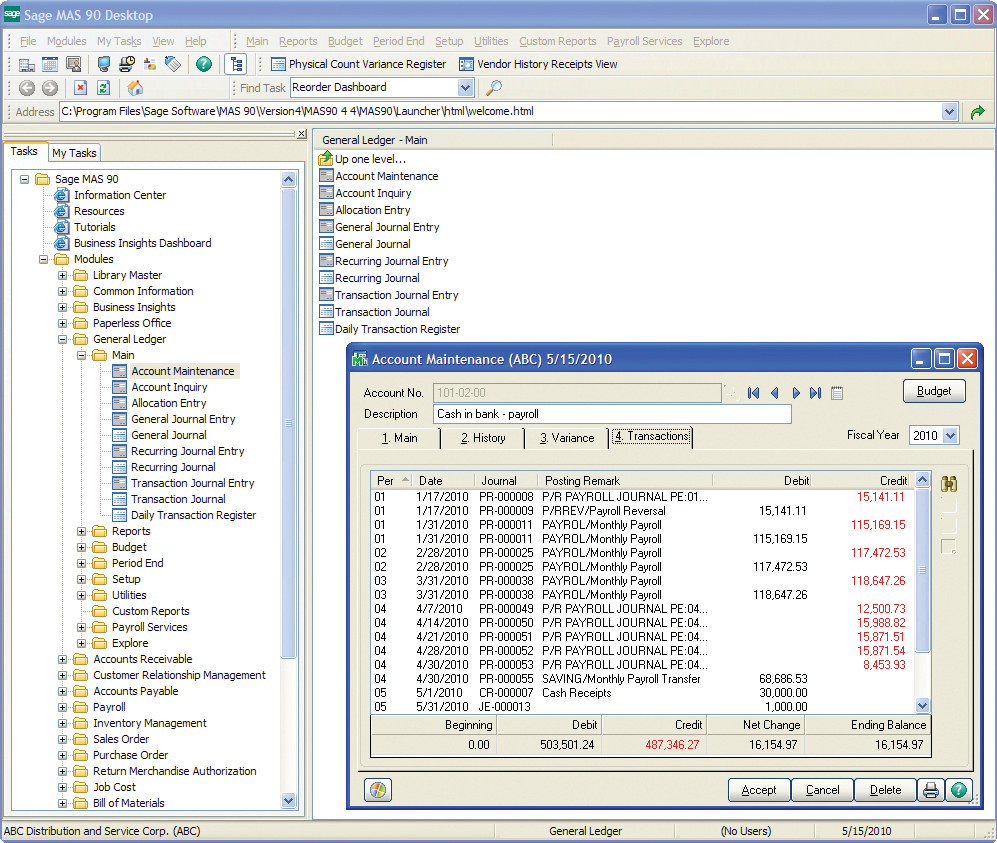
Screenshot of General Ledger uses our exclusive dual grid entry for quick, efficient, and accurate data entry. The grid entry format allows you to easily customize the data entry screens.