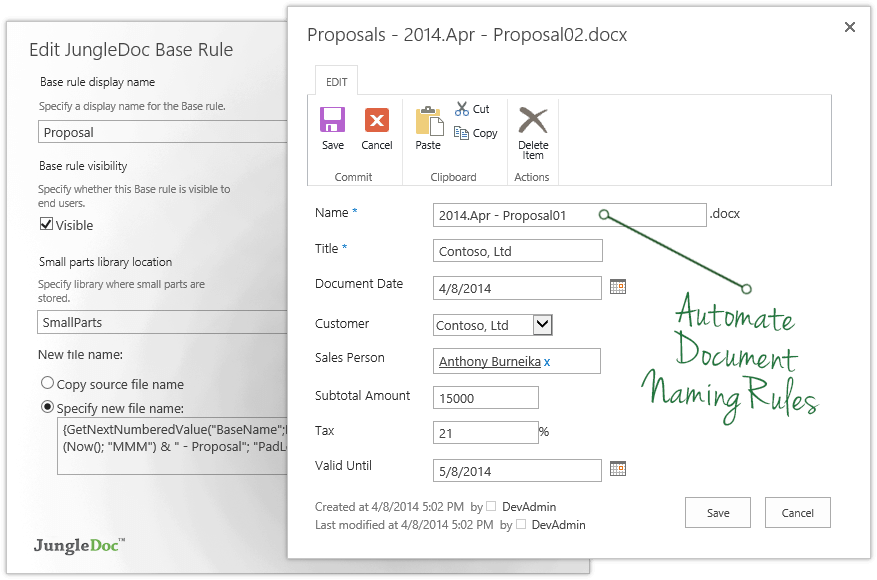
JungleDocs takes properties and parts of an existing document and puts them into a new one. The vendor’s value proposition is that this prevents possible mistakes and saves up to 90% of the user’s time that would be used on inputting and copy-pasting operations. Key features include: Word and PowerPoint document generation and automation Document mail merge from SharePoint lists Template processing engine uses Open XML technology for very fast and…
N/A
M‑Files
Score 8.9 out of 10
N/A
M-Files delivers Context-First Document Management with a metadata-driven architecture that improves productivity across the document lifecycle. By linking documents to the people, processes, clients, and projects that give them meaning, M-Files creates a unified environment that strengthens governance.
N/A
Wondershare PDFelement
Score 5.0 out of 10
N/A
PDFelement is a document management solution from Wondershare Software headquartered in China.
$79.99
per year per user
Pricing
JungleDocs
M‑Files
Wondershare PDFelement
Editions & Modules
No answers on this topic
No answers on this topic
PDFelement
79.99USD
per year per user
PDFelement
129.99USD
one-time fee per user
Offerings
Pricing Offerings
JungleDocs
M‑Files
Wondershare PDFelement
Free Trial
Yes
Yes
Yes
Free/Freemium Version
No
No
No
Premium Consulting/Integration Services
No
No
No
Entry-level Setup Fee
No setup fee
No setup fee
No setup fee
Additional Details
Licensed per Web Front End (WFE) Server
—
For Individuals:
Yearly Plan: $79.99/user;
2-Year Plan: $109.99/user
Perpetual Plan(one-time): $129.99/user
For Teams:
Yearly plan starts at $109/year for 1 user
For Education:
Yearly Plan: $47.99/user;
Perpetual Plan(one-time): $99.99/user
More Pricing Information
Community Pulse
JungleDocs
M‑Files
Wondershare PDFelement
Considered Multiple Products
JungleDocs
Verified User
Anonymous
Chose JungleDocs
JungleDocs was intuitively easier to use than eFileCabinet and Sharepoint. JungleDocs works with Sharepoint to extend its feature set and make it easier to use. Our team didn't feel that eFileCabinet was suitable for all of our use cases, especially the RFI response …
We are still fairly new to automating our contracts and documents so JungleDocs is the only program we have used so far. Chose to use JungleDocs because offered a free trial and the department already used SharePoint and JungleDocs is compatible with SharePoint.
Configuration of general access vs Libraries and silos of data makes this such an easier application to use. Especially when it comes to workflows and security and then support of that configuration.
Microsoft Sharepoint is not very flexible in my opinion. Mass changes are not easy to carry out. Microsoft Teams data is too much. I can't keep up with all the Microsoft Teams groups I'm in.
We selected it because it is having out of box integration capabilities to connect with M-Files. We are using M-Files already as a content management system and we were lacking the feature of document sharing. With Hubshare now this gap has been filled.
Document handling is much easier as in Sharepoint. We select M-files because its metadata model fits our needs better, and it is easier to use than Sharepoint. You can customize metadata easily and fast.
M-Files provides an easier way of managing document that is needed for any organization and the integrations to other systems makes life easier when there needs migration of the documents to M-Files.
M-Files is with totally unique features from these solutions, one of major is all these solutions have folder structure where M-Files has content based structure. Secondly one of major features is that it enables integration with filters to search within Drawing Documents, most …
I've compared recently with Box, but they still predicate their storage on WHERE instead of WHAT, which means if it isn't in a specific folder, you won't find it. Some documents may relate to multiple projects. In M-Files instead of putting a copy of a file in many folders …
The customization ability seemed to be a level above and easy to navigate and available options are constantly being reinvented. We have used OnBase for years and now desire to move away from this option for a number of reasons.
M-Files is a great ECM platform that has many of the bells and whistles companies are looking for for a casual and easy to use enterprise content system.
M-Files is considered as document management system. However, we started with M-Files using it as application and data management platform. We planned the meta data structures well and now we benefit from it as we start using M-Files as document management system. We considered …
They have closer functions, but in my opinion, M-Files has many more features for document handling. Only GreenDocs has more capabilities related to Engineering, and if your company needs a solution for this area, this would be the best application. M-Files supports more …
PDFelement is the ideal solution for Adobe Acrobat because of its small size, clean interface, quick start, strong features, light system resource usage, and low pricing.
They are doing quite aggressive marketing, therefore it is very present everywhere. Pricing is in the range for private users. If features are improved, I probably would buy it again, otherwise think next time would try the competition (e.g., Nitro).
I used Adobe Acrobat for around 15 years in different large scale companies. But it is too expensive for single users or small enterprises and Adobe offers only yearly subscription which I personally do not like.
Adobe PDF is the alternative for me but much more expensive. It has more features but I don’t need them. For a small business PDFelement's affordability makes it a cost effective option.
I didn't try or buy other programs, but did a good bit of research on them. I went with PDFelement because of the lower pricing, and because of the rich features I learned it had.
I also appreciated the great customer service I received from reps in the community forums, which …
PDFelement has among the several options available in the market, a productivity solution with relevant acquisition costs associated with the benefits offered. Among the functions available in the application, other companies have the same function with lower performance and …
I haven't used any other product besides PDFelement. I found a product that I love and I'm sticking with it. I will say that I went with PDFelement based on reviews and based on the features that this product supplies vs. the others. I trust the company behind PDFelement (been …
JungleDocs is good at reducing the amount of time it takes to create documents/contracts by auto-populating the documents, but it takes some time to get things started up. Harder for members of the department who are less tech savvy to get the hang of the program so in those cases it has decrease efficiency. But for members who are more familiar with metadata and automation processes, it has improved their efficiency.
M‑Files is great for companies with multiple locations. Drive letters can become cumbersome to use and collaborate with colleagues and M‑Files fills that gap. The check out/check in system is great and allows only one editor at a time. This can be good and bad depending on the situation.
PDFelement Pro is well suited for all of our needs and our clients' needs. I bought the Windows version and liked it so much that I purchased the Mac version at the discount that I was offered at checkout. It performs well and is easy to learn and use. Companies could save so much money by using PDFelement instead of Adobe Acrobat Standard/Pro
More user friendly customization options that do not require knowledge of coding/scripting. For example, prompting the creation of a new document from a template in a workflow.
When using the 'insert property' feature in a Word doc, I would love to convert dates from a mm/dd/yy format to be written out (such as September 21, 2018). Or possibly even just to pull the year or the month from a selected date to insert into a document.
I've often wished that I could find more detailed tutorials online for some features.
I wish there was a lighter program for just reviewing a document and then to transition seamlessly to an editing mode. It takes a few seconds longer to load than Preview on my Mac, and based on that frustration, I use Preview to view documents.
M-files meets our almost all needs, we dont have other option to replace m-files. it saves lots, like Hardware because of Vault Feature means we can create many vaults (mini-servers) in m-files in other solutions we need more hardware for more installations.
It is a powerful system that can locate content fast and effectively. The system takes quite some time to setup initially. It can be hard for M-Files support to know how businesses operate and how they want to use the system in a way that works for them. The customization makes it great for companies to cater to their own needs. Once the system is set up in a way that makes sense for the business, the user experience is positive. There is room for improvement in the notifications, workflow, and support areas.
I noticed some lagging with the integration with Microsoft Office but not so much that I would not use it. It has gotten better with updates. to be fair the issues were when Office 2013 first came out.
There is a lot of learning. Although some of the functions you can probably pick up relatively quickly, some of them, including compressing the size or using a different language, remains a myth to me.
Usually when I need help from them I got support and it was very good and focused to solve my problem. I didn't have so many problems, but when used it worked. I just would like to have a support in my native language, but I can understand that sometimes is hard for the companies.
Recently I have had a problem with introducing another laptop to the same license. I wrote an email to the Support Team of Wondershare Software and they successfully fixed the issue in less than 24 hours. Very unusual and impressive.
The key insight is that the most important thing is to have a open mind. The application is easy to use, but if you have a company with different views and it is not aligned could be a huge problem. So the company transformation is required together with the application. Ensure to use as much as possible the capabilities of the application helps to have best ROI.
JungleDocs was intuitively easier to use than eFileCabinet and Sharepoint. JungleDocs works with Sharepoint to extend its feature set and make it easier to use. Our team didn't feel that eFileCabinet was suitable for all of our use cases, especially the RFI response documents. We used a scorecard to rank the products and JungleDocs proved to be the winner.
I've compared recently with Box, but they still predicate their storage on WHERE instead of WHAT, which means if it isn't in a specific folder, you won't find it. Some documents may relate to multiple projects. In M-Files instead of putting a copy of a file in many folders (thus having many copies) you can build out the relationships, so there is only 1 copy of a document which prevents multiple "originals" from being developed separately.
I haven't used any other product besides PDFelement. I found a product that I love and I'm sticking with it. I will say that I went with PDFelement based on reviews and based on the features that this product supplies vs. the others. I trust the company behind PDFelement (been using Wondershare Ultimate Video Converter for years), so I trusted the name
The price we pay for M-Files is about one third less than the price that we were paying our previous vendor plus we have a custom-built amazing dependable system with great support.
From a compliance and legal standpoint, our policies are always available to end users including easy access to previous versions.