TrustRadius: an HG Insights company

Save this comparison

Save this comparison

Add Product

Recommended Comparisons

    Overview
    ProductRatingMost Used ByProduct SummaryStarting Price

    MethodCRM

    Score9.1 out of 10
    N/AMethod:crm is a QuickBooks-integrated, cloud-based CRM platform.

    $35

    per month per user

    OneSpan Sign

    Score9.6 out of 10
    Enterprise companies (1,001+ employees)
    OneSpan Sign (formerly eSignLive) is an e-signature solution for secure document signing processes that enables organizations to digitize business processes and eliminate costly paper and inconvenient “wet” signatures.

    $240

    per year per user

    Pricing
    MethodCRMOneSpan Sign
    Editions & Modules
    CRM Quick Start
    $35
    per month per user
    CRM Pro
    $59
    per month per user
    CRM Enterprise
    $97
    per month per user
    CRM Multi-Entity
    Custom Quote
    Free Trial
    $0
    Free for 30 Days
    Professionnal
    $20
    Per User per Month
    Enterprise
    Call for Pricing
    Enterprise
    Call for pricing
    Contract
    Offerings
    Pricing Offerings
    MethodCRMOneSpan Sign
    Free Trial
    YesYes
    Free/Freemium Version
    NoNo
    Premium Consulting/Integration Services
    YesYes
    Entry-level Setup FeeNo setup feeNo setup fee
    Additional DetailsDiscount available for annual billing.—
    More Pricing Information
    Community Pulse
    MethodCRMOneSpan Sign
    Considered Both Products
    Method Integration Inc.
    No answer on this topic
    OneSpan
    No answer on this topic
    Key User Insights
    Would buy again
    100%
    Would buy again
    19 Answers
    100%
    Would buy again
    7 Answers
    Delivers good value for the price
    100%
    Delivers good value for the price
    17 Answers
    100%
    Delivers good value for the price
    7 Answers
    Happy with the feature set
    100%
    Happy with the feature set
    19 Answers
    100%
    Happy with the feature set
    7 Answers
    Lived up to sales and marketing promises
    100%
    Lived up to sales and marketing promises
    15 Answers
    100%
    Lived up to sales and marketing promises
    6 Answers
    Implementation went as expected
    100%
    Implementation went as expected
    16 Answers
    100%
    Implementation went as expected
    5 Answers
    Features
    MethodCRMOneSpan Sign
    Sales Force Automation
    Comparison of Sales Force Automation features of MethodCRM and OneSpan Sign
    Feature
    MethodCRM
    8.0
    22 Ratings
    2% above category average
    OneSpan Sign
    -
    Ratings
    Customer data management / contact management8.322 Ratings00 Ratings
    Workflow management8.320 Ratings00 Ratings
    Territory management1.81 Ratings00 Ratings
    Opportunity management8.320 Ratings00 Ratings
    Integration with email client (e.g., Outlook or Gmail)8.920 Ratings00 Ratings
    Contract management8.711 Ratings00 Ratings
    Quote & order management9.118 Ratings00 Ratings
    Interaction tracking9.019 Ratings00 Ratings
    Channel / partner relationship management10.012 Ratings00 Ratings
    Customer Service & Support
    Comparison of Customer Service & Support features of MethodCRM and OneSpan Sign
    Feature
    MethodCRM
    10.0
    2 Ratings
    26% above category average
    OneSpan Sign
    -
    Ratings
    Case management10.01 Ratings00 Ratings
    Call center management9.92 Ratings00 Ratings
    Help desk management10.01 Ratings00 Ratings
    Marketing Automation
    Comparison of Marketing Automation features of MethodCRM and OneSpan Sign
    Feature
    MethodCRM
    8.9
    19 Ratings
    14% above category average
    OneSpan Sign
    -
    Ratings
    Lead management8.817 Ratings00 Ratings
    Email marketing9.014 Ratings00 Ratings
    CRM Project Management
    Comparison of CRM Project Management features of MethodCRM and OneSpan Sign
    Feature
    MethodCRM
    7.5
    20 Ratings
    3% below category average
    OneSpan Sign
    -
    Ratings
    Task management9.118 Ratings00 Ratings
    Billing and invoicing management10.015 Ratings00 Ratings
    Reporting3.417 Ratings00 Ratings
    CRM Reporting & Analytics
    Comparison of CRM Reporting & Analytics features of MethodCRM and OneSpan Sign
    Feature
    MethodCRM
    7.7
    18 Ratings
    1% above category average
    OneSpan Sign
    -
    Ratings
    Forecasting8.09 Ratings00 Ratings
    Pipeline visualization9.017 Ratings00 Ratings
    Customizable reports6.017 Ratings00 Ratings
    Customization
    Comparison of Customization features of MethodCRM and OneSpan Sign
    Feature
    MethodCRM
    7.5
    19 Ratings
    2% below category average
    OneSpan Sign
    -
    Ratings
    Custom fields6.419 Ratings00 Ratings
    Custom objects6.418 Ratings00 Ratings
    Scripting environment9.212 Ratings00 Ratings
    API for custom integration8.014 Ratings00 Ratings
    Security
    Comparison of Security features of MethodCRM and OneSpan Sign
    Feature
    MethodCRM
    8.2
    19 Ratings
    2% below category average
    OneSpan Sign
    -
    Ratings
    Single sign-on capability8.117 Ratings00 Ratings
    Role-based user permissions8.319 Ratings00 Ratings
    Integrations with 3rd-party Software
    Comparison of Integrations with 3rd-party Software features of MethodCRM and OneSpan Sign
    Feature
    MethodCRM
    10.0
    2 Ratings
    28% above category average
    OneSpan Sign
    -
    Ratings
    Marketing automation10.02 Ratings00 Ratings
    Compensation management10.02 Ratings00 Ratings
    Platform
    Comparison of Platform features of MethodCRM and OneSpan Sign
    Feature
    MethodCRM
    7.4
    15 Ratings
    3% below category average
    OneSpan Sign
    -
    Ratings
    Mobile access7.415 Ratings00 Ratings
    Best Alternatives
    MethodCRMOneSpan Sign
    Small Businesses
    Salesflare
    Score10 out of 10
    BoldSign, by Syncfusion
    Score10 out of 10
    Medium-sized Companies
    Kintone
    Score9.7 out of 10
    MSB Docs
    Score9.4 out of 10
    Enterprises
    Oracle Sales
    Score8.9 out of 10
    DocuSign
    Score8.7 out of 10
    All AlternativesView all alternativesView all alternatives
    User Ratings
    MethodCRMOneSpan Sign
    Likelihood to Recommend
    8.3
    (24 ratings)
    10.0
    (38 ratings)
    Likelihood to Renew
    10.0
    (3 ratings)
    8.0
    (8 ratings)
    Usability
    9.0
    (18 ratings)
    10.0
    (2 ratings)
    Support Rating
    10.0
    (19 ratings)
    7.9
    (3 ratings)
    Online Training
    -
    (0 ratings)
    9.1
    (1 ratings)
    Implementation Rating
    9.0
    (1 ratings)
    -
    (0 ratings)
    Ease of integration
    9.0
    (1 ratings)
    -
    (0 ratings)
    User Testimonials
    MethodCRMOneSpan Sign
    Likelihood to Recommend
    Method Integration Inc.
    Method[:CRM] is well suited when you have a large company that needs to keep track of customers. It also connects with Quickbooks and that has really been nice for our organization. Our company is small so this really helps us stay on track and build our data base of customers.
    Incentivized
    Read full review
    OneSpan
    OneSpan Sign is suited to many professional business situations. It is well used by the legal, security and compliance teams as well as many people within the financial functions. A lot of businesses have become very agile, and require a paperless environment to working. There are some companies and businesses who would prefer paper documents to be signed, which would not work as well as the paperless versions. I would use it in many different scenarios where I would prefer to have a paperless transaction
    Incentivized
    Read full review
    Pros
    Method Integration Inc.
    • The customization team is brilliant!
    • The various integrations, QBO & Gmail, help me keep track of all customer interactions.
    • The more organized I am, the more time I have to take care of my clients!
    • I have nothing but praise for the support team and the rest of the crew at Method.
    Incentivized
    Read full review
    OneSpan
    • One can set up a workflow in which one can specify the order in which signatures have to be done.
    • Customer service is great and always ready to go the extra mile.
    • Pricing is very transparent, and there are no hidden charges.
    Read full review
    Cons
    Method Integration Inc.
    • It would be great if we could attach files to a lead or account in general and not just in an activity or opportunity.
    • All custom fields do not show up as options for a view when searching for leads or customers within certain parameters.
    Read full review
    OneSpan
    • Search capabilities can be improved by a great extent. We still can't search documents by name of the signatory
    • Pricing seems a bit high when compared with other players in the market
    • Data importing and exporting capabilities can be improved drastically
    Read full review
    Likelihood to Renew
    Method Integration Inc.
    The things Method does well - QuickBooks data integration and extreme customization - it does very, very well. If you are looking for a CRM product or any business process automation software that integrates with QuickBooks, you have to look at Method CRM
    Read full review
    OneSpan
    I don't see any reasons to change as their solution covers all my need for now. I could make even more integrations but that might be something that I will do down the road. I'm used to working with the interface and my data is all there as well.
    Read full review
    Usability
    Method Integration Inc.
    Method has a great overall "usability". Once we started using the software; it did not take long before we were able to start editing our own web lead forms, email templates, etc. I think there is a learning curve however the learning curve is not bad. Anyone looking for a cloud CRM should start here
    Incentivized
    Read full review
    OneSpan
    Easy to use design and tool
    Incentivized
    Read full review
    Support Rating
    Method Integration Inc.
    The Customer Support of this app is fantastic. If you ever have any questions they are there to answer you or fix whatever issue that you are having. The FAQ pages are also extremely helpful when you want to learn about the more in-depth qualities this program has to offer.
    Incentivized
    Read full review
    OneSpan
    The product is so well designed and built that we rarely need to reach out to customer service. But we have reached out to them in case of downtime, and we have always gotten a satisfactory response. We never had to follow up, as customer service executives were very responsible.
    Read full review
    Implementation Rating
    Method Integration Inc.
    Be available to learn! There is a huge learning curve to this program. You have to be willing to take it all in. Be available to the Method expert and be patient.
    Read full review
    OneSpan
    No answers on this topic
    Alternatives Considered
    Method Integration Inc.
    We chose Method:CRM for the QuickBooks integration. It was important for us to have integrations that allowed us to view payments, organize our contacts, and manage our sales force. There were some learning curves, however, such as creating activities, leads, customers and making sure our payments were being logged appropriately. I do wish that payments would be added to the calendar automatically so that the sales rep could view and make a phone call letting them know their invoice is due.
    Read full review
    OneSpan
    My experience with OneSpan in the customer service has been very positive. However, since my experience with OneSpan is much more recent, most of my technical experience with OneSpan includes technical areas that were not available in other products at the time I was working with other products.
    Incentivized
    Read full review
    Return on Investment
    Method Integration Inc.
    • Method:CRM has probably saved me about 6-10 hours per week over the past few years.
    • It has likely saved our company several hundred hours in the last 10 years.
    • It has specifically saved us countless hours with better data management vs. having separate spreadsheets for keeping track of things.
    Incentivized
    Read full review
    OneSpan
    • It has done what we got it for. It has made it much easier for our advisers to do business with clients in remote areas.
    • It has significantly reduced the time that it used to take to open a new account.
    Incentivized
    Read full review
    ScreenShots

    MethodCRM Screenshots

    Screenshot of a shared customer list.Screenshot of a customer profile.Screenshot of activity logging.Screenshot of a workflow visualization.Screenshot of the automated sales process.Screenshot of a testimonial.

    OneSpan Sign Screenshots

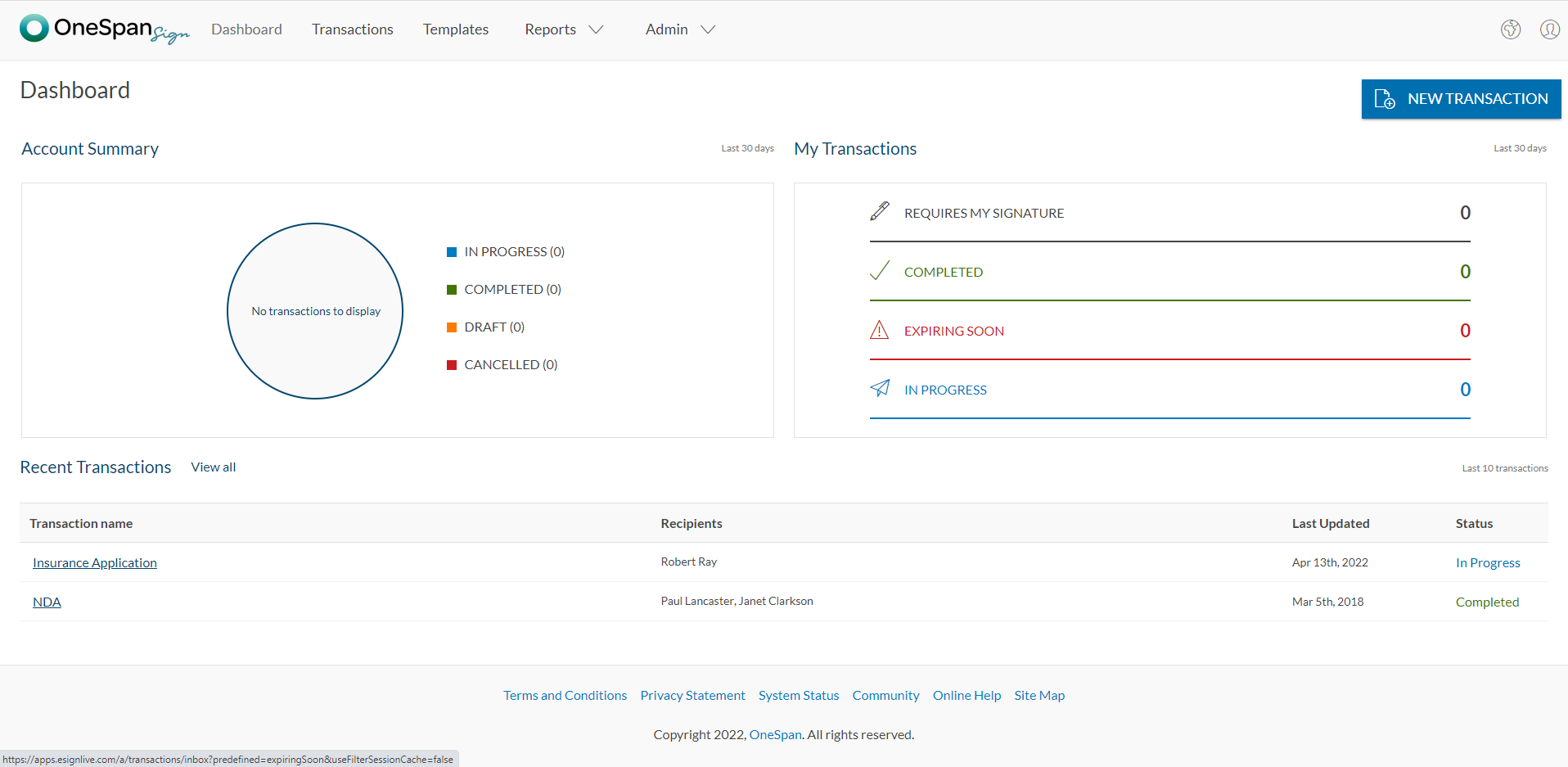
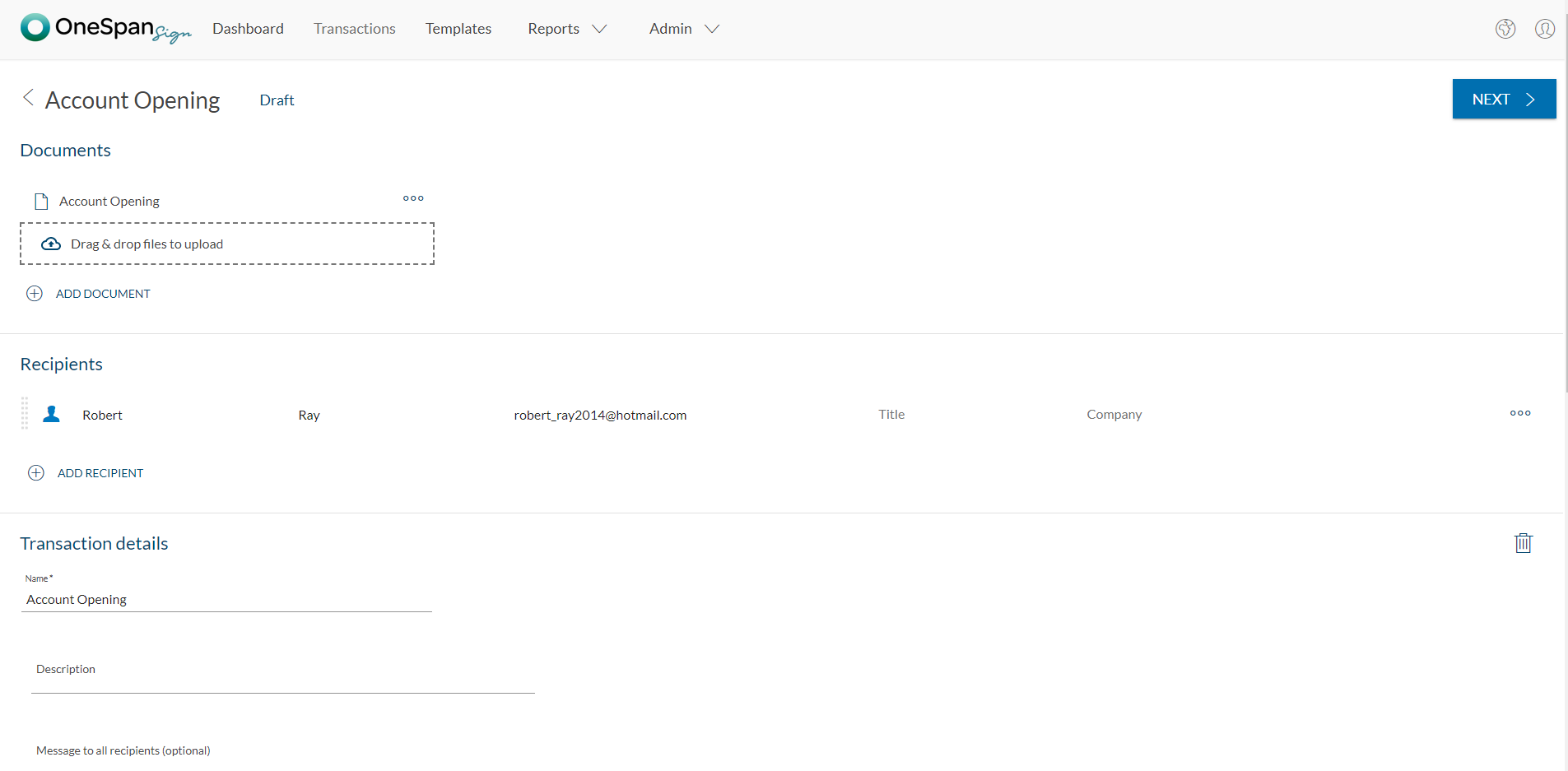
    Screenshot of User initiates the e-signature process by clicking 'New Transaction'.Screenshot of The user adds the necessary documents and signers to the transaction. Additional options like signer authentication & identification, in-person signing, reminders & notifications, and more are available in OneSpan Sign.Screenshot of Add signature blocks to desired locations on your document for your recipients to sign. Simply drag-and-drop the signature blocks into the document. Click the ‘Send to Sign’ button to route your document for signing.Screenshot of The signer can click-to-sign to complete the signing of the account opening application.Screenshot of The signing process is intuitive and easy for your signers. OneSpan Sign offers an optimized signing experience so your signers can sign anywhere, anytime, and across multiple devices.