Overview
ProductRatingMost Used ByProduct SummaryStarting Price
Microsoft Access
Score 7.5 out of 10
N/A
Microsoft Access is a database management system from Microsoft that combines the relational Microsoft Jet Database Engine with a graphical user interface and software-development tools.
$139.99
per PC
SAP Business ByDesign
Score 8.1 out of 10
Mid-Size Companies (51-1,000 employees)
SAP Business ByDesign is SAP's cloud ERP suite offering, launched in 2007, designed for the SMB market. The product includes a broad range of capabilities including financials, human resources, sales, procurement, customer service, and supply chain. Business ByDesign is a new platform, delivered entirely through a SaaS model, with functionality that overlaps somewhat with BusinessOne, which is also an SMB product, although not a true SaaS product.N/A
SAP Business One
Score 8.3 out of 10
N/A
SAP Business One is an integrated enterprise resource planning (ERP) solution for small and medium-sized businesses, The product encompasses functionality around sales, customer relationships, inventory, operations, financials and human resources.
$99
per month
Pricing
Microsoft AccessSAP Business ByDesignSAP Business One
Editions & Modules
Microsoft Access
$139.99
per PC
No answers on this topic
Limited
$99.00
per month
Starter
$110.00
per month
Pro
$132.00
per month
Offerings
Pricing Offerings
Microsoft AccessSAP Business ByDesignSAP Business One
Free Trial
NoYesNo
Free/Freemium Version
NoNoNo
Premium Consulting/Integration Services
NoNoNo
Entry-level Setup FeeNo setup feeOptionalNo setup fee
Additional DetailsSAP Business ByDesign is available for a monthly software-as-a-service (SaaS) subscription, based on a base package, user types, and number of users.
More Pricing Information
Community Pulse
Microsoft AccessSAP Business ByDesignSAP Business One
Considered Multiple Products
Microsoft Access

No answer on this topic

SAP Business ByDesign
Chose SAP Business ByDesign
SAP Business ByDesign has all functionalities that other systems have and more. Additionally, SAP Business ByDesign can be used from activation. The processes in this system are ready to use. SAP Business ByDesign only needs a few initial configurations to work. SAP Business …
Chose SAP Business ByDesign
ByDesign is a step in the right direction for improving and advancing. I would say that it has a way to go before it is a reliable replacement.
SAP Business One
Chose SAP Business One
SAP Business One is a good fit for an organization that wants to transform its business operation with a reasonable cost for migration from the legacy system. SAP Business One can match and support the organization needs because it has most of the best business practices …
Features
Microsoft AccessSAP Business ByDesignSAP Business One
Relational Databases
Comparison of Relational Databases features of Product A and Product B
Microsoft Access
7.7
3 Ratings
3% below category average
SAP Business ByDesign
-
Ratings
SAP Business One
-
Ratings
ACID compliance7.02 Ratings00 Ratings00 Ratings
Database monitoring8.02 Ratings00 Ratings00 Ratings
Database locking8.03 Ratings00 Ratings00 Ratings
Encryption7.02 Ratings00 Ratings00 Ratings
Disaster recovery7.73 Ratings00 Ratings00 Ratings
Flexible deployment8.02 Ratings00 Ratings00 Ratings
Multiple datatypes8.03 Ratings00 Ratings00 Ratings
Payroll Management
Comparison of Payroll Management features of Product A and Product B
Microsoft Access
-
Ratings
SAP Business ByDesign
8.4
2 Ratings
13% above category average
SAP Business One
9.9
12 Ratings
29% above category average
Benefit plan administration00 Ratings4.51 Ratings10.09 Ratings
Direct deposit files00 Ratings9.11 Ratings9.510 Ratings
Pay calculation00 Ratings00 Ratings10.011 Ratings
Customization
Comparison of Customization features of Product A and Product B
Microsoft Access
-
Ratings
SAP Business ByDesign
9.2
5 Ratings
22% above category average
SAP Business One
9.8
40 Ratings
28% above category average
API for custom integration00 Ratings9.24 Ratings9.738 Ratings
Plug-ins00 Ratings9.25 Ratings9.937 Ratings
Security
Comparison of Security features of Product A and Product B
Microsoft Access
-
Ratings
SAP Business ByDesign
9.3
5 Ratings
11% above category average
SAP Business One
9.7
44 Ratings
15% above category average
Single sign-on capability00 Ratings9.04 Ratings9.636 Ratings
Role-based user permissions00 Ratings9.65 Ratings9.943 Ratings
Reporting & Analytics
Comparison of Reporting & Analytics features of Product A and Product B
Microsoft Access
-
Ratings
SAP Business ByDesign
9.2
5 Ratings
23% above category average
SAP Business One
8.9
45 Ratings
19% above category average
Dashboards00 Ratings8.85 Ratings8.640 Ratings
Standard reports00 Ratings9.25 Ratings9.145 Ratings
Custom reports00 Ratings9.65 Ratings8.941 Ratings
General Ledger and Configurable Accounting
Comparison of General Ledger and Configurable Accounting features of Product A and Product B
Microsoft Access
-
Ratings
SAP Business ByDesign
8.7
5 Ratings
13% above category average
SAP Business One
5.9
46 Ratings
26% below category average
Accounts payable00 Ratings9.24 Ratings9.746 Ratings
Accounts receivable00 Ratings9.24 Ratings9.945 Ratings
Global Financial Support00 Ratings9.22 Ratings9.428 Ratings
Primary and Secondary Ledgers00 Ratings9.22 Ratings8.831 Ratings
Journals and Reconciliations00 Ratings8.82 Ratings9.638 Ratings
Configurable Accounting00 Ratings9.22 Ratings9.436 Ratings
Standardized Processes00 Ratings8.01 Ratings9.641 Ratings
Inventory Management
Comparison of Inventory Management features of Product A and Product B
Microsoft Access
-
Ratings
SAP Business ByDesign
9.1
4 Ratings
14% above category average
SAP Business One
9.3
45 Ratings
16% above category average
Inventory tracking00 Ratings9.24 Ratings9.645 Ratings
Automatic reordering00 Ratings10.03 Ratings9.731 Ratings
Location management00 Ratings8.03 Ratings9.941 Ratings
Order Management
Comparison of Order Management features of Product A and Product B
Microsoft Access
-
Ratings
SAP Business ByDesign
8.5
4 Ratings
8% above category average
SAP Business One
7.8
43 Ratings
0% below category average
Pricing00 Ratings9.24 Ratings9.541 Ratings
Order entry00 Ratings9.24 Ratings9.843 Ratings
Credit card processing00 Ratings4.51 Ratings8.524 Ratings
Cost of goods sold00 Ratings9.24 Ratings9.542 Ratings
Order Orchestration00 Ratings9.22 Ratings9.933 Ratings
Subledger and Financial Process
Comparison of Subledger and Financial Process features of Product A and Product B
Microsoft Access
-
Ratings
SAP Business ByDesign
9.2
3 Ratings
21% above category average
SAP Business One
7.3
39 Ratings
2% below category average
Billing Management00 Ratings8.83 Ratings9.534 Ratings
Cash and Asset Management00 Ratings9.22 Ratings9.830 Ratings
Travel & Expense Management00 Ratings10.02 Ratings9.323 Ratings
Budgetary Control & Encumbrance Accounting00 Ratings10.01 Ratings9.528 Ratings
Period Close00 Ratings9.22 Ratings9.535 Ratings
Project Financial Management
Comparison of Project Financial Management features of Product A and Product B
Microsoft Access
-
Ratings
SAP Business ByDesign
9.2
2 Ratings
19% above category average
SAP Business One
7.0
19 Ratings
8% below category average
Budgeting and Forecasting00 Ratings10.01 Ratings7.017 Ratings
Project Costing00 Ratings9.22 Ratings7.016 Ratings
Cost Capture00 Ratings9.22 Ratings7.016 Ratings
Capital Project Management00 Ratings9.22 Ratings7.011 Ratings
Customer Contract Compliance00 Ratings8.01 Ratings7.014 Ratings
Project Revenue Recognition00 Ratings9.22 Ratings6.116 Ratings
Project Execution Management
Comparison of Project Execution Management features of Product A and Product B
Microsoft Access
-
Ratings
SAP Business ByDesign
8.3
3 Ratings
17% above category average
SAP Business One
8.9
17 Ratings
24% above category average
Project Planning and Scheduling00 Ratings9.23 Ratings9.616 Ratings
Task Insight for Project Managers00 Ratings8.02 Ratings9.413 Ratings
Project Mobile Functionality00 Ratings8.02 Ratings8.312 Ratings
Definable Resource Pools00 Ratings00 Ratings9.110 Ratings
Grants Management
Comparison of Grants Management features of Product A and Product B
Microsoft Access
-
Ratings
SAP Business ByDesign
10.0
1 Ratings
30% above category average
SAP Business One
8.4
16 Ratings
13% above category average
Award Lifecycle Management00 Ratings10.01 Ratings10.010 Ratings
Procurement
Comparison of Procurement features of Product A and Product B
Microsoft Access
-
Ratings
SAP Business ByDesign
8.0
1 Ratings
13% above category average
SAP Business One
8.5
19 Ratings
19% above category average
Bids Analyzed and Compared00 Ratings8.01 Ratings9.612 Ratings
Requisitions-to-Purchase Orders Integrated00 Ratings8.01 Ratings9.515 Ratings
Supplier Management00 Ratings8.01 Ratings9.514 Ratings
Contract Authoring00 Ratings00 Ratings10.013 Ratings
Contract Repository00 Ratings00 Ratings9.011 Ratings
Logistics
Comparison of Logistics features of Product A and Product B
Microsoft Access
-
Ratings
SAP Business ByDesign
9.2
3 Ratings
29% above category average
SAP Business One
7.9
25 Ratings
14% above category average
Warehouse Workforce Management00 Ratings9.22 Ratings9.116 Ratings
Transportation Planning and Optimization00 Ratings00 Ratings9.417 Ratings
Transportation Execution Management00 Ratings00 Ratings9.015 Ratings
Trade and Customs Management00 Ratings00 Ratings9.315 Ratings
Fulfillment Management00 Ratings00 Ratings8.718 Ratings
Manufacturing
Comparison of Manufacturing features of Product A and Product B
Microsoft Access
-
Ratings
SAP Business ByDesign
9.0
3 Ratings
19% above category average
SAP Business One
8.8
21 Ratings
17% above category average
Production Process Design00 Ratings9.23 Ratings8.519 Ratings
Production Management00 Ratings9.23 Ratings10.019 Ratings
Configuration Management00 Ratings8.02 Ratings8.515 Ratings
Work Execution00 Ratings8.02 Ratings8.917 Ratings
Manufacturing Costs00 Ratings9.23 Ratings9.117 Ratings
Supply Chain
Comparison of Supply Chain features of Product A and Product B
Microsoft Access
-
Ratings
SAP Business ByDesign
8.6
3 Ratings
19% above category average
SAP Business One
7.8
27 Ratings
9% above category average
Forecasting00 Ratings9.23 Ratings8.325 Ratings
Inventory Planning00 Ratings9.23 Ratings8.127 Ratings
Performance Monitoring00 Ratings8.02 Ratings7.921 Ratings
Risk Management
Comparison of Risk Management features of Product A and Product B
Microsoft Access
-
Ratings
SAP Business ByDesign
-
Ratings
SAP Business One
8.5
11 Ratings
25% above category average
Risk Repository00 Ratings00 Ratings9.29 Ratings
Control Management00 Ratings00 Ratings8.910 Ratings
Control Efficiency Assessments00 Ratings00 Ratings8.99 Ratings
Issue Detection00 Ratings00 Ratings8.910 Ratings
Remediation and Certification00 Ratings00 Ratings10.07 Ratings
Product Lifecycle Management
Comparison of Product Lifecycle Management features of Product A and Product B
Microsoft Access
-
Ratings
SAP Business ByDesign
-
Ratings
SAP Business One
9.5
19 Ratings
27% above category average
Proposal Management00 Ratings00 Ratings7.515 Ratings
Product Master Data Management00 Ratings00 Ratings9.217 Ratings
Best Alternatives
Microsoft AccessSAP Business ByDesignSAP Business One
Small Businesses
InterSystems IRIS
InterSystems IRIS
Score 7.9 out of 10
Zoho One
Zoho One
Score 9.3 out of 10
Zoho One
Zoho One
Score 9.3 out of 10
Medium-sized Companies
InterSystems IRIS
InterSystems IRIS
Score 7.9 out of 10
Infor VISUAL
Infor VISUAL
Score 7.4 out of 10
Infor VISUAL
Infor VISUAL
Score 7.4 out of 10
Enterprises
SAP IQ
SAP IQ
Score 10.0 out of 10
24SevenOffice
24SevenOffice
Score 9.0 out of 10
24SevenOffice
24SevenOffice
Score 9.0 out of 10
All AlternativesView all alternativesView all alternativesView all alternatives
User Ratings
Microsoft AccessSAP Business ByDesignSAP Business One
Likelihood to Recommend
5.0
(99 ratings)
9.6
(7 ratings)
8.5
(50 ratings)
Likelihood to Renew
10.0
(15 ratings)
9.0
(3 ratings)
4.6
(9 ratings)
Usability
7.0
(5 ratings)
8.0
(1 ratings)
8.7
(14 ratings)
Availability
8.0
(1 ratings)
-
(0 ratings)
9.0
(3 ratings)
Performance
-
(0 ratings)
-
(0 ratings)
8.0
(1 ratings)
Support Rating
6.4
(5 ratings)
9.0
(1 ratings)
9.0
(11 ratings)
In-Person Training
-
(0 ratings)
-
(0 ratings)
7.7
(2 ratings)
Online Training
-
(0 ratings)
-
(0 ratings)
4.5
(2 ratings)
Implementation Rating
10.0
(1 ratings)
8.0
(1 ratings)
2.8
(24 ratings)
Ease of integration
8.0
(1 ratings)
-
(0 ratings)
9.0
(1 ratings)
Product Scalability
5.0
(1 ratings)
-
(0 ratings)
9.0
(2 ratings)
Vendor post-sale
-
(0 ratings)
-
(0 ratings)
8.0
(1 ratings)
Vendor pre-sale
-
(0 ratings)
-
(0 ratings)
8.0
(1 ratings)
User Testimonials
Microsoft AccessSAP Business ByDesignSAP Business One
Likelihood to Recommend
Microsoft
As a Material Purchasing/Planning/inventory tracking application, Microsoft Access serves its purpose well. It's presentation is clean, data entry is simple and the ability to customize search fields is welcome. It does, however, come with some caveats; namely, when setting search filters and the need arises to back up a step or two, with Microsoft Access you have to reset, or "clear all", adding extra steps/time to a query.
Read full review
SAP
Do you plan on going public at some point? If so, this may not be the best solution for you
Read full review
SAP
SAP Business One would be more useful if it contained tools to acommodate the growing need of online sales. A more complete shipping module which handles tracking numbers with the common couriers would be great. A built in warehouse management system would be great designed to be used with barcode scanners
Read full review
Pros
Microsoft
  • Very easy to create entity-relationship diagrams for various tables and designing mock layouts.
  • Really easy to navigate as it hold[s] the classic Microsoft UI. Another good thing is that it comes with the complete MS Office Suite.
  • It is really fast when joining multiple tables no matter what type of join.
  • Works on pretty much same SQL scripts so no need to learn a new language!
Read full review
SAP
  • I like the ease of use and the implementation methodology.
  • With SAP Business ByDesign you can integrate other systems with Web Services, and data technology to get information easy and fast.
  • SAP Business ByDesign includes an Analytics Module to create new reports in regards to your needs.
Read full review
SAP
  • SAP Business One is more suitable for small and medium scale enterprises
  • SAP Business One is : analytics, mobile technologies, cloud technologies
  • SAP Business One has exceptional performance in handling business functions such as purchasing and operations and customer relationship management
  • An important key features of SAP Business One is Reporting and Analytics.
Read full review
Cons
Microsoft
  • Microsoft Access has not really changed at all for several years. It might be nice to see some upgrades and changes.
  • The help info is often not helpful. Need more tutorials for Microsoft Access to show how to do specific things.
  • Be careful naming objects such as tables, forms, etc. Names that are too long can get cut off in dialog boxes to choose a table, form, report, etc. So, I wish they would have resizable dialog boxes to allow you to see objects with long names.
  • I wish it could show me objects that are not in use in the database for current queries, tables, reports, forms, and macros. That way unused objects can be deleted without worrying about losing a report or query because you deleted the underlying object.
Read full review
SAP
  • Time off request could be better. Right now, there is no option for sick time
  • It crashes often
  • Customization could be better
Read full review
SAP
  • Following a bench mark process - this seems contradicting to flexibility however we have wished we could follow more of an industry benchmark. Our challenge as a small company has been knowing how to properly use the system. We have discovered that we have set up the system wrong based and are using it improperly which has cause a lot work to correct.
  • Better live reporting options - current we are on prem SQL. Yes SAP is moving to HANA however smaller companies like ourselves are not ready for that. We need to be able to maintain our existing SQL DB. We also have a demand for live BI Reporting. It has been difficult to do this with our current set up.
  • Error handling - have found it very difficult to troubleshoot. Errors are not always clear and answers are hard to find.
Read full review
Likelihood to Renew
Microsoft
I and the rest of my team will renew our Microsoft Access in the future because we use and maintain many different applications and databases created using Microsoft Access so we will need to maintain them in the future. Additionally, it is a standard at our place of work so it is at $0 cost to us to use. Another reason for renewing Microsoft Access is that we just don' t have the resources needed to extend into a network of users so we need to remain a single-desktop application at this time.
Read full review
SAP
SAP BYD work centers are consistent and easy to navigate once you understand one work center. The document flow tab that is in each window allows one to see all related transactions. Document flow is important because one is able to see the flow of transactions and can therefore reverse transactions by following the document flow in reverse. It is possible to group items in each overview screen to see what items are open. The system is working as hoped.
Read full review
SAP
As I said before, it is a first level tool, well developed, and with very strong development support, although the learning curve, its implementation, the cost-benefit ratio, the price and the user experience is not the most suitable for small and medium-sized companies. It is a company with extensive experience, market positioning, technical support and expanded use
Read full review
Usability
Microsoft
Microsoft Access is easy to use. It is compatible with spreadsheets. It is a very good data management tool. There is scope to save a large amount of data in one place. For using this database, one does not need much training, can be shared among multiple users. This database has to sort and filtering features which seem to be very useful.
Read full review
SAP
Because SAP Business ByDesign allows us to improve our work, reduce the operational steps, implement audit controls, allows us found standard reports or it allows us to create new ones if you need more than the exists are enough for your work or your needs. Overall, SAP Business ByDesign allows us to standardize our operations, enhance our work, improve our skills, work over a web environment or mobile interface.
Read full review
SAP
I would like to give 8 out of 10 rating for SAP Business One because SAP Business One is a good choice for the mostly used business management solutions for the small and medium-sized companies. SAP Business One can help in optimizing the existing business process and enables streamline business processes for the daily activities for all users across the entire organization. The importance realization of SAP Business One implementation is based on the selection of the good reputation partner and its approach for the entire implementation. SAP Business One is a user-friendly and easy to use Enterprise system that the organization can benefit its features and functionalities by utilizing it.
Read full review
Reliability and Availability
Microsoft
I don't think the program has ever failed me. It is one of those programs where there is always a solution if you know where to look.
Read full review
SAP
No answers on this topic
SAP
The SAP Business One software is up and running every time
you need it as it was planned. In more than 6 years that we have been
using the product, it has never been unavailable and if it ever was, it was because of a planned maintenance window scheduled in the company.
Read full review
Performance
Microsoft
No answers on this topic
SAP
No answers on this topic
SAP
SAP Business One performance depends mostly on the speed of your internal servers, should you have the solution on premise as we do. Sometimes the system tends to be a little slower for some users when others are executing really big reports of performing some batch loads, but generally, the performance is acceptable to all the users.
Read full review
Support Rating
Microsoft
While I have never contacted Microsoft directly for product support, for some reason there's a real prejudice against MS Access among most IT support professionals. They are usually discouraging when it comes to using MS Access. Most of this is due to their lack of understanding of MS Access and how it can improve one's productivity. If Microsoft invested more resources towards enhancing and promoting the use of MS Access then maybe things would be different.
Read full review
SAP
The Business ByDesign support is stablished since you contract the service with SAP. SAP resolves according to the service level agreement. Currently, we continue with the service and we are using the support channels available. We are receiving the support. The SAP support gets an incident and after that, they contact us to resolve the incident, if necessary, they set the meeting to understand it or we explain the incident
Read full review
SAP
I rate my experience with SAP Business One's support team as excellent (10). They are easy to contact and effortless to work with on any issue or concern. I like the support SAP provides for any of their products. SAP has a great backing and I would recommend them to any of my colleagues.
Read full review
In-Person Training
Microsoft
No answers on this topic
SAP
No answers on this topic
SAP
The training I get was a consultant level training, so it's basically a 6 weeks training covering every aspect and every module of the system. It covered most common use cases and exercise training so you can get along with the software, as well as examples so there culd be a better understanding.
Read full review
Online Training
Microsoft
No answers on this topic
SAP
No answers on this topic
SAP
Over the past two years SAP has added a great deal of new SAP Business One on-line training for version 9.0 and 9.1. Most of the training is very strong, but some is difficult to understand and follow. Additionally, SAP still has a few holes in their on-line training around Production, Bill-of-Materials, MRP and Service.
Read full review
Implementation Rating
Microsoft
there is no key idea, since it is easy to implement Microsoft Access
Read full review
SAP
I recommend implementing all workshops during the ERP selection that you need to know very well about the ERP software. It allows us to gather information to accurate the plan of the project implementation. Additionally, we must reach the high-level commitment to achieve the main goals, to define the RACI matrix and communicate to all project stakeholders.
Read full review
SAP
These implementations are not easy. Even a standard implementation can be difficult. With a never-been-done-before implementation, the implementation team and the user team need to be thorough with planning, make a decision on key points, and stick to them before any design happens. Our biggest challenge was not from StellarOne, rather it was from the mid-implementation decisions from our internal team. StellarOne did a great job warning us, implementing our decision, and then helping us adjust our SAP to handle the new direction we took.
Read full review
Alternatives Considered
Microsoft
Excel is a fantastic - robust application that can do so much so easily. Its easy to train and understand. However - excel does not provide a reporting function and that is typically where we will suggest a move to [Microsoft] Access. [Microsoft] Access requires a little more knowledge of data manipulation.
Read full review
SAP
ByDesign stacks up well against the competition. Companies that do multiple things are usually the best fit (manufacturing, distribution, and service). The more 'modules' used, the fewer competitors will be able to meet the company's needs. It is not inexpensive, but if the needs of the company have the complexity from either a global perspective and need localizations and foreign currency, or a volume perspective and need resources greater than what can be easily housed on-premise, ByDesign should be a top consideration.
Read full review
SAP
SAP provides the most robust solution, with modules available for all department managers and even options for customization according to the company's special needs. We especially used the Crystal reports options to provide reports for each module. Overall, even if it's not the least expensive option, it has the best value for money.
Read full review
Scalability
Microsoft
No answers on this topic
SAP
No answers on this topic
SAP
For most small businesses, the only way you outgrow SAP Business One is if the nature of your business changes radically. Going from 1 to 50 users is quite easy with SAP B1. Going beyond 50 may require moving to the Hana SAP B1 platform to maintain or improve performance, but the path is there.
Add-ons to SAP B1 can also be added as specific needs are encountered that are not closely met by the standard product. These may be required early in the product life because of the nature of your business, or as you expand the use of SAP B1.
Read full review
Return on Investment
Microsoft
  • Not having to recreate queries or reports every time you want to use them.
  • Once an item is created and saved as part of the database, you save manpower by not having to recreate them.
  • ROI from a usability standpoint is great. Solid product with great functionality that requires low maintenance usually.
Read full review
SAP
  • Positive - Access to the real-time reporting allowing for faster decision making especially when fixed price projects are heading into an over budget position.
  • Positive - Complex KPI can now be tracked and as a consequence intensive plans can be made to capitalise on this level of reporting. Staff also have clear visibility over their own performance.
  • Negative - We are a bit on the small side at 30 employees for a ByD solution so it was relatively expensive for us. It would be a much better value preposition above 50 employees.
Read full review
SAP
  • Employee efficiency has definitely increased with SAP Business One. This is attributed in a lot of ways to information visibility. Our employees are able to gather the data they need, quickly, and effectively.
  • Identifying inconsistencies in pricing has also been accomplished through use of reporting off individual tables. Previously, we weren't able to access our data in such a way as to enable us to write custom reports in-house.
  • We have also benefited greatly from having a single source of all business information. We utilize SAP Business One exclusively in-house. All documentation is attached to specific orders and Business Partners, as well as serialized equipment that has been sold.
Read full review
ScreenShots

SAP Business ByDesign Screenshots

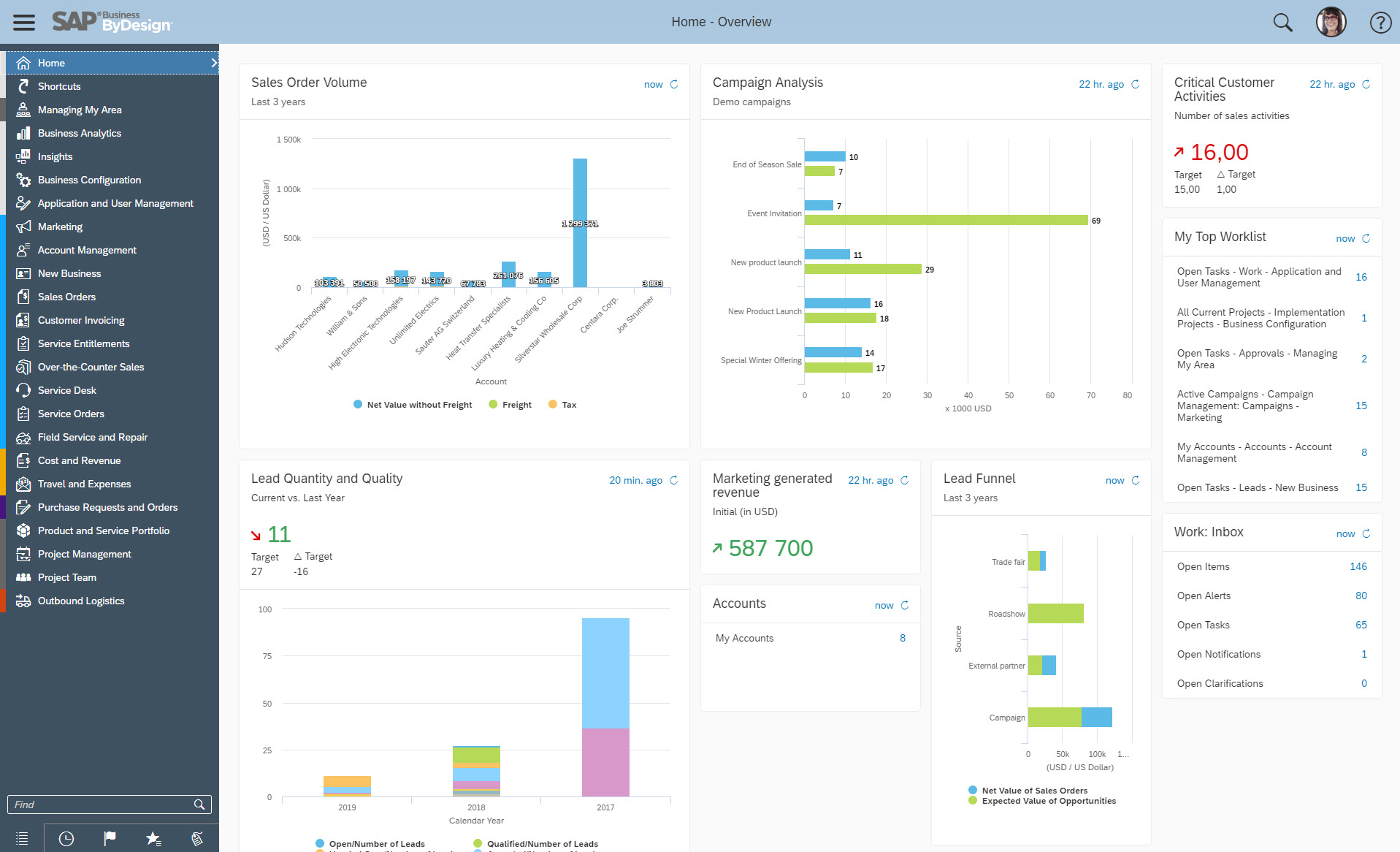
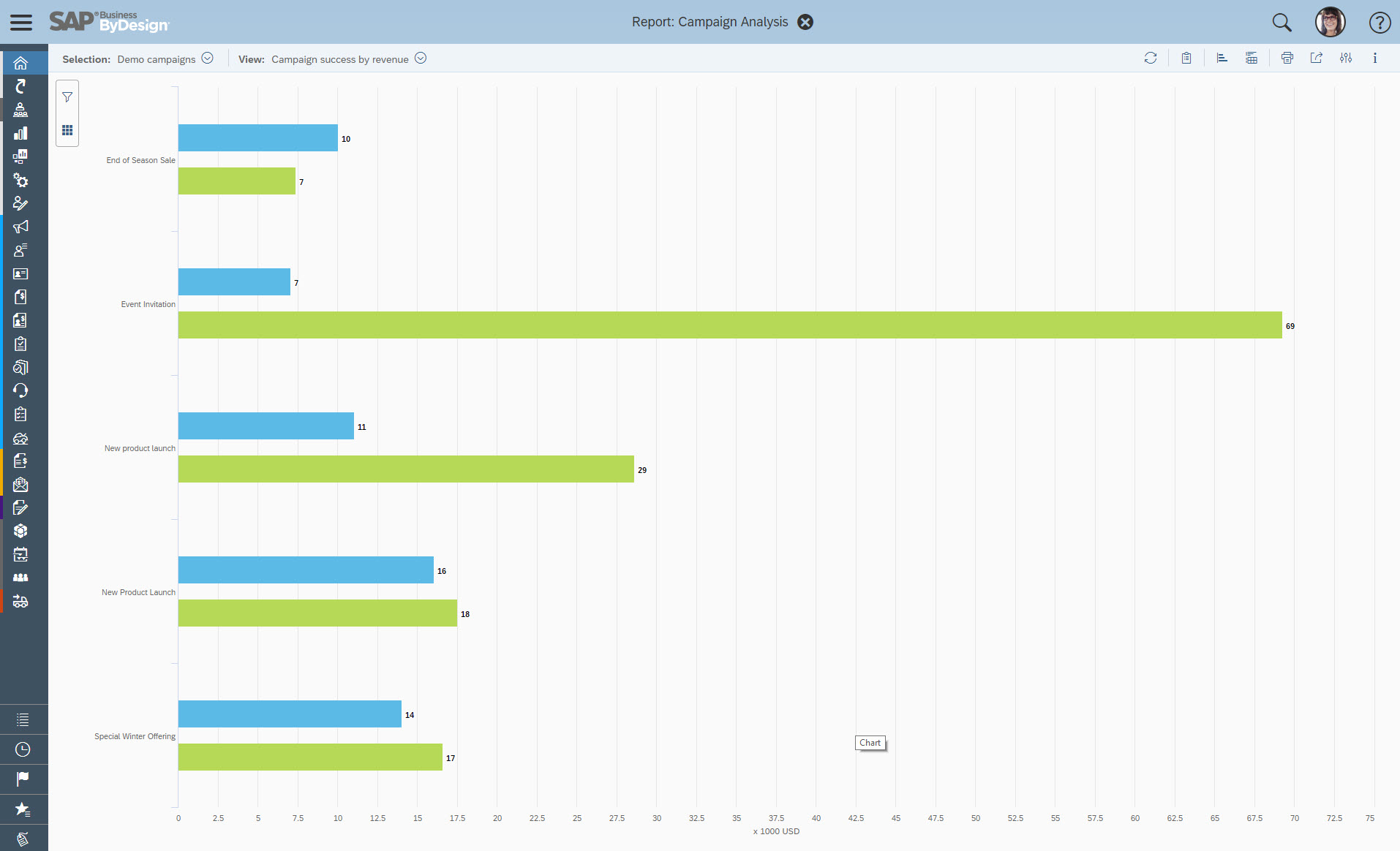
Screenshot of the embedded analytics of SAP Business ByDesign, which makes it possible for key users or end users to define dashboards that contain tailored reports and KPIs for their roleScreenshot of Screenshot of some of the reports available with SAP Business ByDesign, that enable customers to create additional reports or KPIsScreenshot of the document flow, present in each business document in ByDesign, which shows a graphic of the predecessor and successor business documents as well as any associated accounting documents.Screenshot of SAP Business ByDesign's included Project Management module that is integrated with CRM to sell and bill projects, with HR to staff projects, and with SCM and SRM for procurement.Screenshot of the Financial Closing business scenario, used to perform financial period-end closing activities to ensure correct financial statements, such as Balance Sheet, Income Statement, and Cash Flow Statement. The Closing Cockpit helps to minimize the risk of missing important steps or incorrect timing.