QuickBooks Desktop Premier vs. Workday Adaptive Planning

Overview
ProductRatingMost Used ByProduct SummaryStarting Price
QuickBooks Desktop Premier
Score 8.0 out of 10
N/A
QuickBooks Desktop Premier is an installed version of QuickBooks for general business, contractors, manufacturing and warehouse accounting, as well as nonprofits, professional services, and retail.N/A
Workday Adaptive Planning
Score 8.0 out of 10
Mid-Size Companies (51-1,000 employees)
Workday Adaptive Planning streamlines planning workflows, using AI and real-time data integration to improve collaboration and provide predictive forecasts for better strategic analysis.N/A
Pricing
QuickBooks Desktop PremierWorkday Adaptive Planning
Editions & Modules
No answers on this topic
Offerings
Pricing Offerings
QuickBooks Desktop PremierWorkday Adaptive Planning
Free Trial
NoYes
Free/Freemium Version
NoNo
Premium Consulting/Integration Services
NoYes
Entry-level Setup FeeNo setup feeOptional
Additional Details
More Pricing Information
Community Pulse
QuickBooks Desktop PremierWorkday Adaptive Planning
Features
QuickBooks Desktop PremierWorkday Adaptive Planning
Payroll Management
Comparison of Payroll Management features of Product A and Product B
QuickBooks Desktop Premier
8.5
54 Ratings
12% above category average
Workday Adaptive Planning
-
Ratings
Pay calculation9.252 Ratings00 Ratings
Benefit plan administration8.425 Ratings00 Ratings
Direct deposit files8.242 Ratings00 Ratings
Salary revision and increment management8.433 Ratings00 Ratings
Reimbursement management8.436 Ratings00 Ratings
Customization
Comparison of Customization features of Product A and Product B
QuickBooks Desktop Premier
7.5
24 Ratings
1% below category average
Workday Adaptive Planning
-
Ratings
API for custom integration8.017 Ratings00 Ratings
Plug-ins7.024 Ratings00 Ratings
Security
Comparison of Security features of Product A and Product B
QuickBooks Desktop Premier
8.4
58 Ratings
2% above category average
Workday Adaptive Planning
-
Ratings
Single sign-on capability8.550 Ratings00 Ratings
Role-based user permissions8.349 Ratings00 Ratings
Reporting & Analytics
Comparison of Reporting & Analytics features of Product A and Product B
QuickBooks Desktop Premier
8.3
69 Ratings
5% above category average
Workday Adaptive Planning
-
Ratings
Dashboards8.758 Ratings00 Ratings
Standard reports8.468 Ratings00 Ratings
Custom reports7.766 Ratings00 Ratings
General Ledger and Configurable Accounting
Comparison of General Ledger and Configurable Accounting features of Product A and Product B
QuickBooks Desktop Premier
7.8
72 Ratings
2% above category average
Workday Adaptive Planning
-
Ratings
Accounts payable8.370 Ratings00 Ratings
Accounts receivable8.571 Ratings00 Ratings
Cash management8.765 Ratings00 Ratings
Bank reconciliation8.769 Ratings00 Ratings
Expense management8.768 Ratings00 Ratings
Time tracking7.535 Ratings00 Ratings
Fixed asset management6.249 Ratings00 Ratings
Multi-currency support7.623 Ratings00 Ratings
Multi-division support8.239 Ratings00 Ratings
Regulations compliance8.224 Ratings00 Ratings
Electronic tax filing7.936 Ratings00 Ratings
Self-service portal5.923 Ratings00 Ratings
Global Financial Support6.09 Ratings00 Ratings
Primary and Secondary Ledgers7.014 Ratings00 Ratings
Intercompany Accounting7.917 Ratings00 Ratings
Localizations7.66 Ratings00 Ratings
Journals and Reconciliations8.725 Ratings00 Ratings
Enterprise Accounting8.313 Ratings00 Ratings
Configurable Accounting7.915 Ratings00 Ratings
Centralized Rules Framework7.210 Ratings00 Ratings
Standardized Processes8.315 Ratings00 Ratings
Inventory Management
Comparison of Inventory Management features of Product A and Product B
QuickBooks Desktop Premier
8.0
43 Ratings
9% above category average
Workday Adaptive Planning
-
Ratings
Inventory tracking8.342 Ratings00 Ratings
Automatic reordering7.321 Ratings00 Ratings
Location management8.825 Ratings00 Ratings
Manufacturing module7.722 Ratings00 Ratings
Order Management
Comparison of Order Management features of Product A and Product B
QuickBooks Desktop Premier
8.2
47 Ratings
10% above category average
Workday Adaptive Planning
-
Ratings
Pricing8.037 Ratings00 Ratings
Order entry7.838 Ratings00 Ratings
Credit card processing9.134 Ratings00 Ratings
Cost of goods sold8.943 Ratings00 Ratings
Order Orchestration7.58 Ratings00 Ratings
End-to-end order visibility8.59 Ratings00 Ratings
Order exception Resolution7.56 Ratings00 Ratings
BI Standard Reporting
Comparison of BI Standard Reporting features of Product A and Product B
QuickBooks Desktop Premier
-
Ratings
Workday Adaptive Planning
8.0
3 Ratings
5% above category average
Pixel Perfect reports00 Ratings9.01 Ratings
Customizable dashboards00 Ratings7.53 Ratings
Report Formatting Templates00 Ratings7.53 Ratings
Ad-hoc Reporting
Comparison of Ad-hoc Reporting features of Product A and Product B
QuickBooks Desktop Premier
-
Ratings
Workday Adaptive Planning
7.6
3 Ratings
3% below category average
Drill-down analysis00 Ratings8.03 Ratings
Formatting capabilities00 Ratings6.53 Ratings
Integration with R or other statistical packages00 Ratings8.01 Ratings
Report sharing and collaboration00 Ratings8.03 Ratings
Report Output and Scheduling
Comparison of Report Output and Scheduling features of Product A and Product B
QuickBooks Desktop Premier
-
Ratings
Workday Adaptive Planning
8.0
1 Ratings
1% below category average
Publish to PDF00 Ratings8.01 Ratings
Report Versioning00 Ratings8.01 Ratings
Report Delivery Scheduling00 Ratings8.01 Ratings
Data Discovery and Visualization
Comparison of Data Discovery and Visualization features of Product A and Product B
QuickBooks Desktop Premier
-
Ratings
Workday Adaptive Planning
7.7
1 Ratings
3% above category average
Pre-built visualization formats (heatmaps, scatter plots etc.)00 Ratings7.01 Ratings
Location Analytics / Geographic Visualization00 Ratings8.01 Ratings
Predictive Analytics00 Ratings8.01 Ratings
Access Control and Security
Comparison of Access Control and Security features of Product A and Product B
QuickBooks Desktop Premier
-
Ratings
Workday Adaptive Planning
8.1
3 Ratings
4% below category average
Multi-User Support (named login)00 Ratings7.53 Ratings
Role-Based Security Model00 Ratings8.03 Ratings
Multiple Access Permission Levels (Create, Read, Delete)00 Ratings8.03 Ratings
Report-Level Access Control00 Ratings8.52 Ratings
Single Sign-On (SSO)00 Ratings8.52 Ratings
Mobile Capabilities
Comparison of Mobile Capabilities features of Product A and Product B
QuickBooks Desktop Premier
-
Ratings
Workday Adaptive Planning
7.6
3 Ratings
2% above category average
Responsive Design for Web Access00 Ratings8.53 Ratings
Mobile Application00 Ratings7.02 Ratings
Dashboard / Report / Visualization Interactivity on Mobile00 Ratings7.02 Ratings
Budgeting, Planning, and Forecasting
Comparison of Budgeting, Planning, and Forecasting features of Product A and Product B
QuickBooks Desktop Premier
-
Ratings
Workday Adaptive Planning
8.0
194 Ratings
1% below category average
Long-term financial planning00 Ratings7.7180 Ratings
Financial budgeting00 Ratings8.5191 Ratings
Forecasting00 Ratings8.0186 Ratings
Scenario modeling00 Ratings8.0175 Ratings
Management reporting00 Ratings8.0191 Ratings
Consolidation and Close
Comparison of Consolidation and Close features of Product A and Product B
QuickBooks Desktop Premier
-
Ratings
Workday Adaptive Planning
6.9
159 Ratings
12% below category average
Financial data consolidation00 Ratings6.7119 Ratings
Journal entries and reports00 Ratings7.080 Ratings
Multi-currency management00 Ratings7.293 Ratings
Intercompany Eliminations00 Ratings6.272 Ratings
Minority Ownership00 Ratings6.742 Ratings
Local and consolidated reporting00 Ratings7.2106 Ratings
Detailed Audit Trails00 Ratings7.2133 Ratings
Financial Reporting and Compliance
Comparison of Financial Reporting and Compliance features of Product A and Product B
QuickBooks Desktop Premier
-
Ratings
Workday Adaptive Planning
7.6
182 Ratings
4% below category average
Financial Statement Reporting00 Ratings8.1160 Ratings
Management Reporting00 Ratings8.4176 Ratings
Excel-based Reporting00 Ratings7.1176 Ratings
Automated board and financial reporting00 Ratings7.9153 Ratings
XBRL support for regulatory filing00 Ratings6.332 Ratings
Analytics and Reporting
Comparison of Analytics and Reporting features of Product A and Product B
QuickBooks Desktop Premier
-
Ratings
Workday Adaptive Planning
8.1
151 Ratings
0% above category average
Personalized dashboards00 Ratings8.2133 Ratings
Color-coded scorecards00 Ratings8.6110 Ratings
KPIs00 Ratings7.8124 Ratings
Cost and profitability analysis00 Ratings8.0125 Ratings
Key Performance Indicator setting00 Ratings8.4107 Ratings
Benchmarking with external data00 Ratings7.775 Ratings
Integration
Comparison of Integration features of Product A and Product B
QuickBooks Desktop Premier
-
Ratings
Workday Adaptive Planning
6.8
172 Ratings
18% below category average
Flat file integration00 Ratings7.0135 Ratings
Excel data integration00 Ratings8.0165 Ratings
Direct links to 3rd-party data sources00 Ratings5.4123 Ratings
Best Alternatives
QuickBooks Desktop PremierWorkday Adaptive Planning
Small Businesses
Intuit Enterprise Suite
Score 9.2 out of 10

No answers on this topic

Medium-sized Companies
Intuit Enterprise Suite
Score 9.2 out of 10
Centage
Centage
Score 9.4 out of 10
Enterprises
SAP Business One
SAP Business One
Score 8.6 out of 10
OneStream
OneStream
Score 8.8 out of 10
All AlternativesView all alternativesView all alternatives
User Ratings
QuickBooks Desktop PremierWorkday Adaptive Planning
Likelihood to Recommend
8.2
(75 ratings)
7.6
(223 ratings)
Likelihood to Renew
7.5
(14 ratings)
10.0
(46 ratings)
Usability
8.9
(26 ratings)
7.6
(129 ratings)
Availability
10.0
(6 ratings)
9.0
(12 ratings)
Performance
9.0
(5 ratings)
9.0
(6 ratings)
Support Rating
4.0
(13 ratings)
8.2
(33 ratings)
In-Person Training
-
(0 ratings)
8.2
(2 ratings)
Online Training
1.0
(1 ratings)
7.3
(9 ratings)
Implementation Rating
7.2
(7 ratings)
8.6
(27 ratings)
Configurability
9.0
(2 ratings)
8.2
(5 ratings)
Contract Terms and Pricing Model
-
(0 ratings)
7.3
(1 ratings)
Ease of integration
7.0
(1 ratings)
7.3
(8 ratings)
Product Scalability
9.0
(5 ratings)
8.2
(12 ratings)
Professional Services
-
(0 ratings)
8.2
(1 ratings)
Vendor post-sale
6.0
(1 ratings)
8.2
(4 ratings)
Vendor pre-sale
6.0
(2 ratings)
6.4
(4 ratings)
User Testimonials
QuickBooks Desktop PremierWorkday Adaptive Planning
Likelihood to Recommend
Intuit
We really think that ANY typical business would be a reasonable fit for QuickBooks Desktop Premier. While not necessary, even a comparatively unexperienced accounting person could look at the "Home" screen and follow their nose thru typical daily accounting processes without much detailed knowledge. Reporting is simple, looking up customer info and prior transactions is simple, looking up vendors and prior payments is simple... all in all, quite straightforward. I really can't think of an instance where it would be 'less appropriate'.
Read full review
Workday
It's well suited to any business where you have defined inputs, a layer of structured calculations and a defined output. In other words, any business situation! We use it in a law firm setting where it enables us to import staff plans, assign targets to each individual, thereby generating a revenue forecast linked to business capacity. From there, global assumptions determine staff and direct costs, with the user overlaying discretionary costs to arrive at a final P&L forecast. This is then summarised using the reporting and dashboarding layer to provide outputs to senior leaders for sign off.
Read full review
Pros
Intuit
  • Employment - it makes creating paychecks a snap and tracks taxes.
  • Invoicing - they have a straightforward approach to creating invoices and you can even email them to your customers.
  • Customers - the program makes tracking customer information and balances easy.
Read full review
Workday
  • It helps create dynamic plans for finances, operations and various functional units in an organization all under one platform
  • It helps in scenario modeling to help analyze various business events and report by any number of business dimensions including channel, customer or product
  • It can be integrated with any system including ERP, BI or CRM
Read full review
Cons
Intuit
  • Support for older versions of QuickBooks ends after three years, then users must purchase the newest version at full price. Renewals should be deeply discounted for existing users.
  • I would like to see better in-product inventory tracking, so we can choose LIFO or FIFO rather than the ambiguous "average cost" method.
  • I would like to be able to assign payroll taxes to jobs for better job costing.
Read full review
Workday
  • Budgeting either isn't included or an extra fee.
  • Expense reporting aspects are repetitive and hard to fully optimize.
  • Finance tracking is limited to basic reports with multiple levels or drill-down...hard to fully grasp without exporting data and massaging in something else (like Excel).
Read full review
Likelihood to Renew
Intuit
Because we have been extremely happy with the product and our organization tends to be creatures of habit. We rarely leave a product that works this well for the latest and greatest. Typically we follow the "if it's not broken, don't fix it rule". While QB does make changes we typically just roll with it. If we do find something we don't like we work through it until we fully understand its functionality.
Read full review
Workday
For one we're in way too deep to not move forward with Adaptive. We're integrated with Workday, we do a ton of reporting with Adaptive, and it's working very well for planning and forecasting. No reason to look back or change course.
Read full review
Usability
Intuit
We switched to a more "robust" software program with the hiring of a new CFO. The migration of historical data and ancillary information has been cumbersome and riddle with errors and issues. In hindsight much of what the new software program was touted to accomplish is not come to fruition. QB Desktop Premier was sufficient for the organization needs
Read full review
Workday
It is an easy transition for Excel users, with more built-in analytical tools and no need to build formulas. It also has built-in reporting and integration with Microsoft Office products such as Excel and PowerPoint. For non-Finance users, there's an initial learning curve to get used to the tool.
Read full review
Reliability and Availability
Intuit
This is very reliable software, the desktop version is fast. If there is a problem, it is most likely on your own hardware!
Read full review
Workday
There haven't been any lately. The only one issue I can think of is when there was an update in Adaptive that altered our reports. Before I realized there was an issue, Adaptive reached out to let me know, so that it could be fixed.
Read full review
Performance
Intuit
It takes forever to load.
Read full review
Workday
All aspects of Adaptive Insights perform well. One area that I wish was quicker was integration. When importing data from Intacct our accounting ERP platform, it can sometimes take 4 hours for the import to process. The earlier imports are done, the quicker they complete. My estimate for a quick upload is about two hours.
Read full review
Support Rating
Intuit
This is where QuickBooks falls short. Many times my staff has had questions that have not been able to get resolved easily with a chat or call. I personally have had more general questions that have not been answered easily as well. I think QuickBooks needs to provide the resources of having readily accessible help in order to make it simpler to get solutions.
Read full review
Workday
Whenever we have had any questions, issues, or concerns, the support has been quick and thorough. [This] allow[s] us to be able to fully resolve any issues, or be connected with the right group quickly to attain the result we were after; be it from simple formatting to adding new detailed reporting.
Read full review
In-Person Training
Intuit
No answers on this topic
Workday
This was extremely helpful so that they could walk you through the model and teach you more about the complexity of various areas. It is most helpful when it is specific to your organization's model. The larger in-person trainings were helpful but they tended to be more generic and entry level. The trainings that are more tailored to your specific needs are the most helpful.
Read full review
Online Training
Intuit
No answers on this topic
Workday
They often times tended to be way too generic or entry level. They would also become sales pitches to upgrade or get new Adaptive Planning products. The questions in the training would be very niche and specific to other organizations. They were rarely helpful to the group at large.
Read full review
Implementation Rating
Intuit
It is important to do your research. There are tutorial videos online that could help new user of this accounting system. These tutorials are straightforward and easily understandable.
Read full review
Workday
Trust the expertise of very strong 3rd party implementers. Having deployed Adaptive at a separate company before, I thought I knew it all (hubris, I know). Fortunately, I began to (very quickly) trust the judgment of our Carlson implementation team, and they provided invaluable insights and best-in-class processes that have benefitted me and my team greatly.
Read full review
Alternatives Considered
Intuit
QuickBooks Premier handles most of my business functions efficiently in one package. It is not my "everything." I use Replicon for time rather than QuickBooks. I don't want my WIP data interfering with my accounting. I use PaySimple for it's web interface and back office processing. I don't have security issues since I don't have any credit card data in my possession. With today's identity theft environment, I have to protect myself as much as I can. Not having credit card data in my accounting software lets me sleep much better at night. Quicken will do basic accounting but does not have all the double entry accounting systems contained in QuickBooks. QuickBooks Online does much of the basic business functions but I don't like the pricing structure. As a professional accountant, that is very important to me. Bill.com provided a good service but the ability of QuickBooks to add bills and receipts to transactions makes it redundant.
Read full review
Workday
Workday became our choice because it is fully web-based and easily integrates with other systems. The learning curve for Workday was shorter than that of Dynamics. The reporting tools in Workday are more user-friendly than that of Dynamics. However Workday did not have Check Printing tools which are available in Dynamics. The organization started a project to digitize all financial transactions so it was not a priority feature. When it comes to scaling up the functionalities of Workday it was much easier than Dynamics.
Read full review
Contract Terms and Pricing Model
Intuit
No answers on this topic
Workday
Good read only seat access
Read full review
Scalability
Intuit
They're getting better. Still room for improvement.
Read full review
Workday
We went from 2 users to 70+ users over a 2 year period of time. The application scaled wonderfully. 65 of those users were non-finance users so they were able to quickly learn the software and prepare budgets quickly and efficiently. That is the power of Adaptive and its ability to scale
Read full review
Professional Services
Intuit
No answers on this topic
Workday
This is now available in house at Workday which is convenient.
Read full review
Return on Investment
Intuit
  • Most of our business clients use QuickBooks which makes it efficient for us to work on clients that use the program. We can import QuickBooks data into our software which adds efficiencies to our tax practice.
  • Having staff that are familiar with the software enables our firm to provide quality service to the clients that use QuickBooks.
  • We receive referrals from satisfied QuickBooks clients.
Read full review
Workday
  • It's facilitated a better financial literacy and management by the non-financial managers in the company, giving them a much better ability to see what they're spending, control it, and plan better in the future.
  • It's hard to quantify the ease of model and version management, but we could never do what we're doing now with our current staff. It would take a small army to replicate anything close to what Adaptive pulls off using Excel, if it's even possible.
Read full review
ScreenShots

Workday Adaptive Planning Screenshots

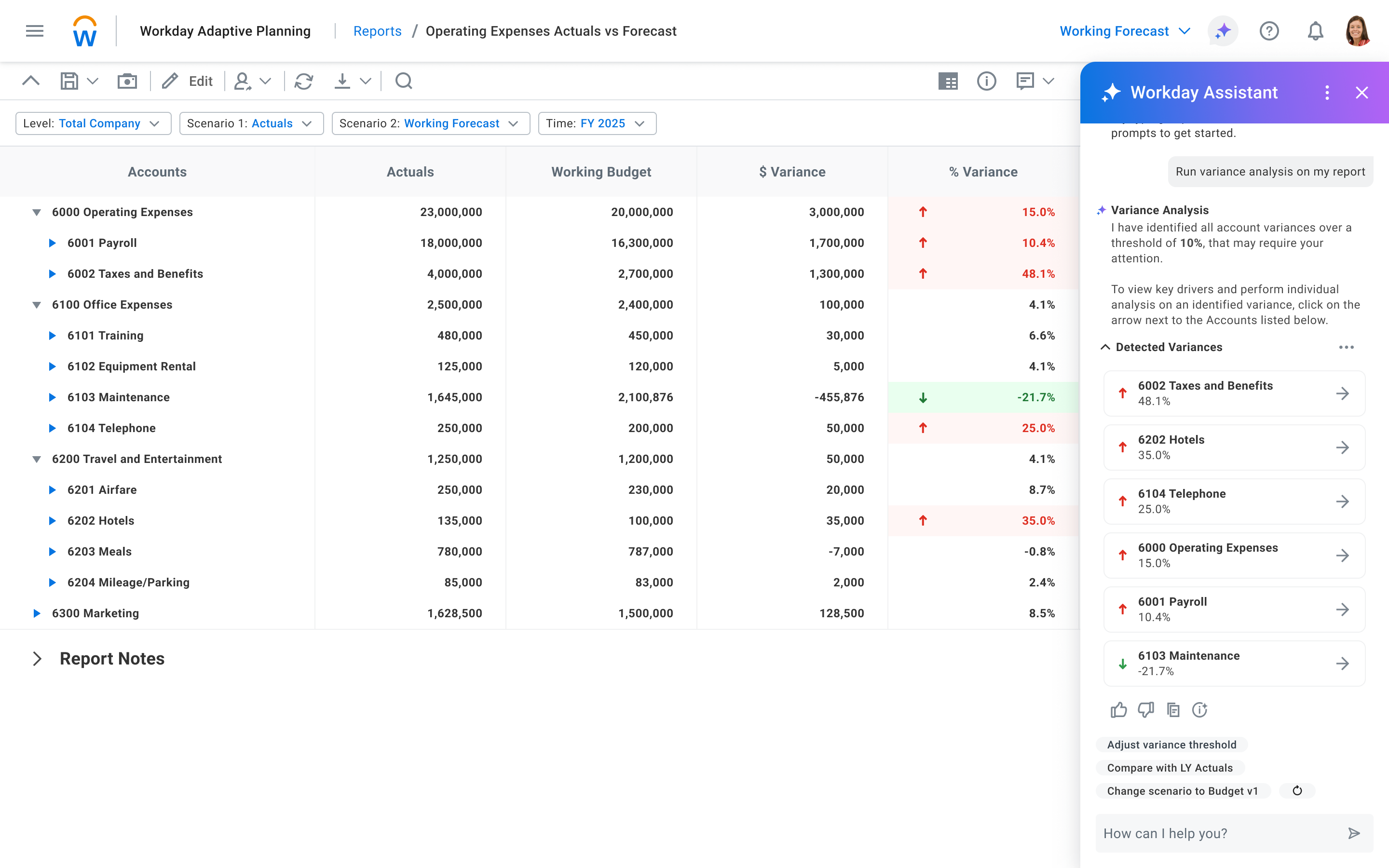
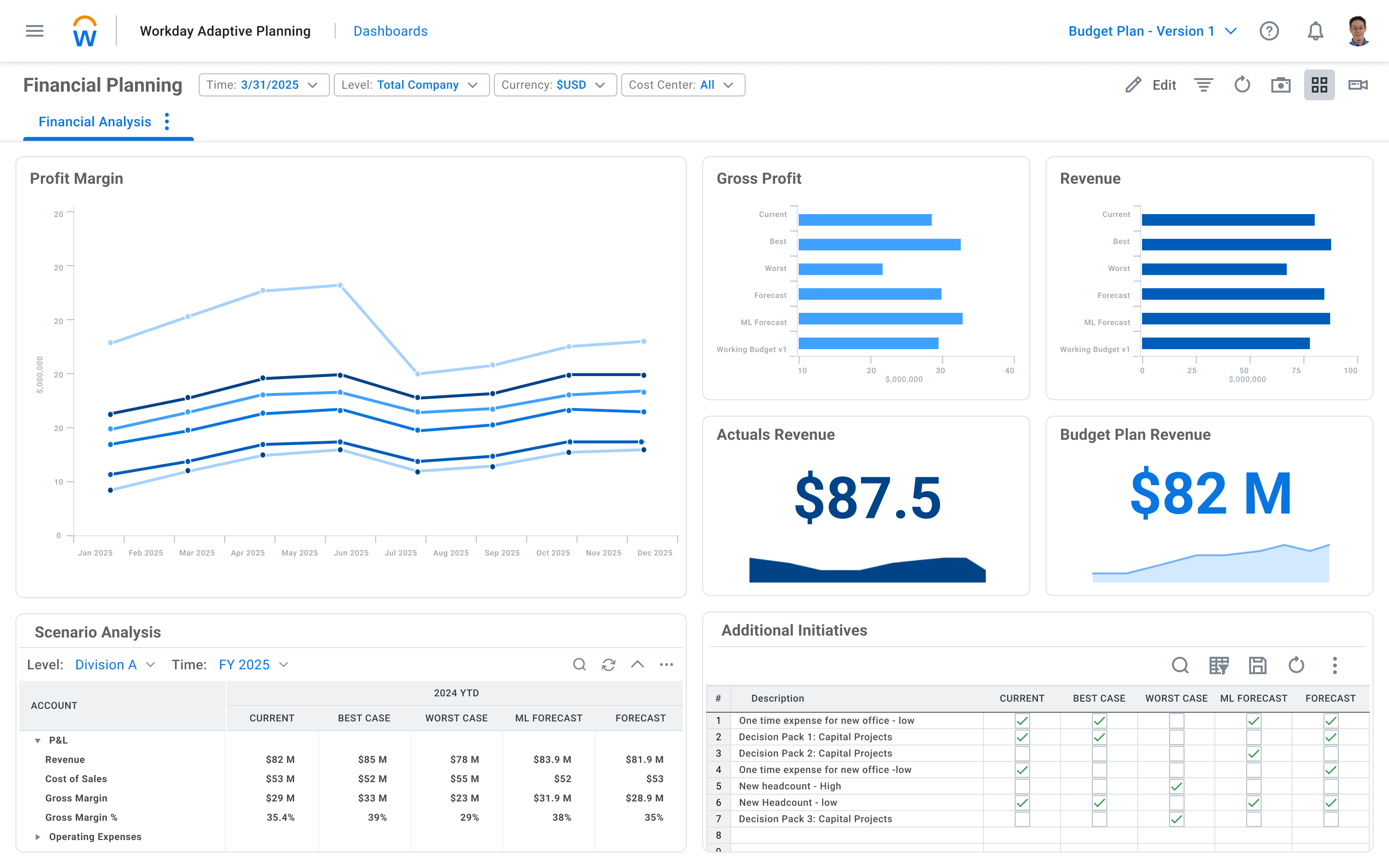
Screenshot of Workday Adaptive Planning AI Predictive ForecasterScreenshot of Workday Adaptive Planning AI AssistantScreenshot of Workday Adaptive Planning DashboardScreenshot of Workday Adaptive Planning Financial Planning DashboardScreenshot of Workday Adaptive Planning Financial Variance AnalysisScreenshot of Workday Adaptive Planning Process and Workflow Management