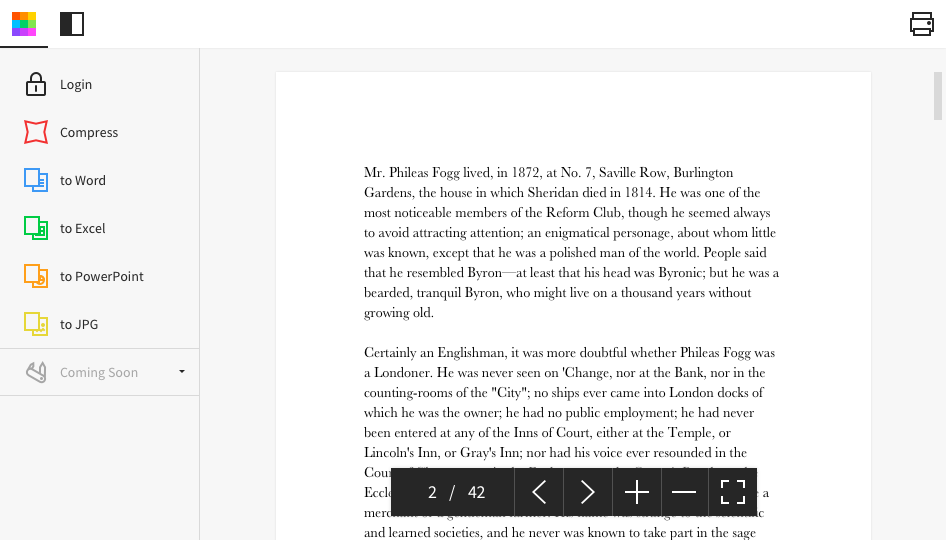
Made in Switzerland, Smallpdf is a company that offers a suite of document management tools for everyone-for work, for home, for life. Founded in Switzerland in 2013, Smallpdf provides what they describe as a simple, secure, and reliable answer to the world's PDF challenges. Smallpdf boasts serving over a billion users in 24 different languages since 2013, and in every country in the world.
$0
Tungsten Power PDF
Score9.6 out of 10
Small Businesses (1-50 employees)
Tungsten Power PDF (formerly Kofax) is an easy-to-use, secure and inexpensive solution to manage PDFs for businesses
and individuals. Benefits:
Ease of Use: Works
like Office desktop products, so it's easier to learn
Compatibility: Works
across devices and platforms, share documents in a storage cloud
…
$129
one-time fee per license
Pricing
Smallpdf
Tungsten Power PDF
Editions & Modules
Smallpdf Basic
$0.00
Smallpdf Pro
$12.00
per month
Smallpdf Pro
$108.00
per year
Power PDF Standard
$129
one-time fee per license
Power PDF for Mac
$129
one-time fee per license
Power PDF Advanced
$179
one-time fee per license
Power PDF Business
Get a Quote: Subscription and Perpetual available
per year per seat
Offerings
Pricing Offerings
Smallpdf
Tungsten Power PDF
Free Trial
Yes
Yes
Free/Freemium Version
Yes
No
Premium Consulting/Integration Services
No
Yes
Entry-level Setup Fee
No setup fee
No setup fee
Additional Details
Discounts are available for bulk purchases
Desktop licenses are buy once, own forever. No subscription fees.
Business server licenses are term-based or perpetual with optional maintenance & support contract.
Volume and upgrade discounts available.
A de minimis incentive was given to thank the reviewer for their time. The incentive was not used to bias or drive a particular response, nor was the incentive contingent on a positive endorsement. More Info
Verified User
Chose Tungsten Power PDF
Compared to online PDF editors, [Kofax Power PDF (formerly Nuance Power PDF)] Advanced is much easier to use and more robust.
Compared to Adobe Acrobat DC, Power PDF Advanced is not as intuitive and has a few missing functions, however price was a major consideration when …
A de minimis incentive was given to thank the reviewer for their time. The incentive was not used to bias or drive a particular response, nor was the incentive contingent on a positive endorsement. More Info
As per my knowledge and experience, Small PDF is well suited when we want to convert the large and bulk processing on the images to convert them into a single file and share. I found it well suited for college students because daily they scan multiple images and merge them to send as a single assignment file. Smallpdf has the future in the education field. Sometimes it is less appropriate for the people who want to share official documents by converting them into pdf without a watermark. I personally really like the Small PDF, it really helped reduce the difficulty of sending files, and photos to others.
A de minimis incentive was given to thank the reviewer for their time. The incentive was not used to bias or drive a particular response, nor was the incentive contingent on a positive endorsement. More Info
Tungsten Power PDF suited very well for most everyday tasks in our architecture office be it combining files into a neatly made package for clients. For basic markups, it is very easy to use but definitely could be improved, as sometimes selecting the text boxes becomes very difficult to do. When we need to be very detailed it would be much better if there were more markup options and if they were easier to use. The program overall meets what we need it to do but it is much better at documenting simple markups than at intense editing/markups.
A de minimis incentive was given to thank the reviewer for their time. The incentive was not used to bias or drive a particular response, nor was the incentive contingent on a positive endorsement. More Info
A de minimis incentive was given to thank the reviewer for their time. The incentive was not used to bias or drive a particular response, nor was the incentive contingent on a positive endorsement. More Info
No bloatware or unnecessary features, obnoxious update requests, or really anything that would stop you from doing what you need to do - read/edit a PDF. This is the major advantage over many competitors.
Opens fast, with intuitive navigation and features; great for reading and annotating PDFs. Exporting and rearranging pages is also very smooth.
Signing is a little unintuitive, but I believe it is reasonably done here.
The PDF is not a file type that is intended to be directly edited. Thus, all PDF editors are clunky. This is no different, but simple tasks like adding text on top of the document, adding comments, or highlighting are relatively smooth.
A de minimis incentive was given to thank the reviewer for their time. The incentive was not used to bias or drive a particular response, nor was the incentive contingent on a positive endorsement. More Info
A de minimis incentive was given to thank the reviewer for their time. The incentive was not used to bias or drive a particular response, nor was the incentive contingent on a positive endorsement. More Info
A de minimis incentive was given to thank the reviewer for their time. The incentive was not used to bias or drive a particular response, nor was the incentive contingent on a positive endorsement. TR verified that a representative sample of customers was invited. More Info
Tungsten Power PDF is easy to use, the staff all like it, and there are no issues with it on any level. It is a more cost-effective solution to our PDF needs than other products currently available on the market. This product works as intended and it fits our business needs perfectly.
A de minimis incentive was given to thank the reviewer for their time. The incentive was not used to bias or drive a particular response, nor was the incentive contingent on a positive endorsement. TR verified that a representative sample of customers was invited. More Info
I give this rating to Smallpdf because it comes with a large array of tools and gadgets. It allows not only pdf reading but also mixing, splitting, conversion to and from pdf, pdf compression or protecting. It is really complete and it works excellent compared to other much more expensive alternatives in the market.
A de minimis incentive was given to thank the reviewer for their time. The incentive was not used to bias or drive a particular response, nor was the incentive contingent on a positive endorsement. More Info
I found it easy to learn and observe that my colleagues also pick it up quickly when they get a license. I've been somewhat involved in training users on the various features, and I find that it's very intuitive compared to some of the other software that my organization uses.
A de minimis incentive was given to thank the reviewer for their time. The incentive was not used to bias or drive a particular response, nor was the incentive contingent on a positive endorsement. More Info
Other that a PDF partially disappearing if left up for a long period of time - no issues. (If you close it and reopen it, it is all there. We have some PDFs that are 400-600 pages long.)
A de minimis incentive was given to thank the reviewer for their time. The incentive was not used to bias or drive a particular response, nor was the incentive contingent on a positive endorsement. More Info
1.- Because it is easy to use and each function is duly indicated so you can not go wrong. 2.- Its service is fast, it takes only a few seconds to transform the files and in less than a minute it is downloaded and you can occupy it without problem. 4.-This IS online so you do not install anything, which is very useful because you can also use it from a tablet or your mobile
Pages nearly always load at the expected rapid speed. Some documents that print quickly from Adobe Reader print much more slowly from Power PDF. I have never generated a report - that's a feature I didn't know existed until now and do not know what it's for
A de minimis incentive was given to thank the reviewer for their time. The incentive was not used to bias or drive a particular response, nor was the incentive contingent on a positive endorsement. More Info
Everything is so simple and works so well, you shouldn't need support, but on the one occasion in several years that I needed it, support was quick and courteous.
I have contacted support a total of three times; once for installation support, twice for software support. I received contact back on my requests within four hours each time. Support was professional and supportive and quickly answered my questions/resolved my issues. I also emailed support a separate time to suggest software upgrades and receive a personal response within 24 hours. Very appreciative.
A de minimis incentive was given to thank the reviewer for their time. The incentive was not used to bias or drive a particular response, nor was the incentive contingent on a positive endorsement. TR verified that a representative sample of customers was invited. More Info
I got an overview of the product from my predecessor who was about to retire from the job I now hold. He did not go into very many of the features and probably only knew about the ones he used most frequently.
A de minimis incentive was given to thank the reviewer for their time. The incentive was not used to bias or drive a particular response, nor was the incentive contingent on a positive endorsement. More Info
We watched the training videos and tested out the features and functionality side by side. Some features are not used on a regular basis is it is convenient to go back and review training on that particular functionality when needed.
A de minimis incentive was given to thank the reviewer for their time. The incentive was not used to bias or drive a particular response, nor was the incentive contingent on a positive endorsement. More Info
It was simple and we were using the program the same day. It was as easy as downloading the program and getting in there and playing around. We felt comfortable with it within the first few hours of use.
A de minimis incentive was given to thank the reviewer for their time. The incentive was not used to bias or drive a particular response, nor was the incentive contingent on a positive endorsement. More Info
I think that Smallpdf stacks up against its competitors in terms of easiness of use. The tool is very user-friendly, every feature is communicated in an efficient way and very simple to user so the user doesn't have to be particularly good at using software. Its features are superficial when compared to Acrobat but easiest to use for sure.
A de minimis incentive was given to thank the reviewer for their time. The incentive was not used to bias or drive a particular response, nor was the incentive contingent on a positive endorsement. More Info
Power PDF is the PDF reader of choice at my workplace. Its unique blend of capability and accessibility, and subscription-free model, has made it a favorite of mine. As a power user of PDFs, I have found its advanced features not only match but exceed those of similar products, and when they're comparable, usability tips the scales in its favor. So pleased with this program, I bought it personally.
A de minimis incentive was given to thank the reviewer for their time. The incentive was not used to bias or drive a particular response, nor was the incentive contingent on a positive endorsement. More Info
Not really familiar since I'm the only person who uses it. But in the past it has been my understanding that Power PDF was offered only on a single-license basis, so it's been expensive for me to use it at home and at work because I had to pay for it on my own. In my current position management supports it so I at least only have to pay for it once.
A de minimis incentive was given to thank the reviewer for their time. The incentive was not used to bias or drive a particular response, nor was the incentive contingent on a positive endorsement. More Info
It has definitely increased efficiency. Lower paid employees can complete a simple task with Smallpdf rather than having a higher paid employee use their time to do it differently.
Smallpdf decreases the customer-response time. Being able to send over the proper sized file quickly makes us look great!
A de minimis incentive was given to thank the reviewer for their time. The incentive was not used to bias or drive a particular response, nor was the incentive contingent on a positive endorsement. More Info
I save hundreds every month by not sending documents to outside editors.
On a monthly basis, I have received files that would be very limited in use, but the PDF software allows me to work with them, saving hours of human power otherwise wasted.
The software is worth the money, but it can be more competitively priced.
A de minimis incentive was given to thank the reviewer for their time. The incentive was not used to bias or drive a particular response, nor was the incentive contingent on a positive endorsement. TR verified that a representative sample of customers was invited. More Info