TrustRadius: an HG Insights company

Save this comparison

Save this comparison

Add Product

Recommended Comparisons

    Overview
    ProductRatingMost Used ByProduct SummaryStarting Price

    Teams Manager

    Score8 out of 10
    Mid-Size Companies (51-1,000 employees)
    IT administrators can keep control of their Microsoft 365 environment with Teams Manager. Teams Manager is used to prevent the uncontrolled creation of Teams and Groups and automate governance processes. Key Features: • Governance Dashboard and Reports – provides an overview of the M365 environment (inactive or ownerless teams, teams with guests etc.) • Provisioning of new teams & SharePoint sites – with channels,…

    $1.60

    per year

    Totango

    Score7.9 out of 10
    N/ATotango is an enterprise customer success platform designed for B2B software and recurring-revenue organizations to manage customer retention, track account health, and automate lifecycle workflows. The platform consolidates product telemetry, financial data, support interactions, and CRM records into a central hub to give cross-functional teams visibility into customer adoption and expansion opportunities.N/A
    Pricing
    Teams ManagerTotango
    Editions & Modules
    Extra Large (4,000+ users)
    $1.60
    per year per user
    Small (up to 249 users)
    1,599
    per year per installation
    Medium (up to 999 users)
    4,049
    per year per installation
    Large (up to 4000 users)
    6,499
    per year per installation
    No answers on this topic
    Offerings
    Pricing Offerings
    Teams ManagerTotango
    Free Trial
    YesNo
    Free/Freemium Version
    NoNo
    Premium Consulting/Integration Services
    YesYes
    Entry-level Setup FeeOptionalOptional
    Additional DetailsPrices are starting prices. Not listed here are the different support and service packages.Each package gives teams a 360° customer account profile, customer health scoring, customer journey program templates (SuccessBLOCS), automated workflows (SuccessPlays), email campaigns, self-paced onboarding, and customer support.
    More Pricing Information
    Community Pulse
    Teams ManagerTotango
    Considered Both Products
    Solutions2Share
    No answer on this topic
    Totango
    No answer on this topic
    Key User Insights
    Would buy again
    90%
    Would buy again
    9 Answers
    91%
    Would buy again
    183 Answers
    Delivers good value for the price
    100%
    Delivers good value for the price
    8 Answers
    95%
    Delivers good value for the price
    124 Answers
    Happy with the feature set
    100%
    Happy with the feature set
    10 Answers
    92%
    Happy with the feature set
    184 Answers
    Lived up to sales and marketing promises
    No answers on this topic
    95%
    Lived up to sales and marketing promises
    89 Answers
    Implementation went as expected
    100%
    Implementation went as expected
    5 Answers
    87%
    Implementation went as expected
    96 Answers
    Features
    Teams ManagerTotango
    Security
    Comparison of Security features of Solutions2Share Teams Manager and Totango
    Feature
    Solutions2Share Teams Manager
    -
    Ratings
    Totango
    8.5
    182 Ratings
    0% below category average
    Role-based user permissions00 Ratings8.5182 Ratings
    Platform & Infrastructure
    Comparison of Platform & Infrastructure features of Solutions2Share Teams Manager and Totango
    Feature
    Solutions2Share Teams Manager
    -
    Ratings
    Totango
    8.5
    216 Ratings
    2% below category average
    API00 Ratings6.9149 Ratings
    Integration with Salesforce.com00 Ratings9.5173 Ratings
    Integration with Marketo00 Ratings9.035 Ratings
    Customer Data Extraction / Integration
    Comparison of Customer Data Extraction / Integration features of Solutions2Share Teams Manager and Totango
    Feature
    Solutions2Share Teams Manager
    -
    Ratings
    Totango
    8.1
    247 Ratings
    8% below category average
    Product usage00 Ratings8.1243 Ratings
    Help desk / support tickets00 Ratings8.2160 Ratings
    Customer Success Management
    Comparison of Customer Success Management features of Solutions2Share Teams Manager and Totango
    Feature
    Solutions2Share Teams Manager
    -
    Ratings
    Totango
    8.1
    260 Ratings
    6% below category average
    NPS surveys00 Ratings9.4124 Ratings
    Sponsor tracking00 Ratings6.16 Ratings
    Customer profiles00 Ratings7.9251 Ratings
    Automated workflow00 Ratings9.1240 Ratings
    Internal collaboration00 Ratings7.7226 Ratings
    Customer health scoring00 Ratings7.5253 Ratings
    Customer segmentation00 Ratings8.7243 Ratings
    CSM Reporting & Analytics
    Comparison of CSM Reporting & Analytics features of Solutions2Share Teams Manager and Totango
    Feature
    Solutions2Share Teams Manager
    -
    Ratings
    Totango
    8.3
    254 Ratings
    1% below category average
    Customer health trends00 Ratings8.4243 Ratings
    Engagement analytics00 Ratings8.8229 Ratings
    Revenue forecasting00 Ratings7.7175 Ratings
    Dashboards00 Ratings8.4237 Ratings
    Best Alternatives
    Teams ManagerTotango
    Small Businesses
    No answers on this topic
    ClientSuccess
    Score6 out of 10
    Medium-sized Companies
    No answers on this topic
    ChurnZero
    Score7.9 out of 10
    Enterprises
    No answers on this topic
    Gainsight CS
    Score8.8 out of 10
    All AlternativesView all alternativesView all alternatives
    User Ratings
    Teams ManagerTotango
    Likelihood to Recommend
    8.0
    (10 ratings)
    9.1
    (261 ratings)
    Likelihood to Renew
    -
    (0 ratings)
    7.3
    (8 ratings)
    Usability
    8.0
    (1 ratings)
    8.6
    (95 ratings)
    Availability
    -
    (0 ratings)
    9.9
    (3 ratings)
    Performance
    -
    (0 ratings)
    8.8
    (2 ratings)
    Support Rating
    -
    (0 ratings)
    7.7
    (93 ratings)
    Online Training
    -
    (0 ratings)
    7.0
    (1 ratings)
    Implementation Rating
    -
    (0 ratings)
    10.0
    (12 ratings)
    Configurability
    -
    (0 ratings)
    8.2
    (4 ratings)
    Ease of integration
    -
    (0 ratings)
    8.0
    (8 ratings)
    Product Scalability
    -
    (0 ratings)
    9.8
    (3 ratings)
    Vendor post-sale
    -
    (0 ratings)
    8.0
    (1 ratings)
    Vendor pre-sale
    -
    (0 ratings)
    8.0
    (1 ratings)
    User Testimonials
    Teams ManagerTotango
    Likelihood to Recommend
    Solutions2Share
    It's well suited if you or your organization performs tasks incorporating other Microsoft programs such as OneNote or Planner. Teams Manager allows for easy management of that software usage; if you do not use any of those, I'm not sure if there is much advantage in using it to manage workflow.
    Incentivized
    Read full review
    Totango
    for a CSM it´s marvelous, you have in one window everything,the agenda for your day by day work, the workload you have in a day,all the customers database and call history added by tasks and toutch points, the to do thing in each customer you know what to do next, with renewal you hace an digital engadgement with customers inform they need to renew in order to keep using the app.
    Read full review
    Pros
    Solutions2Share
    • Handles different teams and teams members
    • Giving them permissions as per their job profile and necessity
    • Seeing the projects' progress through one platform
    Incentivized
    Read full review
    Totango
    • Enables us to easily send and collect NPS & CSAT scores regularly.
    • Syncs with HubSpot to bring in updated client data and deals automatically.
    • Allows us to manage clients based on health score which is multi-dimensional.
    • I can log touch points directly in Totango from Gmail so easily..
    • As we improve and develop our non SaaS business client experience, Totango continues to develop more functionality that we can benefit from.
    Incentivized
    Read full review
    Cons
    Solutions2Share
    • user interface can be enhanced to seperate the color coding for different channels
    • It would be great to receive notifications in Outlook for Shifts and be able to approve/deny requests and schedule changes there while it's synced with the Outlook calendar.
    Incentivized
    Read full review
    Totango
    • Integrations -- in my experience, they constantly break and disconnect.
    • Implementation -- I feel it was a HUGE challenge to set-up our environment. It took over 200 hours and it didn't work.
    • Communication -- during implementation/onboarding, in my opinion, we were mislead on how to create some of our custom data objects and it ended up being a big waste of time since the approach we were instructed to use ended up being incorrect.
    Read full review
    Likelihood to Renew
    Solutions2Share
    No answers on this topic
    Totango
    I personally believe Totango is the right Customer Success Tool for me, my team, and my organization. I couldn't find limitations until now, it's capabilities are on point and it's very scalable. of course, transitioning to another tool would mean a lot of hours and training, and would expose risks
    Incentivized
    Read full review
    Usability
    Solutions2Share
    It is a well-designed and polished application on Teams. Most of its issues stem from Teams UI and UX, which could be improved further. However, if you can fit the team manager to your needs, it can become a very powerful tool to manage data flow.
    Incentivized
    Read full review
    Totango
    It is easy to use and understand, and simple to follow day to day. Logging notes and tasks is one of the key areas this is utilised along with tracking reports and accessing key data points for conversations with customers which is helpful. Mobile app helps too to access information on the go.
    Incentivized
    Read full review
    Reliability and Availability
    Solutions2Share
    No answers on this topic
    Totango
    I have yet to experience any downtime with Totango (knock on wood) so reliability has been really top tier since we were onboarded. Given that the support team has been really helpful so far, I can imagine should downtime every be the case, they'll be able to communicate proactively/effectively on the current state of the platform
    Incentivized
    Read full review
    Performance
    Solutions2Share
    No answers on this topic
    Totango
    At times the integration sync can be really slow when it comes to touchpoints. I can't say the same for customer health syncing, but I do tend to notice the lag from email syncing, and in those cases, I will need to refresh the Totango page a couple of times or wait a couple of extra seconds/minutes for it to show up.
    Incentivized
    Read full review
    Support Rating
    Solutions2Share
    No answers on this topic
    Totango
    I give Totango a support rating of 10 because I can always get support whenever needed. If its a technical issue, I know I can email their support team for help. If it's a more in depth question with respect to our instance of Totango, I can reach out to our CSM and always get help in a very reasonable amount of time. I always look to Totango as the standard when I think of how to best communicate and support our own customers.
    Incentivized
    Read full review
    Online Training
    Solutions2Share
    No answers on this topic
    Totango
    Our CSM did a great job of conducting the training so we understand, at the very least, the functionality that is directly relevant to us. This also allowed us to train our own new team mates when onboarding based on the training flow that was first presented to us. This was also conducted as a interactive sessions, as training are notoriously known to be dry
    Incentivized
    Read full review
    Implementation Rating
    Solutions2Share
    No answers on this topic
    Totango
    Totango has been easy for our team to integrate most of our new features into, which is great considering we have to factor in the customers' usage of the new features into all of the health and usage metrics we have. It has taken a while to integrate our second product however, which is why I would rank this a 7.
    Incentivized
    Read full review
    Alternatives Considered
    Solutions2Share
    We still use it for our one-off situations, but mostly stick to Teams as it is much more user-friendly and allows better sharing capabilities through virtual meetings. Skype is not as easily customized, so it's a no-brainer to use Microsoft Teams and Team Manager for all of our instant messaging and virtual meeting needs.
    Incentivized
    Read full review
    Totango
    Pipedrive is a great CRM for Sales purposes but it doesnt give much tools for CX management. Totango is all the opposite, it is an excellent product for Customer Management . We currently use both platforms integrated with each other and it gives great results to both Sales and Customer Success teams
    Incentivized
    Read full review
    Scalability
    Solutions2Share
    No answers on this topic
    Totango
    Information keeps missing and changing in totango . Because of that there is are lot of problems with it. We need to manually keep the backup in an another file. More over if in case we take the backup its so hard to track since its all in numbers. Totango can be much better if the cloud storage is working fine. My company is planning to discontinue due to this factor
    Incentivized
    Read full review
    Return on Investment
    Solutions2Share
    • Positive in regards to easy access to quick answers through instant messaging
    • Positive in that the Managers have a secure place to go to retrieve sensitive information.
    • Negative in that we do not fully utilize the tool.
    Incentivized
    Read full review
    Totango
    • Since using Totango we have seen our engagement numbers go up as we are better able to identify the groups that are struggling.
    • We have also seen an increase in retention as we are more consistent in messaging and not missing any data.
    Incentivized
    Read full review
    ScreenShots

    Teams Manager Screenshots

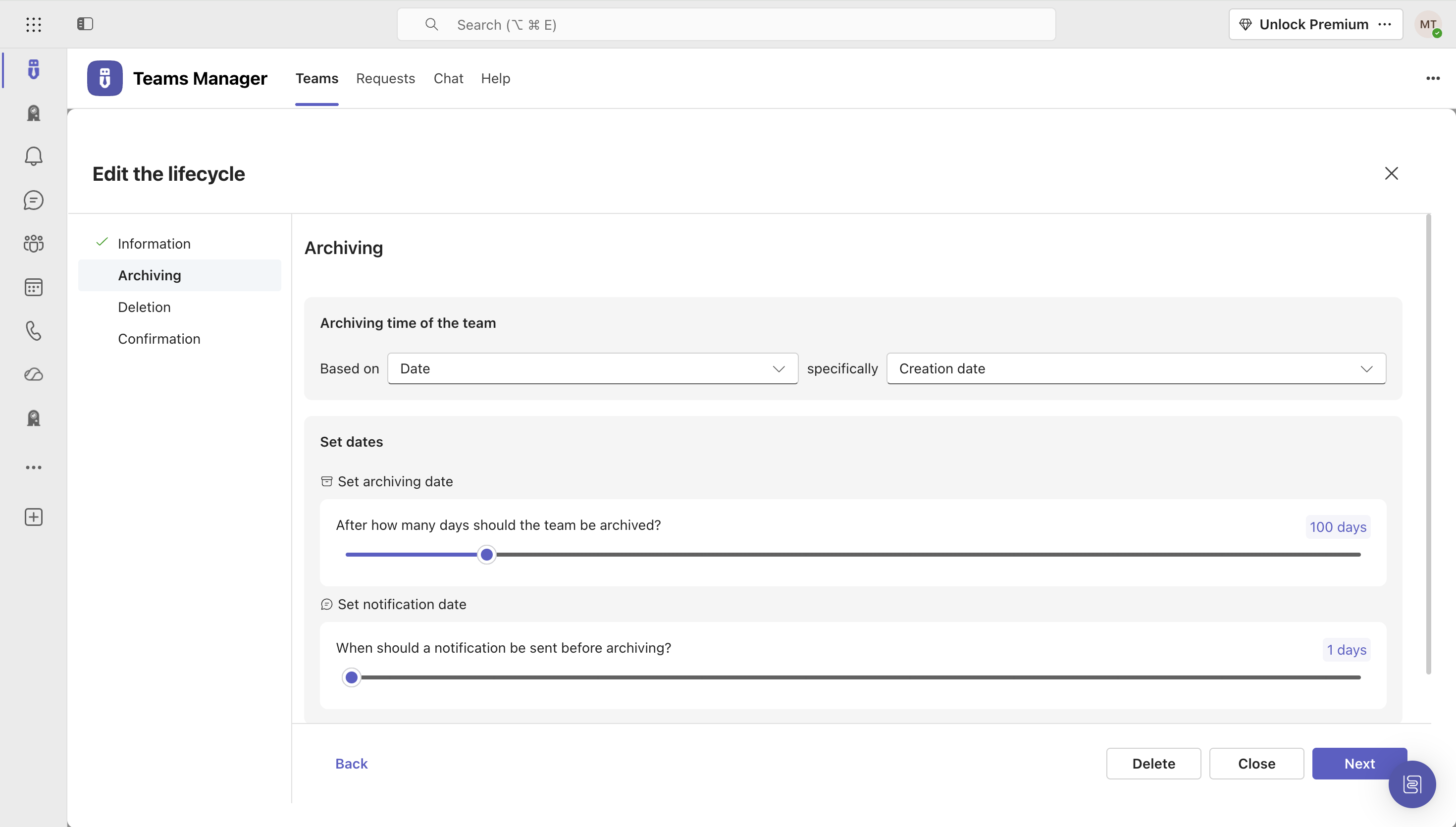
    Screenshot of Governance Dashboard and Reports – for an overview of Microsoft 365 environmentsScreenshot of Automated request and approval process for new teams, M365 groups and SharePoint sitesScreenshot of Templates and provisioning for teams and SharePoint sites (with channels, tabs, apps, folders, Planner with tasks, OneNote with content and more)Screenshot of Lifecycles for teams: inactive or obsolete teams can automatically be archived or even deleted after a specified period of timeScreenshot of Naming conventions for teams, OneNotes, Planners and SharePoint URLs: rules for uniform, relevant names with predefined prefixes and suffixesScreenshot of Policy packages for teams: automatically enforce governance policies for team requests, approvals, access reviews and more

    Totango Screenshots

    Screenshot of collaboration tools to manage a customer portfolioScreenshot of a 360° view of customer healthScreenshot of the dashboard to monitor customer metricsScreenshot of engaging in-app experiences and email campaigns to improve customer retentionScreenshot of integrated data in the Customer Data Hub