When I Work is a way for businesses to schedule, track time and attendance, and communicate with their hourly employees. The schedule and time clock is placed in every employee's pocket with When I Work's iOS and Android apps. It can be used to keep track of time off, employee availability, and manage shift swaps with a few clicks. When I Work integrates with payroll providers to streamline the process and avoid human error.
$2.50
per month per user
WorkflowMax
Score8 out of 10
Small Businesses (1-50 employees)
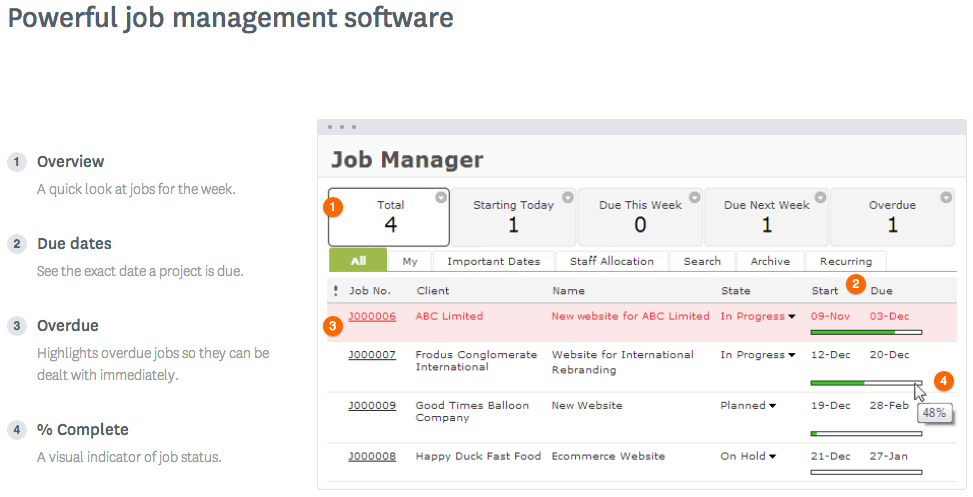
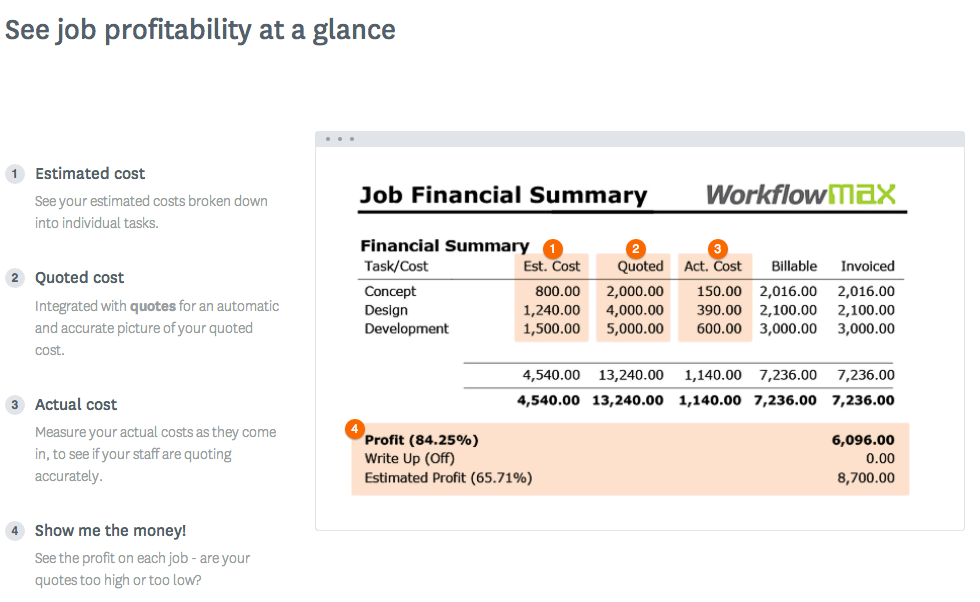
WorkflowMax is a web-based project management solution.The platform offers end-to-end functionality standard to project management software, including time tracking, lead management, collaboration with external stakeholders, invoicing, integrations, and customizable reporting.
I recommend When I Work to those companies that are looking for a way to manage work schedules and want to increase the productivity of all employees. This is an important platform that would bring excellent results to small, medium and large companies. This is a constant monitoring system which allows employees to complete their tasks in the indicated time, When I Work sends automated alerts when an employee is not complying with their tasks and this allows us to know exactly the productivity we are having in each one of the sectors. It is an excellent platform for planning and administration of working hours, it has a very easy-to-use UI that allows schedules to be easily managed. Without a doubt, When I Work would be a perfect implementation for any sector or company, since it has a lot of potential to collect exact data on compliance with working hours.
A de minimis incentive was given to thank the reviewer for their time. The incentive was not used to bias or drive a particular response, nor was the incentive contingent on a positive endorsement. More Info
WorkflowMax is very well suited for a business that wants to track time billed by project, to have an easy way to generate invoices for those projects, and to keep track of overall productivity and invoice status. I imagine it can also be adapted to different types of businesses that deal in goods rather than services and time. I am not sure for which scenarios or businesses the program is not appropriate.
A de minimis incentive was given to thank the reviewer for their time. The incentive was not used to bias or drive a particular response, nor was the incentive contingent on a positive endorsement. More Info
When I Work allowed me to color-code each employee's schedule.
When I Work allowed me to show who was "off" during what time of day. This was essential for morale, as our event included 16-18 hour days, and I wanted to show that everyone had down time each day.
A de minimis incentive was given to thank the reviewer for their time. The incentive was not used to bias or drive a particular response, nor was the incentive contingent on a positive endorsement. More Info
You can customize the notifications and this has helped us enormously to schedule dates that we overlooked. Also the templates are customizable which gives the company its own branding on its reports.
It is integrated with the Xero platform which makes it very useful to streamline the processes of billing, accounts payable, accounts receivable, petty cash flow and all the accounting and administrative area.
It also has a very complete mobile version, where we can be present and monitor the progress of projects in real time, no matter where we are.
A de minimis incentive was given to thank the reviewer for their time. The incentive was not used to bias or drive a particular response, nor was the incentive contingent on a positive endorsement. More Info
When pulling up the schedule on the app, it defaults to Tuesday when the screen is done loading.
If you pull up an individual's schedule it removes your default settings. For example, I have mine set to just my store, but if I need to see an employee's schedule it resets those defaults. You're always looking at the last schedule you pulled up.
A de minimis incentive was given to thank the reviewer for their time. The incentive was not used to bias or drive a particular response, nor was the incentive contingent on a positive endorsement. More Info
Currently the timesheet function allows staff to input time for overlapping periods which can cause some headaches when it comes to payroll and invoicing. We understand this is being addressed.
The amount of flexibility in the product can create some challenges when setting up the jobs database at the onset. It is a daunting challenge but worthwhile when completed correctly and rolled out across the firm. Adding new jobs is much easier.
No search function to find a specific job, you have to scroll through all jobs allocated to you.
A de minimis incentive was given to thank the reviewer for their time. The incentive was not used to bias or drive a particular response, nor was the incentive contingent on a positive endorsement. TR verified that a representative sample of customers was invited. More Info
A de minimis incentive was given to thank the reviewer for their time. The incentive was not used to bias or drive a particular response, nor was the incentive contingent on a positive endorsement. More Info
A de minimis incentive was given to thank the reviewer for their time. The incentive was not used to bias or drive a particular response, nor was the incentive contingent on a positive endorsement. TR verified that a representative sample of customers was invited. More Info
A de minimis incentive was given to thank the reviewer for their time. The incentive was not used to bias or drive a particular response, nor was the incentive contingent on a positive endorsement. More Info
A de minimis incentive was given to thank the reviewer for their time. The incentive was not used to bias or drive a particular response, nor was the incentive contingent on a positive endorsement. TR verified that a representative sample of customers was invited. More Info
Every time I contact When I Work staff with an issue, someone is there with a quick solution to my problem. I love the chat feature. I can continue to work on other things while the When I Work representative assists me.
A de minimis incentive was given to thank the reviewer for their time. The incentive was not used to bias or drive a particular response, nor was the incentive contingent on a positive endorsement. More Info
A de minimis incentive was given to thank the reviewer for their time. The incentive was not used to bias or drive a particular response, nor was the incentive contingent on a positive endorsement. More Info
A de minimis incentive was given to thank the reviewer for their time. The incentive was not used to bias or drive a particular response, nor was the incentive contingent on a positive endorsement. More Info
Decide how to breakdown your ongoing jobs - are they monthly recurring or annual broken into chunks? What are you going to give clients i.e. how will your proposals and invoices look?
A de minimis incentive was given to thank the reviewer for their time. The incentive was not used to bias or drive a particular response, nor was the incentive contingent on a positive endorsement. More Info
When I Work seemed a bit easier to implement for our team and employees. When I Work had all the things we needed without a lot of the bells and whistles that we wouldn't really utilize. When I Work was also a bit more affordable for our budget. Overall, it was the better choice.
A de minimis incentive was given to thank the reviewer for their time. The incentive was not used to bias or drive a particular response, nor was the incentive contingent on a positive endorsement. More Info
WorkflowMax is much much easier than Streamtime, much more affordable and easier to try out and see if it meets your needs. Streamtime is a great comprehensive product but we lost a year's subscription in investment because we couldn't get answers to the support questions we needed and they had a no refund policy!
A de minimis incentive was given to thank the reviewer for their time. The incentive was not used to bias or drive a particular response, nor was the incentive contingent on a positive endorsement. TR verified that a representative sample of customers was invited. More Info
A de minimis incentive was given to thank the reviewer for their time. The incentive was not used to bias or drive a particular response, nor was the incentive contingent on a positive endorsement. More Info
Max enables Loan Assistant to invoice very quickly and easily and integration with Xero for card payments brings our cashflow forward.
Max enables the Loan Assistant team to manage their workflow in an efficient and productive way. The team all work from home. It is the centre of our Loan Assistant universe.
A de minimis incentive was given to thank the reviewer for their time. The incentive was not used to bias or drive a particular response, nor was the incentive contingent on a positive endorsement. More Info