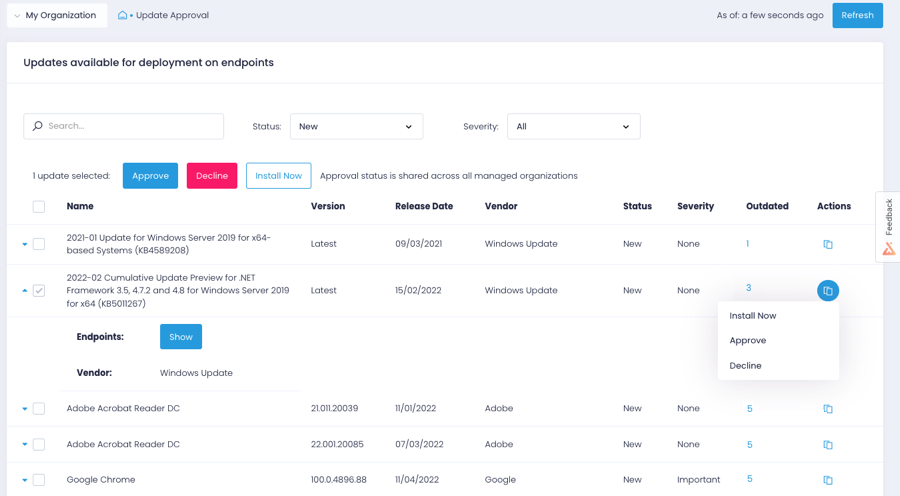
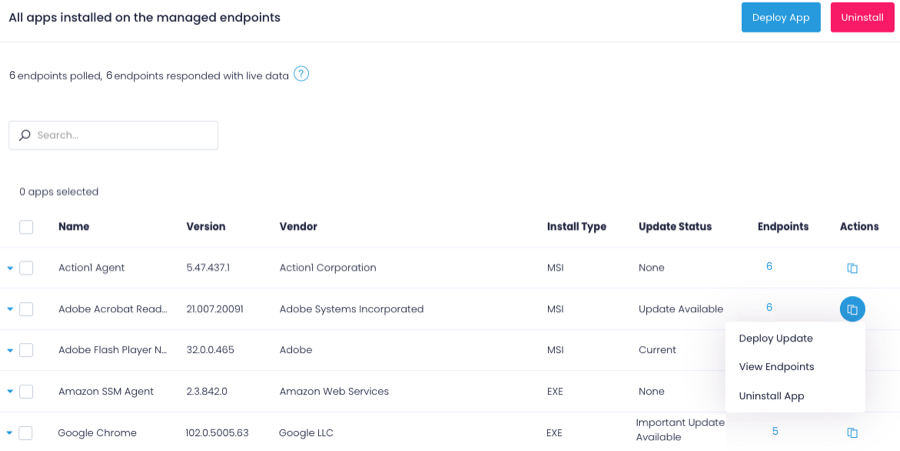
Action1 is an autonomous endpoint management platform that is cloud-native, scalable, and configurable in 5 minutes. It is free for the first 200 endpoints, with no functional limits. By pioneering autonomous OS and third-party patching - AEM’s foundational use case - through peer-to-peer patch distribution and real-time vulnerability assessment without needing a VPN, it eliminates costly, time-consuming routine labor, preempts ransomware and security risks, and protects the digital…
N/A
Automox
Score8.7 out of 10
N/A
Automox is an endpoint management platform built for the era of autonomous operations. It provides a cloud-native foundation that unifies automation, speed, visibility, and trust.
$1
per month per endpoint
VMware Fusion
Score7.3 out of 10
N/A
Vmware Fusion is a virtual user session software built to run Windows applications on Macintosh to run any Windows applications.
N/A
Pricing
Action1
Automox
VMware Fusion
Editions & Modules
No answers on this topic
No answers on this topic
No answers on this topic
Offerings
Pricing Offerings
Action1
Automox
VMware Fusion
Free Trial
No
Yes
No
Free/Freemium Version
Yes
No
No
Premium Consulting/Integration Services
No
No
No
Entry-level Setup Fee
Optional
No setup fee
No setup fee
Additional Details
—
Automox can patch macOS, Windows, and Linux endpoints with PatchOS, an offering at $1 per endpoint/ month with an annual commitment.
The Automate Essentials or Automate Enterprise packages are for scaling IT automation, endpoint configuration, and software updates.
Modules are available with Automox Assist, a one-on-one remote endpoint control and assistance for helpdesk technicians.
If your organization is like mine (nonprofit and tight budget) this product is for you. The first 200 endpoints are free and being we are a small organization, this product is perfect for us. I was able to use Action1 to upgrade all my endpoints from Windows 10 to 11 pretty much effortlessly. If you are not a nonprofit and have more endpoints over 200, this is still a great product to use as I don't find it very expensive to incorporate into your infrastructure.
A de minimis incentive was given to thank the reviewer for their time. The incentive was not used to bias or drive a particular response, nor was the incentive contingent on a positive endorsement. More Info
Automox is well suited in your are looking for patching management solution for your cloud native workload, if you are using Microsoft Azure for example you can use Azure patch management no doubt but what about application level vulnerabilities Microsoft will not give you that information but Automox will. Also you need to make sure apart from patching your 3rd party apps like Zoom, slack, Chrome or any other software you are using need to be updated on time to get latest features installed you need Automox and it work perfect
A de minimis incentive was given to thank the reviewer for their time. The incentive was not used to bias or drive a particular response, nor was the incentive contingent on a positive endorsement. More Info
Due to its perpetual licensing model, VMware Fusion is a great option for users whose needs do not change as much over time. It is also great for occasional-use scenarios such as testing and preparing code to run on newer platforms. Fusion is not really recommended for running graphics-intense applications as graphics acceleration in Fusion is fairly limited in both performance and API support. It has, however, come a very long way and offers near-native performance for many tasks.
A de minimis incentive was given to thank the reviewer for their time. The incentive was not used to bias or drive a particular response, nor was the incentive contingent on a positive endorsement. More Info
Easy remote access to devices. That simple. We have some very unskilled users in the field where asking them to access their PC via conventional remote tools like TeamViewer, Anydesk, etc. was always a pain. Now, all they have to do is ensure their PC is online, and we can connect to them.
Remote software deploy. Before Action1, we did have some GPOs and scripts, but again - being able to deploy to PCs outside of our office/LAN, is just beautiful. On top of the standard repository, being able to create new packages is very useful for our scenario.
Inventory Reporting. Recently we had to identify PCs running old versions of Windows. Can't highlight enough how easy it is.
A de minimis incentive was given to thank the reviewer for their time. The incentive was not used to bias or drive a particular response, nor was the incentive contingent on a positive endorsement. More Info
A de minimis incentive was given to thank the reviewer for their time. The incentive was not used to bias or drive a particular response, nor was the incentive contingent on a positive endorsement. TR verified that a representative sample of customers was invited. More Info
A de minimis incentive was given to thank the reviewer for their time. The incentive was not used to bias or drive a particular response, nor was the incentive contingent on a positive endorsement. More Info
The deployment screens for update deferrals can be hard to understand at first and easy to skip since it carries some default info when you create a new automation rather than a more conspicuous prompt to update.
A de minimis incentive was given to thank the reviewer for their time. The incentive was not used to bias or drive a particular response, nor was the incentive contingent on a positive endorsement. More Info
There are some applications that updates to the wrong version causing Channel version issues, this then needs to be excluded from the policy and updated via a script.
Certain software like NET. is not updated
The worklet / remediation / evaluation system is not always effective, does not work all the time. Needs to be very detailed for it work.
A de minimis incentive was given to thank the reviewer for their time. The incentive was not used to bias or drive a particular response, nor was the incentive contingent on a positive endorsement. More Info
A de minimis incentive was given to thank the reviewer for their time. The incentive was not used to bias or drive a particular response, nor was the incentive contingent on a positive endorsement. More Info
A de minimis incentive was given to thank the reviewer for their time. The incentive was not used to bias or drive a particular response, nor was the incentive contingent on a positive endorsement. More Info
We really like Automox and have had a very positive experience using the platform. It has made managing and supporting our environment significantly easier, while giving us the visibility and control we need to manage devices effectively. It has simplified a number of operational tasks for our team, and we are very happy with the value and capabilities it provides.
A de minimis incentive was given to thank the reviewer for their time. The incentive was not used to bias or drive a particular response, nor was the incentive contingent on a positive endorsement. More Info
For Apple workstations VMware Fusion is the virtualization software to use. No other application (free or paid) can do what Fusion can. The features and constant updates make Fusion an application that cant be beat.
A de minimis incentive was given to thank the reviewer for their time. The incentive was not used to bias or drive a particular response, nor was the incentive contingent on a positive endorsement. More Info
Action1 has taken many of the tasks that are time consuming and made them simple automated tasks that can be run on a schedule. I can schedule tasks to run off-hours and know that they will be done and I no longer have worry about it. As someone who does IT support for a living, it just makes my job so much simpler with less stress.
I would rate Automox's overall usability a 9 out of 10. The platform is easy to navigate and provides strong endpoint visibility through a centralized console. Creating policies and identifying vulnerable devices are straightforward tasks. Remediation can be deployed in a few clicks, compared to the significant work involved in manual patching. The interface drastically improves efficiency for our IT team.
A de minimis incentive was given to thank the reviewer for their time. The incentive was not used to bias or drive a particular response, nor was the incentive contingent on a positive endorsement. More Info
I made an 8 because it's good in almost every aspect. As I said if you are on macos and you need both windows and linux I think is the best options out there. Otherwise if you need only windows there is a competitor that could be better for performance and integration.
A de minimis incentive was given to thank the reviewer for their time. The incentive was not used to bias or drive a particular response, nor was the incentive contingent on a positive endorsement. More Info
A de minimis incentive was given to thank the reviewer for their time. The incentive was not used to bias or drive a particular response, nor was the incentive contingent on a positive endorsement. More Info
I did not need to reach out to support often but when I did the answers were relatively correct and they were answered quickly. The only thing I might "ding" their support on was their lack of understanding of OS's different from Windows and especially Linux. Other than that I was satisfied
A de minimis incentive was given to thank the reviewer for their time. The incentive was not used to bias or drive a particular response, nor was the incentive contingent on a positive endorsement. More Info
I have never contacted VMware, but there is a lot of support online on message boards, forums, StackOverflow, YouTube tutorial videos, and the like. VMware has been around nine years longer than its leading competitor, VirtualBox, although both seem to have a good presence of online user communities who can help solve issues that come up.
A de minimis incentive was given to thank the reviewer for their time. The incentive was not used to bias or drive a particular response, nor was the incentive contingent on a positive endorsement. More Info
A de minimis incentive was given to thank the reviewer for their time. The incentive was not used to bias or drive a particular response, nor was the incentive contingent on a positive endorsement. More Info
Implementing Automox successfully starts with a clear strategy for organizing and grouping devices based on operating systems, environments, or business criticality. This ensures that patching and configuration policies can be applied with precision. A phased rollout approach is essential—beginning with a pilot group allows teams to test patching schedules, reboot behaviors, and custom Worklets before scaling across the organization. Leveraging Worklets from the start can significantly boost automation by enforcing security baselines and performing routine system tasks. Integration with existing SOC tools, such as SIEMs, enhances visibility and response time by correlating patch compliance with threat intelligence. Additionally, aligning patching schedules with operational downtimes minimizes disruptions, and consistent monitoring and reporting helps maintain compliance and prepare for audits. Overall, Automox offers a streamlined and effective solution, but its true value is unlocked through thoughtful planning, testing, and integration with existing IT and security workflows.
A de minimis incentive was given to thank the reviewer for their time. The incentive was not used to bias or drive a particular response, nor was the incentive contingent on a positive endorsement. More Info
A de minimis incentive was given to thank the reviewer for their time. The incentive was not used to bias or drive a particular response, nor was the incentive contingent on a positive endorsement. More Info
After looking at different solutions, Action1 [Cloud Remote Monitoring and Management Solution] was the perfect fit for us that delivered all of the features we wanted without being as costly as some of the others alternatives we've looked at. There was no minimum endpoint count and they even offer up to 50 endpoints for free, which is really great for a small organization like us to help us lower our starting costs and still allows us to grow at our pace without having to commit to a defined amount of endpoints to start.
We chose this tool over Automox because, before Automox, we used Intune, and at the time we were on Office 365, so Intune was almost free. Later, the board decided to move from the Microsoft 365 suite to Google Workspace, and Intune's endpoint management costs were high, so we moved to Automox.
I've heard of other/competitive software but frankly once I tried VMware, I never looked back. There is absolutely nothing that I need that this product does not deliver. It's fast, effective and seems to be extremely durable and reliable. My only concern (and minor) might have to do with memory resources, but frankly it has not been an issue yet.
A de minimis incentive was given to thank the reviewer for their time. The incentive was not used to bias or drive a particular response, nor was the incentive contingent on a positive endorsement. More Info
Saved hours per week on patching and able to ensure a 100% patching success rate.
Able to create custom alerting on potential problems as well as able to create some automation to automatically address problems.
Improved support to our remote locations and users.
Custom deployments allow us to have a mechanism to deploy custom applications we build as well as other third party applications we need to distribute.
A de minimis incentive was given to thank the reviewer for their time. The incentive was not used to bias or drive a particular response, nor was the incentive contingent on a positive endorsement. More Info
Time savings are a huge one - like I mentioned earlier, 3rd party app updating used to be entirely manual.
Endpoint management with the dashboard's convenience and ease of readability is very nice.
The only negative - more recently, granular per-user options for software update notifications don't seem to be possible unless the user is isolated in their own group.
A de minimis incentive was given to thank the reviewer for their time. The incentive was not used to bias or drive a particular response, nor was the incentive contingent on a positive endorsement. More Info
Users using a VM often don't need something as "fancy" as VMware Fusion, and instead can use a free option like Virtual Box, so we waste money on using an extra amount of VMware Fusion licenses.
Developers using and IT admins using VMware Fusion for testing saves us time and money. Simply, we know mistakes would take time and money to fix, but VMware is powerful, allows for proper and fast testing.
A de minimis incentive was given to thank the reviewer for their time. The incentive was not used to bias or drive a particular response, nor was the incentive contingent on a positive endorsement. More Info