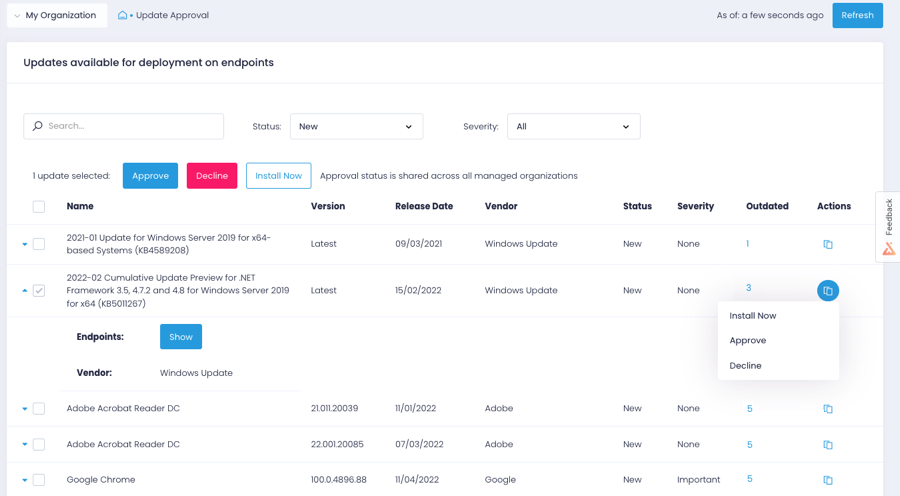
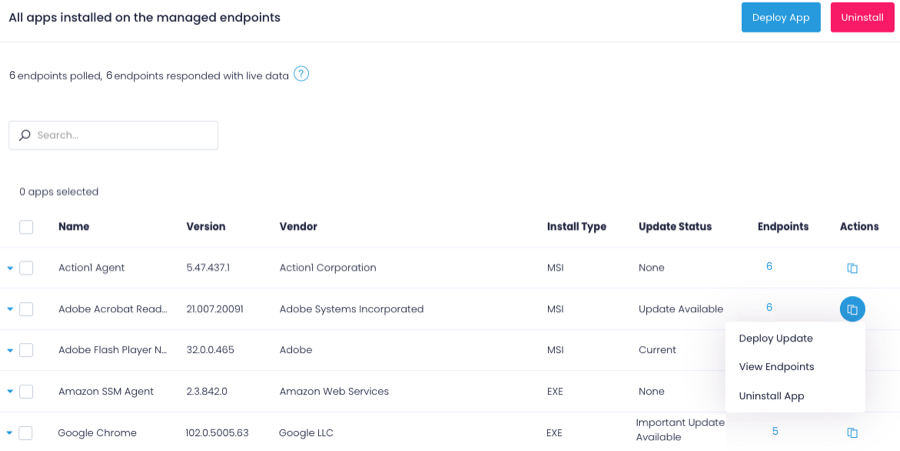
Action1 is an autonomous endpoint management platform that is cloud-native, scalable, and configurable in 5 minutes. It is free for the first 200 endpoints, with no functional limits. By pioneering autonomous OS and third-party patching - AEM’s foundational use case - through peer-to-peer patch distribution and real-time vulnerability assessment without needing a VPN, it eliminates costly, time-consuming routine labor, preempts ransomware and security risks, and protects the digital…
N/A
ManageEngine Endpoint Central
Score9 out of 10
N/A
Desktop Central from ManageEngine is a client desktop management with patching, remote control, and configuration.
$795
per year per user
VMware Fusion
Score7.3 out of 10
N/A
Vmware Fusion is a virtual user session software built to run Windows applications on Macintosh to run any Windows applications.
N/A
Pricing
Action1
ManageEngine Endpoint Central
VMware Fusion
Editions & Modules
No answers on this topic
No answers on this topic
No answers on this topic
Offerings
Pricing Offerings
Action1
ManageEngine Endpoint Central
VMware Fusion
Free Trial
No
Yes
No
Free/Freemium Version
Yes
No
No
Premium Consulting/Integration Services
No
No
No
Entry-level Setup Fee
Optional
No setup fee
No setup fee
Additional Details
—
—
—
More Pricing Information
Community Pulse
Action1
ManageEngine Endpoint Central
VMware Fusion
Considered Multiple Products
Action1
Verified User
Chose Action1
Action1 Cloud Remote Monitoring and Management Solution may not be as feature rich as SCCM and Intune, but it does its job without having to set up and support additional infrastructure on your network. It's more user friendly than ManageEngine's Desktop Central but does most …
A de minimis incentive was given to thank the reviewer for their time. The incentive was not used to bias or drive a particular response, nor was the incentive contingent on a positive endorsement. More Info
If your organization is like mine (nonprofit and tight budget) this product is for you. The first 200 endpoints are free and being we are a small organization, this product is perfect for us. I was able to use Action1 to upgrade all my endpoints from Windows 10 to 11 pretty much effortlessly. If you are not a nonprofit and have more endpoints over 200, this is still a great product to use as I don't find it very expensive to incorporate into your infrastructure.
A de minimis incentive was given to thank the reviewer for their time. The incentive was not used to bias or drive a particular response, nor was the incentive contingent on a positive endorsement. More Info
For small businesses, it is also free, which, for what it offers, is really helpful. It works better than similar products, such as SCCM, both within and outside the internal network. I do not see scenarios in which it could be less appropriate.
Due to its perpetual licensing model, VMware Fusion is a great option for users whose needs do not change as much over time. It is also great for occasional-use scenarios such as testing and preparing code to run on newer platforms. Fusion is not really recommended for running graphics-intense applications as graphics acceleration in Fusion is fairly limited in both performance and API support. It has, however, come a very long way and offers near-native performance for many tasks.
A de minimis incentive was given to thank the reviewer for their time. The incentive was not used to bias or drive a particular response, nor was the incentive contingent on a positive endorsement. More Info
Easy remote access to devices. That simple. We have some very unskilled users in the field where asking them to access their PC via conventional remote tools like TeamViewer, Anydesk, etc. was always a pain. Now, all they have to do is ensure their PC is online, and we can connect to them.
Remote software deploy. Before Action1, we did have some GPOs and scripts, but again - being able to deploy to PCs outside of our office/LAN, is just beautiful. On top of the standard repository, being able to create new packages is very useful for our scenario.
Inventory Reporting. Recently we had to identify PCs running old versions of Windows. Can't highlight enough how easy it is.
A de minimis incentive was given to thank the reviewer for their time. The incentive was not used to bias or drive a particular response, nor was the incentive contingent on a positive endorsement. More Info
We set alerts when a devices gets low on disk space. That is automatic and creates a ticket in ME SDP. We are then able to Add space to a VM Desktop, and then go thru ManageEngine Endpoint Central to extend the drives so the entire process can be done without interruption to the end user.
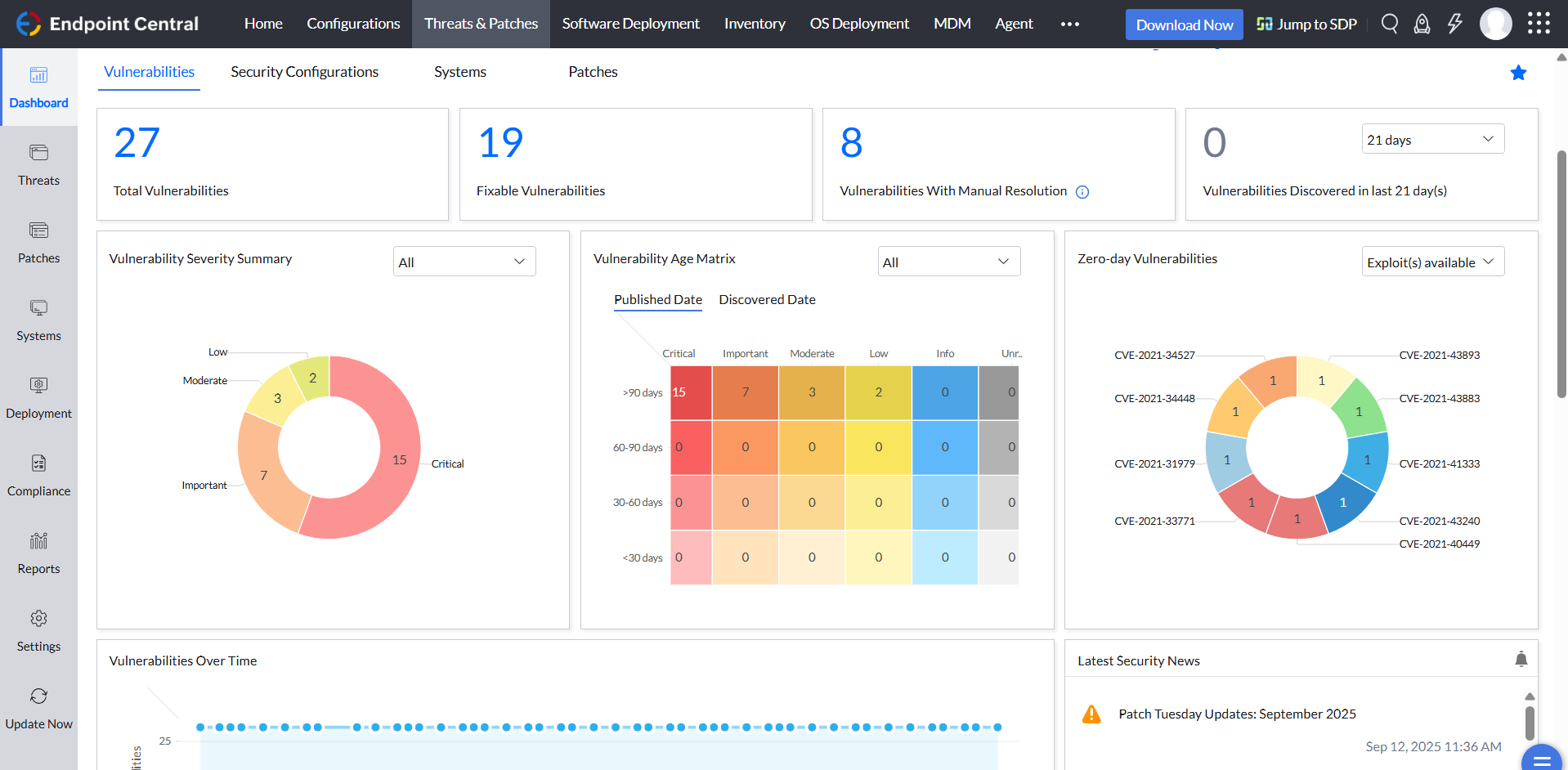
Using the patch scans we can easily see what patches have been installed for all manufacturers not just Microsoft, without having to physically go to the device. It also allows us to choose which patches we want to push out and automate the process so we can be hands off, freeing up out time for other things.
Remote access to devices. This allows us to remotely make changes, not just via remote control but also make registry changes and clean up space without going to the device and without interruption to the end user.
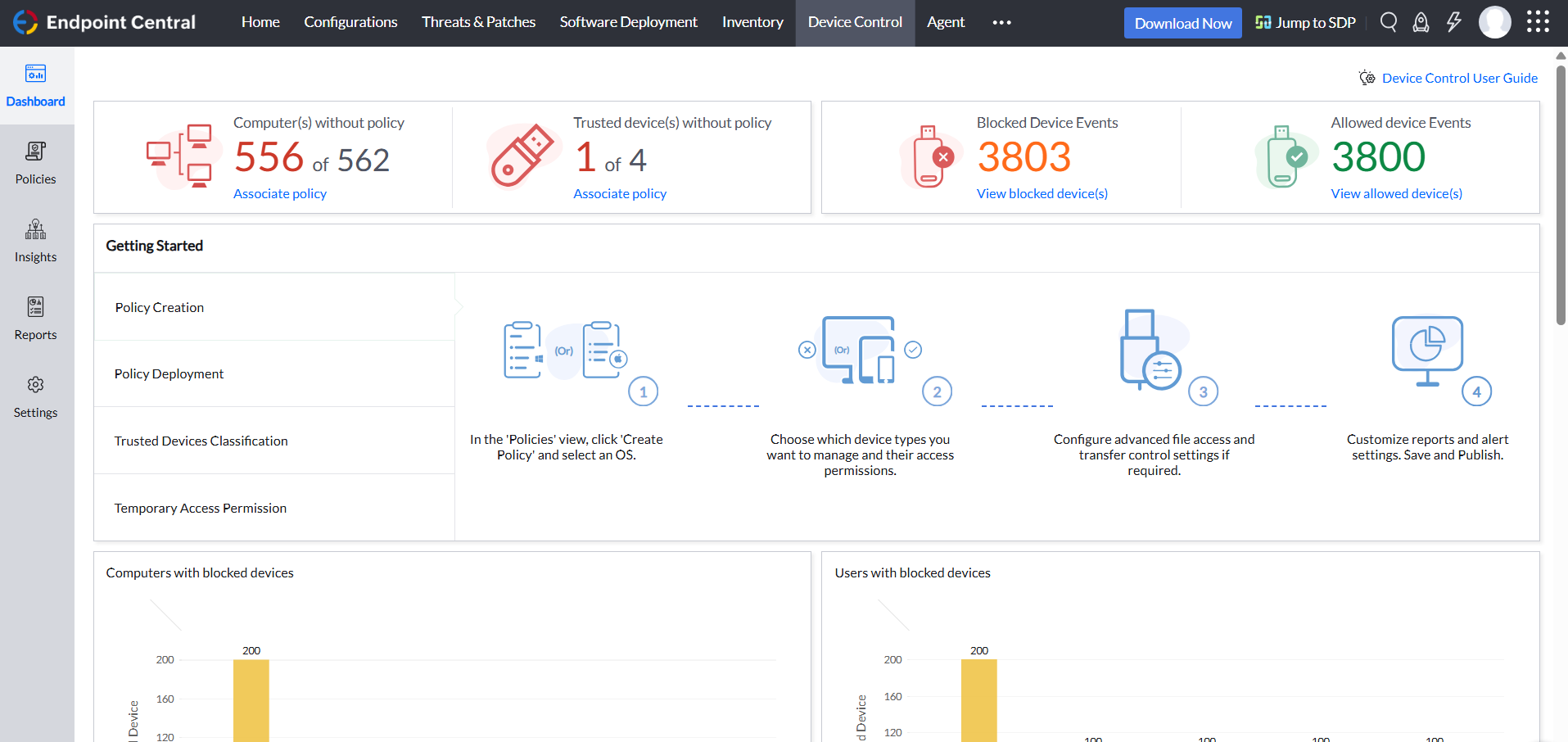
Alerts. We have set up to get email alerts when new hardware is plugged into any computers. This lets us know if someone is bringing in un-authorized equipment (thumb drives, hubs, etc) to better manage what is/is not on our network.
A de minimis incentive was given to thank the reviewer for their time. The incentive was not used to bias or drive a particular response, nor was the incentive contingent on a positive endorsement. TR verified that a representative sample of customers was invited. More Info
A de minimis incentive was given to thank the reviewer for their time. The incentive was not used to bias or drive a particular response, nor was the incentive contingent on a positive endorsement. More Info
The deployment screens for update deferrals can be hard to understand at first and easy to skip since it carries some default info when you create a new automation rather than a more conspicuous prompt to update.
A de minimis incentive was given to thank the reviewer for their time. The incentive was not used to bias or drive a particular response, nor was the incentive contingent on a positive endorsement. More Info
A de minimis incentive was given to thank the reviewer for their time. The incentive was not used to bias or drive a particular response, nor was the incentive contingent on a positive endorsement. More Info
A de minimis incentive was given to thank the reviewer for their time. The incentive was not used to bias or drive a particular response, nor was the incentive contingent on a positive endorsement. More Info
A de minimis incentive was given to thank the reviewer for their time. The incentive was not used to bias or drive a particular response, nor was the incentive contingent on a positive endorsement. More Info
ManageEngine is considered an excellent product due to its comprehensive suite of solutions for IT management, with ManageEngine Endpoint Central specifically excelling in endpoint management. The platform stands out for its user-friendly interface, robust features, and versatility in addressing diverse IT needs. It offers organizations a centralized solution for endpoint security, patch management, software deployment, and asset management
For Apple workstations VMware Fusion is the virtualization software to use. No other application (free or paid) can do what Fusion can. The features and constant updates make Fusion an application that cant be beat.
A de minimis incentive was given to thank the reviewer for their time. The incentive was not used to bias or drive a particular response, nor was the incentive contingent on a positive endorsement. More Info
Action1 has taken many of the tasks that are time consuming and made them simple automated tasks that can be run on a schedule. I can schedule tasks to run off-hours and know that they will be done and I no longer have worry about it. As someone who does IT support for a living, it just makes my job so much simpler with less stress.
Not using WNS to communicate with the endpoint console is a big plus. We now use Workspace One, and WNS can be really annoying at times. After deployment, it cleans itself, which is important for us because our current solution leaves the package on the computer and requires maintenance. The remotely script command is a lifesaver.
A de minimis incentive was given to thank the reviewer for their time. The incentive was not used to bias or drive a particular response, nor was the incentive contingent on a positive endorsement. More Info
I made an 8 because it's good in almost every aspect. As I said if you are on macos and you need both windows and linux I think is the best options out there. Otherwise if you need only windows there is a competitor that could be better for performance and integration.
A de minimis incentive was given to thank the reviewer for their time. The incentive was not used to bias or drive a particular response, nor was the incentive contingent on a positive endorsement. More Info
A de minimis incentive was given to thank the reviewer for their time. The incentive was not used to bias or drive a particular response, nor was the incentive contingent on a positive endorsement. More Info
The immediate chat support is great and very helpful. However, if you need escalated support or have a deeper need that the chat tool can't help with, you will experience significant wait times and slow responses. The time zone difference becomes painful to the point of often just giving up.
I have never contacted VMware, but there is a lot of support online on message boards, forums, StackOverflow, YouTube tutorial videos, and the like. VMware has been around nine years longer than its leading competitor, VirtualBox, although both seem to have a good presence of online user communities who can help solve issues that come up.
A de minimis incentive was given to thank the reviewer for their time. The incentive was not used to bias or drive a particular response, nor was the incentive contingent on a positive endorsement. More Info
A de minimis incentive was given to thank the reviewer for their time. The incentive was not used to bias or drive a particular response, nor was the incentive contingent on a positive endorsement. More Info
It seems that the services offered with the purchase change from what is covered to what is an additional cost. Somethings I thought we had ended up requiring an additional purchase if we wanted to continue using the feature.
A de minimis incentive was given to thank the reviewer for their time. The incentive was not used to bias or drive a particular response, nor was the incentive contingent on a positive endorsement. More Info
A de minimis incentive was given to thank the reviewer for their time. The incentive was not used to bias or drive a particular response, nor was the incentive contingent on a positive endorsement. More Info
After looking at different solutions, Action1 [Cloud Remote Monitoring and Management Solution] was the perfect fit for us that delivered all of the features we wanted without being as costly as some of the others alternatives we've looked at. There was no minimum endpoint count and they even offer up to 50 endpoints for free, which is really great for a small organization like us to help us lower our starting costs and still allows us to grow at our pace without having to commit to a defined amount of endpoints to start.
I was not a part of the initial selection process, but I understand the issue was related to cost per endpoint. As a user of the other solutions I would say that the other solutions do have other strengths that ManageEngine is missing. The remote access tools are superior but at the end of the day you get what you pay for.
A de minimis incentive was given to thank the reviewer for their time. The incentive was not used to bias or drive a particular response, nor was the incentive contingent on a positive endorsement. More Info
I've heard of other/competitive software but frankly once I tried VMware, I never looked back. There is absolutely nothing that I need that this product does not deliver. It's fast, effective and seems to be extremely durable and reliable. My only concern (and minor) might have to do with memory resources, but frankly it has not been an issue yet.
A de minimis incentive was given to thank the reviewer for their time. The incentive was not used to bias or drive a particular response, nor was the incentive contingent on a positive endorsement. More Info
Saved hours per week on patching and able to ensure a 100% patching success rate.
Able to create custom alerting on potential problems as well as able to create some automation to automatically address problems.
Improved support to our remote locations and users.
Custom deployments allow us to have a mechanism to deploy custom applications we build as well as other third party applications we need to distribute.
A de minimis incentive was given to thank the reviewer for their time. The incentive was not used to bias or drive a particular response, nor was the incentive contingent on a positive endorsement. More Info
A de minimis incentive was given to thank the reviewer for their time. The incentive was not used to bias or drive a particular response, nor was the incentive contingent on a positive endorsement. TR verified that a representative sample of customers was invited. More Info
Users using a VM often don't need something as "fancy" as VMware Fusion, and instead can use a free option like Virtual Box, so we waste money on using an extra amount of VMware Fusion licenses.
Developers using and IT admins using VMware Fusion for testing saves us time and money. Simply, we know mistakes would take time and money to fix, but VMware is powerful, allows for proper and fast testing.
A de minimis incentive was given to thank the reviewer for their time. The incentive was not used to bias or drive a particular response, nor was the incentive contingent on a positive endorsement. More Info