Overview
ProductRatingMost Used ByProduct SummaryStarting Price
Adobe Journey Optimizer
Score 8.1 out of 10
N/A
Adobe Journey Optimizer is a customer engagement solution, enabling brands to orchestrate and deliver personalized customer engagement across all channels — including email, web, app, mobile, and more — in the moments that matter to customers.N/A
EZ Texting
Score 9.0 out of 10
N/A
EZ Texting provides businesses and organizations with a text marketing solution, including features and integrations to keep conversations going. The solution can be used by businesses to connect with their audiences. It can be used to send promotions, promote a new product, build brand awareness, or drive traffic to websites or storefronts. EZ Texting Key Features EZ Texting's features are designed to enhance the effectiveness of text marketing…
$25
per month
Pricing
Adobe Journey OptimizerEZ Texting
Editions & Modules
No answers on this topic
Launch
Starting at $25
per month
Boost
Starting at $75
per month
Scale
Starting at $125
per month
Enterprise
Starting at $3,000
per month
Offerings
Pricing Offerings
Adobe Journey OptimizerEZ Texting
Free Trial
NoYes
Free/Freemium Version
NoNo
Premium Consulting/Integration Services
YesNo
Entry-level Setup FeeOptionalNo setup fee
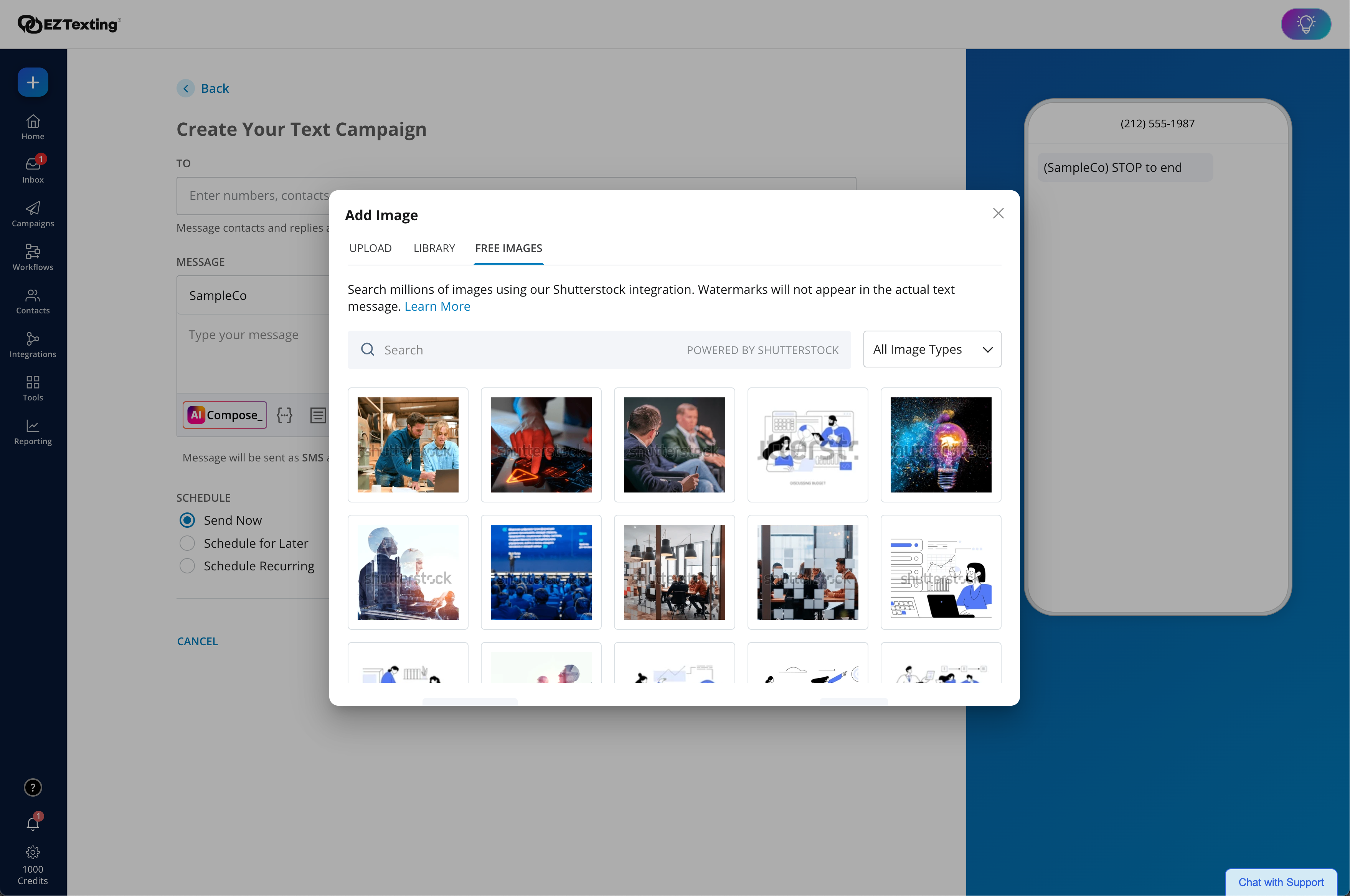
Additional DetailsLAUNCH PLAN: Recommended for up to 500 contacts. Local EZ Textable Number. Max Speed: up to 500/day. Cost Per Msg:$0.030. Delivery Rate: 95% Includes 500 free msg/mo or 6k annually. BOOST PLAN: Recommended for 501-2,000 contacts. Local EZ High-Volume Number. Max Speed: up to 2,000/day. Cost Per Msg: $0.025. Delivery Rate: 95% Includes 500 free msg/mo or 6k annually. SCALE PLAN: Recommended for 2,000-50,000 contacts. Local EZ High-Volume, High-Speed Number. Max Speed: up to 50,000/day. Cost Per Msg: $0.020. Delivery Rate: 95%. Includes 500 free msg/mo or 6k annually. ENTERPRISE PLAN: Recommended for 50,000+ contacts. This Plan offers. Dedicated Short Codes. Max Speed: up to 1 MM/day. Cost Per Msg: $0.010. Delivery Rate: 99%. Includes 200k msg/mo. Pricing information for EZ Texting is supplied by the software provider or retrieved from publicly accessible pricing materials. Final cost negotiations to purchase EZ Texting must be conducted with the seller. Included in All Plans: Unlimited Incoming Messages, Contacts, & Keywords. New Features: Realize ROI faster with AI Compose & Team Inbox with AI Reply. Live Support Chat: Monday-Friday 8am-8pm ET and Saturday-Sunday 9am-5pm ET. Growth Tools: QR Codes, Keywords & Signup Forms. MMS Edge: Enhanced Image Library + Editor powered by Shutterstock. CRM-Lite: Upload, Management, Groups & Personalization.
More Pricing Information
Community Pulse
Adobe Journey OptimizerEZ Texting
Best Alternatives
Adobe Journey OptimizerEZ Texting
Small Businesses
Simplify360
Simplify360
Score 7.8 out of 10
OneSignal
OneSignal
Score 8.0 out of 10
Medium-sized Companies
Dialpad Support
Dialpad Support
Score 9.1 out of 10
Flurry Analytics (discontinued)
Score 9.0 out of 10
Enterprises
Verint Community
Verint Community
Score 9.9 out of 10
Flurry Analytics (discontinued)
Score 9.0 out of 10
All AlternativesView all alternativesView all alternatives
User Ratings
Adobe Journey OptimizerEZ Texting
Likelihood to Recommend
7.9
(16 ratings)
9.0
(278 ratings)
Likelihood to Renew
-
(0 ratings)
9.9
(12 ratings)
Usability
7.2
(16 ratings)
9.0
(116 ratings)
Availability
-
(0 ratings)
9.9
(3 ratings)
Performance
-
(0 ratings)
8.9
(3 ratings)
Support Rating
-
(0 ratings)
9.6
(112 ratings)
Implementation Rating
-
(0 ratings)
7.1
(5 ratings)
Configurability
-
(0 ratings)
7.9
(3 ratings)
Contract Terms and Pricing Model
-
(0 ratings)
9.1
(2 ratings)
Ease of integration
-
(0 ratings)
8.0
(5 ratings)
Product Scalability
-
(0 ratings)
8.9
(3 ratings)
Professional Services
-
(0 ratings)
8.1
(2 ratings)
Vendor post-sale
-
(0 ratings)
9.1
(3 ratings)
Vendor pre-sale
-
(0 ratings)
8.1
(3 ratings)
User Testimonials
Adobe Journey OptimizerEZ Texting
Likelihood to Recommend
Adobe
AJO is best suited for advanced Martech teams who are already bought into the Adobe ecosystem through the use of RTCDP, AA, AAM, etc. Organizations that are starting their Martech journey are good candidates, as well as those who are reevaluating all of their marketing channel vendors near the same time. Success in AJO is highly dependent on the number of marketing channels added. Close coordination with database teams is essential for success. Many of the offline data requirements benefit from modeling of the data. Having dedicated resources developing AJO (RTCDP)-specific views will reduce the amount of QA required to bring the solutions to market
Read full review
CallFire
EZ Texting would be well suited for a small business that doesn't have the man power to be able to contact all of the leads they have coming in or who struggles to maintain communication with current clients at times. It would not be appropriate for a business who is looking to send phishing texts out to a large group of people.
Read full review
Pros
Adobe
  • pre built use case playbooks provide a basis for various trips
  • provides customized messaging
  • custom actions let different systems and databases be easily integrated
Read full review
CallFire
  • I appreciate the detailed delivery reports.
  • The support team’s quick responses are appreciated.
  • The automation feature is incredibly handy for instantly messaging leads right after they sign up.
  • The onboarding process is straightforward.
  • Genuine customer inquiries show up in the inbox, organizing important messages in one place.
  • You can avoid the email spam folder by using ez texting!
  • Opt-outs resolve themselves.
Read full review
Cons
Adobe
  • It doesn´t keep the last search you sis in the journeys and you have to enter the search parameter every time
  • there is a window of time during the day that the audiences give out errors and you can´t see the estimates
  • I should be able to select STO in campaigns, not only in journeys
  • I should be able to select the email parameters when using campaigns
Read full review
CallFire
  • Drafts don't save well, seemed like I kept having to redo the same text because a draft wouldn't save.
  • I want to be able to click and update users quickly, but there were too many steps to add/remove people from lists.
  • The app didn't work if I used google SSO - i couldn't ever get signed in.
Read full review
Likelihood to Renew
Adobe
It has been working very well, and actually it is a reliable tool for audience segmentation and everything that needs to be done for a campaign to deploy correctly
Read full review
CallFire
We're excited about EZ Texting and what it does for us. We want to get more into automation with campaigns dealing directly with web sales so a more robust solution will likely leave EZ Texting as our event activation partner and only be used during select times of the year.
Read full review
Usability
Adobe
At times, Adobe Journey Optimizer offers too many options, making things less user-friendly than I would personally prefer. As mentioned earlier, there is a tendency to encounter decision paralysis with the increase in available options. While having options is excellent, in typical Adobe fashion, too many can be overwhelming for users
Read full review
CallFire
EZ Text was very easy to set up and very intuitive. It does not take long at all to add your contact lists or to set up templates. It takes a second to get used to when it comes to sending mass group texts, but all in all, it does what we need to do and was easy to implement. We were able to do it ourselves.
Read full review
Reliability and Availability
Adobe
No answers on this topic
CallFire
We have never needed to use the system and it be unavailable. They seem to schedule their server maintenance perfectly (at least for us!).
Read full review
Performance
Adobe
No answers on this topic
CallFire
It works pretty well but sometimes things don't work the way you would assume, IE marking messages as read is not as intuitive
Read full review
Support Rating
Adobe
Sometimes when the manager connects to a support representative, even though the response is very immediate, they are not always able to provide a solution and we end up resolving the issue other ways
Read full review
CallFire
EZ Texting "gets it"! When I have had something I needed customer service to help me with, they returned my emails and calls promptly. I have a smaller business and they came through as if I was a huge corporate entity. They really care about all sizes of customers!
Read full review
Implementation Rating
Adobe
The only thing I wanted to mention is that when going into the email edition, when adding labels, I was able to copy and paste the labels before, and now it has changed and I am no longer able to do it without editing the label itself
Read full review
CallFire
The most important aspect of implementation was selecting a valuable keyword. When we first started using EZ Texting, we were able to grab a simple, easy word to use to connect people to our texts. That proved invaluable in our marketing and selling people on using the service. If we didn't have a good word, I would imagine it wouldn't have been as successful.
Read full review
Alternatives Considered
Adobe
They both have their pros and cons, I feel it depends on the users that the products are targetting, SFMC is has more specialized customizations, Adobe does offer similar but require a higher technical knowledge which is not something that is provided bt the other product
Read full review
CallFire
We chose EZ Texting over enterprise solutions because of it's ease of set up, ease of use, and low barrier to entry. We had discussions with other companies, and it seemed very complicated and would require a lot of set up on our end. We don't have a dedicated IT or marketing team. We are a small business. So those barriers were just too complicated and we decided to go with an easier solution.
Read full review
Contract Terms and Pricing Model
Adobe
No answers on this topic
CallFire
We have been grandfathered into our old package, but I wish there were better package options offered now.
Read full review
Scalability
Adobe
No answers on this topic
CallFire
We haven't really utilized it for this purpose but it does seem like there are a lot of great options you can utilize.
Read full review
Professional Services
Adobe
No answers on this topic
CallFire
easy access
Read full review
Return on Investment
Adobe
  • Multichannel onboarding journey improving the engagement of freshmen in the business, resulting in a decrease in the dropout rate.
  • Separate business of anticipation of receivables from suppliers that used to be manual and now I have connected this entire operation via the S3 connector, less manual work and significant gains in conversions and payments
Read full review
CallFire
  • Customers, as well as potential customers, do not seem to have any issue, providing their phone numbers for text messages as opposed to receiving countless emails.
  • Upselling items has improved considerably due to our ability to notify customers of new products and specials that we are offering in the store.
Read full review
ScreenShots

Adobe Journey Optimizer Screenshots

Screenshot of Channel Setup in Adobe Journey OptimizerScreenshot of Content Accelerator in Adobe Journey OptimizerScreenshot of In App Message Designer in Adobe Journey OptimizerScreenshot of Screenshot of Profiles Dashboard in Adobe Journey OptimizerScreenshot of SMS Journey in Adobe Journey Optimizer

EZ Texting Screenshots

Screenshot of EZ Texting Dashboard: View recent activity, upcoming campaigns, and access AI Assistant.Screenshot of the enhanced Shutterstock integration, which helps unlock and edit 450+ million free images and 20k design templates.Screenshot of AI Compose, a tool used to create engaging messages instantly, now has emojis, helpful templates, easy editing, and Spanish translations.Screenshot of Workflows. These are used to send texts triggered by actions and events to boost engagement and drive conversions. With a drag & drop editor, technical expertise or code is never required.Screenshot of Reports. These provide a view of delivery confirmations, bounce rates and opted-outs.