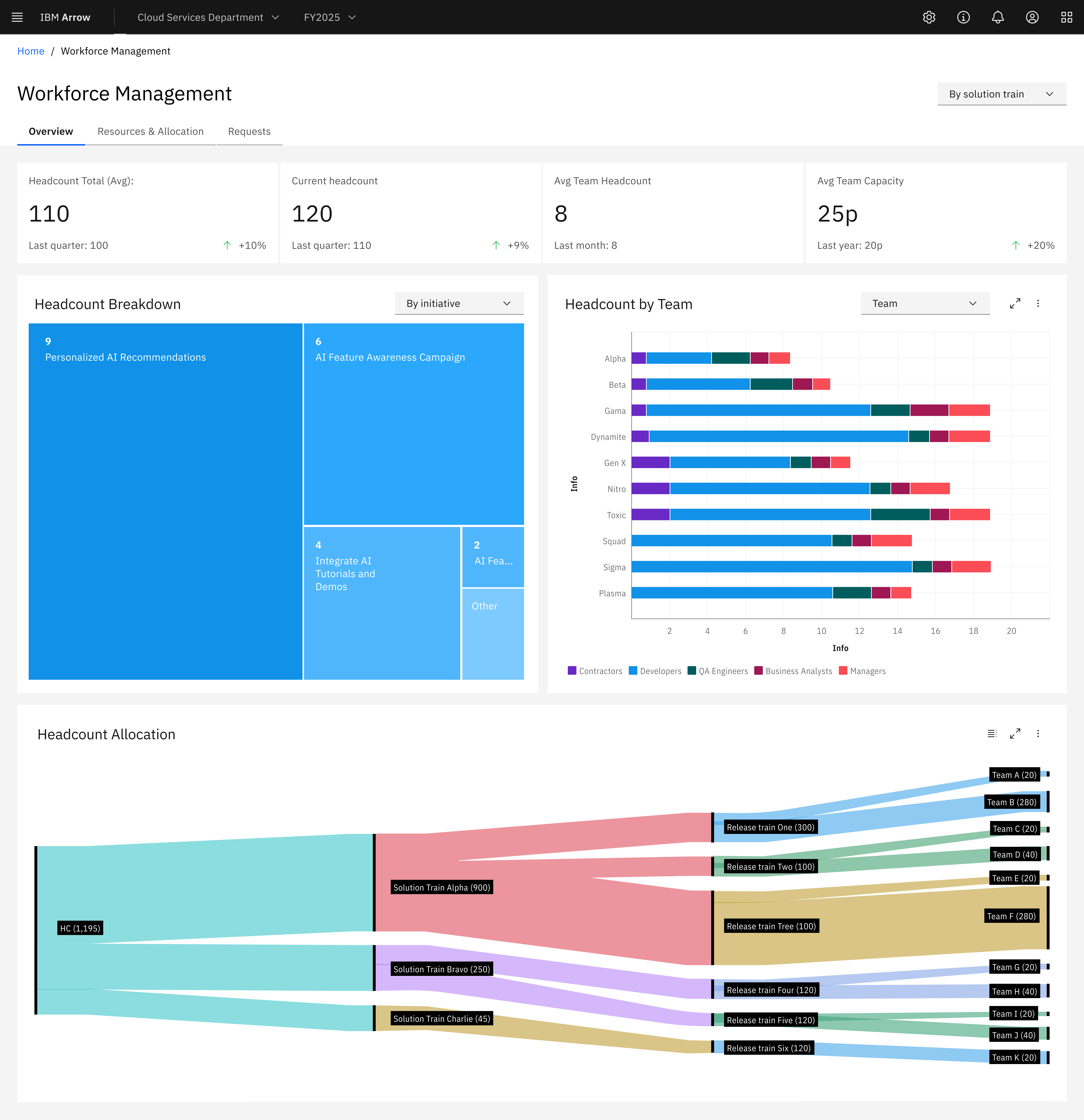
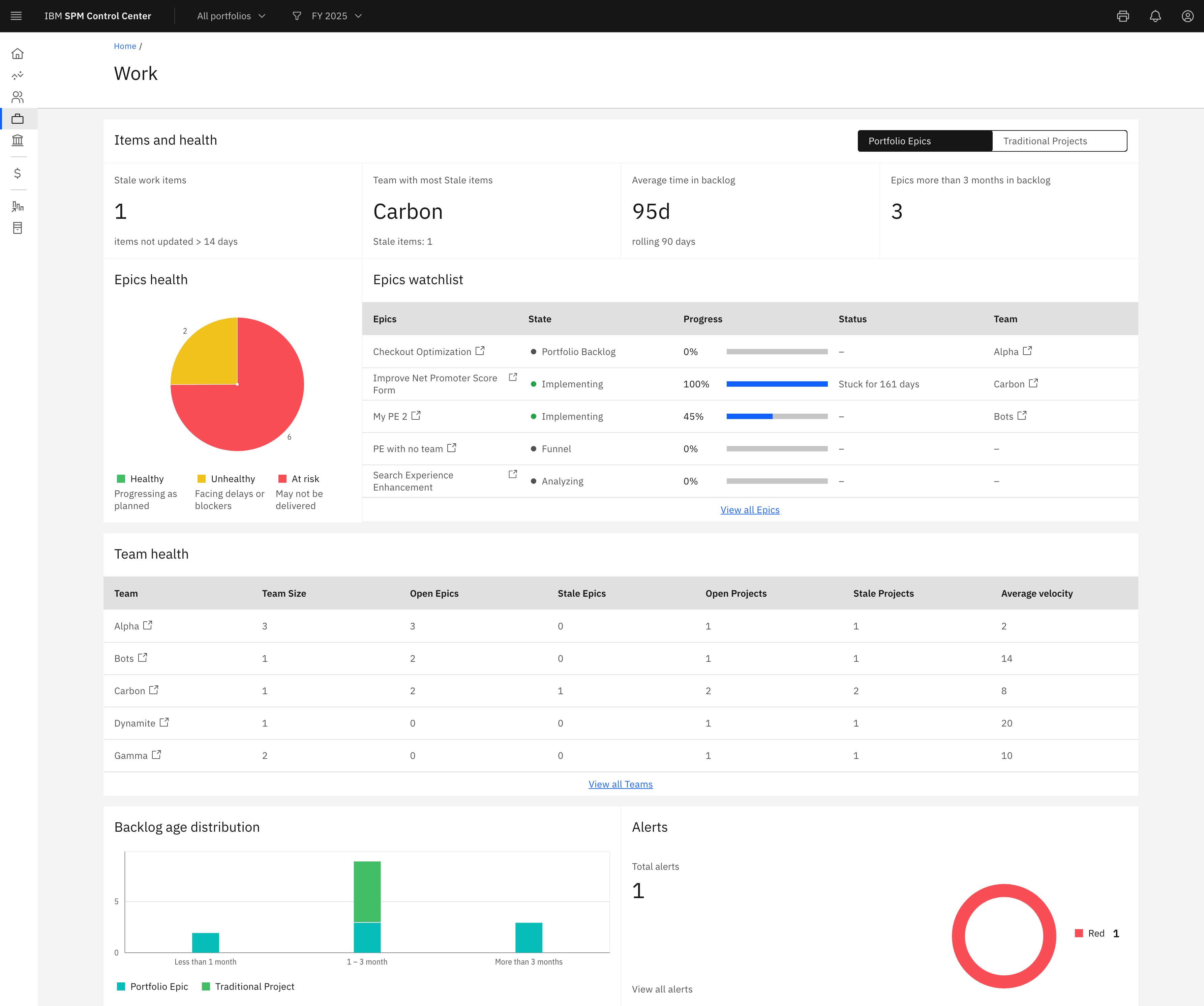
The world of work is constantly changing. Agile work processes in particular are becoming increasingly popular. Even large companies are trying to introduce agile working methods. For many, the Scaled Agile Framework (SAFe) is the right solution for their agile teams. However, implementing SAFe with all its features such as providing reports, visualizing dependencies and automated documentation is not always easy in reality. Many companies spend a lot of time and money searching for the right…
N/A
Azure DevOps
Score 8.1 out of 10
N/A
Azure DevOps (formerly VSTS, Microsoft Visual Studio Team System) is an agile development product that is an extension of the Microsoft Visual Studio architecture. Azure DevOps includes software development, collaboration, and reporting capabilities.
$2
per GB (first 2GB free)
IBM Targetprocess
Score 8.4 out of 10
N/A
IBM Targetprocess is a Strategic Portfolio Management (SPM) SaaS that connects strategy, funding, and execution. It helps enterprises prioritize work, dynamically allocate resources, and continuously adapt plans. With real-time visibility and financial insights, organizations can deliver faster, clearer business outcomes.
N/A
Pricing
Agile Hive
Azure DevOps
IBM Targetprocess
Editions & Modules
No answers on this topic
Azure Artifacts
$2
per GB (first 2GB free)
Basic Plan
$6
per user per month (first 5 users free)
Azure Pipelines - Self-Hosted
$15
per extra parallel job (1 free parallel job with unlimited minutes)
Azure Pipelines - Microsoft Hosted
$40
per parallel job (1,800 minutes free with 1 free parallel job)
During our RFP and demo rating Apptio Targetprocess came out with the highest score by 3% and was the more cost effective of the closer rival. It rated the highest in 4 out of the 8 categories we graded and had one of the most cost effective implementation costs and ranked the …
Agile Hive is used for our value train within a SAFe setup. Every quarter we organize a so-called Product Increment (PI) Planning, where we plan all Features and Enablers in Agile Hive. Based on the priority of the Product Manager all teams plan their Features and Enablers accordingly to the sprints that are determined by the Release Train Engineer and set up in Agile Hive. The teams then create User Stories and estimate them and based on their sprint velocity (defined in Agile Hive) Product Owners can see how many Features and Enablers are realistic in one quarter (Product Increment). Further, dependencies across teams can be defined and made visible in Agile Hive, so that the plan is feasible. Without Agile Hive it would be hard or impossible to plan across several teams within a value train and to manage all dependencies. Additionally, with Agile Hive the plan is more realistic, so what can be achieved within one quarter in product development.
Azure DevOps works well when you’ve got larger delivery efforts with multiple teams and a lot of moving parts, and you need one place to plan work, track it properly, and see how everything links together. It’s especially useful when delivery and development are closely tied and you want backlog items, code and releases connected rather than spread across tools. Where it’s less of a fit is for small teams or simple pieces of work, as it can feel like more setup and process than you really need, and non-technical users often struggle with the interface. It also isn’t great if you want instant, easy programme-level views or a very visual planning experience without putting time into configuration.
Apptio Targetprocess is well suited to track work and progress of that work. In addition it is easy to tie that work to OKRs. Cost and hours rollup across the work hierarchy works well. Our users like the flexibility of Targetprocess and the ability to develop their own views and reports Scenarios where it is less appropriate is to do executive level reporting and develop reports that can pull in all of our time data since there is a 300k record limit
Extremely flexible: We are able to setup work for different groups in ways that work best for them.
Fantastic support group: They are extremely knowledgeable and helpful. I enjoy working with them.
Automation: Their automation capabilities have saved us a lot of time.
Customizing screens: We can go into code for the different entities, move fields around or hide them, add tabs or additional sections as needed to make for a streamlined user experience.
Reporting: Their reporting is flexible and phenomenal. There are so many different ways to pull data and the interface is easy to use.
Their user guide is well built and extremely helpful.
I did mention it has good visibility in terms of linking, but sometimes items do get lost, so if there was a better way to manage that, that would be great.
The wiki is not the prettiest thing to look at, so it could have refinements there.
I don't think our organization will stray from using VSTS/TFS as we are now looking to upgrade to the 2012 version. Since our business is software development and we want to meet the requirements of CMMI to deliver consistent and high quality software, this SDLC management tool is here to stay. In addition, our company uses a lot of Microsoft products, such as Office 365, Asp.net, etc, and since VSTS/TFS has proved itself invaluable to our own processes and is within the Microsoft family of products, we will continue to use VSTS/TFS for a long, long time.
Targetprocess is the most flexible application for tracking work among teams that we have found. This power comes from near limitless ability to customize your views on the work tracked in the system, and from the myriad reporting options to draw metrics and stats out of the data there. Custom fields, processes, and mashups all add to this flexibility and appeal.
It has in general a good usability, but there are some downsides, the big picture view of the entire product increment is too static, so there is no zoom in or zoom out. Mostly throughout planning it is necessary to zoom in to a sprint level and manage the user stories there. Also, the pig picture view has some limitations, because you cannot read the entire user story name (boxes are too small).
It's a great help to get more information about new feature release and stay updated on what the dev team is working on. I like how easy it is to just login and read through the work items. Each work item has basic details: Title, Description, Assigned to, State, Area (what it belongs to), and iteration (when it’s worked on). See image above.They move through different states (New → Discovery → Ready for Prod → etc.).
Overall Targetprocess's usability is good. the tool is easy to use and has features which most BUs and organizations can use. Additional features like AI integration would help the tool and its overall usability. providing additional dashboards for specific roles and executives within the tool would benefit Targetprocess with its scale
Reports are fast loading, considering they can refresh in a second or less and we have 7 years of work tracked in over 40k entities. Pages can load slowly when the views are very busy, but not frustratingly. I am a console user most of my career and generally prefer it over webUI interfaces, but Targetprocess won me over from the beginning and I spend half my day using it now.
When we've had issues, both Microsoft support and the user community have been very responsive. DevOps has an active developer community and frankly, you can find most of your questions already asked and answered there. Microsoft also does a better job than most software vendors I've worked with creating detailed and frequently updated documentation.
TargetProcess' support is one of its strengths. The support team is very responsive and helpful when there is a problem but they're also proactive in providing good release notes and engaging with the community through a voting scheme to influence the priority of new features.
The team also releases new versions frequently with new features but with no knock-ons to currently working features.
You should take some time to get everyone to agree how the system should be setup before work starts being tracked in Targetprocess, this avoids difficult and disruptive changes to processes or plugins later when everyone relies on it daily.
With Jira Software alone it is also possible to plan a SAFe product increment planning, but it would be nearly impossible to see the overall big picture of all product teams involved in a release train. So, the planning on sprint level for one team would be more efficient, but the planning for a whole quarter with all dependencies across teams would be not feasible to present. Therefore, Agile SAFe enables value trains an efficient way to plan a product increment.
Microsoft Planner is used by project managers and IT service managers across our organization for task tracking and running their team meetings. Azure DevOps works better than Planner for software development teams but might possibly be too complex for non-software teams or more business-focused projects. We also use ServiceNow for IT service management and this tool provides better analysis and tracking of IT incidents, as Azure DevOps is more suited to development and project work for dev teams.
I would say TargetProcess is an incredibly wonderful tool. As compare to JIRA Software, it is a fully featured product. It fulfills all my business needs. Tracking efficiency of this application is quite favorable in order to track all the details from a certain project in just a few minutes.
We use the hosted version of Targetprocess and have never run into limitations or degraded performance due to scalability. Excellent performance over 7 years!
We have saved a ton of time not calculating metrics by hand.
We no longer spend time writing out cards during planning, it goes straight to the board.
We no longer track separate documents to track overall department goals. We were able to create customized icons at the department level that lets us track each team's progress against our dept goals.