Overview
ProductRatingMost Used ByProduct SummaryStarting Price
Asana
Score 8.5 out of 10
N/A
Asana is a web and mobile project management app. With tasks, projects, conversations, and dashboards, Asana lets an entire team know who's doing what by when, enabling workload balancing. Users can also add integrations for GANTT charts, time tracking and more.
$13.49
per month per user
Google Tasks
Score 8.4 out of 10
N/A
Google Tasks, also available via a mobile app, aims to allow users to manage, capture, and edit tasks from anywhere, at anytime, with to-dos that sync across all devices. Integrates with Gmail and Google Calendar.N/A
MeisterTask
Score 9.0 out of 10
Small Businesses (1-50 employees)
MeisterTask is a task management and collaboration tool that let teams manage tasks in a customizable environment. MeisterTask's project boards adapt to a team’s workflow, and is suitable for managing a variety of tasks from software sprints to editorial calendars. As opposed to only providing a tool that visualizes the work, MeisterTask automates recurring steps in users' workflows to help them work more efficiently and consistently. MeisterTask is developed by…
$16
per month per user
Pricing
AsanaGoogle TasksMeisterTask
Editions & Modules
Starter
$13.49
per month per user
Advanced
$30.49
per month per user
Enterprise
Contact Sales
Personal
Free
No answers on this topic
Pro
$16
per month per user
Business
$32
per month per user
Enterprise
Custom
Offerings
Pricing Offerings
AsanaGoogle TasksMeisterTask
Free Trial
YesNoNo
Free/Freemium Version
YesNoYes
Premium Consulting/Integration Services
YesNoNo
Entry-level Setup FeeOptionalNo setup feeNo setup fee
Additional DetailsA discount is offered for annual billing.Discounts are available for education and non-profit organisations. 28% discount for annual pricing.
More Pricing Information
Community Pulse
AsanaGoogle TasksMeisterTask
Considered Multiple Products
Asana
Chose Asana
Asana is more robust than the others and stronger at group collaboration and project management.
Chose Asana
When we were researching project management systems for our small business, Asana gave us the most for free. It really allowed us to dive into the product before we committed to it. The features allowed us to customize aspects of the system to use it for projects as well as …
Google Tasks
Chose Google Tasks
Google Tasks stand a little below the Microsoft To Do app, but stands well in terms of simplicity.

Here are the strong points of Google Tasks-
MeisterTask
Chose MeisterTask
Asana: while MeisterTask is card-based, this one is list-based. This one is entirely matter of preference. I prefer cards.

Trello: I used Trello for a long time and liked it. And though it lacked certain features, there were plenty of developers trying to create add-ons to …
Chose MeisterTask
I would rate MeisterTask as the second-best option here. Microsoft Project is easily the best project management software you can buy. It has every feature you could imagine and then some. Asana is inferior to both other programs, having the most limited functionality out of …
Chose MeisterTask
MeisterTask has all the features which is a combination of all other tools. It also offers a basic plan which is good enough for personal use. Even for the Pro and Business plans, prices are affordable. It also offers an integration feature with other Applications. An overall …
Chose MeisterTask
Meistertask is more visual and has a strong integration with mindmeister to create mindmaps first and from that to create tasks for your team. The reporting part is insightful to help monitor your team and see who needs additional help.
Chose MeisterTask
We have tried a lot of tools and we still use quite a lot, but only MeisterTask is the one we could not replace with any others. We use some other software for our personal planning, but when it comes to professional project management and collaboration, we simply choose …
Chose MeisterTask
More user-friendly - the design and user experience is really something outstanding and you love it from the first moment.
Easier learning curve - in few minutes you are ready to deploy a full project within MeisterTask.
Better apps - both the web app and the mobile apps are …
Chose MeisterTask
  • Some other competitors have too many features and are heavy and slow.
  • Meistertask is very reactive and does what you need in some words or clicks.
  • Easy to use, only the necessary features.
Features
AsanaGoogle TasksMeisterTask
Project Management
Comparison of Project Management features of Product A and Product B
Asana
8.4
179 Ratings
8% above category average
Google Tasks
-
Ratings
MeisterTask
7.5
21 Ratings
3% below category average
Task Management9.2179 Ratings00 Ratings10.020 Ratings
Resource Management8.0152 Ratings00 Ratings00 Ratings
Gantt Charts9.161 Ratings00 Ratings8.03 Ratings
Scheduling8.4162 Ratings00 Ratings6.16 Ratings
Workflow Automation9.1132 Ratings00 Ratings7.019 Ratings
Team Collaboration9.4178 Ratings00 Ratings8.020 Ratings
Support for Agile Methodology8.57 Ratings00 Ratings8.216 Ratings
Support for Waterfall Methodology8.57 Ratings00 Ratings00 Ratings
Document Management8.4150 Ratings00 Ratings00 Ratings
Email integration8.4142 Ratings00 Ratings7.017 Ratings
Mobile Access8.8149 Ratings00 Ratings8.618 Ratings
Timesheet Tracking6.16 Ratings00 Ratings5.016 Ratings
Change request and Case Management8.44 Ratings00 Ratings00 Ratings
Budget and Expense Management7.077 Ratings00 Ratings00 Ratings
Professional Services Automation
Comparison of Professional Services Automation features of Product A and Product B
Asana
6.6
48 Ratings
16% below category average
Google Tasks
-
Ratings
MeisterTask
-
Ratings
Project & financial reporting5.51 Ratings00 Ratings00 Ratings
Integration with accounting software7.647 Ratings00 Ratings00 Ratings
User Ratings
AsanaGoogle TasksMeisterTask
Likelihood to Recommend
9.0
(209 ratings)
7.5
(23 ratings)
9.0
(21 ratings)
Likelihood to Renew
9.6
(34 ratings)
-
(0 ratings)
-
(0 ratings)
Usability
8.6
(37 ratings)
8.9
(4 ratings)
9.0
(1 ratings)
Availability
8.4
(2 ratings)
-
(0 ratings)
-
(0 ratings)
Support Rating
5.0
(42 ratings)
2.0
(1 ratings)
8.9
(2 ratings)
Product Scalability
8.2
(1 ratings)
-
(0 ratings)
-
(0 ratings)
User Testimonials
AsanaGoogle TasksMeisterTask
Likelihood to Recommend
Asana
The usability of Asana is broad since it's available in a variety of platforms that are widely used nowadays. I think that it would be great for people who are constantly on the move and switching devices, since it has allowed me to work from my phone, too. I also think that Asana has proven itself to handle a large quantity of work
Read full review
Google
If other google products are already in use, it is very easy to get into Google Tasks as well and everybody probably has a google account, hence, does not need another account as well. It is helpful for simple to do lists, we would not recommend for larger project planning.
Read full review
MeisterLabs GmbH
The best part about Meistertask is how dead simple it is, while still absolutely nailing what it needs to really get right. Meistertask makes task management dead simple for me and keeps the detail out of the way unless I specifically need it.
Read full review
Pros
Asana
  • Through it, we were able to communicate and cooperate with the rest of the team to complete the work in the required manner and at the appropriate time.
  • Available for free on Android and iPhone.
  • Asana has a simple and easy user interface
Read full review
Google
  • The best part, Google Tasks is FREE. No paywall, no ads. Just pure productivity. I was looking for some task-management app which is free, since it was difficult to get a paid one. I found that this was the perfect solution for me.
  • It's deeply integrated with other Google services like Gmail and Calendar. It can pick tasks with Gmail from emails, in the form of suggestions. It's up to you, completely. The tasks will appear in your calendar automatically, if it's time or date specific.
  • It's simple and hassle free to insert tasks and complete them. The app loads fast and hardly faces any crash. I encountered no such crashes.
  • It is present in multiple platforms. I would create a task in my phone, and would check it off on my laptop.
  • It's hassle free to add and check off tasks. It was very helpful for me in college.
Read full review
MeisterLabs GmbH
  • The learning curve is really short compared to other software that is related to this.
  • It is very easy to manage several projects at the same time, thus saving time in the work process.
  • Managing the elements of the list is very comfortable since its interface allows everything to work in an orderly manner based on what I want to put as important for me.
  • It has versions that are adapted to any type of company or if you want to give a personal use because it also has an option based on what you want to do with MeisterTask.
Read full review
Cons
Asana
  • Asana is not really a project management tool, it is good for simple projects only
  • UI has some glitches (doesn't save preferences, etc.)
  • Integration with other tools (Office 365, MS Project)
  • No reminders if the working period you entered is on holidays
Read full review
Google
  • It may take some time & adjustments to build a workflow that covers your specific needs.
  • Need a feature to hide tasks that are weeks or even months ahead into the future.
  • Missing a full tab view where you can see all your different lists of tasks.
Read full review
MeisterLabs GmbH
  • Some detailed task definitions may be difficult to implement.
  • Those using traditional project tools may find MeisterTask a little bit superficial and scattered.
  • Often you may need additional tools to complete the inefficiencies of Kanban board (no analytics for team performance, lack of time planning, etc.).
  • Reports and analytics are limited.
Read full review
Likelihood to Renew
Asana
  • Mobile + Desktop capabilities - Able to use it anywhere, anytime.
  • Task management - Easy to view projects and their progress.
  • Time management - Easy to see what elements require time / how they interrelate and manage the project on an overall basis.
  • Company management - Be able to see from a master dashboard perspective where each project is in its stages of completion.
  • Clear communication - It's visually documented who is doing what at what time so that the whole project gets done.
Read full review
Google
No answers on this topic
MeisterLabs GmbH
No answers on this topic
Usability
Asana
It is very user-friendly. Takes a new employee an hour to start figuring out how the system works. That's an important factor. You don't want to encounter the issue where employees need a week to understand how the system works. For example, JIRA, I tried using it for a week and I still don't understand the complicated layout. Asana has a simple interface. Once you see it, you get it type of program.
Read full review
Google
Google is simple to use and easy to understand. Having a one-click to add tasks via Google Calendar is a must for any busy business that manages multiple accounts and/or projects. Compliance and business standards are at the forefront, with notification reminders so you don't forget any of those annual certifications, for example.
Read full review
MeisterLabs GmbH
Simple. interface. Not a lot of extra bells and whistles which can be cumbersome to implement when trying to create a process for efficiency
Read full review
Reliability and Availability
Asana
Working with Asana on a daily basis
Read full review
Google
No answers on this topic
MeisterLabs GmbH
No answers on this topic
Support Rating
Asana
I haven't had to use their support so I can't rate it. The fact that I haven't needed them reflects the ease of use of the product. I would recommend that any new users schedule a complete demo of the product to ensure that they are using it to it's fullest (there's a lot of useful features).
Read full review
Google
Since the app is free, we can't expect to get a great support. 1. The app does not even have a dedicated forum where other members can help each other. 2. The app only has a feedback option, which I rarely think visits the team. 3. Even after sending many feedbacks, you can't expect a reply. 4. In a nutshell, if you face any problem, you can just wait. Nothing more than that.
Read full review
MeisterLabs GmbH
Meister task is a great project management app. However, I moved to a move extensive project management tool for our growing team
Read full review
Alternatives Considered
Asana
Asana is a top-tier project management software that helps us organize and track projects from start to finish. It allows us to apply tasks/to-dos to multiple projects without duplication, divide complex projects into smaller tasks, and track project progress. It also helps us organize work on Kanban boards or linear lists. It stands out from the crowd in a big way compared to the competition.
Read full review
Google
Google Tasks is not necessarily better than its competitors and certainly not as robust or complex as most to-do applications and platforms available in the market, but because it is automatically integrated into G Suite services--our primary technology interface--this free option has precluded us from needing to explore other tools that are often "better" but not as intuitive when so much time and focus is already spent within the Google ecosystem.
Read full review
MeisterLabs GmbH
Meistertask seems like it was made for work, and it doesn’t hide its features amid complicated menus. The Mobile experience is one of the best I have used in task management. It integrates with other tools more widely via Zapier and various built-in ecosystem connections within the Meisterlabs space. If you need to get started simplifying your digital life, this can help.
Read full review
Scalability
Asana
I used this tool on a daily basis at work and it runs as a solid rock
Read full review
Google
No answers on this topic
MeisterLabs GmbH
No answers on this topic
Return on Investment
Asana
  • Productivity - Most of all, it allows me to be more productive and have a good sense of where I am with projects and deadlines.
  • Easy to use - I can make the most of my time to get up (and stay) up and running.
  • Project coordination - Allows me to assign tasks to my interns and communicate directly within the platform to keep the work train moving.
Read full review
Google
  • Personally, has managed over 1280 tasks for me in the past couple of years that I have been able to check off thanks to the app
  • Has accurately allowed me personally to schedule out tasks into the future that I want to get done but don't have the mental space currently to be trying to remember or do
Read full review
MeisterLabs GmbH
  • MeisterTask saves me a lot of time in communicating about various tasks of a project. The activity chat feature lets me communicate with other members of my team without having to be in the same location as them, and increasing our productivity.
  • It has caused me to use some additional time though, and create a Gantt chart myself instead of being able to use a built-in feature.
  • MeisterTask is great for letting us organize and keep track of all aspects of a project and make sure each one gets done by its respective due date.
Read full review
ScreenShots

Asana Screenshots

Screenshot of Product HomepageScreenshot of Team ConversationsScreenshot of Project CalendarsScreenshot of InboxScreenshot of List ProjectScreenshot of Portfolios

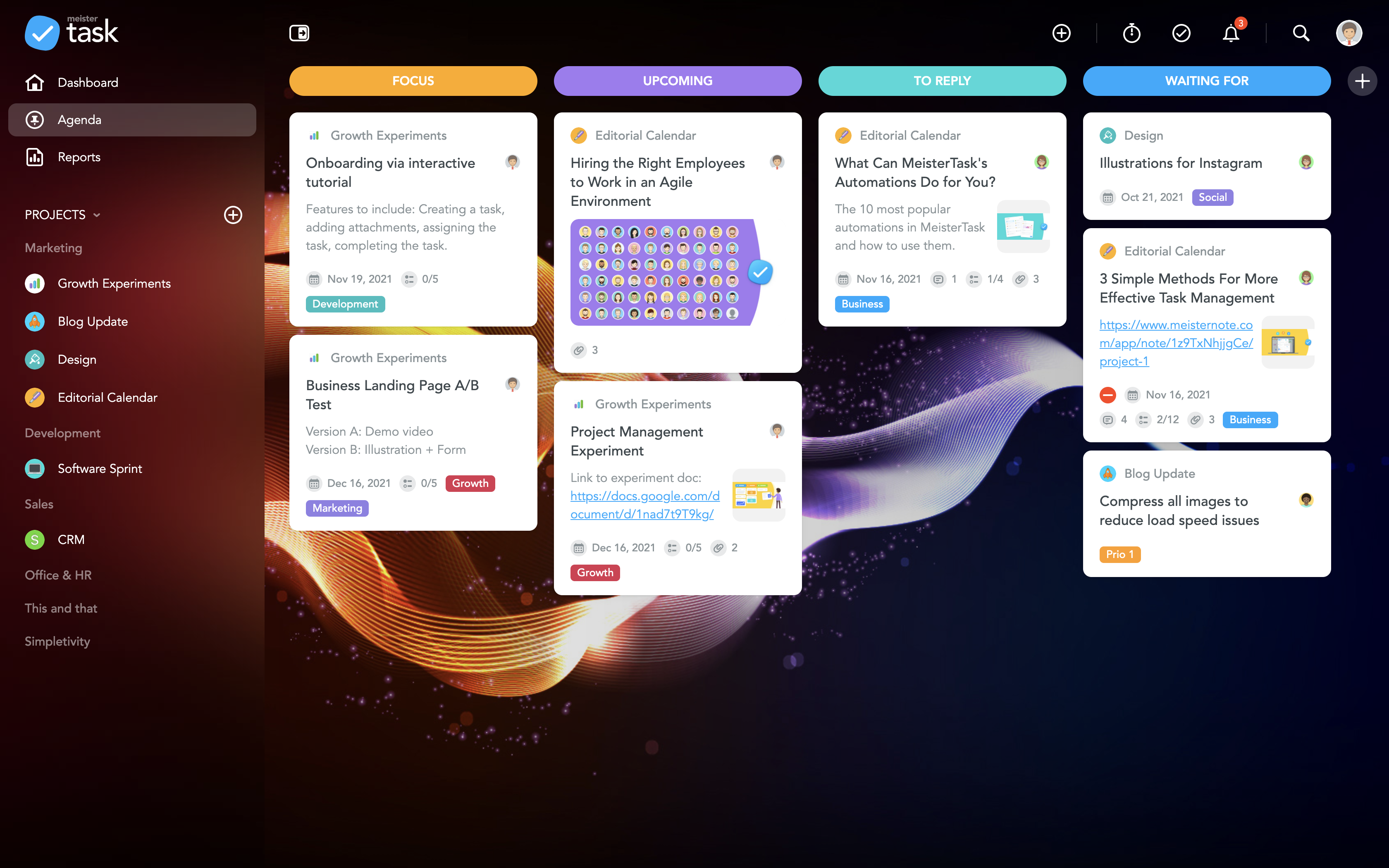
MeisterTask Screenshots

Screenshot of the MeisterTask DashboardScreenshot of MeisterTask's Personal AgendaScreenshot of MeisterTask's Project BoardScreenshot of the Task boardScreenshot of the MeisterTask TimelineScreenshot of MeisterTask Automations