Atera is presented as an Agentic AI platform for IT management, that offers a digital workforce of AI agents that proactively and autonomously support entire IT operations. Atera’s all-in-one IT management platform consolidates RMM, helpdesk, ticketing, and automation, so IT teams and MSPs can manage and protect infrastructure, automate tasks, and boost service quality by reducing downtime and improving SLAs. Atera has shifted focus from automation to AI-powered autonomy in IT. With…
$139
per month per user
Microsoft Intune
Score 8.3 out of 10
N/A
Microsoft Intune (formerly Microsoft Endpoint Manager), combining the capabilities of the former Microsoft System Center Configuration Manager, SCCM or ConfigMgr, is presented as a unified endpoint management option. Microsoft Intune is an endpoint management solution for mobile devices, an MDM solution that allows the user to securely manage iOS, Android, Windows, and macOS devices with a single endpoint management solution. The component Endpoint Configuration Manager (the…
$5
per user/per month
Pulseway
Score 7.1 out of 10
Mid-Size Companies (51-1,000 employees)
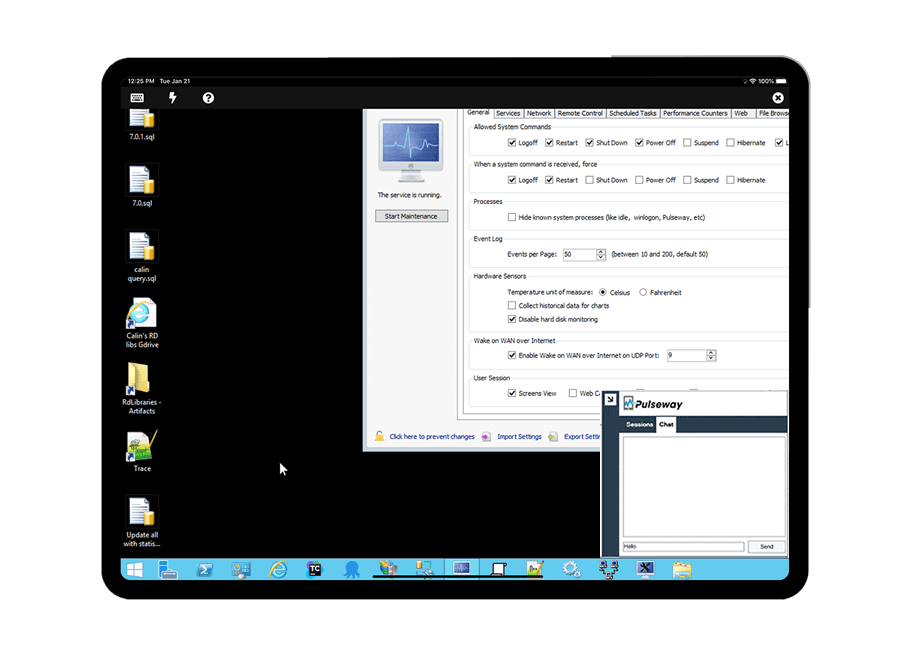
Pulseway is an IT monitoring and management solution that enables users to monitor, manage and control all systems and servers from a smartphone, tablet or browser. For system administrators, Pulseway sends a notification, so they can see an issue and sort it in seconds. Pulseway features: Automation: Auto-remediation workflows, so that IT issues are fixed before users even notice them. Mobile Access: Customers can monitor, manage, connect with…
$0.80
per month per installation
Pricing
Atera
Microsoft Intune
Pulseway
Editions & Modules
MSP - Pro
$129
per month (billed annually) per user
IT Department - Professional
$149
per month (billed annually) per user
MSP - Growth
$179
per month (billed annually) per user
IT Department - Expert
$189
per month (billed annually) per user
MSP - Power
$209
per month (billed annually) per user
IT Department - Master
$219
per month (billed annually) per user
Microsoft 365 Business Basic
$5
per user/per month
Microsoft 365 For Individuals
$6.99
per month
Microsoft 365 Apps
$8.25
per user/per month
Microsoft 365 For Families
$9.99
per month
Microsoft 365 Business Standard
$12.50
per user/per month
Microsoft 365 Business Premium
$15
per user/per month
Enterprise
$0.80
per month per installation
Offerings
Pricing Offerings
Atera
Microsoft Intune
Pulseway
Free Trial
Yes
No
Yes
Free/Freemium Version
No
No
Yes
Premium Consulting/Integration Services
Yes
No
Yes
Entry-level Setup Fee
No setup fee
No setup fee
No setup fee
Additional Details
Unlimited devices.
—
No hidden fees or contracts. Term-based discounts.
We started with Pulseway and loved the features but quickly realized the cost was going to be more than we could invest. Atera is billed on a per-tech and not a per-device basis. This is much more cost effective for our model and saves a lot of money. Also, with the Splashtop …
So far, Pulseway was nice, but Atera was better--ease of access and ease of use being the two main things. The automatic alerting right off the bat was very helpful. Pulseway had a similar app for tracking information on the phone, but it didn't have the same cost per …
In terms of age Atera is a bit more mature than these younger competitors and it shows with its wider array of features. Pricing might be a bit higher depending on which features you want or deem to be most necessary but in our experience Atera was the cheapest one on the …
It is live in our organization and it works along with Atera in our organization, however I have more trust on Atera due to its stability and ruggedness, so Atera is the only choice most of the IT dept works on. I would not comment on the ManageEngine PAM solution as I have less …
Atera is way more user friendly , it has a smooth learning curve and the pricing is favorable. Atera also has a lot of features that make it superior. They even have additional features like the ticketing system that was a pleasant surprise to have. Overall Atera stands out at …
Compared to several other RMM packages we trialed, Atera was simple to set up and deploy. the Atera pricing model is very different which makes it affordable, and having the ability to tie into a number of add-on services, gives us the ability to expand our MSP offerings as …
Atera pricing is per technician and not per device which can literally save thousands of dollars annually. Atera is not as complicated and time-consuming to learn and use. Atera does not have a bunch of features that a small MSP business would not use and yet has to pay for.
I have used a lot of Microsoft System Center. This is, of course, a great and powerful tool. But also very expensive and not everyone can buy it and it is not very reasonable. The advantage of the cutter is the price and the speed and convenience of installation. A lot of …
Pulseway has the most features, the best looking app with the best design and better usability than any others we evaluated. We liked the uniformity of the app design across all platforms (Windows, Android, Apple) and the notifications displayed on each platform. The price was …
Atera is doing well in the monitoring part as it is informing the real time ping of running devices and if any device goes down, it is informing us on the real time. It is helping us to monitor the last reboot status, current logged in users, time zone, IP addresses and other things so that we can track our end devices status. In the patching part Atera is pathing our all devices with the notification stating user to restart device at their convenient time. It is also patching our third party applications. It is good in installing and uninstalling of the third party application but limited to availability in the Atera inventory. Atera is not good in some parts such as in the patching part of applications, sometime it fails to update all 3rd party applications that were not installed via Atera. It is not good if you have to transfer a file to multiple systems at the same time.
Microsoft Intune is well suited for the larger end of the small business segment to the enterprise. The ability to configure and remotely deploy computer configurations, control mobile devices, and fine tune security controls of each device or device group is a major win for this product. Smaller and mid-sized businesses may balk at having to increase their license level to unlock the better updating features.
If you have to manage a large number of computers, especially spread over multiple clients or a large physical area. This is one of the main products that allows us to act as a Managed Service Provider (MSP) and actually manage our clients devices and not just react to issues as clients call them in. Clients really love the proactive approach it allows us to take. Sadly as we became more familiar with options out there we found this area lacking and what was actually holding us back.
Atera is very helpful in monitoring the servers and end-user devices for high CPU, memory, hard disk uses, and temperature monitoring.
Atera is good at installing third-party applications and also helps to remove it from the end systems.
Atera is perfect for patching as you can select the patches as per your need and reject those that are not required for you or going to disturb any of your internal applications.
Atera is good for managing software inventory as it provides you with the complete software list that is used in your infrastructure.
[Microsoft Endpoint Manager (Microsoft Intune + SCCM)] helps to speed up the deployment of patches/software throughout our environment. I can easily build a package and then deploy across all endpoints.
The ability to supercede software is also quite handy. This automates the removal of old versions and replacing them with newer versions.
The Intune Autopilot option is very useful if you want to deploy software to devices straight out of the box. You can configure them to download software when a user opens a new PC and turns it on for the first time.
It monitors computers and notifies us of any issues with any computer.
It allows remote control of computers, such as requesting a computer to reboot itself.
It is very highly configurable to monitor exactly what we need to monitor. For example, on server, we can have it notify us any time the server is shutdown or rebooted. On the other hand, for a desktop computer, we don't have to be bothered with notifications when a user decides to reboot his computer.
Atera does not yet have a MDM system, but I have been told that it is in the works!
Sometimes getting around the admin section of the IT side of Atera can be tricky, but the webinars and chat support help.
Many of the demo and onboarding agents are based in Israel, so it can be a challenge to find available times during the day while living in the United States.
Deploying more apps besides Microsoft Edge and Microsoft Office 365 app
Microsoft needs to make it easier to deploy exe, pkg, and msi apps without having to go through the manual process of re-packaging these apps using tools from github like intuneapputil
Add a feature to push out software updates for 3rd party apps
As of right now, we have found nothing that can offer as many features as Atera does along with the affordability. They are doing monthly releases each month and not just making small changes (shared scripting library, chocolatey support, Install packages, Splashtop SOS support, Scheduled tickets to name a few). The uptimes are great and accessibility to the dashboard has yet to be limited. We are a happy customer and bordering on fanboy status now
Mascom Wireless is a Microsoft shop and SCCM has proved to be helpful in keeping our Microsoft products up to date every month without fail. We also have a Microsoft Enterprise Agreement which we renewed for three years ending 2022. The remote access utility works wonders for the organisation and have saved travel bills including subsistance allowance. We have been able to fulfill security audits both internal and external. We have been able to keep a robust inventory of our computer assets and nothing falls of the cracks
Atera's remote monitoring feature is one of it's best features. The laptops and servers we used it on responded quickly to our administrative task requests and made our work light. We were able to increase the resources, manage patches, windows updates and quite a few other tasks remotely and that too 24×7.
The console is not intuitive and does not work well often. Due to the complexity of the product, documentation can be confusing. When properly configured, routine tasks like OS deployment, remote control, and software deployment are easy to do. Troubleshooting of System Center Configuration Manager issues is hard, as there are various logs, and their content can be hard to understand.
The tool is easy to use however it is can be daunting with the amount of features available in it. Last I checked, their knowledge base was not very expansive and they relied a lot on the changelog for how to do some stuff. This can make it hard to learn how to do some more advanced things like the automation.
It's a 'heavy' system, which demands a lot of resources form the datacenter perspective. So, make sure you followed the requirements to avoid frustration in the future. From the 'client' perspective, it's fine. I've never had any issue with that.
Atera support provides answers to my questions lightning fast. They have never left me feeling like I'm out there on my own. I can ask questions by email, or by chat, or by opening a ticket with them and they are always on it quickly. They also have a forum where other Atera users can help you if you need it, and you can also add feature requests via the forum.
We have not needed to seek support for this product in the time that we have used it thus far. It's been working really well, and have not had any major issues. Being that it's a Microsoft product, it goes without saying that there will be many support options available if needed. This includes phone, web, forums, KB articles, etc. There is even comprehensive documentation that is available on the web through Microsoft's website for use of the product.
I have never had to use the support for Pulseway. However, when initially starting out, we would receive emails every so often asking how we are doing and if there is any support that they can provide. I would imagine that any request would be supplied with the same great support!
Work with a "test group" of users who you have a good relationship with so that when things don't work properly they understand! Work with your partner nicely without forcing things especially timelines as you are bound to make mistakes and create oversights in the project Management can also interfere with the implementation (which can cause delays) if you make too many mistakes which takes me back to having a "test group" where you have good relations
Because Atera is a much more effective and efficient solution to manage all our IT operations, it automates each of our business processes. It offers us the best support to respond to any problem that may arise. I think Atera is much more cost-effective and reliable; its value is justified with each function and satisfies all our business needs and requirements.
We did not evaluate or use other products like Microsoft Endpoint Manager (Microsoft Intune + SCCM). The main reason we did not evaluate or use other products is because Microsoft Endpoint Manager (Microsoft Intune + SCCM) integrates seamlessly with Microsoft 365 and Windows PCs. Expenses would have increased as well if we had purchased another similar product.
Pulseway has the most features, the best looking app with the best design and better usability than any others we evaluated. We liked the uniformity of the app design across all platforms (Windows, Android, Apple) and the notifications displayed on each platform. The price was a major contributor to our selection of Pulseway compared to the competition.
The intuitive user interface has enabled both users and support technicians to familiarize themselves quickly with the functionality, and the learning curve is less.
Some features need to be accessed through documentation; they're not available directly on the dashboard.
Sometimes, internet access plays a significant role, whereas low connectivity is a hindrance.
In our current environment, this System Center Configuration Manager had replaced several standalone solutions for patching, imaging, remote assistance, reporting, etc. That saved a lot of time and resulted in money to manage the IT infrastructure.
Once SCCM is deployed and fully configured, all agents are deployed and it is easy to automate a lot of processes and just control them from time to time to make sure that everything is working as supposed to be.
SCCM + Windows 10: great built-in endpoint protection solution. As a result, there is no need to buy additional software for that purpose.
The imaging process is better compared to WDS because you can modify deployment packages and apply patches to a newly imaged machine. This saves tons of time for new employees deployment.
Problems can be dealt with more rapidly because I have access to systems from anywhere. I don't have to carry a computer with me nor do I have to find a location with potentially non-secure wifi to gain access to my systems.
I can handle 99% of my system admin tasks using Pulseway and never have to touch a system or connect to the console.
Pulseway gives so much control over a system that I don't need to spend extra money on other software to perform management tasks.