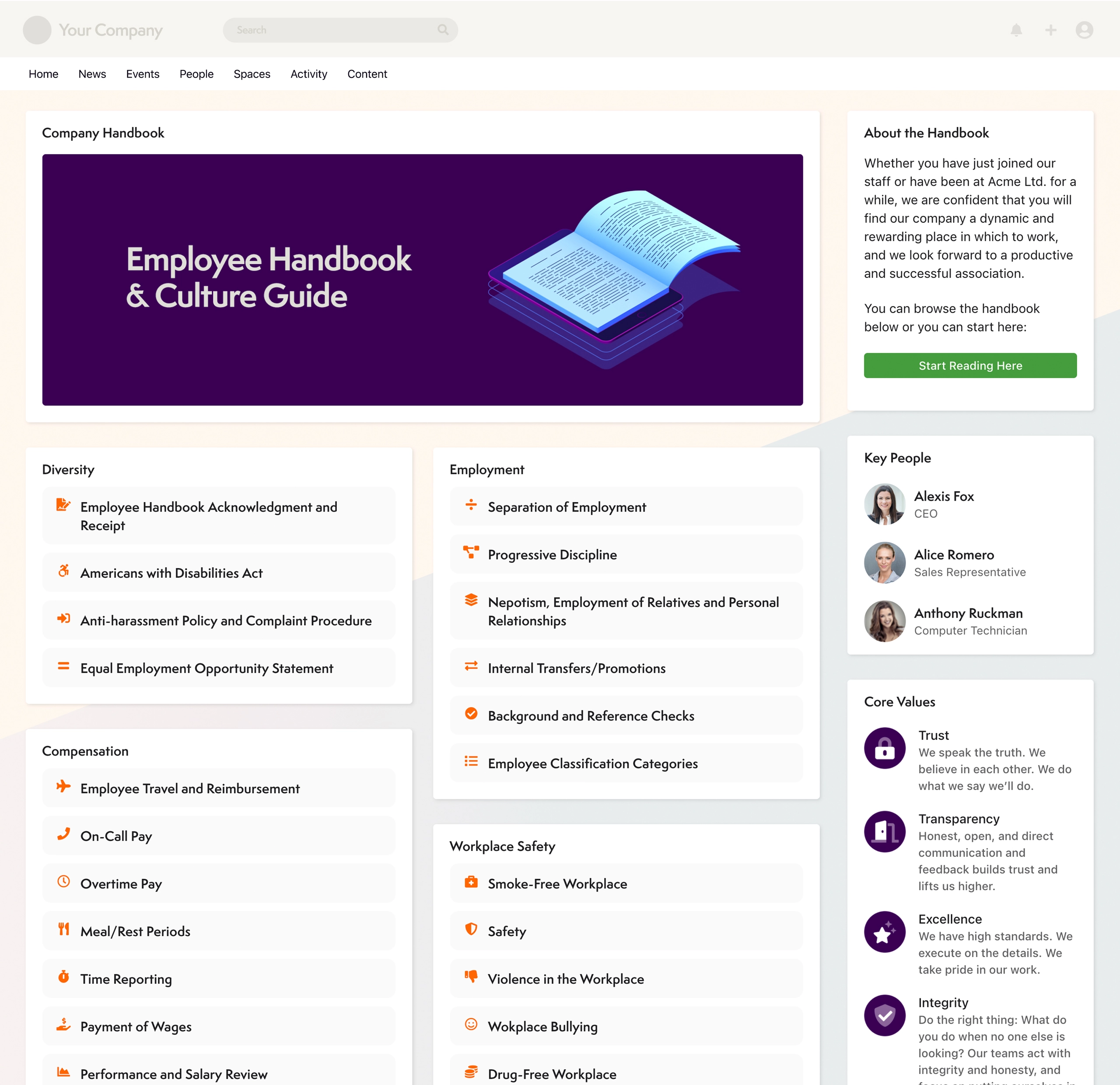
Axero's Communifire is an Enterprise Social and Collaboration platform. Used internally, it connects employees, key customers and partners to pursue shared goals. Used to build an online community, it puts the emphasis on working together, not just meeting socially. The platform, designed to encourage the spread and expansion of ideas is suited for organizations that want their community to not only get connected but also feel they are getting things done.
$49
per month
InVision
Score7.9 out of 10
N/A
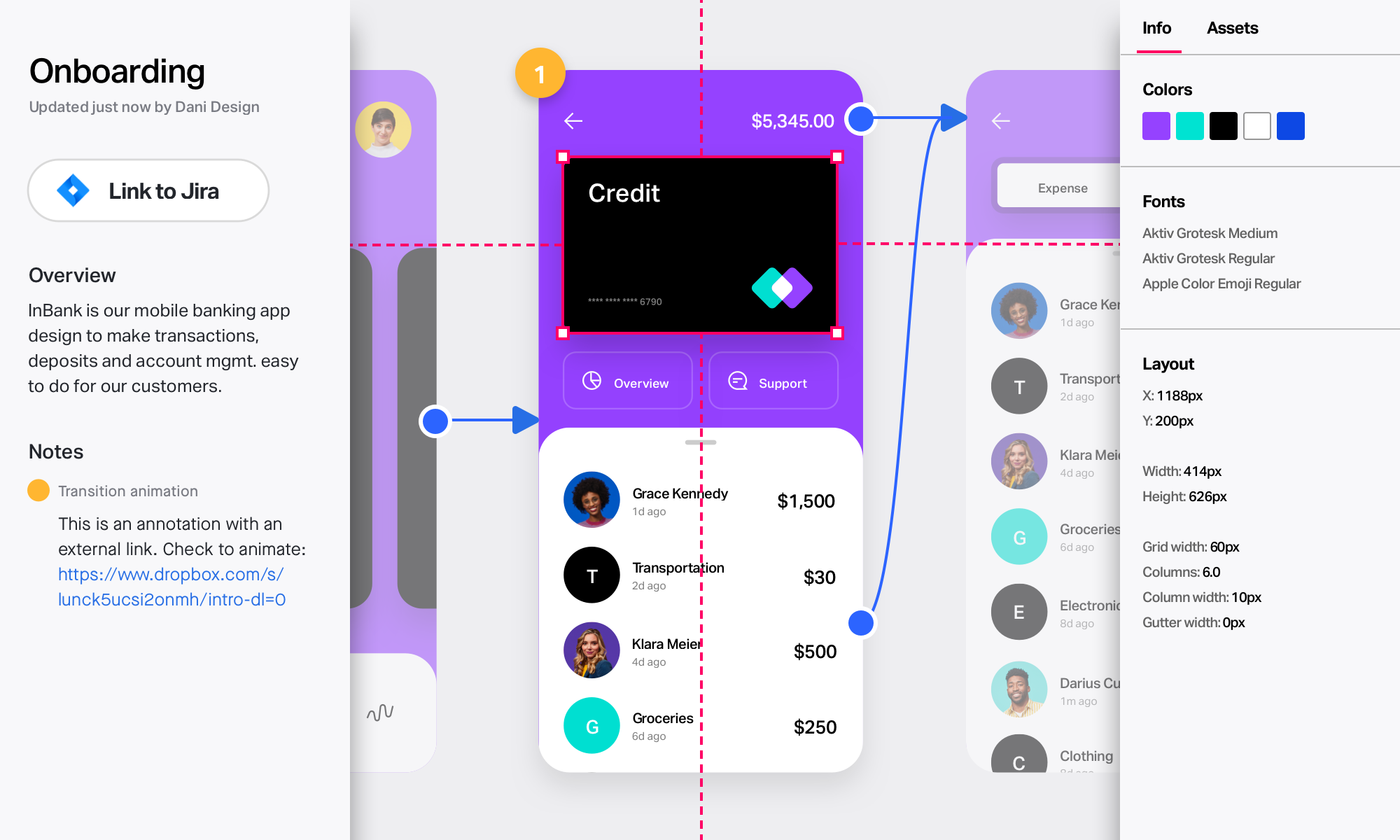
InVision is a collaborative design and prototyping platform with features such as freehand drafting mode and interactive mockups, collaboration, idea management, user testing, and integration with Slack and other collaboration tools. According to the vendor, 1 million designers are using the free version.
$0
Mural
Score7.6 out of 10
N/A
MURAL (formerly Mural.ly) from Tactivos (DBA MURAL) in San Francisco is described by the vendor as a digital workspace and visual collaboration tool, designed for creative teams to make the process of design more efficient for distributed teams, working remotely.
$12
per month
Pricing
Axero
InVision
Mural
Editions & Modules
No answers on this topic
Free
$0
Pro
$7.75
per user/per month
Enterprise
Contact Sales
Starter
$12
per month
Plus
$20
per month
Enterprise
Contact sales team
Offerings
Pricing Offerings
Axero
InVision
Mural
Free Trial
Yes
No
Yes
Free/Freemium Version
No
No
No
Premium Consulting/Integration Services
Yes
No
No
Entry-level Setup Fee
No setup fee
No setup fee
No setup fee
Additional Details
Axero tailors your investment to meet your unique needs. Custom pricing and volume discounting available. Contact Axero for details.
Business Analyst in Product Management at ThoughtWorks (Information Technology & Services, 5001-10,000 employees)
Chose Mural
I have had an experience of working with all the three above mentioned tools--Miro, InVision, and Lucidchart--and I can confidently say that MURAL (formerly Mural.ly) beats all these three tools when it comes to performing any kind of online collaboration activities, which …
A de minimis incentive was given to thank the reviewer for their time. The incentive was not used to bias or drive a particular response, nor was the incentive contingent on a positive endorsement. More Info
Specific scenarios where Communifire would be well suited to an organisation, would be companies that are people focused and committed to frequent and open communication channels from both the top-down and bottom-up. It also would suit organizations that are committed to providing the staff opportunities to collaborate, share and actively contribute to company initiatives and planning. If these aren't elements of your organization's culture, the system would still work for you or those companies who just want to push information out and have an effective intranet. Communifire would cater to these scenarios just as well and is more than capable of providing that type of simple solution.
InVision is well suited for design reviews and immersing yourself in the experience of an app-to-be. As a Product Manager, it's difficult to take abstract concepts, user pain points, and business needs, and produce a vision for an app without a visual aid to communicate a vision. InVIsion offers PMs, designers, and developers the opportunity to sketch a vision, communicate about it with inline commenting, and shareable with other stakeholders.
A de minimis incentive was given to thank the reviewer for their time. The incentive was not used to bias or drive a particular response, nor was the incentive contingent on a positive endorsement. More Info
I've recommended MURAL to a lot of people in a lot of fields. This is a great tool for any group of people that might stand around a white board if they were in person. Even if they are in person, I still recommend it pretty often because, unlike a white board, MURAL is virtual, so it can go offline with you. I've recommended it to other Software Teams, individual software developers, engineering teams, Sales Managers, Office Staff, Manufacturing teams, and more.
Communifire allows people to connect easily through instant chat and messaging. It works similarly to other social media platforms like Facebook so its not hard to learn.
Communifire makes it easy to share news and events with our community and the presentation of this information looks very professional.
I found Communifire quite easy to configure to our individual needs. There were a lot of options to turn things on or off. This was important to us because in some areas of our community we wanted to allow our contractors many features and in other areas we wanted to really limit what was on offer.
We had a big list of things we needed a platform to do. Communifire ticked all the boxes.
A de minimis incentive was given to thank the reviewer for their time. The incentive was not used to bias or drive a particular response, nor was the incentive contingent on a positive endorsement. More Info
A de minimis incentive was given to thank the reviewer for their time. The incentive was not used to bias or drive a particular response, nor was the incentive contingent on a positive endorsement. More Info
enables easy for all collaboration especially in the hybrid environment
makes brainstorming better as users can create digital sticky notes, draw diagrams, and add images to visually represent concepts and ideas
it helps to visualize data effectively - users can create charts, graphs, and diagrams to present data-driven insights to team members and stakeholders
A de minimis incentive was given to thank the reviewer for their time. The incentive was not used to bias or drive a particular response, nor was the incentive contingent on a positive endorsement. TR verified that a representative sample of customers was invited. More Info
A de minimis incentive was given to thank the reviewer for their time. The incentive was not used to bias or drive a particular response, nor was the incentive contingent on a positive endorsement. More Info
A de minimis incentive was given to thank the reviewer for their time. The incentive was not used to bias or drive a particular response, nor was the incentive contingent on a positive endorsement. TR verified that a representative sample of customers was invited. More Info
A de minimis incentive was given to thank the reviewer for their time. The incentive was not used to bias or drive a particular response, nor was the incentive contingent on a positive endorsement. More Info
Our business depends upon this software to provide information on all aspects of our business. The future of business is a marriage between web site and customer interaction. This software will allow us to move in that direction.
A de minimis incentive was given to thank the reviewer for their time. The incentive was not used to bias or drive a particular response, nor was the incentive contingent on a positive endorsement. More Info
This rating has a caveat - there is always room for improvement, and this team gets it. You always learn from customers how to do things better and easier, so it is a constant learning of how people use the site. Although the search engine is exceptional, most people do not use it as their first line of research. Much of the usability has to do with layout - and is not just a software usability item, so the rating is severely dependent up on the layout/options you choose for your usage. And their team will do anything in their power to get the results and layout you want. The areas that need improvement - and acknowledged by the team - are the administrative tools. There are a ton of options, and it takes a little to learn some of those. For most people, however, this won't be an issue, because the support team will always help you. This is always the case with more power. If there were fewer options it would no doubt be easier, but they give you the keys to all of the cars in the lot; so a little more to learn.
Easy for prototyping, sharing for comments and review changes with version. lags a bit when the design is heavy and large design models learning curve is shorter so saves time with new stakeholders responsiveness could be better and auto modeling can be introduced Not much advance features that can be used
A de minimis incentive was given to thank the reviewer for their time. The incentive was not used to bias or drive a particular response, nor was the incentive contingent on a positive endorsement. More Info
Overall, MURAL is really easy to use, but there are a couple downsides. It's really easy to make areas of the board consistent because double clicking adds stickies that match those around the current one. It's really easy to connect the elements. And it's really easy to organize elements. Inconsistent controls, Panning, Line Connections, and latency are the only issues I had. My biggest issue is that the MURAL mouse buttons are very different from most similar software. This always causes me problems switching to a graphics software or 3D modelling software. Because MURAL uses the same button to pan and move elements, it's really easy to move things when panning around. The lines can also be a (sometimes huge) problem because thew will occasionally disappear or connect to things incorrectly. I think this is tied to latency issues which, in addition to causing phantom lines, can sometimes cause confusion to your team.
A de minimis incentive was given to thank the reviewer for their time. The incentive was not used to bias or drive a particular response, nor was the incentive contingent on a positive endorsement. More Info
I didn't need to contact InVision support, as I've never needed it. They have an intuitive UI, and most of the questions are answered in their help portal or in tutorials online. Since many people use it, there a great resources available on for example YouTube. No problems so far with InVision.
A de minimis incentive was given to thank the reviewer for their time. The incentive was not used to bias or drive a particular response, nor was the incentive contingent on a positive endorsement. More Info
We selected Communifire for the excellent sales support, strong feature set and quick set up time. We were able to get started immediately and build out features as need required which led to faster execution and higher adoption rates among our team.
We only tested out using Adobe XD for similar uses and found it to be more challenging to fit within our processes. It didn't have as robust a set of capabilities as InVision and wasn't as easy to use enterprise wide. I recall also having issues with working with Sketch.
A de minimis incentive was given to thank the reviewer for their time. The incentive was not used to bias or drive a particular response, nor was the incentive contingent on a positive endorsement. More Info
Mural was easier to use and share compared with Whiteboard. Whiteboard's functionality is limited. It is also integrated into Teams in an odd way that makes it difficult for team members to refer to old whiteboards. Mural as a stand alone web app is better.
A de minimis incentive was given to thank the reviewer for their time. The incentive was not used to bias or drive a particular response, nor was the incentive contingent on a positive endorsement. More Info
We are still building out features of the platform but with implemention of paid features by members, we will be able to cover our operating cost of the platform.
InVision helps our team better and more professionally portray the value and the work we do as designers, leading to more company buy-in in supporting and funding our work. In the past, we would create PowerPoints with screenshots to portray a user workflow that we would share out to stakeholders. Once we began to use this app, where stakeholders could click through and comment as though they were “real” users, stakeholders began to better understand our work, designs, and workflows. This has led to more productive conversations that, in turn, lead to more effective end products that have more consistently served our business goals in tangible ways.
InVision helps us save production time, effort, and cost, as we are able to solve design issues early in the process by having clickable prototypes to show to internal stakeholders and external users. It’s, understandably, difficult for people to provide effective feedback on screenshots. Using the clickable prototypes we created in InVision, we are able to get more effective feedback to solve user workflow issues before we spend time and money developing problematic designs (and later having to redesign them).
It’s easier to market designs to potential buyers with clickable prototypes than with screenshots. With these prototypes, we’ve been able to sell more digital products before product release dates, which has helped to secure many contracts and new business relationships that continue to this day.
A de minimis incentive was given to thank the reviewer for their time. The incentive was not used to bias or drive a particular response, nor was the incentive contingent on a positive endorsement. More Info
A de minimis incentive was given to thank the reviewer for their time. The incentive was not used to bias or drive a particular response, nor was the incentive contingent on a positive endorsement. More Info