Easy Projects is a project management tool designed for a wide range of businesses (small to mid-sized and enterprise level). It includes both basic features like creating projects and tasks and filling in the calendar, and also some advanced ones, including an interactive Gantt chart, an executive dashboard, time tracking and billing. It provides integration with MS Outlook, is customizable and has SaaS/On-Premise options.
$15
per month
Jira Align
Score 7.8 out of 10
N/A
A solution to bridge the gap between strategy and execution for portfolio, product, and program management teams, used to manage idea intake, prioritize your feature backlog, and track progress with live roadmaps.
$27,000
per year
Planview ChangePoint
Score 7.0 out of 10
N/A
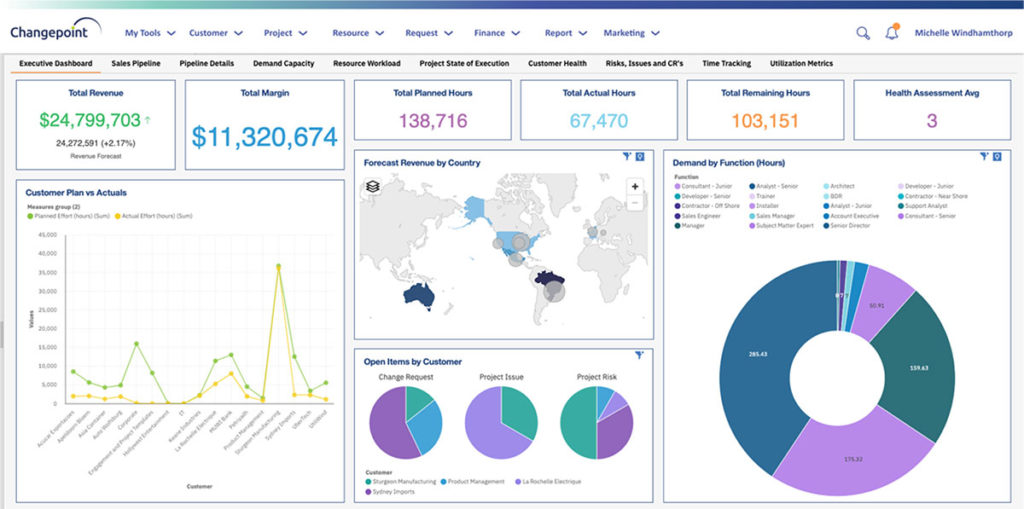
Planview Changepoint is a platform that marries professional services automation (PSA), project portfolio management (PPM) and business analytics to provide managers broad operational visibility and control over their strategic business portfolios.
Alongside Easy Projects we use Jira too to develop projects, write stories, make EPICS, [and] make QA, so maybe EP needs to improve that part [like] how to track QA performance. The principal use for Jira is the creation and tracking related to Bugs in our systems, and the …
I liked using Asana at my previous companies, but it's hard to say that one is better than the other. Both these platforms are great for project management and help solve similar problems but in their unique way. They both have great interfaces, but I enjoy the layout of Easy …
Each member of our team can choose their own view, so they can see only what is relevant to them. Plus, we can keep track of everyone's progress without bothering them. Our team loves that everyone can have a different view, so they see only what's important to them. In addition, we can keep tabs on everyone's progress without pestering them. The user interface has some nice quality of life features, such as the different views for different members of our team.
The Atlassian Jira Align (formerly AgileCraft) tools help keep our scrum teams moving in the right direction. It gives Sr. Executives visibility into the progress of our digital transformation efforts. It provides information to our program manager to create the necessary artifacts to justify continued funding of our initiatives. It also supports the SAFe framework, along with some others. And the Atlassian Jira Align (formerly AgileCraft) tools provide integration to other tools that we use in our portfolio.
Changepoint is basic and would, therefore, work for businesses with uncomplicated requests, pretty straightforward workflows and willingness to work with an unsightly solution. It is basic, from the UI to the search option and the way the information is captured, which can be frustrating and counter-intuitive at times. It is relatively robust (i.e. I have been using it for almost 2 years and have not seen it crash once) but it does log me out when the system has been inactive for about 30 minutes - and I am only notified about being logged out upon clicking the Submit button, meaning many a line of text have been typed more than once!
Effective Sprint planning : Sprint planning can be done using Planning Poker in AgileCraft by clicking Team > Manage > Other > Estimation Games very effectively for distributed teams.
Team Capacity Allocation Report: After tasks are created at team or program level, the report from AgileCraft cab be pulled and can be verified that no team member is under or over allocated. A report can be generated by navigating to Team > Manage > Assign Tasks.
Effective Requirement trace-ability: To maintain requirements trace-ability follow the steps below:
Upload test cases against the story/requirement. once uploaded test cases will be visible under that story
Execute Test cases in AgileCraft and mark them as Pass/Fail based on the actual outcome
Based on test results, The acceptance criterion's can be marked as “Pass” or “Fail” & if marked failed corresponding defect can be logged & can be attached with the story
So against each story we can easily see whether all test cases been executed or not & which acceptance criterion's are failed & how many defects are in open or close state.
Daily Scrum: In AgileCraft, the option to run a daily stand-up is available from Team > Manage > Daily Standups. Selecting the sprint number opens the daily stand-up meeting window in which each team member's tasks are visible and hours can be burned against them. Conduct Scrum meetings in AgileCraft, and burn each associate hour against the tasks created during the meeting. The burn-down chart can be generated & viewed during the stand-up to check whether the team is on track.
Changepoint has significant reporting capabilities, though of course, the data that comes out is only as good as the data that goes in. I enjoy being able to use the standard reports to understand exactly how much a project has cost us and to compare it to how much we are charging. This allows us to more accurately set our prices. Though we have not used the report designer capability, I understand that custom reports can be designed with relative ease.
Changepoint has a versioning capability for changes made to user profiles in the system manager, which I find particularly helpful. As a non-power user, it is valuable to be able to see what changes I have made to various profiles so that I can troubleshoot a problem down the line.
Changepoint has significant functionality well beyond the features that we are currently using, and for this reason, I think it is affordable and a good deal. Particularly if your organization is interested in dedicating the time and resources into using all of the features around project planning, resource allocation, etc., the price is well worth the value.
Easy Projects has some problems when it comes to accessing the site via different methods/browsers. It is either very slow or never works on a tablet. It is not smart-phone friendly. And it stopped working for us in Firefox -- all we could use is Safari or Chrome (we are a Mac-based office).
Easy Projects' email notifications are overwhelming. I turned them off completely since I was getting messages every time one little detail was added or changed.
While the reports are great, they are somewhat hard to pull. It takes a lot of trial and error -- I would not say the reports are an "intuitive area."
The biggest by far is what we fondly call "the screen of death." When you mark the last open task associated with a job as complete, a screen pops up that asks if you want to close the overall job, as well. The "yes" field is pre-selected, so if you are overzealous and click through quickly, it automatically closes the job. I don't know why they think this feature is helpful. We have so many staffers that complain they suddenly can't find their open job -- well, it's been marked completed and goes into the archive.
The initial ticket creation screen lacks some important features, such as assigning "point values" (a measure of effort needed for the ticket).
The browser needs to be manually refreshed to see new tickets, which can make things confusing when several people in a meeting are simultaneously creating tickets.
The interface on some smaller portions of the software are sometimes difficult to understand.
We use Changepoint to manage the IS organization. I would like to see more advancement in order to do benefits management.
I would like to see a capability where a project manager can build a very detailed work breakdown structure, but only require project resources to charge time and provide a task status at a higher level.
EP is great but could be better. EP has been a wonderful tool within our organization, it has helped us control expenses, resources, and the time needed to invest in each project, however when it comes to presenting reports and details it is a bit weak, there are more tools specialized in data visualization, and it would be good to make some kind of integration between EP and the other market alternatives
Sometimes the decision to renew boils down to an old adage "if it isn't broken don't fix it". Previous to moving to Changepoint, it was obvious that we needed a better project management tool. Projects we completed on time but the time zone difference between the teams and several iterations of back and forth caused a number of communication issues with projects. The difference is night and day.
As I have mentioned, some older, less tech savvy, team members have not found it as intuitive. I found it the same when I started using it although it quickly made sense. I think this is because there are lots of features we do not use so this can get in the way of what we do use
In my personal experience, I only needed EP support once and the truth is that they attended me very well and very quickly, they helped me with what I needed, it was a question regarding the use of WebServices, they solved my doubt and then they contacted me another agent to verify that everything was resolved and if they could help me with anything else
Overall support from Jira team is good. It comes at an additional price but it is very efficient. There are no long wait times, you get a dedicated team to look into your issues. The support is available throughout the year and they keep a record of your issues. Overall we are very satisfied with the support they have provided us over the years, it has been very effective for the price that we pay.
East Projects integrates with other financial systems such as NetSuite and Compass, which allows a great financial view into the existing and future projects and overall financial health of our resourcing. Other systems, such as Wrike and MS Projects, just focus on project/task management, whereas this is a one-stop shop. It also allows us to manage internal resources.
Microsoft Azure Devops won't have the major functionality of software management like Jira. The customization provided by Jira is having a cutting edge over any project management tool. Adds-on and Plugins feature in the Jira Tool make it as perfect as desired task management tool for any company. One of the best Agile based Project Management Tools.
Planview Changepoint helps us to understand our key customers enabling us to capitalize on every financial opportunity and helps us to forecast demand against the capacities required for new opportunities, and also it automates and monitors contractual terms and conditions. It gives us visibility into our employees' skills and helps to optimize resource allocation.
Increased team collaboration improved the results significantly, because we managed to reduce the amount of time wasted on unnecessary iterations, therefore reducing costs.
The reasonable pricing enabled us to enjoy the service we needed with with less impact on our budget than we've expected.
It has positively impacted our tech teams, allowing them to better organize the tasks and items they are working on and has greatly improved their ability to communicate & review these tasks with other teams.
I believe it negatively impacted other departments as lengthy training was required by many associates to attempt using the tool, only to find out it didn't meet our needs, therefore much time was wasted.
Employee efficiency has decreased significantly within our Project MAnagement team. The main causes are lack of logical steps/not user-friendly and the slowness of the entire program.
Changepoint PSA has greatly improved being able to track budgets for all projects. Before this software, budgets were done manually by hand and cross-referenced with Accounting. Now, we can pull a report out of the system, as long as all parties entered their time and data correctly.