Overview
ProductRatingMost Used ByProduct SummaryStarting Price
Box
Score 8.5 out of 10
N/A
Box is an online Intelligent Content Management solution that caters to individual users as well as businesses.
$21
per month 3 users (minimum)
Formstack Forms
Score 7.5 out of 10
N/A
Formstack is an online form building solution. Its drag-and-drop web form creator gives digital marketers a tool for online data collection and engagement. Users can collect payments and pass form data to popular marketing apps through third-party integrations. With Formstack, users can capture responses, store the information and share it with their teams.
$50
per month
GoFormz
Score 9.0 out of 10
N/A
GoFormz is a digital forms and data capture solution, that can be used by businesses of every size and industry to modernize their operations and work more efficiently. GoFormz offers a way to implement digital forms and automated processes, requiring no code, retraining, or dedicated IT team to get started. GoFormz’s online form builder can be used to digitize existing documents or create entirely new forms from scratch. GoFormz can create identical, digital, and…
$30
per month per user
Pricing
BoxFormstack FormsGoFormz
Editions & Modules
Business Starter
$7
per month per user (3 minimum)
Business
$20
per month per user (3 minimum)
Business Plus
$33
per month per user (3 minimum)
Enterprise
$47
per month per user (3 minimum)
Enterprise Plus
$50
per month (billed annually) per user (3 minimum)
Enterprise Advanced
Contact us
per month per user (35 minimum)
Enterprise
Contact sales team
Team
$30
per month per user
Advanced
$60
per month per user
Enterprise
Contact Sales
Enterprise
Contact for Pricing
Offerings
Pricing Offerings
BoxFormstack FormsGoFormz
Free Trial
YesYesYes
Free/Freemium Version
YesNoYes
Premium Consulting/Integration Services
YesNoYes
Entry-level Setup FeeOptionalNo setup feeOptional
Additional DetailsA discount is available for annual pricing.Plans start at $50/month (billed annually), including: 20 Digital Forms 1,000 Submissions Per Form 14,400 API Calls Per Day Drag-and-Drop Form Builder Custom Themes Payment Integrations Salesforce Integration SSO User Management Form PrefillThe Enterprise plan offers enhanced security and admin features, as well as HIPAA secure options. Contact sales. A discount is available for annual billing on the Advanced and Team plans. All newly created accounts receive a 14-day free trial of the Advanced plan. Each account starts with 25 free Public Forms credits. Additional credits are available for purchase. Prices are displayed in USD. In some US States, state or local tax may apply. Subscriptions to third-party services are not included. May require a one-time setup fee.
More Pricing Information
Community Pulse
BoxFormstack FormsGoFormz
Considered Multiple Products
Box
Chose Box
Used Dropbox. Great product too, especially if you are on the personal usage side. I use the Box app on various devices - android, desktop, apple and they all work fine.

We were able to cancel our Basecamp account as a result of the collaboration feature from Box.
Formstack Forms

No answer on this topic

GoFormz

No answer on this topic

Features
BoxFormstack FormsGoFormz
Enterprise Content Management
Comparison of Enterprise Content Management features of Product A and Product B
Box
7.6
26 Ratings
6% below category average
Formstack Forms
-
Ratings
GoFormz
-
Ratings
Content capture & imaging8.119 Ratings00 Ratings00 Ratings
File sync, storage & archiving9.725 Ratings00 Ratings00 Ratings
Document management8.424 Ratings00 Ratings00 Ratings
Records management7.020 Ratings00 Ratings00 Ratings
Content search & retrieval8.224 Ratings00 Ratings00 Ratings
Enterprise content collaboration8.021 Ratings00 Ratings00 Ratings
Content publishing & creation5.015 Ratings00 Ratings00 Ratings
Security, risk management & information governance8.226 Ratings00 Ratings00 Ratings
Contract lifecycle management8.912 Ratings00 Ratings00 Ratings
Automated workflows8.914 Ratings00 Ratings00 Ratings
Artificial intelligence2.011 Ratings00 Ratings00 Ratings
Mobile support6.723 Ratings00 Ratings00 Ratings
Integration9.523 Ratings00 Ratings00 Ratings
Survey Format & Appearance
Comparison of Survey Format & Appearance features of Product A and Product B
Box
-
Ratings
Formstack Forms
8.5
64 Ratings
6% above category average
GoFormz
-
Ratings
Survey templates00 Ratings8.556 Ratings00 Ratings
Themes00 Ratings8.057 Ratings00 Ratings
Custom logo/branding00 Ratings8.961 Ratings00 Ratings
Survey Content
Comparison of Survey Content features of Product A and Product B
Box
-
Ratings
Formstack Forms
7.6
61 Ratings
11% below category average
GoFormz
-
Ratings
Changes to live survey00 Ratings6.556 Ratings00 Ratings
Question design help00 Ratings8.01 Ratings00 Ratings
Multiple question types00 Ratings8.261 Ratings00 Ratings
Survey Logic
Comparison of Survey Logic features of Product A and Product B
Box
-
Ratings
Formstack Forms
7.5
61 Ratings
10% below category average
GoFormz
-
Ratings
Survey logic flexibility00 Ratings7.561 Ratings00 Ratings
Survey Reporting & Analytics
Comparison of Survey Reporting & Analytics features of Product A and Product B
Box
-
Ratings
Formstack Forms
8.6
62 Ratings
6% above category average
GoFormz
-
Ratings
Response tracking00 Ratings10.01 Ratings00 Ratings
Data export00 Ratings10.062 Ratings00 Ratings
Standard reports00 Ratings7.359 Ratings00 Ratings
Custom reports00 Ratings5.751 Ratings00 Ratings
Analytics00 Ratings10.01 Ratings00 Ratings
Survey Administration & Security
Comparison of Survey Administration & Security features of Product A and Product B
Box
-
Ratings
Formstack Forms
10.0
60 Ratings
15% above category average
GoFormz
-
Ratings
Access controls00 Ratings10.058 Ratings00 Ratings
Compliance00 Ratings10.052 Ratings00 Ratings
Survey Distribution
Comparison of Survey Distribution features of Product A and Product B
Box
-
Ratings
Formstack Forms
8.0
1 Ratings
1% below category average
GoFormz
-
Ratings
Vendor-offered crowdsourcing00 Ratings8.01 Ratings00 Ratings
Respondent restrictions00 Ratings8.01 Ratings00 Ratings
Best Alternatives
BoxFormstack FormsGoFormz
Small Businesses
Square 9 Softworks
Square 9 Softworks
Score 9.7 out of 10
Square 9 Softworks
Square 9 Softworks
Score 9.7 out of 10
Square 9 Softworks
Square 9 Softworks
Score 9.7 out of 10
Medium-sized Companies
MediaValet
MediaValet
Score 9.0 out of 10
Qualaroo
Qualaroo
Score 6.1 out of 10
Qualaroo
Qualaroo
Score 6.1 out of 10
Enterprises
MediaValet
MediaValet
Score 9.0 out of 10
Verint Voice of the Customer
Score 9.3 out of 10
Verint Voice of the Customer
Score 9.3 out of 10
All AlternativesView all alternativesView all alternativesView all alternatives
User Ratings
BoxFormstack FormsGoFormz
Likelihood to Recommend
8.0
(154 ratings)
7.7
(77 ratings)
-
(0 ratings)
Likelihood to Renew
8.0
(12 ratings)
2.0
(13 ratings)
-
(0 ratings)
Usability
8.0
(21 ratings)
9.1
(9 ratings)
-
(0 ratings)
Availability
10.0
(5 ratings)
10.0
(2 ratings)
-
(0 ratings)
Performance
9.1
(12 ratings)
-
(0 ratings)
-
(0 ratings)
Support Rating
8.5
(29 ratings)
6.0
(8 ratings)
-
(0 ratings)
In-Person Training
10.0
(1 ratings)
-
(0 ratings)
-
(0 ratings)
Online Training
10.0
(3 ratings)
-
(0 ratings)
-
(0 ratings)
Implementation Rating
10.0
(6 ratings)
1.0
(2 ratings)
-
(0 ratings)
Configurability
10.0
(1 ratings)
-
(0 ratings)
-
(0 ratings)
Ease of integration
10.0
(1 ratings)
-
(0 ratings)
-
(0 ratings)
Product Scalability
10.0
(1 ratings)
-
(0 ratings)
-
(0 ratings)
Vendor post-sale
10.0
(1 ratings)
-
(0 ratings)
-
(0 ratings)
Vendor pre-sale
10.0
(1 ratings)
-
(0 ratings)
-
(0 ratings)
User Testimonials
BoxFormstack FormsGoFormz
Likelihood to Recommend
Box
I think Box is great for research teams or anyone that has a large number of files that need to be securely stored. Particularly in the case of social science research, where it is important to protect identifying data, Box is a great option. In cases where teams need a more reliable means for real-time collaboration, I would probably consider a different alternative
Read full review
Formstack
Formstack makes it easy to create a variety of forms. I have used it for event interest and registrations, email list sign-ups, and surveys. I have found it easy to customize, and easy to export data for import into other systems (e.g., CRM).
Read full review
GoFormz
No answers on this topic
Pros
Box
  • The main feature that I like the most in Box is that it makes collaboration seamless, workers can easily check the documents any time and make changes according to the needs.
  • Box manages and backs up all of your files on its cloud servers, and provides a very nice interface for creating, viewing, editing, and collaborating on the most commonly used file types (PDF, XLS, DOC, etc.).
  • Over the past few years, Box has built on top of its basic cloud storage management with a host of other tools, such as workflows, AI, monitoring, and analytics.
  • It is helping us to make good connections with clients and our workers themselves as to its syncing and viewing feature to all is very much helpful and easy to go.
Read full review
Formstack
  • Allows for unique situations. As a school, we don't have the luxury of being cookie cutter. Neither do our forms.
  • Support. If we don't know how to do it, their support team has been very helpful and actually attempts to understand the issue on hand.
  • User friendliness. In our field we have a phrase: "what if you get hit by a bus?" With Formstack, you can "get hit by the bus" and someone else can jump in and still keep things running (this is used as a phrase for illness, not termination).
Read full review
GoFormz
No answers on this topic
Cons
Box
  • The graphic design of the dashboard should be simpler and more tangible that can be changed to the liking of the Admin.
  • Sometimes there are some syncing issues in the background.
  • The product has very limited functionality in some areas which could be a bit frustrating at times.
Read full review
Formstack
  • Setting up our multi-step form took some getting used to. Some of the branching logic configuration wasn't as intuitive as would be ideal.
  • Since we were pushing data directly into Hubspot, I found it cumbersome to deal with data storage limits within Formstack. I would get frequent notices that new responses were not being stored in Formstack and that I needed to upgrade or delete data. I got tired of that.
  • More/easier support for custom fonts would have been a huge plus. We were able to customize the form's appearance, but had to make some concessions in that regard.
Read full review
GoFormz
No answers on this topic
Likelihood to Renew
Box
I like the security features and I like the website. It's easy to use and create and move things around as needed. The main reason for a lower rating is because the Box Sync app is just not a good program. It's a memory hog, it's slow, transfer speeds are slow, and it's not the most efficient route. If you have a large Box account and you need to get a computer up to speed on a large amount of data within Box, you are in for the long haul. Last time I had to do this, it took 3 days to sync all of the files and we are talking around 100 GB worth of data
Read full review
Formstack
Our user base has come to rely on Formstack to get forms done. The Formstack tools make it easy to start from scratch or copy an existing form to "quick start" a new, similar form. The price is right and frees up IT staff to do more transformative work.
Read full review
GoFormz
No answers on this topic
Usability
Box
Everything with Box is seamless. It can be integrated into virtually any other software or application. You can even get the app for your phone or tablet to work on the go. File syncing is so quick. The only reason I gave it a 9 is the issue I discussed earlier about the local file application rebooting and not continuing to sync files. Other than that, it's great!
Read full review
Formstack
It's easy to learn how to use, generally easy for clients to use, and overall I've never had an overwhelmingly negative experience with it. While there are a few tweaks that could make it really shine, Formstack Forms serves almost all our needs and we're super happy with it.
Read full review
GoFormz
No answers on this topic
Reliability and Availability
Box
Yeah, it's always worked, I've never had any kind of connection issues, the only issues I've had it I've been on our end when the Internet hasn't worked.
Read full review
Formstack
No answers on this topic
GoFormz
No answers on this topic
Performance
Box
The general operation and management of Box is very efficient, both when accessing the account, and when adding files, downloading or modifying any document directly. The web platform, mobile and desktop versions work really well and quickly, making all the work and process flow smoothly and without setbacks. So far I have not been able to observe any inconvenience
Read full review
Formstack
No answers on this topic
GoFormz
No answers on this topic
Support Rating
Box
I found their support community lacking in clarity when I experienced a login issue. The error messaging was poor on my Box Sync application. I did not reach out to support staff for help, instead, I reasoned that I should try downloading the Box Sync application again and reinstall it. That fixed my issue, thankfully. I think a less computer-savvy user would've been much more frustrated.
Read full review
Formstack
The agents in the original group, especially the ones in cahoots with the developers, are really solid and know what they're talking about--I'm looking at you, Collin. The 'Tier 1' support agents that typically reply to the tickets are really spotty. If you have an overly technical question, i.e. bugfix, or describe a feature from a few years back that randomly disappeared, these agents typically will give you what feels like a generic reply and not know what you're talking about.
Read full review
GoFormz
No answers on this topic
In-Person Training
Box
The in person training was done in house and I helped with the training, people seem to respond well.
Read full review
Formstack
No answers on this topic
GoFormz
No answers on this topic
Online Training
Box
The documentation is good. Since Box is a popular service, there were also a number of YouTube videos and other sources that were helpful as we were considering the product and planning for deployment. Also, the ability to try the free version helped to prepare us.
Read full review
Formstack
No answers on this topic
GoFormz
No answers on this topic
Implementation Rating
Box
Be careful with settings. It is easy to get overwhelmed with updates. For example, you don’t want to be updated when doing historical data uploads. I recommend taking off notifications initially and then turn on post you have done your historical data upload.
Read full review
Formstack
We implemented on one of the earlier versions. Through continuous engineering improvements, the interface keeps getting easier and more intuitive. Therefore, later implementations keep getting easier and better.
Read full review
GoFormz
No answers on this topic
Alternatives Considered
Box
They are kind of the same. And both of them do their job as promised. But for company and project wise I think that Box slightly wins for some points. Which [makes him] win over Google Drive (don't forget that Google Drive is very easy to use and has a lot [of] nice features too).
Read full review
Formstack
Drupal is a much more customizable platform, however you must have someone build the forms first and then you can work with them if you do not have the programming knowledge. If you have any changes to make, it can sometimes be both a time consuming and difficult process. Formstack is much more efficient if you do not have an in house programmer.
Read full review
GoFormz
No answers on this topic
Scalability
Box
It's great, as we put more files on there it's done very well.
Read full review
Formstack
No answers on this topic
GoFormz
No answers on this topic
Return on Investment
Box
  • Box has been an only positive experience. It provides a seamless way for me and my team to collaborate on documents in such a way where we're not sending the document back/forth via email. It's a huge timesaver.
  • Box reduces the risk of sharing a sensitive document to the wrong person via email.
  • Box has provided a platform where my team can share notes in meetings - this has helped streamline and organize our meetings. Our meetings are more productive and actionable.
Read full review
Formstack
  • Positive - ability to analyze submission trends - e.g. when a marketing email is sent, looking at increased form viewing and submissions in relation to the sending of the campaign.
  • Immediate response - those that submit forms receive immediate response that their form has been submitted.
Read full review
GoFormz
No answers on this topic
ScreenShots

Box Screenshots

Screenshot of an overview of Box's intelligent content management platform. It provides a unified, AI-powered approach to managing and securing your unstructured data, or content. ICM provides organizations with collaboration, AI, security, compliance, and workflow tools, interoperable and customizable, to get the most from their content.Screenshot of how with Box AI, AI can be accessed right where enterprise content exists. While that work can reside within Microsoft, Google, Apple, and other productivity suites, Box helps users to tap the full potential of AI for unstructured data.Screenshot of how Box creates a central workspace to edit, review, and assign tasks. Users can automate business processes and centralize content workflows in Box, including a configurable content submission, unlimited e-signatures, user-drive no-code workflow, and task assignment to power approvals.Screenshot of how Box secures content from threats, including malware and ransomware, and recover from attacks if they happen. This helps to maintain a zero trust architecture to ensure proper usage of corporate data, and prevent data theft.Screenshot of how Box can connect to any productivity suite, including Microsoft, Google, and Apple. This extends any existing security investments with integrations into key DLP, SIEM, and network security tools. Thus, seamless experiences can be built for users in any system they use, whether that’s a business tool like Salesforce or ServiceNow, or communications engines like Zoom and Slack.Screenshot of an overview describing Box's scalability. With unlimited storage capabilities Box has an exabyte (1,000PB) of customer data plus 1 gigabit per second upload and download speed. At its core, Box is a multi-tenant global SaaS platform with enterprise-grade reliability and end-to-end encryption to secure content.

GoFormz Screenshots

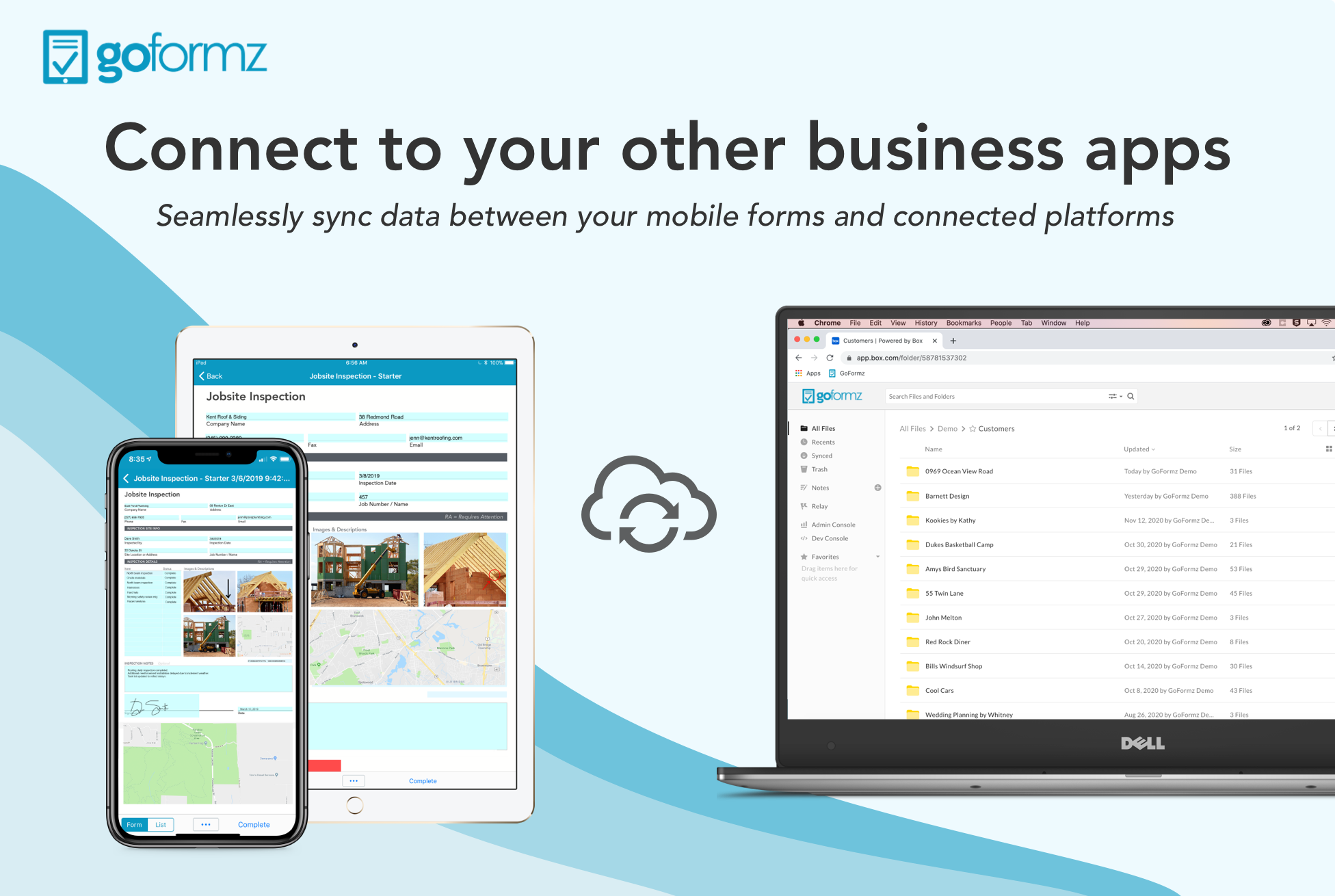
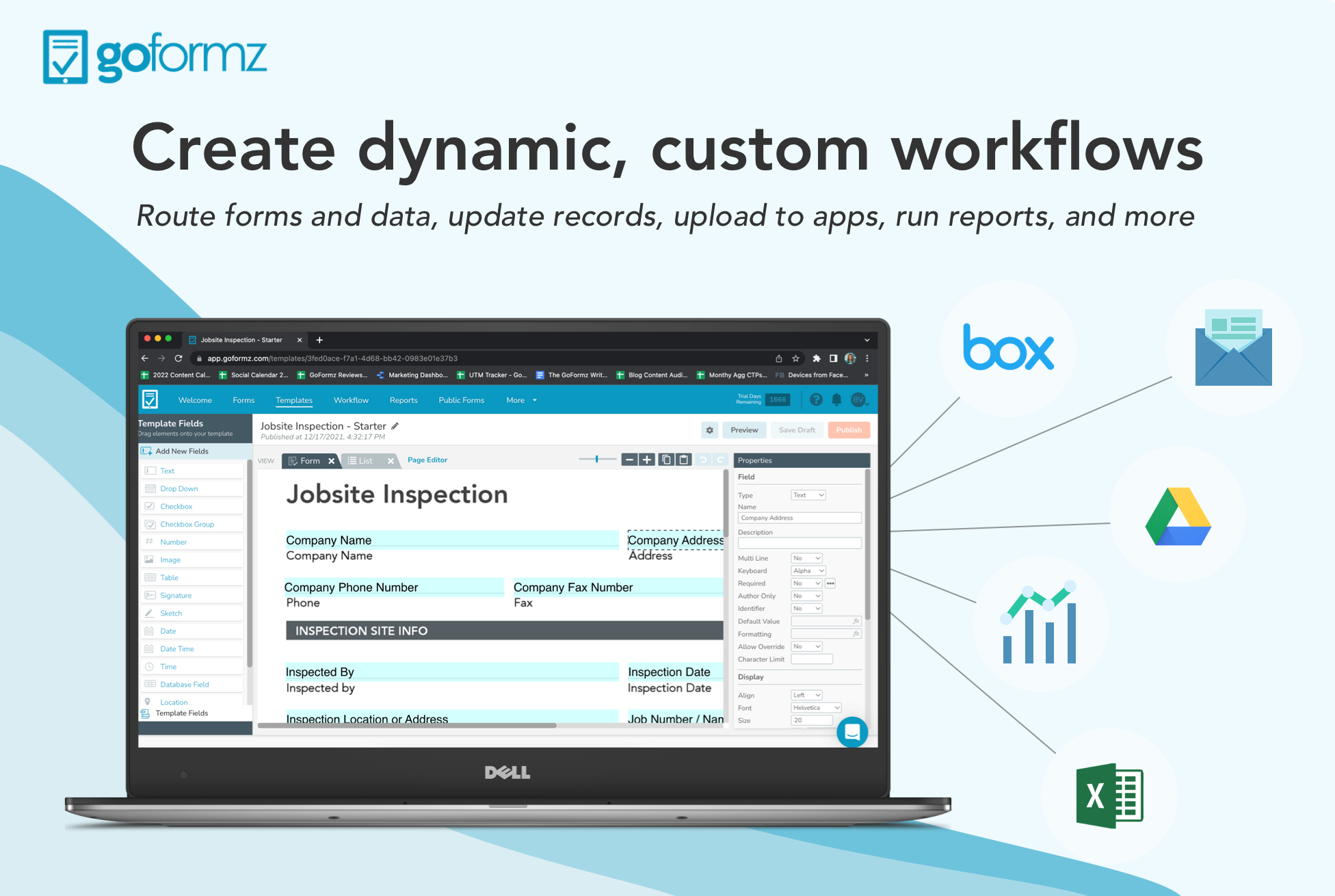
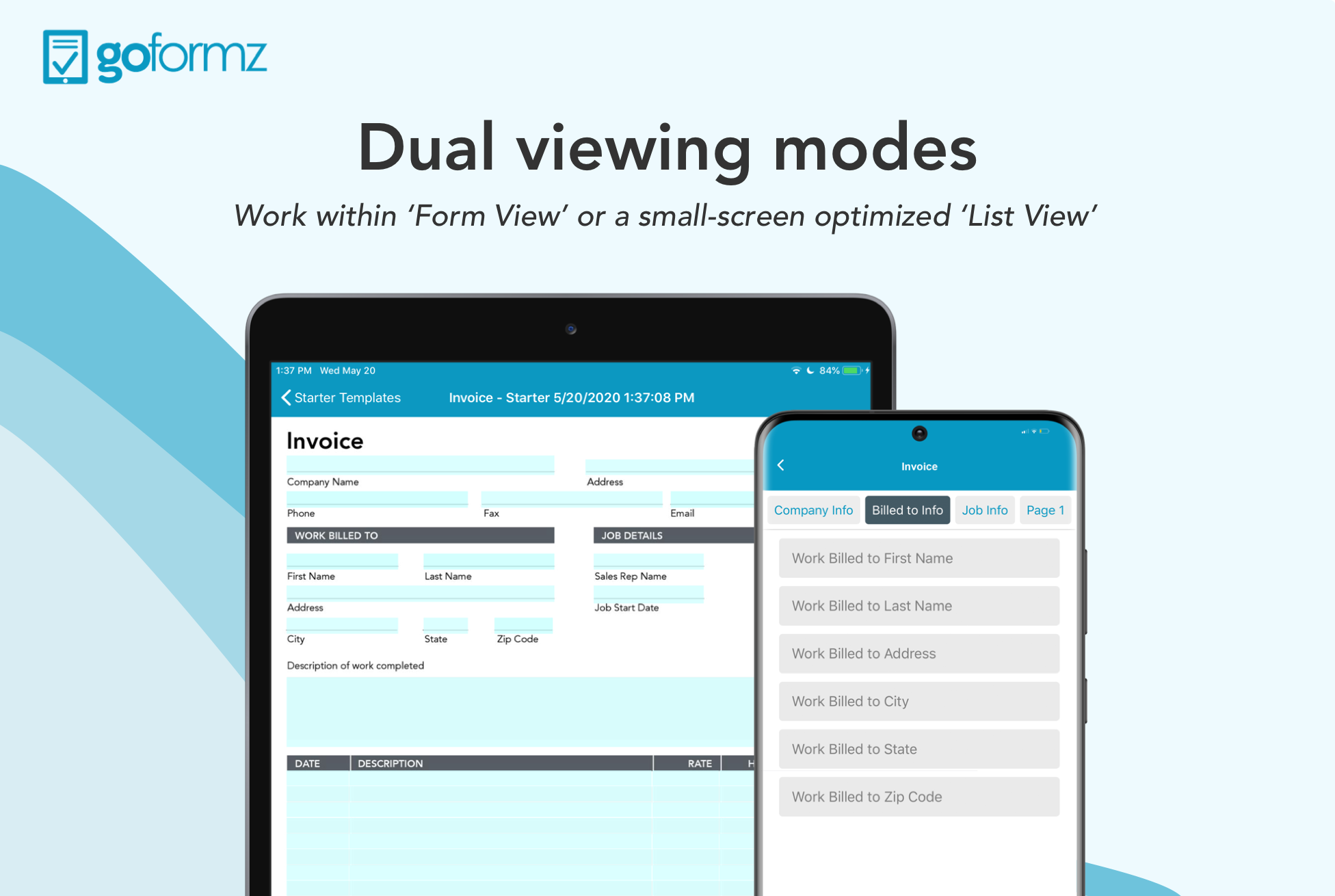
Screenshot of where to create digital versions of existing work forms (or brand new versions) and fill them out on a phone, tablet, or computer.Screenshot of a mobile form that is connected with critical business applications. Forms can be connected to apps like Salesforce and Box to Procore and Smartsheet.Screenshot of where to input images, sketches, signatures, and GPS, into digital forms directly from a mobile device.Screenshot of where to trigger the dispatch of pre-filled forms to teams in the field and automate business workflows.Screenshot of the drag-and-drop form builder.Screenshot of where to toggle between a form viewing mode and a small screen viewing mode to simplify data capture on any device.