Changepoint, a discontinued product, began as a professional services automation and portfolio management product, was acquired by Compuware in 2004, and was later divested to Marlin Equity Partners in 2014. Under Changepoint, the company acquired Daptiv that same year, combining its professional services automation capabilities with SaaS project portfolio management. Planview acquired Changepoint in 2021 and offered it as Planview ChangePoint. It is no longer available to new customers.
N/A
ScreenConnect
Score8.3 out of 10
N/A
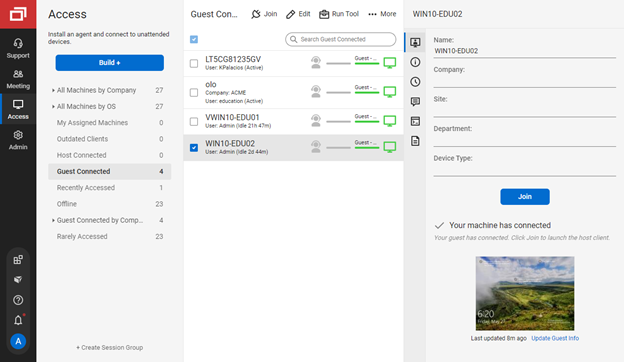
ConnectWise ScreenConnect is a remote support, access, and meeting solution. With it, users can utilize remote support and access to repair computers, provide updates, and manage machines. Users can also conduct online seminars and presentations using remote meetings.
Changepoint is basic and would, therefore, work for businesses with uncomplicated requests, pretty straightforward workflows and willingness to work with an unsightly solution. It is basic, from the UI to the search option and the way the information is captured, which can be frustrating and counter-intuitive at times. It is relatively robust (i.e. I have been using it for almost 2 years and have not seen it crash once) but it does log me out when the system has been inactive for about 30 minutes - and I am only notified about being logged out upon clicking the Submit button, meaning many a line of text have been typed more than once!
A de minimis incentive was given to thank the reviewer for their time. The incentive was not used to bias or drive a particular response, nor was the incentive contingent on a positive endorsement. More Info
We often need to create an ad-hoc session with a device that is not under our management. We find ourselves doing this more than ever in the COVID world. Many people are working from home on personal machines with their employer, our client's permission and we are facilitating more support for these personal machines. Connectwise Control [(formerly ScreenConnect)] gives us a robust resource to control the device, navigate anywhere we need, execute various commands, and engage in an on-screen chat with the client. The session is very simple to create and very user-friendly to initiate. We do not recommend it for Android, Apple, or Chromebook applications. There is little to no support for these platforms.
A de minimis incentive was given to thank the reviewer for their time. The incentive was not used to bias or drive a particular response, nor was the incentive contingent on a positive endorsement. More Info
Changepoint has significant reporting capabilities, though of course, the data that comes out is only as good as the data that goes in. I enjoy being able to use the standard reports to understand exactly how much a project has cost us and to compare it to how much we are charging. This allows us to more accurately set our prices. Though we have not used the report designer capability, I understand that custom reports can be designed with relative ease.
Changepoint has a versioning capability for changes made to user profiles in the system manager, which I find particularly helpful. As a non-power user, it is valuable to be able to see what changes I have made to various profiles so that I can troubleshoot a problem down the line.
Changepoint has significant functionality well beyond the features that we are currently using, and for this reason, I think it is affordable and a good deal. Particularly if your organization is interested in dedicating the time and resources into using all of the features around project planning, resource allocation, etc., the price is well worth the value.
The interface is easy to use and makes sense. It's easy to understand how to organize a large number of machines involving multiple clients. But, it's also applicable for smaller set of machines too.
The connection speed is very quick. I've used solutions in the past that take a variable amount of time to connect, or they just take a long time every time. Control is quick every time. It doesn't get in the way of being able to support the machines on the other end.
The connections are reliable. I haven't experienced random disconnects throughout hundreds of instances. It was a breath of fresh air coming from the previous solution we used. I consider Control a gold standard for what a great remote connection solution can be.
A de minimis incentive was given to thank the reviewer for their time. The incentive was not used to bias or drive a particular response, nor was the incentive contingent on a positive endorsement. More Info
We use Changepoint to manage the IS organization. I would like to see more advancement in order to do benefits management.
I would like to see a capability where a project manager can build a very detailed work breakdown structure, but only require project resources to charge time and provide a task status at a higher level.
I'd like to see the ability to selectively log off the remote machine via a button on the toolbar. Currently it's a setting to always lock on disconnect, or never lock on disconnect, requiring the tech to manually lock the machine if called for at the end of a session. Its a small time save that would add up!
The chat feature could be expanded to be a lot more useful. Allowing clients to start conversations, and have conversations ping an email address if no one is monitoring the dashboard would be extremely valuable.
Some clarity on licensing when providing host-passes to guest technicians would be a boon, especially for one-off support sessions with vendors.
A de minimis incentive was given to thank the reviewer for their time. The incentive was not used to bias or drive a particular response, nor was the incentive contingent on a positive endorsement. More Info
Sometimes the decision to renew boils down to an old adage "if it isn't broken don't fix it". Previous to moving to Changepoint, it was obvious that we needed a better project management tool. Projects we completed on time but the time zone difference between the teams and several iterations of back and forth caused a number of communication issues with projects. The difference is night and day.
I would recommend this product for both internal remote control of end user workstations and remote access to other clients over the internet. It provides a secure and feature rich product that allows me to complete any necessary tasks without ever leaving the office. I will continue to renew as I'm eager to see what they do next. I would however wish the cloud service had a better API to work in conjunction with team collaboration or chat services to make it easier to connect with end users who use multiple workstations. (Slack or Stride provide this functionality)
A de minimis incentive was given to thank the reviewer for their time. The incentive was not used to bias or drive a particular response, nor was the incentive contingent on a positive endorsement. More Info
On the whole SC is a very powerful tool that is a vital part of the IT service arsenal. On-site visits are an "emergency" only type of scenario. Just "showing your face" is not winning any browny points for me. If my client sees my face, it's usually just to upgrade hardware or to deal other aspects of business. SC provides me and my client the bulk of the info I need to get projects done.
A de minimis incentive was given to thank the reviewer for their time. The incentive was not used to bias or drive a particular response, nor was the incentive contingent on a positive endorsement. More Info
A de minimis incentive was given to thank the reviewer for their time. The incentive was not used to bias or drive a particular response, nor was the incentive contingent on a positive endorsement. More Info
It performs well. It also has full control over windows security and does not get hung up like GoToMeeting when trying to install remote software at the prompt to install as admin / override. I have used TeamViewer, WebEx, LogMeIn and GoToMeeting. This is by far the best at spontaneous, remote control. It is also very easy to get a novice user connected to the session.
A de minimis incentive was given to thank the reviewer for their time. The incentive was not used to bias or drive a particular response, nor was the incentive contingent on a positive endorsement. More Info
There have been two times when something has went wrong and I needed immediate assistance in order to be able to use Screenconnect to be able to help clients and response has not been immediate. The response time has been within 24 hours. Both times if there had been easier to navigate self help I would have been able to help myself. With better self help and a speedier response it would definitely be a 10 as they always respond and help. Just a little more difficult or slow than it should be at times
A de minimis incentive was given to thank the reviewer for their time. The incentive was not used to bias or drive a particular response, nor was the incentive contingent on a positive endorsement. More Info
I find ScreenConnect to be very simple and effective overall, with the main problem being that a number of my clients can't download the app due to existing firewalls and so on. Otherwise it does its job well, and I'm happy with it.
A de minimis incentive was given to thank the reviewer for their time. The incentive was not used to bias or drive a particular response, nor was the incentive contingent on a positive endorsement. More Info
ConnectWise has done everything they could to help us in any situation. Great support team and their new updates are always providing features that we need. Its a simple solution that works the way we need it to. Their legacy pricing model is still much better than their subscription based model however it is still fair pricing
A de minimis incentive was given to thank the reviewer for their time. The incentive was not used to bias or drive a particular response, nor was the incentive contingent on a positive endorsement. More Info
Planview Changepoint helps us to understand our key customers enabling us to capitalize on every financial opportunity and helps us to forecast demand against the capacities required for new opportunities, and also it automates and monitors contractual terms and conditions. It gives us visibility into our employees' skills and helps to optimize resource allocation.
A de minimis incentive was given to thank the reviewer for their time. The incentive was not used to bias or drive a particular response, nor was the incentive contingent on a positive endorsement. More Info
I have worked with Citrix, AnyDesk, LogMeIn, VNC Connect, and many others. I ultimately installed ConnectWise as a self-hosted solution, based on the incredible list of features and capabilities, and the pricing at the time. I continue to use the product as it is still one of the best solutions out there and is certainly capable of growing and expanding to meet the needs of my business.
A de minimis incentive was given to thank the reviewer for their time. The incentive was not used to bias or drive a particular response, nor was the incentive contingent on a positive endorsement. More Info
I have used multiple remote desktop support software in the past (Bomgar, Team Viewer, Logmein and Join.me) and this is far the easiest of the bunch to use. It is very easy to create a session and easy to maintain remote desktops from their access view (where you install the software and can get in at any time) I highly recommend this product from ConnectWise!
A de minimis incentive was given to thank the reviewer for their time. The incentive was not used to bias or drive a particular response, nor was the incentive contingent on a positive endorsement. More Info
Employee efficiency has decreased significantly within our Project MAnagement team. The main causes are lack of logical steps/not user-friendly and the slowness of the entire program.
Changepoint PSA has greatly improved being able to track budgets for all projects. Before this software, budgets were done manually by hand and cross-referenced with Accounting. Now, we can pull a report out of the system, as long as all parties entered their time and data correctly.
Instead of waiting 30+ seconds to initiate sessions, they initiate and display a desktop in two or three seconds. The amount of frustration this avoids is immeasurable.
Once installed it doesn't need more handholding, i.e., having the remote enter a username/password. It is always just there.
A de minimis incentive was given to thank the reviewer for their time. The incentive was not used to bias or drive a particular response, nor was the incentive contingent on a positive endorsement. More Info