ConceptDraw PROJECT vs. CoSchedule Marketing Suite vs. Microsoft Project

Overview
ProductRatingMost Used ByProduct SummaryStarting Price
ConceptDraw PROJECT
Score 9.0 out of 10
N/A
ConceptDraw PROJECT is a project management tool providing a set of options to plan and implement projects successfully, and belongs to the ConceptDraw OFFICE suite. The core features of the tool are task and resource management and reporting, along with change control. The vendor says managing multiple projects is simple due to the Gantt Chart and Multi-Project Views and shared Resource Pool. Tasks that occur on a…N/A
CoSchedule Marketing Suite
Score 10.0 out of 10
N/A
CoSchedule provides a content calendar, content optimization, and contentmarketing products, with users among 50,000 marketers worldwide, helping them organize their work, deliver projects on time, and prove marketing team value.N/A
Microsoft Project
Score 8.0 out of 10
N/A
Microsoft Project is a project management software. It provides core PM functionality, including agile workflow support and resource management. Project can be deployed in the cloud or on-premise.
$120
per year per user
Pricing
ConceptDraw PROJECTCoSchedule Marketing SuiteMicrosoft Project
Editions & Modules
No answers on this topic
Project Server
$0
Planner Plan 1
$10
per month per user
Planner and Project Plan 3
$30
per month per user
Planner and Project Plan 5
$55
per month per user
Project Standard 2024
$679.99
one-time fee per installation
Project Professional 2024
$1,129.99
one-time fee per installation
Offerings
Pricing Offerings
ConceptDraw PROJECTCoSchedule Marketing SuiteMicrosoft Project
Free Trial
YesNoYes
Free/Freemium Version
NoYesNo
Premium Consulting/Integration Services
NoNoNo
Entry-level Setup FeeNo setup feeNo setup feeNo setup fee
Additional DetailsPrice varies for Individual, Commercial, Academic, Nonprofit and GovernmentPlans are billed annually.
More Pricing Information
Community Pulse
ConceptDraw PROJECTCoSchedule Marketing SuiteMicrosoft Project
Considered Multiple Products
ConceptDraw PROJECT
Chose ConceptDraw PROJECT
MS Project has far more features and functionality, but ConceptDraw PROJECT has the features we need at a price-point that is far easier to handle for a small business.
Chose ConceptDraw PROJECT
Microsoft Project is a typical Microsoft product - too much programming overhead, poor graphics, confusing and fussy interface. OmniGraffle is close to CD PROJECT but has its own fussy parts, plus it is a lot more expensive than CD PROJECT; it is in the middle between …
Chose ConceptDraw PROJECT
ConceptDraw has a much simpler licensing and pricing model. Perpetual license and ability to use in offline mode was an important criteria for us. Perfect bundle for small and medium business.
CoSchedule Marketing Suite

No answer on this topic

Microsoft Project

No answer on this topic

Features
ConceptDraw PROJECTCoSchedule Marketing SuiteMicrosoft Project
Project Management
Comparison of Project Management features of Product A and Product B
ConceptDraw PROJECT
9.0
3 Ratings
15% above category average
CoSchedule Marketing Suite
-
Ratings
Microsoft Project
8.0
111 Ratings
3% above category average
Task Management9.63 Ratings00 Ratings8.2110 Ratings
Resource Management9.63 Ratings00 Ratings7.7107 Ratings
Gantt Charts9.63 Ratings00 Ratings9.0107 Ratings
Scheduling9.53 Ratings00 Ratings8.4109 Ratings
Email integration10.01 Ratings00 Ratings5.082 Ratings
Timesheet Tracking7.01 Ratings00 Ratings10.073 Ratings
Budget and Expense Management7.93 Ratings00 Ratings7.686 Ratings
Workflow Automation00 Ratings00 Ratings10.083 Ratings
Team Collaboration00 Ratings00 Ratings7.398 Ratings
Support for Agile Methodology00 Ratings00 Ratings4.883 Ratings
Support for Waterfall Methodology00 Ratings00 Ratings7.783 Ratings
Document Management00 Ratings00 Ratings9.077 Ratings
Mobile Access00 Ratings00 Ratings10.067 Ratings
Change request and Case Management00 Ratings00 Ratings7.764 Ratings
Professional Services Automation
Comparison of Professional Services Automation features of Product A and Product B
ConceptDraw PROJECT
9.4
3 Ratings
19% above category average
CoSchedule Marketing Suite
-
Ratings
Microsoft Project
8.8
79 Ratings
13% above category average
Project & financial reporting9.43 Ratings00 Ratings7.476 Ratings
Quotes/estimates00 Ratings00 Ratings7.755 Ratings
Invoicing00 Ratings00 Ratings10.045 Ratings
Integration with accounting software00 Ratings00 Ratings10.050 Ratings
Content Creation
Comparison of Content Creation features of Product A and Product B
ConceptDraw PROJECT
-
Ratings
CoSchedule Marketing Suite
7.3
1 Ratings
7% below category average
Microsoft Project
-
Ratings
Ideation00 Ratings5.01 Ratings00 Ratings
Content collaboration00 Ratings7.01 Ratings00 Ratings
Content calendar00 Ratings10.01 Ratings00 Ratings
Content Publishing
Comparison of Content Publishing features of Product A and Product B
ConceptDraw PROJECT
-
Ratings
CoSchedule Marketing Suite
10.0
1 Ratings
24% above category average
Microsoft Project
-
Ratings
Content distribution00 Ratings10.01 Ratings00 Ratings
Content promotion00 Ratings10.01 Ratings00 Ratings
Content automation00 Ratings10.01 Ratings00 Ratings
Content Reporting & Analytics
Comparison of Content Reporting & Analytics features of Product A and Product B
ConceptDraw PROJECT
-
Ratings
CoSchedule Marketing Suite
10.0
1 Ratings
29% above category average
Microsoft Project
-
Ratings
Closed-loop tracking and reporting00 Ratings10.01 Ratings00 Ratings
Content performance analytics00 Ratings10.01 Ratings00 Ratings
Best Alternatives
ConceptDraw PROJECTCoSchedule Marketing SuiteMicrosoft Project
Small Businesses
Stackby
Stackby
Score 8.9 out of 10
Vyond
Vyond
Score 8.6 out of 10
Stackby
Stackby
Score 8.9 out of 10
Medium-sized Companies
InEight
InEight
Score 8.4 out of 10
Conductor
Conductor
Score 9.2 out of 10
InEight
InEight
Score 8.4 out of 10
Enterprises
InEight
InEight
Score 8.4 out of 10
Conductor
Conductor
Score 9.2 out of 10
InEight
InEight
Score 8.4 out of 10
All AlternativesView all alternativesView all alternativesView all alternatives
User Ratings
ConceptDraw PROJECTCoSchedule Marketing SuiteMicrosoft Project
Likelihood to Recommend
9.6
(3 ratings)
10.0
(11 ratings)
8.1
(111 ratings)
Likelihood to Renew
-
(0 ratings)
-
(0 ratings)
10.0
(3 ratings)
Usability
-
(0 ratings)
10.0
(1 ratings)
8.7
(9 ratings)
Support Rating
9.4
(3 ratings)
9.0
(2 ratings)
8.2
(34 ratings)
Implementation Rating
-
(0 ratings)
-
(0 ratings)
5.0
(1 ratings)
User Testimonials
ConceptDraw PROJECTCoSchedule Marketing SuiteMicrosoft Project
Likelihood to Recommend
CS Odessa LLC
Getting started - using the Gantt chart to enter tasks in any order and then using those tasks to initially define a MindMap to further explore alternative dependencies. The alternative works better when initiating a project with significant unknowns.
Read full review
CoSchedule
CoSchedule is great for businesses or agencies who need an overview of all their marketing efforts, and who want to establish collaboration between multiple departments. The calendar view is one of the best we've worked with and makes it easy to see exactly what's happening. There is some slight clunkiness when it comes to admin-related tasks, and a few things aren't easy to find, but there's great support.
Read full review
Microsoft
Microsoft Project Online is suited to Turnkey Projects where more Collaboration is required in Project Progress monitoring, risk assessment and conveying, issue recording and tracking. It is less appropriate when ERP Suites other than MS Dynamics are used, i.e when Enterprises need to integrate Finance / Accounting with It and having straight project management workflow
Read full review
Pros
CS Odessa LLC
  • Integration with ConceptDraw Mindmap makes work breakdown very easy.
  • We have cross-functional teams where team members often work on different projects in parallel. The multi project management feature has been a blessing over these years.
  • Another import feature is the availability of many different predefined report generation templates that made it very easy to communicate different aspects of the project to different stakeholders.
Read full review
CoSchedule
  • Best time to post is great at updating to when we get the most engagement by platform
  • Requeue tool to slate out additional posts for a given piece of content is a huge time saver
  • Aggregate analytics tool shows us a peek across our posts on a given platform that's actually easier to read than the platform itself
Read full review
Microsoft
  • I love the Gantt Chart that Microsoft Project offers me, because it provides me with a view from various aspects, it provides me with exact details about the fulfillment of tasks over a period of time, it also allows me to make comparisons with the necessary data and the fulfilled data. by the employees, in order to know exactly if the project's expectations have been met.
  • I love the Gantt Chart that Microsoft Project offers me, because it provides me with a view from various aspects, it provides me with exact details about the fulfillment of tasks over a period of time, it also allows me to make comparisons with the necessary data and the fulfilled data by the employees, in order to know exactly if the project's expectations have been met.
  • The alert system for the fulfillment and delay of assignments is perfect. Microsoft Project allows me to configure the task system, I can assign the necessary tasks to fulfill the project, and the software alerts me immediately if the managers are fulfilling the assignments.
Read full review
Cons
CS Odessa LLC
  • Non-intuitive keyboard shortcuts
  • No advanced reporting or estimates
Read full review
CoSchedule
  • The platform seems sluggish as of late, likely as a result of the robust amount of data we are entering and the number of filters we're creating.
  • Social media scheduling exists, but we do run into publishing errors more often then we'd like.
  • Task templates when updated are not retroactive, so when you create projects for an entire year and then change a template, you need to go back and change them manually.
Read full review
Microsoft
  • Seems overly complicated for users sometimes in using Project and its functionalities
  • Hard to share files for those folks who do not have MS Project, and then have to print out for them
  • Can be confusing since it looks and feels like MS Excel
Read full review
Likelihood to Renew
CS Odessa LLC
No answers on this topic
CoSchedule
No answers on this topic
Microsoft
I like using Microsoft Project. It simplifies building a schedule
Read full review
Usability
CS Odessa LLC
No answers on this topic
CoSchedule
The interface is very intuitive, from setting up social profiles, to posting, to tags, to optimizing for best day/time to post. It's super easy to scan the aggregate analytics. The calendar is very easy to grok at a glance, and the more advanced functionality is intuitive to set up.
Read full review
Microsoft
Microsoft
Project is easy to operate because data could be inserted, changed and
deleted like you are in an Excel timesheet. Besides, it provides a great
level of automation beween his fields allowing few data changes. Also, its
funcionalities are well defined and grouped in upper menus, so you can find a
funcionality quickly
Read full review
Support Rating
CS Odessa LLC
Online tutorials always available + chat, email and phone. Questions answered promptly and completely.
Read full review
CoSchedule
I didn't have to use their official support, but I can say that they put out a lot of content online to help users. Their YouTube page has quite an array of tutorial videos explaining how things work and how to get the most out of their tools. If you're struggling, before picking up a phone or blasting off an email, try searching for your problem on YouTube or their forums.
Read full review
Microsoft
Microsoft in recent years has transformed itself and gives a positive feeling when one interacts with the company. The company is focusing on its customers and willing to go extra mile to make customers happy.The company continues to invest in its products and bringing new features from time to time. Overall it is a positive feeling to be associated with such an iconic company.
Read full review
Implementation Rating
CS Odessa LLC
No answers on this topic
CoSchedule
No answers on this topic
Microsoft
I wasn't part of it so I don't know
Read full review
Alternatives Considered
CS Odessa LLC
ConceptDraw has a much simpler licensing and pricing model. Perpetual license and ability to use in offline mode was an important criteria for us. Perfect bundle for small and medium business.
Read full review
CoSchedule
CoSchedule provides collaborative planning of projects. The calendar view is very well designed. Meetings and tasks can be scheduled and tracked easily. Whatever is being done, no matter how big the task/project is, it gives a bird-eye view of everything. Additionally, it also integrated very well with WordPress. Their customer service team is also very helpful.
Read full review
Microsoft
While many of the above tools are extremely well-versed, Microsoft Project's largest advantage comes from it being related to the largest business productivity company in the world. Project does have its sharing limitations - but regardless, offers one of the most robust tools in the market today. Microsoft Project is built with large-scale projects in mind but is more than up to the task for smaller projects as well. However, there are options available (especially cloud-based options) that may be more fitting for higher-level projects that do not require going into the weeds.
Read full review
Return on Investment
CS Odessa LLC
  • Inexpensive way to present a professional project plan when needed
Read full review
CoSchedule
  • It has saved me about 1 hour per day to keep things organized from Asana to WordPress.
  • By not having a functioning Google Doc import feature, it costs me about 30 minutes for each blog post to copy paste all the content, images, etc.
  • By bundling too many features into their plans, many of which we don't use (e.g. social media scheduling), we lose a little ROI because we are not using the full feature set. We use and prefer Buffer for social media, so when CoSchedule raised their price $40+ per month on features we would not be using, that hurt.
Read full review
Microsoft
  • Project saved me, as the project manager, countless hours of digging through tickets and schedules to plan everything out. It also saved me time in adjusting the project triangle as needed, since it does so much automatically.
  • It is costly, and since it requires extensive training to master, it's not just the high licensing cost that you need to take into account.
  • The reporting features - even just printing out Gantt charts - makes it far easier to communicate with stakeholders. That means less time for PMs doing all of this manually, and it means less follow-up questions and delays moving forward.
Read full review
ScreenShots

ConceptDraw PROJECT Screenshots

Screenshot of Resource AllocationScreenshot of Gantt Chart ViewScreenshot of Multiproject DashboardScreenshot of Split and Recurring TasksScreenshot of Micro ReportsScreenshot of Custom Fields to a Project Schedule

CoSchedule Marketing Suite Screenshots

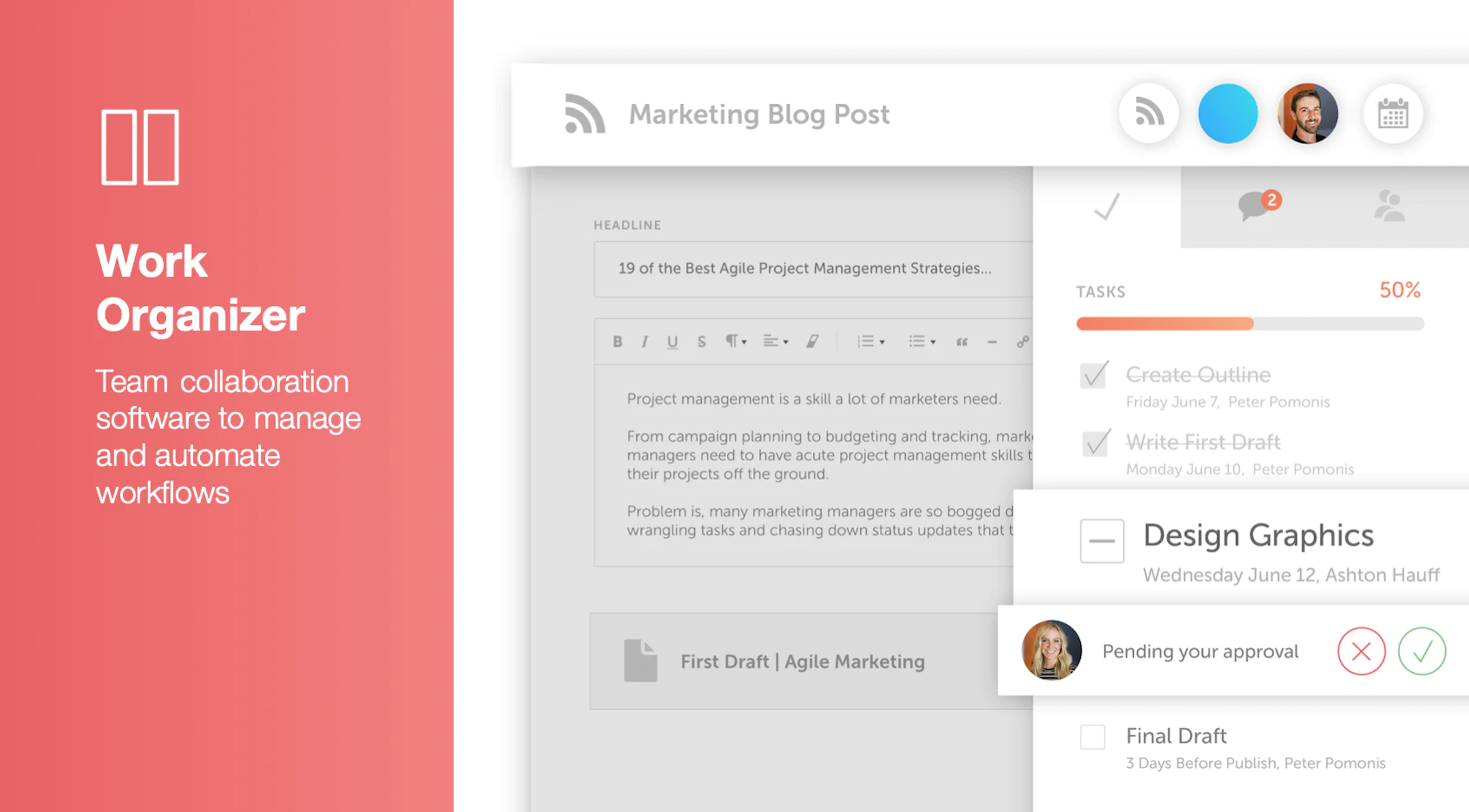
Screenshot of Calendar Organizer: Visualizes everything in real time, and shows every project on a unified calendar of record. Helps to keep stakeholders in the know and pivot quickly when priorities change.Screenshot of Content Organizer: Eliminates content bottlenecks from idea to promotion. Optimizes the editorial process, and centralizes publishing and promotion by connecting marketing tools.Screenshot of Work Organizer: Maximizes resources by implementing consistent, defined workflows to speed up production and identify how urgent changes impact proactively planned work.Screenshot of Asset Organizer: Catalogs and maintains control of brand assets with customized taxonomies to find, update, and share files. Folders and files can be shared with stakeholders to make sure work is up-to-date.Screenshot of Idea Board: Used to write down ideas, take in requests, and prioritize the projects that are up-next, before giving them a publish date and putting them on the calendar organizer.Screenshot of An AI-powered Marketing Intelligence Assistant that can be used to write first-draft copy, complete work faster, and generate new ideas.