Contentsquare is an enterprise experience intelligence and Digital Analytics platform designed to track, visualize, and optimize user journeys across websites and mobile applications. The platform captures digital interaction telemetry—such as clicks, scrolls, hovers, and page drop-offs—without manual event tagging to power Web Analytics, session replays, funnel visualization, and experience monitoring.
N/A
Unbounce
Score8.3 out of 10
Mid-Size Companies (51-1,000 employees)
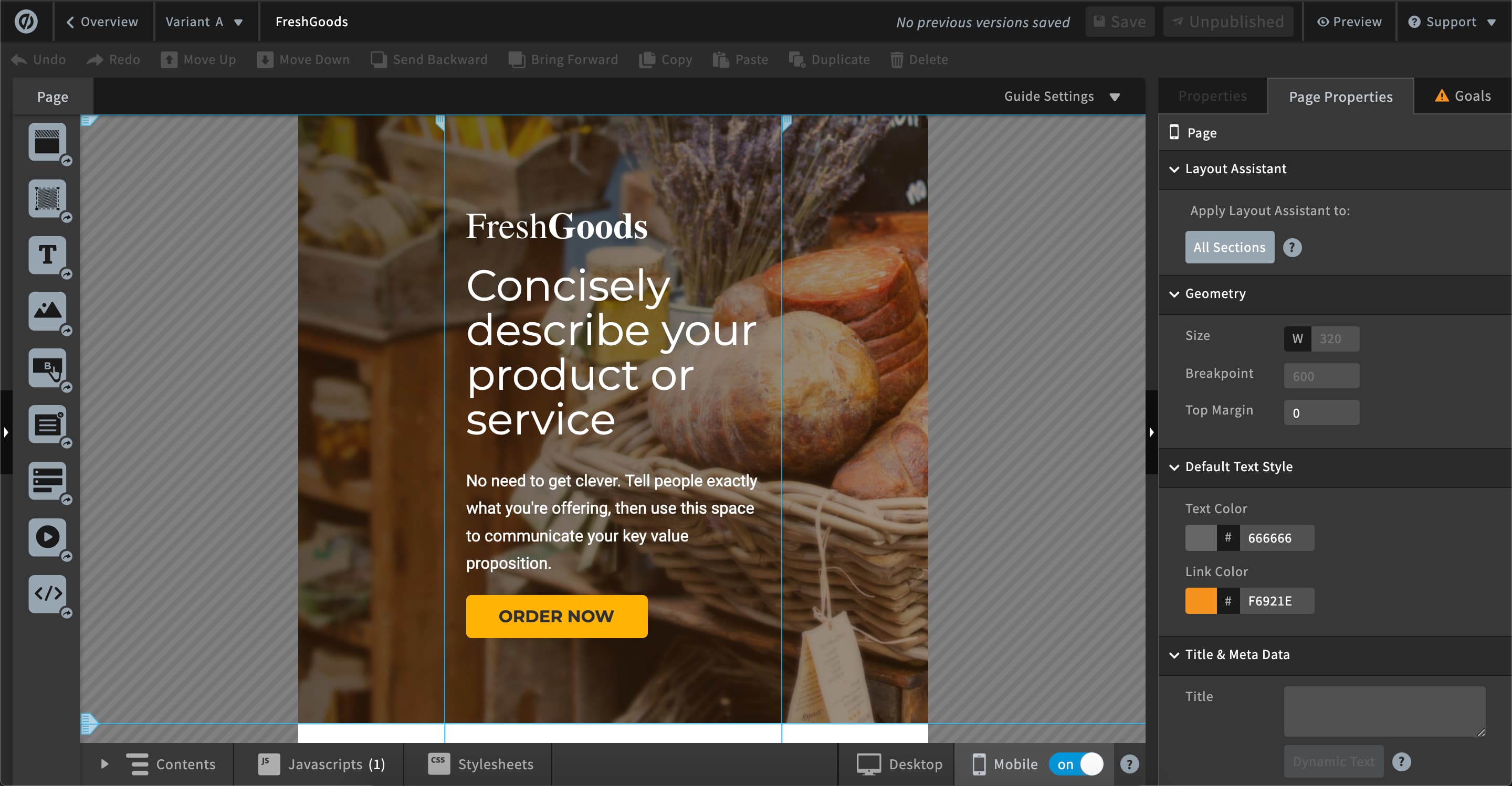
Unbounce is a landing page builder for marketers. Marketers can use the drag and drop platform to create customized, responsive landing pages for their marketing campaigns.
$99
per month
Pricing
Contentsquare
Unbounce
Editions & Modules
No answers on this topic
Build
$99
per month
Experiment
$149
per month
Optimize
$249
per month
Agency
Contact Sales
Offerings
Pricing Offerings
Contentsquare
Unbounce
Free Trial
No
Yes
Free/Freemium Version
Yes
No
Premium Consulting/Integration Services
No
Yes
Entry-level Setup Fee
No setup fee
Optional
Additional Details
—
All plans include: Unlimited conversions, Unlimited subdomains, 1000+ integrations, Built-in AI copywriting, and Customer support. Discount available for annual pricing.
Hotjar is good for a first pass at understanding user sentiment or locating potential usability issues. There are features such as "rage clicked" which shows recordings or instances when a user rage clicked or had an issue with your site. Hotjar has also been helpful to launch intercept surveys on mobile, desktop, and app, which not all competitor software allow. Hotjar recordings are fun to watch. "Watching Hotjar like Netflix" is a favorite pastime at work.
A de minimis incentive was given to thank the reviewer for their time. The incentive was not used to bias or drive a particular response, nor was the incentive contingent on a positive endorsement. More Info
As I am using this platform for a long time, I believe I am happy with the services I am getting from this outstanding software. It has made my landing page experience better than ever without any coding knowledge to apply. It has upgraded my business in a positive direction and I believe I am using this software for many years to come.
A de minimis incentive was given to thank the reviewer for their time. The incentive was not used to bias or drive a particular response, nor was the incentive contingent on a positive endorsement. More Info
Heat mapping is great on Hotjar. It is a good place to start when you are looking at the UX & CRO on your website. You can see the % of people clicking on elements on a page, how far they scroll, and mouse movements.
Hotjar is great for session recordings. These record the mouse movements, clicks, pages and scrolls of a user in video format. You can watch these to investigate what works well on a site and identify potential roadblocks and bugs.
Hotjar is great as it ensures that users details are anonymous; for instance, if you are watching a session recording, you cannot see what a user types in a form field, as Hotjar blanks this out.
Hotjar has a poll function, so you can have polls on your website.
A de minimis incentive was given to thank the reviewer for their time. The incentive was not used to bias or drive a particular response, nor was the incentive contingent on a positive endorsement. More Info
AB testing is simple to set up. Clone a page make your changes and pit one or more against each other. Set the number of views and you're told the winner once the test is done. Simple
Tracking code is easy to add. Follow the straightforward instructions in the back end
Easy to add multiple domains to your account. So you can use the landing pages you build on numerous sites if you so desire
A de minimis incentive was given to thank the reviewer for their time. The incentive was not used to bias or drive a particular response, nor was the incentive contingent on a positive endorsement. More Info
A de minimis incentive was given to thank the reviewer for their time. The incentive was not used to bias or drive a particular response, nor was the incentive contingent on a positive endorsement. More Info
One of the cons of Unbouncewas the learning curve. We are very familiar now with the ends and outs but in the beginning, it would have been super helpful to have some sore of learning up front.
The pricing structure is not great for our particular organization. We will never need unlimited page views but we do often need more landing pages we make it work but the pricing model could be improved.
The reporting could be a little better. We supplement with some of our own trackings but for the most part, the reporting from Unbounce is a basic level understanding of how the page is performing.
A de minimis incentive was given to thank the reviewer for their time. The incentive was not used to bias or drive a particular response, nor was the incentive contingent on a positive endorsement. More Info
For small companies with limited user testing budgets, ClickTale serves as a useful user testing tool. When I cannot get the funds for in depth user testing, I always know that I have a baseline of information I can rely on
The nonprofit discount makes it so affordable that my client was happy to continue their subscription all year round. They have used it to build landing pages to capture expressions of interest for their next recruitment window. It hasn't quite produced the sort of results we were hoping for, but I'm not sure that's Unbounce's fault.
A de minimis incentive was given to thank the reviewer for their time. The incentive was not used to bias or drive a particular response, nor was the incentive contingent on a positive endorsement. More Info
It is fairly easy to use, easy to explain, and easy to learn even for a non-techie like me. I admit I was a little intimidated when it was recommended by my developers, but I learned afterwards that there really was nothing to worry about. My experience has been awesome so far!
A de minimis incentive was given to thank the reviewer for their time. The incentive was not used to bias or drive a particular response, nor was the incentive contingent on a positive endorsement. More Info
Unbounce made it easy for my team to build landing pages for website and email. We gained valuable A/B testing insights and gathered information from visitors effectively converting them to leads. The Editor is straight forward and I was able to learn to use it on my own without instruction. CRM integration was easy and consistently worked.
Hotjar is a SaaS-based company, and as such has a good support service. Users can quickly submit support tickets through Hotjar's online portal. Enterprise customers get access to additional support members and have SLAs to support their larger, more complex needs. Overall, Hotjar is extremely reliable and I've never had to reach out to customer support.
A de minimis incentive was given to thank the reviewer for their time. The incentive was not used to bias or drive a particular response, nor was the incentive contingent on a positive endorsement. More Info
Unbounce customer support is very strong. We have been able to connect with them via email and telephone mediums. They are very knowledgeable and can effectively help resolve difficult problems that are slowing us down. Overall Unbounce customer support is very professional. Our wait times have always been small or at least reasonable.
A de minimis incentive was given to thank the reviewer for their time. The incentive was not used to bias or drive a particular response, nor was the incentive contingent on a positive endorsement. More Info
Choose a subdomain that is appropriate for multiple types of pages. You don't want to have to keep changing it. Think about using Google Tag Manager to manage your Google Analytics code and event tracking. Build one landing page to completion. Then make a copy of it if you need to create variant pages.
A de minimis incentive was given to thank the reviewer for their time. The incentive was not used to bias or drive a particular response, nor was the incentive contingent on a positive endorsement. More Info
ContentSquare [(Clicktale)] is going deeper on UX understanding than traditional web analytics tools. You can truly understand how a page is used (where users click or even miss click, on which part of the page they are spending most of their time, if some links are clicked but bad positioned on the page...), and that's a thing you can't really measure trough a traditional web analytics tool.
A de minimis incentive was given to thank the reviewer for their time. The incentive was not used to bias or drive a particular response, nor was the incentive contingent on a positive endorsement. More Info
Despite my review for unbounce being not the greatest review or score in the world, when stacked up against its two biggest competitors, I'd prefer Unbounce over Leadpages and Instapage. Leadpages drag and drop editor, integrations, and overall UI/UX is 10x worse than unbounce and unbounce really leads in the category of nice templates and quickness to a production landing page with much better options and integrations.
A de minimis incentive was given to thank the reviewer for their time. The incentive was not used to bias or drive a particular response, nor was the incentive contingent on a positive endorsement. More Info
Our UX team can now use hard data to back up and validate design decisions that we make. Our role as usability experts is becoming more respected and integral to business objectives because we now have data that can back up our field of study and prove that our roles are demonstrably useful and necessary.
HotJar allows our small team of 3 UX designers to get research data as if we were a much larger team. Instead of painstakingly using our time to do guerrilla research, endless user observations, and other types of manual testing, we can now get a significant portion of our data from HotJar.
Using HotJar is actually giving our team a sense of excitement and enjoyment in our day-to-day usability work. Instead of seeing UX as a chore, HotJar is making data gathering and analyzing more fun, because we can see tangible results from a much larger pool of user/user-data than we could in the past.
A de minimis incentive was given to thank the reviewer for their time. The incentive was not used to bias or drive a particular response, nor was the incentive contingent on a positive endorsement. More Info
Unbounce has positively impacted PPC Director's ability to provide clientele with the service of building informative, relevant, and high-converting landing pages. For instance, the traceable effectiveness of landing pages built by PPC Director in Unbounce remains directly correlated to long-term client retention.
A de minimis incentive was given to thank the reviewer for their time. The incentive was not used to bias or drive a particular response, nor was the incentive contingent on a positive endorsement. More Info