TrustRadius: an HG Insights company

Save this comparison

Save this comparison

Add Product

Recommended Comparisons

    Overview
    ProductRatingMost Used ByProduct SummaryStarting Price

    DemandTools

    Score10 out of 10
    N/ADemandTools for AppExchange is a data quality toolset for Salesforce.com CRM centric customers. The product comprises 11 individual modules to control, standardize, verify, deduplicate, import and manipulate Salesforce and/or Force.com data.N/A

    OnePageCRM

    Score10 out of 10
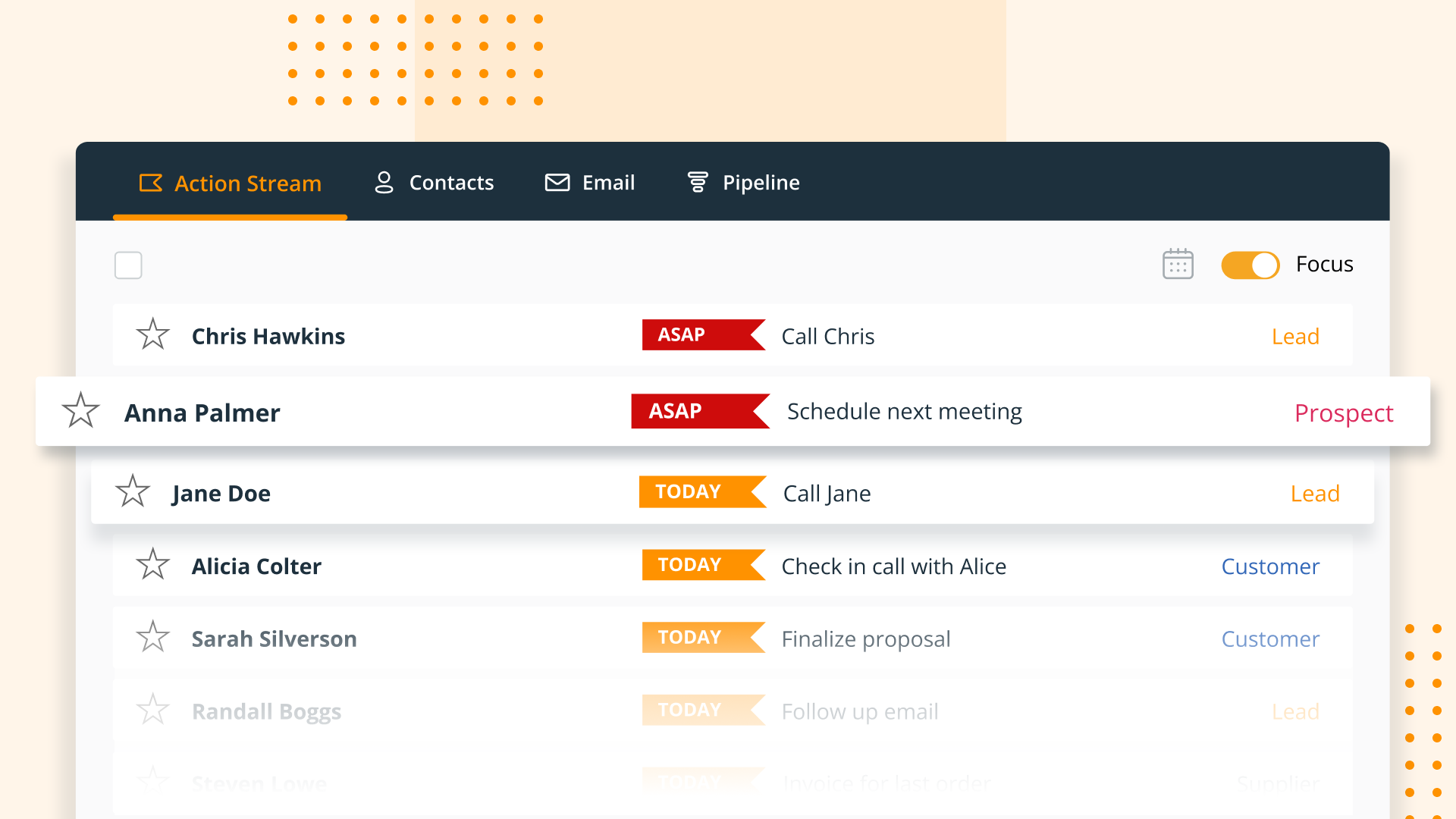
    N/AOnePageCRM aims to turn the complexity of a CRM into a simple to-do list. This action-focused CRM helps users interact with contacts by setting simple follow-up tasks. Just out of a promising sales call? Type the next action to "Send a quote", set a date, and move on to the next contact. Contacts will be sorted by task priority so the user can sell with focused attention to each prospect and client. OnePageCRM can be tried with a 21-day free trial today.

    $9.95

    per month per user

    Pricing
    DemandToolsOnePageCRM
    Editions & Modules
    No answers on this topic
    Professional Plan (Annually)
    $9.95
    per month per user
    Professional Plan (Monthly)
    $15
    per month per user
    Business Plan (Annually)
    $19.95
    per month per user
    Business Plan (Monthly)
    $29
    per month per user
    Offerings
    Pricing Offerings
    DemandToolsOnePageCRM
    Free Trial
    NoYes
    Free/Freemium Version
    NoNo
    Premium Consulting/Integration Services
    NoNo
    Entry-level Setup FeeNo setup feeNo setup fee
    Additional Details—OnePageCRM offers 4 months free in annual subscriptions.
    More Pricing Information
    Community Pulse
    DemandToolsOnePageCRM
    Considered Both Products
    Validity
    No answer on this topic
    OnePageCRM
    No answer on this topic
    Key User Insights
    Would buy again
    100%
    Would buy again
    6 Answers
    No answers on this topic
    Delivers good value for the price
    100%
    Delivers good value for the price
    6 Answers
    No answers on this topic
    Happy with the feature set
    100%
    Happy with the feature set
    6 Answers
    No answers on this topic
    Lived up to sales and marketing promises
    100%
    Lived up to sales and marketing promises
    6 Answers
    No answers on this topic
    Implementation went as expected
    83%
    Implementation went as expected
    5 Answers
    No answers on this topic
    Features
    DemandToolsOnePageCRM
    Sales Force Automation
    Comparison of Sales Force Automation features of DemandTools and OnePageCRM
    Feature
    DemandTools
    -
    Ratings
    OnePageCRM
    9.3
    4 Ratings
    17% above category average
    Customer data management / contact management00 Ratings9.94 Ratings
    Workflow management00 Ratings10.04 Ratings
    Territory management00 Ratings10.02 Ratings
    Opportunity management00 Ratings10.03 Ratings
    Integration with email client (e.g., Outlook or Gmail)00 Ratings10.02 Ratings
    Contract management00 Ratings5.43 Ratings
    Quote & order management00 Ratings10.02 Ratings
    Interaction tracking00 Ratings9.53 Ratings
    Channel / partner relationship management00 Ratings9.22 Ratings
    Customer Service & Support
    Comparison of Customer Service & Support features of DemandTools and OnePageCRM
    Feature
    DemandTools
    -
    Ratings
    OnePageCRM
    9.9
    3 Ratings
    25% above category average
    Case management00 Ratings9.93 Ratings
    Call center management00 Ratings9.93 Ratings
    Help desk management00 Ratings9.93 Ratings
    Marketing Automation
    Comparison of Marketing Automation features of DemandTools and OnePageCRM
    Feature
    DemandTools
    -
    Ratings
    OnePageCRM
    10.0
    4 Ratings
    26% above category average
    Lead management00 Ratings10.04 Ratings
    Email marketing00 Ratings10.03 Ratings
    CRM Project Management
    Comparison of CRM Project Management features of DemandTools and OnePageCRM
    Feature
    DemandTools
    -
    Ratings
    OnePageCRM
    10.0
    4 Ratings
    26% above category average
    Task management00 Ratings10.04 Ratings
    Reporting00 Ratings10.03 Ratings
    CRM Reporting & Analytics
    Comparison of CRM Reporting & Analytics features of DemandTools and OnePageCRM
    Feature
    DemandTools
    -
    Ratings
    OnePageCRM
    10.0
    4 Ratings
    27% above category average
    Forecasting00 Ratings10.02 Ratings
    Pipeline visualization00 Ratings9.94 Ratings
    Customizable reports00 Ratings10.02 Ratings
    Customization
    Comparison of Customization features of DemandTools and OnePageCRM
    Feature
    DemandTools
    -
    Ratings
    OnePageCRM
    10.0
    3 Ratings
    27% above category average
    Custom fields00 Ratings9.83 Ratings
    Custom objects00 Ratings10.02 Ratings
    Scripting environment00 Ratings10.02 Ratings
    API for custom integration00 Ratings10.01 Ratings
    Security
    Comparison of Security features of DemandTools and OnePageCRM
    Feature
    DemandTools
    -
    Ratings
    OnePageCRM
    10.0
    4 Ratings
    17% above category average
    Single sign-on capability00 Ratings9.94 Ratings
    Role-based user permissions00 Ratings10.02 Ratings
    Integrations with 3rd-party Software
    Comparison of Integrations with 3rd-party Software features of DemandTools and OnePageCRM
    Feature
    DemandTools
    -
    Ratings
    OnePageCRM
    10.0
    1 Ratings
    28% above category average
    Marketing automation00 Ratings10.01 Ratings
    Platform
    Comparison of Platform features of DemandTools and OnePageCRM
    Feature
    DemandTools
    -
    Ratings
    OnePageCRM
    10.0
    3 Ratings
    27% above category average
    Mobile access00 Ratings10.03 Ratings
    Best Alternatives
    DemandToolsOnePageCRM
    Small Businesses
    Dataloader.io
    Score10 out of 10
    Salesflare
    Score10 out of 10
    Medium-sized Companies
    Informatica Customer 360 for Salesforce
    Score8.7 out of 10
    Kintone
    Score9.7 out of 10
    Enterprises
    Dataloader.io
    Score10 out of 10
    Oracle Sales
    Score8.9 out of 10
    All AlternativesView all alternativesView all alternatives
    User Ratings
    DemandToolsOnePageCRM
    Likelihood to Recommend
    10.0
    (118 ratings)
    7.6
    (4 ratings)
    Likelihood to Renew
    9.9
    (16 ratings)
    -
    (0 ratings)
    Usability
    10.0
    (7 ratings)
    -
    (0 ratings)
    Availability
    9.8
    (2 ratings)
    -
    (0 ratings)
    Performance
    8.5
    (3 ratings)
    -
    (0 ratings)
    Support Rating
    9.0
    (5 ratings)
    -
    (0 ratings)
    Online Training
    8.5
    (2 ratings)
    -
    (0 ratings)
    Implementation Rating
    6.9
    (6 ratings)
    -
    (0 ratings)
    Configurability
    7.5
    (2 ratings)
    -
    (0 ratings)
    Ease of integration
    9.0
    (1 ratings)
    -
    (0 ratings)
    Product Scalability
    8.5
    (2 ratings)
    -
    (0 ratings)
    Vendor post-sale
    9.0
    (1 ratings)
    -
    (0 ratings)
    Vendor pre-sale
    9.0
    (1 ratings)
    -
    (0 ratings)
    User Testimonials
    DemandToolsOnePageCRM
    Likelihood to Recommend
    Validity
    DemandTools is good for almost everything related to mass data manipulation. The only scenario I haven't tried using DemandTools and was recommended to use Data Loader for was inserting records while keeping the original created date. The issue was that we had a disconnection with an external messaging partner, and when the records were retrieved, a few days had passed since the original day of the incoming messages. To insert the messages while keeping the original created date, DataLoader was helpful. I am not sure how to do that in DemandTools. But again, for everything else, DemandTools is a lifesaver.
    Incentivized
    Read full review
    OnePageCRM
    OnePage is great for any company with a sales team. Onepage is great for lead tracking, and showing all communication in one place. Its timeline is easy to use and understand. OnePage also makes it easy to manage a sales team. Their reporting capabilities are excellent and it is a great way to track deals.
    Incentivized
    Read full review
    Pros
    Validity
    • PowerGrid can review and make the updates simultaneously.
    • Single Table Dedupe makes merg[ing] the records easy and can make updates at the same time.
    • BulkBackup [is] just one click, majority data got updated.
    • Scenarios save a lot of time for similar working load.
    Incentivized
    Read full review
    OnePageCRM
    • It uses a split screen: one half is your action stream, the other is for a selected contact. This is really helpful.
    • You can do mass actions-- like rescheduling a group of actions for another day.
    • "Tags" are a handy feature... it's sophisticated enough to trigger automated follow-ups in our mail service, Klaviyo
    Incentivized
    Read full review
    Cons
    Validity
    • I wish I could make changes to my existing scenarios using save rather than having to create a whole new scenario. Maybe you can, I just haven't been able to.
    • Some features aren't user intuitive and it takes a while to learn.
    Incentivized
    Read full review
    OnePageCRM
    • The ability to interface with all or many VoIP services would be top of my priority list
    • Skype is not a favourite of mine, but Google hangouts is which is now included with OnePageCRM
    • The ability to create email templates would be good. I have a separate app for that, but it would be good to have it on board
    Incentivized
    Read full review
    Likelihood to Renew
    Validity
    It's a great product. The only thing that holds us back is it was frustrating working with their sales team. We also don't like that when Validity purchased DemandTools they immediately started charging us quite a bit while it had been free for non-profit users when CRMFusion owned it. They also don't let you buy it for just 1 or 2 seats, you have to pay, I believe, in batches of 100 seats.
    Incentivized
    Read full review
    OnePageCRM
    No answers on this topic
    Usability
    Validity
    Allows for control in uploading lists, saved processes for checking duplicate records.

    Allows for backup files and quick reverts if something goes wrong.

    Extends reporting when Salesforce.com cannot support specific pieces of info being put together in a report.

    Automated processes for set and forget hygiene tasks
    Read full review
    OnePageCRM
    No answers on this topic
    Reliability and Availability
    Validity
    There has not been a time since I started 9 months ago that I've encountered any kind of downtime.
    Incentivized
    Read full review
    OnePageCRM
    No answers on this topic
    Performance
    Validity
    DemandTools is a bit clunky and slow at times
    Incentivized
    Read full review
    OnePageCRM
    No answers on this topic
    Support Rating
    Validity
    Support can be slow so do not expect quick turn for urgent issues.
    Help for specific queries not not there. Product tech support is offered. It would be great if query support, even if paid, was offered
    The training webinars help with the basics but not much if you need advanced functionality.
    Read full review
    OnePageCRM
    No answers on this topic
    Online Training
    Validity
    The trainings are free live webinars that give you a solid base for getting started with the program. The only weakness is they don't have any advanced classes.
    Read full review
    OnePageCRM
    No answers on this topic
    Implementation Rating
    Validity
    I had just started using Salesforce about 3 months before I did the implementation myself, and it was easy to do just following their step-by-step instructions.
    Read full review
    OnePageCRM
    No answers on this topic
    Alternatives Considered
    Validity
    Though RingLead has much more to offer in terms of automation (and it is in Salesforce rather than a separate program), DemandTools still has our heart. DemandTools is very cost-friendly and we were able to increase the value of DemandTools by programming in additional saved scenarios. I decreased admin time in the DemandTools suite by approximately 25% after implementing saved scenarios for every reoccurring update or list upload.
    Incentivized
    Read full review
    OnePageCRM
    We use all these software for task management and email marketing. OnePage doesn't send out mass emails and we needed a more robust task management system, so we use SharpSpring and Asana as well.
    Incentivized
    Read full review
    Scalability
    Validity
    It's done everything we've needed it to do.
    Incentivized
    Read full review
    OnePageCRM
    No answers on this topic
    Return on Investment
    Validity
    • It is a tremendous time saver. It does things Salesforce doesn't even have the capability to do. Tasks that would take hours to manually complete.
    • We can process a tremendous amount of data daily through one person, vs. weeks for the data to be cleaned, reviewed, routed and input.
    • Saves on headcount by allowing a dedicated user to set up batches and jobs for other teams to ensure their data integrity.
    • The return on investment isn't easily quantifiable but it is FELT in our department.
    Incentivized
    Read full review
    OnePageCRM
    • OnePage has helped with time efficiency for the sales team. Because OnePage is so easy to use and manage, our sales team can spend more time selling and less time working with the system.
    • OnePage is great for organization. It helps us track our daily schedules/tasks and shows all communication clearly in one place.
    Incentivized
    Read full review
    ScreenShots

    DemandTools Screenshots

    Screenshot of DemandTools Home ScreenScreenshot of Modify FormulaScreenshot of Data Quality Automation

    OnePageCRM Screenshots

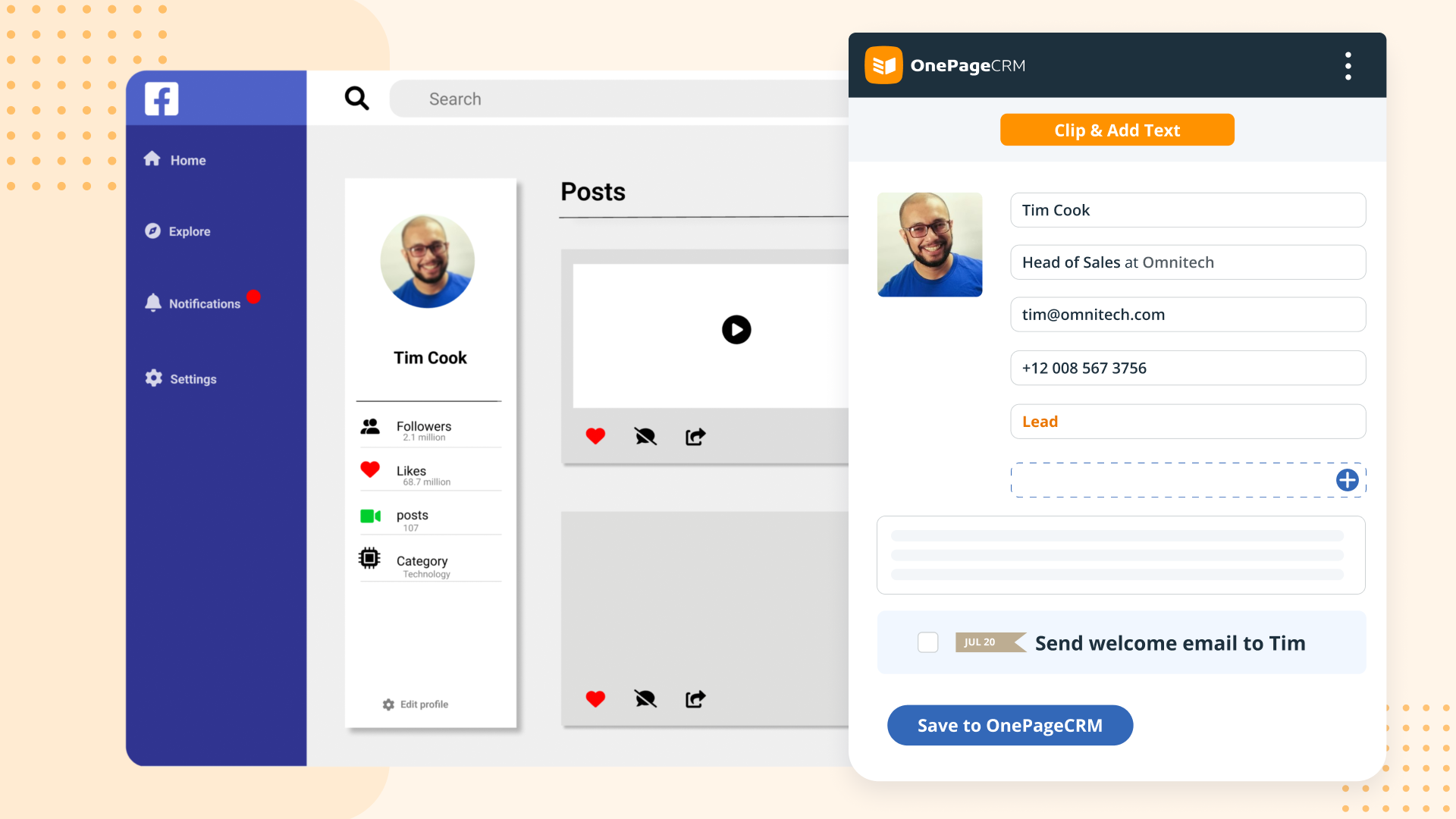
    Screenshot of OnePageCRM transforms the user's database into an actionable to-do list. Contacts are sorted into Action Stream by task priority so users know what to do next.Screenshot of OnePageCRM displays relevant calls, notes, deals, and golden nuggets about a contact in one place.Screenshot of OnePageCRM's email integration allows users to send emails in bulk, create templates, and track opens.Screenshot of For lead generation, OnePageCRM's browser extension lets users add leads to a CRM from any webpage in one click.Screenshot of For sales on the go, download the OnePageCRM mobile app (iOS & Android). Log calls and update deals.Screenshot of Manage deals with OnePageCRM's drag-and-drop feature and keep track of goals with a live KPI dashboard.