Overview
ProductRatingMost Used ByProduct SummaryStarting Price
DocuSign
Score 8.7 out of 10
N/A
DocuSign supports transactions with document sharing and electronic signature, as well as automated and guided data collection and entry, record updating across disparate systems and payment collection upon agreement, as well as analytics and reporting.
$15
per month
Juro
Score 8.2 out of 10
Mid-Size Companies (51-1,000 employees)
Juro is an intelligent contracting platform that embeds contract automation into the tools business teams already use via integrations. It is used to manage contracts end-to-end while legal remains in control.
$10,000
per year per installation
Nitro Productivity Suite
Score 8.4 out of 10
N/A
Nitro Productivity Suite combines electronic signature and general PDF editing, from Nitro, Inc. It is built around capabilities such as getting approvals and esignatures in seconds and sharing and reviewing documents from anywhere.
$9.99
per month per user
Pricing
DocuSignJuroNitro Productivity Suite
Editions & Modules
Personal
$15
per month
Real Starter
$15
per month
DocuSign for Realtors
$35
per month
Standard
$40
per month
Business Pro
$60
per month
Advanced Solutions
Custom Pricing
Essentials
$10,000+
per year per installation
Nitro Sign® Essentials
$9.99
per month billed annually per user
Nitro Sign® Advanced
$19.99
per month billed annually per user
Nitro Sign® Premium
Let's chat
Offerings
Pricing Offerings
DocuSignJuroNitro Productivity Suite
Free Trial
YesYesNo
Free/Freemium Version
NoNoNo
Premium Consulting/Integration Services
NoNoNo
Entry-level Setup FeeNo setup feeNo setup feeNo setup fee
Additional DetailsAll Juro plans include unlimited users, unlimited templates and unlimited workflows. Pricing is dictated by how many contracts will be processed annually, and whether more powerful integrations are used.
More Pricing Information
Community Pulse
DocuSignJuroNitro Productivity Suite
Considered Multiple Products
DocuSign
Chose DocuSign
I prefer DocuSign to Adobe Sign because of the workflow process. To me, DocuSign flows much easier and the interface is easier for me to locate the things I need. I also appreciate the templates that DocuSign allowed, especially because Egnyte had a direct integration with …
Juro
Chose Juro
The AI features seemed better on Juro
Nitro Productivity Suite

No answer on this topic

Features
DocuSignJuroNitro Productivity Suite
Contract Authoring
Comparison of Contract Authoring features of Product A and Product B
DocuSign
-
Ratings
Juro
7.7
3 Ratings
5% below category average
Nitro Productivity Suite
-
Ratings
Contract creation00 Ratings7.83 Ratings00 Ratings
Contract templates00 Ratings8.23 Ratings00 Ratings
Clause library/saved fields00 Ratings6.63 Ratings00 Ratings
Guided logic00 Ratings8.22 Ratings00 Ratings
Contract Collaboration
Comparison of Contract Collaboration features of Product A and Product B
DocuSign
-
Ratings
Juro
7.7
3 Ratings
5% below category average
Nitro Productivity Suite
-
Ratings
Contract sharing00 Ratings8.63 Ratings00 Ratings
Contract editing00 Ratings7.03 Ratings00 Ratings
Collaborating on contracts00 Ratings7.03 Ratings00 Ratings
Approval process00 Ratings8.23 Ratings00 Ratings
Interdepartmental workflows00 Ratings7.72 Ratings00 Ratings
Contract Monitoring
Comparison of Contract Monitoring features of Product A and Product B
DocuSign
-
Ratings
Juro
8.2
3 Ratings
1% below category average
Nitro Productivity Suite
-
Ratings
Contract database00 Ratings8.13 Ratings00 Ratings
Contract search00 Ratings8.53 Ratings00 Ratings
Contract milestone reminders & alerts00 Ratings8.63 Ratings00 Ratings
Tracking contract status00 Ratings8.63 Ratings00 Ratings
Best Alternatives
DocuSignJuroNitro Productivity Suite
Small Businesses
Foxit eSign
Foxit eSign
Score 9.2 out of 10
airSlate WorkFlow
airSlate WorkFlow
Score 9.9 out of 10
Foxit eSign
Foxit eSign
Score 9.2 out of 10
Medium-sized Companies
MSB Docs
MSB Docs
Score 9.4 out of 10
PandaDoc
PandaDoc
Score 8.6 out of 10
MSB Docs
MSB Docs
Score 9.4 out of 10
Enterprises
Conga Sign
Conga Sign
Score 8.5 out of 10
Conga CLM
Conga CLM
Score 8.8 out of 10
DocuSign
DocuSign
Score 8.7 out of 10
All AlternativesView all alternativesView all alternativesView all alternatives
User Ratings
DocuSignJuroNitro Productivity Suite
Likelihood to Recommend
8.6
(161 ratings)
8.2
(3 ratings)
9.2
(17 ratings)
Likelihood to Renew
7.0
(12 ratings)
-
(0 ratings)
10.0
(1 ratings)
Usability
8.2
(19 ratings)
7.7
(3 ratings)
9.0
(4 ratings)
Availability
10.0
(3 ratings)
-
(0 ratings)
-
(0 ratings)
Performance
10.0
(2 ratings)
-
(0 ratings)
8.0
(1 ratings)
Support Rating
10.0
(46 ratings)
8.0
(1 ratings)
9.2
(3 ratings)
Online Training
10.0
(1 ratings)
-
(0 ratings)
-
(0 ratings)
Implementation Rating
10.0
(5 ratings)
-
(0 ratings)
-
(0 ratings)
Ease of integration
-
(0 ratings)
-
(0 ratings)
5.0
(1 ratings)
Product Scalability
10.0
(1 ratings)
-
(0 ratings)
-
(0 ratings)
User Testimonials
DocuSignJuroNitro Productivity Suite
Likelihood to Recommend
DocuSign
This product is well suited in the use case that I provided before: when it comes to onboarding employees and providing a clear channel for decision making for human resources, this is an excellent tool to accomplish that. I would say the weak points is when you have back and forth communication with users that it might seem a little redundant to have that back and forth communication in that scenario.
Read full review
Juro
Juro is a great platform if you have a mess of managing and keeping track of contracts. With Juro, creating, sharing and tracking the contracts have been so easy
Read full review
Nitro, Inc
I run a professional services business from home. I need to edit documents quickly and easily and with minimal subscriptions to minimize overheads. I love that Nitro is a one-off payment to get a license to the software, and you can simply upgrade to the latest version if that's what you want, but you're not obligated to. I've been using the same version of Nitro for 7-8 years now. Despite the fact the upgraded versions have a lot of great, nice-to-have features, the version I'm on still does the job.
Read full review
Pros
DocuSign
  • Ease of sending the same document out to multiple recipients, at multiple locations, for multiple signatures
  • Quick turnaround - once the recipient signs the document, we receive notification and the document back immediately
  • Can resend, alter, change, and/or add to the email and/or document that is sent out very easily
  • The recipient can save the document after signing, so they too have their own electronic copy for their records
Read full review
Juro
  • AI search across all contracts
  • Storing different types of contracts in separate workspaces, with different permissions on each workspace
  • Reminding contract owners when to start discussions on renewals
  • Basic reporting and lists of certain types of contracts for extraction
Read full review
Nitro, Inc
  • Ability to combine files SEAMLESSLY and order them around as necessary (so underrated)
  • Signing not only for yourself but for others. Helpful for those who have been granted the authority to sign for VPs and directors
  • Much easier to use than some other PDF viewing services
Read full review
Cons
DocuSign
  • Tracking, particularly when collecting signatures through connected applications, such as an ATS, is not always clean or easily traceable.
  • Formatting documents to handle electronic signature types (signatures, initials, etc.) is not always easy, and highly dependent on the partner's technology.
  • It is not convenient to have to use DocuSign as a stand alone product if the signatures are required for 3rd party applications. It definitely excels on its own, but the scope of that usage, at least for us, is slim.
Read full review
Juro
  • I would like to see more in-depth reporting, ability to create graphs etc.
  • Scrolling through lists of contracts could be quicker
Read full review
Nitro, Inc
  • Converting from PDF to Microsoft Word can be complicated at times. Some parts of a document such as tables are not converted properly.
  • Sometimes it appears to be easier to save MS Word documents to PDF rather than using NPS to convert. It can be a bit slow to convert at times.
  • In my view, it wasn't user friendly at the beginning.
Read full review
Likelihood to Renew
DocuSign
I can't imagine doing business without DocuSign now. I would never want to go back to the way we used to do things. The "new way" is "the way" is "the right way." We can honestly be proud of a "one right way" process and not have to suffer through "5 ways for 5 days."
Read full review
Juro
No answers on this topic
Nitro, Inc
We will definitely be renewing the Nitro Productivity Suite. Saves the company a lot of money for something we use everyday
Read full review
Usability
DocuSign
Generally user-friendly once you have command of the basics, but also has a lot of nuances that can make it difficult to train others on. DocuSign University is a helpful tool, but understandably a lot of content to get through to become a well-versed user. A lot of different functionalities but only a few I use on a weekly basis.
Read full review
Juro
It's quite intuitive and easy to use and has a nice UI. Its features offer value for users
Read full review
Nitro, Inc
For the most part, the entire software is extremely easy to navigate and use. You won't need to follow tutorials or anything for the bulk of the core features, as it's all pretty seamlessly designed.
Read full review
Reliability and Availability
DocuSign
It does not go down. I have had zero issues with DocuSign, approaching 4 years.
Read full review
Juro
No answers on this topic
Nitro, Inc
No answers on this topic
Performance
DocuSign
Everything loads quickly. Reports are generated in a reasonable time. No noticeable difference in integrated software processing speeds.
Read full review
Juro
No answers on this topic
Nitro, Inc
It works as advertised.
Read full review
Support Rating
DocuSign
I'd give them a 10, but there has been 1 or 2 small cases that seemed to fall to the wayside, but I was able to call them up and get them resolved. We were having a bad implementation night (after midnight) and we needed assistance from Docusign. They were able to get an engineer to help us in the early morning hours
Read full review
Juro
Very helpful support team. Answers as early as possible and clears all questions.
Read full review
Nitro, Inc
Nitro checks all the boxes for what we need. It is fairly priced, it allows us to read and edit PDF documents, convert PDF to MS Word and convert MS Word to PDF. It allows us to combine multiple files and do all the post processing like adding page numbers and adding headers and footers
Read full review
Online Training
DocuSign
Docusign is super easy to use, and apart from a few administration details, there was really nothing to train on. Post implementation, there were issues with configuration of auto-filled documents with the integrating 3rd party. That training required some time, because the DocuSign expert took the time to walk me through the 3rd party's configuration (how often does that happen?) so I could see how DocuSign should be best used to overcome weaknesses in the 3rd party platform. 10/10 expert care.
Read full review
Juro
No answers on this topic
Nitro, Inc
No answers on this topic
Implementation Rating
DocuSign
Until you get the hang of it, I recommend doing several internal tests before sending a document to a client. As I mentioned earlier, you have to go through a bit of trial and error at first to verify that the workflow works as expected.
Read full review
Juro
No answers on this topic
Nitro, Inc
No answers on this topic
Alternatives Considered
DocuSign
There has never been anything that we could really compare to Docusign. We have tried sending documents in a PDF version, but that was not nearly as efficient. DocuSign saves your signature in the system and uses that as it goes through your documents.
Read full review
Juro
The AI features seemed better on Juro
Read full review
Nitro, Inc
Every 1-2 years will do a check on current PDF options to include trialing the software. Have tried Foxit and several that seem to have failed in the marketplace. Over the last 4 years, I have always stuck with Nitro. Unfortunately, we still need to keep Adobe Acrobat (free version) installed to view a small percentage of some PDFs we receive.
Read full review
Scalability
DocuSign
In my years of using DocuSign, I have never had an outage. I haven't even encountered a bug.
Read full review
Juro
No answers on this topic
Nitro, Inc
No answers on this topic
Return on Investment
DocuSign
  • Less paper use, faster signature times, less time standing at the printer/scanner to send documents to yourself
  • Security over your signature! Security over your company's signature and authorization to approve projects, cash flow etc
  • Love audit trails and the seamless tracking of the status of the document
Read full review
Juro
  • Reduced time spent on new contract checks from 1 hour to 5 minutes
  • Reduced time taken to answer generic questions from the business about our contractual landscape
Read full review
Nitro, Inc
  • ROI was very quick as the license costs were so low. We purchased 8 licenses versus the initial 2 we were planning on for Adobe.
  • More people were able to use the product than we initially thought due to low purchase costs.
  • We haven't had any further costs to own the product after the initial purchase. We would need to purchase new licenses if we wanted to upgrade.
Read full review
ScreenShots

DocuSign Screenshots

Screenshot of Screenshot of Screenshot of

Juro Screenshots

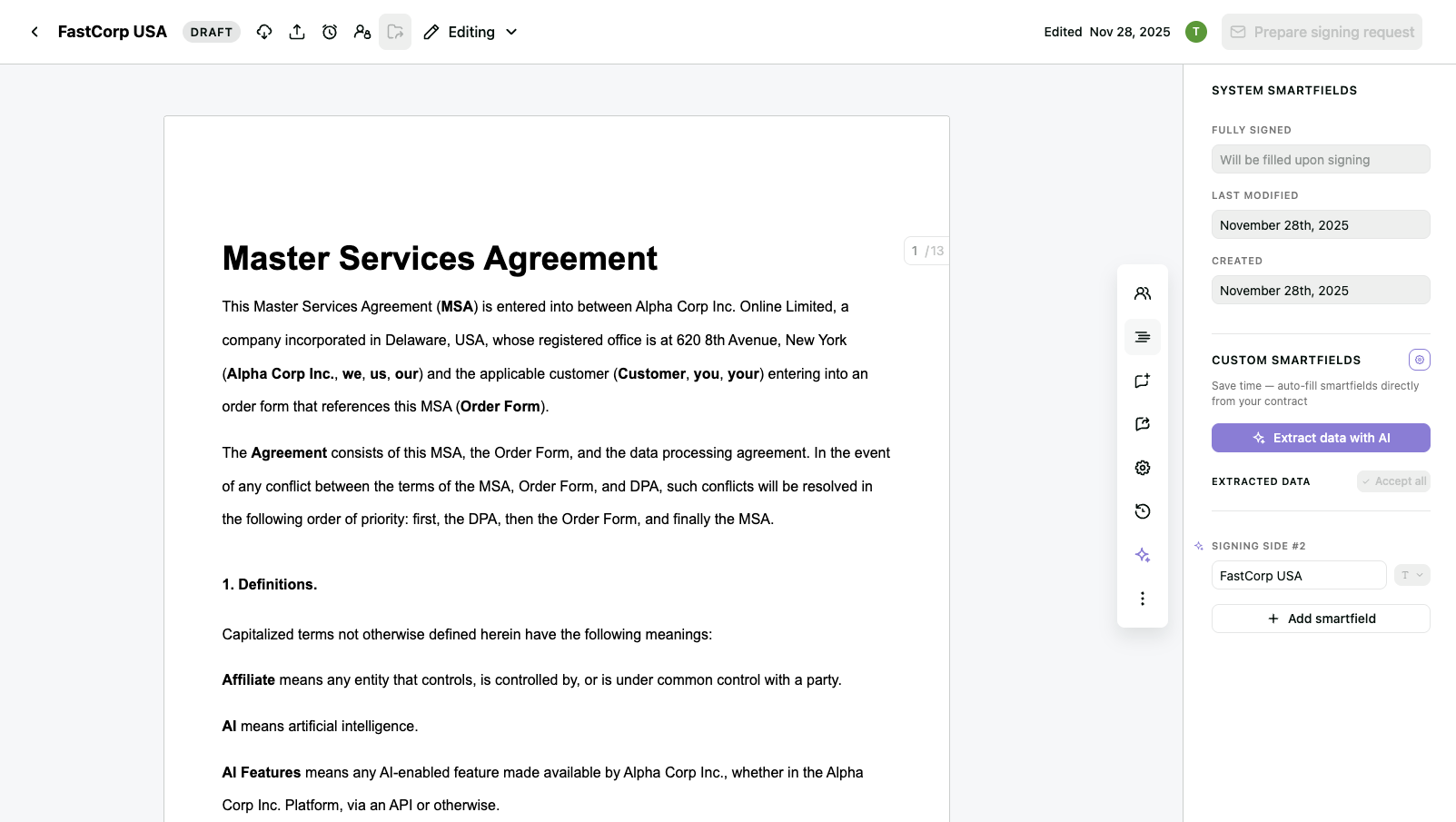
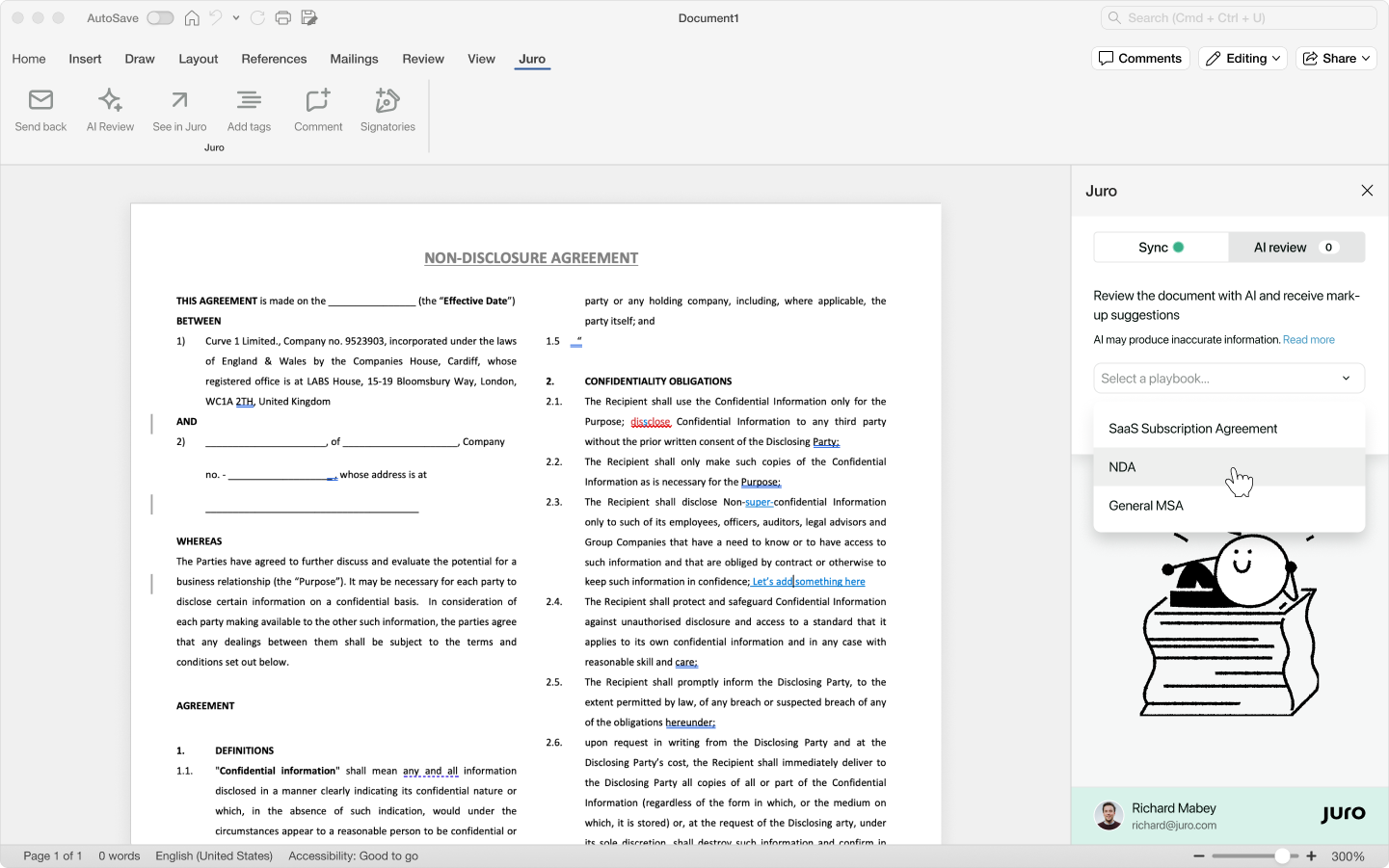
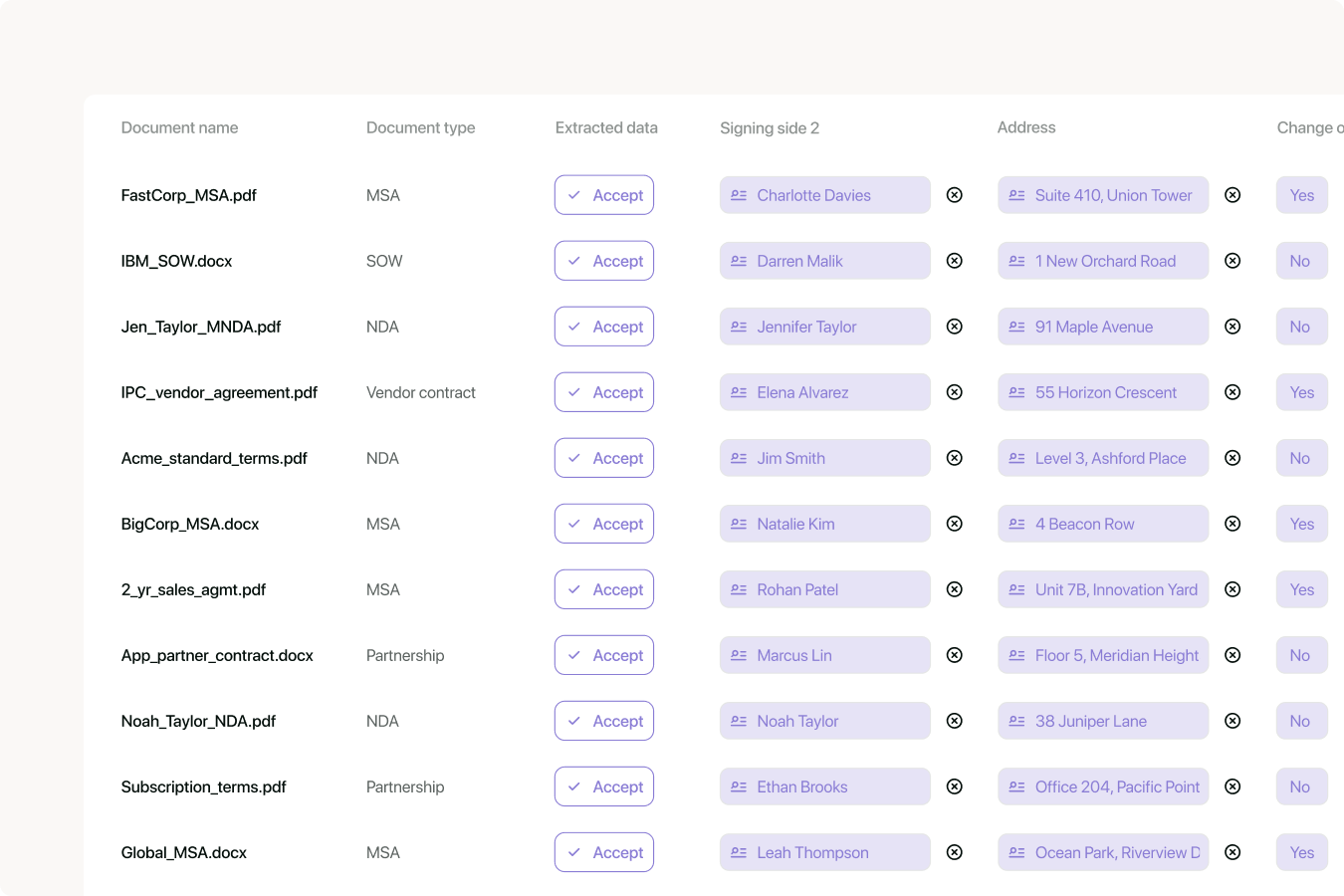
Screenshot of the Juro editor, custom-built for browser-based contracting.Screenshot of Juro AI reviewing and redlining contracts directly in WordScreenshot of bulk AI extraction and tagging of contract data in Juro