Epicor Eclipse is an end-to-end business system for wholesale distributors, as well as electrical, HVAC, plumbing and PVF businesses. Eclipse simplifies complex distribution processes found in today’s dynamic supply chains.
N/A
Vista
Score8.2 out of 10
N/A
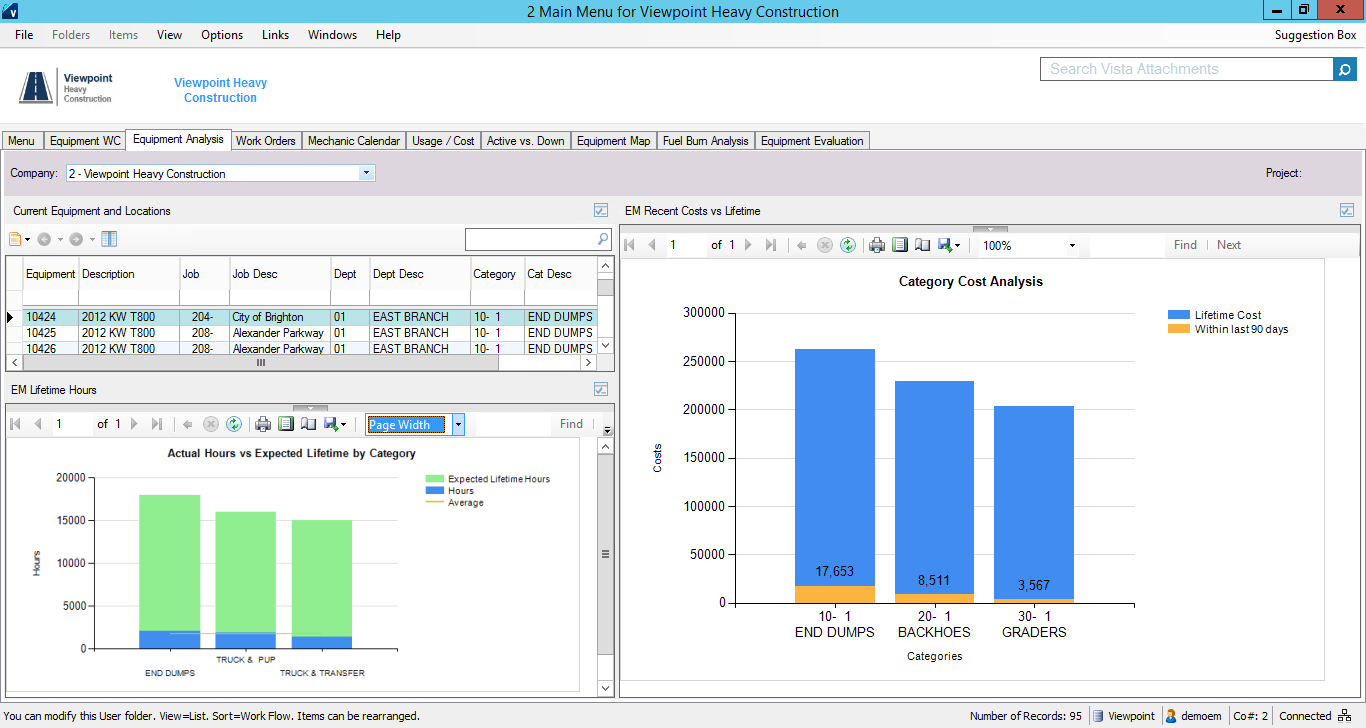
Viewpoint’s Vista is a construction accounting software. Vista’s core accounting features include accounts receivable and payable, general ledger, payroll and time management, and cash management. It also provides tools for document management, including document templates and reporting.
N/A
Pricing
Epicor Eclipse
Vista
Editions & Modules
No answers on this topic
No answers on this topic
Offerings
Pricing Offerings
Epicor Eclipse
Vista
Free Trial
No
No
Free/Freemium Version
No
No
Premium Consulting/Integration Services
No
No
Entry-level Setup Fee
No setup fee
No setup fee
Additional Details
—
Prospective buyers may contact Viewpoint directly for a price quote.
The capabilities, when combined with some of the integration offerings, make for a really nice platform. Coming from another company where we had several systems for processing inbound, outbound, e-commerce, sales, etc., it is nice to have everything contained in one system. makes communication within the company easier and teaching easier.
A de minimis incentive was given to thank the reviewer for their time. The incentive was not used to bias or drive a particular response, nor was the incentive contingent on a positive endorsement. TR verified that a representative sample of customers was invited. More Info
The company has made a commitment to the use of the Vista products and continue to move forward trying to implement more with the Vista HR Management. From timekeeping to onboarding in the near future we strive to look for better ways to utilize the products for our accounting and payroll purposes.
A de minimis incentive was given to thank the reviewer for their time. The incentive was not used to bias or drive a particular response, nor was the incentive contingent on a positive endorsement. TR verified that a representative sample of customers was invited. More Info
The order entry process is very smooth, allowing users to see availability and immediately source unavailable items from vendors or other branches with single keystrokes or clicks. You can choose what columns of information display in order entry to help order writers make decisions.
A set of built-in and unlimited user-defined "queues" allow users to be pro-active - always knowing what needs to be taken care of in real time. A "Trouble" queue, for example, shows a user their orders where the available date is further out than the requested date so they can take action.
The RF warehouse system directs one or more pickers through the entire process of picking a customer's order and eliminates mistakes through scanning barcodes for both the shelf location and the product. The Carton Packing add-on can be used to verify quantities and products during packing, and product labels that indicate the order shipping information along with the package contents and quantities.
A de minimis incentive was given to thank the reviewer for their time. The incentive was not used to bias or drive a particular response, nor was the incentive contingent on a positive endorsement. More Info
In my opinion, Epicor seems to want to sell add-on products constantly. They don't provide pricing at the beginning, but then rely on sticker shock and hidden costs (e.g. APIs)
There are times when we cannot figure out where numbers are coming from, especially costs. It would be nice if there was a way to see, in plain English, where a cost is coming from.
It seems unconscionable that we are unable to print financial statements to a pdf file.
In our experience, Support, which had been going well for a while, has become much less reliable and not very timely.
A de minimis incentive was given to thank the reviewer for their time. The incentive was not used to bias or drive a particular response, nor was the incentive contingent on a positive endorsement. More Info
Their payroll module is terribly slow and very clunky.
Job costing parameters are very strict and limited.
Each module interface has too many forms and screens.
There is too much flexibility regarding where to put information into the system. There isn't one place to do anything, which creates confusion for staff.
A de minimis incentive was given to thank the reviewer for their time. The incentive was not used to bias or drive a particular response, nor was the incentive contingent on a positive endorsement. More Info
For several reasons. First, they have used this system for 20 years and to change would be costly, not only for a new system but also to try and train everyone on said new system. Second, the system is ideal for our industry and very easy to learn for any new employees that come into the organization. Third, I'm fairly certain the powers that be wouldn't want to try and learn something new and deal with the usual bugs that go with implementing a new system (the special nuances that each company has that can get overlooked when they are in the process of implementing software).
A de minimis incentive was given to thank the reviewer for their time. The incentive was not used to bias or drive a particular response, nor was the incentive contingent on a positive endorsement. More Info
It is extremely customizable and tracks so many complicated costs very well, more-so than other construction software programs out there that we've used in the past. It is also not an easy program to use for those even slightly not comfortable with a computer. The help sections/knowledge base could be better organized and updated more. It is a very powerful software program for our business and we rely on it hugely to see how our projects are running in real-time.
A de minimis incentive was given to thank the reviewer for their time. The incentive was not used to bias or drive a particular response, nor was the incentive contingent on a positive endorsement. More Info
Epicor Eclipse has saved our organization from financial mismanagement, which could lead to operational inefficiencies. It has streamlined purchase orders and invoice processing, reducing instances of underpayment and overpayment. It has enhanced the segmentation of financial statements by store and by day, making it easier to track profitability.
A de minimis incentive was given to thank the reviewer for their time. The incentive was not used to bias or drive a particular response, nor was the incentive contingent on a positive endorsement. More Info
I think that Vista's is an easy program to use very user friendly with lots of help features to allow the user to fix an issue without having to put a support call into Vista. The reporting and exporting capability's are strong.
A de minimis incentive was given to thank the reviewer for their time. The incentive was not used to bias or drive a particular response, nor was the incentive contingent on a positive endorsement. TR verified that a representative sample of customers was invited. More Info
I haven't experienced any outages in the two years I have been using the system. It is always available as long as the computer is up. The only time I have seen it not be available was on occasions where we lost internet, or power and then we lost access to everything, not just Epicor Eclipse.
A de minimis incentive was given to thank the reviewer for their time. The incentive was not used to bias or drive a particular response, nor was the incentive contingent on a positive endorsement. More Info
Only issue is when there is an upgrade - it takes several times to get back logged in. Otherwise no issues with getting on to the program. We are set up on lap top or on the remote desk top. Works 90% of the time
Everything in this system moves fairly quickly, that may be in part because we are a small company with only 21 users on the system at a time, or it may just be a the way the Epicor Eclipse works for any size company with any number of users. I can only speak for what I know and say that it is fast for our purposes.
A de minimis incentive was given to thank the reviewer for their time. The incentive was not used to bias or drive a particular response, nor was the incentive contingent on a positive endorsement. More Info
No issue downloading the reports - I do find sometimes it is easier to export and save than it is to print to a pdf. Options on the different reports not consistent. You can print a couple projects on the JC Contract Status Report - but you have to do each project for the JC Cost by contract item - when neither one is a drill down - not a big deal
The tier 1 support is trying, and sometimes they are successful. Sometimes they aren't. This topic isn't as black and white as the questions might suggest. Currently their Tier 1 support team is over seas, all items automatically go to Tier 1 and then when they can't help they either escalate it or tell me they need to check with someone else and they will get back to me. If they escalate me to Tier 2, then the issue comes back to the States and the support is usually at a higher knowledge/experience level and it can get resolved fairly quickly. If they don't escalate, then it might take weeks and multiple follow ups on my part before I either get a satisfactory resolution or finally get escalated.
A de minimis incentive was given to thank the reviewer for their time. The incentive was not used to bias or drive a particular response, nor was the incentive contingent on a positive endorsement. More Info
When privately owned, it was very good, then dropped when owned by Bane Capital Investments. Now that it has been bought by Trimble and has a home, support is back up again. Response time is better than most software companies, and the information provided is good. They have Chat support for quick answers, and a good Knowledge Base and video libraries.
The training classes that I have attended have been top notch. The presenters are extremely knowledgeable on their subject matter, including real-world application of the system. They aren't just software techs training end users, they seem to be end users that have become experts in the over functionality and capabilities of the system.
A de minimis incentive was given to thank the reviewer for their time. The incentive was not used to bias or drive a particular response, nor was the incentive contingent on a positive endorsement. More Info
The on-line training is very good, and it is taught by the same people that do the live in-person training sessions. The difficult part of it is, asking questions about your specific company's nuances or special circumstances. I don't remember if you can access the on-line training sessions after you have taken them for reminders purposes, but if so that is a great asset.
A de minimis incentive was given to thank the reviewer for their time. The incentive was not used to bias or drive a particular response, nor was the incentive contingent on a positive endorsement. More Info
Excellent training! They keep you on track to insure your implementation is going as planned. There are ample ways to receive additional training and training can be provided by position type. If you put on the effort, the training is there.
I don't really know about the implementation, it was back in 1998 and I didn't start here until 2016. By the time I started here they had been running it for a number of years and most of the people that were here when it was implemented are no longer here, and the ones that are don't really have much to say about how the implementation went either bad or good.
A de minimis incentive was given to thank the reviewer for their time. The incentive was not used to bias or drive a particular response, nor was the incentive contingent on a positive endorsement. More Info
The trainer Viewpoint sent did not understand the processes, he only knew where the modules were located. He had no understanding of the actual process itself.
A de minimis incentive was given to thank the reviewer for their time. The incentive was not used to bias or drive a particular response, nor was the incentive contingent on a positive endorsement. More Info
Most of my experience has been with Epicor's Prophet 21. For most distribution verticals, Prophet 21 is the only way to go. The comparison I've drawn is this: Prophet 21 is like a ferrari. Epicor Eclipse is like a reliable donkey. Both get you from point A to point B but Prophet 21 is going to get you there much quicker and with the kind of insight into your business that will help you thrive.
A de minimis incentive was given to thank the reviewer for their time. The incentive was not used to bias or drive a particular response, nor was the incentive contingent on a positive endorsement. More Info
I personally have not used another ERP system other than Viewpoint Vista. I am sure there are others out there, but from listening to my managers experiences before Great Basin Industrial implemented Viewpoint, the other options were less superior to what Viewpoint offers. I think if you are looking for an ERP system in the construction industry, then Viewpoint is the way to go
A de minimis incentive was given to thank the reviewer for their time. The incentive was not used to bias or drive a particular response, nor was the incentive contingent on a positive endorsement. TR verified that a representative sample of customers was invited. More Info
A de minimis incentive was given to thank the reviewer for their time. The incentive was not used to bias or drive a particular response, nor was the incentive contingent on a positive endorsement. More Info
I don't really know about the scalability. It's the same as it was when I started, I do know that you can buy more user licenses, but I think they come in packs of 5, which can be a problem if you only need 1 and will never use the other 4. But, again I'm not sure on that.
A de minimis incentive was given to thank the reviewer for their time. The incentive was not used to bias or drive a particular response, nor was the incentive contingent on a positive endorsement. More Info
For a small business - this program is well used in the accounting and operations. The two different work plans are set up for success. Alot of the programs we do not use - but like the reports that are generated - one disadvantage if you do not know crystal reports you cannot edit your form to meet your needs so there is a lot of printing different several forms to get all the information you need.
A de minimis incentive was given to thank the reviewer for their time. The incentive was not used to bias or drive a particular response, nor was the incentive contingent on a positive endorsement. More Info
Reporting features allow tracking items trending downward which can glut inventory space and dollars if not adjusted
GMROI reports help analyze turn ratios and adjusted dollar values and margins of product lines.
Suggested Purchase Order features allowed controlled inventory purchases which avoid lost sales while managing overall dollars invested in an acquired product with the lowest freight costs possible.
A de minimis incentive was given to thank the reviewer for their time. The incentive was not used to bias or drive a particular response, nor was the incentive contingent on a positive endorsement. More Info
Not sure I can speak to this as the company moved to Viewpoint before I began here. I think it is helpful for the Project Management and Superintendent staff to easily review how specific job items went, which we do in the PM contract drilldown analysis
A de minimis incentive was given to thank the reviewer for their time. The incentive was not used to bias or drive a particular response, nor was the incentive contingent on a positive endorsement. More Info