TrustRadius: an HG Insights company

Save this comparison

Save this comparison

Add Product

Recommended Comparisons

    Overview
    ProductRatingMost Used ByProduct SummaryStarting Price

    Exclaimer

    Score8.8 out of 10
    N/AExclaimer is a provider of email signature solutions, operating with the goal of empowering businesses to u

    $0.90

    per month (billed annually) per user

    MailUp

    Score10 out of 10
    N/AMailUp is the eponymous email & SMS platform from the Italian company that was founded in 2002 that now has a modest but respectable presence across the western world with a diverse customer base (Yamaha, Amnesty International, Korean Air, etc.). Mailup's platform combines email marketing, with transactional email and SMS features, and offers SMTP relay and plugins for ecommerce, CRM and CMS systems. Their unusual pricing scheme is tiered just on subscribers but on volume of sends and that…N/A
    Pricing
    ExclaimerMailUp
    Editions & Modules
    Starter
    $0.90
    per month (billed annually) per user
    Standard
    $1.45
    per month (billed annually) per user
    Pro
    $1.75
    per month (billed annually) per user
    No answers on this topic
    Offerings
    Pricing Offerings
    ExclaimerMailUp
    Free Trial
    YesYes
    Free/Freemium Version
    NoNo
    Premium Consulting/Integration Services
    YesYes
    Entry-level Setup FeeNo setup feeOptional
    Additional DetailsLicensing is based on the number of active mailboxes Exclaimer adds email signatures to. Subscriptions are on a monthly or annual basis. Volume and charitable discounts are available. Minimum number of users is 10 per month.—
    More Pricing Information
    Community Pulse
    ExclaimerMailUp
    Considered Both Products
    Exclaimer
    No answer on this topic
    MailUp
    No answer on this topic
    Key User Insights
    Would buy again
    97%
    Would buy again
    275 Answers
    No answers on this topic
    Delivers good value for the price
    99%
    Delivers good value for the price
    262 Answers
    No answers on this topic
    Happy with the feature set
    97%
    Happy with the feature set
    275 Answers
    No answers on this topic
    Lived up to sales and marketing promises
    97%
    Lived up to sales and marketing promises
    231 Answers
    No answers on this topic
    Implementation went as expected
    93%
    Implementation went as expected
    243 Answers
    No answers on this topic
    Features
    ExclaimerMailUp
    Email & Online Marketing
    Comparison of Email & Online Marketing features of Exclaimer and MailUp
    Feature
    Exclaimer
    -
    Ratings
    MailUp
    9.5
    1 Ratings
    17% above category average
    WYSIWYG email editor00 Ratings10.01 Ratings
    Dynamic content00 Ratings10.01 Ratings
    Ability to test dynamic content00 Ratings8.01 Ratings
    Mobile optimization00 Ratings10.01 Ratings
    Best Alternatives
    ExclaimerMailUp
    Small Businesses
    No answers on this topic
    Mad Mimi
    Score10 out of 10
    Medium-sized Companies
    No answers on this topic
    Campaign Monitor by Marigold
    Score9 out of 10
    Enterprises
    No answers on this topic
    Emma by Marigold
    Score8.5 out of 10
    All AlternativesView all alternativesView all alternatives
    User Ratings
    ExclaimerMailUp
    Likelihood to Recommend
    8.9
    (288 ratings)
    10.0
    (1 ratings)
    Likelihood to Renew
    9.0
    (17 ratings)
    -
    (0 ratings)
    Usability
    10.0
    (67 ratings)
    -
    (0 ratings)
    Availability
    9.1
    (2 ratings)
    -
    (0 ratings)
    Performance
    7.3
    (2 ratings)
    -
    (0 ratings)
    Support Rating
    10.0
    (19 ratings)
    -
    (0 ratings)
    Implementation Rating
    7.8
    (7 ratings)
    -
    (0 ratings)
    Configurability
    8.2
    (2 ratings)
    -
    (0 ratings)
    Contract Terms and Pricing Model
    9.1
    (2 ratings)
    -
    (0 ratings)
    Ease of integration
    9.1
    (1 ratings)
    -
    (0 ratings)
    Product Scalability
    9.1
    (2 ratings)
    -
    (0 ratings)
    Professional Services
    1.0
    (1 ratings)
    -
    (0 ratings)
    Vendor post-sale
    7.3
    (1 ratings)
    -
    (0 ratings)
    Vendor pre-sale
    1.0
    (2 ratings)
    -
    (0 ratings)
    User Testimonials
    ExclaimerMailUp
    Likelihood to Recommend
    Exclaimer
    Exclaimer is highly beneficial for larger companies that have a range of business units and requirements around the look and feel of signatures. Smaller organisations are unlikely to need the same degree of customisation, so the requirement is diminished. Particularly as there is something of a cost premium and another platform to manage.
    Incentivized
    Read full review
    MailUp
    Great for marketing teams looking to quickly deploy emails without the need for HTML coding.
    Incentivized
    Read full review
    Pros
    Exclaimer
    • Allows for easily customizing the templates for the signatures.
    • Allows uploading custom logos or banners to be applied in the different signatures
    • Allows assigning specific signatures to groups of users
    • Connects easily with all Google Suite email accounts within the organization
    Incentivized
    Read full review
    MailUp
    • Email marketing creation
    • Email design
    • HTML template creation
    Incentivized
    Read full review
    Cons
    Exclaimer
    • A complete tutorial could be added to avoid common pitfalls (such as when to use 0 and when to use auto).
    • The email add-in seems quite clunky when getting going.
    • There is no way to self-serve user-specific changes (such as toggling on/off certain extras, such as direct dials, extensions, and job titles).
    Incentivized
    Read full review
    MailUp
    • Alt tag styling within the editor
    Incentivized
    Read full review
    Likelihood to Renew
    Exclaimer
    We are very happy with exclaimer it runs 99.9% of the time without any issues. It also very easy to use and maintain and the design team are happy to use it as its so user friendly. When compared to how much time we used to spend updating banners exclaimer saves us hours. This more than justifies the cost and when it comes to renew we wont be thinking twice about doing so
    Incentivized
    Read full review
    MailUp
    No answers on this topic
    Usability
    Exclaimer
    In the order that I recall the setup process: Signature templates need to be set up (attribute mapping to AD) Office 365 connector needs to be set up (global admin needed and exclaimer engineer for guidance) Signature policies need to be set up (who gets which signatures) Office membership groups need to be setup (who in the org will use exclaimer) Members need to be added to those groups (user membership) Agents need to be deployed on the end-user hosts (local agent)
    Incentivized
    Read full review
    MailUp
    No answers on this topic
    Reliability and Availability
    Exclaimer
    Never had any issues with availability during our outages.
    Incentivized
    Read full review
    MailUp
    No answers on this topic
    Performance
    Exclaimer
    I have to admit that there has been an odd occasion when the pages have taken a while to load. This is the exception rather than the rule.
    Incentivized
    Read full review
    MailUp
    No answers on this topic
    Support Rating
    Exclaimer
    I've only had one issue in 7 years where I needed to reach out to Exclaimer for support, but it was handled quickly and resolved my issue. No messing around to provide additional information. Just a quick solution to what I was facing which resolved the issue on the first go around.
    Incentivized
    Read full review
    MailUp
    No answers on this topic
    Implementation Rating
    Exclaimer
    Our implementation was relatively easy as we weren't cutting over from anything. We just got the software installed, set up the file share and got active directory set up. We got exsync on a scheduled task and it just worked. We built our templates and policies and it has always been relatively smooth.
    Incentivized
    Read full review
    MailUp
    No answers on this topic
    Alternatives Considered
    Exclaimer
    Exclaimer blows the doors off compared to Letsignit. Exclaimer is a little more expensive, but you get what you pay for. What you get is a much better user interface, real analytics instead of one crappy report you have to manually sort, and a much more robust campaign area. With Letsignit I was constantly getting messages that they were experiencing one problem or another, leading to service outages that impacted our users. Gotta love it when the CEO calls because he can't find his email signature. I've had no service interruptions with Exclaim and no email "excuses." That's the sort of thing that makes you lose confidence in a supplier quickly. Oh, and no communication/bills in French. I lived near the Canadian border, I get it, but you have customer databases, communicate appropriately.
    Incentivized
    Read full review
    MailUp
    Mailup has hands down the best editor for creating responsive emails, I've tried almost everything out there and this is the best, I recommend this to colleagues all the time!
    Incentivized
    Read full review
    Contract Terms and Pricing Model
    Exclaimer
    Everything runs smoothly between us
    Incentivized
    Read full review
    MailUp
    No answers on this topic
    Scalability
    Exclaimer
    you can easily design more than one signature and spit it among the organisation
    Incentivized
    Read full review
    MailUp
    No answers on this topic
    Professional Services
    Exclaimer
    We used the Design Template service; this was a very pleasant experience and the design team we in constant communication with us to ensure the templates were designed exactly to our remit.
    Incentivized
    Read full review
    MailUp
    No answers on this topic
    Return on Investment
    Exclaimer
    • Uniform feel for all emails sent by the organisation.
    • Meets regulatory Compliance.
    • Ability to send out the right phone numbers for the right departments.
    • It is easy to onboard new staff with the correct details from day 1 (no setup is needed from the new starter).
    Incentivized
    Read full review
    MailUp
    • Faster email development
    • More team members able to contribute to the email development process
    • Better templates
    Incentivized
    Read full review
    ScreenShots

    Exclaimer Screenshots

    Screenshot of how Exclaimer helps amplify every email with optimized email signatures for the whole organization.Screenshot of the Social Feeds feature. This can display the three latest social posts in an email signature, to strengthen connections and communities.Screenshot of where Exclaimer gives users the ability to automate and schedule signature updates. This helps to guarantee consistent, branded signatures on every email – even from mobile devices and Macs.Screenshot of the Exclaimer Cloud Outlook Add-in, which allows users to choose their email signature as they compose a message.Screenshot of where users can assign signatures to teams, departments, or entire organizations. This interface lets users tailor messages for specific recipients, fostering engagement through personalized approaches.

    MailUp Screenshots

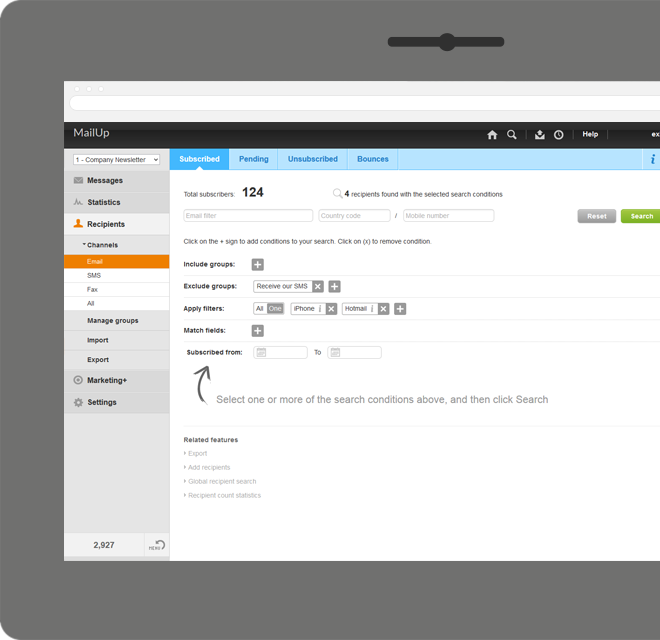
    Screenshot of Manage lists. With MailUp, you can manage mailing lists, groups and sending profiles, automatically eliminating duplicate addresses and handling users who cancel their subscription. The procedure is guided, quick and safe. The utmost simplicity, with no need to install additional software. Not bad, right?Screenshot of he winning variable, with mathematical certainty
With A/B testing, discover, prior to mailing, what your recipients prefer to read, by automatically testing several versions of the same text, measuring its effectiveness on a select group. Opening results improve by up to 30% and, for each version, you have more statistical information. Mailing after mailing, you can only do better!Screenshot of Creating emails for mobile devices is easy
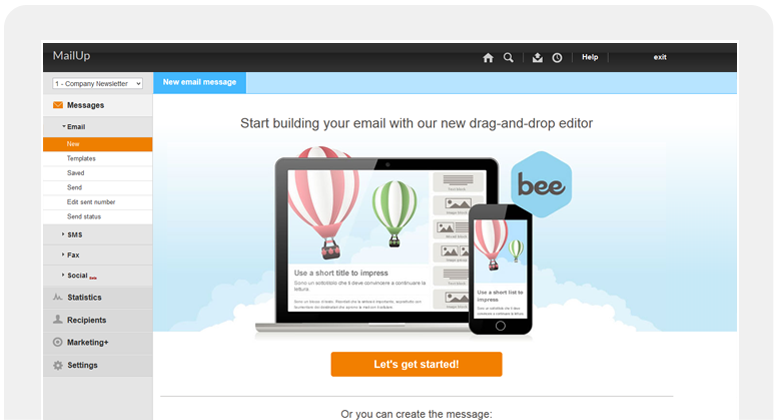
Free your creativity and create emails and newsletters that have great visual impact, optimised for mobile devices. While you concentrate on the content of your campaign, MailUp takes care of the rest with the aid of an intelligent editor and plenty of cutting-edge functions. Not bad, right?Screenshot of Countless ways to create your messages.

There's not only BEE with which create messages. You can start with HTML documents, RSS/Atom, URL or choose from hundreds of graphic models. Starting with an empty email? The convenient WYSIWYG editor helps you put your messages together with just a few clicks. It's all up to you!Screenshot of .and you can do the same with unsubscribe lists.

Automatic management of unsubscribe lists allows you to activate the UNSUBSCRIBE button directly in the email client interface. The unsubscribers list also shows a list of users who performed this action, which may be edited and exported. This function also allows you to make up random groups of users, specifying the number of subscribers. This makes it easier to manage random sampling and A/B testing.Product screenshot