Chose Google Drive
For cross platform use and storage offerings Google Drive comes out on top!

| Product | Rating | Most Used By | Product Summary | Starting Price |
|---|---|---|---|---|
 FileInvite | N/A | FileInvite automates the process of collecting information and documents from your clients. The vendor says the process is simple, and the interface is secure. All you have to do is create and send a FileInvite with the information you require. The client then uploads the files to a secure portal where you can approve or decline the information that has been submitted. FileInvite also allows you to set up reminders, templates and sync with your cloud storage like Google… | N/A | |
 Google Drive | N/A | Google Drive is a cloud file storage, synchronization, and collaboration platform and service, that features Google Docs, Sheets, and Slides for document editing and presentation. | $6 per month | |
 MEGA | N/A | Launched in 2013, MEGA is a zero-knowledge cloud storage provider that delivers user-controlled end-to-end encryption, with an emphasis on easy accessibility. | N/A |
| FileInvite | Google Drive | MEGA | ||||||||||||||||||||||
|---|---|---|---|---|---|---|---|---|---|---|---|---|---|---|---|---|---|---|---|---|---|---|---|---|
| Editions & Modules | No answers on this topic |
| No answers on this topic | |||||||||||||||||||||
| Offerings |
| |||||||||||||||||||||||
| Entry-level Setup Fee | No setup fee | No setup fee | No setup fee | |||||||||||||||||||||
| Additional Details | — | Discounts are available for students, educators, and non profit organizations. | — | |||||||||||||||||||||
| More Pricing Information | ||||||||||||||||||||||||
| FileInvite | Google Drive | MEGA | |
|---|---|---|---|
| Considered Multiple Products | FileInvite No answer on this topic | Google Drive |  MEGA  🐿 Matthew Karsten Purple Squirrel Media Chose MEGA Mega is a must go to first when expanding cloud storage capabilities and security. Mega can store any file types beyond that of Google Drive and iCloud. Mega is competitively priced to be a suitable option to replace or augment other cloud storage options depending on your …  antonio lopez Marketing Chose MEGA From my experience both are very good, but they are also very different. MediaFire has managed to survive regardless of all the problems that it's had, but at some point it fell short, not in speed because it is really fast, but in the space that provides. That's where MEGA … |
| FileInvite | Google Drive | MEGA | |||||||||||||||||||||||||||||||
|---|---|---|---|---|---|---|---|---|---|---|---|---|---|---|---|---|---|---|---|---|---|---|---|---|---|---|---|---|---|---|---|---|---|
| File Sharing & Management |
| ||||||||||||||||||||||||||||||||
| Cloud Storage Security & Administration |
| ||||||||||||||||||||||||||||||||
| Cloud Storage Platform |
|
| FileInvite | Google Drive | MEGA | |
|---|---|---|---|
| Small Businesses |  Square 9 Softworks Score 9.7 out of 10 |  SugarSync Score 4.1 out of 10 | SugarSync Score 4.1 out of 10 |
| Medium-sized Companies |  MSB Docs Score 9.4 out of 10 |  Druva Security Cloud Score 9.4 out of 10 | Druva Security Cloud Score 9.4 out of 10 |
| Enterprises |  Tungsten Capture Score 8.0 out of 10 | Druva Security Cloud Score 9.4 out of 10 | Druva Security Cloud Score 9.4 out of 10 |
| All Alternatives | View all alternatives | View all alternatives | View all alternatives |
| FileInvite | Google Drive | MEGA | |
|---|---|---|---|
| Likelihood to Recommend | 1.0 (6 ratings) | 8.4 (222 ratings) | 9.0 (4 ratings) |
| Likelihood to Renew | - (0 ratings) | 10.0 (6 ratings) | - (0 ratings) |
| Usability | 7.0 (2 ratings) | 8.5 (52 ratings) | 10.0 (1 ratings) |
| Availability | - (0 ratings) | 10.0 (1 ratings) | - (0 ratings) |
| Performance | 10.0 (1 ratings) | 9.0 (7 ratings) | - (0 ratings) |
| Support Rating | - (0 ratings) | 1.2 (49 ratings) | 10.0 (1 ratings) |
| In-Person Training | - (0 ratings) | 9.0 (1 ratings) | - (0 ratings) |
| Implementation Rating | - (0 ratings) | 8.0 (3 ratings) | - (0 ratings) |
| Configurability | - (0 ratings) | 6.0 (1 ratings) | - (0 ratings) |
| Ease of integration | 10.0 (1 ratings) | 5.0 (1 ratings) | - (0 ratings) |
| Product Scalability | - (0 ratings) | 10.0 (1 ratings) | - (0 ratings) |
| FileInvite | Google Drive | MEGA | |
|---|---|---|---|
| Likelihood to Recommend | FileInvite
| Google
 Abhinav Bajpai Graphics Artist | MEGA - The Privacy Company
 Jonah Dempcy Web & Mobile Developer |
| Pros | FileInvite
| Google
 Humayun Farooqi Customer Success Manager | MEGA - The Privacy Company
🐿 Matthew Karsten Purple Squirrel Media |
| Cons | FileInvite
 Abraham Smythe Head of Acquisition | Google
| MEGA - The Privacy Company
antonio lopez Marketing |
| Likelihood to Renew | FileInvite No answers on this topic | Google
| MEGA - The Privacy Company No answers on this topic |
| Usability | FileInvite
| Google
 Mandy Cramer Accounting Department | MEGA - The Privacy Company
Jonah Dempcy Web & Mobile Developer |
| Reliability and Availability | FileInvite No answers on this topic | Google
| MEGA - The Privacy Company No answers on this topic |
| Performance | FileInvite
| Google
| MEGA - The Privacy Company No answers on this topic |
| Support Rating | FileInvite No answers on this topic | Google
| MEGA - The Privacy Company
Jonah Dempcy Web & Mobile Developer |
| In-Person Training | FileInvite No answers on this topic | Google
| MEGA - The Privacy Company No answers on this topic |
| Implementation Rating | FileInvite No answers on this topic | Google
 Elizabeth Sullivan-Hasson Research Assistant | MEGA - The Privacy Company No answers on this topic |
| Alternatives Considered | FileInvite
| Google
| MEGA - The Privacy Company
|
| Scalability | FileInvite No answers on this topic | Google
| MEGA - The Privacy Company No answers on this topic |
| Return on Investment | FileInvite
| Google
 Juan Miguel Rojas Cofundador - CEO | MEGA - The Privacy Company
🐿 Matthew Karsten Purple Squirrel Media |
| ScreenShots | FileInvite Screenshots 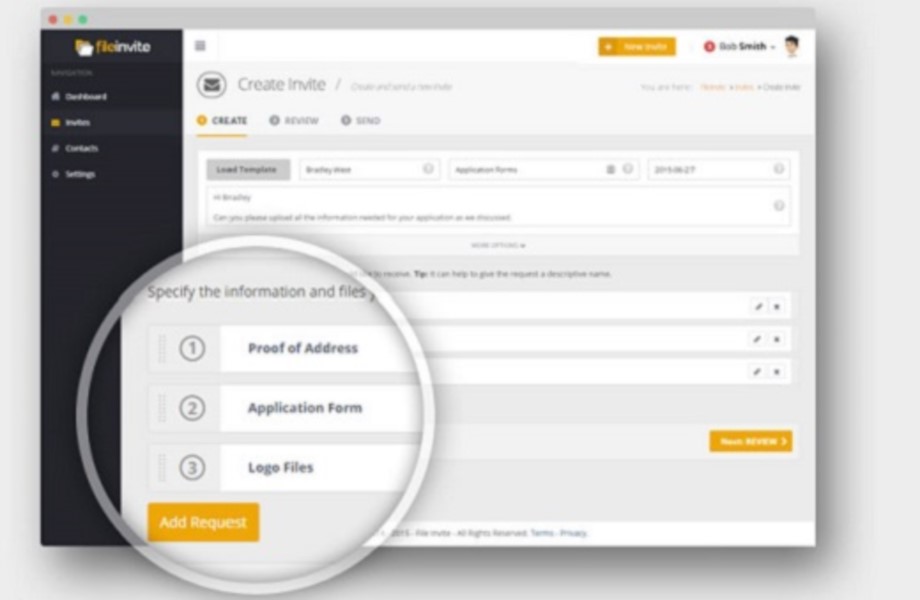  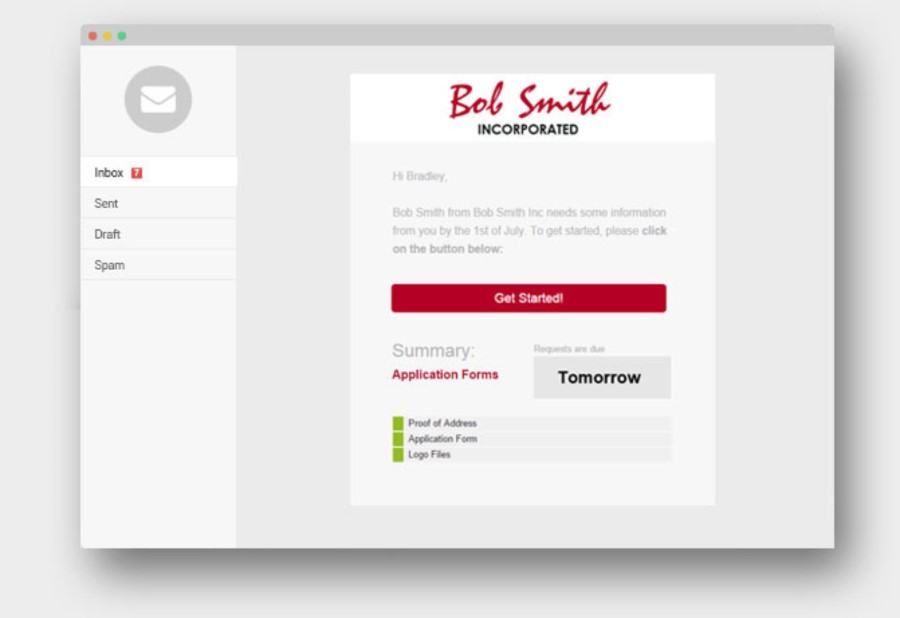   | Google Drive Screenshots   |