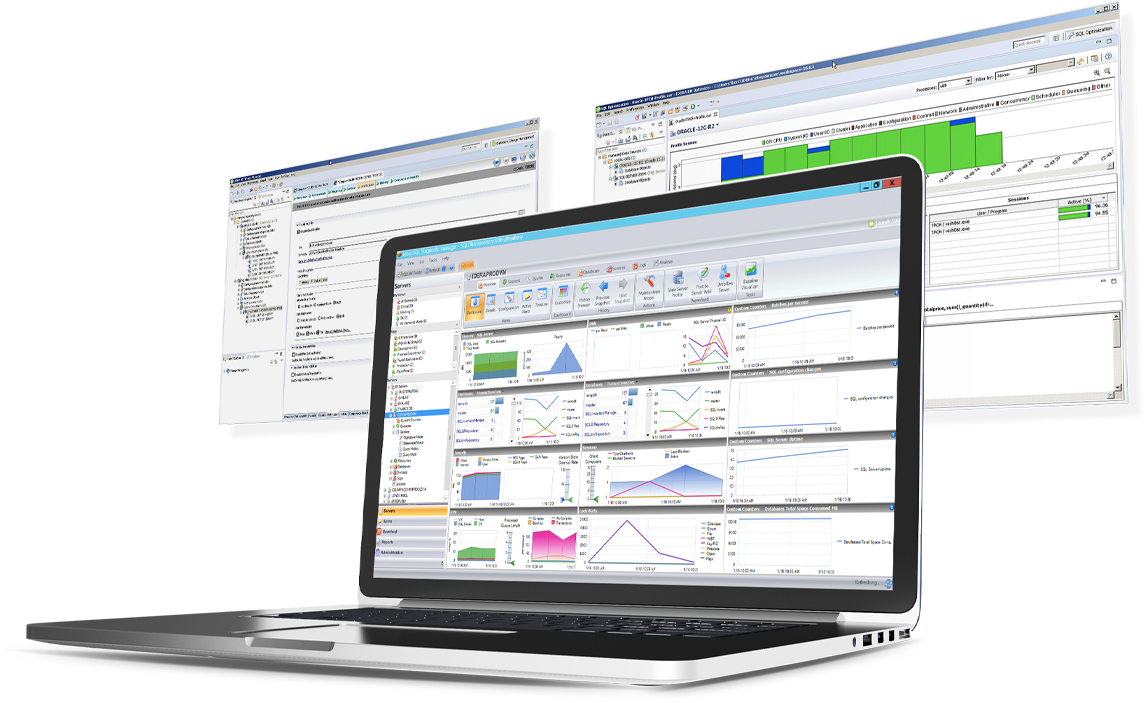
SQL Diagnostic Manager for Microsoft SQL Server helps database administrators to find and fix Microsoft SQL Server performance problems in physical, virtual, and cloud environments. Unlike its competition, it provides effective scalability, advanced SQL query analysis and optimization, prescriptive analysis with corrective SQL scripts, powerful automated alert responses, broad PowerShell integration, complete customization, and extensive support for current and legacy Microsoft SQL Server and…
$1,996
per instance with first year maintenance included
SolarWinds SQL Sentry
Score 10.0 out of 10
N/A
SolarWinds SQL Sentry is designed to help data professionals optimize SQL Server database performance
in physical, virtual, and cloud environments. SQL Sentry delivers metrics to help users find and fix database performance problems
and provides scalability, boasting demonstrated success monitoring 800+ SQL
Server instances with one monitoring database. With
SQL Sentry, the user can monitor:
SQL Server
Azure SQL
Database
SQL Server
Analysis…
$0
Free
Toad Database Developer Tools
Score 8.8 out of 10
N/A
Toad by Quest is a database management toolset that database developers, administrators and data analysts use to simplify workflows, create code free from defects, automate frequent or repetitive processes, and minimize risks. Editions include Toad for Oracle, which automates administration tasks and helps proactively manage databases while embracing performance optimization and risk mitigation. Similar editions exist for IBM DB2, SQL Server, SAP, or MySQL and Postgres environments (Toad Edge).
All the toolsets we looked at have the same basic feature sets. We felt like IDERA SQL Diagnostic Manager for SQL Server had more features (SQL Doctor features) and better historical features. More toolsets now have a lot of these features, but for eight years, IDERA SQL …
We chose SolarWinds SQL Sentry because it met more of our requirements than any other single tool. Proactive monitoring, quick collection times (every few seconds vs minutes), flexible custom alerting as well as in-depth data for performance analysis (Top SQL is by far my …
SQL Sentry was just a more slick application to use versus Idera. Visually it was easier to navigate and manage, and the ability to move licenses about to Instances was a benefit.
It has been a while now since using the Idera product, but SQL Sentry seems to provide greater configuration and alerting options. SQL Sentry offers 12 different options, all of which are configurable individually for each alert. It can be done at the global level as well as by …
I like SQL Sentry the best. Foglight was a long time ago and way more comprehensive tool than I needed at the time. Diagnostic Manager has some good features but I had some capacity and performance issues at times with it. SQL Sentry has been consistent and effective at …
Manager Application Development and Database Services
Chose SolarWinds SQL Sentry
Other tools in the SQL Sentry Suite helped determine the purchasing decision. In particular the SQL Sentry Event manager product allowed us to easily connect and visualize the overnight process. Previously the overnight process was schedule driven and prone to fail as a result …
Both tools cover what you'd expect from an enterprise-grade SQL monitoring tool. Performance monitoring, alerting and diagnostics on both the tools are excellent and I cannot fault either on technical capabilities and feature offerings.
The sheer amount of information, ability to tune almost all areas of alerting and thresholds, and the low impact of monitoring as well as transparency into how their monitoring processes may impact performance gives them the advantage over these others. In some cases their …
I have tried SQL optimizer and Idera's diagnostic manager. Of the three, SQL Sentry is my favorite. I like the dashboard, the tab layout, the interface.
Sentry is more centralized and wide open. It has abilities to "dive" into deepest SQL aspects providing details that other products are just unable to do. It is not just a quick monitoring, alerting tool. It has the unique ability to "teach" or "remind" you (throughout policies …
The former company I worked for had such an extremely large and high volume transaction volume. Idera's SQL Diagnostic Manager just could not keep up with the pace of the transactions. The main SQL server cluster was running between 25,000 to 50,000 transactions per second (24 …
PA has the lightest monitoring footprint of any of the other third-party applications out there. The featureset of PA includes things such as virtualization monitoring, top SQL statements, and granular historical trending that other products miss or gloss over. The sheer amount …
For us, there were 3 big items that swung SQL Sentry. 1) customization of alerts and notification 2) polers in other domains allow for a more secure deployment. In addition, the polers allow for redundancy, ensuring we are spending time fighting fires, not fixing the fire …
SQL Server [Business Intelligence] Manager is useful for tracking performance across SSIS, SSRS and SSA and have the data represented in dashboards. It helps improve performance and helps end users. However, several features are redundant for smaller organization that can use the tools that comes with existing Microsoft products. These features also takes time to learn and use.
This solution is perfect for a team with a large server count and, at least, moderate experience supporting a SQL Server environment. If the environment is smaller or the team has less experience working with SQL Server performance tuning methodologies, then the tool may be overwhelming for the users.
Toad for Oracle is very well suited for all Oracle implementations, be it single instance or RAC. It is best suited for use of Oracle DBA, Developer and Database Engineers. I don't recommend Toad for Oracle for Project Managers or Solution Architects. This can be a pricier choice for these people. They can do fine with free options like SQL Developer.
SQLdm does a good job of providing information at a high level, but also allows me to drill down to specific queries and events if needed. I don't always need to sift through tons of details to get the information I need. It also gives a very wide range of information from SQL specific metrics, to OS metrics, to VM metrics, all the way up to host server metrics.
I like how the alert and notification system can be customized. For example, if you know a certain server regularly has long-running queries, you can adjust the alert to not fire unless a query has been running for 30 minutes while the rest of the servers fire after 30 seconds. That is very helpful in not being bombarded at dinner with alerts from a server similar to, "I've been at 90% cpu for 26 milliseconds!!!!!!!...and now it's back down to 30%" Good information to know, but not something you need to literally lose sleep over.
I like how you can configure different servers to be monitored differently. For example, you can have a group of servers called DEVELOPMENT that you can turn on heavier monitoring on so you can test how changes in applications might affect the SQL environment, but in the PRODUCTION group, you may only want to enable the heavier analysis and logging when performance issues are actively being reported.
The Top SQL functionality has been extremely useful for identifying poorly performing queries by resource consumption.
The flexibility of creating your own Advisory Conditions has allowed us to integrate our custom internal alerts into a centralized dashboard and alerting platform.
Being able to highlight any chart on the dashboard and then tool-matching that window across all the other charts makes it much easier to correlate the different performance metrics against each other.
Toad is a de-facto standard tool for data developers and analysts. Generally speaking it provides almost every function needed to manage data in EDW with great performance and stability.
The nature of clinical data is big-sized: one table may have billions of rows. Toad provides critical functions to manage SQLs, e.g. Top SQL that can monitor and manage SQLs using CPU power and network bandwidth, so that EDW administrator can optimize ETL operations in the best efficiency.
Many of our data analysts are not computer science backgrounded (having clinical / nursing background). Toad provides great auditing tools such as Tuning Lab or SQL Scanner, so that data analysts can train themselves with guidance of the tool.
Windows client has some issues. When you have small time intervals for your data collection, it can cause the client to become unresponsive and require you to restart it.
It takes more time to get the web client running than it does to get the windows client running.
The visualizations have been the same for the last eight years--could use a little bit of a refresh.
Tuning advice: With all the graphs and data available, it's not always easy to determine the best thing to do. I'd like to see SentryOne provide some best practice analysis based on the historical information collected for the server being looked at.
They could add help tips or links to help documents, when you select a graph on the dashboard. Inexperienced users tend to put blinders on and focus on one thing when they see a high counter or something out of the ordinary. It would be very useful to include a link that provides underlying help. The link would provide an explanation of the counter in detail and offer possible explanations as to why the counter is off.
The power and control it gives is at the same time kind of a negative thing. There's too many options available, even when you don't need them. For simple database operations it's sometimes easier to just use SQL Developer since navigation is way more intuitive and easy.
Related with the above: there is a steep learning curve. However, since this is the main tool for any Oracle developer, this is not that much of a problem.
If I remember well, Toad used to be free, some 20 years ago. Or at least had a free version. It would be nice to have a free version. The dedicated Oracle developers and DBA's won't use the free version, but all the rest of us developers might use it instead of SQL Developer. It would make communications between everybody somewhat easier.
Absolutely. SQL Sentry is an absolute must have for any company with a SQL Server estate. It provides a force multiplier to effectively manage SQL Server, and the feature sets are second to none. The support and expertise at SentryOne is incredible. They are very supportive of both the platform users and helping your business with the product
I accept that the flexibility of the alerting comes at a price. Other than the alerting SQL Sentry's interface is intuitive. Connecting to a new SQL instance, given that all the needed ports are open in your firewalls is straight forward. Reviewing the performance and queries for an instance is available in with a right click. As you dig in new tabs are created to present the detailed data. I find the ability to filter and rollup metrics on a query very helpful in dealing with the "it's running slow". You can easily compare the metrics of run times for the same query to let the user know, it's probably data your doing a billion reads instead of the usual 100 thousand.
I give is an 8 because nothing is a 10 and there is always room for improvement. I believe the user who is not as technologically inclined would be better suited with an easier way to identify the options for setting the layout up for Toad's GUI. To some it is very cumbersome and confusing.
The system is working perfectly in capturing data, but we do experience issues with SQL Timeout when viewing results in the remote clients. This may be due to the fact that our monitoring service is consuming most of the CPU, and it is the same server that is hosting the SQL Repository. We could probably fix the issue by separating the SQL instance from the monitoring service.
In most cases the pages load very quickly. In our particular case, we need to do some movement of services to separate our monitoring service to separate infrastructure from the repository. When we first started with SQL Sentry on 5 licenses, we did not have any issues. Since we have now grown that to 25, we are experiencing some challenges. We do not believe this to be a tool problem
From their infancy as a smaller company to now as a global player they have always kept focus on prioritising he customer. They know their product and the technology it supports and are easily accessible for both resolving problems with the product all the way to adding value through additional training and assisting with getting return on investment through utilisation of the many features the product provides.
I give the overall support for Toad for Oracle a 10/10. This is because whenever there has been an issue with this software, our team has got an immediate response. The same can not be said for similar software. The most recent example of this is when we needed to renew our licenses. Some employees were unable to log in to code with the given license key. Support was able to resolve the issue quickly.
Was suggested that we install the process monitors on a dev or qa database server, but we found it more useful to create an IT db server and put it there (along with a few other apps that we use for monitoring).
IDERA SQL Diagnostic Manager for SQL, Redgate SQL, and MonitorLogicMonitor are similar products to each other. We decided on IDERA SQL Diagnostic Manager for SQL because our experience with locating heavy queries has been very good and it provides real-time monitoring of all servers and databases. It also allows you to have a large volume of historical data which allows you to analyze trends in the databases.
SQL Sentry offers more features and is customize-able to fit our business needs. It has more centralized management and support. The company's technical support is also top notch. It is also worth mentioning that SentryOne Team Blog is an excellent source. One can find lots of valuable troubleshooting skills on the blog site - very educational and informational.
Toad is much better than Tableau query writer. Tableau is not intuitive and requires knowledge of proprietary database language to fully implement. Tableau does not perform as quickly and accurately as Toad. Toad is very easy and slim to install. Additional hardware is often required to run Tableau smoothly. Support for Tableau is even more expensive than Toad support.
We are running 25 instances through a single monitoring service and it is able to keep up. We are finding that this many instances in our environment is about as many as can be handled. We will need to deploy additional monitoring services. Luckily, there is no additional licensing costs to deploy additional monitoring services. For us, it's just an additional Azure VM.
Better customer service as it alerts me automatically to loss of service issues so I can react and either get things fixed before it impacts the customers or to let my management know as soon as possible
It helps me find expensive SQL so our customers get better performance and we make better use of our resources
Quick and easy query development helps reduce man-hours in a project which converts to real dollars.
Query analysis and tuning result in low database overhead and low latency, thus translating into real dollars because a system can thus handle more requests from customers.
Ease of use makes it easy to deploy greenhorns in projects with minimal training, thus helping save money. Otherwise menial and simple jobs would have required experienced DBAs.