iManage Work is a document management solution formerly known as HP Worksite. iManage was divested from Hewlett-Packard in 2015 and is now an independent company, headquartered in Chicago.
N/A
Planview ProjectPlace
Score 8.3 out of 10
N/A
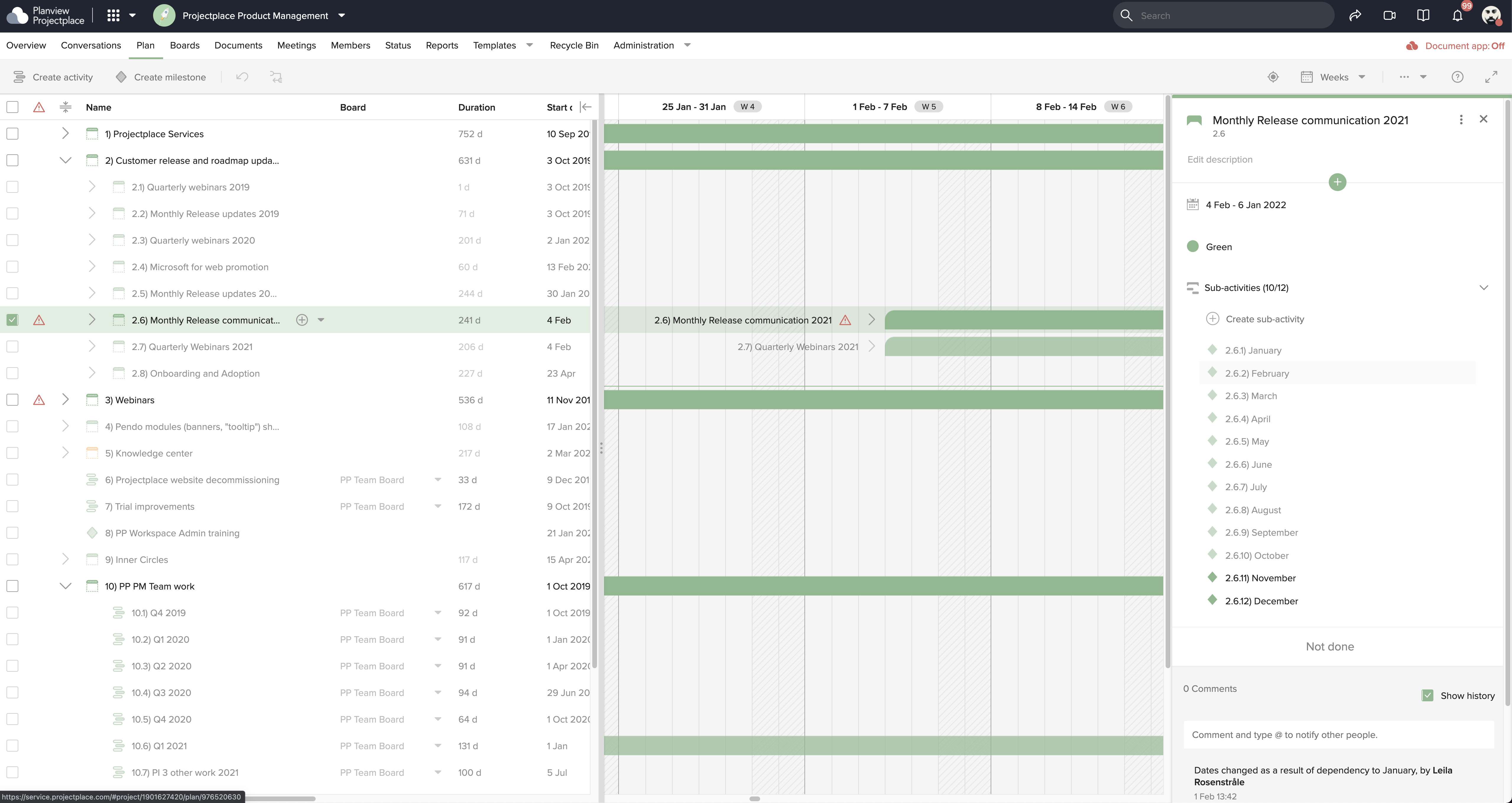
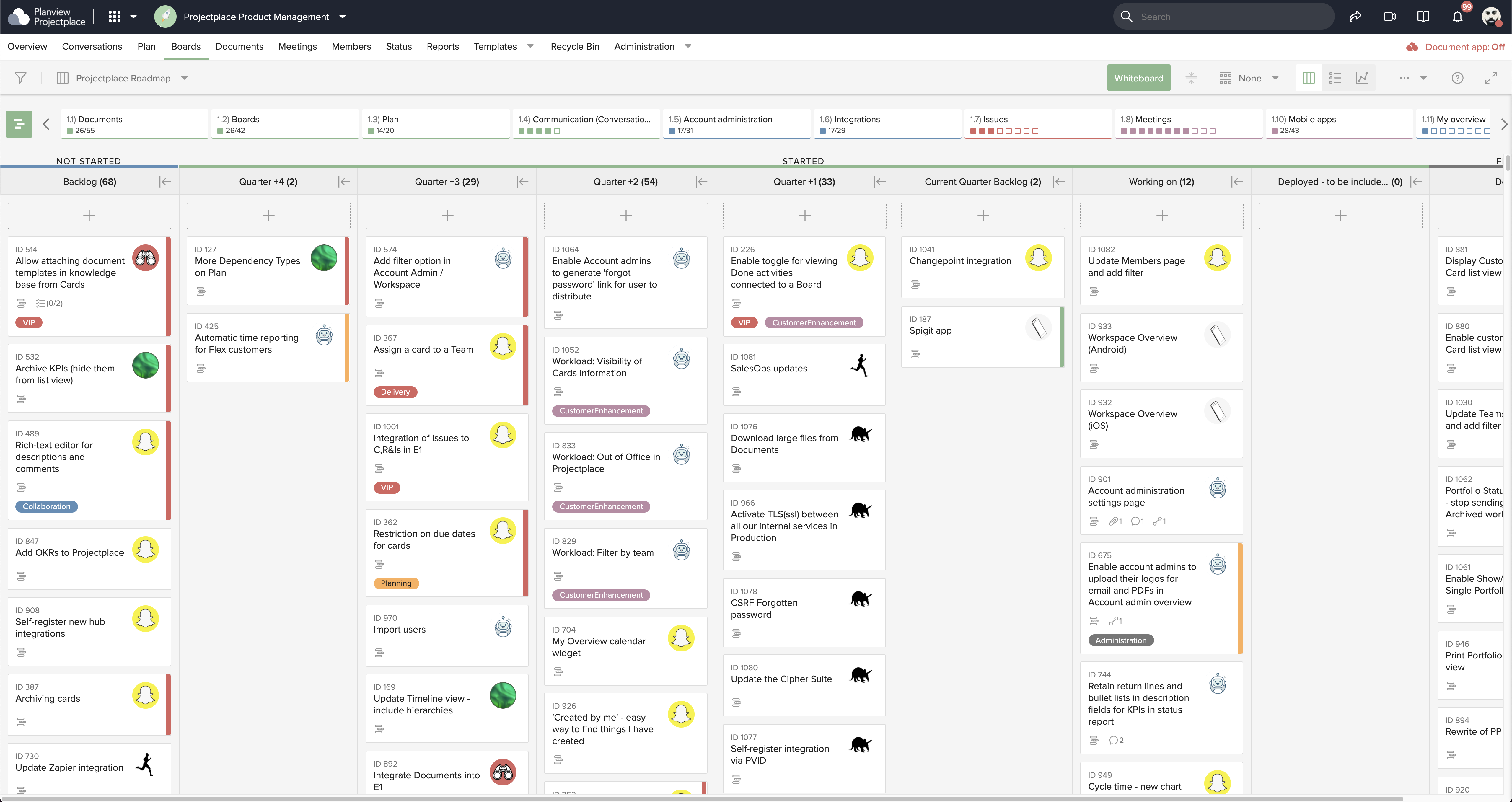
Projectplace is a collaborative work management solution. The vendor says the product is built with teams of all sizes and complexity in mind, from virtual teams of five to entire global enterprises with tens of thousands of active users. It is also designed to incorporate waterfall and agile workflows.
N/A
Zoho Projects
Score 9.2 out of 10
N/A
Zoho Project is online project management and planning software that provides project teams with a web-based collaborative environment. Zoho Projects can also include a bug tracking module specifically design to support software development project. It is integrated with other Zoho products including Zoho CRM.
$5
per month per user
Pricing
iManage Work
Planview ProjectPlace
Zoho Projects
Editions & Modules
No answers on this topic
No answers on this topic
Free
$0
Premium
$5
per month per user
Enterprise
$10
per month per user
Project Plus
Contact Sales
Offerings
Pricing Offerings
iManage Work
Planview ProjectPlace
Zoho Projects
Free Trial
No
Yes
Yes
Free/Freemium Version
No
No
Yes
Premium Consulting/Integration Services
No
Yes
Yes
Entry-level Setup Fee
No setup fee
No setup fee
Optional
Additional Details
—
—
Discount offered for annual billing.
More Pricing Information
Community Pulse
iManage Work
Planview ProjectPlace
Zoho Projects
Considered Multiple Products
iManage Work
No answer on this topic
Planview ProjectPlace
Verified User
Manager
Chose Planview ProjectPlace
Planview Projectplace and these other project management tools stack up in an honestly very similar way, most offer a similar suite of tools and helpful ways to track and plan all your projects and tasks. I think that Planview Projectplace ultimately has most of the great …
Legal team using this product helps the team to better access documents securely within their email app (Outlook) and the user experience to control the document is excellent and being able to make it private and isolate confidential documents during a court session is very important and iManage has met our requirements. Also, being able to access instantly from users' workstation/laptop devices is very important and iManage plugin for outlook has satisfied our Business requirements.
Planview ProjectPlace is a vibrant platform that manages all activities and schedules different roles based on their urgency, importance, and requests. Further, Planview ProjectPlace outlines the need for proper documentation with the aim of accurate referencing. Tasks are credibly shared, and proper reporting is enhanced to transform firms' work environment. ; Lastly, Planview ProjectPlace brings sustainable email integration for enterprises.
My work involves projects of 5-15 people with numerous projects running simultaneously. Prior to Zoho, I did not have a central location from which to view all project statuses at once. Zoho looks to provide this and also looks like it will deliver. I am anxious to see how our organization's use of it develops. At this time, I feel I am likely to recommend Zoho Projects because my organization has made great software decisions in the past so I have a level of trust already that the research has been done that Zoho is the best solution for our line of work.
We use it to manage our sales orders as there are lots of moving parts which are necessary to get client orders done properly.
I use it anytime I have a new idea I want to put into motion. As I can create a list for brainstorming, feedback, specific actions necessary in order to test and or implement the idea.
Unrelated to business, it's a great way to plan travel in order to make sure you don't forget those important things like passport, flight arrangement, client meeting confirmation, and meeting prep as far as what specific documents or things do you need to bring with you.
And since everyone is on the go and expected to keep up with work, the mobile/tablet app makes it a breeze to keep up, work on, and create new projects.
Proper implementation of the software is important. We have a client who also has iManage for their large in-house legal department but the implementation seems to have not been as thorough so their experience with the software has not been as positive.
Again, proper implementation is key to how powerful the software can be. For a long while our organization did not have the full-text searching implemented, and it was a game changer when we finally did it.
I understand that our implementation of iManage does not allow for multiple template matters based on different situations. So we have five default folders, but it would be nice to have a couple of templates, with different numbers and names of the subfolders depending on the situation.
Under the time tracking, it would be nice to have a set template that would load each week and not have to click a button to load the previous week's template.
Somehow making it more intuitive.
Having to add in each service line and each detail that I cover for every service line each week is a bit ridiculous.
It has been what our firm has always used, and overall everyone seems to be pleased with it. It is user friendly and intuitive and it doesn't appear we have any intention of changing what we use for our purposes.
We're committed now & have >50 users on Projectplace. All our projects are now tracked in the tool. We this investment of time & training, the cost of maintaining Projectplace is relatively low for the benefit. So we will renew, even if there are some idiosyncrasies in the tool & there are opportunities for improvement.
I've reviewed about 8 other project management solutions and Zoho Projects is the best I've seen without being overly complicated. Zoho Projects keeps getting better! Recent new enhancements makes it even easier to navigate. There are new keyboard shortcuts that cut my time way down. The tools are very easy to use.
To me iManage is very intuitive and user friendly. The switch from the application vs the Outlook extension was an adjustment, but it was one I made pretty easily once it happened.
Easy to use platform and provides the user with an amazing experience and straightforward tools that empower and help execute tasks with fast performances that allow quick and easy service delivery. Easy on implementation and get started immediately with enterprise-ready Planview Projectplace and start to connect with teams and departments at once.
Zoho Project has been very user-friendly. As a small business, we have a diverse group of people with varying skill sets. This platform has been easy for our team to learn, implement, and succeed with. The mobile version is also very handy for our team.
We had an issue a few years ago where a plug-in of some sort which allowed the viewing of PDFs got updated and then whenever some people previewed PDFs in iManage then Outlook would crash. My outlook crashed over 20 times in a single day once. It was a pretty bad time. I know one of our information technology professionals in another office worked non-stop with iManage to get it resolved, and it seemed like they did take the issue pretty seriously.
I haven't needed to get in touch with support because the product is quite well structured and understandable. There were no issues initially when making payments or later for monthly payments. The project manager using the software is quite skilled in the software and has not needed much help. New licenses are easy to acquire, and there is no delay in getting them. I know there are several ways of support available, so that's a plus.
Although it might lack intuitiveness, once you get a hang of how Zoho Projects works, you can do a LOT. The impact good project management has on profitability is huge, and it has helped not only improve communication and coordination when working on a project, but more importantly have adequate tracking of time, due dates and potential bottle necks
I have viewed several other document management system software, but iManage was already installed at my company before I started working here. For us, I think this is the right solution. Companies with a smaller number of employees or smaller document collections could find some other options that might suite their needs and budget better. We definitely want an on premises solution that provides all the security, tracking, searching, and integration issues iManage offers. Many of the other solutions have adopted cloud technologies only at this point and we are not ready to consider cloud storage due for our sensitive documents at this point.
[In my experience] Jira is more refined, better looking, and easier to become familiar with. Also, the massive market share of Jira helps in consultancy as you can switch between clients easily. Projectplace has many powerful tools but so does Jira, and Jira integrates with our suite of software much easier compared to Projectplace.
Zoho Projects provides a more limited set of functionality and customization options than other task/bug trackers on the market, but what it lacks in functionality it makes up for in ease of use. It probably has 80-90% of the features of its competitors but takes about a third of the time to get up and running and realizing value.
The amount of time needed in searching is reduced to few seconds and organizing the documents by case numbers has been the best ROI for our Legal team.
The Automation for index searching and AI of relating to the case numbers increases the productivity for the users within our legal team where error is minimum.
Less efforts are required to manage Permissions and granting permissions. Applying APIs for granting permissions has been automated.
[We have the] ability to support remote work through projects that scale across multiple groups
We have large-scale quarterly projects, so the ability to save and duplicate project templates are helpful for us to keep track of tasks down to the specific card
We needed a system to organize our growing business, so anything was better than what we had, which was nothing.
Recording time spend is a huge reason for using project software. It has made me aware of the tasks that are taking too long and where we are not being profitable as a company.
It has kept our team accountable for what needs to get completed and when projects are not in motion or completed timely. It's helpful to know in order to get billing out faster.