Intermapper is a network monitoring and mapping software for hybrid environments. Intermapper provides real-time performance alerts and bandwidth monitoring with cross-platform functionality.
N/A
NETSCOUT nGeniusONE
Score 8.2 out of 10
N/A
NETSCOUT’s nGeniousONE is a platform designed to monitor enterprise-level networks. It includes standard monitoring capabilities, as well as advanced inspection and analytics features.
N/A
SolarWinds Engineer's Toolset
Score 7.9 out of 10
N/A
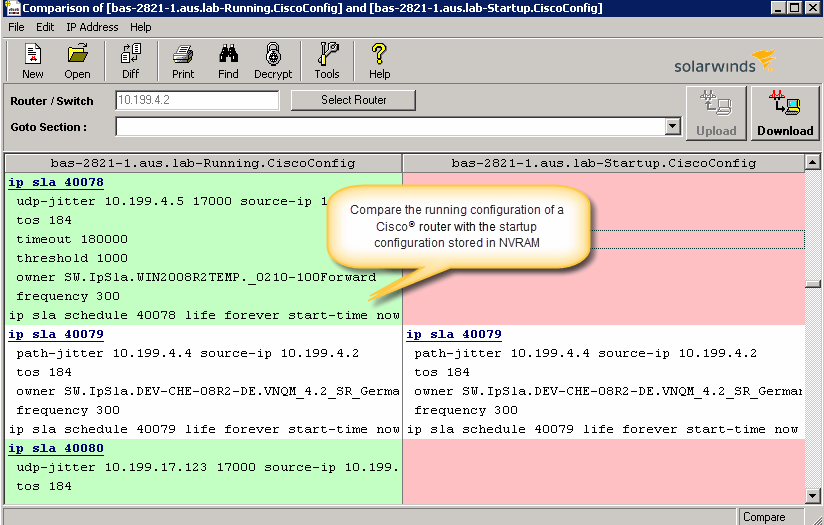
SolarWinds® Engineer’s Toolset (ETS) helps users monitor and troubleshoot a network with over 60 tools for network management. ETS allows users to monitor and receive alerts in real time on network availability and health, and perform network diagnostics for faster troubleshooting and resolution of complex
network issues. With ETS users can deploy an array of network discovery tools including Port Scanner, Switch Port Mapper or advanced Subnet Calculator, manage Cisco®
devices with specialized…
$1,585
Per Instance
Pricing
Intermapper
NETSCOUT nGeniusONE
SolarWinds Engineer's Toolset
Editions & Modules
No answers on this topic
No answers on this topic
One Time Price
$1,585
Per Instance
Offerings
Pricing Offerings
Intermapper
NETSCOUT nGeniusONE
SolarWinds Engineer's Toolset
Free Trial
Yes
No
Yes
Free/Freemium Version
Yes
No
No
Premium Consulting/Integration Services
Yes
No
No
Entry-level Setup Fee
Optional
No setup fee
No setup fee
Additional Details
Intermapper pricing is based on number of devices monitored. Intermapper is free for 5 devices or less. Subscription pricing starts at $303 for 25 devices. Device-based pricing starts at $765 for 25 devices.
—
—
More Pricing Information
Community Pulse
Intermapper
NETSCOUT nGeniusONE
SolarWinds Engineer's Toolset
Features
Intermapper
NETSCOUT nGeniusONE
SolarWinds Engineer's Toolset
Network Performance Monitoring
Comparison of Network Performance Monitoring features of Product A and Product B
Intermapper is a light weight, quick and easy to use monitoring application. It will get you up and monitoring key infrastructure devices with a simple management interface and effective alert system that doesn't generate a lot of noise. It provides mobile device access through a web interface and is relatively inexpensive.
NETSCOUT nGeniusONE is a great network performance monitoring tool as it helps to trace the path of packet and to identify the exact place where the packet is loss. It is well suited in scenarios where the organization have large network and they need continuous monitoring because loss of connectivity may lead to serious financial loss in sectors like banking, hospitals. The network performance and connectivity needs to be stable for proper execution of transactions, bookings, data transfer and other critical task. Performance monitoring of large enterprise is a big task and doing that manually requires very much effort, but with NETSCOUT nGeniusONE it becomes easy. It is not well suited in scenarios where there is small network and they can survive if any link flaps for small duration of time.
I have found the toolset especially useful for scanning subnets to discover devices, and for setting up temporary real-time monitors when we are troubleshooting or setting up new connections. The most useful aspect has been the ability to apply the tools to help troubleshoot and pinpoint intermittent issues. More general tools like Orion often do not have the granularity to detect issues like intermittent packet loss which are especially impactful to applications like Voice. The toolset gives us another level of capability to dig into issues.
The best thing about Intermapper is that it is map-based. You start by building your map, which is done completely automatically. I've used many different monitoring software packages, Solarwinds, Nagios, Opmanager, and it is a royal PITA to create live maps with those.
Another great feature is that it shows you, visually, the bandwidth utilization of your network by using "ants" and color codes. Incredibly useful.
Alarms are very easy to setup, again much easier than the packages mentioned above.
NetScout nGeniusONE can help to deep dive into the packet layer, help to identify the real network and service performance problems in the protocol layer. We have been using NetScout nGeniusONE as the main monitoring solution for the mobile network for many years.
I have recently use NetScout nGeniusONE to support problem troubleshooting for a customer issue complaining of slow application connection into our Datacenter services. it was easy to use NetScout nGeniusONE to capture the problematic connection sessions by using various type of filters and export a pcap file for further analysis.
I‘ve also use NetScout nGeniusONE to investigate an NBN connection issue which was intermittent and hard to capture, however, by using NetScout nGeniusONE it was easy to go back to the history capture and logs, so we won't miss any important leads.
The unifying component that is intended to be the initial interface to the tools seems clunky. I prefer to start the tools individually rather than using it.
The port scanner could use some improvements to make it easier to use.
Requires quite a bit of training not only for config but to use. Highly recommend having a SME come in from Netscout to help initially for these. Once you learn the UI, it’s much better to use but is not intuitive.
The product works well and is very easy to maintain. As such, we haven't had many occasions to use support. When we have called them they were easy to contact and responsive to our questions. We have had the product for years and it may have been a year or better since the last time we contacted them.
If you spend the right amount of money with them they work very close to you to support your needs. I ignore how they work in companies with lower expenses on their products. NetScout is not a very dynamic introducing platform with enhancements that their customers need. We contract their professional services so support level is good, although too pricey from my perspective.
Intermapper is a cross between WhatsUp Gold and Nagios. WhatsUp Gold being for a less technical end-user and Nagios doing more than just SNMP scans and up down monitoring.
Wireshark has been around for years and has been used primarily for packet analyzing. NetScout does this and goes above and beyond with the graphics interface analyzes and customer filtering for packet analyzes. You can go straight to the packet analyze within NetScout but you will find that to be more work, this would be like starting with Wireshark. Instead, begin with the graphical interface to narrow down the traffic, a visual effect. Then go to the packet analyzer, time saver. As for PRTG, it's a NetFlow/SNMP collector with a quick and dirty look at traffic but lacks the tools to dig into the information it provides.
I haven't compared any tools similar to SolarWinds Engineer's Toolset. This might be because I'm pretty biased when it comes to monitoring, and reporting solutions. I've found that SolarWinds provides the biggest bang for the buck in my opinion. I'm sure there are other solutions on the market that compete, but I haven't tried any of them because I've been very satisfied with SolarWinds.
Downtime costs money. Every minute we can get ahead of an outage is time that a plant is not sitting there waiting. We don't need to wait for a call from a plant, we know they are down immediately and we can begin troubleshooting.
NETSCOUT nGeniusONE is the best tool and very profitable for our organization as it helped in to reduce the manual effort of engineers to track the Network flaps and connectivity issue.
Return on investment for this product is quiet good as of now and we have achieved 80% ROI till now and we are very much confident that we will achieve the full ROI.
It has helped in cost cutting as we need only few network admin and engineers to track the discovery, behavior and connectivity. Earlier we need a lot of employee to do that due to which the organization may suffer some financial loss.